Shopify Plus Inventory Management: What Plus Adds, What It Doesn't, and When You Need an App


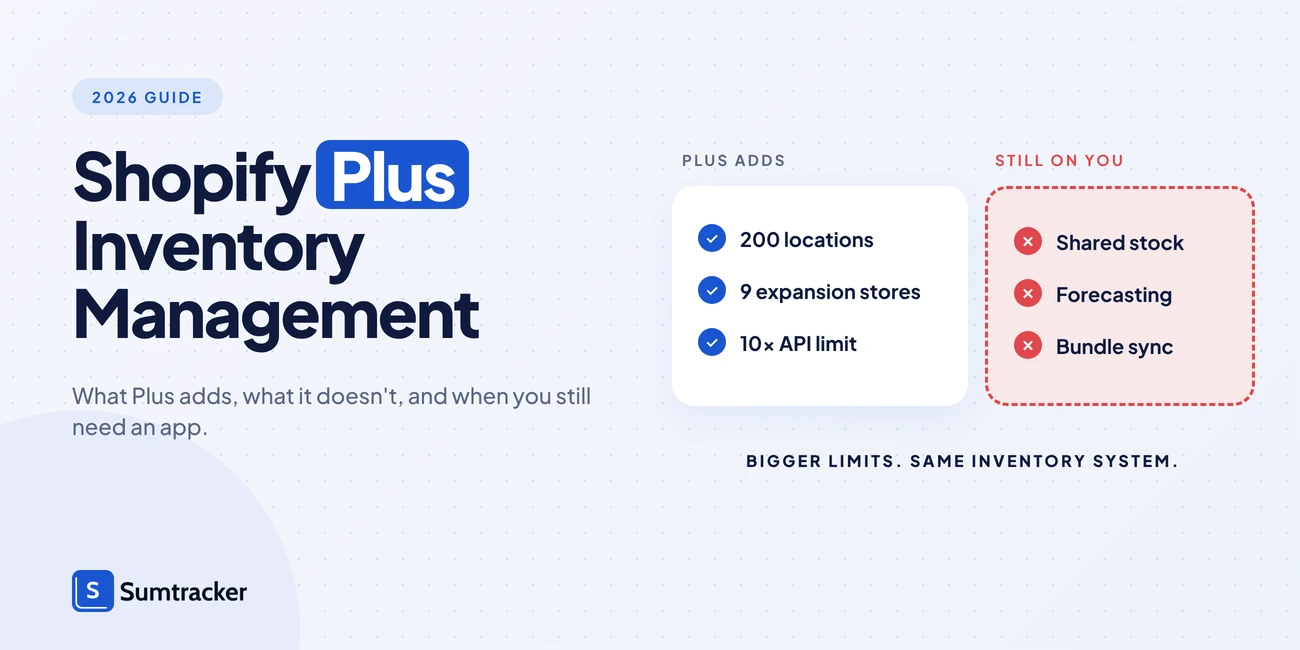
Shopify Plus runs on the same inventory system as every Shopify plan. What it adds for inventory is scale and a few Plus-only tools, not demand forecasting or multichannel stock sync.
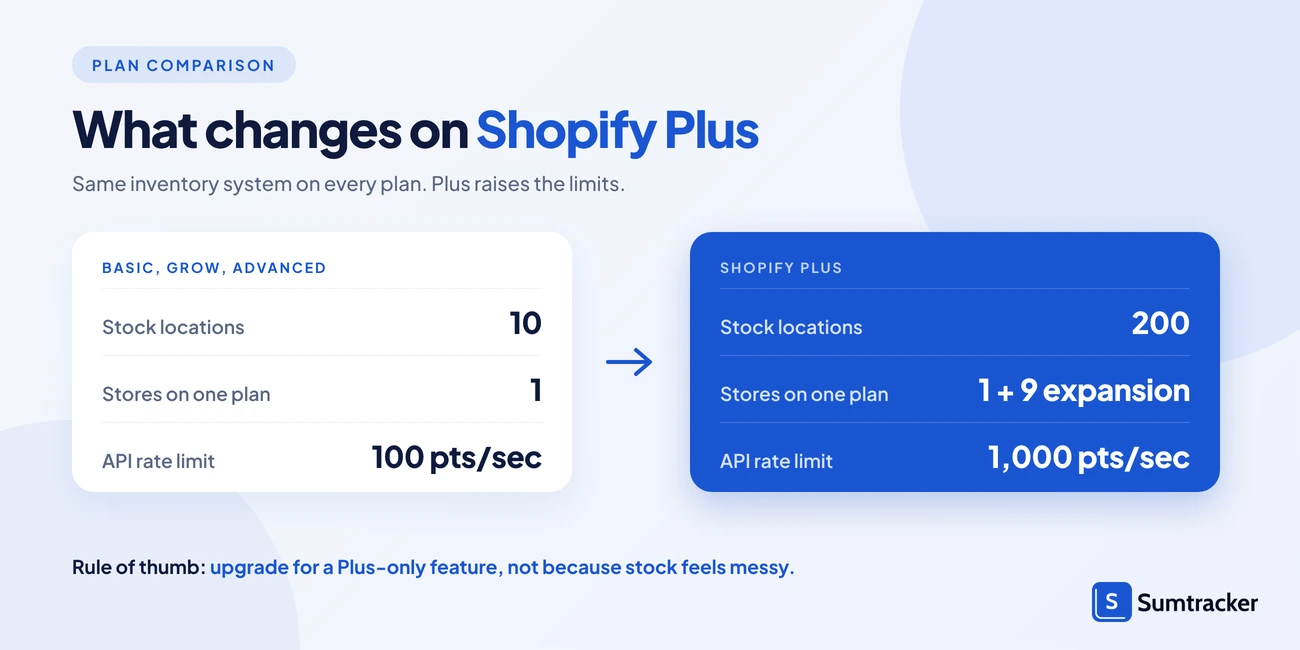
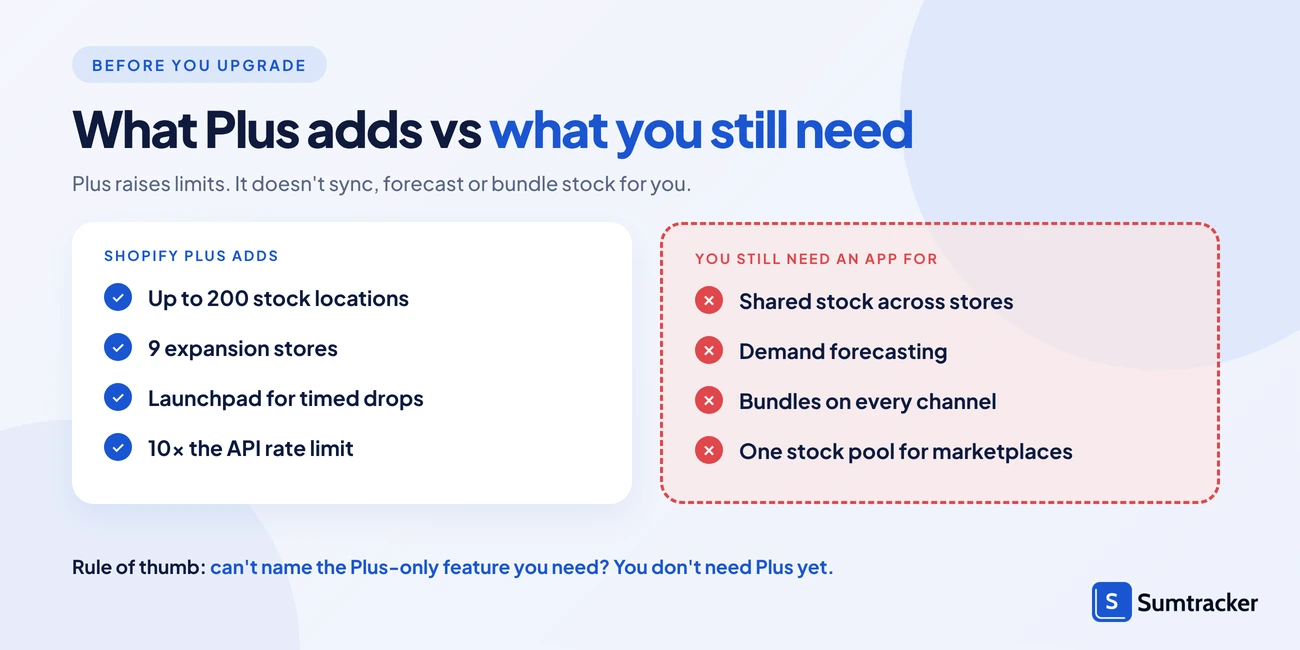
- Plus raises the limits to 200 locations (vs 10) and 9 expansion stores, and gives each app 1,000 GraphQL API points per second, 10x the standard plans.
- Expansion stores don't share stock, order routing doesn't prevent overselling, and Shopify Flow and B2B are no longer Plus-only.
- At $2,300 to $2,500 a month, upgrade for a hard Plus-only need; sync, bundle and forecasting gaps need an inventory app on any plan.
Shopify Plus doesn't come with a separate inventory system. It runs on the same inventory engine as every other Shopify plan. What Plus changes is scale: more locations, more stores, faster API access and a few Plus-only apps.
That matters if you're paying $2,300 to $2,500 a month and expecting inventory problems to disappear. Some will. Others won't.
This guide covers each Plus feature that touches inventory, what it actually does, and the gaps you'll still need to fill. Every plan detail here was checked against Shopify's Help Center and developer docs in November 2026.
Quick answer: Shopify Plus adds up to 200 locations (vs 10), 9 expansion stores, Plus-only B2B catalog and payment controls, the Launchpad app for scheduled sales, and 10x the GraphQL API rate limit of standard plans. It does not add demand forecasting, shared stock across expansion stores, or inventory sync with every sales channel you might use.
What Shopify Plus Inventory Management Includes
Shopify Plus inventory management is Shopify's standard inventory system with higher limits and a few extra tools. You track stock the same way on Plus as on Basic: per variant, per location, using the same five inventory states.
Every Plus feature below works through those states, especially Available. If you need a refresher on what each state means, our complete guide to Shopify inventory management explains them.
The features that actually change on Plus fall into four groups:
- Scale: up to 200 locations and 9 expansion stores.
- Selling models: Plus-only B2B catalog and payment options.
- Events: the Launchpad app for scheduled sales, drops and restocks.
- Speed: higher API rate limits for the apps and systems that update your stock.
Shopify Plus vs Other Shopify Plans: Inventory Features Compared
Most core inventory features are the same on every paid plan. The differences show up in limits and in a handful of Plus-only tools.
Table 1: Inventory-related features by Shopify plan (as of November 2026)
Sources: Shopify Plus plan, locations, B2B features by plan, Shopify Flow, GraphQL rate limits. Larger businesses may also pay a variable platform fee on top of the Plus base price.
Why API rate limits matter for inventory
Every inventory app, ERP or 3PL that updates your stock talks to Shopify through its API. The rate limit caps how much work that app can do each second.
Shopify measures the GraphQL Admin API in points per second. Each app gets its own limit per store, so one app's usage doesn't slow another.
Table 2: GraphQL Admin API rate limits by plan
Source: Shopify developer docs
In practice, a higher limit lets stock updates reach Shopify faster when order volume spikes. Plus also removes one large-catalog throttle. Once a store passes 500,000 variants, other plans can only create 10,000 new variants a day. That cap doesn't apply on Plus.
Practical tip: A higher API limit only helps if your apps use it. Ask each inventory app or 3PL how often it pushes stock to Shopify, in minutes, not just whether it's "real time".
More Locations for Warehouses, 3PLs and Retail Stores
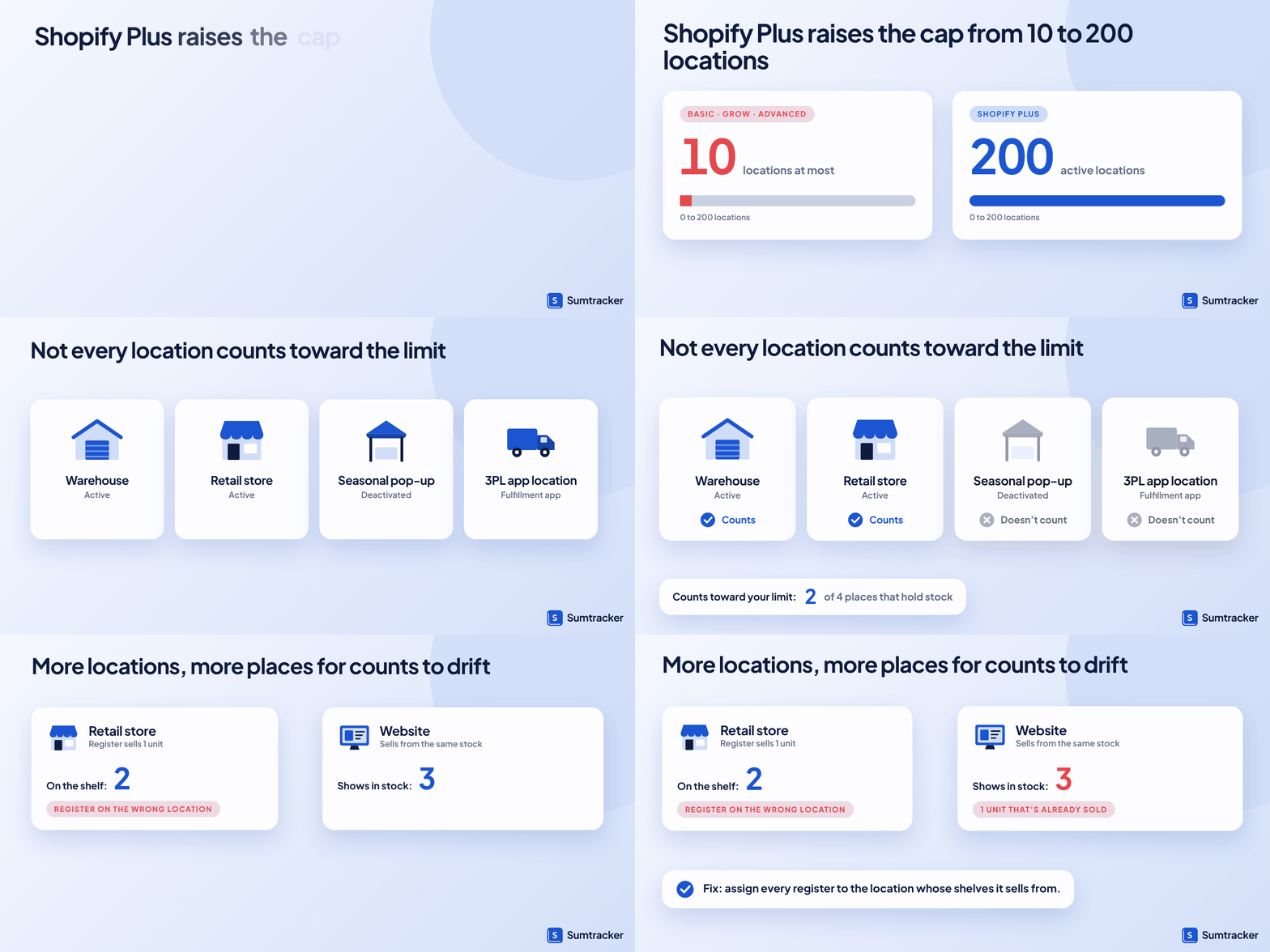
Shopify Plus supports up to 200 active locations. Every other plan stops at 10, and Shopify Starter stops at 2.
How to add and set up locations is the same on every plan, and our guide to Shopify inventory locations walks through it. What matters on Plus is how the 200-location limit is counted. Two details help you stretch it:
- Deactivated locations don't count. You can deactivate a seasonal pop-up without losing a slot.
- Fulfillment-app locations don't count either. If a 3PL or fulfillment app stocks inventory for you, it appears under "App and custom fulfillment locations" and sits outside your limit.
Plus also bundles retail costs. The first 20 POS Pro locations are included in every Plus plan. If you run more than 20 POS Pro locations and use Shopify Payments as your main provider in-store, POS Pro is waived for your first 200 retail locations.
In-person selling is growing as fast as online. Shopify's offline GMV, which includes POS sales, grew 30% year over year in Q3 2026, so more merchants now keep stock in stores and warehouses at the same time.
More locations means more places for counts to drift. A retail store selling from the same pool as your website is a common source of overselling. Every register must be assigned to the location whose shelves it sells from.
When drift ends in a stockout, you lose more than one sale. In a DOSS survey of 1,000 US shoppers in April 2026, 45% said they buy from a different retailer when a product is out of stock.
Worth a listen: In an episode of Shopify Masters, Matthew Burrows of Plant Material explains how the brand runs three Los Angeles nurseries on real-time inventory. He credits showing live stock online with saving the business six figures, and talks through buying only what each location needs.
Practical tip: Keep damaged, display and returned units out of Available. Move them to the Unavailable state, or to a separate holding location, so no channel can sell them. Our guide to damaged inventory in Shopify covers the steps.
Before you go further, it helps to put your own setup on one page: which of your locations count toward the limit, which stores share stock, and whether any of your needs are truly Plus-only. We built a free spreadsheet that does that counting for you.
Expansion Stores: Do They Share Inventory?
No. Expansion stores don't share inventory by default. Each one is a separate Shopify store with its own products, locations and stock counts.
Shopify Plus includes 9 expansion stores on top of your main store. Brands use them for regional storefronts, a separate wholesale store, or a sister brand. Each live expansion store needs its own theme license.
Selling across borders is now routine. 70% of online shoppers worldwide buy from retailers outside their home country, according to a DHL eCommerce survey of 29,000 shoppers in 29 countries.
The Organization Admin lets you manage staff and settings across stores. It doesn't merge their inventory. If your US store and UK store both pull from one warehouse, a sale in one won't lower stock in the other unless something syncs them.
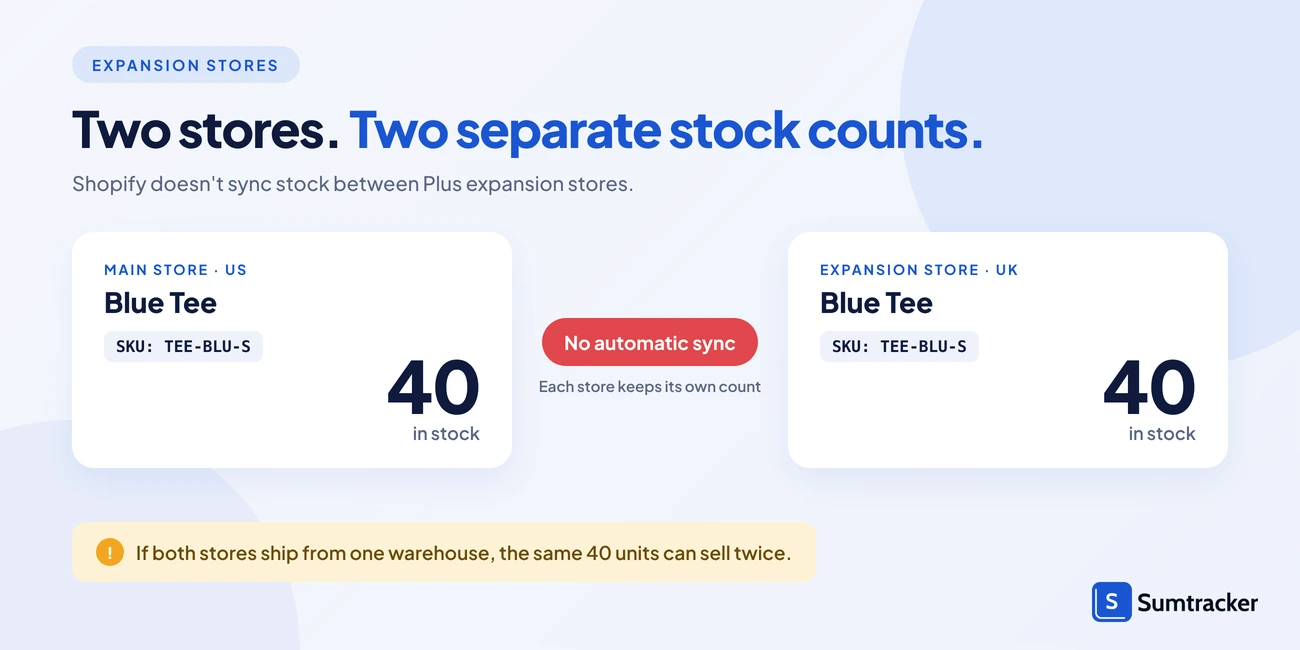
If two of your stores need to sell the same units, our guide to syncing inventory between two Shopify stores compares the options, from CSV imports to sync apps.
Practical tip: Before you launch an expansion store, write down which warehouse stock it's allowed to sell. That one decision tells you whether you need a sync tool, per-store limits, or nothing extra.
B2B and Wholesale Inventory on Shopify Plus
B2B is no longer a Plus-only feature. Since April 2, 2026, merchants on Basic, Grow and Advanced can sell wholesale with Shopify's native B2B tools at no extra cost.
Wholesale is also growing fast on the platform. Shopify said its B2B GMV grew 74% year over year in Q3 2026, the quarter ended September 30.
What Plus still adds is control over who sees what, and how they pay:
- Unlimited catalogs. Other plans get up to 3 active catalogs across all B2B markets combined.
- Direct catalog assignment. Plus can assign a catalog to a specific company or company location. Other plans assign catalogs through markets.
- Deposits, partial payments and payment requests per fulfillment. Plus only.
None of these features reserve stock for wholesale buyers. B2B and direct-to-consumer orders draw from the same Available count at each location. A large wholesale order can quietly empty a SKU your website needed for the weekend.
Three ways to protect retail stock:
- Hold wholesale stock at its own location. Route B2B orders there.
- Set stock aside as Unavailable. Shopify lets you move units to Unavailable as safety stock, so they can't be sold until you release them.
- Reserve with draft orders. Units reserved in a draft order count as Committed, which takes them out of Available.
For how much to hold back, see our guide to safety stock.
Practical tip: Before you accept a large wholesale order, check Available, not On hand. On hand includes units already committed to other orders.
Running Flash Sales and Product Drops with Launchpad
Launchpad is a Shopify-built app that only Plus stores can use. It schedules sales, product drops and restocks so they go live at an exact time, even outside working hours.
Peak demand is why timing matters. Over Black Friday–Cyber Monday 2025, Shopify merchants sold a record $14.6 billion, up 27% on 2024, and sales peaked at $5.1 million per minute at 12:01 p.m. EST on Black Friday. At that pace, a restock that goes live ten minutes late is real lost revenue.
For inventory, Launchpad can:
- Publish products to your sales channels at a set date and time.
- Add inventory to products when the event starts.
- Change prices at the start and end of the event.
- Lock your store with a password page shortly before launch, so shoppers can't pre-fill carts.
Know its limits before you plan around it:
- Events can't overlap. A new event must start at least five minutes after the last one ends.
- A collection added to an event can't hold more than 1,000 products.
- Prices you edit during an event return to their pre-event values when it ends.
- Launchpad's help pages still list Shopify Scripts options, but all Shopify Scripts stopped running on June 30, 2026. Build event discounts with Shopify Functions or discount apps instead.
Launchpad releases stock on time. It doesn't stop that stock being sold twice across channels. For that, see how to set a close-at quantity, which marks a product sold out while a few units remain.
Practical tip: Run a test event on a hidden product a week before a big drop. Check that the inventory change, the publish time and the end time all fire as planned.
Automating Inventory Tasks with Shopify Flow on Plus
Shopify Flow is not a Plus-only app anymore. It's free on Basic, Grow, Advanced and Plus.
Plus gets two Flow extras:
- Tasks from custom partner apps. Plus stores can use Flow tasks built by custom partner apps.
- Higher usage limits. Flow's limits follow each plan's API limits, so Plus workflows have more room at high volume.
Watch: Shopify's own Flow walkthrough, embedded on the Shopify Flow help page, shows how triggers, conditions and actions fit together: Shopify Flow video.
Table 3: What Shopify Flow can do on each plan
Source: Shopify Flow, Shopify Help Center
The inventory workflows themselves are the same on every plan. For step-by-step recipes, such as low-stock alerts, hiding sold-out products and tagging stock levels, see our guide to the Shopify Flow inventory quantity changed trigger.
Practical tip: Each Flow workflow runs inside one store. A workflow in your US store can't see or change stock in your UK expansion store, so build and test workflows store by store.
Order Routing for Multi-Location Plus Stores
Order routing decides which location fulfills each item in an order. It works on every plan once you have two or more active locations. You'll find it under Settings > Shipping and delivery > Order routing.
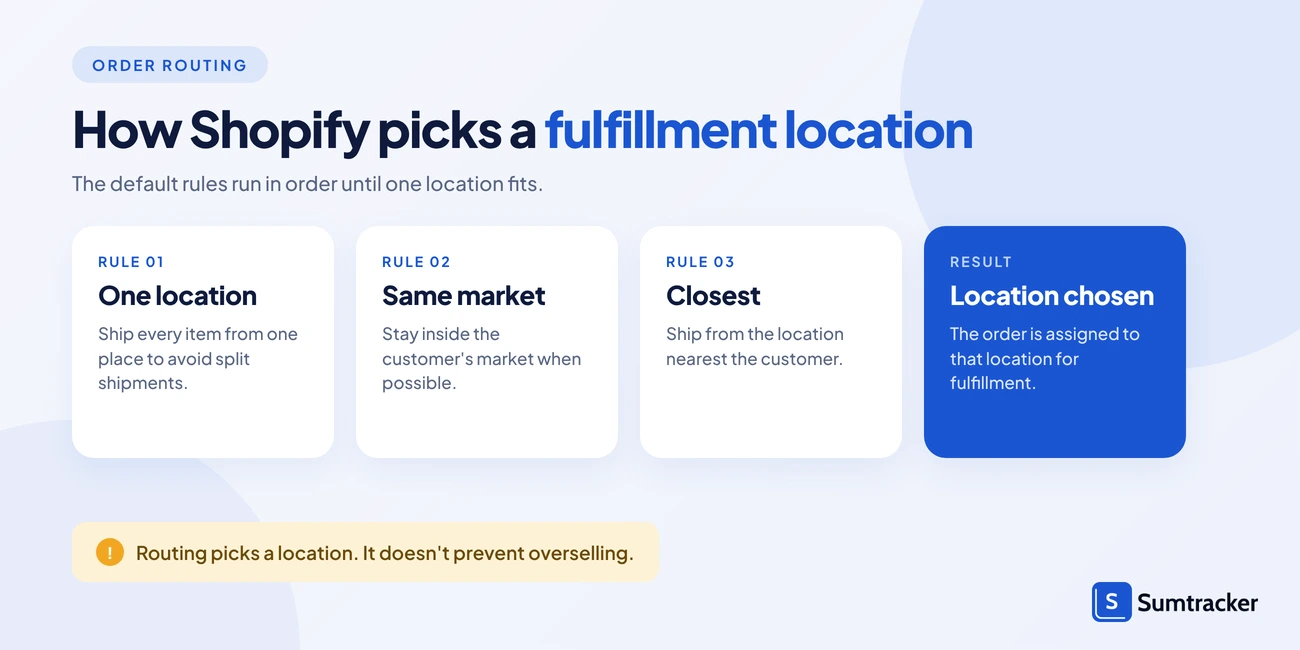
Shopify's default strategy does three things, in order:
- Minimize split fulfillments by choosing a location that can ship every item.
- Stay within the destination market when possible.
- Ship from the closest location.
You can add Use ranked locations to put a 3PL ahead of your stores, or Use location metafield to prioritize locations by a value you set, such as a has_capacity true/false field.
The Plus-only piece is custom location rules built with Shopify Functions. They're in early access, and Plus merchants must join the Shopify Partners program to deploy rules they build themselves.
One line from Shopify's own help page is worth remembering: order routing doesn't prevent overselling. It can send an order to a location with no available stock so you don't lose the sale. You then move stock or change the fulfillment location before shipping.
Common reasons an order lands at the wrong location:
- The location doesn't have "Fulfill online orders from this location" turned on.
- Its address isn't verified, so the closest-location rule skips it.
- It was out of stock when the order was placed.
- It isn't in an active shipping zone for that destination.
Case study: Allbirds. San Francisco-based footwear brand Allbirds runs on Shopify Plus and has 31 retail stores. Its online orders used to ship only from the warehouse, so the website could run out of a product that stores still had. Stores also held slow-selling sizes that went back to the warehouse at the end of each season.
Allbirds made its stores fulfillment locations with ship-from-store, rolled out in four waves. Custom workflows built on Shopify's APIs let the team set each store's shipping days and hours and cap the online orders it gets each day. Shopify's routing rules don't include a daily cap per location, so Allbirds built that part itself. The brand says over 50% of what it ships from stores is generally slower-moving inventory.
Practical tip: When you have several warehouses, add Ship from closest location as the last rule. It breaks ties that would otherwise go to your oldest location.
What Shopify Plus Still Doesn't Do for Inventory
Shopify's native inventory tools have improved a lot in 2026. Since June 22, 2026, receiving a purchase order creates a transfer, and you can receive incoming stock in the admin or in POS. Stocky, Shopify's old inventory app, shut down on August 31, 2026, and its core jobs moved into the admin.
Our blog on why Shopify works for selling but not for serious inventory control covers Shopify's native limits on any plan. The table below covers only the gaps that are still there after you upgrade to Plus:
Table 4: Common Shopify Plus inventory gaps and how to cover them
Gaps like these add up across the industry. IHL Group estimates that inventory distortion, meaning out-of-stocks plus overstocks, costs retailers $1.73 trillion a year worldwide.
If any row describes your business, an inventory app is the practical fix. Our list of the best Shopify inventory restocking software compares options for forecasting and reordering.
Is Upgrading to Plus Worth It Just for Inventory?
Usually not. Most inventory problems come from sync, process and forecasting gaps, and Plus doesn't fix those. Upgrade when you've hit a hard Plus-only limit, not because inventory feels messy.
At $2,300 to $2,500 a month, Plus costs roughly $27,600 to $30,000 a year in base fees alone. That figure is easy to compare with the cost of an inventory app.
Table 5: Does your inventory problem need Plus?
Rule of thumb: If you can't name the Plus-only feature you need, you don't need Plus for inventory yet.
Do you need Shopify Plus? Check with this calculator
Not sure if Plus is worth it for your store? Use the interactive calculator below: tick the Plus-only features you need, pick your current plan and enter your monthly online sales. It shows what Plus would cost you each month and the sales level at which it pays for itself.
How Sumtracker Works with Shopify Plus
Sumtracker is an inventory management and replenishment app that connects natively to Shopify, Shopify Plus and Shopify POS. It fills the gaps in Table 4 without replacing Shopify as your store.
Here's how it maps to the Plus gaps above:
- Shared stock across expansion stores: connect your main store and each expansion store to one inventory record, alongside Amazon, Walmart, Etsy and eBay.
- Bundles everywhere you sell: selling a bundle lowers the stock of every item in it, on every connected store and channel.
- Holding stock back per channel: set a maximum quantity per store or a close-at quantity to protect fast sellers.
- Forecasting and reorder planning: the Replenish plan adds purchase orders, stock transfers, 12-month demand forecasting and reorder suggestions.
Sync is automatic but not instant. Changes reach your stores within minutes, so keep a small buffer on your fastest sellers.
Pricing starts at $59/month for the Manage plan and $119/month for Replenish, scaling with annual order volume. Both include a 14-day free trial (Sumtracker pricing).
One multi-location customer, Bonefly, put it this way: "We have 4 Shopify accounts under Sumtracker updating inventory for our 10 locations around the US and Mexico."
See the full Sumtracker Shopify Plus integration, or start a free trial.
FAQs
Does Shopify Plus have better inventory management than other plans?
Not a different system. Plus uses the same inventory engine as every plan. It adds higher limits (200 locations, 9 expansion stores), Launchpad, Plus-only B2B options and 10x the standard GraphQL API rate limit.
Do Shopify Plus expansion stores share inventory?
No. Each expansion store tracks its own stock. To sell the same units from several stores, you need an inventory app or ERP that syncs counts between them.
Is Shopify Flow only for Shopify Plus?
No. Flow is free on Basic, Grow, Advanced and Plus. Plus adds tasks from custom partner apps and higher usage limits.
Does order routing prevent overselling on Shopify Plus?
No. Shopify states that order routing doesn't prevent overselling. It picks a fulfillment location; it can still assign an order to a location without stock.
Do I need an inventory app if I'm on Shopify Plus?
You do if you sync stock across expansion stores, sell bundles on marketplaces, or need forecasting and reorder planning. Single-store, single-channel Plus merchants can often manage with native tools and Flow.
Conclusion
Shopify Plus makes Shopify's inventory system bigger, not different. You get more locations, more stores, faster API access, Launchpad and Plus-only B2B controls, all built on the same five inventory states as every other plan.
That makes the upgrade decision simpler. If you've hit a hard limit, such as more than 10 locations, separate regional or wholesale storefronts, or customer-specific B2B catalogs, Plus is the fix. If your problems are overselling across channels, running out of bestsellers or keeping expansion stores in sync, Plus won't solve them on its own.
Start by naming the Plus-only feature you actually need. Then cover the remaining gaps with clear location rules, safety stock, and an inventory app that keeps every store and channel working from one stock record.

Bhoomi writes about inventory management and multichannel selling at Sumtracker. Her focus is on solving real operational problems for Shopify, Amazon, and marketplace sellers through well-researched content. She covers everything from multi-location inventory syncing and stock error troubleshooting to replenishment planning and platform comparisons, turning complex eCommerce operations into clear, actionable guidance.
LinkedInRelated Articles
Tool and strategies modern teams need to help their companies grow.

Ready to Simplify Your Inventory Management?
Join hundreds of e-commerce merchants who rely on Sumtracker to save time, eliminate errors, and grow their business.