Why You Keep Overselling: 7 Causes and How to Prevent Them



If you’ve ever had more orders come in than stock available, you know the sinking feeling of overselling.
At first, it might even feel like a “good problem” to have. After all, sales are rolling in.
But when customers expect products that aren't in your warehouse, things can quickly spiral: refunds, angry reviews, and stress-filled nights trying to fix the mess.
Don't worry!
Overselling is common, and with the right systems, it’s largely preventable.
Let’s break down why overselling happens, what risks it brings, and the practical steps you can take to stop it for good.
What Is Overselling?
Overselling is when you accept more orders for a product than you have in stock.
It usually happens when your sales channels, warehouses or bundles don’t share one accurate stock count. The same unit gets sold twice, and one customer’s order can’t be filled.
Overselling isn’t the same as a stockout. A stockout means you have nothing left to sell. Overselling means you sold stock you didn’t have.
Oversold items usually end in a canceled order and a full refund, or a long wait for the customer.
Causes of Product Overselling
Overselling often happens not because your product is “too popular,” but because your inventory processes can’t keep up. Here are the most common reasons:
1. Inventory syncing delays
When you sell on multiple platforms like Shopify, Amazon and eBay, stock levels don’t always update instantly. Even a short delay can lead to the same product being sold twice.
2. Manual stock updates
If you’re still relying on spreadsheets or manual edits, errors are almost guaranteed. Forgetting to update after a sale or restock throws your numbers off balance.
Small inventory discrepancies from manual errors add up. In ECR Retail Loss research, correcting inaccurate inventory records lifted retailers’ sales by about 4% to 8%.
3. Preorders and backorders
Selling products before they arrive sounds like a great way to lock in sales, but without careful tracking, you can end up overselling stock you don’t actually have.
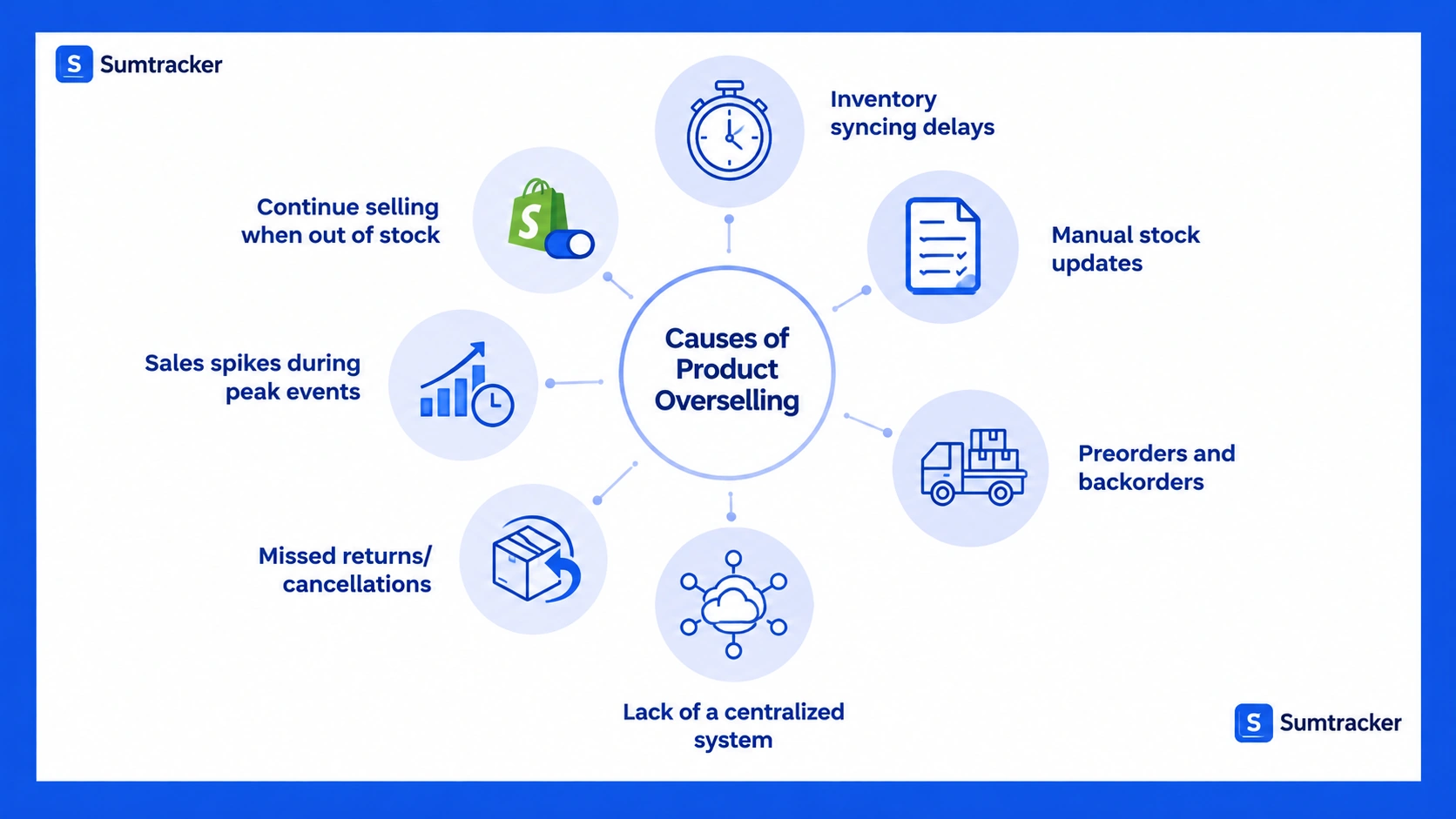
4. Lack of a centralized system
When each channel runs on its own data, you’re stuck juggling multiple stock counts. Without one source of truth, mismatches become inevitable.
5. Missed returns or cancellations
If canceled orders or product returns don’t flow back into inventory in real time, your available stock number drifts further from reality.
6. “Continue selling when out of stock” is turned on
In the Shopify admin, this product setting lets customers keep buying after available inventory reaches zero. It’s useful for preorders, but if it’s left on by mistake, every extra sale is an oversell.
You’ll find it in the product settings, under the Inventory section of each product or variant, according to the Shopify Help Center.
Tip: After changing inventory settings, place a test order to check that Shopify will stop selling the product at zero.
7. Sales spikes during peak events
During a product drop or flash sale, many orders land in the gap between a sale on one channel and the stock update on the others. The faster stock sells, the more orders fit into that gap.
Risks of Overselling for Your Business
Overselling might seem like a small hiccup, but the damage runs deeper than just refunding a few orders. It chips away at trust, time, and profit. Here’s how:
1. Frustrated customers and lost trust
Nothing disappoints a shopper faster than buying something, only to be told it’s unavailable. A single canceled order can push them straight to your competitors.
In a 2026 survey of 1,000 U.S. adults commissioned by DOSS, 62% said they had switched to a competing brand at least once because of a stockout. An oversell can feel worse, because the customer has already paid. That hurts customer loyalty and your brand reputation.
2. Negative reviews and lower marketplace rankings
Platforms like Amazon, eBay, and Etsy don’t take overselling lightly. Canceling too many orders can lead to a drop in ratings, hurting both your reputation and visibility.
3. Increased costs from refunds and returns
Every canceled order costs more than just the sale. You’re paying in lost time, refund fees, and sometimes even return shipping.
4. Supplier and operations strain
When overselling happens, you’re forced into last-minute reorders or rush shipments, which can damage supplier relationships and inflate costs.
5. Profit leakage
Add it all up (angry customers, penalties, extra shipping and lost sales) and overselling quickly eats into your hard-earned margins.
Across the industry, IHL Group estimates that inventory distortion, meaning out-of-stocks plus overstocks, costs retailers $1.73 trillion a year in lost revenue and excess costs.
How to Prevent Product Overselling
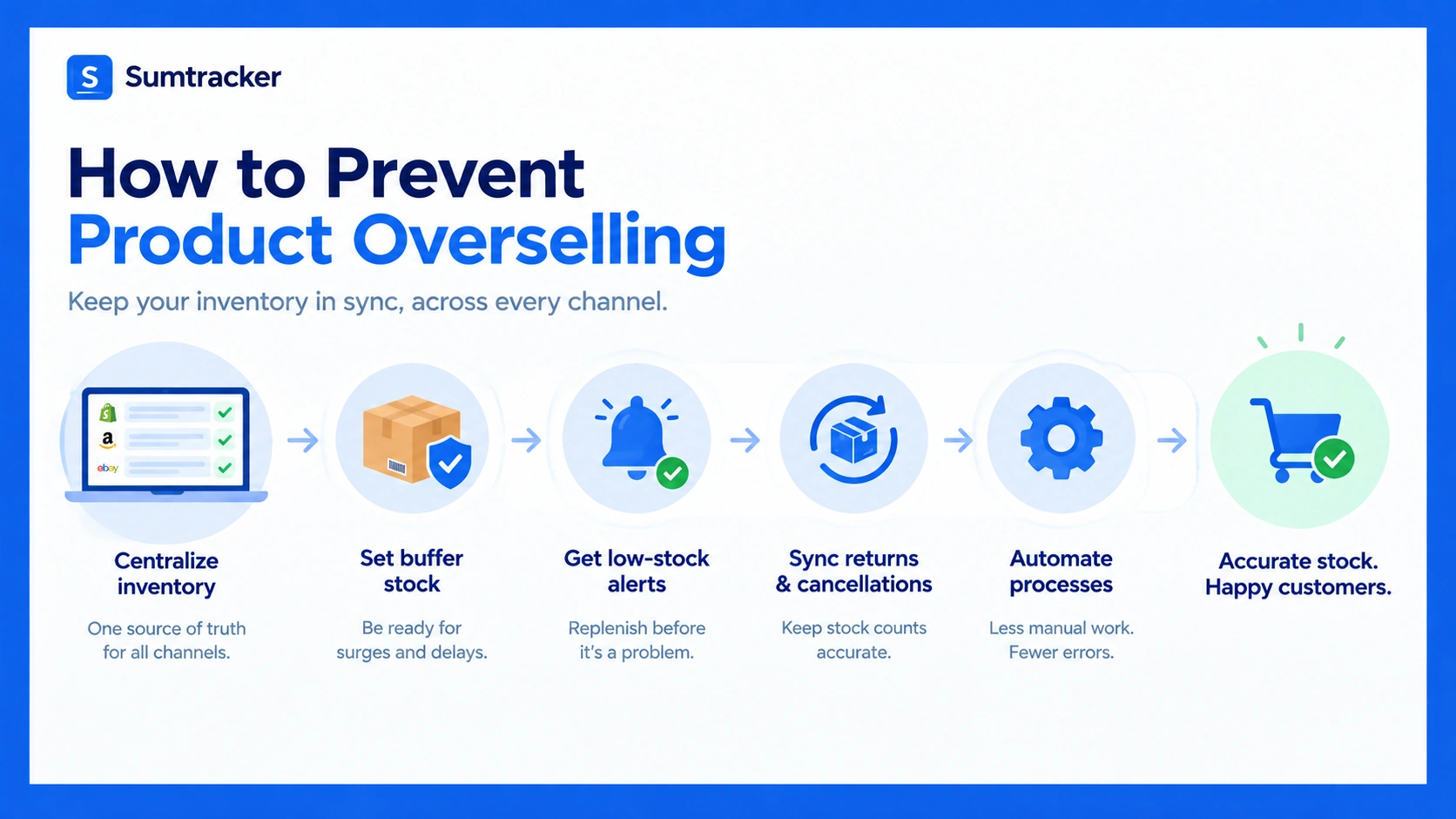
Preventing overselling requires structured systems rather than reactive fixes. The goal is to ensure every sales channel reflects accurate stock levels at all times. Here’s how to approach it:
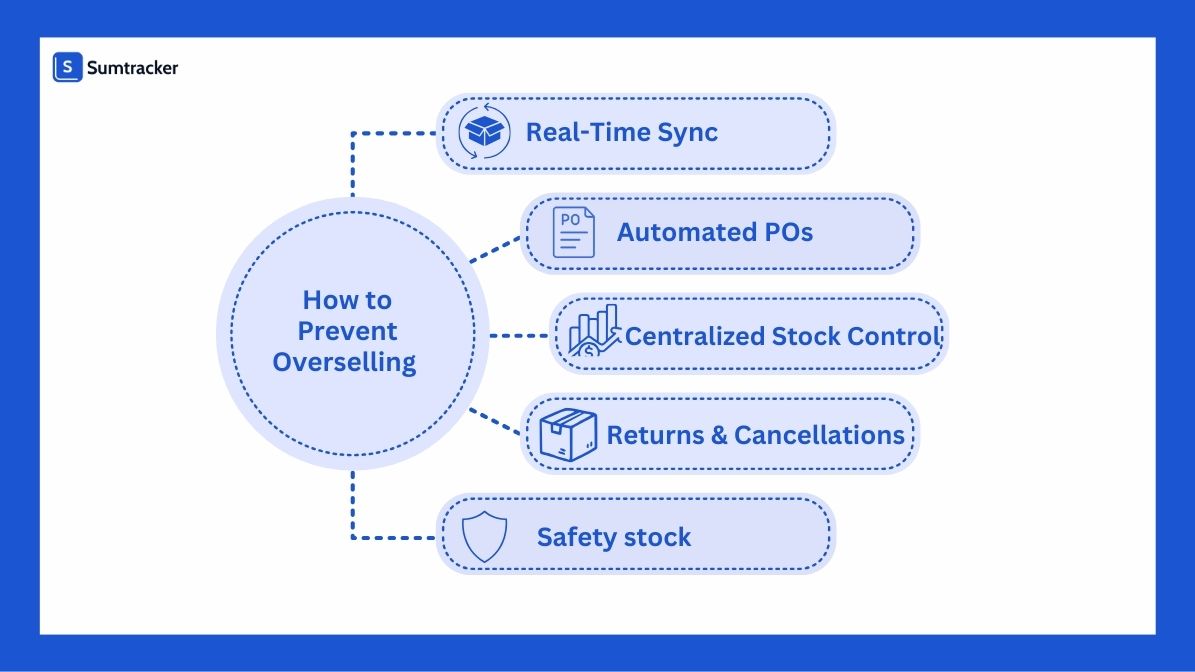
- Centralized inventory control
Use a single platform as the source of truth for stock data. This reduces discrepancies between Shopify, Amazon, eBay, and other sales channels.
- Establish buffer inventory
Maintain safety stock thresholds to absorb sudden demand surges or supplier delays, preventing stockouts and oversold orders.
- Automated notifications
Configure low-stock alerts so replenishment decisions are proactive rather than reactive.
- Seamless returns and cancellation updates
Ensure returned or canceled items are automatically reflected in available stock to keep counts accurate.
- Process automation
Replace manual updates with automated syncs and workflows. Automation minimizes human error while saving time for higher-value tasks.
How to prevent overselling across multiple channels
To prevent overselling across multiple channels, keep one stock count and push the same inventory levels to every channel.
When you sell on multiple sales channels and Shopify, Etsy, eBay and Amazon each hold their own number, a sale on one channel doesn’t show on the others until someone updates it.
- Sync every channel, including your own website, from that one count instead of editing each channel separately.
- Hold back a small buffer on fast sellers. Few tools offer true real-time inventory updates; most sync every few minutes. Keep buffers small, though, because too much safety stock ties up cash and can turn into dead stock.
- Cap how much stock each channel shows if one channel sells much faster than the rest.
For step-by-step guides to syncing inventory, see our Shopify and Etsy and Shopify and eBay guides.
How to prevent overselling on Amazon and eBay
Marketplaces track seller cancellations, and running out of stock is one of the most common causes.
eBay counts an order you cancel because the item was out of stock as a transaction defect. Sellers can drop to Below Standard when their defect rate goes above 2% and more than four buyers are affected, according to eBay’s seller performance standards.
Amazon tracks a cancellation rate for orders you fulfill yourself. You’ll find it in your Account Health dashboard in Seller Central.
To protect your account:
- Sync marketplace stock from the same source as your other channels.
- Keep a larger buffer on SKUs that sell fast on marketplaces.
- Fix data errors at the source, such as SKUs that don’t match between Shopify and Amazon, so the right product gets updated.
- Move stock tracking out of spreadsheets. A spreadsheet can’t update Amazon between your manual edits.
How to prevent overselling on Black Friday, flash sales and product drops
Oversells at peak happen because orders arrive faster than stock updates reach every channel. A drop that sells out in minutes can sell the last few units on several channels at once.
Flash sales push sales velocity far above normal, so a buffer that works on a normal day can be too small.
Black Friday and Cyber Monday (BFCM) are the biggest test, because traffic, discounts and marketplace orders all peak in the same few days.
To avoid overselling before Black Friday, a flash sale or a drop:
- Raise the buffer on featured SKUs. A close at quantity setting marks a product as sold out while a few units are still left.
- Check that every channel, including marketplaces and POS, is connected and syncing a week before the event, not on the day.
- Pause manual stock edits and bulk imports during the event.
- Sell limited drops on one channel only, if you can.
- Recount featured SKUs before and after the event and fix any gaps.
How to prevent overselling bundles and kits
Bundles oversell when a bundle has its own stock count instead of drawing from its components.
If a gift set and a single mug use the same mugs, selling either one must reduce the mug count. A bundle’s available quantity should equal how many bundles its scarcest component can make.
Learn how this works in our guide to Shopify bundle inventory.
How to prevent overselling with POS and online orders
Selling in a physical store and your online store from the same stock is another common cause of overselling.
Shopify’s “Continue selling when out of stock” setting doesn’t apply to POS orders. Staff can still sell when available stock reaches zero or below, though POS warns them first, according to the same Shopify Help Center page.
- Train staff to stop at the out-of-stock warning unless the item is physically on the shelf.
- Ring up in-store sales right away, not at the end of the day.
- If you offer buy online, pick up in store (BOPIS), count shelf stock for popular items often so online stock matches what’s really there.
What to look for in software to prevent overselling
Shopify inventory tools work well when you sell from one Shopify store. Once you add marketplaces or retail stores, most Shopify merchants add third-party apps from the Shopify App Store to keep stock in sync.
Inventory software prevents overselling by keeping one stock count and updating every channel automatically. When you compare tools, check that it:
- syncs stock to all your channels automatically, and tells you how often
- supports bundles and kits that draw from component stock
- lets you set a buffer per product
- sends low stock alerts when stock falls below a certain threshold
- flags sync errors, so you can fix them before they cause an oversell
- covers inventory tracking at every location, including 3PLs and retail stores
Sumtracker is an inventory management, forecasting and planning platform for Shopify and multi-channel eCommerce brands. Here’s what it does to reduce overselling:
- Syncs stock quantities from one inventory record to your Shopify stores and marketplaces such as Amazon, eBay, Etsy and Walmart.
- Runs automatically, pushing changes to your stores within minutes, according to the Sumtracker help center. It isn’t instant, so keep a small buffer on fast sellers.
- Updates stock for refunds, returns and cancellations, so returned units don’t go missing from your counts.
- Calculates bundles and kits from their components, so selling a bundle reduces the stock of every item in it.
- Holds back stock with close at quantity, which marks a product as sold out while a few units are still on hand.
- Tracks stock by location, including 3PL warehouses and transfers between them.
No tool can promise zero oversells, but these features close most of the gaps that cause them.
Best Practices to Stay Ahead of Stockouts and Overselling
Preventing overselling isn’t just about fixing mistakes. It’s about building a system that anticipates them. The most successful eCommerce brands treat inventory as a strategic function, not just an operational task. Here are practices worth adopting:
- Leverage demand forecasting
Analyze historical sales patterns, seasonality, and lead times to predict future demand. This ensures replenishment is timely and data-driven rather than guesswork.
- Automate purchase orders
Streamline procurement by setting reorder points that automatically trigger purchase orders when stock hits a threshold. This reduces delays caused by manual decision-making.
- Track stock across all locations
If you use multiple warehouses, 3PLs, or fulfillment centers, visibility must be unified. Centralized tracking prevents discrepancies that lead to overselling.
- Plan for peaks and promotions
Sales events like Black Friday, Prime Day, or seasonal launches can magnify stockouts. Building higher buffer stock and flexible supplier terms in advance helps avoid shortages.
- Regular inventory audits
Even with automation, periodic checks are essential. Audits catch discrepancies early and maintain confidence in your system’s accuracy. Compare physical inventory counts with the stock levels in your inventory system, and fix gaps before they lead to overselling.
How Sumtracker Helps Prevent Overselling
Babymaxi is an online baby-carrier retailer based in Amsterdam that sells across Europe through Shopify. Its catalog grew to hundreds of SKUs from dozens of suppliers. Here’s a summary of the Babymaxi case study.
The Challenge
Babymaxi moved its stock from an in-house warehouse to two 3PL warehouses. With stock split across locations, it had:
- 5–7 overselling incidents a month
- no central view of where stock was or how it moved
- trouble assigning supplier deliveries to the right warehouse
The Solution
Babymaxi centralized its stock in Sumtracker. It used inventory sync to keep Shopify updated across both warehouses, stock transfers to move units between locations, and purchase orders to manage supplier deliveries.
The Results
According to the case study:
- overselling fell from 5–7 incidents a month to near zero
- inventory accuracy reached 99%+ across warehouses
- time spent managing inventory fell by about 70%, from roughly 10 to 3 hours a week
Conclusion
The lesson applies beyond Babymaxi: when stock is split across locations, one shared inventory record is what keeps overselling under control.
Are you ready to stop overselling?
Overselling doesn’t just hurt revenue. It damages customer trust. With Sumtracker, you get automatic inventory sync, automated purchase orders, and full visibility across every channel.
Start your free trial of Sumtracker today and take control of your inventory before your next sales spike.
FAQs
What is overselling?
Overselling is when you accept more orders for a product than you have in stock. It usually happens when channels, warehouses or bundles don’t share one accurate stock count, so the same unit is sold twice.
Why does product overselling happen in eCommerce?
Overselling happens when sales channels don’t share one up-to-date stock count. Manual updates, delayed stock adjustments, and lack of centralized systems are the biggest culprits.
What happens if I oversell a product?
You have to cancel or delay the order and refund the customer. On marketplaces, the cancellation can count against your seller metrics. You also risk a bad review and losing a repeat buyer.
Can overselling hurt my seller ratings on marketplaces?
Yes. Marketplaces like Amazon and eBay track cancellations. eBay counts an out-of-stock cancellation as a transaction defect. Too many defects can lower your seller level, reduce visibility and lead to account restrictions.
How can I prevent overselling on Shopify?
Turn off “Continue selling when out of stock” for products you can’t sell past zero, keep a small safety buffer, and sync every channel from one stock count. Inventory software like Sumtracker automates the sync and buffers.
How do I prevent overselling on Black Friday?
Raise stock buffers on your featured SKUs and check that every channel is syncing a week before the event. During Black Friday and Cyber Monday, pause manual stock edits and bulk imports. Recount featured SKUs afterwards and fix any gaps.
How do I stop overselling across Etsy, eBay and my website?
Use one stock count as your source of truth and sync it to Etsy, eBay and your website automatically. Add a small buffer on fast sellers, and avoid editing stock separately on each channel.
When should I consider inventory software to prevent overselling?
If you sell on multiple channels, frequently cancel orders, or spend hours reconciling spreadsheets, it’s time to move to automated inventory software like Sumtracker.
Conclusion
Related Articles
Tool and strategies modern teams need to help their companies grow.


Ready to Simplify Your Inventory Management?
Join hundreds of e-commerce merchants who rely on Sumtracker to save time, eliminate errors, and grow their business.