.svg)
Close at Quantity in Inventory Management: A Complete Guide


If you’ve ever oversold a product, dealt with sudden stockouts, or struggled to keep inventory accurate across multiple channels, you already know how quickly things can spiral.
One small delay in syncing inventory can lead to canceled orders, unhappy customers, and lost revenue.
That’s where Close at Quantity comes in.
Think of it as a safety buffer for your inventory.
Instead of selling every last unit you have, you intentionally “close” listings a little earlier before stock actually hits zero.
It’s a simple concept, but it can make a huge difference in how smoothly your operations run, especially if you’re selling on platforms like Shopify, Amazon, or Etsy.
In this guide, we’ll break down what Close at Quantity means, how it works, when to use it, and how it helps you avoid common inventory headaches.
What Is Close at Quantity in Inventory Management?
Close at Quantity is an inventory control setting that lets you stop selling a product before it actually goes out of stock.
Instead of allowing customers to purchase until inventory reaches zero, you define a minimum threshold and once stock hits that level, the product is automatically marked as unavailable or “closed” for sale.
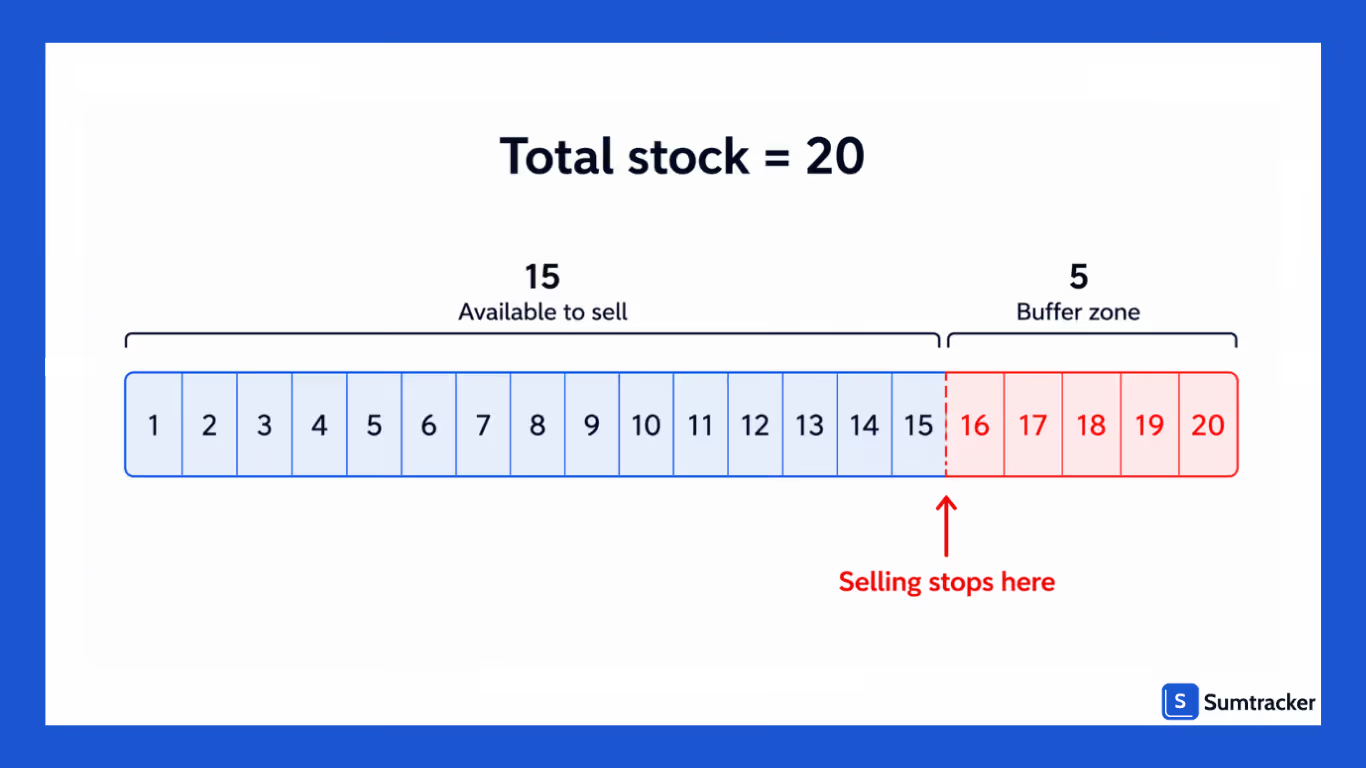
For example, if you have 20 units in stock and set a Close at Quantity of 5, your product will stop selling when inventory reaches 5 units not 0.
Those remaining units act as a buffer.
This buffer helps protect your business from common issues like:
- Overselling due to sync delays across channels
- Sudden spikes in demand
- Manual inventory errors or adjustments
- Returns or order changes
In simple terms, Close at Quantity is a preventive control.
How Close at Quantity Works
Close at Quantity works by setting a predefined inventory threshold that automatically stops a product from being sold once stock reaches that level.
Instead of selling all the way down to zero, you create a small buffer and your system takes care of the rest.
Here’s how it plays out in practice:
- You set a Close at Quantity value (for example, 3 units)
- Your inventory continues to update normally as orders come in
- Stock levels decrease in real time across your sales channels
- As soon as inventory hits 3, the product is automatically removed, hidden, or marked out of stock
No manual action is required, it’s all automated.
A Simple Example
Let’s say you start with 15 units in stock and set a Close at Quantity of 4:
- Customers place orders → stock reduces from 15 → 10 → 6
- Once inventory reaches 4 → the product is no longer available for purchase
- The remaining 4 units stay untouched as a safety buffer
Why This Works So Well
Inventory management systems even the best ones can have slight delays when syncing across platforms like Shopify, Amazon, or Etsy. During that gap, multiple orders can come in at the same time.
Close at Quantity accounts for this uncertainty by ensuring you’re never selling your last few units.
When Should You Use Close at Quantity?
Close at Quantity isn’t something you need to apply across every single product but in the right situations, it can save you from a lot of operational headaches.

You should consider using it when your inventory becomes harder to control in real time or when the cost of overselling is high.
You’re Selling Across Multiple Channels
If you’re listing products on platforms like Shopify, Amazon, Etsy, or eBay, inventory updates aren’t always perfectly instant. Even a slight delay can result in the same unit being sold twice. Close at Quantity adds a buffer that protects you from these sync gaps.
You’re Running Ads or Promotions
Paid campaigns can drive sudden spikes in traffic and orders. When demand increases quickly, your inventory can deplete faster than your system updates. Setting a close threshold ensures you don’t oversell during high-traffic moments.
Your Products Sell Quickly
Fast-moving or trending products can go from fully stocked to sold out in minutes. In these cases, selling down to zero is risky. A small buffer gives you breathing room when demand surges unexpectedly.
You’re Operating with Low Inventory
When stock levels are already tight, even a single extra order can cause issues. Close at Quantity helps you stay cautious and avoid last-minute cancellations.
You’ve Faced Overselling Before
If you’ve had to cancel orders, issue refunds, or deal with unhappy customers due to stock mismatches, that’s a clear signal. Close at Quantity is a simple way to prevent those situations from repeating.
You Want More Operational Control
Sometimes it’s not just about avoiding problems, it’s about running a smoother operation. Close at Quantity gives you more control over how your inventory behaves, especially during uncertain or high-pressure scenarios.
Common Use Cases of Close at Quantity
Close at Quantity becomes especially valuable in real-world selling scenarios where inventory can change quickly or unpredictably. Here are some of the most common situations where it makes a clear difference:
Running Ads or Promotions
When you launch ads or run limited-time offers, traffic can spike almost instantly. Orders may start coming in faster than your inventory updates across channels. A Close at Quantity buffer ensures you don’t oversell while your campaign is performing well.
Low Inventory Situations
When stock is already running low, there’s very little room for error. Even a slight delay in syncing or one unexpected order can push you into overselling. Closing early helps you avoid last-minute cancellations and keeps things under control.
Selling Across Multiple Channels
If you’re selling on platforms like Shopify, Amazon, Etsy, or eBay at the same time, your inventory is constantly being updated from multiple sources. Close at Quantity acts as a safety net, reducing the risk of the same unit being sold on more than one channel.
Fast-Moving or Viral Products
Some products suddenly take off whether due to trends, social media, or seasonality. When demand spikes, inventory can drop rapidly. A safety stock ensures you don’t run into issues while trying to keep up with the surge.
Managing Manual Inventory Adjustments
If you frequently make manual updates like stock corrections, damaged goods, or internal transfers, there’s always a chance of temporary mismatches. Close at Quantity gives you a cushion while those adjustments settle.
Handling Returns and Exchanges
Returns don’t always get processed instantly, and exchanges can complicate available stock. Keeping a small buffer ensures you can handle these scenarios without impacting new orders.
Risks of Not Using Close at Quantity
Not using Close at Quantity might seem like you’re maximizing every sale but it often leads to avoidable problems, especially as your business scales. Here are the key risks to be aware of:

- Overselling Products: When inventory updates aren’t perfectly in sync, you may sell more units than you actually have leading to order cancellations later.
- Poor Customer Experience: Customers who place orders only to be told the item is out of stock are likely to feel frustrated and disappointed.
- Negative Reviews and Brand Impact: Frequent stock issues can result in poor ratings and damage your brand’s credibility over time.
- Platform Penalties: Marketplaces like Amazon and eBay monitor seller performance closely. High cancellation rates can hurt your rankings and visibility.
- Operational Chaos: Your team may end up spending time fixing inventory errors, processing refunds, and handling complaints instead of focusing on growth.
- Loss of Long-Term Revenue: While you may gain a few extra sales upfront, the long-term impact of lost trust and poor customer experience can reduce repeat purchases.
How Sumtracker Helps Support Close at Quantity
Managing Close at Quantity manually across multiple channels can quickly become messy. This is where Sumtracker steps in by helping you automate the process and keep your inventory accurate without constant monitoring.
Here’s how Sumtracker makes it easier:
- Set Close at Quantity Thresholds Easily: Define custom buffer levels for each product so listings automatically stop before inventory reaches zero.
- Real-Time Inventory Sync Across Channels: Keep stock updated across Shopify, Amazon, Etsy, eBay, and Walmart, reducing the chances of mismatched inventory.
- Automatically Prevent Overselling: Once your inventory hits the defined threshold, Sumtracker ensures the product is no longer available for sale no manual action needed.
- Centralized Inventory Control: Manage all your products, stock levels, and thresholds from a single dashboard instead of juggling multiple platforms.
- Handles High-Volume Sales Smoothly: Whether you’re running ads or experiencing a surge in demand, your buffer stays intact, helping you avoid last-minute issues.
- Improves Operational Efficiency: Spend less time fixing inventory errors and more time focusing on growing your business.
Conclusion
Close at Quantity might seem like a small setting, but in reality, it plays a big role in keeping your inventory accurate and your operations stress-free. Instead of reacting to overselling, cancellations, and stock mismatches, you’re proactively preventing them.
If you’re selling across multiple channels or dealing with fluctuating demand, having that extra buffer can make all the difference. It helps you protect customer experience, maintain better control over your stock, and avoid unnecessary operational chaos.
And if you want to take it a step further, tools like Sumtracker make it incredibly easy to implement and manage Close at Quantity across all your sales channels without manual effort.
If you’re tired of overselling and inventory mismatches, it might be time to set up Close at Quantity the right way.
Try Sumtracker for free and start automating it and see how much smoother your operations become.
FAQs
What is the ideal Close at Quantity value?
There’s no one-size-fits-all number. It depends on your sales velocity and operations. Fast-selling products or multi-channel setups typically need a higher buffer (e.g., 3–5 units), while slower products may need less.
Does Close at Quantity reduce sales?
Not really. While you may stop selling the last few units, it actually prevents order cancellations and poor customer experiences—which helps protect long-term revenue.
Is Close at Quantity useful for single-channel sellers?
It can still be helpful, especially during high-demand periods or when running promotions. However, it’s most valuable for multi-channel sellers where sync delays are more common.
Can I set different Close at Quantity levels for different products?
Yes, and you should. Different products have different demand patterns, so setting custom thresholds gives you better control and accuracy.
How is Close at Quantity different from safety stock?
They’re similar in concept but used differently. Safety stock is typically for internal planning and forecasting, while Close at Quantity directly controls when a product stops being sold.
Do I need software to manage Close at Quantity?
You can manage it manually, but it becomes difficult as you scale. Using a tool like Sumtracker helps automate the process and ensures accuracy across all your sales channels.
Conclusion

Bhoomi writes about inventory management and multichannel selling at Sumtracker. Her focus is on solving real operational problems for Shopify, Amazon, and marketplace sellers through well-researched content. She covers everything from multi-location inventory syncing and stock error troubleshooting to replenishment planning and platform comparisons, turning complex eCommerce operations into clear, actionable guidance.
LinkedInRelated Articles
Tool and strategies modern teams need to help their companies grow.
.avif)

Ready to Simplify Your Inventory Management?
Join hundreds of e-commerce merchants who rely on Sumtracker to save time, eliminate errors, and grow their business.
