.svg)
Batch Tracking Inventory in Shopify: Complete Guide to Managing Product Lots


Batch tracking in Shopify means recording which production lot every unit came from, along with its expiry date, so you can sell the right stock first and trace any unit back to its batch.
Shopify has no native lot or expiry tracking.
You get it through an app or an external inventory system.
That gap matters more than it used to U.S. regulators logged 1,634 recalls in the first half of 2026, and those recalls covered 941.2 million units, more than all of 2025.
When a supplier flags a bad batch, a store without lot data has to treat every unit of that SKU as suspect.
This guide covers what batch tracking is, who needs it, what Shopify does and does not do natively, how to migrate existing stock, how to handle multiple locations and 3PLs, how to run a recall, and which apps are worth a look. It ends with an honest checklist for deciding whether you need batch tracking at all.
What Is Batch Tracking in Shopify?
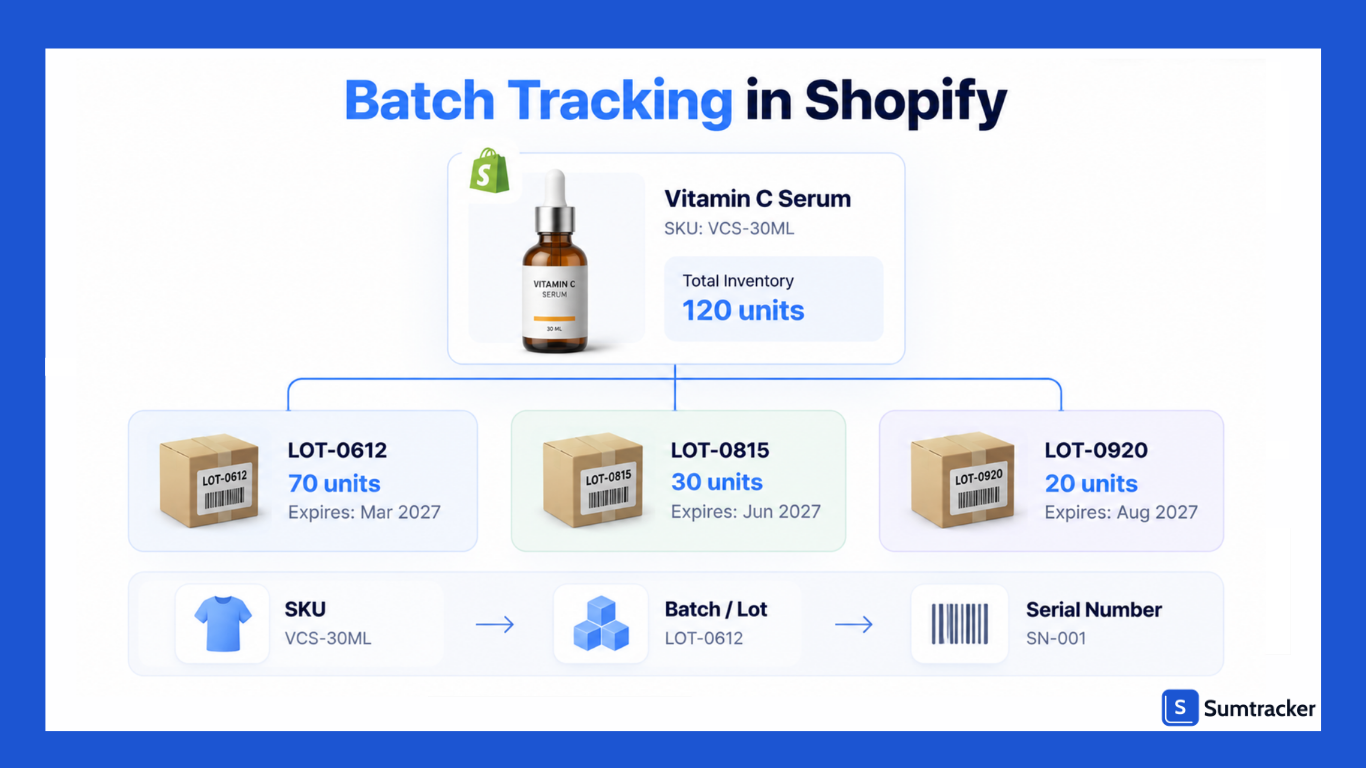
Batch tracking (also called lot tracking) groups units that were made or received together under a unique batch number.
Each batch can carry details such as the manufacture date, expiry date, and supplier.
Your SKU tells you what the product is; the batch number tells you which production or receiving lot it came from.
In Shopify terms, a variant like "Vitamin C Serum 30ml" has one inventory count per location.
Batch tracking splits that count into lots.
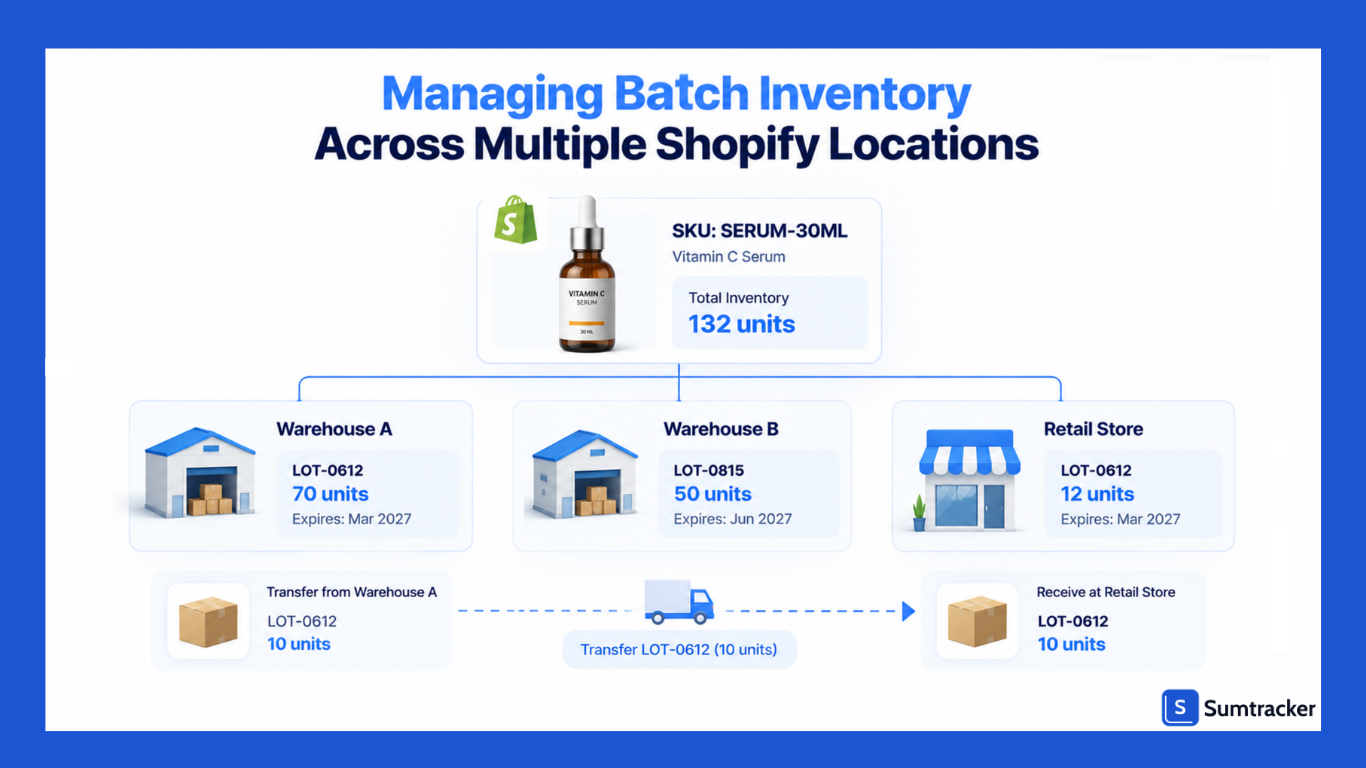
For example, 120 units on hand might really be 70 units from LOT-0612 (expires March 2027) and 50 units from LOT-0815 (expires June 2027).
The three levels of tracking are easy to mix up, so here is how they compare:
FIFO vs FEFO
Batch data is what lets you control which units ship first. Two rules are common:
- FIFO (first in, first out): ship the oldest received batch first.
- FEFO (first expired, first out): ship the batch with the nearest expiry date first, even if it arrived later.
For anything with a shelf life, FEFO is usually the safer rule. A newer delivery can expire sooner than older stock if the supplier sent short-dated product.
Rule of thumb: If two batches of the same SKU can have different expiry dates, use FEFO. If expiry does not matter but you still need recall traceability, FIFO is enough.
Which Shopify Businesses Need Batch Tracking?
Batch tracking is especially useful when products expire, may need to be recalled by lot, or require lot-level traceability for a regulator, retailer, or marketplace.
Most Shopify stores selling apparel, furniture, or other non-perishable products typically don't need it.
Food brands have an extra reason to plan ahead.
The FDA's Food Traceability Rule (FSMA 204) requires lot-level records for foods on its Food Traceability List. Its compliance date moved from January 20, 2026 to July 20, 2028, and Congress directed the FDA not to enforce it before then (FDA Bridge summary).
Large retailers and distributors are already writing these requirements into supplier contracts, often ahead of that date.
Practical tip: Ask your manufacturer or co-packer whether they already print lot codes on packaging. If they do, you only need to capture that code at receiving. If they don't, fix that first. Batch tracking breaks down when the physical label and the system disagree.
Does Shopify Include Native Batch Tracking?
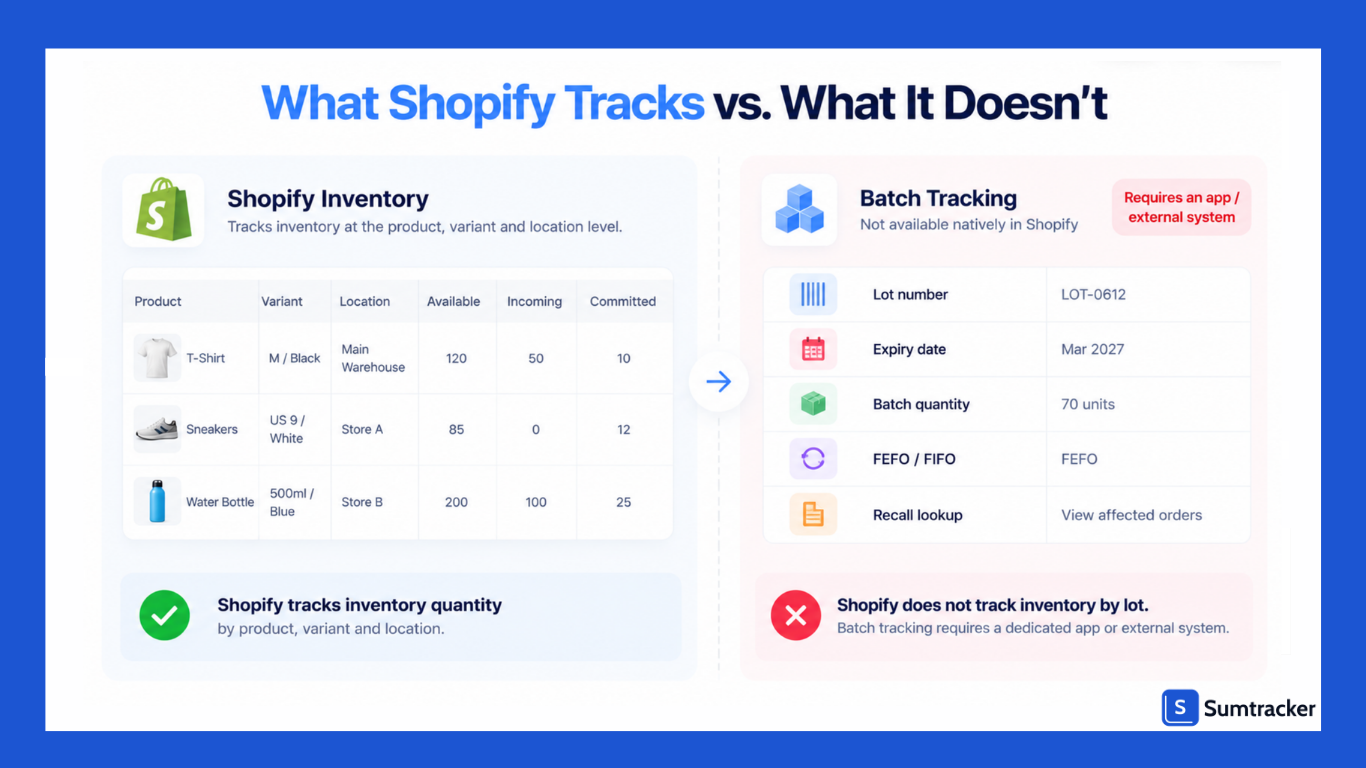
No. Shopify's native inventory system tracks quantities by product variant and location. There is no lot number field, no expiry date field, and no FEFO allocation.
Shopify's inventory got noticeably stronger in 2026, though, and some of those features help a batch workflow.
This 2026 change can cause confusion:
Batch fulfillment is not batch tracking. Shopify's new edition added a way to group orders into batches for picking and packing. It organizes work. It does not record which lot went into which order.
What about metafields or tags?
Some merchants store a lot code in a variant metafield. That works only if you hold one batch per variant at a time.
The moment two lots sit on the shelf together, a single metafield can't tell you how many units belong to each, and it can't record which lot shipped in which order.
Practical tip: Use Shopify's Quality control unavailable state as a quarantine bin. Move units there when a batch arrives, and release them to Available only after you log the lot code and check the label. It costs nothing and stops unchecked stock from selling.
For a broader look at Shopify's native inventory capabilities, read Can Shopify do inventory management?
How to Migrate Existing Inventory to Batch Tracking
Migration means splitting the stock you already have into lots, so the batch totals match Shopify's on-hand count from day one. The hard part is not the app. It is counting the shelf by lot.
- Pick the SKUs that need lots. Start with perishable or regulated products and leave non-essential SKUs untracked.
- Count inventory by lot. At each location, count every SKU and record its lot number and expiry date. Sumtracker's Shopify inventory audit checklist can be used as a count sheet.
- Reconcile Shopify's inventory first. Make sure Shopify's on-hand quantity matches your physical count before importing lot data. Otherwise, your lot quantities will start out incorrect.
- Build an import file. Create one row for each SKU, lot, and location. Many batch-tracking apps support CSV imports.
- Handle unlabeled stock. If some units have no readable lot code, assign a clearly identifiable legacy lot, such as LEGACY-2026, and record the best available expiry information.
- Set the allocation rule. Use FEFO for products with expiry dates and FIFO where expiry isn't a concern.
- Test the workflow. Run a test order for each location and confirm that the expected lot is allocated and recorded correctly.
- Freeze changes during cutover. Choose a quiet period and pause receiving until you've verified the import.
Rule of thumb: The sum of all lots for a SKU at a location must equal Shopify's on-hand for that SKU at that location. Check this the day you go live, then again after your first week. If the numbers drift, find out why before you add more SKUs.
After go-live, regular counts keep lot data honest. Sumtracker's guide to cycle counting in Shopify shows how to count small sections often instead of doing one big annual count.
Managing Batch Inventory Across Multiple Shopify Locations
Every lot belongs to one location at a time. Shopify decides which location fulfills an order. Your batch app then decides which lot ships from that location. Both steps have to be right.
Shopify supports multiple inventory locations, but your batch-tracking app may have its own location limits or pricing tiers. Check both before choosing a solution, especially if you operate several warehouses, retail stores, or 3PL locations.
Three things that go wrong across locations
- Transfers that lose the lot. When stock moves from a warehouse to a store, the transfer should retain the lot information. If it moves only a quantity, the receiving location can end up with stock with no lot attached.
- Orders without a clear fulfillment location. Check how your batch-tracking app handles pickup, draft, and other orders where the fulfillment location may not be immediately assigned. The app should not allocate a lot from the wrong location.
- One location holding older stock. A slower retail location can hold a batch until it approaches expiry while another location continues selling newer stock.
A simple shelf-life check per location
To spot the third problem early, compare how long a lot will take to sell with how long it can still be sold:
Days of cover = Units of the lot at the location ÷ Average daily units sold at that location
Sellable days = Days until expiry − Minimum shelf life you promise customers
If days of cover is greater than sellable days, that lot will not sell through in time.
For example, 90 units selling 2 per day gives 45 days of cover. If the lot expires in 60 days and you promise customers at least 30 days of shelf life, you have only 30 sellable days.
At 2 per day, you will sell about 60 units in that window, so move the other 30 units to a faster location now, or discount them.
Practical tip: Set your minimum shelf life rule before you go live. Many retailers and marketplaces reject or penalize product that arrives close to expiry, so ship-by dates matter as much as expiry dates.
For location setup, Sumtracker's guide to Shopify multi-location inventory covers fulfillment priority and location roles, and tracking real-time inventory across locations in one dashboard covers visibility.
Batch Tracking With 3PLs and Fulfillment Centers
When a 3PL fulfills your orders, its warehouse management system (WMS) should be the source of truth for lot data because the 3PL physically receives, stores, and picks the inventory. If a Shopify batch-tracking app assigns lots independently, its records can differ from what the warehouse actually ships.
In Shopify, a 3PL may appear as a separate location or connect through a fulfillment service. This keeps its inventory separate from your other locations. The lot-level details, however, should remain synchronized with the 3PL's WMS.
Here is a practical split of responsibilities:
Questions to ask your 3PL before you sign
- Do you capture lot numbers and expiry dates at receiving for every SKU, or only on request?
- Can you pick by FEFO, and can I set a minimum shelf life per SKU?
- How do I get lot numbers per shipped order: API, Shopify order metafields, or a scheduled report?
- How fast can you produce a list of every order that shipped a given lot?
- Do you charge extra for lot control?
Sumtracker's guide on what a 3PL is and how to choose one has a broader checklist.
Using Batch Tracking for Product Recalls
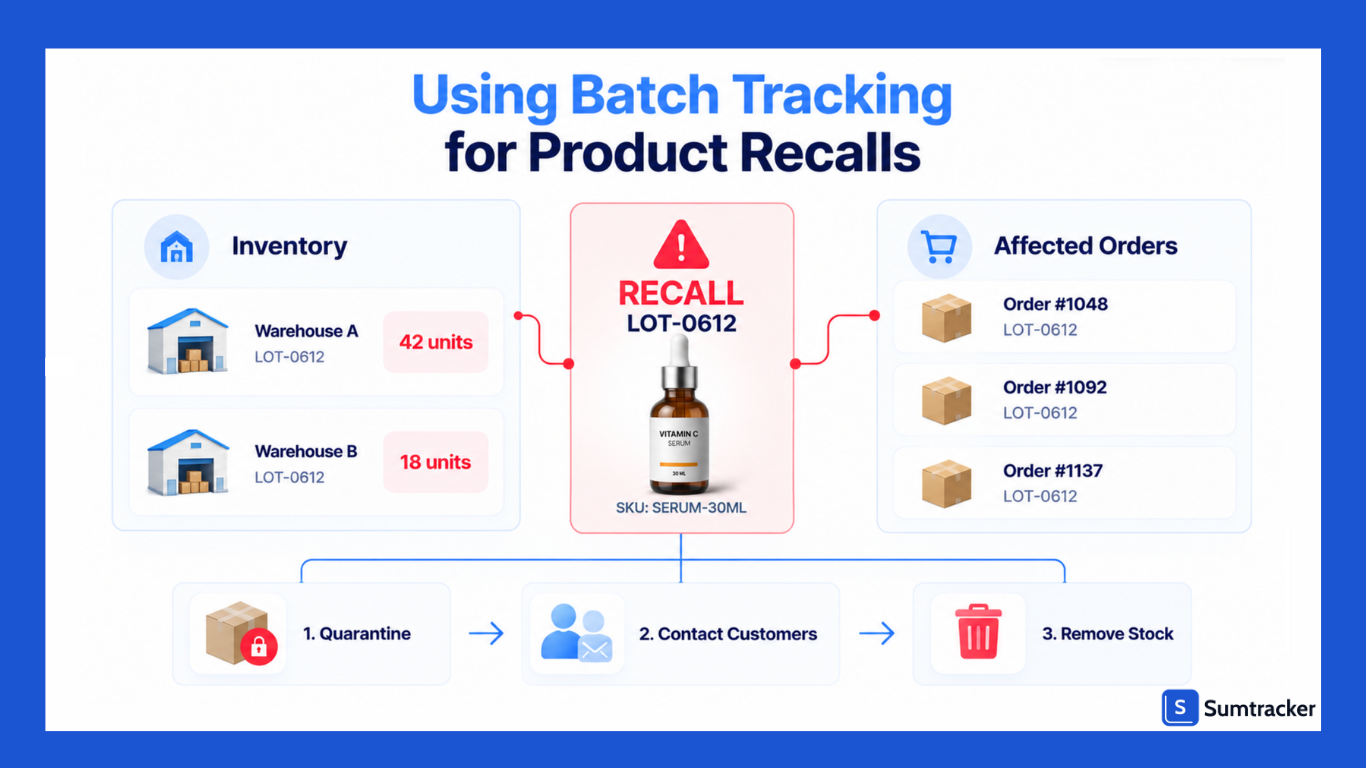
With lot data, a recall becomes a lookup: find the lot, identify the orders, contact those customers, and quarantine the remaining stock. Without lot-level records, you may need to investigate a much broader set of orders and inventory because you can't reliably isolate the affected batch.
Recalls aren't limited to large brands. The Consumer Product Safety Commission recorded 289 recalls in the first half of 2026, according to Sedgwick's Product Safety and Recall Index.
In the food sector, undeclared allergens were the most common cause of FDA food recalls in Q1 2026, with 57 events, according to the same index.
Recall steps when you have lot data
- Confirm the scope. Get the exact lot numbers or production date range from your supplier or regulator.
- Quarantine stock. Move affected units at every location to Shopify's Unavailable state and ask your 3PL to place a hold.
- Pull the affected orders. Export every order that received those lots, along with the necessary customer contact information.
- Notify customers. Explain what is affected, how to check the lot code on the product, and what to do next.
- Handle returns and refunds. Track returned units against the recalled lot so you can account for the affected inventory.
- Remove the stock. Record destroyed or returned inventory so your on-hand quantities remain accurate.
- Keep the records. Save the order export, customer communications, and disposal records in one place.
With vs. Without Lot Tracking
Case study: How lot codes scoped a 19-million-egg recall
On July 22, 2026, Midwest Poultry Services recalled 1,589,577 dozen shell eggs, roughly 19 million eggs. Environmental monitoring at two of its Texas farms had found possible Salmonella Enteritidis contamination.
The recall did not cover every egg the company sold. Its scope was defined by codes printed at production:
- Production window: eggs produced between June 6 and July 3, 2026
- Plant code: cartons stamped P-1950 or 0840962
- Julian dates: 157 to 184
- Sell-by or best-by dates: July 20 to August 17, 2026
The eggs were sold under several brands at stores including Kroger and Brookshire's. Retailers and shoppers could check the carton stamp and know right away whether a pack was affected.
The lesson for a Shopify store is simple. A lot code on your packaging only helps in a recall if your system also recorded which orders received that lot.
For foods on the FDA's Food Traceability List, FSMA 204 will require you to hand the FDA an electronic, sortable spreadsheet of traceability records within 24 hours of a request once enforcement begins in July 2028. That is a useful target for any brand.
To see how lot codes link records across a supply chain, watch the FDA's own explainer, How the Food Traceability Rule Works: Cheese Supply Chain Example. It shows how a traceability lot code is assigned and how that code lets the FDA trace a product step by step.
Practical tip: A recall also tests your general stock accuracy. Sumtracker's guide to inventory reconciliation explains how to keep system counts and shelf counts aligned between recalls.
Common Batch Tracking Mistakes to Avoid
Most batch tracking failures come from process gaps, not software. The app can only be as accurate as the information entered into it.
Bundles deserve extra attention. If you sell gift sets or multipacks, the components carry the lots, not the bundle SKU. Sumtracker's guide to syncing bundle inventory across channels explains why component-level tracking matters. The same principle applies to lot tracking.
To learn how a recall drill exposed gaps in one company's lot tracing, listen to Why Recall Planning Matters for Every Food Company from Holland & Knight's Legal Bites podcast (April 2026), featuring Sedgwick's food recall director Ryan Gooley.
Practical tip: Keep a one-page receiving checklist at the receiving bench: record the lot code, enter the expiry date, check it against the label, then release the stock to Available. Errors that start at receiving can carry through to every order, making this one of the most important steps to get right.
Best Shopify Apps for Batch Tracking Inventory
For most Shopify stores, a dedicated batch-tracking app is enough. Brands that manufacture their own products may need a broader manufacturing or inventory system instead. Here are some options to consider based on their Shopify App Store listings and product pages:
Prices and features can change, so confirm the current Shopify App Store listing before installing. Review history and feature availability can also vary between apps.
What to Check Before You Choose
- Bundle support: Does the app assign lots to bundle components?
- POS support: Does it update lot quantities for in-store sales?
- Location limits: How many locations does your plan support?
- Recall output: Can it identify orders and customers associated with a lot?
- Packing slips: Can lot numbers be printed on slips or labels?
- 3PL fit: Can it receive lot data from your 3PL instead of assigning its own?
Practical tip: Test your top two choices with the same five scenarios: a normal order, a bundle, a POS sale, a return, and a location transfer. This will reveal differences that aren't obvious from the feature list.
Where Sumtracker Fits
To be clear, Sumtracker does not provide batch or lot tracking. It handles inventory sync across Shopify, Amazon, Etsy, eBay, and Walmart, along with bundles, purchase orders, multi-location inventory, and replenishment.
Brands selling perishables across multiple channels can pair a dedicated batch-tracking app with Sumtracker for cross-channel inventory management.
Before going live, test how both systems update inventory in Shopify to avoid conflicting stock changes. For more on this setup, see Sumtracker's guide to Shopify multi-channel inventory sync.
Do You Actually Need Batch Tracking?
Batch tracking is most useful when products expire, require lot-level traceability, or may need to be recalled by lot. If none of these apply, accurate SKU-level inventory may be enough. Batch tracking adds a step to receiving, transfers, and returns, so it should solve a real business need.
Use this table to decide:
Rule of thumb: Ask yourself, "If a supplier recalled one lot today, could I list every customer who received it by tomorrow?" If you sell expiring or regulated products and the answer is no, you need batch tracking.
Conclusion
Batch tracking lets Shopify stores connect inventory to the specific lot it came from, making it easier to manage expiry dates, rotate stock, and trace products during a recall.
It's especially valuable for businesses selling food, supplements, cosmetics, pet products, and other goods where shelf life or lot-level traceability matters.
Shopify can handle inventory quantities, locations, purchase orders, and receiving, but native Shopify inventory doesn't provide lot-level tracking or expiry management. For those workflows, you'll need a dedicated batch-tracking app or external inventory system.
Before implementing batch tracking, make sure your inventory records are accurate, your receiving process captures lot information consistently, and your 3PL or other fulfillment partners can preserve that data.
Start with the SKUs that actually need traceability rather than adding complexity to every product.
When the process is set up correctly, batch tracking isn't just about knowing what's in stock. It's about knowing which stock you have, where it is, when it expires, and which customers received it.
FAQs
Does Shopify have batch tracking?
No. Shopify tracks inventory quantities by variant and location, but it has no lot number field, no expiry date field, and no FEFO allocation. To track batches, you need a batch-tracking app or an external inventory system.
What is the difference between batch tracking and lot tracking?
There is no practical difference. Both terms describe grouping units that were made or received together under one number so you can track expiry dates and trace them in a recall. "Lot" is more common in food and pharma, while "batch" is more common in manufacturing and cosmetics.
What is the difference between a batch number and a serial number?
A batch number covers a group of units made or received together. A serial number identifies one single unit. Batch numbers are used for expiry control and recalls, while serial numbers are used for warranties and high-value items like electronics.
Should I use FIsFO or FEFO for my Shopify store?
Use FEFO (first expired, first out) for any product with an expiry date, because a newer delivery can expire sooner than older stock. Use FIFO (first in, first out) when expiry doesn't matter but you still want recall traceability.
Can I track lots and expiry dates when using a 3PL?
Yes, if your 3PL supports lot control. The 3PL's warehouse system should own lot data, because it physically receives and picks the stock. Before you sign, confirm that the 3PL captures lot codes at receiving, picks by FEFO, and can report which lot went into each order.
Do small Shopify stores need batch tracking?
It depends on what you sell, not how big you are. A small store selling supplements, skincare, food, or pet products may need it for expiry control and recalls. A large store selling apparel or furniture usually doesn't.
Conclusion

Bhoomi writes about inventory management and multichannel selling at Sumtracker. Her focus is on solving real operational problems for Shopify, Amazon, and marketplace sellers through well-researched content. She covers everything from multi-location inventory syncing and stock error troubleshooting to replenishment planning and platform comparisons, turning complex eCommerce operations into clear, actionable guidance.
LinkedInRelated Articles
Tool and strategies modern teams need to help their companies grow.


Ready to Simplify Your Inventory Management?
Join hundreds of e-commerce merchants who rely on Sumtracker to save time, eliminate errors, and grow their business.