.svg)

Inventory Reconciliation Explained: Methods, Steps, and Best Practices


Ever checked your inventory system and thought you had plenty of stock, only to realize the shelves tell a different story?
It’s a common situation for growing businesses.
A few missed updates, misplaced items, or unrecorded returns can quickly create a gap between what your system says you have and what’s actually available.
That’s where inventory reconciliation comes in.
By regularly comparing your recorded stock with your physical inventory, businesses can catch discrepancies early, fix errors, and keep their inventory data accurate and reliable.
In this guide, we’ll explain what inventory reconciliation is, why it matters, and the best ways to keep your stock records reliable.
What Is Inventory Reconciliation?
Inventory reconciliation is the process of verifying that the inventory recorded in your system matches the actual physical stock you have on hand.
Businesses regularly compare their inventory records (from spreadsheets, ERPs, or inventory management software) with what’s physically available in warehouses, stores, or fulfillment centers. If the numbers don’t match, the difference is investigated and corrected.

For example:
If your system shows 120 units of a product but your warehouse count reveals 110 units, there’s a discrepancy that needs reconciliation.
Inventory reconciliation helps businesses:
- Maintain accurate stock records
- Identify missing or misplaced inventory
- Detect data entry errors
- Improve inventory planning and forecasting
- Prevent overselling across sales channels
Why Inventory Reconciliation Is Important for Businesses
Accurate inventory data is essential for running a healthy business. Even small mismatches between system data and actual stock can cause serious issues.
Here’s why inventory reconciliation matters.
Prevents overselling
If your inventory records show more stock than you actually have, you risk selling items that are no longer available. This leads to cancelled orders, unhappy customers, and damaged brand reputation.
Improves purchasing decisions
Accurate stock data helps businesses order the right amount of inventory. Without reconciliation, companies may accidentally overstock or run out of fast-selling products.
Reduces financial errors
Inventory is a major business asset. Incorrect stock records can affect accounting, financial reports, and profit calculations.
Helps detect shrinkage
Inventory discrepancies may reveal theft, damage, or lost items. Regular reconciliation helps businesses identify these issues early.
Supports multi-channel selling
Businesses selling on platforms like Shopify, Amazon, and eBay rely on accurate stock levels. Inventory reconciliation ensures all channels reflect the correct inventory data.
Types of Inventory Reconciliation Methods
Businesses use different inventory reconciliation methods depending on their inventory size, operational complexity, and how frequently they want to verify stock accuracy.
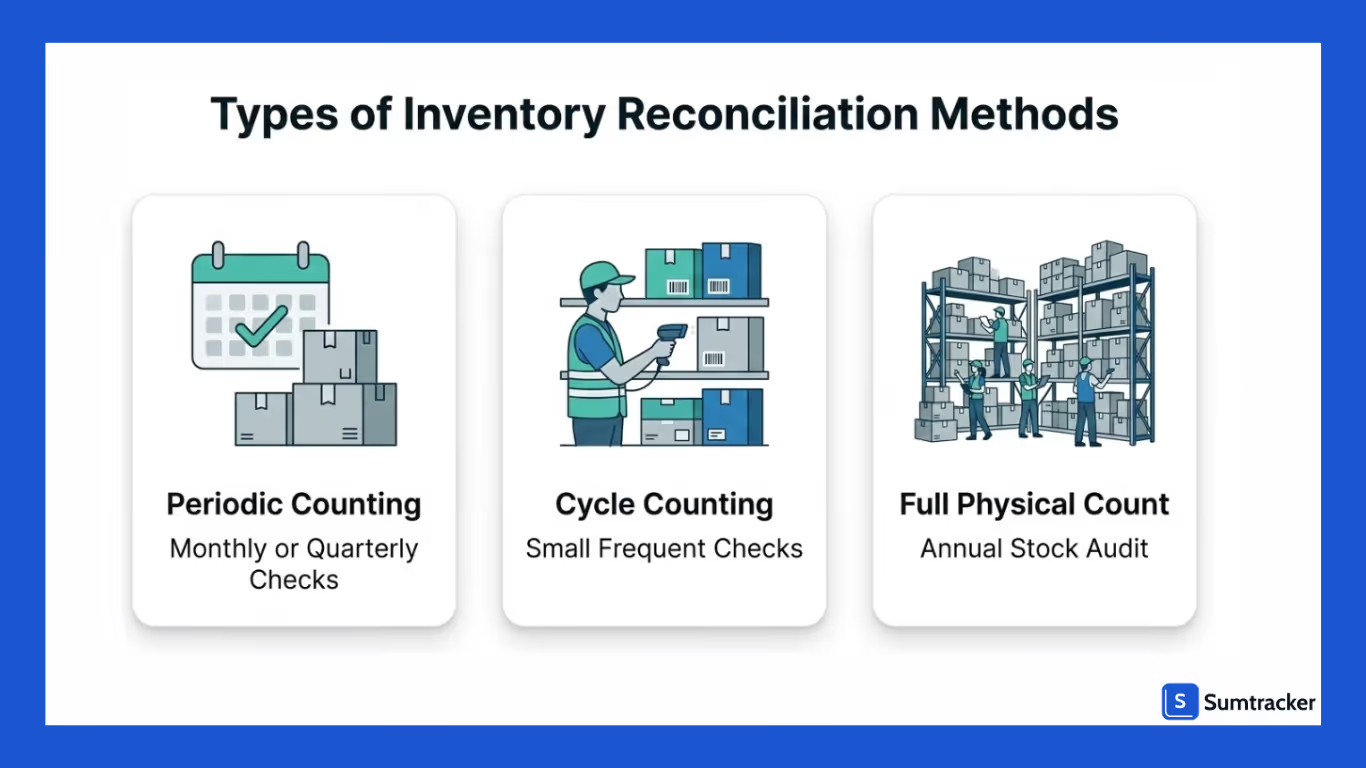
Some methods involve counting all inventory at once, while others focus on smaller, more frequent checks.
Here are the most common inventory reconciliation methods used by businesses.
Periodic Inventory Reconciliation
Periodic reconciliation involves reviewing and counting inventory at specific intervals, such as monthly, quarterly, or annually.
In this method, businesses compare their recorded inventory data with the physical stock available in the warehouse or store at the end of the chosen period. Any differences are investigated and corrected.
This approach is commonly used by smaller businesses because it requires fewer resources. However, discrepancies may remain unnoticed for longer periods since checks are not done frequently.
Cycle Counting
Cycle counting is a more continuous approach to inventory reconciliation. Instead of counting all inventory at once, businesses count a small subset of products regularly, such as daily or weekly.
Products are usually categorized based on their importance or sales volume. For example:
- High-value or fast-moving items may be counted more frequently.
- Slow-moving items may be counted less often.
Cycle counting helps businesses identify discrepancies earlier and reduces the need for large, time-consuming full inventory counts.
Full Physical Inventory Count
A full physical inventory count involves counting every single item in the warehouse or store and comparing the results with the system’s inventory records.
This method is typically conducted once a year or during financial audits. It provides a complete snapshot of inventory accuracy but can be time-consuming and may require temporarily pausing operations.
Despite the effort involved, full inventory counts are often necessary for accounting and compliance purposes.
Step-by-Step Process to Reconcile Inventory
Inventory reconciliation becomes much easier when businesses follow a clear and consistent process. Instead of simply counting products and adjusting numbers, reconciliation should involve verifying records, identifying discrepancies, and correcting the underlying causes.

Here’s a simple step-by-step approach businesses can follow to reconcile inventory effectively.
1. Review Your Inventory Records
Start by reviewing the inventory quantities recorded in your system. This could be an inventory management platform, ERP, or even a spreadsheet used to track stock levels.
Make sure you have the most recent data, including:
- Sales orders
- Purchase orders
- Returns
- Stock transfers
- Inventory adjustments
Having accurate system records ensures you’re comparing the right numbers during reconciliation.
2. Perform a Physical Stock Count
Next, count the actual inventory present in your warehouse, retail store, or fulfillment center. This physical count gives you the real stock numbers that will be compared against your system records.
To make counting easier:
- Organize inventory locations before counting
- Use barcode scanners if available
- Assign teams to different sections of the warehouse
A structured counting process helps reduce counting errors.
3. Compare System Data with Physical Inventory
Once the physical count is completed, compare the counted quantities with the inventory levels recorded in your system.
At this stage, you’ll identify discrepancies such as:
- Missing inventory
- Extra stock not recorded in the system
- Incorrect quantities
These differences highlight where reconciliation adjustments may be needed.
4. Investigate Inventory Discrepancies
Before making adjustments, it’s important to understand why the discrepancy occurred.
Common things to review include:
- Recent sales or orders that may not have synced properly
- Unrecorded customer returns
- Damaged or misplaced items
- Supplier shipment errors
- Incorrect manual stock adjustments
Identifying the root cause helps prevent the same issues from happening again.
5. Adjust Inventory Records
Once discrepancies are confirmed and their causes understood, update the inventory records to match the correct stock levels.
These adjustments should be properly documented and may include:
- Writing off damaged or lost inventory
- Adding missing inventory that was not recorded
- Correcting quantity errors in the system
Accurate adjustments ensure your system reflects the real inventory available for sale.
6. Document the Reconciliation Process
Finally, record the reconciliation results and any adjustments made. Documentation helps businesses track recurring inventory issues and improve inventory control processes.
Keeping a record of reconciliation activities can also help with:
- Financial reporting
- Internal audits
- Identifying operational inefficiencies
Best Practices to Keep Inventory Data Accurate
Maintaining accurate inventory data requires consistent processes and reliable systems. Following a few core practices can help businesses reduce discrepancies and keep stock records trustworthy.
- Conduct regular cycle counts
Instead of waiting for yearly audits, count small groups of products regularly. This helps identify discrepancies early and keeps inventory records more accurate.
- Standardize inventory workflows
Establish clear procedures for receiving stock, fulfilling orders, handling returns, and making inventory adjustments to reduce operational errors.
- Track every inventory movement
Ensure all stock changes such as sales, returns, purchase orders, and transfers—are properly recorded so your system always reflects the latest inventory levels.
- Minimize manual updates
Manual data entry increases the risk of mistakes. Automating inventory updates wherever possible helps maintain reliable and consistent stock data.
For businesses with more complex operational requirements, Retoolers can help build custom inventory dashboards and integrations that connect inventory systems with internal workflows and further reduce manual reconciliation efforts.
- Use centralized inventory management software
Managing inventory from a single system improves visibility, keeps stock levels synchronized, and makes it easier to maintain accurate inventory records.
How Inventory Management Software Simplifies Reconciliation
Inventory reconciliation can quickly become complex when businesses manage hundreds or thousands of products across multiple locations or sales channels.
This is where inventory management software like Sumtracker can make reconciliation significantly easier.

Instead of manually comparing spreadsheets or records, businesses can rely on Sumtracker to maintain accurate inventory data and highlight discrepancies when they occur.
Here’s how inventory management software like Sumtracker helps simplify reconciliation:
- Real-time inventory tracking
Sumtracker records every stock movement like sales, returns, purchase orders, stock adjustments, and transfers in real time. This ensures inventory data stays updated and reduces the chances of discrepancies. - Centralized inventory visibility
With Sumtracker, businesses can view inventory across multiple sales channels and locations from a single dashboard. This centralized visibility makes it easier to compare stock data and reconcile inventory quickly. - Accurate stock syncing across channels
When inventory changes due to an order or adjustment, Sumtracker updates the stock levels accordingly. This helps prevent mismatches between different systems and keeps inventory records consistent. - Clear inventory movement history
Sumtracker provides detailed logs of inventory changes, making it easy to trace when and where stock levels were updated. This transparency helps businesses investigate discrepancies faster. - Reports and stock insights
Sumtracker offers reports that help businesses analyze stock levels, inventory adjustments, and inventory trends, making it easier to detect unusual changes and maintain accurate inventory data.
Conclusion
Inventory reconciliation may not be the most exciting part of running a business, but it’s one of the most important for maintaining accurate operations.
By regularly reconciling your stock, identifying discrepancies early, and following consistent inventory processes, businesses can avoid common problems like overselling, unexpected stockouts, and inaccurate reports.
Simple practices such as cycle counting, tracking stock movements, and standardizing inventory workflows go a long way in keeping inventory records trustworthy.
Inventory management software can make a significant difference by automating stock tracking, improving visibility, and helping teams quickly detect and resolve discrepancies.
In the end, accurate inventory isn’t just about numbers, it’s about ensuring your business can operate efficiently, fulfill orders confidently, and scale without losing control of your stock.
FAQS
What is the main purpose of inventory reconciliation?
The main purpose of inventory reconciliation is to ensure that the inventory recorded in your system matches the actual physical stock you have. It helps identify discrepancies, correct errors, and maintain accurate inventory records.
How often should businesses perform inventory reconciliation?
The frequency depends on the size and complexity of the business. Many companies perform cycle counts weekly or monthly, while a full physical inventory count is typically done annually. High-volume businesses may reconcile inventory more frequently.
What causes inventory discrepancies?
Inventory discrepancies can occur due to several reasons, including manual data entry errors, unrecorded returns, supplier shipment mistakes, damaged or lost items, and syncing issues across multiple sales channels.
What is the difference between cycle counting and full inventory counting?
Cycle counting involves counting a small portion of inventory regularly, while full inventory counting involves checking every item in the warehouse at once, usually once a year. Cycle counting helps detect issues earlier without disrupting operations.
Can inventory management software help with reconciliation?
Yes, inventory management software helps simplify reconciliation by automatically tracking stock movements, updating inventory levels in real time, and highlighting discrepancies, making it easier for businesses to maintain accurate inventory records.
Conclusion

Bhoomi writes about inventory management and multichannel selling at Sumtracker. Her focus is on solving real operational problems for Shopify, Amazon, and marketplace sellers through well-researched content. She covers everything from multi-location inventory syncing and stock error troubleshooting to replenishment planning and platform comparisons, turning complex eCommerce operations into clear, actionable guidance.
LinkedInRelated Articles
Tool and strategies modern teams need to help their companies grow.


.avif)
Ready to Simplify Your Inventory Management?
Join hundreds of e-commerce merchants who rely on Sumtracker to save time, eliminate errors, and grow their business.
