.svg)

Cycle Counting in Shopify Inventory: Improve Accuracy & Reduce Stock Discrepancies


Here's the thing nobody tells you when you set up Shopify: the numbers lie.
Not because the platform is broken, but because inventory is a living thing, and the moment the product starts moving, counts start drifting.
You've probably felt this. You're confident you have stock. A customer orders. You go to pick it. It's not there. Now you're scrambling, apologizing, and eating a refund on a sale you already celebrated.
Most store owners respond to this by doing a big count. Shut everything down, count every SKU, and reconcile for hours. It feels productive. But two weeks later, you're drifting again.
Cycle counting fixes this, and if you're running Shopify, you can build it into your operation without overhauling everything.
In this article, we're going to discuss:
- What is cycle counting?
- How does cycle counting work?
- Which methods works best?
- Best tool that make this easier.
What is Cycle Counting in Shopify Inventory?
Cycle counting is counting all your inventory at once; you count a portion of it on a rotating schedule. A little bit, consistently, over time.
Think of it like this. Instead of cleaning your entire house once a month in one exhausting marathon session, you do the kitchen on Monday, the bathroom on Wednesday, and the bedroom on Friday. The house stays clean, and you never feel that "where do I even start" moment.
The same logic applies to your inventory.
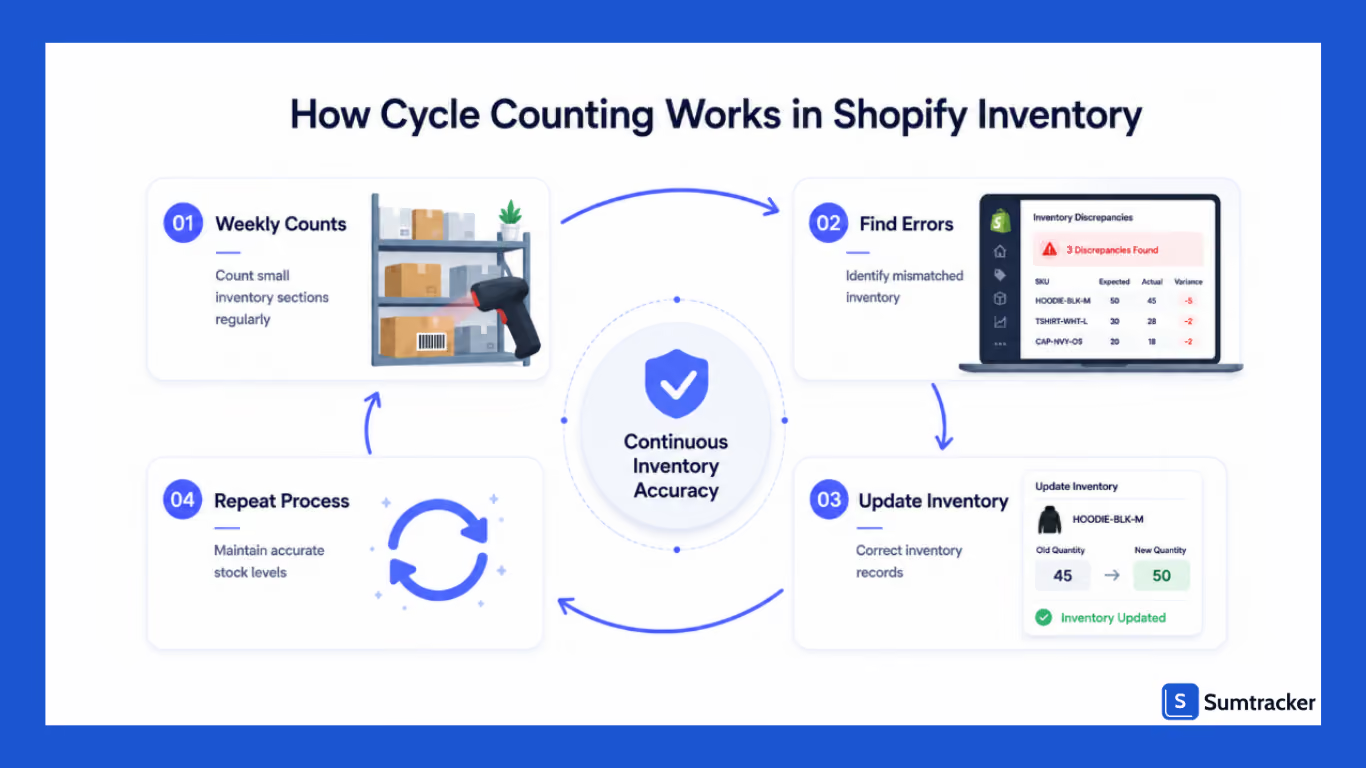
You break your entire product catalog into smaller chunks and rotate through them — daily, weekly, whatever pattern looks good for your operation.
By the time you've worked through everything, you start again. Your Shopify inventory numbers are getting verified constantly, not once a year.
What does that actually look like?
A Shopify store with 300 SKUs might count 20–30 products every Friday morning. A retailer with 2,000+ SKUs might run daily counts just for fast-moving inventory. Multi-location businesses often rotate between stores and warehouse locations every week.
And it doesn't eat up your whole day. Most Shopify merchants get through a cycle count in just 15–30 minutes, as long as products are organized and barcode workflows are already set up.
How Does Cycle Counting Work in Shopify?
The best cycle counting systems are simple and consistent.
A structured process solves all three problems.
Step 1: Classify Inventory Using ABC Analysis
Most retailers should not count every product equally.
ABC analysis prioritizes inventory based on sales velocity and operational importance.
Shopify’s ABC analysis framework is where a small percentage of products often drives the majority of sales revenue.
Step 2: Count Small Inventory Sections
Instead of counting the entire warehouse, teams usually count:
- shelving zones
- product groups
- high-velocity inventory
- returns inventory
- bundle inventory
Most merchants schedule counts:
- before store opening
- during slower fulfillment periods
- early mornings before shipping starts
Sample Weekly Counting Schedule
Step 3: Compare Physical Inventory Against Inventory Records
After physical inventory counting, businesses compare the counted quantities against Shopify inventory records.
This is usually where operational problems become visible.
For example:
- One SKU repeatedly shows shortages.
- Inventory discrepancies appear between locations.
- Barcode workflows create inconsistencies.
- Returns processing delays affect quantities.
Step 4: Reconcile and Adjust Inventory
After discrepancies are verified, inventory is updated inside Shopify.
For larger inventory corrections, many teams use Shopify CSV exports and bulk inventory updates instead of adjusting products one by one.
One important operational habit is logging adjustment reasons consistently.
Which Cycle Counting Method Works Best for Shopify Stores?
Different inventory operations require different counting methods.
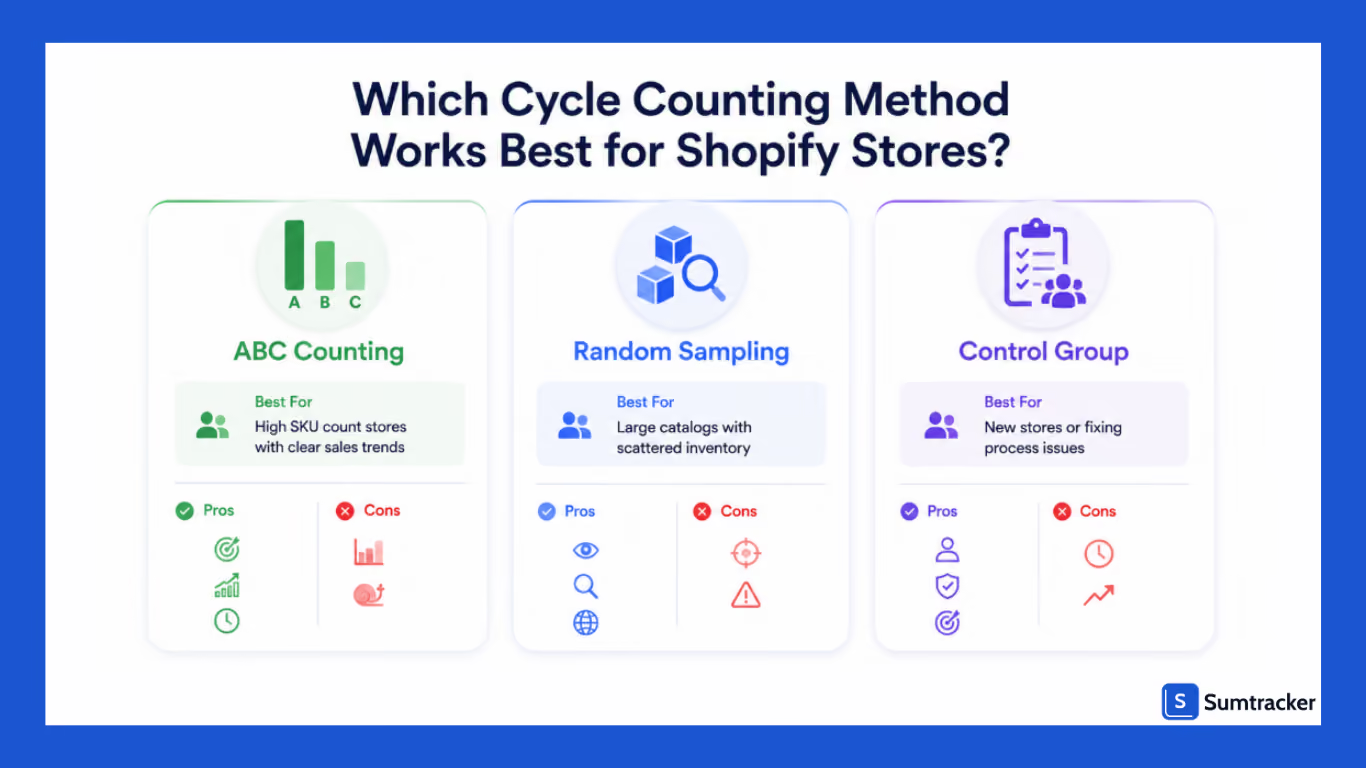
The best approach usually depends on SKU count, inventory movement, and operational complexity.
ABC Cycle Counting
ABC cycle counting works best for retailers with:
- high SKU counts
- clear sales trends
- fast-moving inventory
This method prioritizes products contributing the most revenue.
Many retailers filter the report to the last 90 days and classify:
- top 20% products as A inventory
- next 30% as B inventory
- remaining products as C inventory
That process usually works well, but it becomes more time-demanding as SKU counts grow.
Random Sample Cycle Counting
Random sample cycle counting involves counting random inventory groups during each inventory cycle.
This method helps identify:
- hidden inventory issues
- inconsistent staff workflows
- counting of inventory process problems
This method works well for identifying unexpected inventory discrepancies across larger catalogs.
The downside is that random counting may overlook recurring discrepancies tied to specific high-risk products.
Control Group Cycle Counting
The control group counting repeatedly audits a small batch of products over a short period.
This method works well for businesses implementing cycle counting for the first time because it helps identify:
- human mistakes
- inconsistent counting workflows
- operational process issues
The same inventory is then counted multiple times over 1–2 weeks to identify recurring discrepancies before expanding cycle counts across the full catalog.
However, this method usually becomes less practical once inventory operations scale significantly.
Shopify POS Quick Count: What It Does Well (and Where It Falls Short)
For retailers using Shopify POS, the Quick Count feature simplifies smaller inventory counts directly inside the POS interface.
Many growing retailers run into operational limitations once order volume increases.
For example, stores processing more than roughly 50 orders daily may experience inventory timing mismatches if orders, transfers, or returns overlap with active inventory counts.
This can create temporary phantom variance during counting windows.
Some merchants also notice limitations around:
- multi-location reconciliation
- bundle inventory workflows
- larger warehouse counting operations
- overlapping transfer adjustments
That is one reason growing retailers often supplement Shopify POS with dedicated inventory tracking systems.
Common Inventory Problems Cycle Counting Helps Prevent
The biggest benefit of cycle counting is not simply more correct inventory data.
It is operational stability.
Overselling During High-Demand Periods
A Shopify apparel retailer running Black Friday promotions may sell inventory faster than expected across online and physical stores.
Without accurate stock levels, overselling becomes much more likely.
Replenishment Mistakes
Inaccurate inventory records create unreliable reorder points.
This often leads businesses to:
- Overbuy slow-moving products
- underbuy bestselling inventory
- react too late to consumer demand
Correct inventory data improves replenishment planning and demand forecasting.
Theft and Inventory Shrinkage
Routine cycle counts help retailers identify:
- theft
- damaged inventory
- receiving mistakes
- recurring inventory discrepancies
Without continuous inventory verification, these issues often remain hidden for months.
Inventory Drift Across Multiple Locations
A mid-sized apparel retailer operating across Texas and California started noticing differences in inventory between its Shopify store and physical inventory during holiday sales periods.
The business managed more than 4,000 SKUs across multiple locations and relied mostly on quarterly physical inventory counts.
Over time, delayed returns processing, manual barcode mistakes, and inconsistent inventory updates created inventory drift that led to overselling incidents and replenishment problems.
The operations team first exported inventory data from Shopify, identified its top-selling SKUs using sales reports, and introduced weekly ABC cycle counts before fulfillment hours started.
The retailer also introduced barcode-supported inventory counting workflows for high-velocity products.
Within roughly three months, accuracy improved from approximately 89% to 96%, while emergency inventory adjustments and overselling incidents dropped significantly.
As one inventory operations podcast explains, cycle counting works best when businesses count inventory continuously instead of waiting for one large annual count because discrepancies can be identified and corrected earlier in the process.
How Sumtracker Helps Shopify Merchants Maintain Cycle Counts
As Shopify businesses scale, maintaining accurate inventory manually becomes increasingly difficult.
Sumtracker helps businesses improve inventory visibility through:
- real-time inventory updates
- centralized inventory visibility
- barcode-supported inventory workflows
- multi-location inventory tracking
- inventory replenishment planning
- faster inventory reconciliation
Most Shopify merchants can typically complete initial setup within a few hours, depending on SKU count and inventory complexity.
Comparison: Manual vs Inventory Software Workflows
FAQs
How do I handle cycle counts during a flash sale?
Most Shopify merchants pause non-essential inventory adjustments during flash sales because rapid order activity can create temporary inventory variance.
What is the biggest cycle counting mistake Shopify merchants make?
The most common mistake is counting inventory during active fulfillment windows. Orders, returns, and transfers continue updating stock quantities during that time, which often creates false discrepancies.
Can I do cycle counting in Shopify without software?
Yes. Many merchants start with Shopify inventory exports and manual reconciliation workflows. However, spreadsheet-based inventory counting becomes harder to manage once SKU counts grow.
How long should a typical Shopify cycle count take?
Most smaller cycle counts take around 15–30 minutes when inventory is organized properly, and barcode workflows are already in place.
Does Shopify POS Quick Count work for multi-location inventory?
It works reasonably well for smaller retail inventory workflows, but larger businesses usually need additional systems for centralized visibility and reconciliation.
Conclusion
Most inventory problems do not appear overnight.
They build gradually through small operational inconsistencies that compound over time.
This is why cycle counting has become one of the most effective inventory managing methods for Shopify retailers.
Instead of relying only on large physical inventory counts, businesses can continuously verify inventory data and make better replenishment decisions throughout the inventory cycle.
For growing retailers managing multiple locations, large SKU catalogs, or fast-moving stock, maintaining accurate inventory becomes increasingly critical for business efficiency and long-term growth.
With barcode-supported workflows and inventory systems like Sumtracker, maintaining accurate stock levels becomes much easier to scale as the business grows.

Bhoomi writes about inventory management and multichannel selling at Sumtracker. Her focus is on solving real operational problems for Shopify, Amazon, and marketplace sellers through well-researched content. She covers everything from multi-location inventory syncing and stock error troubleshooting to replenishment planning and platform comparisons, turning complex eCommerce operations into clear, actionable guidance.
LinkedInRelated Articles
Tool and strategies modern teams need to help their companies grow.



Ready to Simplify Your Inventory Management?
Join hundreds of e-commerce merchants who rely on Sumtracker to save time, eliminate errors, and grow their business.
