.svg)
Shopify Raw Material Inventory Tracking: Complete Guide (2026)


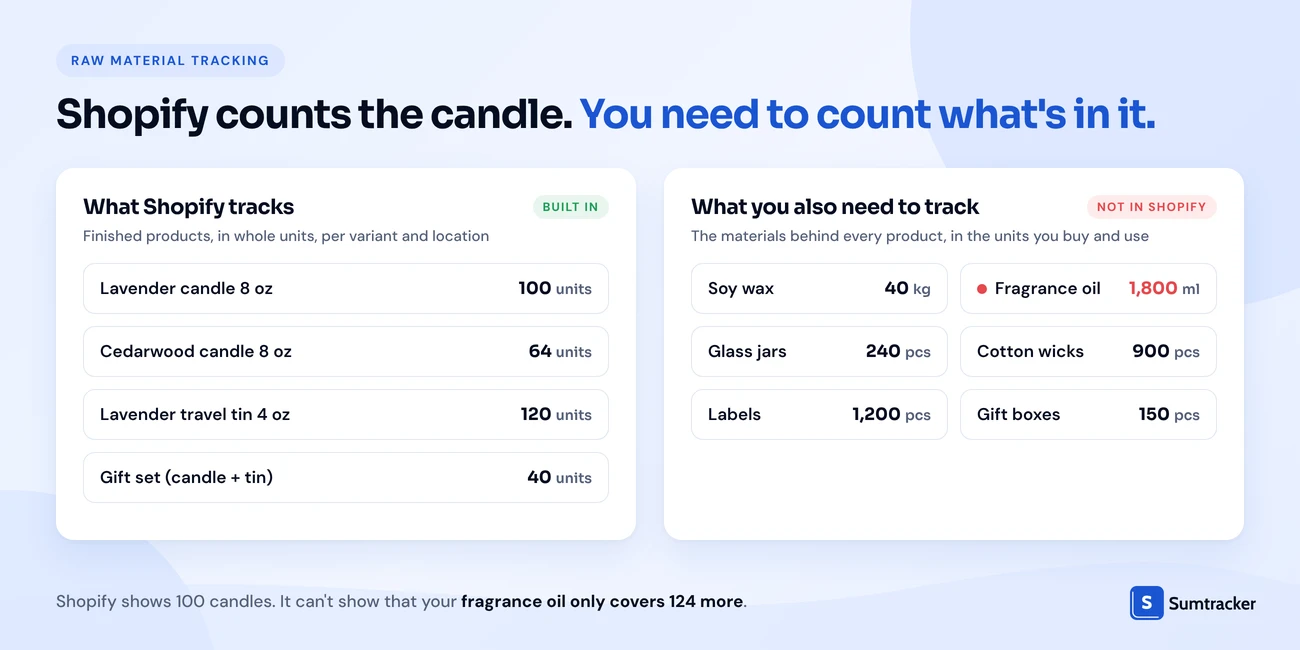
Shopify tracks finished products, not the raw materials you make them from. It has no native bill of materials (BOM), no unit conversion, and no automatic material deduction.
- Map it: build a BOM for every product that lists each material and the quantity one unit uses.
- Deduct it: materials come off on each sale with a BOM app, or on each production run with a manufacturing app.
- Reorder it: Reorder point = average daily usage × (lead time + safety days), set for each material.
Start with the free Raw Material Tracker & BOM Calculator, then move to an app such as Assemblified, Material Manager or Stocksmith as orders grow.
If you make what you sell, your finished-goods count is only half the story.
A candle maker can show 100 candles in Shopify and still be one wick order away from stopping production.
That gap is getting more expensive to ignore. In the NAM's Q2 2026 Manufacturers' Outlook Survey, 83.1% of manufacturers named rising raw material costs as their top business challenge, up from 57.5% one quarter earlier.
When materials cost more, every gram you waste or forget to count hits your margin.
This guide explains why Shopify doesn't track raw materials, who actually needs to, how BOMs work, which apps do the job in 2026, and how to set it up step by step.
You'll also get a free Raw Material Tracker & BOM Calculator template to start with today.
Why Shopify Doesn't Track Raw Materials Natively
Shopify doesn't track raw materials because its inventory system only counts sellable units per variant, per location. A raw material like 40 kg of soy wax isn't a sellable unit, so Shopify has nowhere natural to put it.
As of October 2026, there is still no native BOM, raw material, or manufacturing feature in Shopify.
Three gaps cause most of the pain:
- No link between a product and its parts. Shopify can't know a hoodie uses 1.6 m of fabric and 2 drawstring tips.
- No fractional units. Materials are bought in kilos, litres, and rolls but used in grams, millilitres, and centimetres.
- Every product is a storefront item by default. You can add "Soy wax" as a product and remove it from every sales channel. But Shopify still won't deduct it when a candle sells.
Practical tip: If you keep materials as hidden products in Shopify, put them in a separate collection or product type such as "Raw material." It keeps them out of storefront filters and makes them easy to bulk edit or export.
For a full picture of what Shopify's built-in inventory can and can't do, read our Shopify inventory management guide.
Do You Need Raw Material Inventory Tracking for Your Shopify Store?
You need it if running out of a material can stop you from shipping orders. If you only buy finished goods and resell them, you don't.
Use this table to check where you stand:
A few signs you've already outgrown counting by hand:
- You've had to cancel or delay orders because one part ran out.
- You reorder materials when the shelf "looks low" instead of at a set number.
- You don't know your exact material cost per product.
- The same material goes into many products, and nobody knows how much is spoken for.
- Your counts are kept in a notebook or a spreadsheet only one person understands.
Rule of thumb: If two or more products share the same material, start tracking that material now. Shared materials are where stockouts hide, because no single product's sales tell you how fast the material is going.
Selling made-to-order? Our guide to Shopify made-to-order inventory covers capacity, lead times, and order limits alongside materials.
How Raw Material Inventory Tracking Works
Raw material tracking works in four steps: record your materials, link them to products with a BOM, deduct them when they're used, and reorder before they run out.
The main choice is when materials get deducted. There are two models, and they fit different businesses.
Many growing brands use both. They deduct packaging on sale and run production orders for the product itself.

The four steps in practice
- Record each material with a SKU, a unit (g, ml, m, pc), a cost per unit, and the quantity on hand.
- Build a BOM for every finished product or variant. This says exactly how much of each material one unit uses.
- Deduct consumption automatically, either per order or per production run.
- Reorder on a trigger. Each material gets a reorder point based on how fast it's used and how long your supplier takes.
Step 4 is where shared materials matter. One material often feeds many products.
That's why you track usage at the material level, not the product level. A jar running low affects every candle that uses it.
Practical tip: Count partly used containers in your stock takes. Weigh open bags of wax or bottles of oil instead of counting only sealed ones. Open stock is often the gap between what your system says and what's on the shelf.
We cover the component side of this in more detail in our guide to Shopify bundle inventory.
Free template: Raw Material Tracker & BOM Calculator
To get started without an app, download our free Raw Material Tracker & BOM Calculator (Excel). It has four tabs:
- Materials: units, costs, stock on hand, lead times, reorder points, and a status column that flags "Order now" or "Reorder."
- Products: price, material cost per unit, gross margin, max buildable, and the limiting material.
- BOM: one row per material per product, with waste % built in.
- Start Here: instructions and every formula explained.
It comes filled with a small candle business example, so you can see how the numbers flow before entering your own.
What Is a Bill of Materials (BOM), and Why Does It Matter?
A bill of materials (BOM) is the list of materials, and the quantity of each, that goes into one finished unit. In raw material tracking, it's the link that tells your system how much to deduct when you sell or make a product.
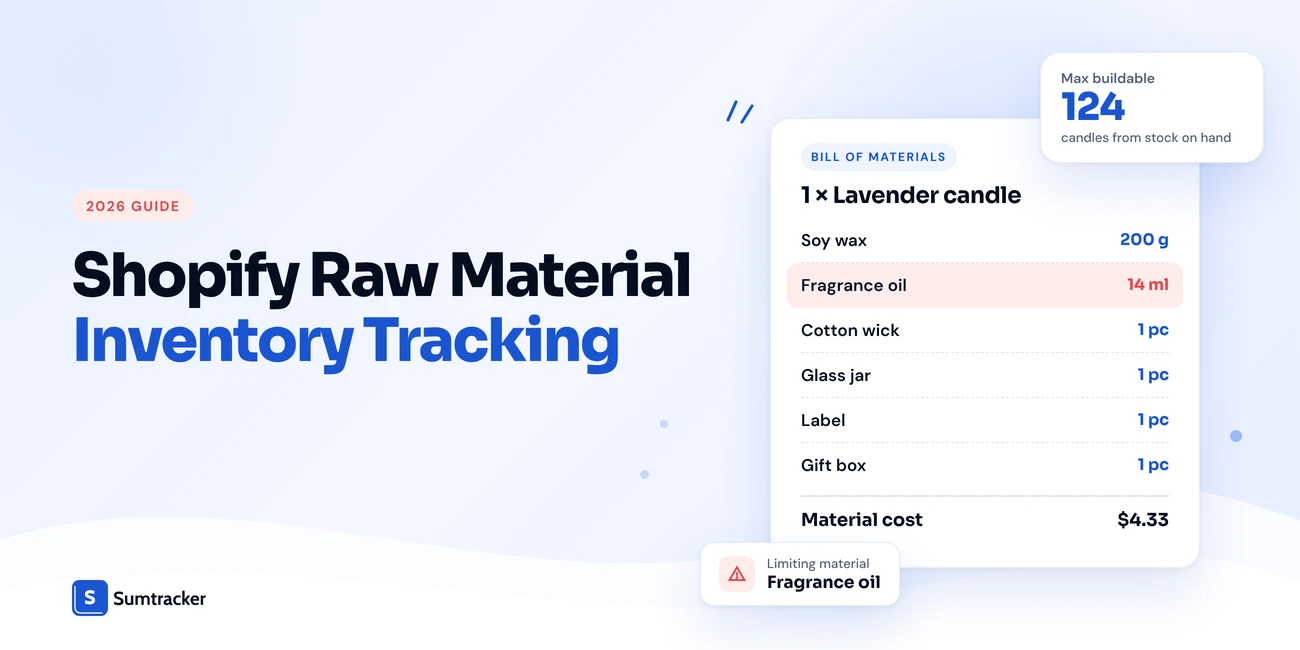
For example, one 8 oz lavender candle uses 200 g of soy wax, 14 ml of fragrance oil, 1 wick, 1 jar, and 1 label. Sell or pour one candle, and each of those materials goes down by that amount. Without this record, you're back to counting the shelf by hand.
What a BOM tells you about your materials
1. Effective quantity (what you really use, including spills, trims, and failed pours):
Effective qty = Qty per unit × (1 + Waste %)
2. How many units your materials can make right now:
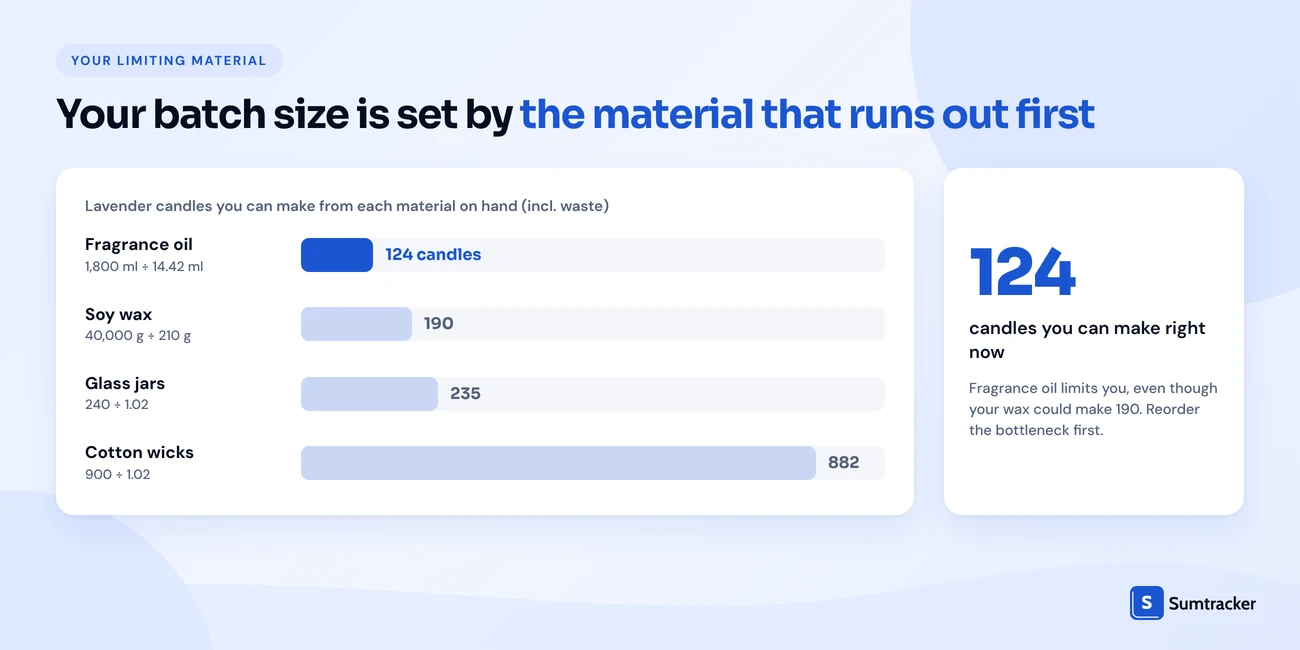
Max buildable = Lowest of (Available material ÷ Effective qty per unit) across all materials in the BOM
The material with the lowest result is your limiting material. If you have 1,800 ml of lavender oil, you can make 124 candles (1,800 ÷ 14.42), even if your 40 kg of wax could make 190.
For a clear walkthrough of BOM structure, watch What Is a Bill of Materials (BOM)? | Inventory & Manufacturing Explained by Tracey Smith. It covers raw materials, sub-assemblies, and why a BOM matters.
Practical tip: Weigh a real production batch to set your waste %. Don't guess. Pour 20 candles, weigh the wax used, divide by 20, and compare it with your recipe. The difference is your waste.
Best Shopify Apps for Raw Material Inventory Management
The best app depends on your deduction model. BOM apps deduct materials on each sale. Manufacturing apps deduct them when you log a production run. These three cover both models at different price points.
Details come from each app's Shopify App Store listing.
1. Assemblified
Assemblified is the low-cost pick for multi-level assemblies. Its Essential plan ($6/mo) covers sub-assemblies, automatic adjustments on refunds and cancellations, and POS and multi-location support. The Enhanced plan ($12/mo) adds work orders, pre-built inventory, and COGS that include labour.
Best for: stores that make or pack at the time of the order and want BOMs on a small budget.
2. Material Manager
Material Manager links each Shopify variant to the materials it uses. Every sale updates material stock. Paid plans add low-stock alerts, auto-generated purchase orders, and forecasting. It can also track pre-assembled stock alongside raw materials.
Best for: makers who want a simple setup and a free tier to test with (up to 3 materials and 100 orders a month).
3. Stocksmith (formerly Craftybase)
Stocksmith is the new name for Craftybase, an app built for handmade and small-batch makers. It handles recipes, sub-assemblies, automatic COGS, batch and lot tracking, and production scheduling on higher plans. Every plan includes unlimited materials and products.
Best for: makers who pour, sew, or mix in batches and want material costs and COGS worked out automatically.
What to check before you choose
- Deduction trigger: on order, on fulfillment, or on production? Pick the one that matches how you work.
- Units of measure: can you buy in kg and use in g?
- Shopify POS: do in-store sales deduct materials too?
- Locations: are materials tracked per location?
- Refunds and cancellations: do materials go back automatically?
- Other channels: if you also sell on Etsy or Amazon, do those orders deduct materials?
Practical tip: Run every shortlisted app through the same five test orders: a normal sale, a cancellation, a refund, a POS sale, and an order for a product that shares a material with another. Then check each material count by hand.
Materials Inventory vs. Finished Goods Inventory in Shopify
Materials inventory is what you buy to make products. Finished goods inventory is what customers can buy. Shopify only shows the second one, but you have to manage both.
A third type often sits between them: work in progress (WIP). These are units you've started but not finished, like candles poured but not labelled. Small makers rarely track WIP formally, but you should know it exists when you do a stock count.
Why the difference matters for your margins
Shopify's "Cost per item" field is one static number per variant. If wax goes up 15%, Shopify won't know until you edit every candle by hand.
With a BOM, you change the wax cost once, and every product's material cost updates. That's the cost you should copy into Shopify so its profit reports stay honest.
It also changes how you read turnover. Materials and finished goods turn at different speeds, so measure them separately. Our guide to inventory turnover calculation in Shopify shows the formula. For record-keeping and COGS rules, see inventory compliance for Shopify stores.
How to Set Up Raw Material Tracking in Shopify
For a small catalog, setup is mostly careful data entry. The steps are the same whichever tool you pick: list materials, count them, build BOMs, set reorder points, then test.
Step 1: Pick your deduction model
Decide whether materials should come off on sale or on production (see the table in "How Raw Material Inventory Tracking Works"). This decides which kind of app you need.
Step 2: Choose where materials will live
Step 3: List every material
Give each material a SKU, a name, a unit, a supplier, and a cost per unit. Include packaging, labels, and inserts. They run out just as easily as wax.
Practical tip: Use a clear SKU prefix for materials, such as RM- for raw materials and PK- for packaging. RM-WAX-SOY and PK-BOX-GIFT are easy to filter and can never be confused with a product SKU.
Step 4: Count what you have
Do a full count before go-live. Weigh open containers. Record units in the same unit your BOM will use (grams, not "half a bag").
After go-live, count high-use materials more often than the rest. Our guide to cycle counting in Shopify shows how to count small sections on a schedule.
Step 5: Build a BOM for every product and variant
Variants usually have different BOMs. An 8 oz candle and a 4 oz tin use different jars and different amounts of wax. Add a waste % for any material you pour, cut, or trim.
Step 6: Set a reorder point for each material
Reorder point = Avg daily usage × (Lead time in days + Safety days)
Daily usage comes from your BOM. Multiply each product's expected daily sales by its effective quantity, then add up across every product that uses the material.
Example: your candles use 1,925 g of wax a day in total. Your supplier takes 14 days, and you want 7 days of safety stock. Your reorder point is 1,925 × (14 + 7) = 40,425 g. Order when you drop to about 40 kg.
For more on choosing lead times and safety stock, see our reorder point guide.
Step 7: Set up alerts and purchase orders
- Alerts: set a low-stock alert on each material at its reorder point, in your app or your tracker.
- Purchase orders: group materials by supplier into one PO, and update cost per unit when each order arrives. Our guide to managing purchase orders, suppliers and replenishment in one workflow covers the rest.
Step 8: Test before you trust it
Place test orders and check material counts by hand. Test a sale, a cancellation, a refund, and two products that share a material. Fix any mismatch before you switch off your old method.
Rule of thumb: Run your old method and the new setup side by side for two weeks. If material counts match a physical count at the end, switch over.
Common Challenges of Tracking Raw Materials in Shopify
Most problems come from shared materials, unit mismatches, and counts that drift, not from the software itself.
Material costs and lead times are less predictable now
The pressure on input costs is widespread. In a July 2026 analysis, the New York Fed found that about 80% of small firms surveyed nationally saw their imported input prices rise in 2025 compared with 2024.
About 70% of small goods firms used at least some inputs sourced from outside the U.S.
For makers, that means two things. Your BOM costs go stale faster, and lead times on imported materials need a bigger buffer.
Case study: a candle maker short on materials at peak season
In December 2025, NPR reported on how tariffs hit small candle businesses. Ferzan Jaeger of District Candle Lab in Washington, D.C. said much of her raw material was out of stock going into November and December, her busiest months.
She named jars as her most expensive component, because they're heavy and costly to ship. Imported jars were the first input hit by new duties. Her fragrance costs rose too, because U.S. labs rely on imported plants and chemicals.
The takeaway for any maker: your bottleneck is often your priciest or slowest-to-arrive material, not your best-selling product. Track that material most closely, and reorder it earliest before peak season.
Small count errors add up
Spills, failed batches, and samples that never get logged slowly push your records above what's on the shelf. For a maker, wax or fabric that exists only on paper means you take orders you can't fill. Regular counts fix it. Use our Shopify inventory audit checklist as a starting point.
Where Sumtracker Fits
Sumtracker isn't a raw material or manufacturing tool, and it doesn't build finished stock from materials.
It helps with one part of the job: components and packaging used at the time of the order. You set a product up as a bundle of its components, such as the blank tee behind a print-on-demand design, or the box and insert card that ship with every order.
When the order is fulfilled, Sumtracker deducts each component, and stock from Shopify, Amazon, Etsy, eBay, and Walmart sits in one dashboard. If you make products in batches from raw materials, use one of the apps above.
FAQs
Can Shopify track raw materials?
Not natively. Shopify tracks finished products per variant and location. It has no bill of materials, no units like grams or millilitres, and no automatic material deduction. You need a spreadsheet or a third-party app.
Can I add raw materials as products in Shopify?
Yes. You can create each material as a product and remove it from all sales channels so customers don't see it. Shopify still won't deduct it when a finished product sells, so you'll need manual updates or an app.
What is the difference between a BOM and a bundle?
A BOM lists the materials used to make one unit, often in grams, millilitres, or metres. A bundle groups whole products that are sold together. Some apps use bundle logic to deduct components, which works well for kits, packaging, and made-to-order items.
How do I calculate how many products I can make from my materials?
For each material in the BOM, divide the available quantity by the effective quantity one unit uses. The lowest result is the most you can make, and that material is your bottleneck.
How do I set reorder points for raw materials?
Multiply average daily usage by the supplier lead time plus your safety days. Daily usage comes from adding up material use across every product that contains it.
Should materials be deducted when an order is placed or when a product is made?
Deduct on sale if you make, pack, or personalize after the order. Deduct on production if you build finished stock ahead of time. Many brands do both: packaging on sale, the product itself on production.
What's the cheapest way to track raw materials in Shopify?
A spreadsheet costs nothing. Several Shopify apps also have free tiers, usually capped at 3 materials and about 100 orders a month. Paid BOM apps start at a few dollars a month.
Conclusion
Shopify counts what you sell. It doesn't count what you make it from.
If a missing wick, jar, or blank can stop your orders, you need a record of materials that sits next to Shopify.
Start with a BOM for every product. Add waste %, count what you have, and set a reorder point for each material. The free template gets you there today.
When orders pick up, move to an app that matches how you work. Choose a BOM app if you make or pack at the time of the order. Choose a manufacturing app if you build stock in batches.
Whichever you pick, watch your shared and slow-to-arrive materials first. That's where most stockouts start.

Bhoomi writes about inventory management and multichannel selling at Sumtracker. Her focus is on solving real operational problems for Shopify, Amazon, and marketplace sellers through well-researched content. She covers everything from multi-location inventory syncing and stock error troubleshooting to replenishment planning and platform comparisons, turning complex eCommerce operations into clear, actionable guidance.
LinkedInRelated Articles
Tool and strategies modern teams need to help their companies grow.

.avif)
Ready to Simplify Your Inventory Management?
Join hundreds of e-commerce merchants who rely on Sumtracker to save time, eliminate errors, and grow their business.