.svg)

Purchase Orders, Suppliers & Replenishment: How to Manage Them in One Workflow


Your inventory issues aren’t caused by what you don’t know, they’re caused by systems that don’t share what they know with each other.
That’s the real problem.
Mostly purchase orders, supplier details, and replenishment data live in separate places.
You might be checking stock in one tool, digging up supplier info from old emails, and creating purchase orders in a spreadsheet. Everything technically exists but it’s not connected.
And when these pieces don’t talk to each other, small gaps turn into big problems: delayed reorders, incorrect POs, and missed sales.
The fix isn’t working harder, it’s managing everything as one connected workflow.
When purchase orders, suppliers, and replenishment are handled in one place, decisions become faster, errors drop, and your inventory finally starts working with you, not against you.
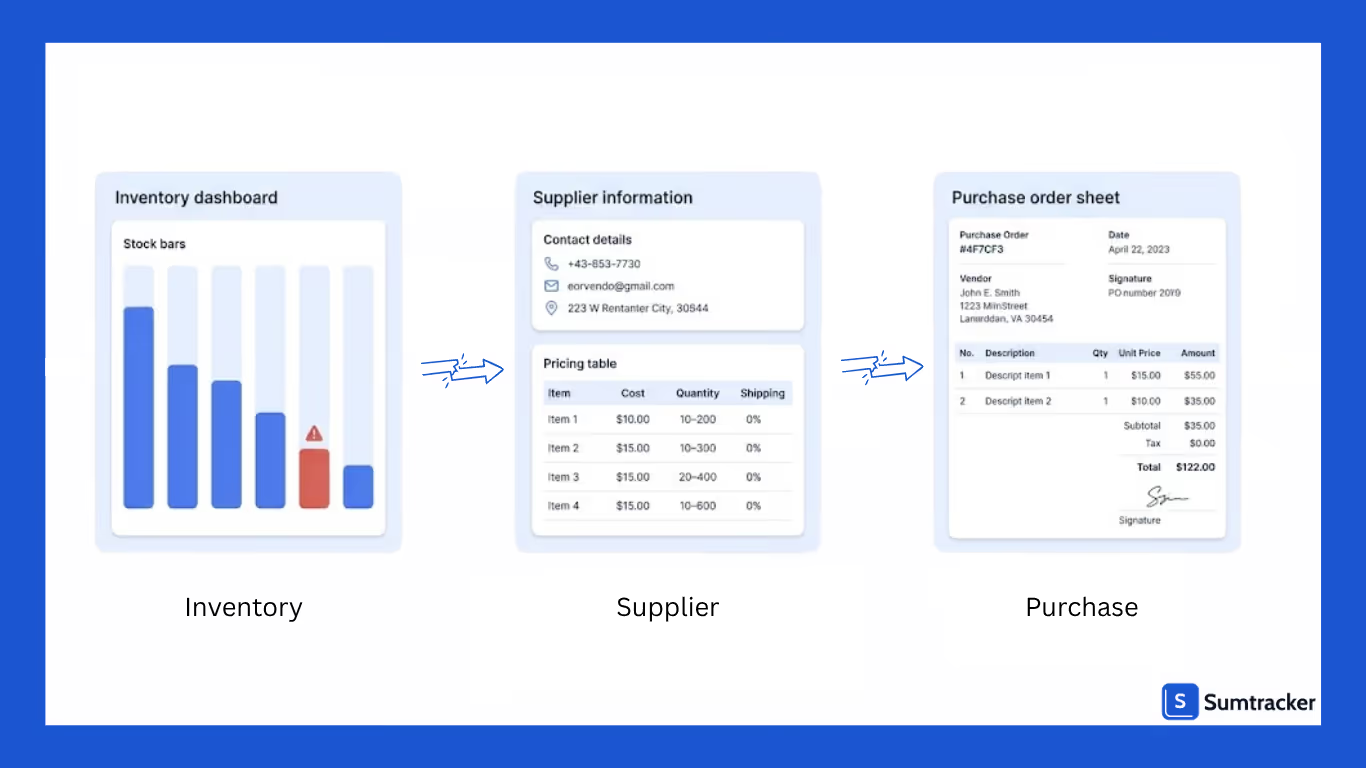
The Problem with Managing Purchase Orders, Suppliers, and Replenishment Separately
Managing purchase orders, suppliers, and replenishment as separate tasks might seem manageable. But in reality, it creates constant friction.
You’re checking stock levels in one place, referring to supplier details somewhere else, and creating purchase orders in a completely different tool.
Every step depends on manually pulling information together and that’s where things start to break.
A small disconnect can lead to bigger issues:
- You reorder too late because replenishment data wasn’t clear
- You choose the wrong supplier or pricing because information wasn’t easily accessible
- You create inaccurate purchase orders due to outdated or scattered data
Over time, this doesn’t just slow you down, it affects your ability to stay in stock, manage cash flow, and operate efficiently.
The real issue isn’t the process itself, it’s the lack of connection between these moving parts.
When they’re handled separately, you’re constantly reacting instead of operating with clarity and control.
How Purchase Orders, Suppliers, and Replenishment Work Together
These three aren’t separate tasks, they’re part of the same cycle. The problem is, when they’re managed in different places, that connection isn’t visible.
But when you look at how they actually work, it’s pretty straightforward.
It starts with inventory replenishment.
You check what’s selling, what’s low, and what’s about to run out. This gives you a clear signal of what needs to be reordered.
That insight turns into a purchase order.
Instead of creating it from scratch or guessing quantities, you’re simply acting on what your inventory is already telling you.
The purchase order is then sent to the right supplier. They process it, ship the products, and once the stock arrives, your inventory gets updated.
And then the cycle continues.
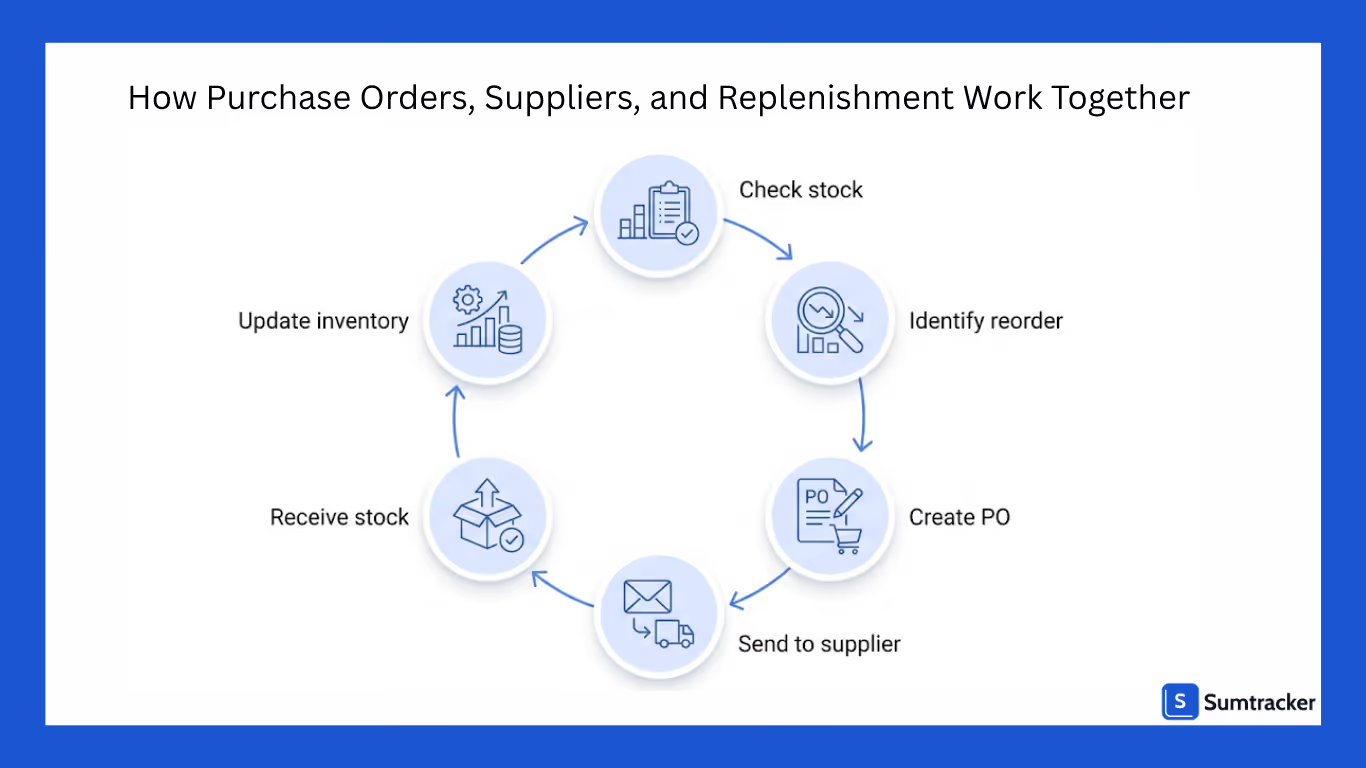
To simplify it, the flow looks like this:
Check stock → Identify what to reorder → Create purchase order → Send to supplier → Receive stock → Update inventory → Repeat
When this flow is connected, things start to feel easier. You’re not second-guessing what to order or scrambling last minute, it’s all driven by real data, step by step.
Centralizing Supplier Information for Better Purchasing
Supplier information is one of those things that seems simple until you actually need it.
You know the supplier exists, you’ve worked with them before, but now you’re digging through emails, spreadsheets, or old notes just to find pricing, lead times, or even basic contact details. It slows everything down, especially when you’re trying to place orders quickly.
When supplier information is centralized, that friction disappears.
Instead of searching for details, you already have:
- Which supplier is linked to which products
- Their latest pricing
- Lead times and past order history
- Contact details in one place
This makes purchasing a lot more straightforward. You’re not second-guessing who to order from or whether the information you’re using is outdated.
Creating and Managing Purchase Orders from One System
Creating purchase orders shouldn’t feel like starting from scratch every time. But when your data is scattered, that’s exactly what happens, you’re copying product details, checking supplier info, and double-checking quantities manually.
It takes time, and it’s easy to get something wrong.
When everything is in one system, the process becomes much simpler. You already know what needs to be ordered, which supplier it’s linked to, and how much to purchase.
Instead of piecing things together, you’re just turning that information into a purchase order.
That means:
- Products and suppliers are already connected
- Quantities are based on actual stock needs
- You can create POs faster without re-entering data
Managing those orders also becomes easier. You can track what’s been created, what’s been sent, and what’s still pending, all in one place.
Using Replenishment Data to Drive Purchase Decisions
A lot of purchasing decisions still come down to instinct, ordering when something feels low or when you suddenly notice it’s almost out of stock. That approach works for a while, but it doesn’t scale.
Replenishment data changes that.
Instead of guessing, you’re looking at what’s actually happening and how fast products are selling, how much stock is left, and how long it typically takes to restock. That context makes a big difference.
So instead of asking, “Should I reorder this?”, you’re answering:
- How soon will this run out?
- How much do I actually need?
- When should I place the order to avoid a gap?
It also helps you avoid the other side of the problem of overordering. When you have clear visibility into demand, you’re less likely to tie up cash in stock that won’t move quickly.
Tracking Incoming Stock from Suppliers in Real Time
One of the most common gaps in inventory management is this, you know what you have, but you don’t always know what’s on the way.
And that creates confusion.
You might reorder something that’s already been ordered but hasn’t arrived yet. Or you might assume stock is coming soon, only to realize later that it’s delayed or wasn’t ordered at all.
When you can track incoming stock in real time, that uncertainty goes away.
You can clearly see:
- What’s been ordered
- What’s already shipped
- What’s still pending
- When it’s expected to arrive
This gives you a much more complete picture of your inventory and not just current stock, but future availability as well.
Reducing Errors by Managing Everything in One Place
Copying data from one place to another, switching between tools, and relying on information that may already be outdated. That’s where your inventory starts failing.

When everything is managed in one place, those gaps start to disappear.
With Sumtracker, your purchase orders, supplier details, and replenishment data are all connected. You’re not manually stitching information together, the system already knows what needs to be ordered, from whom, and when.
That means:
- Fewer manual entries and less duplication
- Consistent data across your entire workflow
- Clear visibility into what’s ordered, pending, and received
Instead of constantly double-checking things, you can trust the process. Each step flows into the next, reducing the chances of something slipping through.
Conclusion
When purchase orders, suppliers, and replenishment are managed separately, the problems aren’t always obvious at first. It just feels like things take longer, require more effort, and need constant double-checking.
But over time, those small inefficiencies turn into missed sales, excess stock, and unnecessary stress.
The real shift happens when you stop treating these as separate tasks and start managing them as one connected workflow. That’s when decisions become clearer, processes become faster, and your inventory starts behaving the way it should.
If you’re still juggling spreadsheets, emails, and disconnected tools, it might be time to simplify things.
Sumtracker helps you manage purchase orders, suppliers, and replenishment in one place—so you can spend less time fixing errors and more time growing your business.
👉 Try Sumtracker and see how much smoother your inventory workflow can be.
FAQs
1. What is the connection between purchase orders, suppliers, and replenishment?
Replenishment tells you what to order, purchase orders are how you place that order, and suppliers are who fulfill it. All three are part of the same continuous workflow.
2. Why is managing these separately a problem?
When these processes are disconnected, you end up relying on manual work, outdated data, and guesswork. This increases the chances of errors, delays, and poor inventory decisions.
3. How does centralizing supplier and PO data help?
It ensures you always have accurate supplier details, pricing, and order history in one place, making it easier to create accurate purchase orders and avoid confusion.
4. How can replenishment data improve purchasing decisions?
Replenishment data shows what’s selling, what’s running low, and when stock will run out. This helps you order the right products at the right time, instead of relying on assumptions.
5. How does Sumtracker help manage this workflow?
Sumtracker connects your inventory, suppliers, and purchase orders in one system. It helps you track stock levels, create POs based on real data, and manage incoming inventory, all without switching between tools.
Conclusion

Bhoomi writes about inventory management and multichannel selling at Sumtracker. Her focus is on solving real operational problems for Shopify, Amazon, and marketplace sellers through well-researched content. She covers everything from multi-location inventory syncing and stock error troubleshooting to replenishment planning and platform comparisons, turning complex eCommerce operations into clear, actionable guidance.
LinkedInRelated Articles
Tool and strategies modern teams need to help their companies grow.


Ready to Simplify Your Inventory Management?
Join hundreds of e-commerce merchants who rely on Sumtracker to save time, eliminate errors, and grow their business.
