.svg)
Shopify Bundle Inventory: How It Works & How to Manage It


Are you selling bundles on Shopify and struggling to keep up with component inventory?
I know it gets difficult to track how many bundles you actually have when you sell its components individually.
If you are just starting out, Shopify solves this for you with its built-in tool. It helps you calculate how many bundles you can sell based on the available inventory of your components.
Bundle inventory isn't even that simple; you should be equipped with all the know-how to stay on top of your inventory.
Well, I got you!
In this guide, I'll explain how Shopify bundle inventory works, how Shopify calculates available bundle quantities, and how to set up bundle inventory correctly.
I'll also cover bundles vs. kits and multipacks, managing bundles across locations, handling returns, and the Shopify reports you can use to analyze bundle sales.
What Is Shopify Bundle Inventory Management?
Shopify bundle inventory management is the process of tracking the stock of products that are sold together as a bundle.
It involves keeping component quantities accurate, calculating how many complete bundles are available, and making sure bundle sales are reflected in the inventory of the products inside them.
Bundles matter more than most merchants realize.
According to McKinsey research, strategic bundling can boost sales by 20% and increase profits by 30%. And multiple industry sources, including Swell's bundling statistics report, estimate that up to 30% of ecommerce revenue now comes from bundled products.
From these stats we can conclude that bundles inventory directly affects the revenue.
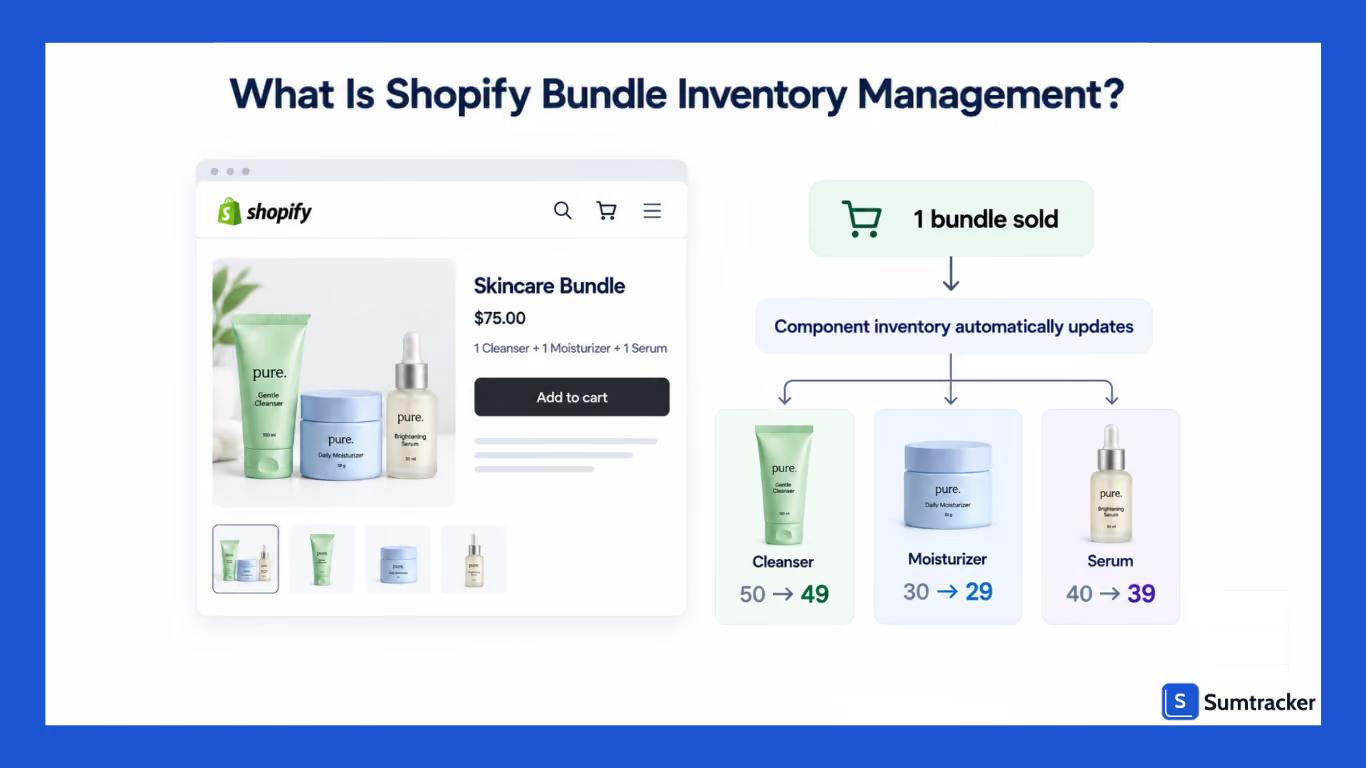
For example, suppose you sell a skincare kit containing a cleanser, moisturizer, and serum, each product is also available individually.
When a customer purchases the kit, the inventory of each component needs to be accounted for so your available stock remains accurate.
How Shopify handles this depends on how you create the bundle.
If you create the bundle as a standalone product without linking it to its components, Shopify treats it as a separate product.
The bundle's inventory is managed independently, so selling the bundle doesn't automatically reduce the inventory of the products inside it.
Shopify Bundles work differently. It links the bundle to its component products and calculates how many bundles are available based on the inventory of those components.
This distinction is important because several bundles can share the same components. If a serum is included in three different bundles, selling any of those bundles affects the amount of serum available for the others.
For a deeper look at how to handle this scenario, see how to manage inventory for the same product in multiple bundles.
Effective Shopify bundle inventory management keeps these relationships accurate so you can avoid overselling and know how many complete bundles you can actually fulfill.
How Does Shopify Bundle Inventory Work?
Shopify bundle inventory works by connecting a bundle to the products that make up that bundle.
When a bundle is sold, the inventory consumed by its components needs to be reflected in the component products so you don't sell more units than you can fulfill.
How this works depends on how you create the bundle.
Standalone bundle product
If you create a bundle as a regular Shopify product without connecting it to its component products, Shopify treats it as a separate product.
For example, if you create a "Skincare Set" containing one cleanser and one moisturizer, Shopify won't automatically know that selling one Skincare Set should consume one cleanser and one moisturizer.
The bundle and its components have separate inventory records.
This setup can lead to inaccurate inventory if you sell the components individually as well as through the bundle.
Shopify Bundles
Shopify's Bundles app connects a bundle with its component products. When a customer purchases the bundle, Shopify accounts for the inventory of the products included in it.
For example, if a bundle contains one cleanser and one moisturizer, selling one bundle consumes one unit of each component.
Shopify also calculates how many complete bundles can be sold based on the available inventory of the components.
This means the bundle's availability can change when a component is sold individually, restocked, or runs out of stock.
Third-party bundle apps
Third-party bundle apps can provide additional functionality for merchants whose requirements go beyond Shopify's native Bundles app.
Depending on the app, this can include features such as mix-and-match bundles, build-your-own bundles, more advanced fulfillment workflows, or broader inventory management capabilities.
The exact inventory behavior varies by app, so check how a solution handles component inventory, locations, orders, and fulfillment before choosing one.
How Shopify Calculates Bundle Inventory
Shopify calculates bundle inventory based on the inventory available for the products that make up the bundle. The number of complete bundles you can sell is limited by the component with the lowest available quantity relative to how many units the bundle requires.
Here's a simple example. Imagine a bundle contains:
- 20 cleansers
- 10 moisturizers
- 25 serums
If the bundle requires one unit of each product, you can sell 10 complete bundles because the moisturizer is the limiting component.
The calculation becomes more important when a bundle contains multiple units of the same product. The table below shows how this works:
In simple terms:
Available bundle inventory = the lowest number of complete bundles that can be made from the available component inventory.
When a bundle is sold through Shopify Bundles, Shopify updates the inventory of its component products. This helps keep component stock aligned with bundle sales and prevents you from treating the bundle as completely separate inventory.
Bundles vs. Kits vs. Multipacks vs. Variants
Bundles, kits, multipacks, and variants can look similar in a Shopify store, but they represent different product structures and can affect inventory differently.
Bundle
A bundle combines two or more products into a single offer. For example, a skincare bundle might contain one cleanser, one moisturizer, and one serum.
The products can continue to be sold individually. When a bundle is sold, the inventory consumed by its components needs to be reflected in their stock levels.
For a more detailed look at how bundle and kit inventory management works in practice, see this guide on bundle and kit inventory management for ecommerce.
Kit
A kit is often used to describe products that are physically assembled or packaged together before fulfillment.
For example, a warehouse might pre-pack a cleanser, moisturizer, and serum into a single gift box and store it as a ready-to-ship kit.
The important distinction is operational: a bundle doesn't necessarily have to be physically assembled, while a pre-kitted product is prepared in advance for fulfillment.
Multipack
A multipack contains multiple units of the same product.
For example, a six-pack of water bottles uses six units of the same product for every one multipack sold. If you have 60 individual units available, you can potentially fulfill 10 six-packs.
Multipacks are therefore different from bundles that combine different products. If you sell packs, sets, or gift bundles, this guide on tracking inventory for packs, sets, and gift bundles in Shopify covers the details.
Variant
A variant is a different version of the same product, such as a T-shirt available in Small, Medium, and Large or a product offered in multiple colors.
Inventory is typically tracked at the variant level. Selling one Small T-shirt doesn't reduce the inventory of the Medium variant.
Understanding the difference between these product structures helps you choose the right Shopify setup and avoid creating unnecessary inventory relationships.
How to Set Up Bundle Inventory Tracking on Shopify
The right setup depends on the type of bundle you sell and how you fulfill orders. For a simple fixed bundle, Shopify Bundles may be enough. More complex setups may require a third-party app.
If you want a visual walkthrough of how Shopify bundles work, the YouTube video Shopify Bundles Done Right: The Setup Most Stores Get Wrong covers setup, app comparison, bundle types, and an inventory checklist.
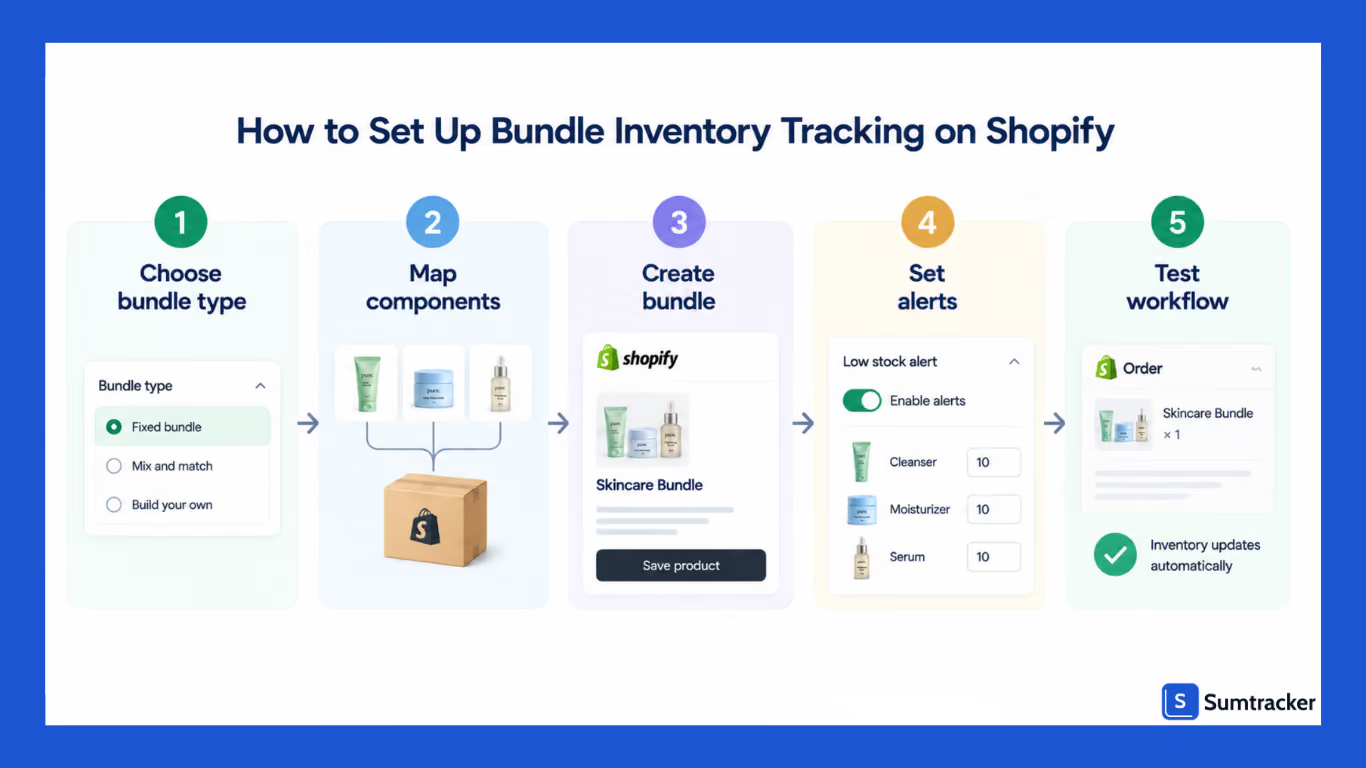
Step 1: Choose how you'll create the bundle
You generally have three approaches:
- Standalone product: Create the bundle as a separate product without connecting it to its components. This is simple, but Shopify won't automatically manage the component inventory relationship.
- Shopify Bundles: Use Shopify's Bundles app to create fixed bundles or multipacks and have Shopify calculate inventory from the bundle's components.
- Third-party bundle or inventory app: Use a compatible app when you need functionality beyond the native bundle setup, such as more advanced bundle configurations or broader inventory management workflows.
Step 2: Map your components
Before creating a bundle, document exactly what it contains. This is often referred to as a bill of materials (BOM).
For each bundle, record:
- The bundle name and SKU
- Each component product and SKU
- The quantity of each component required
- The locations where those components are stocked
- Whether the bundle is pre-kitted or assembled when ordered
This becomes particularly important when the same component appears in multiple bundles.
Step 3: Create the bundle
If you're using Shopify Bundles, open the Bundles app from your Shopify admin and select Create bundle. Add the products and quantities that make up the bundle, review the bundle details, and save it.
Shopify then calculates the bundle's available inventory from its components.
If you're using a third-party app, follow its setup process to map the bundle SKU to its component products.
Step 4: Set inventory alerts for important components
Don't look only at the bundle's inventory.
If one component is used across several bundles, a low stock level for that component can affect multiple products. Set appropriate low-stock thresholds for the individual components so you can reorder before they limit bundle availability.
Step 5: Test the complete workflow
Before promoting the bundle, place a test order and verify:
- Component inventory updates correctly
- The bundle becomes unavailable when a required component has no available inventory
- The order contains the information your fulfillment workflow requires
- Inventory remains accurate when a component is sold individually
- Returns and cancellations update inventory as expected
Testing the full workflow before launch can help catch inventory and fulfillment problems before customers encounter them.
Shopify Bundle Inventory Across Multiple Locations
Managing bundle inventory becomes more complicated when your products are stored across multiple locations.
Shopify tracks product inventory by location, but Shopify Bundles calculates bundle availability using the overall inventory of its components rather than determining whether all components are available at the same location.
For example, suppose you have:
- Warehouse A: 10 cleansers, 0 moisturizers
- Warehouse B: 0 cleansers, 10 moisturizers
You have enough total inventory of both products, but neither location has both components available.
This matters if your fulfillment process requires a complete bundle to be shipped from one location. Before using bundles across multiple warehouses, check how your bundle solution handles location-level inventory and fulfillment.
How to Forecast Demand for Bundles
Forecasting gets more complicated when the same products are sold both individually and as part of bundles.
Research from Recharge's 2025 subscription commerce report found that bundle buyers have 18% higher lifetime value over 12 months than single-product buyers. That makes accurate forecasting even more important — you want to keep bundles in stock for the customers who spend the most.
For each component, track:
- Standalone sales
- Units consumed through bundle sales
- Demand from other bundles that use the same component
Here's an example of how component demand adds up across bundles and individual sales:
If you forecast only from standalone sales, you'd underestimate the serum by 150 units per month. That's enough to create recurring stockouts.
When forecasting bundle inventory, consider:
- Historical bundle and component sales
- Components shared across multiple bundles
- Seasonal or promotional demand
- Supplier lead times
- Current inventory and safety stock
The goal is to forecast component demand, not just bundle sales. This helps you determine how much inventory you need to keep bundles and individual products in stock.
If you want to hear more about how Shopify sellers approach inventory planning, the Ecommerce Coffee Break podcast has a good episode on inventory management for growing Shopify stores, covering why spreadsheets fail at scale and how to think about inventory as a growth lever.
Handling Returns and Refunds for Bundles
Returns can affect bundle inventory differently from regular product returns, particularly when customers return only part of a bundle.
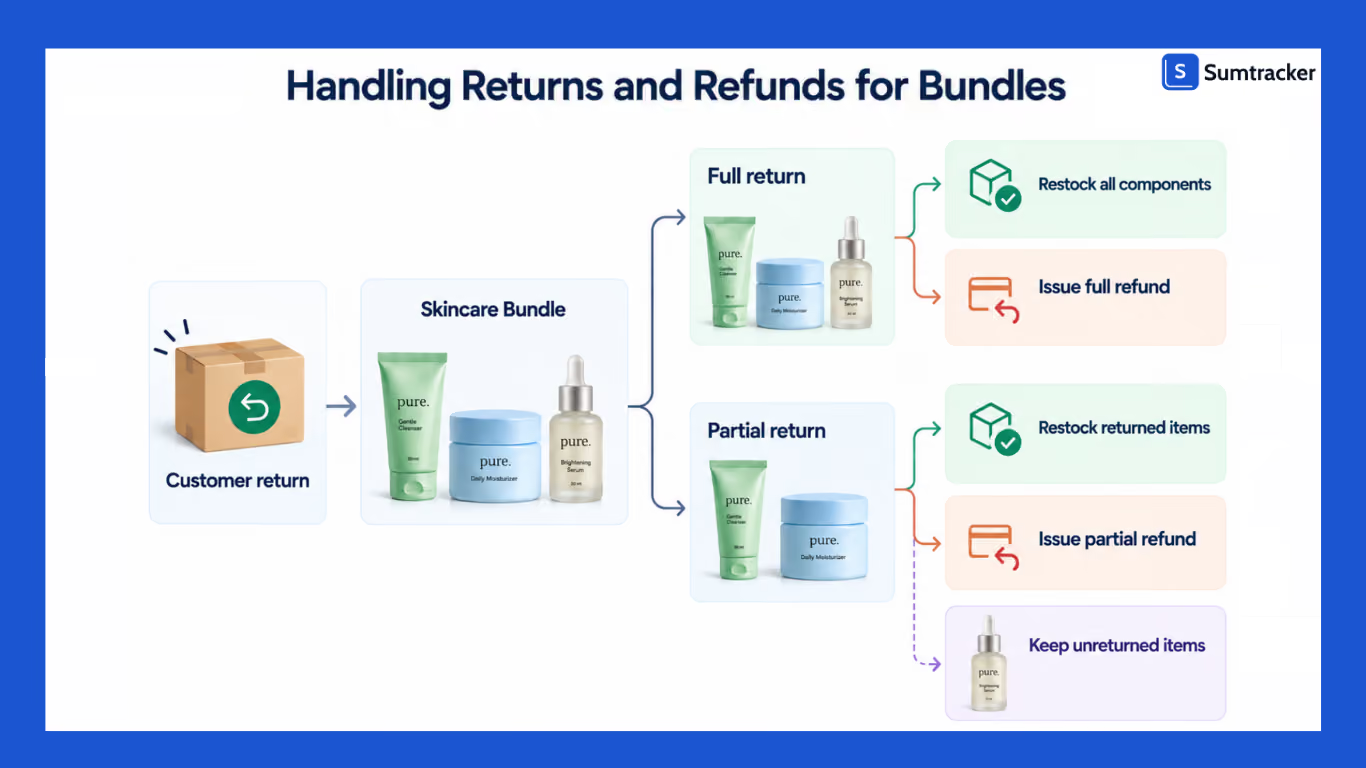
Before selling bundles, decide how you'll handle:
- Full bundle returns: Whether all components are returned and restocked together.
- Partial returns: Whether customers can return individual components from a bundle.
- Refunds: How the refund amount is calculated when only part of a bundle is returned.
- Restocking: Whether returned components can go back into sellable inventory.
- Pre-kitted bundles: Whether a returned kit needs to be broken down before its components are restocked.
Your return policy and inventory workflow should follow the same rules. After setting up your bundle, test a return or cancellation to confirm that inventory is restored correctly.
Shopify Bundle Reports You Can Use to Analyze Bundle Sales
Shopify provides dedicated reports for stores using Shopify Bundles, making it easier to understand how your bundles and their components are performing.
Bundle Total Sales Over Time
This report shows how your bundle sales change over a selected period. It can help you identify trends in bundle demand and see whether bundle sales are increasing or declining.
Total Sales by Bundle
This report shows sales for individual bundles, helping you identify which bundles are generating the most revenue.
Total Sales by Bundle Component
This report shows sales generated by the individual products included in your bundles. It can help you understand which components are most commonly sold through bundles.
Bundle Component and Product Comparison
This report compares a product's sales when it is sold as part of a bundle with its sales when sold individually.
Together, these reports give you a clearer picture of which bundles sell, which components drive bundle sales, and how bundle sales compare with individual product sales.
Best Shopify Apps for Bundle Inventory Management
The right bundle solution depends on how your store sells and fulfills bundles. Here's a comparison of the key options:
Shopify Bundles
Shopify's native Bundles app is designed for creating fixed bundles and multipacks directly within Shopify. It calculates bundle availability from component inventory and updates component inventory when bundles are sold.
It's a good option if you want a simple, Shopify-native solution and your requirements fit its supported bundle types.
However, it has limitations. For example, Shopify Bundles doesn't provide location-level bundle inventory, and features such as subscriptions, pre-orders, and try-before-you-buy aren't supported.
Sumtracker
Sumtracker is an inventory management platform that includes bundle inventory management alongside broader inventory workflows such as replenishment planning, purchase orders, supplier management, inventory reporting, and multi-channel inventory management.
It's a better fit for merchants who need to manage bundles as part of a broader inventory operation rather than using a dedicated bundle tool alone.
Simple Bundles
Simple Bundles is a third-party bundle management app that supports multiple bundle configurations and can break bundle orders into component items for fulfillment workflows.
It's worth considering if you need more flexibility than Shopify's native Bundles app provides, particularly for more complex bundle structures or fulfillment requirements.
Common Problems With Shopify Bundle Inventory
Bundle inventory can become difficult to manage when the same products are sold individually and through multiple bundles.
Overselling
If bundle sales don't correctly reduce component inventory, your store can show more stock than you actually have available to fulfill.
This isn't a rare problem. Crafter's Lab, a brand selling across multiple Shopify stores, dealt with recurring overselling before implementing automated bundle tracking with Sumtracker. After switching, they reduced overselling by 99.7% and saved 8–10 hours per week.
Stock count mismatches
When component inventory isn't updated after bundle sales, your Shopify inventory records can gradually become inaccurate.
Shared components
A single product may be included in several bundles. If that component runs low, it can affect the availability of multiple bundles at the same time.
Multi-location issues
Having enough total stock across locations doesn't necessarily mean you can fulfill a complete bundle from one location. Check how your bundle solution handles location-level inventory.
Fulfillment errors
Your warehouse or 3PL needs clear instructions on whether a bundle should be picked as individual components or fulfilled as a pre-assembled unit. Test the workflow before launching a new bundle.
Frequently Asked Questions
How does Shopify calculate bundle inventory?
Shopify calculates bundle availability based on the inventory of the products included in the bundle. The component with the lowest available quantity determines how many complete bundles you can sell.
Does selling a bundle reduce the inventory of its components?
Yes. When you use Shopify Bundles, Shopify accounts for the component products when a customer purchases a bundle, so their available inventory reflects the sale.
Can I sell the same product individually and in multiple bundles?
Yes. You can sell a product on its own and include it in multiple bundles. The inventory of that product affects the availability of every bundle that uses it.
Does Shopify bundle inventory work across multiple locations?
Shopify tracks product inventory by location, but Shopify Bundles calculates bundle availability based on overall component inventory rather than checking whether all components are available at the same location.
Can I manage mix-and-match bundles with Shopify?
Shopify's free Shopify Bundles app supports fixed bundles and multipacks. For mix-and-match bundles, you need a third-party app or Shopify Plus custom bundle functionality.
Conclusion
Managing bundle inventory on Shopify is about more than simply creating a bundle. You need to keep component inventory accurate, understand how bundle availability is calculated, and account for shared products, multiple locations, returns, and demand.
Shopify Bundles can handle the basics for merchants selling simple fixed bundles and multipacks. If your inventory operation is more complex, especially across multiple channels, locations, or replenishment workflows, a dedicated inventory management solution can give you more control.
The key is to set up your bundle structure correctly, test how inventory changes after sales and returns, and monitor the components that determine your bundle availability. This helps you avoid overselling and keep your inventory accurate as your store grows.

Bhoomi writes about inventory management and multichannel selling at Sumtracker. Her focus is on solving real operational problems for Shopify, Amazon, and marketplace sellers through well-researched content. She covers everything from multi-location inventory syncing and stock error troubleshooting to replenishment planning and platform comparisons, turning complex eCommerce operations into clear, actionable guidance.
LinkedInRelated Articles
Tool and strategies modern teams need to help their companies grow.

Ready to Simplify Your Inventory Management?
Join hundreds of e-commerce merchants who rely on Sumtracker to save time, eliminate errors, and grow their business.