.svg)
Inventory Compliance for Shopify Stores: How to Keep Audit-Ready Records



If you sell physical products through an online store, physical stores or both, your inventory records do more than track stock levels.
They back up your tax return, your accounts and, for some products, your legal duties to regulators.
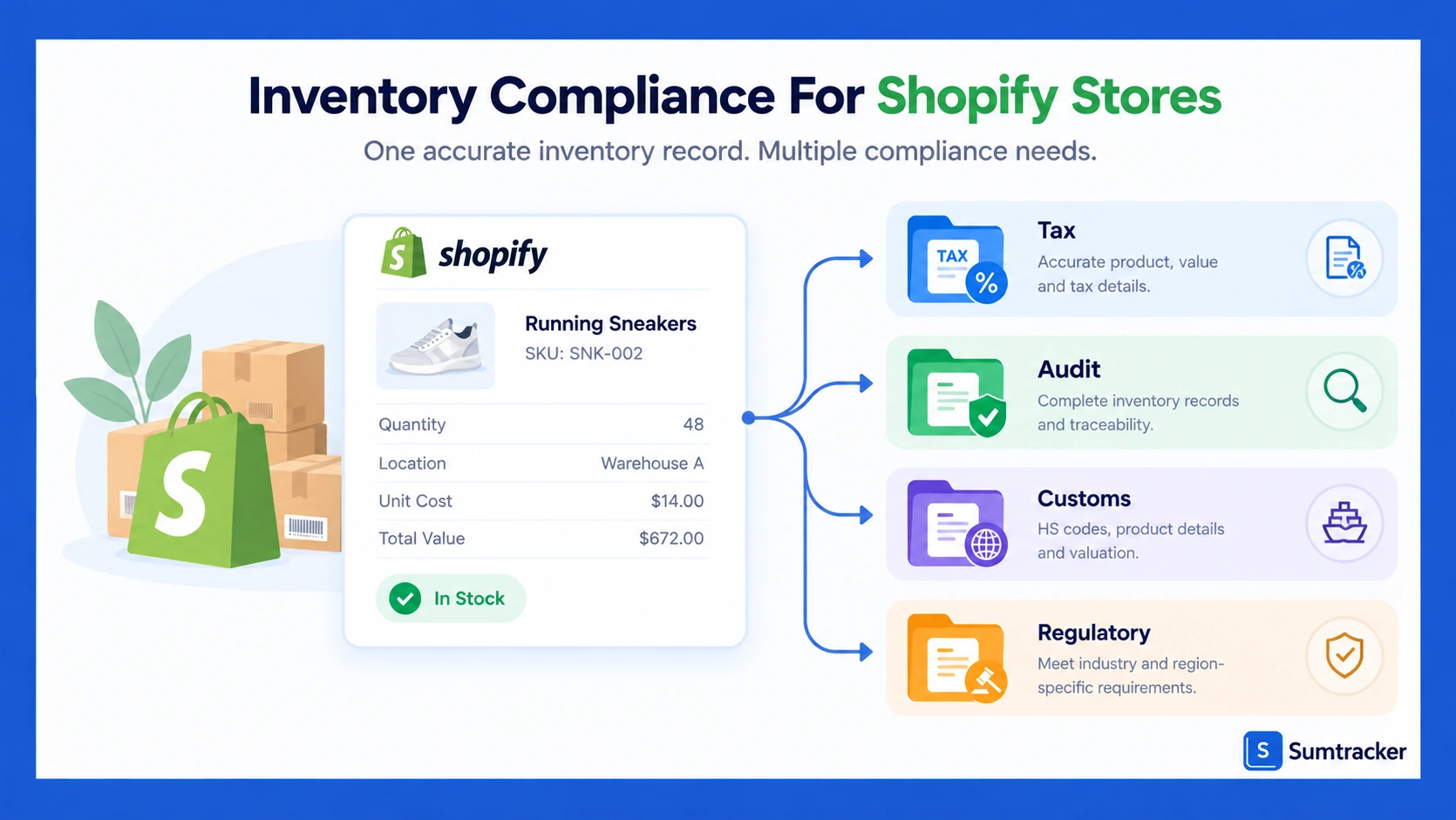
Inventory compliance for Shopify stores means keeping records that show what you hold, what it cost, and why every number changed.
Most store owners don’t find the gaps until an accountant, auditor, or buyer asks for them.
Accuracy is the first problem. In a study of nearly 370,000 inventory records from 37 stores of one retailer, researchers found 65% were inaccurate. That’s one retailer, not Shopify stores, but it shows how easily records drift.
That’s where a compliance process comes in. Shopify inventory management tracks quantities well, but it doesn’t keep everything your accountant or a regulator will ask for.
In this guide, you’ll learn what Shopify records on its own, where it falls short, and how Shopify merchants can close the gaps.
We’ll cover tax records, COGS, accounting standards, regulated products, customs, data security, record retention, physical counts and internal controls.
Before you start: This guide is general information, mostly for US stores, with notes for Canada and the UK. It isn’t legal, tax or accounting advice. Check your obligations with a qualified accountant or lawyer.
What Is Inventory Compliance for Shopify Stores?
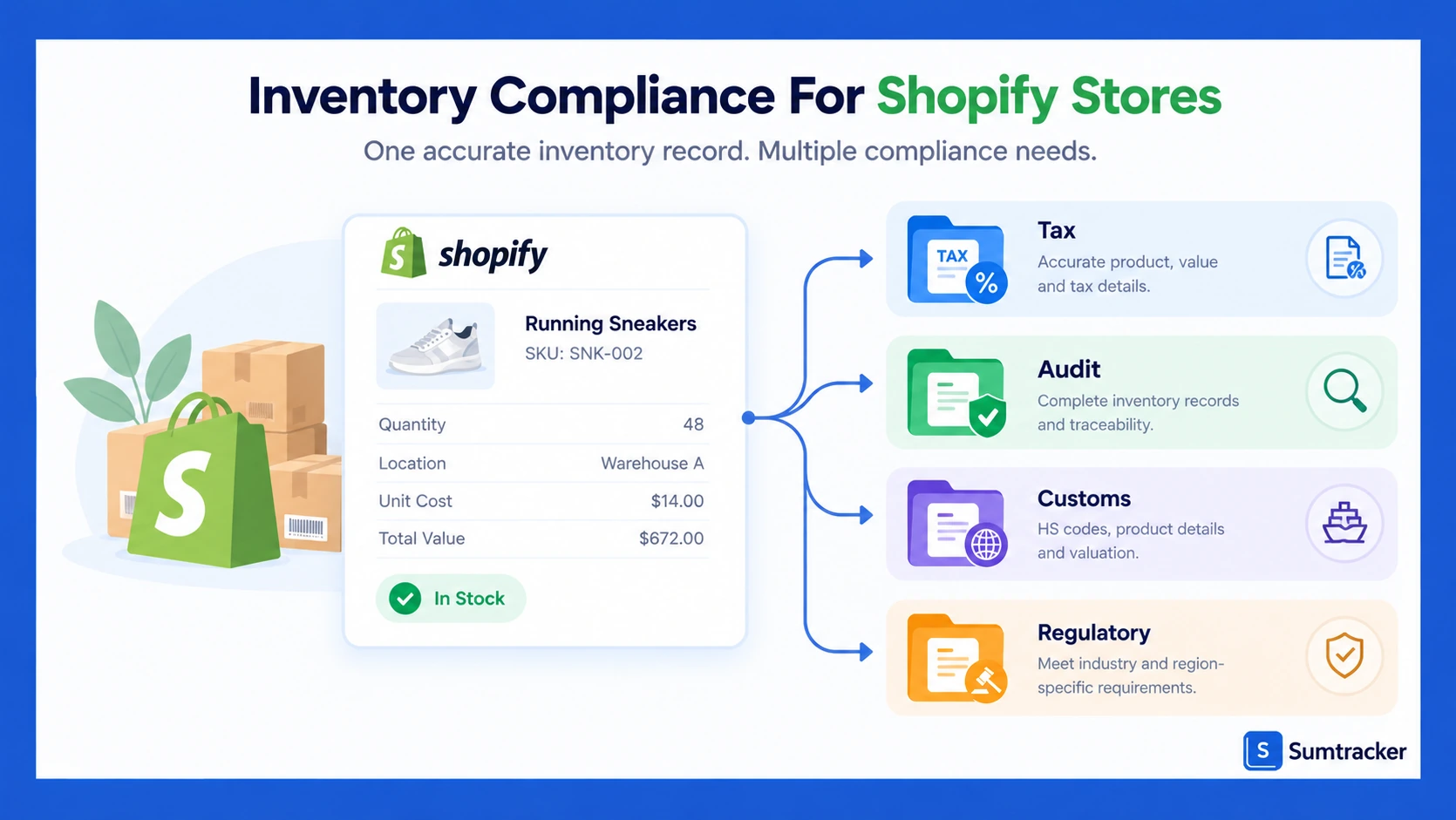
Inventory compliance is keeping accurate, complete records of your stock, its cost, and every change to it, for as long as the rules require.
It sits on top of everyday inventory management. Managing inventory well keeps your inventory levels right. Compliance proves your inventory data to people outside the business.
It isn’t one rule. It’s several sets of inventory rules that all depend on the same records.
Which rules apply depends on your business model. A small online business filing a simple tax return has fewer duties than a supplement brand preparing audited accounts. A retail business with physical stores adds in-store stock to the picture.
Rule of thumb: Compliance isn’t the same as effective inventory management. Good inventory control prevents overselling. Compliance means you can prove your numbers to someone outside the business.
What Shopify Tracks Natively, and Where It Falls Short
Shopify tracks stock by state and location, keeps a short adjustment history and stores one cost per item. Those built-in tools are enough to run daily operations. On their own, they aren’t enough to answer an accountant or auditor.
Stock States and Tracking Capabilities
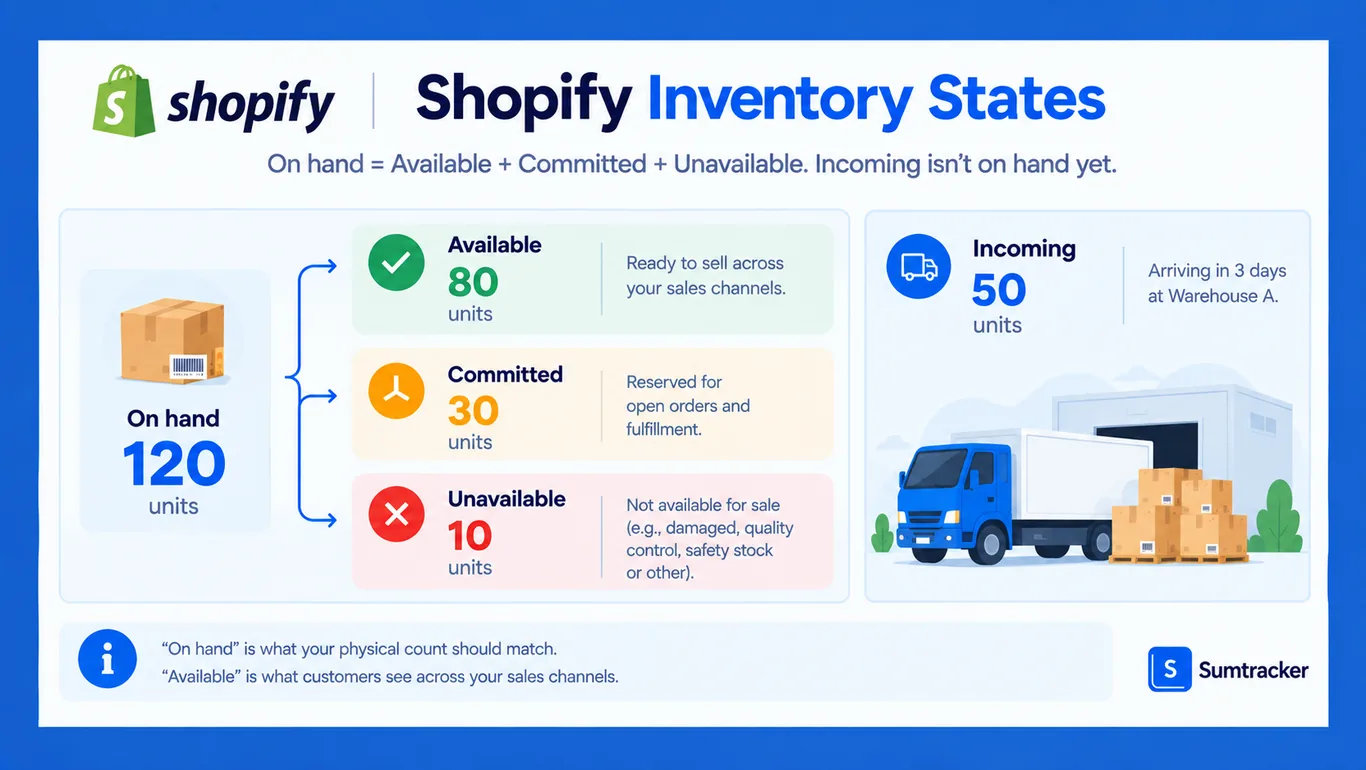
Shopify inventory splits each product’s stock at every location into five states. Shopify’s inventory states guide defines them (as of October 2026):
For compliance, On hand matters most. It’s the number your physical count should match. Available inventory is what customers see across your sales channels.
If Committed stock confuses your counts, read how Shopify committed inventory works.
Shopify tracks these states separately at multiple locations, such as multiple warehouses, retail stores and 3PLs. If stock is recorded at the wrong warehouse, your count won’t match.
The number of active locations depends on your plan, according to Shopify’s locations guide. Deactivated locations and locations managed by fulfillment apps don’t count toward the limit.
Common mistake: Some AI-generated answers say Shopify supports up to 1,000 locations. Shopify’s own docs list 200 on Plus. Plan your locations around the documented limit.
The “Accountant-Ready” Gap
Shopify’s inventory tracking answers “how many, where and when.” It only partly answers “what did it cost, why did it change, and who approved it?”
Here’s what’s missing, based on Shopify’s adjustment history guide and adjusting quantities guide:
Merchants notice these gaps. In a March 2026 Shopify Community thread, a merchant said the reason field had disappeared after an update. Shopify Support called it a compliance blocker.
For older changes, use the Inventory adjustment changes report in Shopify Analytics. But Shopify’s inventory reports guide says historical inventory metrics only go back to October 1, 2023, so export and keep your own copies.
Why this matters: A quantity history isn’t a cost history. If a write-off has no reason, value or approval, you can’t back it up later.
What Inventory Records Do You Need for Tax?
For tax, you need records that back up your closing stock, your COGS and every write-off, plus regular physical counts. The details depend on where you file.
US Tax Rules for Inventory
IRS Publication 538 sets the main rules for keeping inventory:
- You must keep inventory if buying and selling goods is how you make income, from online sales or in store.
- You identify cost using specific identification, FIFO (first in, first out) or LIFO (last in, first out).
- You value stock at cost, or at the lower of cost or market.
- You must take a physical count at reasonable intervals and correct your records to match.
Small business exceptions. For tax years starting in 2026, the IRS gross receipts test is $32 million in average annual gross receipts over the past three years (Rev. Proc. 2025-32). Tax shelters don’t qualify.
It’s not a blanket exemption. If you qualify, you may be able to:
- treat inventory as non-incidental materials and supplies, or follow your financial statements, as long as the method clearly reflects income
- skip the UNICAP rules, which otherwise make resellers add some indirect costs, like storage, to inventory (IRS guidance)
Your accountant should confirm whether you qualify and which method fits.
Sales tax. Depending on the state, storing stock there can create a sales tax duty, according to Shopify’s sales tax guide. Keep a dated list of states where you hold stock, including 3PLs and warehouses run by online marketplaces.
Canada and the UK
Both require longer retention than the basic US rule:
Documenting Inventory Adjustments
Every write-off or correction changes your COGS. Inventory adjustments like these need a record you can show later.
For every adjustment, keep:
- Date and location
- SKU, quantity and unit cost
- Reason, using the same words every time
- Who made it and who approved it
- Evidence, such as photos, a disposal record, a count sheet or a police report
In Shopify, move damaged units to Unavailable using Adjust by. Use Inventory removal for stock that’s gone, and always pick a reason.
Then copy each change into your own log, with its unit cost, because Shopify records quantity but not value.
To find past changes, see how to view inventory adjustment history in Shopify.
Common mistake: Writing “broken”, “damage” and “damaged in warehouse” for the same thing. Mixed terms make write-offs hard to total and look like weak controls. Pick one list of reasons and stick to it.
Tracking COGS When Shopify Can’t
Shopify stores one cost per item for your product inventory. Its profit reports guide says it reports profit only for items that had a cost when they sold.
That cost doesn’t change when new stock arrives. Shopify’s Stocky migration guide confirms it stays fixed, and suggests an app for average or landed cost.
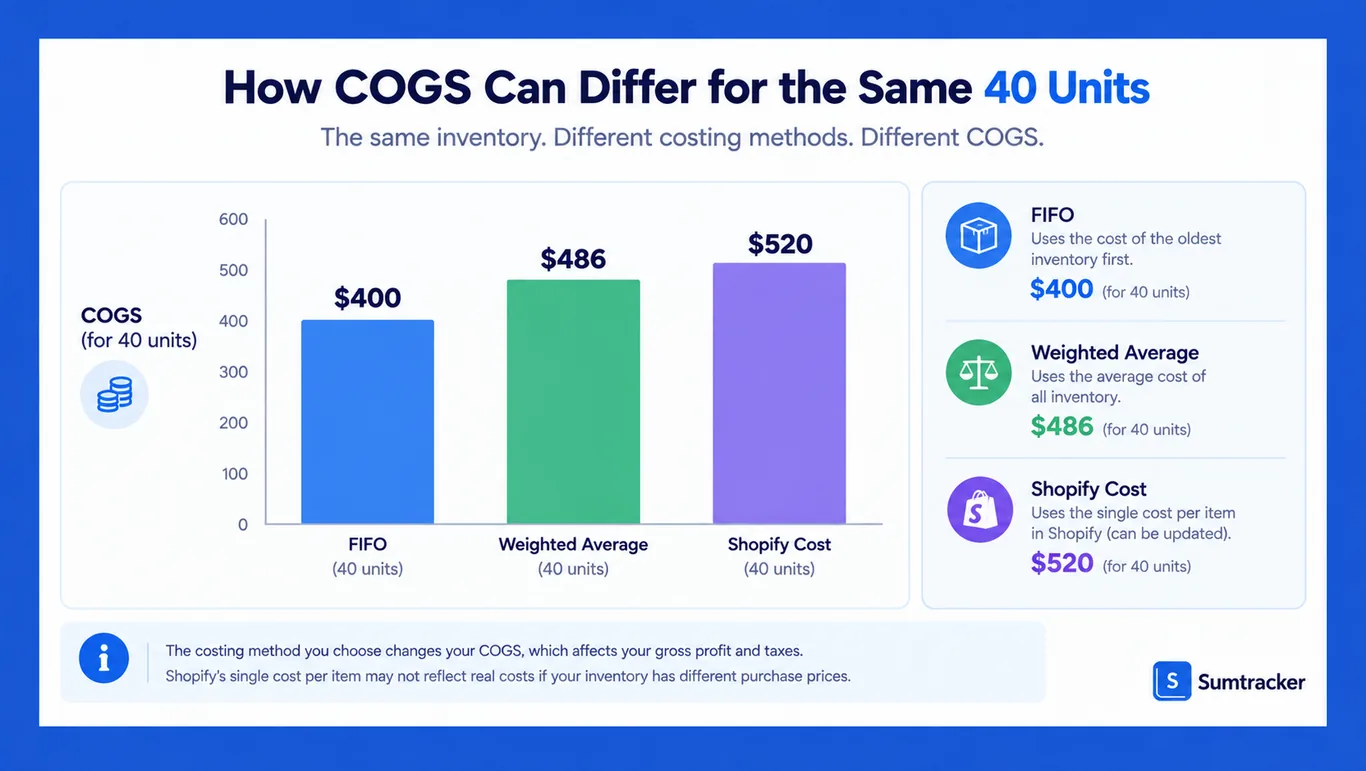
Here’s a simplified illustration for one SKU, ignoring returns, freight and other costs:
- You receive 100 units at $10 each.
- You sell 60. Forty older units remain.
- You receive 100 more at $13 each.
- You update Shopify’s cost per item to $13.
- You sell the 40 older units.
Each method gives a different COGS for those 40 units:
In this example, Shopify’s figure is $120 higher than FIFO. That’s because Shopify applies whatever cost is in the field at the time of sale, not a cost-flow method.
Weighted average cost = (Old units × Old cost + New units × New cost) ÷ Total units
For this SKU: (40 × $10 + 100 × $13) ÷ 140 = $12.14.
Treat Shopify’s cost as a reporting figure. Your official books and tax return should use the cost method your accountant sets, applied to your full cost records.
Three ways to fix it, from simplest to strongest:
- Keep a cost log. Record every delivery’s quantity, unit cost, freight and duties. Your accountant can apply FIFO or average cost from it.
- Use your accounting system for COGS. Keep Shopify’s figure for daily reports only.
- Use an inventory app that updates cost from each purchase order, including freight and duties.
Not sure what belongs in cost? Read our guide to cost price and purchase price.
What Do GAAP and IFRS Require for Inventory?
GAAP and IFRS are financial reporting frameworks, not rules every store must follow. They apply when you prepare accounts under them, usually for a lender, investor, audit or sale of the business. Tax rules can differ. Both frameworks require:
- stock valued at cost
- one consistent cost method
- write-downs when stock loses value
Here’s how they compare, based on FASB’s ASU 2015-11 and IAS 2:
Shopify’s month-end inventory value report multiplies a single cost per item by quantity. That won’t match your value under FIFO or average cost when purchase prices change, so treat it as an estimate.
To prepare for an audit, loan or sale:
- Choose one cost method and write it down.
- Rebuild cost history from supplier invoices and delivery records.
- Review slow-moving and damaged stock every quarter, and write down what won’t sell for its cost.
- Match your valued stock to your count and your accounts at year end.
Tip: You can usually rebuild costs from old invoices. You can’t rebuild what you never recorded, like which lot went to which customer. Write down how you rebuilt any figures.
For valuation methods, see our guide to Shopify inventory valuation.
Which Industry and Customs Rules Apply?
Food, supplements and cosmetics have extra rules about lot codes and record keeping. Any store that ships abroad also needs correct customs data on each product.
Food, Supplements and Cosmetics
The main US rules (as of October 2026). Each applies only to the products and businesses it covers:
The food traceability rule covers foods on FDA’s Food Traceability List, not all food. FDA won’t enforce it before July 20, 2028. Exemptions depend on your size and activities, and the rule’s definition of “shipping” excludes sales shipped directly to consumers. Use FDA’s exemption tool to check your position.
For cosmetics, FDA says certain small businesses are exempt from registration, product listing and GMP rules, with exceptions for some product types.
Shopify has no built-in lot or expiry tracking. You could store lot codes in metafields, but that won’t link each order to a lot. You also can’t add lot codes to orders after they ship, so start recording them before you start selling. Our guide to batch tracking in Shopify covers your options.
Rule of thumb: If a recall hit today, you should be able to list every order with the affected lot within one working day.
Customs Records
Every product you ship abroad needs a Harmonized System (HS) code and a country of origin. Shopify’s HS codes guide says wrong data can mean penalties, delays or seized goods.
You can set both in Shopify:
- One product: in the product’s Shipping section
- Many products: in the bulk editor, using the Harmonized system code and Country of origin columns
- A default: under Settings → Taxes and duties → Customs information
Keep the supplier documents that prove each product’s origin.
How Do Data Security Rules Affect Inventory?
Inventory data rarely includes card numbers, so card security rules mostly apply to your checkout. The bigger risks are customer data in apps and loose access.
PCI DSS. Shopify says it is Level 1 PCI DSS compliant and covers every store’s checkout and hosting (Shopify PCI page). Inventory apps don’t need card data. Your own PCI duties depend on how you take payments.
SOC reports. Ecommerce businesses selling B2B often get asked for security proof. Shopify publishes SOC 1, SOC 2 and SOC 3 reports on its compliance reports page. These cover Shopify only, so ask third-party apps and custom integrations for their own.
Customer data. Apps that read names, addresses, emails or phone numbers must request each field. They must also meet Shopify’s protected customer data rules, such as encryption and retention limits.
Privacy laws. If you store customer details with custom orders, cover them in your retention and deletion policy under laws such as the GDPR and CPRA.
Tip: Before installing an app from the Shopify App Store, check what data it asks for. An app that only syncs stock shouldn’t need customer names or addresses.
How to Build a Compliant Documentation System
A compliant documentation system is one place where every stock movement, cost and count is recorded and kept with your financial records. Shopify feeds it, but it isn’t the whole system.
The Monthly Package for Your Accountant
Build the system by producing the same files every month. Many COGS errors start when an accountant only gets a sales report.
Tip: Save these files on the same day each month in a locked folder. A snapshot taken weeks after month end won’t satisfy an auditor.
How Long to Keep Inventory Records
A retention policy for keeping inventory records says what you keep, for how long and who can delete it. The periods below are general starting points. The right period depends on where you file, your business structure and the record type.
Rule of thumb: Many US businesses keep inventory and cost records for seven years. Agree your period with your accountant, and keep records longer during an audit or dispute.
Your records hold up best when they are:
- Original: dated system exports, not retyped figures
- Unchanged: saved read-only, with fixes added as new entries
- Traceable: each change shows who made it
- Easy to find: for an audit, a buyer or an insurance claim
How to Run Compliant Physical Counts
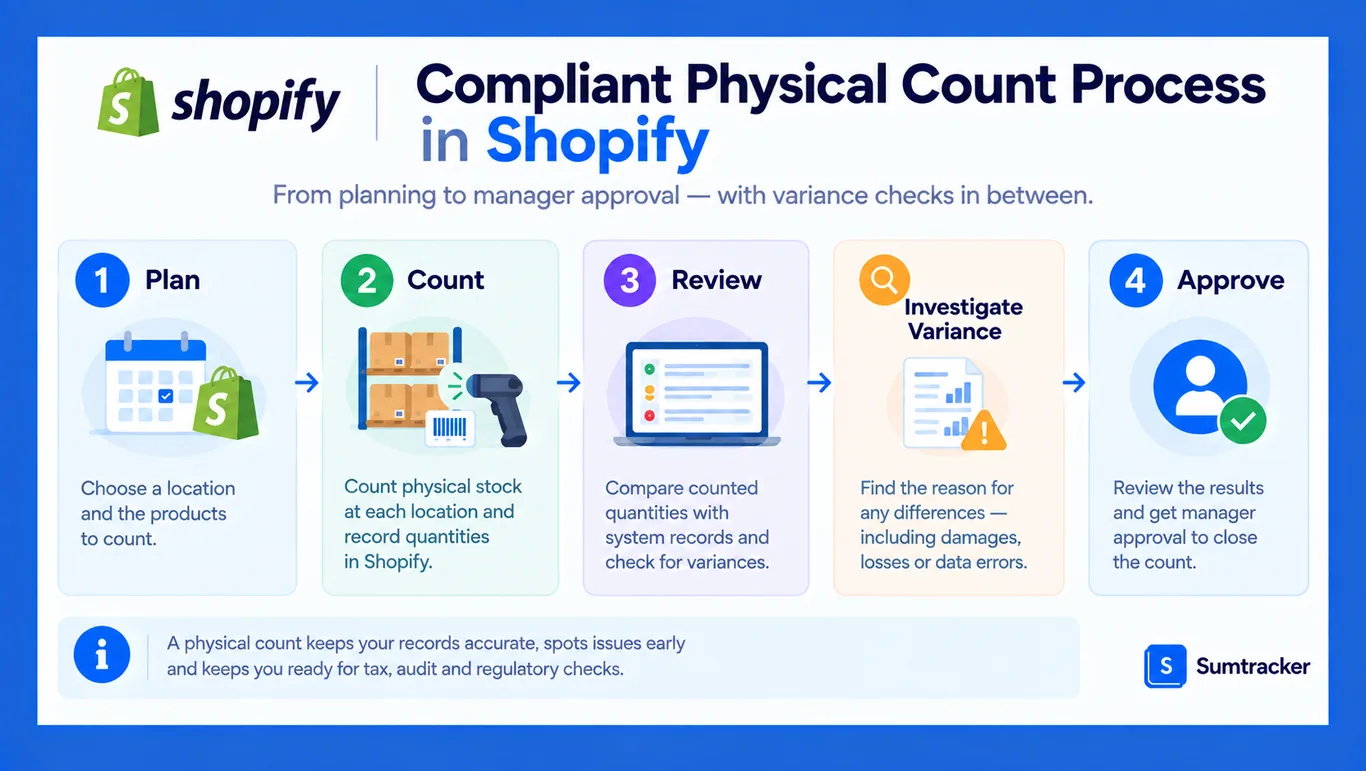
A compliant inventory count is planned, checked against your records, investigated and approved before stock levels change.
Shopify’s stock counts feature follows four steps:
- Plan the count in Products → Inventory → Stock counts.
- Count using barcode scanning or by hand. At POS Pro locations, store associates can count in the POS app.
- Review the differences.
- Approve as a manager. Shopify then updates stock and logs each change.
Add these controls:
- Pause or record sales and stock transfers during the count.
- Use a second counter for high-value stock.
- Don’t let the counter approve their own variances.
- Investigate large inventory variances before approving, for example anything over 2% of a location’s units.
- Keep the count sheet and sign-off with your monthly records.
For how often to count your store inventory, see our Shopify inventory audit checklist.
Which Apps Help With Inventory Compliance?
Inventory management apps fill four gaps in Shopify:
- longer audit trails
- cost tracking
- lot and expiry tracking
- one stock record across all your sales channels
Pick inventory management software based on the gap you need to close.
Before you install, ask each app:
- How far back does its history go, and can you export it?
- Which cost method does it use, and does it update Shopify?
- Can it list every order that got a specific lot?
- Does it support purchase order creation and receiving?
- Does it send COGS and adjustments to your accounting software?
- Does it support custom workflows, for example with Shopify Flow?
Why this matters: Disconnected tools mean several versions of the truth. Reconcile each inventory system monthly, or choose one system of record.
One stock record makes it easier to track inventory levels across multiple sales channels and warehouses. When baby-carrier retailer Babymaxi moved to multiple 3PLs, it centralized stock in Sumtracker. The Babymaxi case study reports:
- 99%+ inventory accuracy
- overselling down from 5–7 incidents a month to near zero
- inventory admin cut from about 10 to 3 hours a week
Sumtracker is an inventory management, forecasting and planning platform for Shopify and multi-channel eCommerce brands. It logs stock movements with up to 18 months of history and updates landed cost from purchase orders (as of October 2026). It doesn’t track batches or expiry dates, and it isn’t an accounting system.
How Compliant Records Improve Inventory Control
Records built for compliance also make day-to-day inventory control more reliable. Reorder points, safety stock and forecasts all run on the same inventory data.
- Reorder points and safety stock need accurate stock levels and supplier lead times. Wrong counts mean you reorder too late or too early.
- Low stock alerts in Shopify Flow fire based on recorded quantities, so they’re only as good as your records.
- ABC analysis in Shopify’s inventory reports ranks your product catalog by revenue, so you know which items to count most often.
- Demand forecasting and inventory forecasting use your sales history to predict demand and plan for seasonal demand. Some tools use machine learning algorithms, but every method depends on clean data.
When records drift, you get lost sales. A customer buys an item that isn’t there, and fulfilling orders turns into cancellations that hurt customer satisfaction. Accurate records help you meet demand as customer demand and your supply chain shift.
To set those numbers up, see our guides to safety stock and reorder points.
How to Set Up Internal Controls for Inventory
Internal controls are simple rules that stop mistakes and misuse before they reach your records. The essentials are limited access, split duties, required reasons and monthly checks.
Common mistake: Adding a long compliance step that staff skip when busy. Half-filled records are hard to defend. Keep required fields few and check a sample each month.
Shopify’s permissions have limits. For example, you can’t limit inventory access to one location. Our guide to controlling inventory access in Shopify covers workarounds.
For the monthly check, follow our guide to inventory reconciliation.
Frequently Asked Questions
Does Shopify have built-in inventory compliance features?
Partly. Shopify tracks stock by state and location, keeps adjustment history and reports, offers optional reasons and supports approved stock counts. It doesn’t keep cost history, lot data or approvals, so most stores add a process or an app.
Does Shopify calculate COGS using FIFO?
No. Shopify uses the single cost per item in place when an item sells. It doesn’t use FIFO or weighted average. For those, use your accounting system or an inventory app that calculates cost from each delivery.
How long should a Shopify store keep inventory records?
In the US, the IRS generally requires three years, and up to seven in some cases. Many businesses keep seven. Canada and the UK generally require six years. Regulated food and supplement records have their own rules.
Do I need inventory compliance if I dropship?
Yes, but less of it. In a dropshipping business model you hold no stock, so you have no counts or write-offs. You still need supplier invoices to back up COGS, and regulated products still need lot and supplier records.
Do I need a physical count if I use Shopify?
Yes. If you rely on Shopify’s running stock levels, the IRS expects physical counts at reasonable intervals, with records corrected to match. Shopify’s stock counts feature lets you plan, count, review and approve them.
Conclusion
Inventory compliance for Shopify stores comes down to records you can show and defend: what you hold, what it cost and why it changed.
Shopify gives you a good base, but it doesn’t keep cost history, the value of each change or long-term records on its own.
To track inventory with records that hold up, add a monthly package for your accountant, required reasons and regular counts. Use an app where you need one.
Start this month: export your stock snapshot and adjustment reports, and agree a retention period with your accountant.
Related Articles
Tool and strategies modern teams need to help their companies grow.
.avif)


Ready to Simplify Your Inventory Management?
Join hundreds of e-commerce merchants who rely on Sumtracker to save time, eliminate errors, and grow their business.