.svg)
Shopify Made-to-Order Inventory: How to Manage Custom Products Without Stock


If you sell personalized products on Shopify, you don't necessarily need a warehouse full of finished goods.
You can make the product only after someone places an order, which keeps your inventory lean.
But it also creates a different set of challenges.
With made-to-order products, your real inventory isn't just the finished product.
It's the materials, production time, capacity, and supplier availability behind each order.
If any of those are mismanaged, you can end up with delayed orders, missed delivery promises, or shrinking margins.
The good news is that Shopify gives you several ways to structure an MTO business.
The key is knowing which settings to use, how much you can realistically produce, and how to keep your customers informed.
In this guide, we'll walk through how made-to-order inventory works on Shopify, how to set it up, manage materials and production capacity, calculate profitability, and keep orders moving from purchase to delivery.
What Is Made-to-Order Inventory on Shopify?
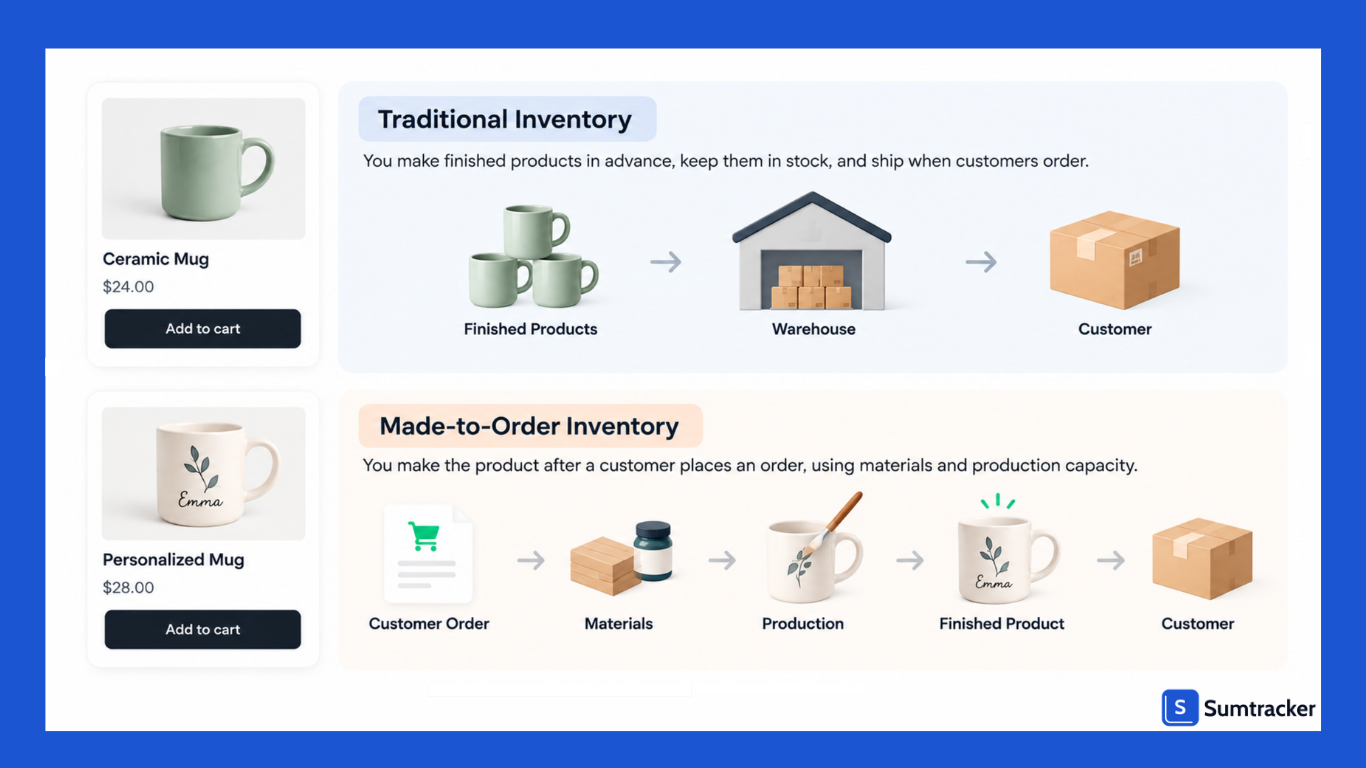
Made-to-order (MTO) inventory means you produce an item only after a customer buys it. You don't need to keep finished products in stock. Instead, you need the materials, components, labor, and capacity to make them.
Shopify's own guide describes on-demand manufacturing in a similar way. Production starts after the customer places an order. This reduces the need to hold finished inventory and lowers the risk of unsold products.
Common MTO products on Shopify include:
- Personalized jewelry, engraved gifts, and custom prints
- Furniture and home goods made in specific sizes or finishes
- Tailored or made-to-measure clothing
- Ceramics, candles, and other handmade goods
- Print-on-demand apparel
The key idea: in an MTO business, your real inventory is materials and capacity. Your finished-goods count on Shopify is just a switch that controls whether customers can check out.
How Does Made-to-Order Inventory Work?
A typical MTO workflow has five stages: order, production, quality check, fulfillment, and shipping.
Here's what each stage looks like:
- Order placed. The customer chooses the product and provides any required details, such as size, material, engraving, or uploaded files.
- Order sent to production. The order is passed to your production team or manufacturing partner. This can happen through a job sheet, production board, or automated workflow.
- Production. Materials are pulled and the item is made.
- Quality check. Each piece is checked against the customer's exact specs, not just a batch sample.
- Pack and ship. The product is packaged and shipped. The order is then marked as fulfilled in Shopify and tracking is shared with the customer.
Many MTO brands are actually partly pre-built. They stock semi-finished parts and customize at the last step. That cuts lead time without the risk of holding finished goods.
Case study: Jono Pandolfi Designs. Jono Pandolfi Designs keeps some ceramics in bisque form. The team then glazes and finishes them after receiving an order. This lets the brand offer customized products while reducing production time.
Rule of thumb: If your production time is longer than customers will wait, find the slowest step that isn't customer-specific. Do that step ahead of time and stock the result.
How to Set Up Made-to-Order Products on Shopify
Shopify doesn't have a single "made-to-order" toggle. You build the setup from a few native settings, plus apps where needed.
Step 1: Choose your inventory setting
You have three options per product or variant.
Shopify allows Continue selling when out of stock only when inventory tracking is enabled. It also lists made-to-order products as a use case for this setting.
Pro tip: If you have a fixed weekly capacity, you can use inventory quantity as production slots. For example, set the quantity to 40 and turn off overselling. Once all 40 are ordered, the product stops selling.
Step 2: Set up customization options
Use variants for choices that change price or materials (size, wood type, metal). Shopify supports up to 2,048 variants and three options per product. For additional customization, such as engraving text, use line item properties or a product options app.
Step 3: Show a realistic delivery date at checkout
Go to Settings > Shipping and delivery > Expected delivery dates. Shopify lets you set a custom processing time of 3–40 business days or 1–8 weeks.
For MTO products, use a processing time that reflects your actual production time. If different products have different lead times, show those differences on the product page.
Step 4: Decide how customers pay
You can charge in full at checkout, capture payment later, or take a deposit through an eligible pre-order setup.
Step 5: Label MTO products clearly
Put the lead time on the product page, in the cart, on the order confirmation, and in your shipping policy. One mention is not enough.
Made-to-Order vs. Pre-Order: What's the Difference?
People often mix these up. They solve different problems.
- Made-to-order: The product is made for a specific customer after purchase. It often has custom specs.
- Pre-order: The product is standard, but it isn't released or restocked yet. Many customers get the same item.
- Backorder: The product was in stock, sold out, and more is coming.
Shopify handles true pre-orders through purchase options.
According to Shopify, to use preorders, you need to install a preorder app from the Shopify App Store and then manage preorders in the Shopify admin.
Also, pre-orders are currently only available to merchants using Shopify Payments or PayPal Express.
Pre-order apps can also support deposits and deferred payments. Shopify supports purchase options such as pre-orders, subscriptions, and try-before-you-buy, but not installments, layaways, or crowdfunding.
How to Calculate Profitability for Made-to-Order Products
MTO reduces the risk of unsold finished inventory. However, the cost per unit can be higher. The clear tradeoff is that on-demand production can reduce economies of scale because you make products individually.
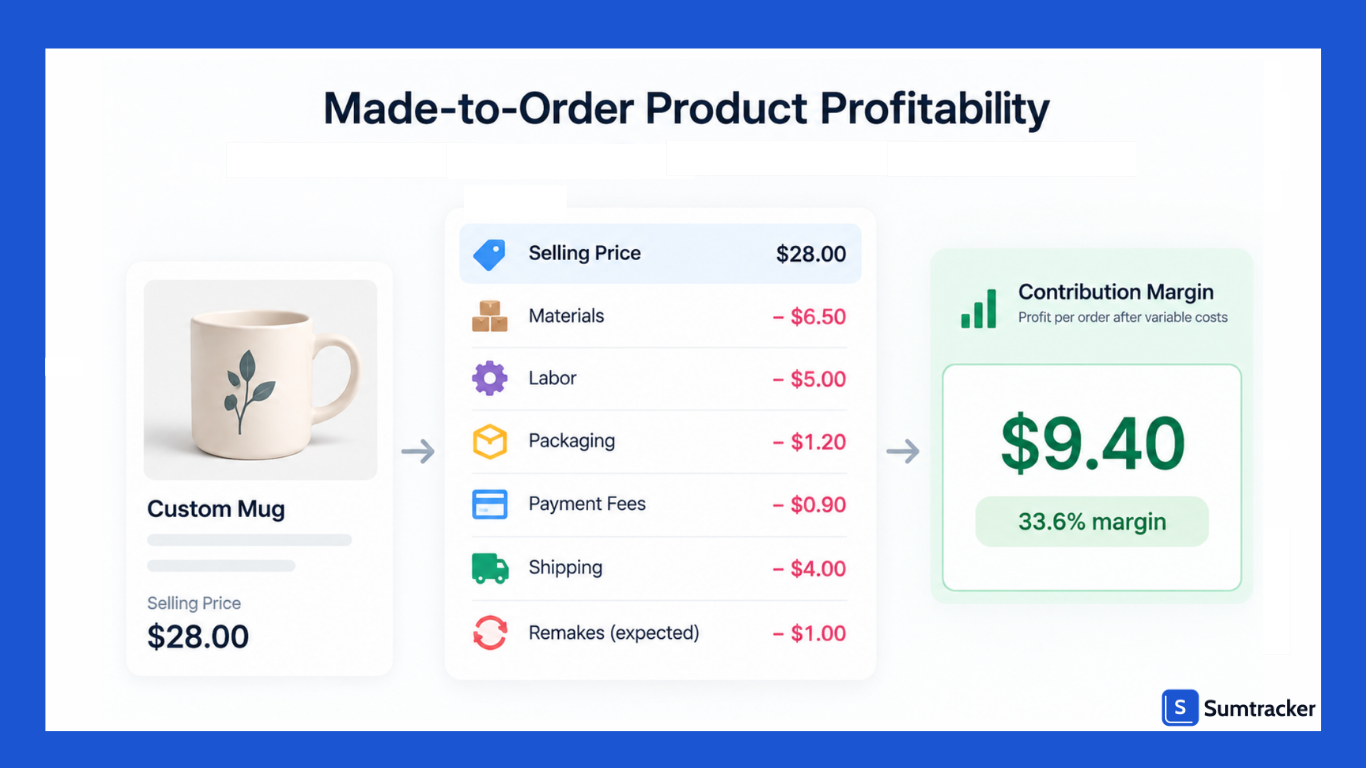
So price your products based on your actual cost per order, not just what similar mass-produced products cost.
The formulas
Contribution margin per order = Price − (Materials + Labor + Packaging + Payment fees + Shipping you absorb + Remake allowance)
Minimum price for a target margin = Fixed costs per order ÷ (1 − Payment fee % − Target margin %)
How to Plan Production Capacity and Set Order Limits
In a stocked business, you run out of product. In an MTO business, you run out of time. Capacity planning is how you avoid promising dates you can't hit.
Step 1: Calculate weekly capacity
Weekly capacity (units) = (Makers × Productive hours per day × Working days) ÷ Hours per unit
Step 2: Plan below 100%
Nobody works at full capacity every hour. Machines break, people get sick, and remakes happen. Plan orders at around 75% to 85% of theoretical capacity.
Step 3: Quote lead time from the backlog
Quoted lead time = (Current backlog ÷ Weekly order cap) + Production time + Buffer
With 1.5 weeks of queue, plus 2 days to make and finish, plus a 2-day buffer, the shop should quote roughly 2.5 weeks before shipping. That fits inside Shopify's custom processing time range.
Pro tip: Update your quoted lead time every week based on the backlog. A fixed "ships in 2 weeks" message becomes false the moment you get a busy week.
How to Manage Raw Materials for Made-to-Order Products
You don't stock finished products, so raw materials become your inventory. Running out of one wick, clasp, or fabric roll can stop production completely.
Shopify doesn't track this layer well. It shows finished-product quantities, not the parts that go into them. We covered this gap in detail in our guide to component and raw material tracking for Shopify stores.
Build a bill of materials (BOM)
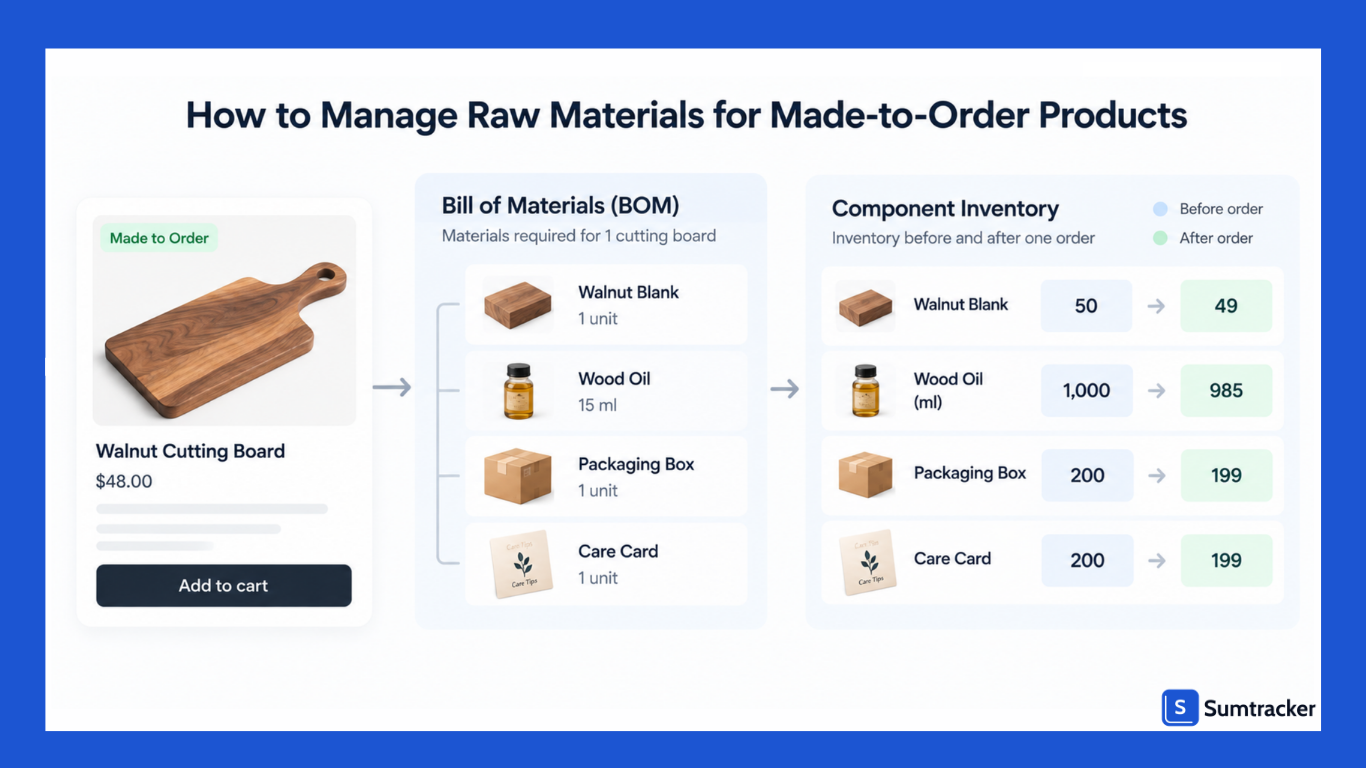
A BOM lists every material and quantity that goes into one finished unit. For example, one cutting board might use one walnut blank, 15 ml of oil, one box, and one care card.
Once you have BOMs, an inventory tool can deduct materials automatically when an order comes in. In Sumtracker, you can set materials up as components of a product, so each sale reduces the component stock behind it.
Planning, forecasting, and replenishment are three different jobs
These terms get used as if they mean the same thing. They don't.
- Forecasting estimates demand. How many boards will we sell next month?
- Planning decides what you need to meet that demand. How many blanks, how many labor hours, and when?
- Replenishment is the action of restocking. Place the purchase order when blanks hit the reorder point.
Good forecasting without replenishment still leads to stockouts. Fast replenishment without forecasting leads to overbuying.
Forecasting accuracy also shapes how much buffer you need.
A 2026 study found that AI-based forecasting models cut safety stock by 19.4% and led to 28.6% fewer stockouts than traditional time-series methods.
The better your demand estimate, the less extra material you have to hold just in case.
Set reorder points for each material
Reorder point = (Average daily usage × Supplier lead time in days) + Safety stock
Rule of thumb: Set safety stock highest on materials with long lead times or a single supplier. A cheap part from a slow, sole supplier can hold up more orders than your most expensive material.
How to Find and Manage Manufacturers and Suppliers
MTO puts extra pressure on suppliers. You often need small quantities, fast turnaround, and consistent quality on every single unit.
When vetting suppliers or production partners, check:
- Minimum order quantities (MOQs) for materials and for production runs
- Lead time, and how reliable it has been in practice
- Rush capacity and what it costs
- Quality standards, including how they handle defects and remakes
- Backup options, so one supplier's delay doesn't stop your whole catalog
A sudden spike can overwhelm a low-volume production system. It is recommended to have a redundancy plan, such as multiple, pre-vetted manufacturing partners to manage overflow.
Once you have suppliers in place, standardize your purchase orders. Grouping materials by supplier into one PO saves time and reduces errors. We explain how in our guide to automating purchase orders.
Legal Requirements and Consumer Protection for Made-to-Order Products
Longer lead times bring legal duties. This section is general information, not legal advice. Check the rules for every market you sell into.
United States: the FTC Mail, Internet, or Telephone Order Rule
The FTC rule applies to most online orders. If you make no shipping statement, you must have a reasonable basis for believing you can ship within 30 days. That's why it's often called the "30-day rule."
If you can't ship on time, you must act. A business must notify the customer of the delay, give a revised shipment date, and explain the customer's right to cancel for a full, prompt refund.
Consent rules depend on the length of the delay. For definite delays of up to 30 days, businesses may treat the customer's silence as agreement.
For longer or indefinite delays, and for second and later delays, they need the customer's written, electronic, or verbal consent.
For MTO sellers, this means your stated lead time is a legal promise, not just marketing copy.
European Union: withdrawal rights and personalized goods
EU consumers usually get 14 days to withdraw from an online purchase. Personalized items can be an exception.
The right of withdrawal doesn't apply to goods produced to the customer's specifications or that are clearly personalized.
Two practical points:
- The exception must be disclosed. Sellers must inform consumers before the purchase, or they lose the right to rely on the exception.
- It covers truly custom items, not standard products you simply make after the order. A plain mug made on demand isn't the same as a mug printed with the customer's name.
There's also a newer rule for stocked items. Since 19 June 2026, traders selling to EU consumers online must provide a prominently displayed, easy-to-find online withdrawal function, commonly called the "withdrawal button."
It covers contracts where a statutory right of withdrawal exists, meaning cases where no Article 16 exemption applies.
If you run a hybrid catalog, your personalized items may be exempt while your stocked items are not.
Pro tip: Write your policy per product type, not per store. "Personalized items can't be returned unless faulty. Ready-to-ship items can be returned within 14 days" is clearer and safer than one blanket rule.
How to Manage Cash Flow for Made-to-Order Products
MTO can be very cash-friendly. You often get paid before you spend on production. That only holds if you choose your payment timing carefully.
Manual capture is risky for long lead times. Shopify Payments provides an authorization period of 7 days.
Shopify Plus merchants get more room on some cards, but it costs extra. When you manually capture a payment after the standard 7-day period, a 1.75% charge applies on top of standard credit card fees.
Pre-order apps avoid this by saving the card. Per Shopify's developer docs, you can enable deposits for pre-order and Shopify stores the customer's payment method, so merchants can collect the remaining balance without contacting the customer.
Rule of thumb: If your lead time is longer than your authorization window, don't rely on manual capture. Charge in full or take a deposit with a saved card.
Also track the cash gap: the days between paying for materials and receiving customer money. If you buy materials in bulk ahead of orders, that cash is tied up until those materials are used.
How to Manage Orders and Fulfillment for Made-to-Order Products
MTO orders sit unfulfilled much longer than stocked orders. Without a clear system, they get lost.
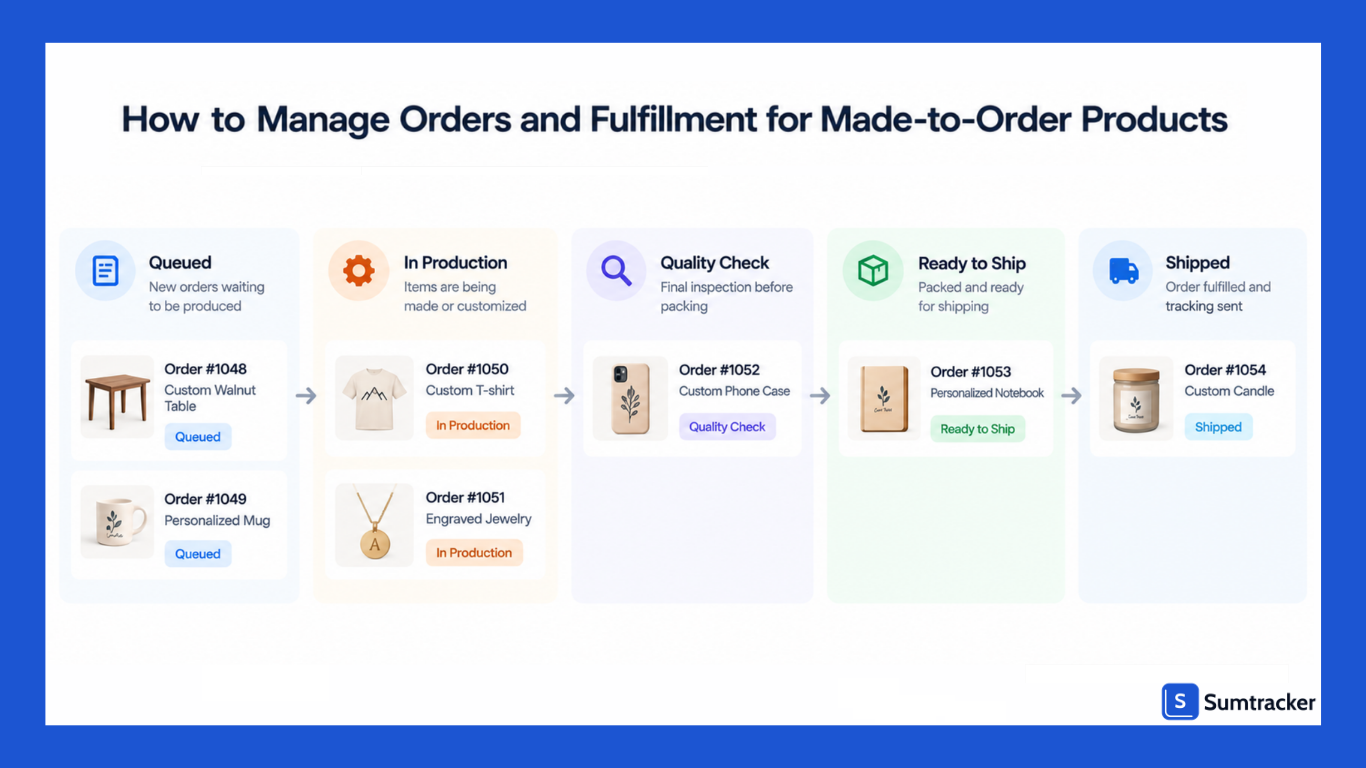
Practical ways to organize them in Shopify:
- Tag orders by stage (for example: mto-queued, in-production, qc, ready-to-ship). Filter your orders list by tag to see the pipeline.
- Use Shopify Flow to add tags automatically when an order contains an MTO product.
- Print job sheets that include every line item property, so makers never work from memory.
- Split mixed orders. If an order has a stocked item and an MTO item, decide upfront whether you ship the stocked item first or hold everything.
- Check specs twice. Confirm engraving text and measurements before production starts. Catching a typo at order review costs nothing. A typo caught after production costs a full remake.
If you sell the same MTO products on Amazon, Etsy, or eBay as well as Shopify, keep material stock and order caps synced across every channel.
Otherwise, each channel sells against the same capacity as if it were the only one.
Customer Communication and Expectation Management
Slow delivery is a known reason shoppers abandon purchases.
In Baymard Institute's US data, 21% of shoppers who abandoned during checkout said delivery was too slow.
For MTO sellers, the fix isn't always faster production. Often it's clearer expectations earlier, so the right customers buy and the rest aren't surprised.
Where to state your lead time:
- Product page, near the Add to Cart button
- Cart page
- Checkout (via Shopify's expected delivery dates)
- Order confirmation email
- Shipping policy page
Then keep customers updated. A simple sequence works well: order confirmed, production started, quality check passed, shipped with tracking.
Pro tip: Promise the date you can hit on a bad week, not a good one. Shipping early builds goodwill. Shipping late triggers support tickets and, under the FTC rule, delay notices.
Hybrid Inventory Models: Combining Stocked and Made-to-Order Products
Most growing brands end up with a mix. They stock their bestsellers and make the long tail to order. This works well because each product gets the model that suits its demand.
A common split:
- Stock: core sizes, popular colors, fast-moving gifts
- Make to order: rare sizes, premium materials, personalized items
- Stock semi-finished parts: blanks, bases, or bisque-fired pieces that get customized later
Case study OKA: British furniture brand OKA runs a hybrid model on Shopify Plus. Stocked items reach UK customers within about three weeks, while its "Tailored by OKA" pieces are made to order in the customer's choice of fabric, colour, and finish and can take up to 20 weeks. OKA lists lead times by product range, ships made-to-order pieces separately from stocked items, and publishes an order-by date for Christmas delivery.
🎧 Listen: Fusion on Shopify Masters, where Fusion's team explains their nightly sync, raw-material forecasting, and discount discipline.
The main hybrid risk is shared materials. If a stocked product and an MTO product use the same fabric, both draw from one pool. Track that material as one component across both, or you'll promise MTO orders with fabric already used for stock.
How to Market Made-to-Order Products on Shopify
MTO gives you marketing angles that stocked brands don't have. Use them.
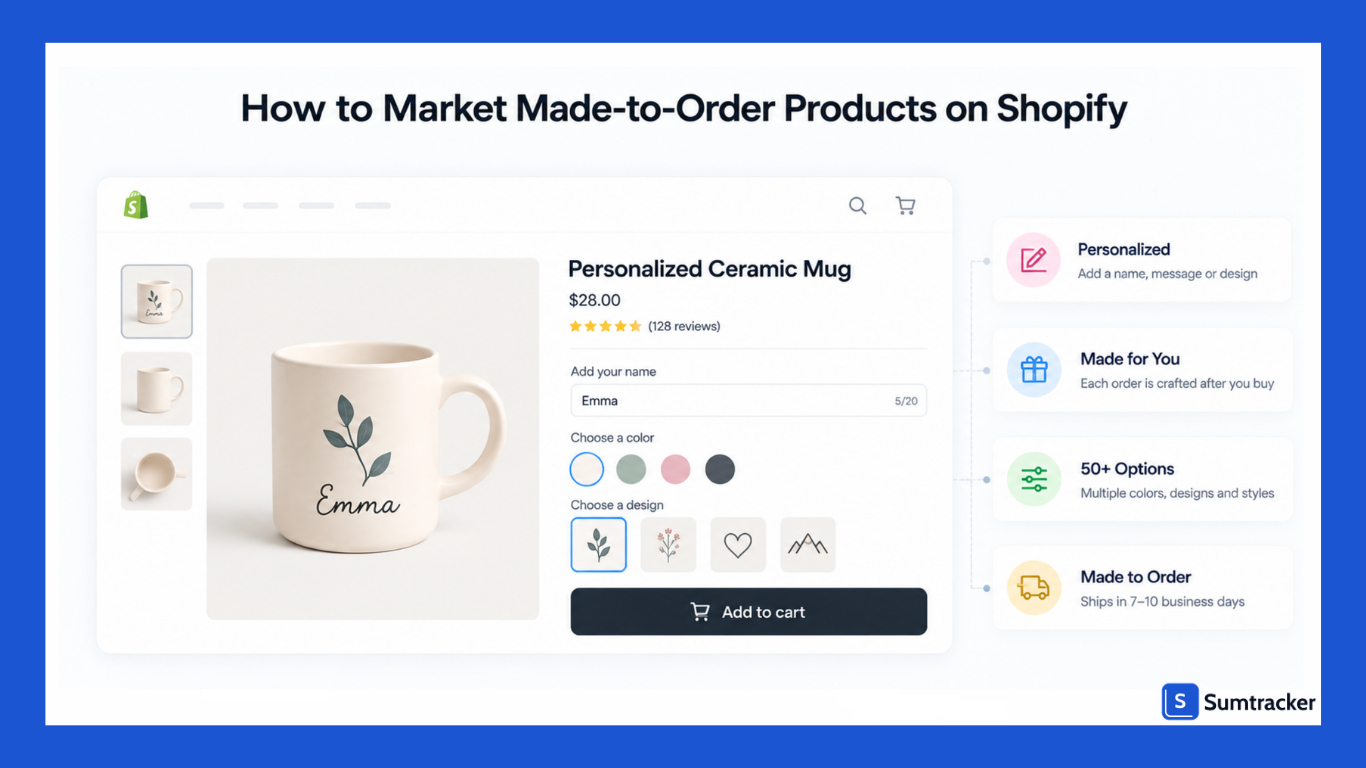
- Show the process. Behind-the-scenes photos and short videos make the wait feel worthwhile.
- Sell the choice. "Seven sizes" or "50+ shapes" is a concrete benefit. Show the range visually.
- Highlight less waste. Making to order can reduce unsold stock. State this carefully and avoid broad sustainability claims you can't back up.
- Use customer photos. Real personalized results build trust in the final product.
- Add a live preview for engraving or text customizations, so buyers see what they'll get.
- Offer paid rush production for gift deadlines, but only if your capacity plan has room for it.
- Plan seasonal cutoffs. Publish "order by" dates for holidays well in advance, based on your real backlog.
Keep your product pages focused. Jono Pandolfi's advice was to trim your offering down so it is as stripped down and reproducible as possible. Too many options can slow production and confuse buyers.
Key Metrics and KPIs for Made-to-Order Operations
Stocked brands watch sell-through and turnover. MTO brands need a different set.
Rule of thumb: Review on-time ship rate and backlog weekly, and margin and remake rate monthly. Weekly numbers help you adjust lead times. Monthly numbers help you adjust pricing.
Common Made-to-Order Inventory Challenges and How to Solve Them
Best Practices for Managing Made-to-Order Inventory on Shopify
- Treat materials and capacity as your real inventory. Finished-goods settings in Shopify are only the storefront switch.
- Pick one Shopify inventory setting per product type and apply it consistently: not tracked, tracked with overselling, or production slots.
- Quote lead times from your live backlog, and update them weekly.
- Plan at 75% to 85% of capacity so remakes and bad weeks don't break your promises.
- Price from full per-order costs, including a remake allowance and any shipping you absorb.
- Match payment timing to lead time. Avoid manual capture when production takes longer than the authorization window.
- Disclose return rules before purchase, especially for personalized items sold into the EU.
- Stock semi-finished parts where it shortens lead time without adding much risk.
- Track every material with a bill of materials and a reorder point.
- Communicate at every stage, from product page to shipping confirmation.
Made-to-order selling works best when the back end is as organized as the storefront.
Conclusion
Made-to-order inventory on Shopify is less about managing finished stock and more about managing materials, production capacity, lead times, and customer expectations.
The right setup depends on how your business operates.
Use Shopify's inventory settings to control whether customers can place orders, set realistic processing times based on your backlog, and make your production capacity visible in your order limits.
For the materials behind each product, use bills of materials, reorder points, and supplier planning to prevent one missing component from stopping production.
As your catalog grows, a hybrid approach can also make sense: keep fast-moving products in stock, make slower or personalized products to order, and stock semi-finished components where they can shorten lead times.
The goal isn't simply to accept more MTO orders. It's to build a system that lets you accept the right number of orders, deliver when promised, and maintain healthy margins as you grow.
Frequently Asked Questions
Can you sell made-to-order products on Shopify?
Yes. Shopify does not have a single made-to-order setting, but you can configure products using its inventory tracking and overselling settings. You can also use inventory quantities as production slots when you have a fixed production capacity.
How do I manage inventory for made-to-order products on Shopify?
Instead of focusing only on finished-product stock, track the materials, components, and production capacity needed to fulfill orders. Bills of materials and reorder points can help you know when materials need to be replenished.
Should I track inventory for made-to-order products on Shopify?
It depends on your production model. If you have no fixed order capacity, you can leave inventory untracked or allow selling when inventory reaches zero. If you have a fixed weekly capacity, tracked inventory without overselling can be used to represent available production slots.
How do I set a lead time for made-to-order products on Shopify?
Set a processing time that reflects your actual production time and current backlog. Shopify allows custom processing times of 3–40 business days or 1–8 weeks. For businesses with changing demand, update the quoted lead time regularly rather than using a fixed estimate.
What is the difference between made-to-order and pre-order?
Made-to-order products are produced for a customer after they place an order, often with custom specifications. A pre-order is typically for a standard product that isn't available yet and will be produced or released later.
How do I prevent too many made-to-order orders on Shopify?
If production capacity is limited, use tracked inventory as production slots and turn off overselling. You can also calculate a weekly order cap based on your available production hours and leave a buffer for remakes, delays, and unexpected issues.
How should I manage raw materials for made-to-order products?
Create a bill of materials for each product so you know which materials and quantities are required for every order. Then set reorder points for critical materials based on usage, supplier lead time, and safety stock.
Can made-to-order products be sold alongside stocked products?
Yes. A hybrid inventory model can combine stocked bestsellers with made-to-order products and semi-finished components. The important thing is to track shared materials across both models so one product doesn't consume materials needed to fulfill another.
Conclusion

Bhoomi writes about inventory management and multichannel selling at Sumtracker. Her focus is on solving real operational problems for Shopify, Amazon, and marketplace sellers through well-researched content. She covers everything from multi-location inventory syncing and stock error troubleshooting to replenishment planning and platform comparisons, turning complex eCommerce operations into clear, actionable guidance.
LinkedInRelated Articles
Tool and strategies modern teams need to help their companies grow.
.avif)

.avif)
Ready to Simplify Your Inventory Management?
Join hundreds of e-commerce merchants who rely on Sumtracker to save time, eliminate errors, and grow their business.