How to Report Inventory Levels to Your Suppliers (Without the Spreadsheet Chaos)


At a Glance:
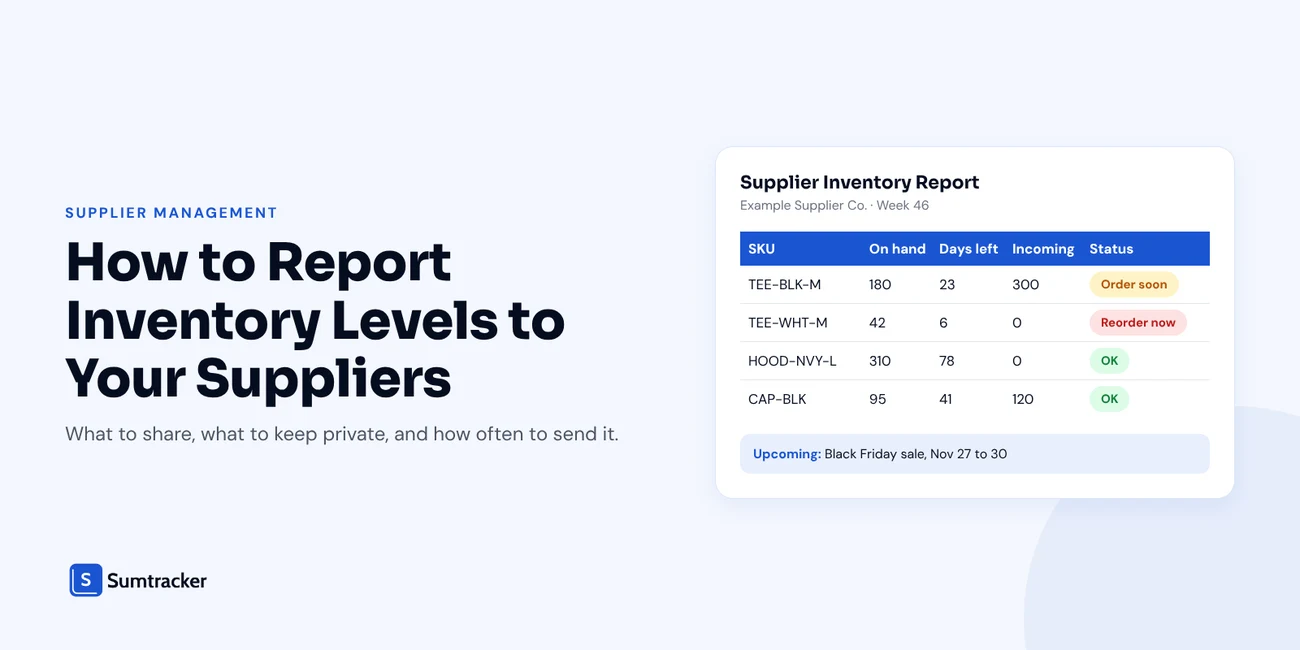
A supplier inventory report shows a supplier how much of their product you have, how fast it sells, what is already on order and what demand is coming. Sent on a fixed rhythm, it lets them plan production before your PO arrives.
- Include stock on hand by SKU and location, sales velocity, days of stock left, incoming stock on open POs and upcoming demand.
- Keep margins, retail prices, other suppliers' pricing and customer data private.
- Send it weekly for fast movers, every two weeks for steady sellers and monthly for slow movers or long lead times.
- Flag a SKU when days of stock left, including incoming, drops to lead time plus safety days.
Your supplier cannot plan around stock levels they cannot see.
So they wait for your purchase order. Then they quote a lead time. Then you find out the factory is already booked.
A short, regular inventory report fixes most of this.
It tells your supplier what you have, how fast it sells and what is coming. They plan production around real numbers instead of surprise orders.
This guide covers what to put in the report, what to leave out, how often to send it, and how to build one in under an hour.

Why Your Suppliers Need to See Your Inventory Levels
Most suppliers only learn about your demand when a PO lands in their inbox.
By then, it is often too late. Their raw materials are allocated. Their production slots are full. Your "urgent" order joins the queue.
This gap between seller and supplier is expensive across the whole industry. IHL Group's 2026 Inventory Distortion Study found that supply chain coordination failures account for $298 billion in annual losses, now the largest single cause of out-of-stocks and overstocks it measures.
You do not need enterprise software to close that gap. A clear report, sent on time, does most of the work.
Here is what changes when suppliers can see your numbers:
- Earlier warnings. They see a SKU running low before you place the PO, so they can reserve materials.
- Better production planning. They can batch your orders with others and schedule runs ahead of your peak.
- Fewer rush orders. Less air freight, fewer expedite fees and fewer "can you do it in two weeks?" emails.
- Stronger terms. A supplier who trusts your forecasts is more open to talking about MOQs, payment terms and priority slots.
Practical tip: Start with your top three suppliers by spend. They have the most impact on your stockouts and the most reason to read your report.
What to Include in an Inventory Report for Suppliers
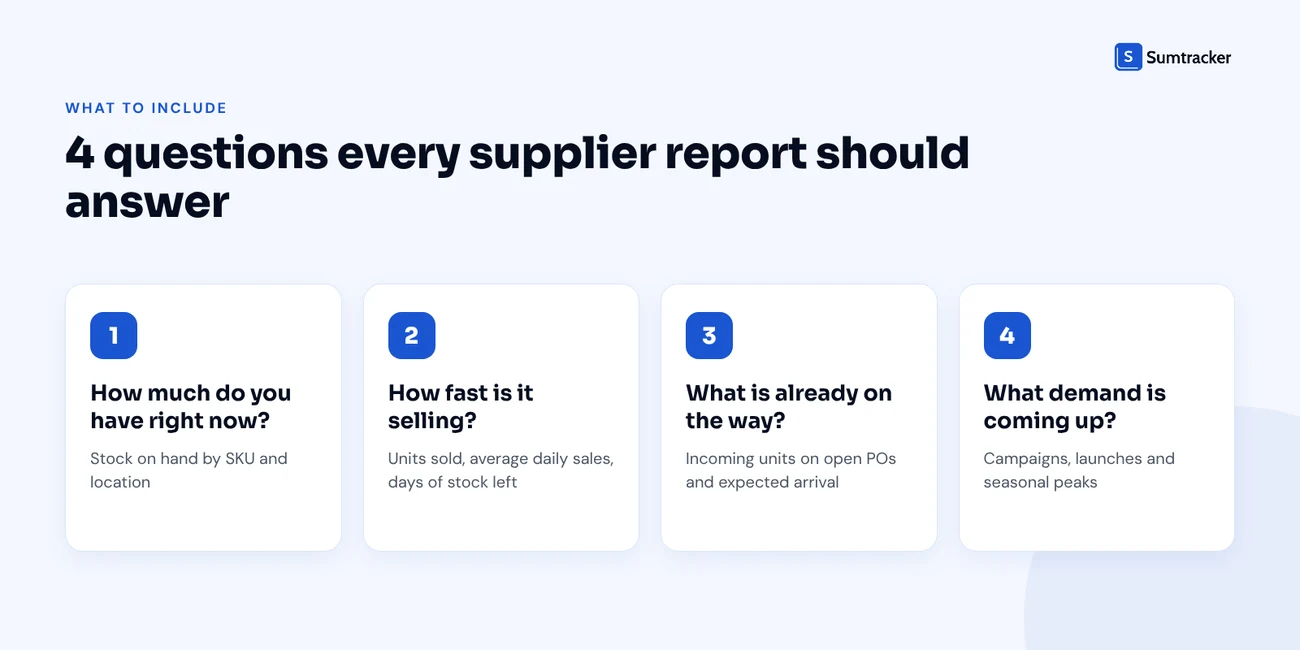
A good supplier report answers four questions:
- How much do you have right now?
- How fast is it selling?
- What is already on the way?
- What demand is coming up?
Before you build the report, make sure each product is linked to the right supplier. If you have not done that yet, our guide on linking suppliers to Shopify inventory covers SKU mapping and setup.
Here is what each column should include and why it matters to the supplier:
Stock on Hand by SKU and Location
List available stock for each SKU, not just a total.
If you hold stock in more than one place (your warehouse, a 3PL, a retail store), split it by location. A supplier who ships to two warehouses needs to know which one is running low.
Sales Velocity and Days of Stock Left
Raw stock numbers do not mean much on their own. 200 units could last a year or a week.
Add two simple calculations:
Average daily sales = Units sold in window ÷ Days in window
Days of stock left = Stock on hand ÷ Average daily sales
Example: you sold 240 units of a T-shirt in the last 30 days and have 180 left.
- Average daily sales = 240 ÷ 30 = 8 units per day
- Days of stock left = 180 ÷ 8 = 22.5 days
Now the supplier knows exactly how much time they have. For more on the first calculation, see our guide to sales velocity.
Rule of thumb: Use a 30-day window for fast or trending products and a 60 to 90-day window for steady sellers. Short windows react faster. Long windows smooth out one-off spikes.
Incoming Stock From Open POs
Always show what is already on order. Otherwise the supplier may read "22 days left" as an emergency when 300 units are already in production.
Add one more line to your calculation:
Days left including incoming = (Stock on hand + Incoming units) ÷ Average daily sales
Using the same example with 300 units on an open PO: (180 + 300) ÷ 8 = 60 days.

If you want a refresher on tracking open orders, our post on managing POs, suppliers and replenishment in one workflow walks through it.
Expected Demand (Campaigns, Peak Season, New Launches)
Your sales history only shows the past. Your supplier also needs to know what is coming.
Share anything that will move demand:
- Planned sales and discount events
- Product launches and restocks of popular items
- Seasonal peaks like Black Friday or back-to-school
- New channels or wholesale accounts going live
This matters more now that buying cycles are getting longer. The same IHL Group study found that 49% of retailers extended their advance-buying timelines by an average of three months in 2025 because of tariff volatility. When buyers order further ahead, suppliers need demand signals further ahead too.
Practical tip: Give each event a confidence level (high, medium or low). It tells the supplier which numbers to plan around and which to keep an eye on.
To save you building this from scratch, we turned every column above into a ready-to-use spreadsheet. Enter your stock, sales and open POs, and it works out average daily sales, days of stock left and a reorder status (Reorder now, Order soon or OK) for each SKU. It also has a tab for upcoming demand and a pre-send checklist.
Download the free Supplier Inventory Report Template →
What Not to Share With Suppliers
Sharing inventory data builds trust. Oversharing hands over your negotiating position.
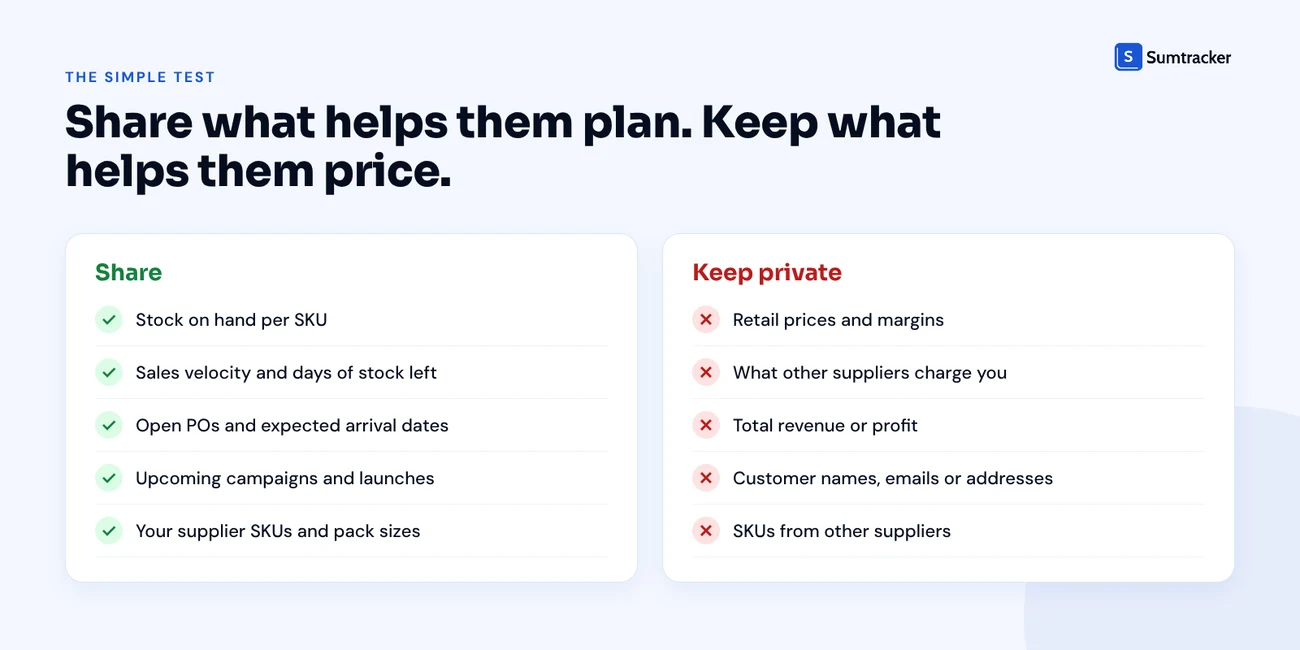
The simple test: share what helps them plan, keep what helps them price.
Rule of thumb: Only send each supplier their own SKUs. A report that lists every product you sell tells them who else you buy from. If you buy the same product from more than one supplier, our guide to managing multiple suppliers in Shopify shows how to keep those relationships separate.
How Often to Send Inventory Updates
There is no single right answer. Match the rhythm to how fast your products sell and how long the supplier takes to deliver.
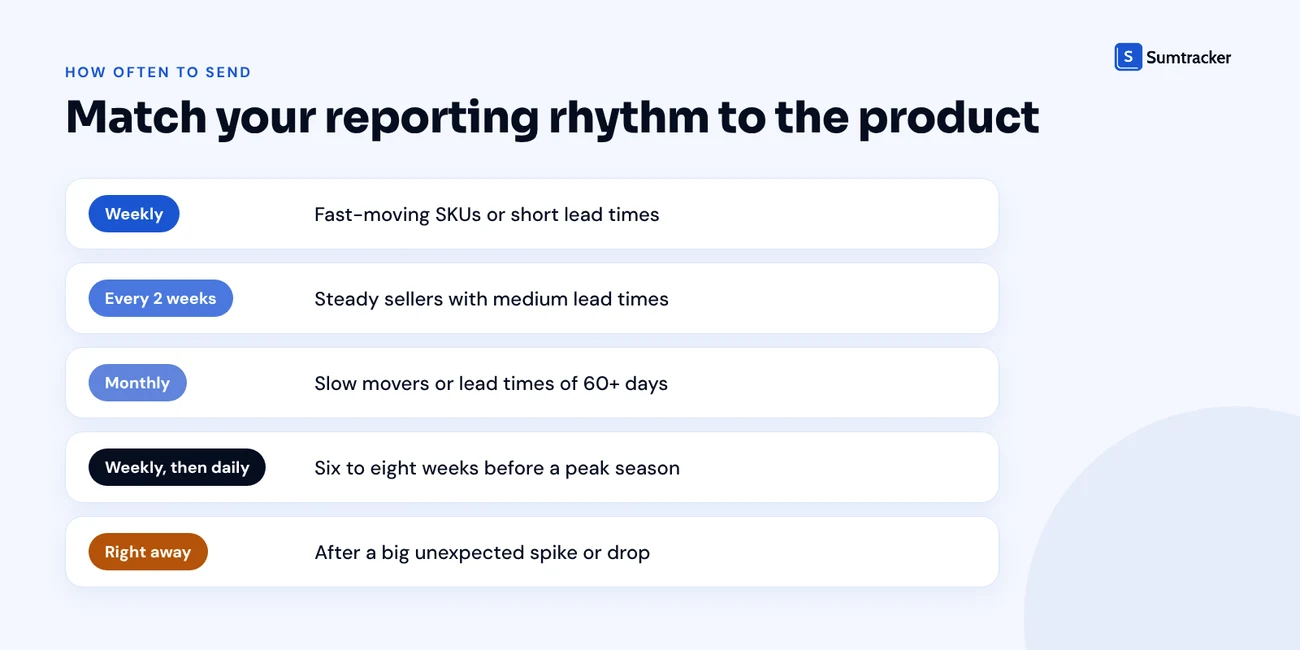
Practical tip: Pick a fixed day, like every Monday morning. Suppliers start to expect it, and you stop forgetting to send it.
Production planning looks different from the supply side. In this Ecommerce Coffee Break episode on planning production runs, Lara Guevara, CEO and founder of Move Supply Chain, talks about how first production runs go wrong, why alternative vendors matter and why visiting suppliers builds long-term relationships.
How to Build a Supplier Inventory Report Step by Step
This process assumes your products are already linked to suppliers. If not, set that up first using our supplier linking guide.
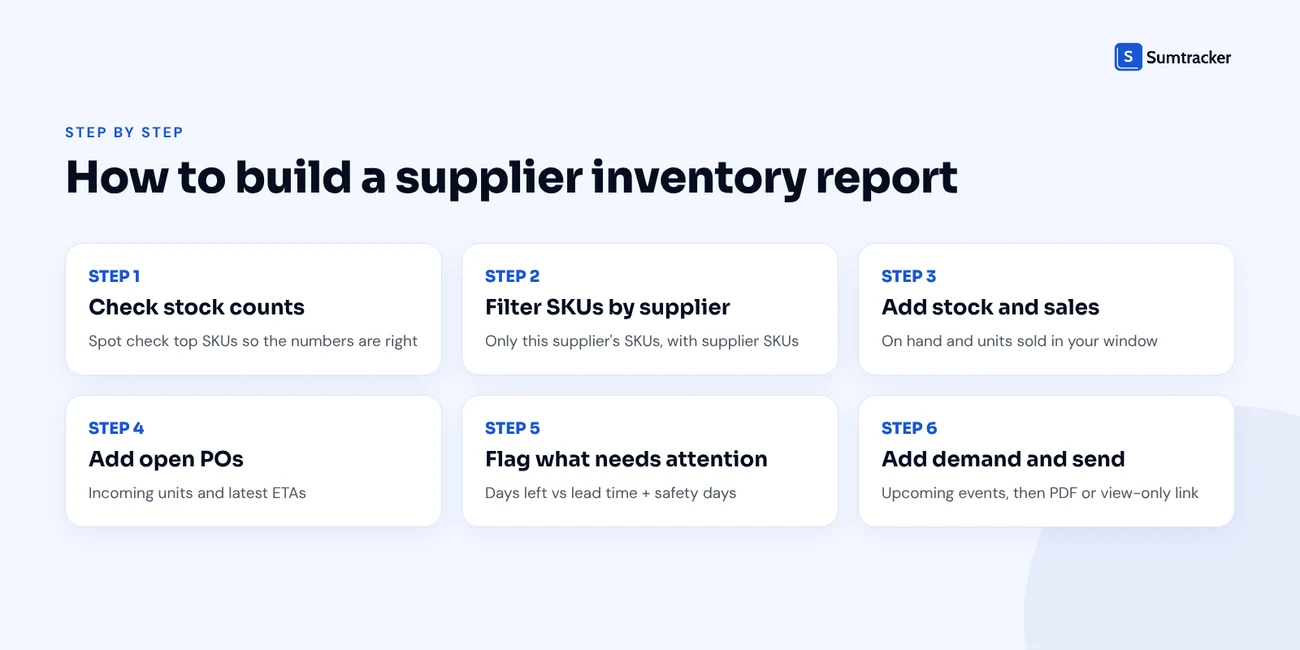
Step 1: Make Sure Your Stock Counts Are Accurate
A report is only as good as the numbers in it. If your counts are off, your supplier plans around the wrong figures.
Run a quick spot check on your top SKUs before the first report. Our free inventory audit template can help.
WMS&Co., a US specialty retailer that sells DTC and wholesale and works with a wide range of suppliers, faced this exact problem. Their stock reconciliation sessions took around two hours each. After moving to Sumtracker, the same sessions take 15 to 30 minutes, and they now run at 97%+ inventory accuracy.
Step 2: Filter Your SKUs by Supplier
Pull a list of only the SKUs this supplier makes. Add the supplier SKU next to each one.
In Shopify, the vendor field and your purchase order history are the quickest places to find this. Shopify's own purchase orders (Products > Purchase orders in your admin) also store a supplier SKU on each line.
Step 3: Add Stock and Sales Data
For each SKU, add stock on hand and units sold in your chosen window.
Shopify's built-in inventory reports can help here. Our Shopify inventory reports guide explains which reports show what.
Step 4: Add Open POs and Expected Arrival Dates
List every open PO for this supplier with the units still to arrive and the latest ETA.
If an ETA has already passed, flag it. That is the first thing your supplier should respond to.
Step 5: Flag SKUs That Need Attention
Compare days of stock left (including incoming) with the supplier's lead time.
Reorder now if: Days left including incoming ≤ Lead time + Safety days
Using our example: 60 days left, a 45-day lead time and 7 safety days. 60 is more than 52, so no urgent reorder. But it is close enough to flag as "order soon".
For how to set lead times and safety stock properly, see our guides on lead time and reorder points.
Rule of thumb: If a supplier's lead time varies a lot, base your flag on their slowest recent delivery, not their average.
Step 6: Add Upcoming Demand and Send
Add your planned events, check the report against the "what not to share" list, and send it as a PDF or a view-only link.
Ways to Share Inventory Reports With Suppliers
How you send the report matters less than sending it consistently. Here are the four common options.
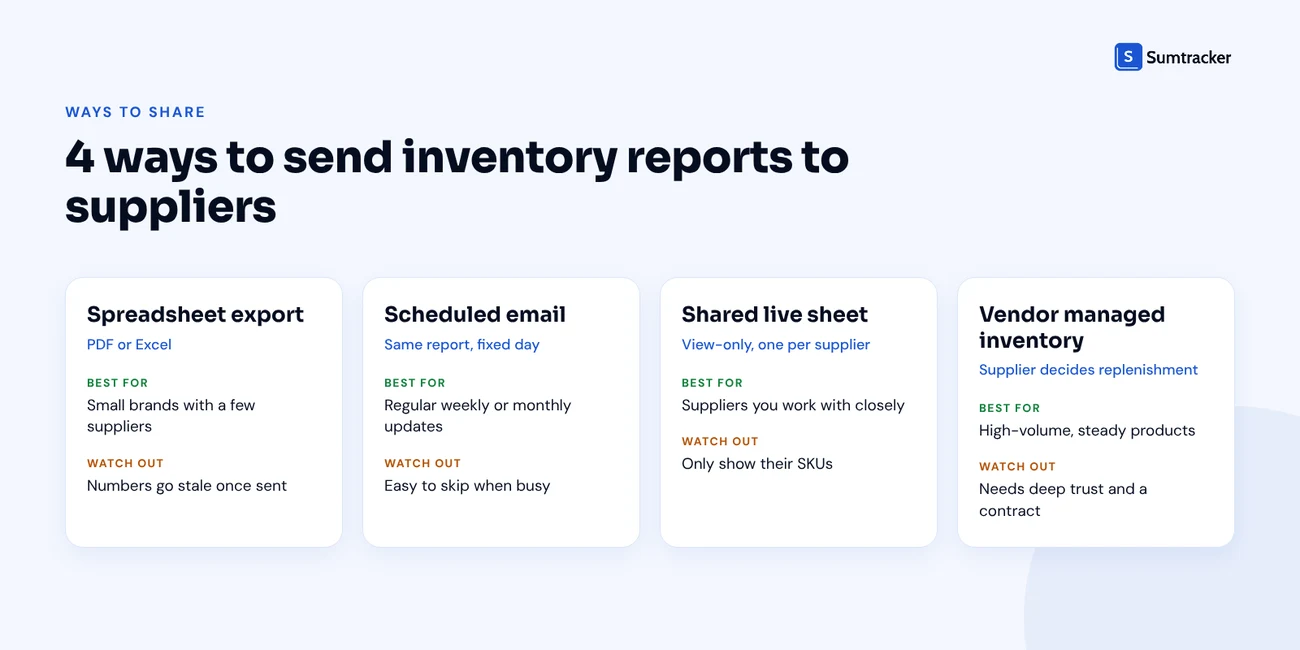
Spreadsheet Exports
The simplest option. Build the report, export it as a PDF or Excel file, and email it.
PDF is safer for sharing because the supplier cannot see your formulas or hidden columns.
Scheduled Email Updates
Same report, sent on a fixed day. Add two or three lines in the email body calling out what changed: "SKU X is selling faster than last month," or "PO 1042 is now five days late."
Those lines get read. The attachment often does not.
Shared Live Sheets
A view-only Google Sheet or similar that you update in place. The supplier always sees the latest numbers without waiting for an email.
Practical tip: Make one sheet per supplier. Never share a master sheet with filters, because filters can be removed.
When Vendor Managed Inventory (VMI) Makes Sense
With VMI, the supplier monitors your stock and decides when to send more, within limits you agree on. It is common with large retailers.
For most small and mid-sized ecommerce brands, it is a step too far. It works best when demand is steady, volumes are high and you trust the supplier with your data. If you are new to the idea, this short vendor managed inventory explainer covers how it works, its benefits and its risks.
Rule of thumb: Try regular reporting for at least two quarters before considering VMI. If a supplier cannot act on a weekly report, they will not handle your stock decisions well either.
Common Mistakes When Reporting Inventory to Suppliers
Stale or wrong numbers are the most common problem, and they are common across retail. IHL Group's Closing the Execution Gap research found that 78% of retailers deal with inventory inaccuracies on a weekly or monthly basis.
Here are the mistakes we see most often and how to fix them.
Do Not Forget Bundle and Packaging Components
If you sell bundles or kits, your component stock drops every time a bundle sells. A report that only shows finished products will undercount demand for those components.
The same goes for packaging and raw materials. Whif, an Australian fragrance brand on Shopify with a catalog of 1,000+ products, needs to track bottles, labels, boxes and fragrance products, not just finished perfumes. With Sumtracker, the team tracks every component in one place and has cut purchase order processing time by 50%.
For more on component tracking, see our guide on managing inventory for products sold in multiple bundles.
How Sumtracker Helps You Prepare Supplier Inventory Reports
Building the report by hand works for a few suppliers. Once you have dozens of SKUs across several suppliers and locations, the copying and pasting adds up.
Sumtracker keeps the numbers a supplier report needs in a single dashboard, so you are not stitching data together every week.
A few details worth knowing:
- The Days of Inventory Remaining report needs at least 30 days of sales data. It leaves out products with no sales in the selected period and products created during that period.
- On the Replenish plan, Sumtracker forecasts sales using up to 12 months of history, accounts for days a product was out of stock, and suggests reorder quantities and dates per product.
- Bundles are calculated at the component level, so component demand is not missed.
Try Sumtracker free for 14 days →
Final Thoughts
Your supplier is part of your inventory system, whether you treat them that way or not.
A short, accurate report sent on a fixed rhythm gives them what they need to plan: what you have, how fast it sells, what is on order and what is coming.
Keep your margins and pricing private. Send each supplier only their own SKUs. And start with your biggest suppliers first.
Grab the free supplier inventory report template and send your first report this week.
FAQs
What is a supplier inventory report?
A supplier inventory report is a document you send to a supplier showing your current stock, sales pace, open purchase orders and upcoming demand for the products they make. It helps the supplier plan production before your purchase order arrives.
How often should I share stock levels with my supplier?
Weekly for fast-moving products or short lead times, every two weeks for steady sellers, and monthly for slow movers or lead times over 60 days. Increase the frequency in the six to eight weeks before a peak season.
Is reporting inventory to suppliers the same as vendor managed inventory?
No. With regular reporting, you share data and still decide when and how much to order. With vendor managed inventory (VMI), the supplier monitors your stock and decides when to replenish, within limits you agree on.
Should I share sales forecasts with suppliers?
Yes, at the SKU level. Share expected demand from campaigns, launches and seasonal peaks, with a confidence level for each. Keep revenue, margins and pricing private.
What should I not share with suppliers?
Your retail prices, margins, what other suppliers charge you, total revenue or profit figures, customer data, and SKUs from other suppliers.
Can I share Shopify data with suppliers?
Yes. Shopify purchase orders can be exported as PDFs from Products > Purchase orders. For stock and sales figures, use the inventory reports under Analytics > Reports and build the supplier report from those.
Conclusion

Bhoomi writes about inventory management and multichannel selling at Sumtracker. Her focus is on solving real operational problems for Shopify, Amazon, and marketplace sellers through well-researched content. She covers everything from multi-location inventory syncing and stock error troubleshooting to replenishment planning and platform comparisons, turning complex eCommerce operations into clear, actionable guidance.
LinkedInRelated Articles
Tool and strategies modern teams need to help their companies grow.


Ready to Simplify Your Inventory Management?
Join hundreds of e-commerce merchants who rely on Sumtracker to save time, eliminate errors, and grow their business.