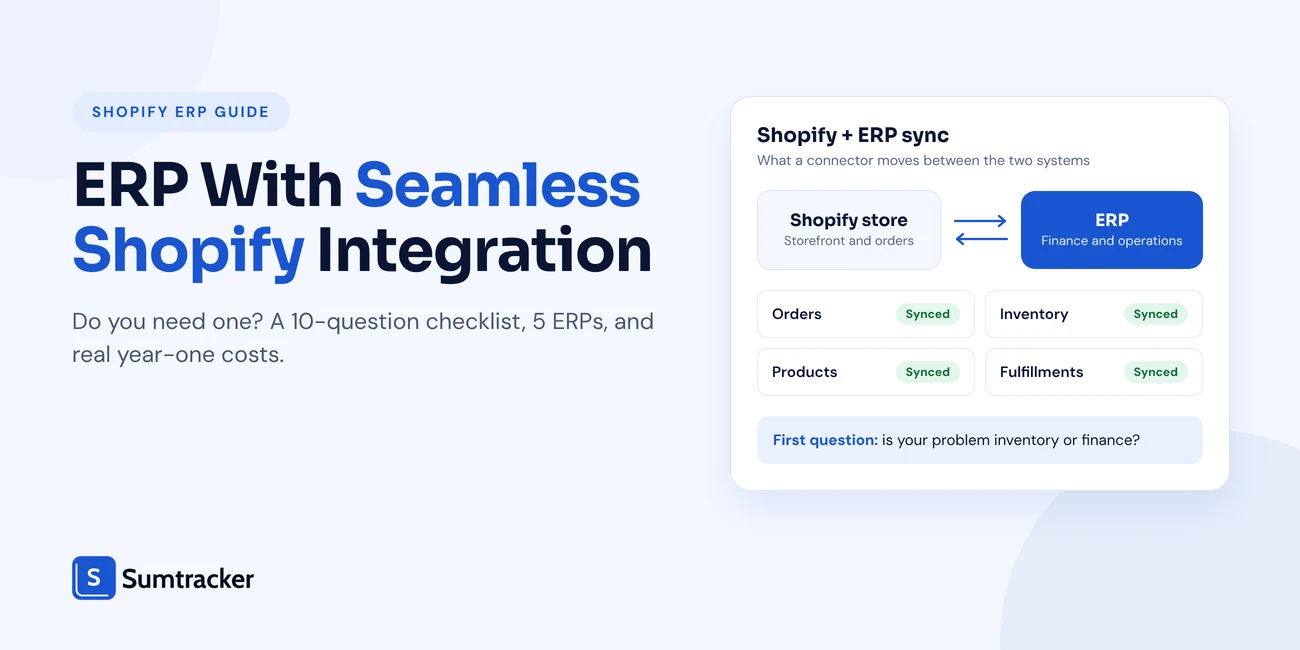
ERP With Seamless Shopify Integration: Do You Actually Need One?


An ERP with Shopify integration shares orders, products, stock and fulfillment data with your store automatically. Many Shopify sellers who search for one actually have inventory problems, not ERP problems.
- Check your need first: multiple entities, manufacturing, one general ledger, B2B terms, lot or serial tracking, or HR and CRM in one system point to an ERP. Multichannel stock, warehouses, bundles and purchase orders point to inventory software.
- Test "seamless": ask which data syncs, in which direction, how often, and what happens when a sync fails.
- Connection options: a native connector from the ERP vendor, a third-party connector app, or middleware and custom APIs.
- Budget for year one: plan for 2 to 3 times the license cost once implementation and the connector are added.
The guide includes an interactive checklist, three Shopify-connected ERPs, a worked cost example and a lighter alternative.
Here is something most ERP guides won't tell you: you might not need an ERP yet.
Most Shopify sellers start searching for an ERP when something breaks. Stock counts stop matching. A best-seller oversells on Amazon. Purchase orders live in three spreadsheets.
Those are real problems. But they are inventory problems, not always ERP problems.
An ERP is built to run your whole business in one system: accounting, purchasing, inventory, manufacturing, and often HR. That power comes with a price tag, a setup project, and months of work.
What is an ERP with Shopify Integration?
An ERP with Shopify integration is a business management system that shares data with your Shopify store automatically. Orders, products, stock levels, customers, and fulfillment updates move between the two systems without manual exports.
The key thing to understand: Shopify is not an ERP. Shopify runs your storefront, checkout, and order flow.
Shopify also runs a Global ERP Program. It launched in October 2021 with Microsoft Dynamics 365 Business Central, Oracle NetSuite, Infor, Acumatica, and Brightpearl as the first partners. These vendors build certified connectors that live in the Shopify App Store.
To see where an ERP fits, compare it with the two tools most Shopify sellers already know.
Table 1: Shopify vs inventory management software vs ERP
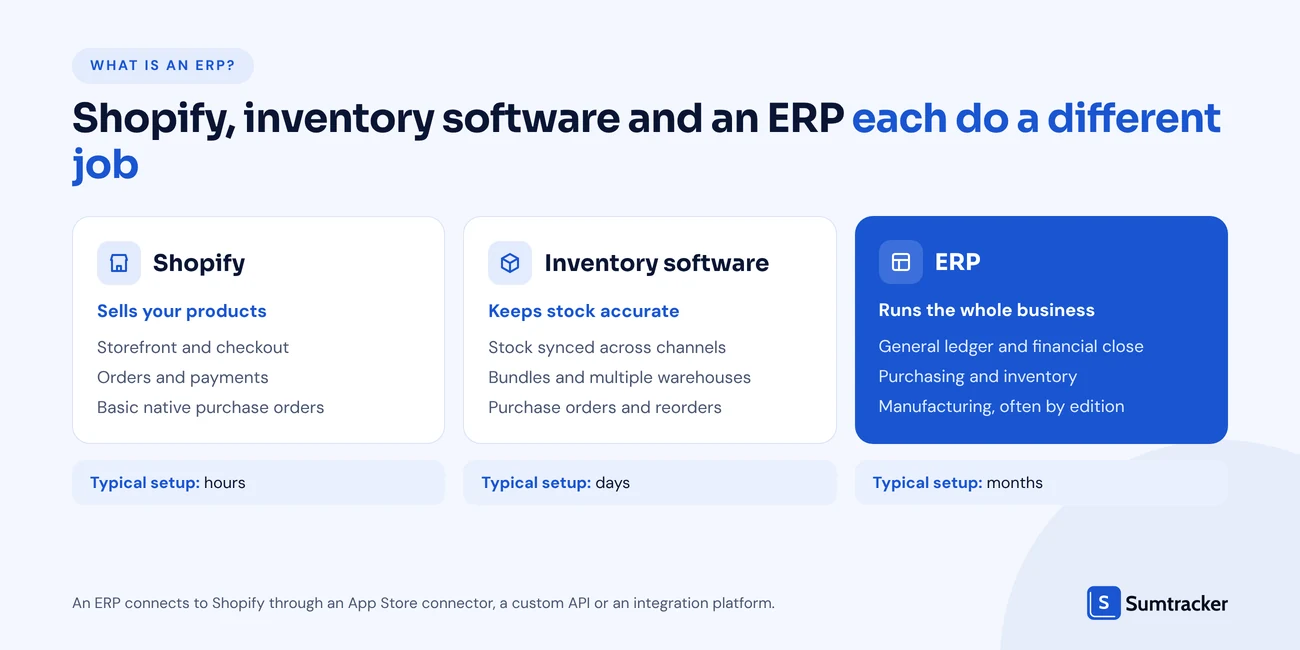
Rule of thumb: If the work you want to fix happens before an order ships (stock, reorders, bundles), start with inventory software. If it happens after the money comes in (ledgers, consolidation, financial reporting), that is ERP territory.
Do You Actually Need an ERP? Take This 10-Question Checklist.
Answer 10 yes-or-no questions about your business today, not where you hope to be in three years. The calculator scores your answers and tells you which system fits.
Practical tip: Check your Shopify plan limits before you assume you've outgrown your setup. Basic, Grow, and Advanced plans allow up to 10 stock locations, while Plus allows up to 200. Our Shopify Plus inventory management guide breaks down what each plan includes.
Why Shopify Sellers Start Looking for an ERP
Most sellers don't wake up wanting an ERP. They want a problem to stop. These are the most common triggers:
- Overselling. A product sells out on Shopify but stays live on Amazon or eBay.
- Spreadsheet purchasing. Reorder quantities are guessed, copied, and re-typed.
- Bundle errors. One kit sells, and the component stock doesn't update.
- Multiple warehouses. Stock sits with a 3PL, in a store, and in a back room, and no one sees the full picture.
- Month-end pain. Sales, payouts, and stock values don't line up in the books.
Only the last one is a true ERP problem. The first four are about inventory.
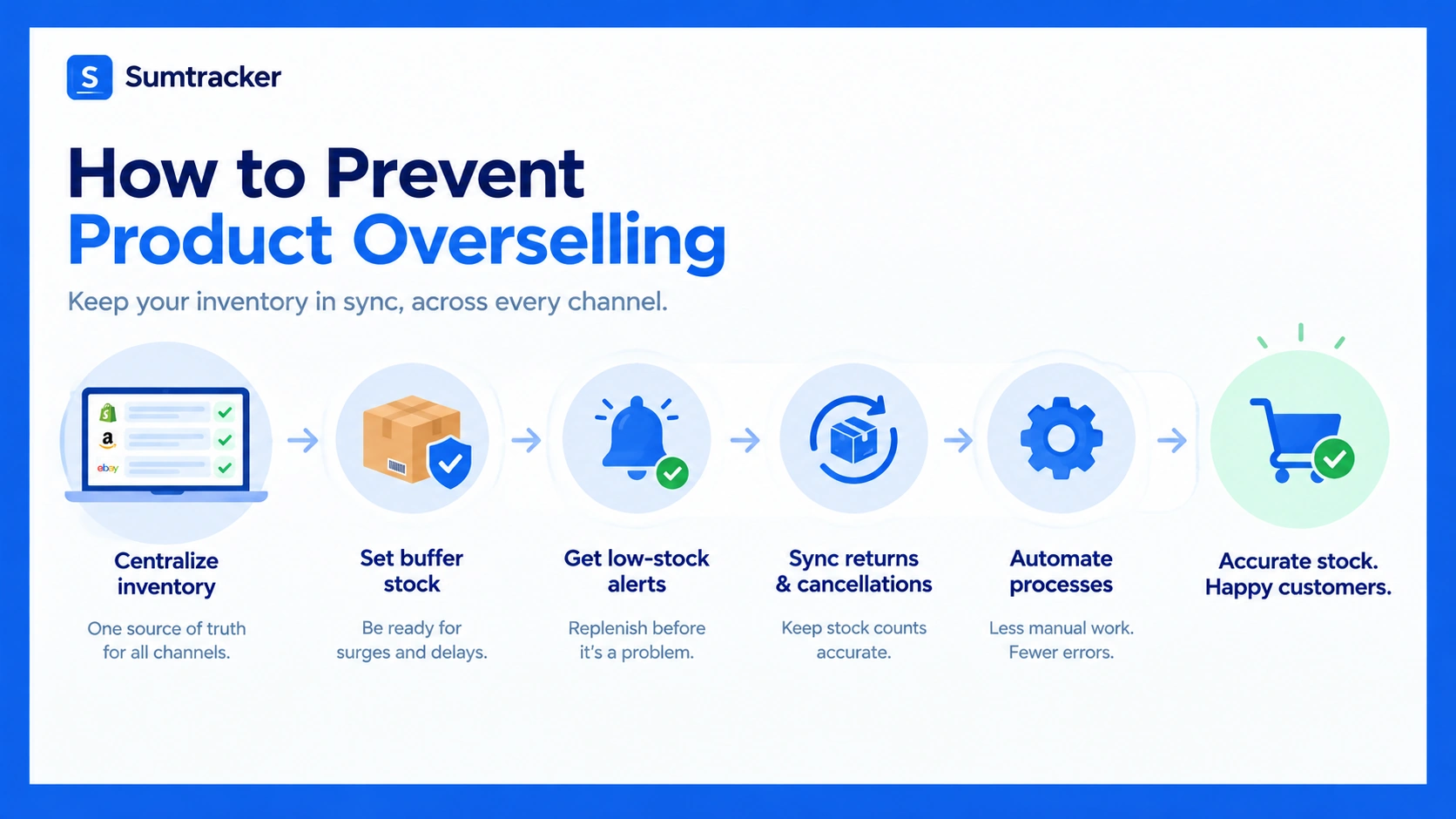
If overselling is your main trigger, start with why overselling happens and how to prevent it.
What "Seamless" Shopify Integration Actually Means
Every vendor calls its Shopify integration "seamless." The word means nothing until you test it.
A seamless integration moves the right data, in the right direction, at the right time, and tells you when something fails. Use the seven checks below on any ERP or connector you evaluate.
Table 4: The 7-point seamless integration test
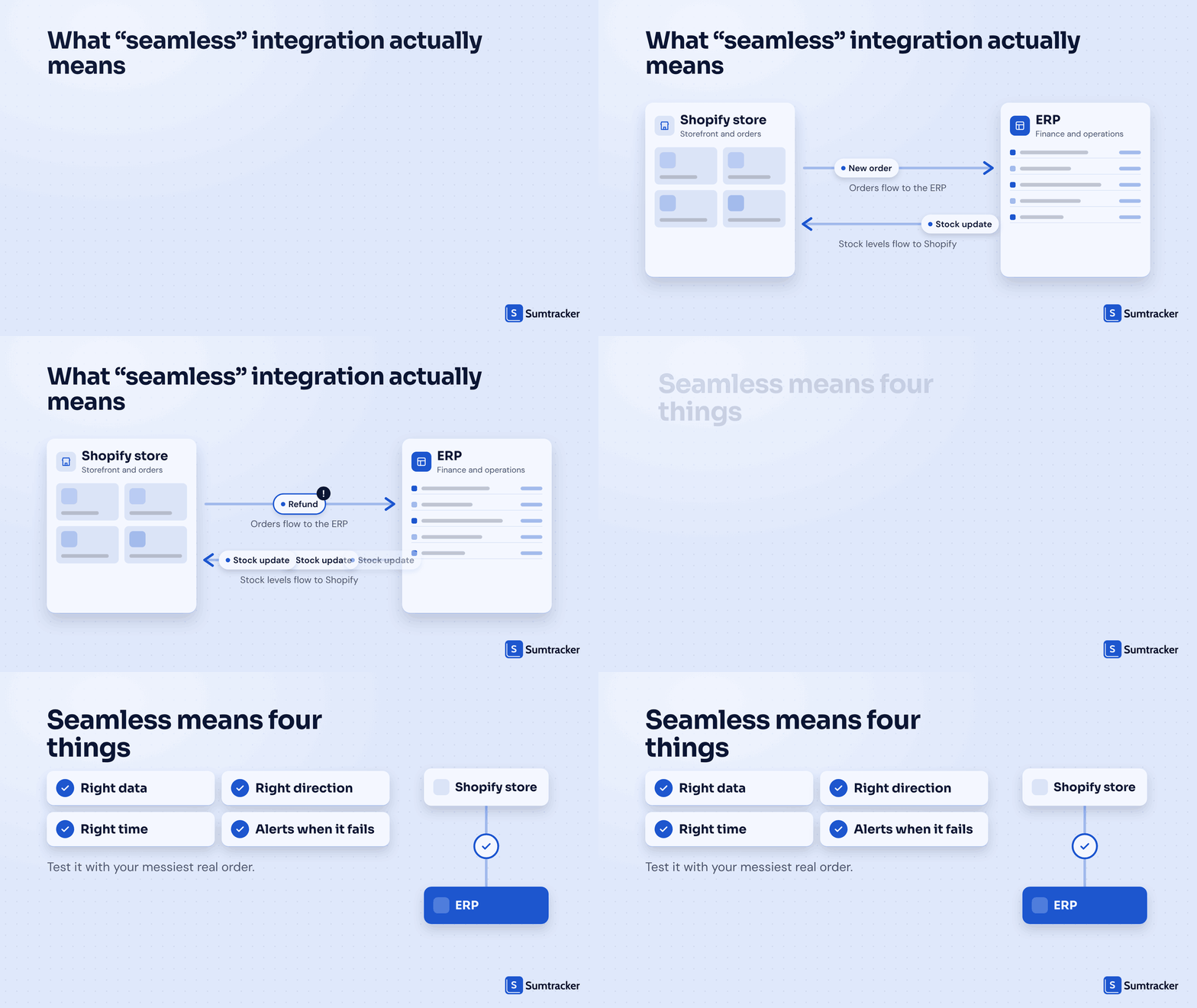
Here is what a good answer can look like in practice. Microsoft's Shopify Connector for Business Central can receive real-time notifications when a new Shopify order is created, then import it through a background job. Inventory sync uses location mapping between the two systems.
Practical tip: Run a test with your messiest real order before you sign. Use a bundle, a partial shipment, and a refund. Clean demo orders hide the gaps.
Common Sync Failures and How to Catch Them
Even good connectors break.
The real question is whether you find out in minutes or at month-end.
These are the failures that come up most often:
- Unmapped products. The connector tries to turn each Shopify product into an item in the ERP. If SKUs don't match, the product doesn't come through.
- Unmapped customers. A Shopify customer is imported but isn't linked to a customer record in the ERP. The order gets stuck before it reaches your books.
- Refunds and returns. On some connectors, returns and partial refunds don't sync properly. Someone ends up fixing them by hand.
- Shipments that don't sync back. If shipments posted in the ERP don't reach Shopify, customers miss their tracking updates.
- Currency mismatches. If you sell in more than one currency, orders in euros or Canadian dollars may not show correctly in the ERP.
How to catch them early:
- Check the error queue daily. Most connectors have one. In Business Central, the Shopify Activities panel flags unmapped customers and shipments that failed to sync. Microsoft's Shopify troubleshooting guide covers the common cases.
- Don't assume a failed record will retry. Some connectors only import records created or changed since the last sync. A record that failed once can stay missing.
- Spot-check stock every week. Pick 10 fast-moving SKUs and compare Shopify, the ERP, and the shelf. If the numbers drift apart, a sync is failing somewhere.
Native Integration vs Connectors vs Middleware
There are three ways to link an ERP to Shopify. The method you choose affects cost, reliability, and who fixes things when they break.
- Native (certified) connector: Built or co-built by the ERP vendor and listed in the Shopify App Store.
- Third-party connector app: Built by an independent developer. Often cheaper and faster to set up, but support depends on that developer.
- Middleware (iPaaS) or custom API: A platform such as Celigo, or code your team writes. Flexible, but you pay for setup and upkeep.
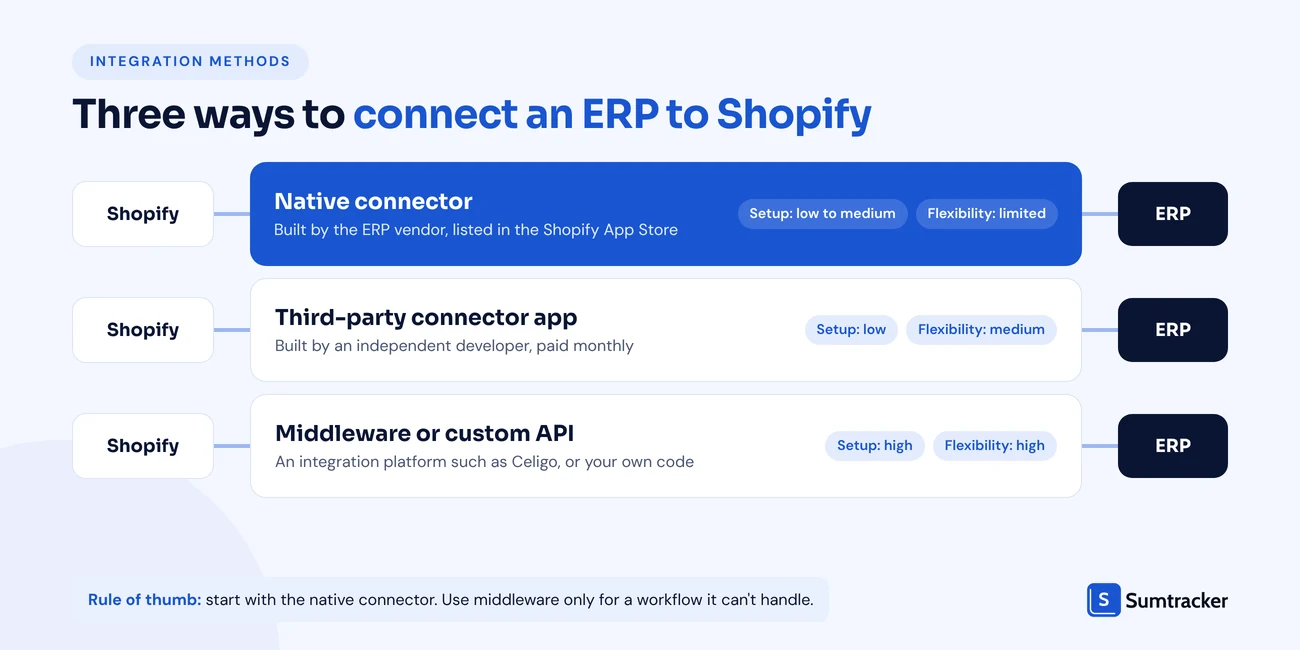
Table 5: Integration methods compared
Why does this matter so much? Because integration gaps are a budget risk. Panorama Consulting's 2026 ERP Report found that more than a quarter of organizations exceeded their project budgets, and the leading cause was additional technology needs. In plain terms: teams found gaps after they signed and had to buy more tools to fill them.
Rule of thumb: Start with the native connector. Move to middleware only when you can name a specific workflow the native connector can't handle.
Listen: What to do before connecting Shopify to an ERP.
On The ABCs of ERP & Beyond podcast, ERP practitioners Peter Nicholson and Nirav Shah cover 5 Things to Do Before You Connect Your E-Commerce Site to an ERP. Two of their points fit here: connectors are not all created equal, and you should clean up your product data before you connect anything.
Key Features to Look For in a Shopify ERP
A good Shopify ERP does more than pass orders back and forth. Look for these features, in roughly this order of importance for an ecommerce business.
- Two-way inventory sync by location. Stock should update in Shopify when it changes in the ERP, at each location you sell from.
- Order import with refunds and partial fulfillments. Simple orders are easy. Returns and split shipments are where integrations break.
- Bundle and kit handling. When a bundle sells, every component should drop by the right amount. See how this works in our guide to Shopify bundle inventory.
- Purchasing and supplier management. Purchase orders, receiving, landed costs, and supplier lead times.
- Financials. General ledger, accounts payable and receivable, tax, and multi-currency.
- Multichannel support. Amazon, eBay, Walmart, and wholesale orders flowing into the same stock pool. Check which channels the connector actually covers. Most Shopify ERP connectors cover Shopify only, while Acumatica's native connectors also cover Amazon and BigCommerce. If you sell elsewhere, ask the vendor: is each extra channel a separate connector, a separate fee, or middleware?
- B2B support. Company accounts, price lists, and payment terms, if you sell wholesale.
- Reporting. Inventory value, margins by channel, and sell-through.
- Clear user and pricing rules. Know whether you pay per user, per transaction, or by modules.
Practical tip: Score each vendor from 0 to 2 on every feature you actually need today. Ignore features you might need "someday." Modules you don't use still add to your bill.
Best ERPs With Seamless Shopify Integration
These 3 ERPs have a Shopify connector built or supported by the ERP vendor itself. All three are part of Shopify's Global ERP Program.
Table 6: Shopify-connected ERPs at a glance (checked November 2026)
ERP license fees are billed separately by the vendor.
1. Oracle NetSuite: Best for multi-entity finance
NetSuite is Oracle's cloud ERP. Its Shopify app syncs product, pricing, inventory, sales order, and fulfillment data, and supports B2C, B2B, and Shopify POS.
- Strength: Strong accounting, consolidation across subsidiaries, and a large partner network.
- Watch out for: Oracle doesn't publish prices. Every deal is negotiated, and implementation is a separate project.
2. Microsoft Dynamics 365 Business Central: Best for Microsoft 365 teams
Business Central has a Shopify Connector made by Microsoft. It's free to install and can sync products, inventory, orders, fulfillments, and more. You need both a Business Central license and a Shopify plan.
- Strength: Published pricing. Essentials costs $80 per user per month, and Premium costs $110, both billed yearly.
- Watch out for: Per-user pricing grows with your team. You buy through Microsoft or a partner, and setup work is a separate cost.
3. Brightpearl by Sage: Best for high-volume retail order processing
Brightpearl calls itself a retail operating system rather than a classic ERP. Its pricing page says plans are designed for fast-growth and larger merchants, with unlimited users included.
- Strength: Built around retail and wholesale order workflows, with accounting included.
- Watch out for: Custom quotes only. It's aimed at larger merchants, so smaller stores may pay for more than they use.
Two More ERPs for Growing Teams
Acumatica: best for teams that keep adding users
- The Shopify integration is built into Acumatica's Retail Edition. There's no extra software or third-party app to buy.
- You pay for the features and resources you use, not per user. Every user is included.
- Pricing is quote-based. Acumatica doesn't publish a fixed price.
Odoo: best for teams that want one modular suite
- Odoo publishes its prices. Standard starts at $31.10 per user per month and Custom at $46.70 per user per month, at the discounted first-year rate.
- Odoo's own Shopify app, Odoo Connect, costs $100 per month with a 15-day free trial.
- The catch: the app works only with Odoo.sh or on-premises hosting, not Odoo Online. It's also available only to merchants in the US and Canada. Odoo.sh hosting comes with the Custom plan, so budget for that tier. See Odoo's pricing page.
- Outside the US and Canada, sellers use third-party connectors from the Odoo Apps Store. Their features and prices vary widely.
How Much Does a Shopify ERP Cost?
The license is only one part of the bill. Year one also includes the connector, implementation, data migration, and your team's time.
Table 7: What you pay for in year one
A worked example
NetSuite is a useful example because its costs are well documented by consultants, even though Oracle doesn't publish prices. NetSuite consultancy BrokenRubik reports, based on client contracts, that small businesses with 5 to 10 users pay $24,000 to $54,000 a year in license fees. It also notes the common rule of budgeting 1 to 2 times the annual license fee for implementation in small businesses.
Here's what that means for year one:
Estimate only. Built from client-reported benchmarks and the connector's App Store price. Your quote will differ.
Rule of thumb: Take any ERP license quote and multiply it by two to three for your year-one budget. That covers implementation and the extras most teams forget.
What a real brand decided
Whif, an Australian fragrance brand on Shopify with 1,000+ products, faced a similar choice. They needed to track bottles, labels, boxes, and fragrance oil, and manage purchase orders. Many of the larger systems they looked at had enterprise-level pricing of $5,000 to $10,000 a month.
Instead, Whif chose Sumtracker as its inventory and purchasing system. The result: 50% faster purchase order processing and about 8 hours a week saved on inventory work. Their co-founder and COO, Chris Rolfe, said the PO feature is simple: once stock arrives, "it's just one click to update."
How Long Does a Shopify ERP Implementation Take?
For a small, standard setup, it takes weeks. Most other setups take months.
The bigger factors are scope, data quality, and how much you customize.
Typical implementation timelines
Estimates, not quotes.
Fixed-scope packages often leave out the slowest parts, like third-party integrations and customizations. Your Shopify connector may fall outside the fixed price.
Who You Need on the Project
An implementation partner. Business Central, NetSuite and, Acumatica are mostly set up through certified partners.
An internal owner. The partner delivers the system. Your team still owns the decisions and the testing. Someone needs time set aside for this.
Your finance and ops leads. Finance sets up the chart of accounts. Ops knows how your SKUs, bundles, and locations actually work.
Plan Data Migration From Day One
Leaving data migration until late in the project is one of the most common reasons implementations run over.
Before you connect anything, clean and prepare:
- SKUs: remove duplicates and fill in missing barcodes
- Opening stock for every location
- Open purchase orders and sales orders
- Customer and supplier records
Bad data in a new system is still bad data.
It just syncs faster.
What Slows Projects Down
- Customization. Every change from the standard setup adds build and test time.
- More locations or entities. Multi-site businesses often roll out one location at a time.
- Extra integrations. Each one, whether it's Amazon, a 3PL, or a WMS, needs its own testing.
A Lighter Alternative: Inventory Management Software for Shopify
If your checklist score pointed away from an ERP, you have two options: Shopify's built-in tools, or a dedicated inventory app.
Start with what Shopify already gives you.
Shopify's admin now includes native purchase orders. You can record products, quantities, costs, and payment terms, manage suppliers, and receive stock through transfers.
This matters because Shopify discontinued its Stocky app after August 31, 2026, and moved those workflows into the admin. Shopify's help page doesn't list demand forecasting or reorder suggestions, and native tools only cover Shopify's own locations and channels.
Where Sumtracker fits
Sumtracker is inventory management software for Shopify and multichannel sellers. It's built for the Part B needs in the checklist above, without the ERP setup project.
Table 8: What Sumtracker does and doesn't do
The QuickBooks Online link is what makes this a practical "light ERP" setup for many stores. When a purchase order moves to Incoming, Sumtracker pushes it to QuickBooks as a purchase order, and each received delivery becomes a bill linked to that PO.
Pricing: Manage starts at $59/month and Replenish starts at $119/month, based on yearly order volume. Both come with a 14-day free trial, no credit card needed.
Practical tip: Before you book an ERP demo, list your top three inventory problems. If an inventory tool solves all three, test it first. A 14-day trial costs far less than an ERP discovery project.
How to Choose the Right System for Your Store
The right system depends on your stage, not on what bigger brands use. Many Shopify sellers move through the setups below as they grow.
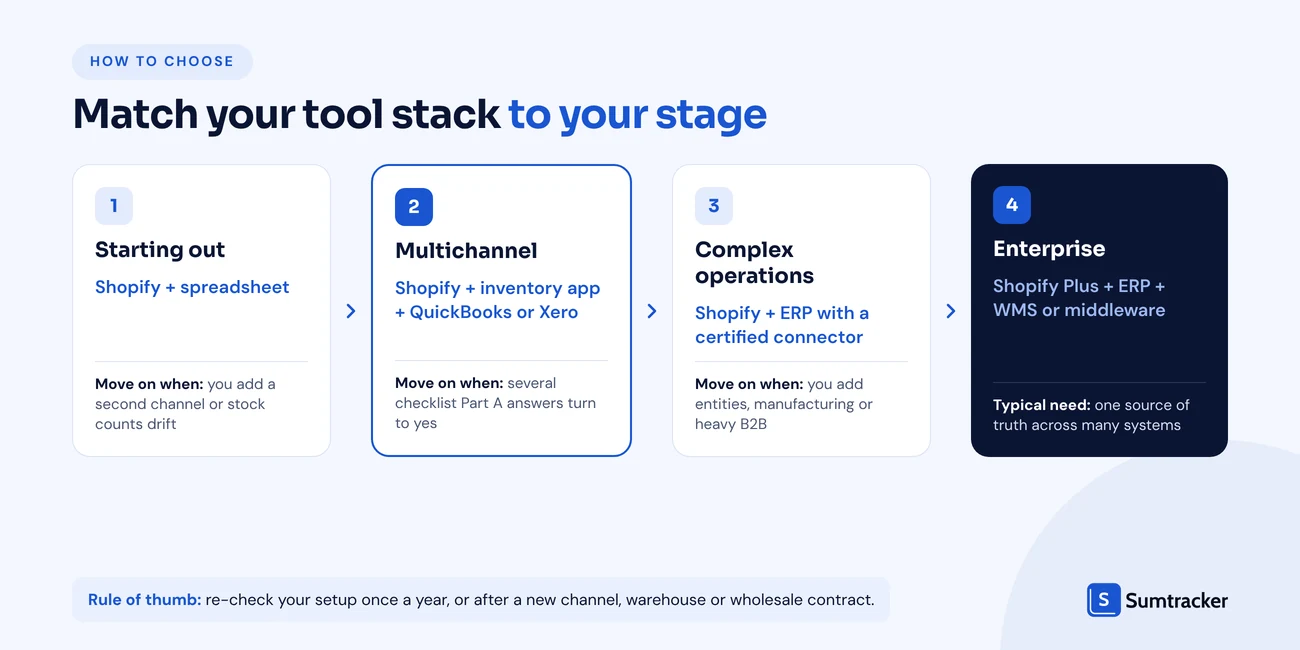
Table 9: The Shopify tool stack by stage
A 5-step selection process
- Write down your problems first. List the five tasks that waste the most time each week. This becomes your requirements list.
- Retake the checklist. Use your Part A score to decide between an inventory tool and an ERP.
- Clean your product data. Fix duplicate SKUs and missing barcodes before connecting anything. Our guide to SKU management shows how.
- Test the integration, not the demo. Run the 7-point seamless test from earlier on a trial account.
- Plan the move. Decide what data moves, what you set up by hand, and what stays behind. See our inventory data migration guide.
Rule of thumb: Re-check your setup once a year or after a big change, such as a new sales channel, a new warehouse, or a wholesale contract. Systems that fit last year may not fit now.
FAQs
Does Shopify have a built-in ERP?
No. Shopify is a commerce platform, not an ERP. It connects to ERPs through App Store connectors, custom APIs, or integration platforms. Shopify's Global ERP Program lists certified connectors for NetSuite, Business Central, Acumatica, Brightpearl, and Infor.
What is the best ERP for Shopify?
It depends on your needs. NetSuite suits multi-entity finance. Business Central suits teams on Microsoft 365. Acumatica suits teams that need many users. Brightpearl suits high-volume retail. Odoo suits businesses that want a modular suite. If your problems are mostly about stock, an inventory tool may serve you better than any ERP.
How much does an ERP for Shopify cost?
It ranges widely. Business Central starts at $80 per user per month, billed yearly. NetSuite doesn't publish prices, but consultants report small businesses paying $24,000 to $54,000 a year in licenses, plus implementation. Budget two to three times the license cost for year one.
How long does it take to integrate an ERP with Shopify?
How long it takes to integrate an ERP with Shopify depends on whether the ERP is already running. If it is, installing a native connector and mapping your data is the quick part. If you're implementing the ERP from scratch, plan for weeks to months: a well-scoped Business Central project can go live in about 12 weeks, while NetSuite usually takes 3 to 6 months. Cleaning your product data first is the easiest way to shorten either one.
Can a small Shopify store use an ERP?
Yes, but it's often more than a small store needs. If you answered "yes" to fewer than two Part A questions in the checklist, inventory software plus accounting software is usually simpler and cheaper.
What's the difference between an ERP and inventory management software?
An ERP runs finance, operations, and inventory in one system, usually including a general ledger. Inventory management software focuses on stock: syncing it across channels, handling bundles, planning reorders, and managing purchase orders. Many stores pair an inventory tool with QuickBooks or Xero instead of buying an ERP.
Does Sumtracker replace an ERP?
For inventory, purchasing, and multichannel sync, yes. Sumtracker doesn't include a general ledger, payroll, HR, or manufacturing bills of materials. On the Replenish plan, it pushes purchase orders and bills to QuickBooks Online, which covers the inventory side of the accounting link for many stores.
Conclusion
An ERP with seamless Shopify integration is the right tool for some businesses. If you run several entities, manufacture products, or sell heavily to wholesale accounts, it can bring finance and operations into one place.
But many Shopify sellers search for an ERP when what they really need is accurate stock across channels, clear reorder suggestions, and simpler purchase orders. Those problems can often be solved in days, not months.
Start with the checklist. Be honest about your Part A score. Then pick the smallest system that solves today's problems and still has room for next year.
If inventory is the real bottleneck, try Sumtracker free for 14 days and see if it covers what you need before you commit to an ERP.

Bhoomi writes about inventory management and multichannel selling at Sumtracker. Her focus is on solving real operational problems for Shopify, Amazon, and marketplace sellers through well-researched content. She covers everything from multi-location inventory syncing and stock error troubleshooting to replenishment planning and platform comparisons, turning complex eCommerce operations into clear, actionable guidance.
LinkedInRelated Articles
Tool and strategies modern teams need to help their companies grow.

Ready to Simplify Your Inventory Management?
Join hundreds of e-commerce merchants who rely on Sumtracker to save time, eliminate errors, and grow their business.