.svg)
Shopify Stocky Step by Step Migration Guide to Sumtracker [2026]


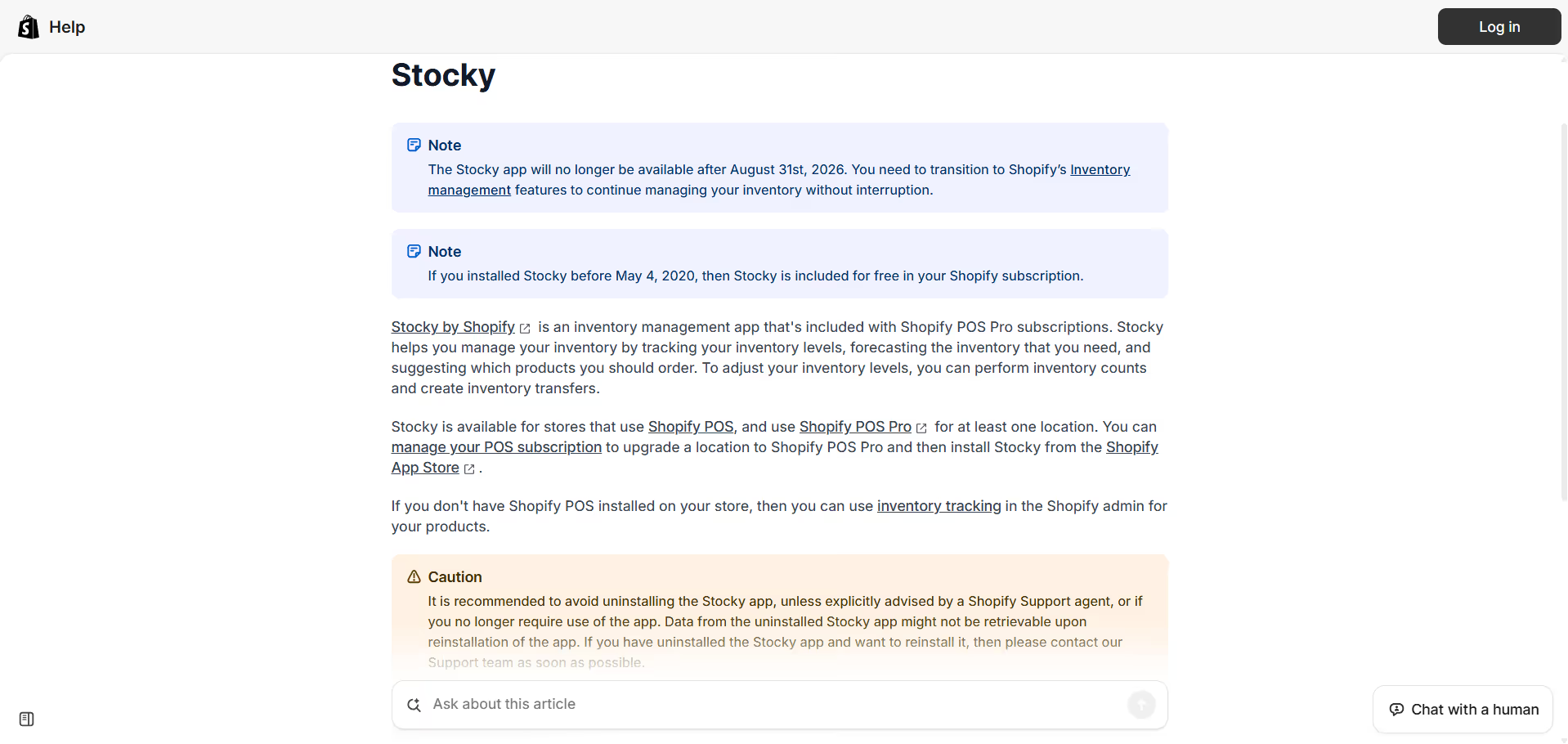
Shopify has officially announced the Stocky sunset and migration timeline. Read the full announcement here.
If you’ve been using Stocky to manage your inventory, then this Shopify notification is very important for you.
For many Shopify merchants, especially growing brands in the U.S., managing multiple locations or warehouses, Stocky became the default way to handle transfers, replenishment, and inventory visibility.
That’s now changing, and merchants should begin preparing well before the final shutdown date.
Shopify has confirmed that Stocky will be fully shut down on August 31, 2026, with the app already removed from the Shopify App Store on February 2, 2026.
Several Stocky features have already been deprecated, affecting how merchants handle inventory transfers and replenishment workflows today.
For many merchants, this update is bigger than simply replacing an app.
Shopify is gradually consolidating inventory management functionality into Shopify Admin itself, meaning merchants will increasingly manage inventory directly within Shopify instead of relying on a separate Stocky workflow.
However, not every Stocky capability is being fully replaced. Merchants relying on advanced replenishment planning, operational transfers, or multi-location inventory coordination may find Shopify’s built-in tools limiting as their operations grow.
This guide explains what’s changing, what merchants should prepare for, and how to transition away from Stocky without disrupting inventory operations.
When Stocky Will Stop Working (Key Dates)
As per the official announcement from Shopify, Stocky will completely sunset after August, 2026.
If you are one of those merchants who rely on Stocky for everyday inventory operations, the following dates are important for you to know, as they directly affect access to transfers, replenishment workflows, and inventory management inside the app.
Here are the key milestones Shopify merchants should know:
- February 2, 2026 – Stocky was removed from the Shopify App Store, meaning new installs and reinstalls are no longer possible.
- August 31, 2026 – Stocky will stop functioning completely and can no longer be used for inventory management.
Although the app is still usable until the final shutdown date, you should avoid waiting until the last minute to migrate to a newer system.
Shopify is gradually reducing support and functionality as part of the sunset process, and access restrictions are expected to increase over time.
For businesses managing multiple locations, warehouses, or high inventory volumes, transitioning early helps avoid operational disruption and gives teams enough time to validate inventory accuracy before moving to a new system.
What to Do If You’re Still Using Stocky Today
If Stocky is still an integral part of your inventory workflow, your first priority should be to stop depending on it and decide where your inventory operations will live going forward.
Start by identifying how you use Stocky today:
- If you only track stock levels and perform occasional transfers, you can transition to Shopify Admin and continue managing inventory there.
- If you rely on Stocky for transfer coordination, replenishment planning, or multi-location visibility, Shopify’s built-in inventory tool might not be a good choice for you.
Next, plan your transition before the shutdown:
- Treat Stocky as temporary and avoid building new processes around it.
- Validate your current inventory accuracy inside Shopify.
- Choose a long-term setup that matches your operational complexity.
For merchants who need more than basic tracking, tools like Sumtracker help replace the operational workflows Stocky no longer supports, including multi-location transfers, restock planning, and inventory visibility across channels.
Taking action now avoids rushed decisions, inventory mismatches, and operational stress closer to the shutdown date.
How to Move Off Stocky Without Breaking Your Inventory
Moving off Stocky is not at all risky, but you need to have a structured process to do it . Follow these steps to avoid inventory mismatches and operational issues.
1. Lock down Stocky usage
The first step for you is to stop creating any new workflows inside Stocky.
As Shopify continues phasing out the platform, merchants should increasingly treat Stocky as a temporary or read-only system instead of a long-term operational tool. This reduces the risk of building processes that will disappear soon.
2. Clean up your inventory data
Before switching systems, take time to audit your inventory data inside Shopify.
This includes:
- Resolving duplicate SKUs
- Correcting negative inventory
- Removing outdated locations
- Verifying current stock counts
Clean inventory data makes migration significantly smoother and reduces stock mismatches after the transition.
3. Decide where inventory management will live
You can be comfortable using Shopify Admin for basic inventory tracking.
But if you need other features, you may need a dedicated inventory platform that supports:
- Multi-location inventory management
- Purchase orders
- Restock planning
- Inventory transfers
- Multi-channel syncing
- Inventory forecasting
Choosing the right long-term setup early helps avoid rushed decisions closer to the shutdown date.
4. Migrate gradually instead of all at once
One of the biggest mistakes merchants make during inventory transitions is moving everything at the same time.
A safer approach is to migrate inventory operations in stages.
Start with a smaller group of products, locations, or workflows first. Validate stock accuracy carefully before expanding the migration across the rest of the business.
This staged approach helps catch issues early without disrupting fulfillment operations.
5. Monitor stock movement closely after migration
The first few weeks after migration are critical.
Merchants should monitor inventory movement closely during this period, including:
- Transfers
- Sales deductions
- Purchase orders
- Stock adjustments
- Restock recommendations
Reviewing inventory activity daily during the early transition phase helps identify discrepancies before they become larger operational problems.
6. Fully decommission Stocky
Once your inventory levels are stable and workflows are functioning correctly in the new system, you can stop using Stocky completely.
You don’t need to wait until the final shutdown date, as it can bring you unnecessary operational stress.
What Merchants Need Beyond Stocky
Many merchants preparing for the Stocky shutdown aren't simply looking for another inventory tool. They're looking for ways to improve the workflows they relied on inside Stocky.
In conversations with Shopify merchants, several common requirements have emerged:
"We've been using Stocky as our finished goods inventory source of truth, which is being sunsetted in August."
"Secondary Goal: Replace Stocky for purchase order (PO) management."
"Replace Stocky with robust purchase orders that calculate weighted average landed costs, track partial shipments, and generate barcode labels."
These conversations highlight a broader trend. Many merchants are using the Stocky sunset as an opportunity to upgrade inventory operations, improve purchasing workflows, and gain better visibility across locations.
What Are Merchants Switching to After Stocky?
As Stocky gets phased out, most Shopify merchants are moving toward one of two approaches, depending on how complex their operations are.
Shopify Admin for simpler inventory needs
Some merchants are choosing to manage inventory directly inside Shopify Admin after Stocky shuts down.
This usually works well for:
- Smaller catalogs
- Single-location stores
- Basic stock tracking
- Simpler operational workflows
For businesses with relatively straightforward inventory operations, Shopify’s native tools may be enough moving forward.
Dedicated inventory systems for growing operations
Merchants with more operational complexity are increasingly moving toward dedicated inventory management platforms instead.
This is especially common for businesses managing:
- Multiple locations or warehouses
- Purchase orders and transfers
- Inventory forecasting
- Multi-channel sales operations
- Larger SKU catalogs
If you're comparing options, you can also explore our detailed guide covering the best Stocky alternatives for Shopify merchants.
Is Shopify Admin Enough After Stocky?
For some merchants, Shopify’s built-in inventory system may be enough after Stocky shuts down.
Over the past year, Shopify has gradually moved more inventory functionality directly into Shopify Admin, making it easier for merchants to manage stock without relying on a separate app.
But whether Shopify Admin is sufficient really depends on how complex your inventory operations are.
Shopify Admin works well for:
- Basic inventory tracking
- Single-location stores
- Smaller product catalogs
- Simple stock adjustments
- Merchants selling only through Shopify
For newer or smaller businesses, Shopify’s native inventory tools can handle day-to-day inventory management reasonably well.
However, as operations become more complex, many merchants start running into limitations.
Shopify Admin may feel limited in:
- Multi-location inventory operations
- Inventory forecasting and replenishment planning
- Purchase order management
- Multi-channel inventory syncing
- Operational transfer workflows
- Advanced reporting and inventory visibility
This is especially true for merchants selling across marketplaces like Amazon, eBay, Etsy, retail stores, or multiple Shopify locations.
While Shopify is consolidating inventory functionality into its core platform, many operational workflows that merchants relied on inside Stocky are still fairly limited inside Shopify Admin itself.
That’s why many growing brands eventually move toward a dedicated inventory management platform as operations scale.
Moving from Stocky to Sumtracker
For many Shopify merchants, moving from Stocky to Sumtracker is simpler than expected.
Because Sumtracker connects directly to Shopify, products, variants, inventory quantities, and locations can be imported automatically.
Most merchants don't need to manually rebuild their catalog or recreate inventory records from scratch.
The goal is to make the transition as seamless as possible while minimizing operational disruption.
5 Simple Migration Process
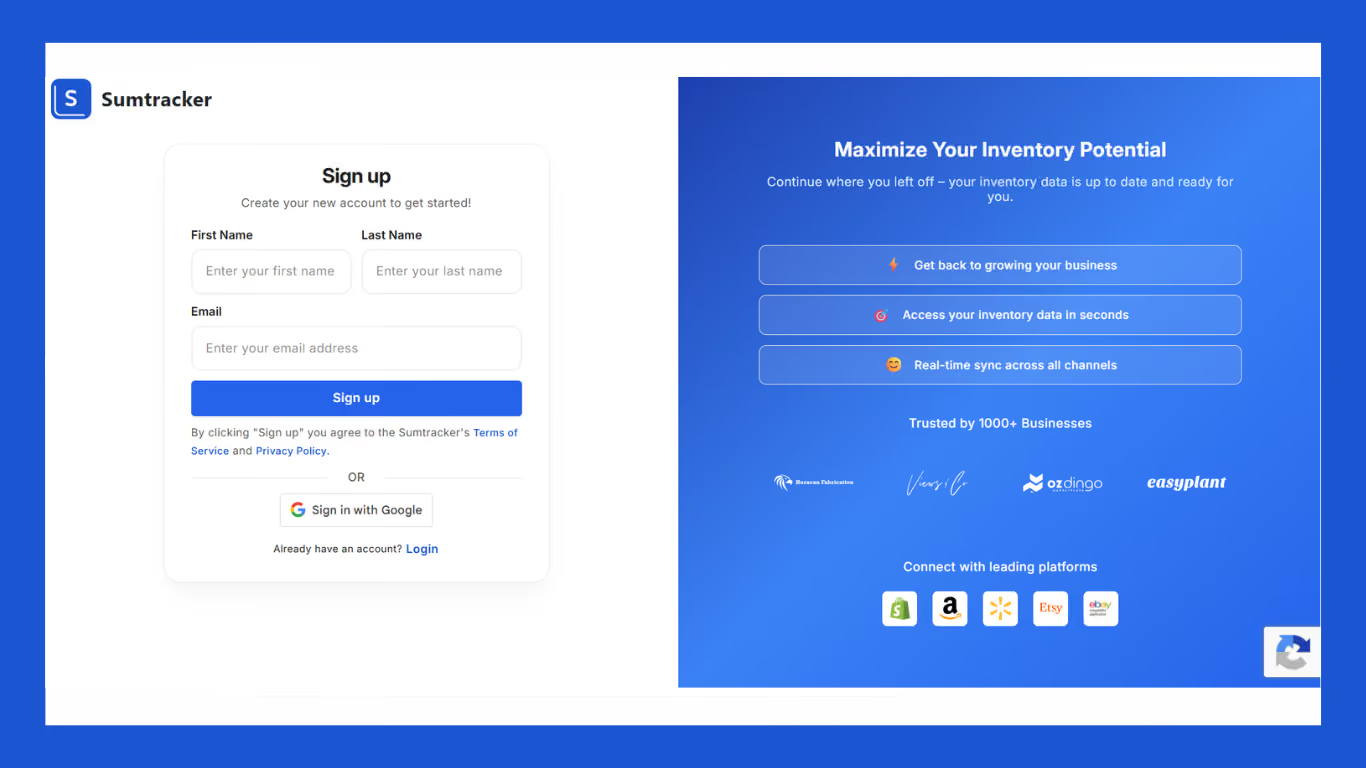
Step 1: Create your Sumtracker account
Go to sumtracker.com and sign up using your email or Google account. It only takes a minute.
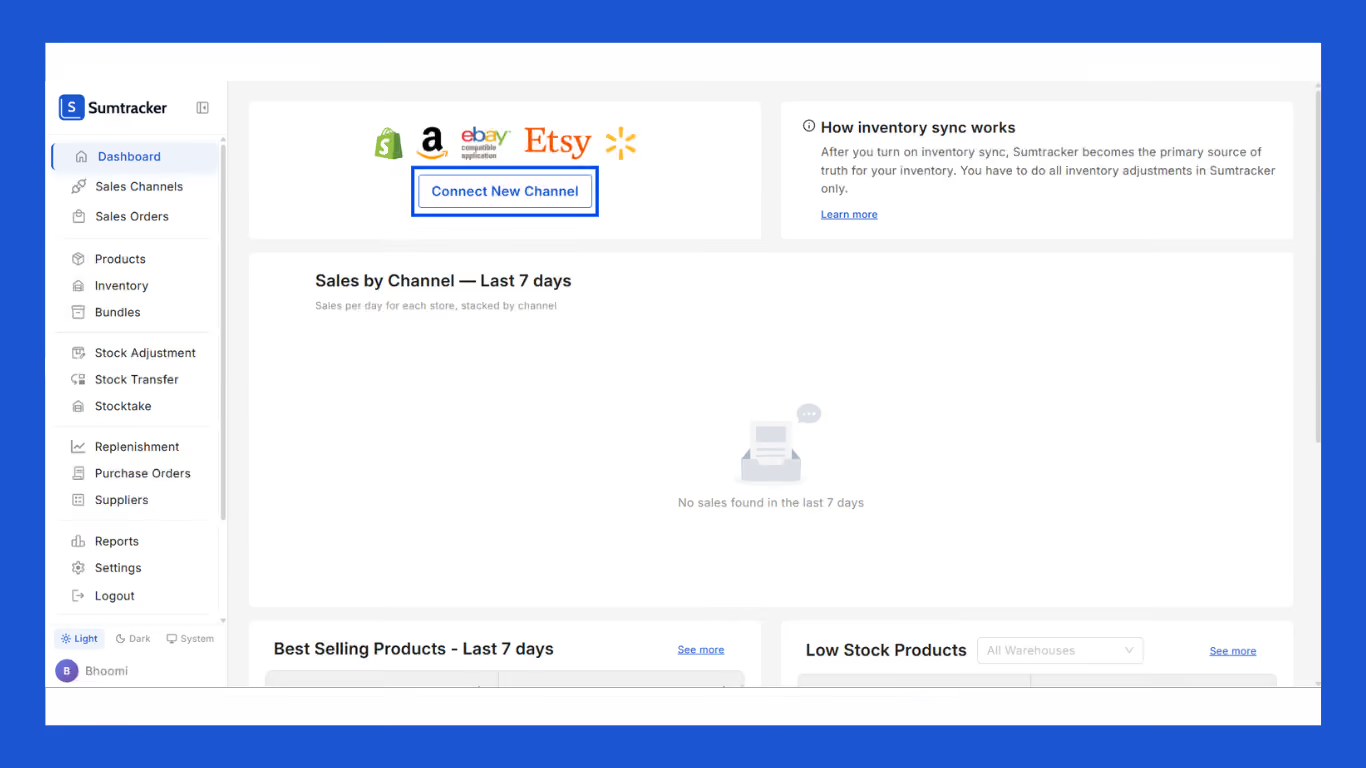
Step 2: Go to Dashboard and click "Connect New Channel"
Once you're in, you'll land on the Sumtracker dashboard. Click the Connect New Channel button to link your store.
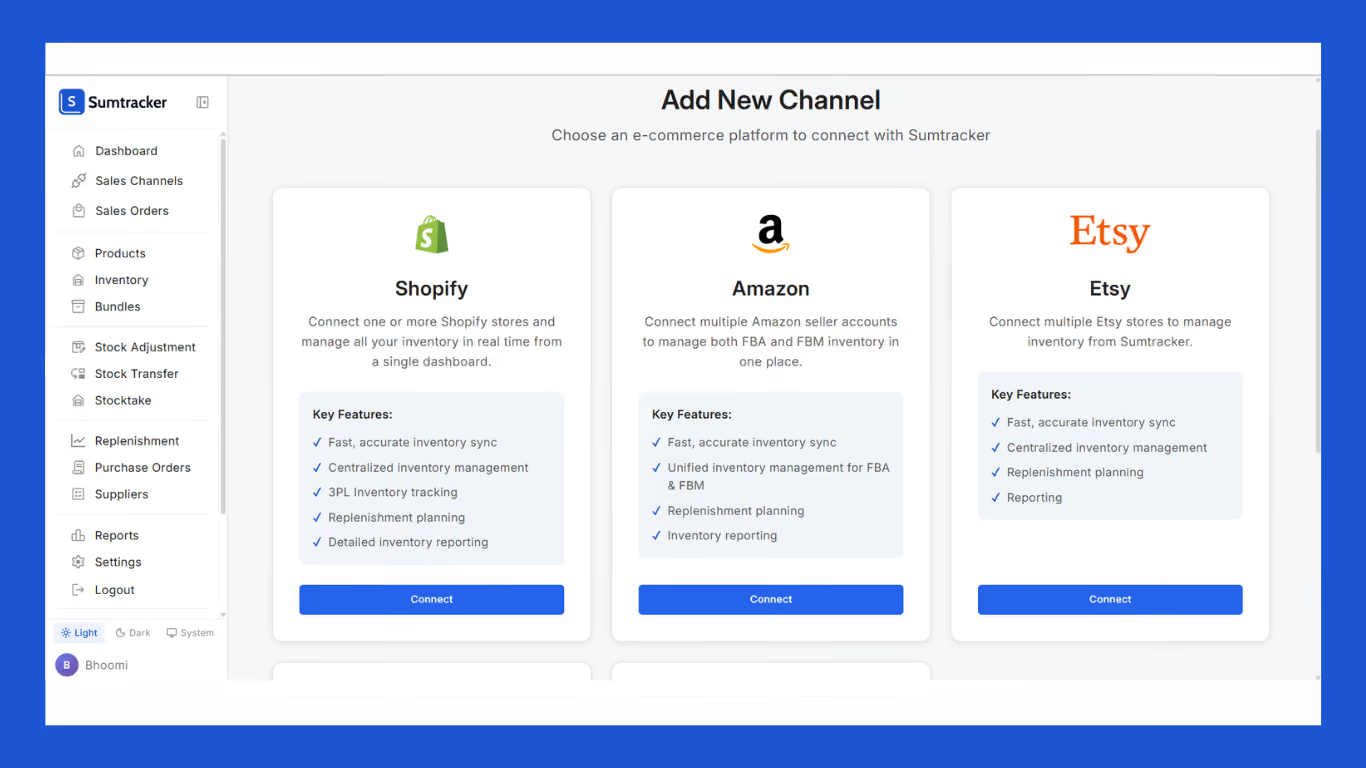
Step 3: Select Shopify as your sales channel
You'll see options for Shopify, Amazon, Etsy, and more. Click Connect under Shopify.
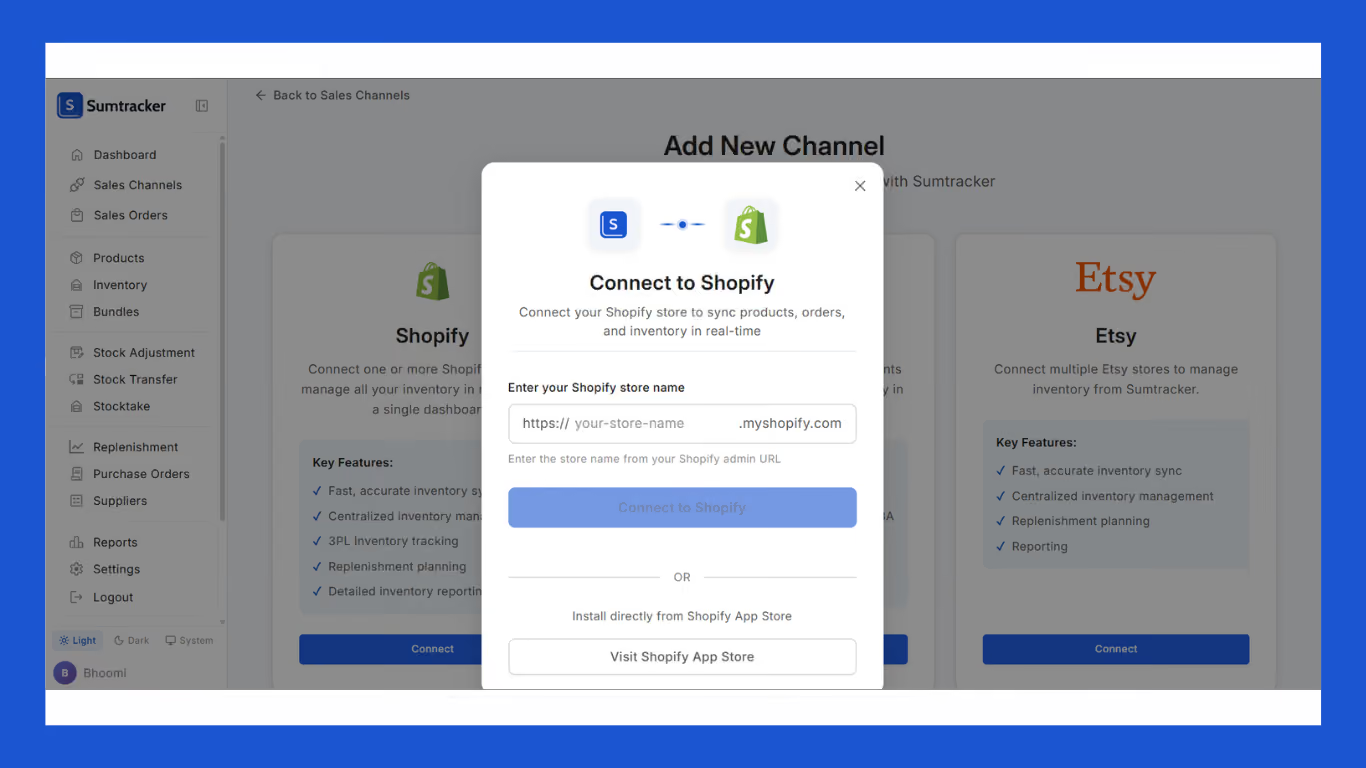
Step 4: Enter your Shopify store name
A popup will appear asking for your Shopify store URL. Enter your store name (e.g. your-store-name.myshopify.com) and click Connect to Shopify. Your products and inventory will sync automatically.
5. Start managing inventory in Sumtracker
Once inventory is verified, day-to-day operations can move into Sumtracker.
Still not sure where to start?
Book a free demo call with the Sumtracker team and they'll walk you through the entire migration from setup to going live.
How Shop Santé Replaced Stocky with Sumtracker
Shop Santé, a leading Canadian health and wellness retailer. With a large catalog of wellness products, inventory management became increasingly complex as the business expanded.
Managing accurate inventory presented several operational challenges and after stocky sunset announcement, the team needed a tool that can help in better visibility into inventory levels across locations, more efficient stock transfers, stronger replenishment planning, and improved forecasting for fast-moving products.
By implementing Sumtracker, Shop Santé gained a centralized view of inventory across its retail and ecommerce operations.
The team was able to streamline purchase order management, improve stock allocation between stores, and make more informed replenishment decisions based on inventory trends.
Some of the Sumtracker features Shop Santé use:
- Multi-Location Inventory Management
- Purchase Orders & Receiving
- Inventory Transfers
- Demand Forecasting
- Replenishment Planning
- Stock Counts & Barcode Scanning
- Bundle & Pack Management
Results:
- Centralized inventory visibility across 40+ retail locations
- Improved stock transfer management between stores
- Faster replenishment planning for high-demand products
- Better inventory forecasting across retail and ecommerce channels
- Reduced risk of stockouts on popular supplement products
Need Help Migrating from Stocky?
If you’re planning to move your inventory workflows to Sumtracker, our support team can help you migrate smoothly.
From syncing products and locations to validating inventory levels, we’ll help ensure your data moves across without disrupting daily operations.
To get assistance, simply reach out to Sumtracker support, and our team will guide you through the transition.
If you’re still evaluating options, you can also read our detailed guides explaining why Sumtracker is a better alternative to Stocky and how it compares to Shopify’s built-in inventory tools.
These resources walk through the differences in transfers, forecasting, and multi-location inventory management in more detail.
FAQS
When will Stocky stop working completely?
Stocky will stop functioning completely after August 31, 2026. After that date, merchants will no longer be able to use the app for inventory management, transfers, replenishment, or operational workflows.
Can I continue using Stocky until it’s removed?
You can use Stocky until August 2026, but it’s already delisted and no longer supported. Shopify recommends transitioning earlier to avoid disruption.
What happens to the Stocky app on Shopify?
Shopify has already removed Stocky from the Shopify App Store, meaning new installs and reinstalls are no longer possible. The app will eventually become fully inaccessible after the sunset process completes.
What happens to Stocky's data?
Merchants should export or validate important inventory data before Stocky shuts down completely. Shopify has not positioned Stocky as a long-term inventory system, so businesses should avoid depending on historical app access later.
What should I use instead of the Shopify Stocky app?
The best replacement depends on how complex your inventory operations are. Smaller merchants may manage inventory directly inside Shopify Admin, while growing brands often move to platforms like Sumtracker for forecasting, transfers, and multi-location inventory management.
Conclusion

Bhoomi writes about inventory management and multichannel selling at Sumtracker. Her focus is on solving real operational problems for Shopify, Amazon, and marketplace sellers through well-researched content. She covers everything from multi-location inventory syncing and stock error troubleshooting to replenishment planning and platform comparisons, turning complex eCommerce operations into clear, actionable guidance.
LinkedInRelated Articles
Tool and strategies modern teams need to help their companies grow.
.avif)
.png)
Ready to Simplify Your Inventory Management?
Join hundreds of e-commerce merchants who rely on Sumtracker to save time, eliminate errors, and grow their business.
