.svg)
Handling Discontinued Products on Shopify: A Complete Guide


Every Shopify store eventually stops selling something.
A supplier ends a line. A product never takes off. A newer version replaces the old one.
Discontinuing a product on Shopify is not a single click.
It touches your product page, your Google rankings, your Shopping feed, every marketplace listing, your open purchase orders, and the customers who were waiting for a restock.
Get it right, and you keep the traffic, the reviews, and the customer. Get it wrong, and you end up with 404 errors, oversold orders, and stock you never needed.
A discontinued product is one you have permanently stopped selling and restocking.
That is different from an out-of-stock product, which you plan to sell again, and from a seasonal product, which returns on a schedule. Each one needs different handling, and mixing them up causes most of the problems in this guide.
This guide covers the full process as Shopify works today, including the Unlisted product status Shopify added in 2025, URL redirects, variants, multichannel listings, Google Shopping, Shopify Markets, and seasonal items.
Why Handling Discontinued Products Correctly Matters for Shopify SEO
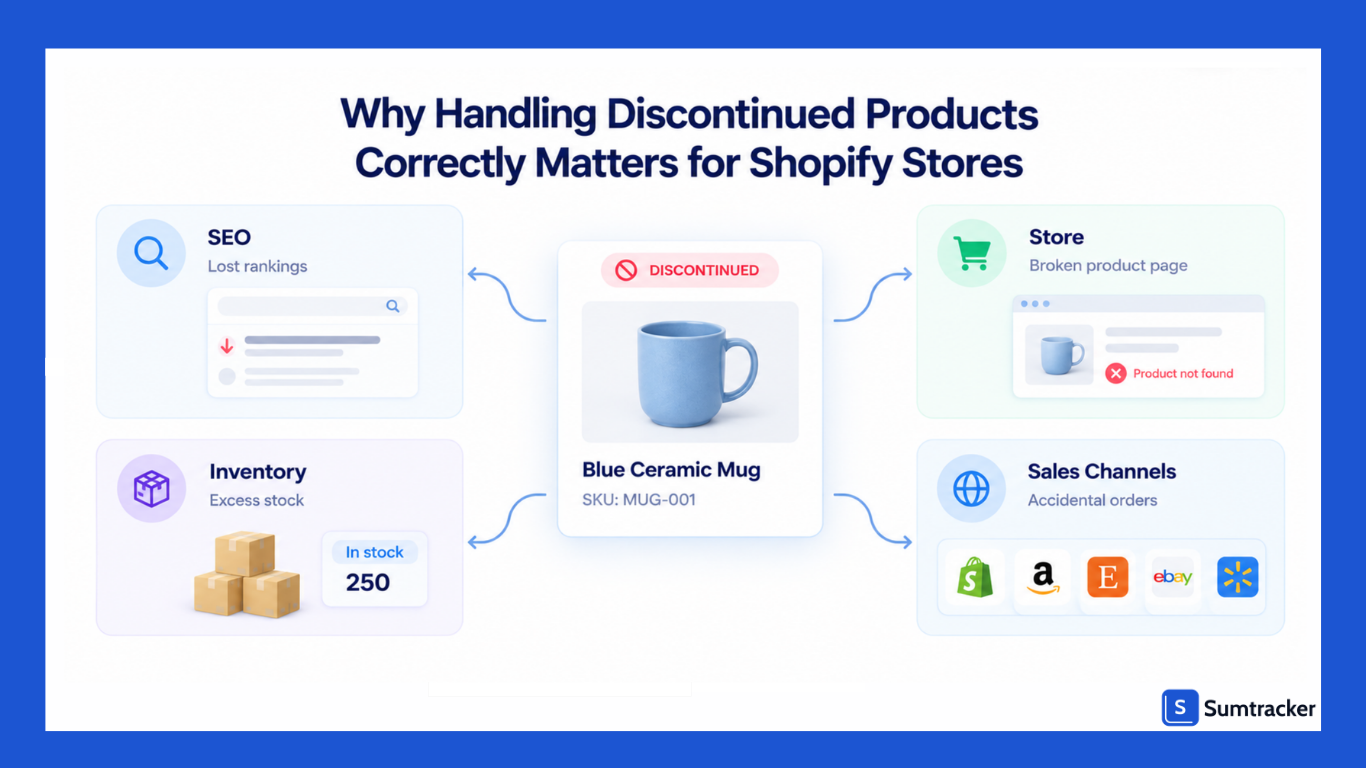
A product page is more than a product listing. Over time, it can build search rankings, backlinks from blogs and gift guides, and internal links from your collections and other pages. Delete it without a plan, and all those links lead nowhere.
Here is what can happen when you simply delete a discontinued product:
- The URL returns a 404. Google can eventually remove the page from search results, and you may lose the search traffic it was bringing in.
- Backlinks no longer lead to a useful page. Websites that still link to the old URL send visitors to a page that no longer exists.
- Shoppers hit a dead end. Anyone clicking an old link or bookmark sees an error page instead of a product or relevant alternative.
Broken links are more common than most merchants realize.
A Pew Research Center analysis found that about one in five webpages from a 2021 sample were no longer accessible just two years later. Every product you remove without a plan can add to that problem.
Out-of-Stock Pages Can Also Lose Visibility
Keeping a product page live does not guarantee that it will continue to appear in search results.
Google's John Mueller has said that a page showing a product as out of stock can be treated like a soft 404. In that case, Google may eventually stop showing the page in search even though the URL still works.
If you keep a discontinued product page live, give shoppers a reason to visit it. Product specifications, compatibility information, manuals, or a link to a replacement can make the page more useful than a simple "Out of stock" message.
Shopify Adds One Extra Wrinkle
Many Shopify themes create collection-based product URLs such as /collections/mugs/products/blue-mug.
When a product is removed, these URLs can also become broken links. Merchants have reported this after archiving products that appeared in multiple collections.
If your theme still uses these nested links, update your internal links to the main /products/ URL where appropriate. Use Shopify's URL redirects when an old product URL needs to point to a relevant replacement.
Rule of thumb: Before removing a product page, check three things: organic clicks from the last 12 months, referring domains, and internal links from your menus, collections, and blog posts. If all three are zero, the page may be a candidate for removal. If any are not, decide whether to keep the page or redirect it.
When to Keep, Redirect, or Delete a Discontinued Product Page
The right choice comes down to two questions: does the page still have value, and is there a close replacement? Use those answers to decide what happens to the URL.
A few points can save merchants from common mistakes:
- A 404 is not a penalty. Google expects ecommerce products to disappear. If a product is permanently gone and there is no relevant replacement, a 404 can be the right response.
- Never redirect to the homepage by default. Google advises against sending many old URLs to one unrelated page such as the homepage. Redirect to a relevant replacement or destination instead.
- Shopify cannot serve a 410 status from the admin. A removed product returns a 404, so the practical choices are to keep the page live, redirect it, or let it return a 404.
- Avoid redirect chains. If the replacement is later discontinued, update the original redirect so it points directly to the newest relevant page.
Deciding which products to cut is the step before deciding what to do with their URLs.
Rachel from The Business of Apparel podcast covers this in SKU Rationalization 101. The episode focuses on apparel, but the same approach can help with other product catalogs. For a data-driven way to shortlist products, start with ABC analysis and sales velocity.
Rule of thumb: Redirect to a page a shopper would consider a genuine substitute. If you would not recommend it to a customer looking for the discontinued product, it is probably not a good redirect target.
How to Manage Discontinued Products on Shopify
Shopify gives you five ways to take a product off sale, and each one affects the product URL differently. Choosing the right option is important when you're discontinuing a product.
Unlisted is not an SEO-saving option. Shopify's developer documentation confirms that Unlisted adds noindex and nofollow tags, removes the product from your sitemap and the Shopify Catalog, and hides it from collections, storefront search, and recommendations.
It is useful for private or VIP products, but not for a discontinued product you want to keep visible in search. In that case, keep the product Active and manage its availability instead. This short video on Unlisted products shows how the status works in Shopify.
Step-by-Step Process
- Make the keep, redirect, or 404 decision first. Use the table in the previous section.
- Stop new sales. Set available inventory to zero at every location and make sure Continue selling when out of stock is turned off for every variant.
- Change the product status. Archive it if it is gone for good. Keep it Active only if you are keeping the page live.
- Create the redirect if you need one. In your Shopify admin, go to Content > Menus > View URL redirects > Create URL redirect. Enter the old path (for example, /products/blue-mug) and the new one.
- Clean up internal links. Remove the product from menus, manual collections, and featured sections, and update blog posts that link to it.
- Check your sales channels and feeds. More on this in the multichannel and Google Shopping sections below.
Redirect Rules Worth Knowing
Shopify's URL redirect documentation includes a few rules that are easy to miss:
- A redirect only works when the old URL returns a 404. If the product is still Active and published, the redirect is ignored.
- Making the product visible again deletes the redirect automatically. You would need to recreate it if you hide the product again.
- Limits are generous. Standard plans allow up to 100,000 redirects, and Shopify Plus allows up to 20,000,000.
- Bulk changes are supported. You can import redirects from a CSV file, which helps when you discontinue a whole range at once.
You can also automate redirects with Shopify Flow. Its Create redirect URL action can run in any workflow, and Shopify's own example creates a redirect whenever a product is deleted.
Shopify notes that the example builds the old path from the product title, so it may fail if the product had a custom handle. Test it before relying on it.
If you are archiving many products at once, the bulk editor saves time. Our guide to bulk editing inventory in Shopify walks through setting stock to zero across many SKUs.
Practical tip: Archive, don't delete. An archived product keeps its details and can be restored in a few clicks. A deleted product is gone, and if it ever comes back, you start the page, the description, and the URL from scratch.
How to Handle Discontinued Product Variants on Shopify
When only one size, color, or option is discontinued, you are retiring a variant, not the whole product. The product page and its URL remain live, so there is no product-level redirect to create.
This matters more now that Shopify supports larger variant sets. Shopify raised the limit to 2,048 variants per product. Larger variant sets also mean more opportunities for discontinued options to remain available by mistake.
Shopify has no archive setting for a single variant. You have two real options:
A few things to check before you remove a variant:
- Bundles and kits. If the variant is a component in a bundle, removing it can affect the bundle's availability or inventory calculations.
- Shared links. Variant links use a ?variant= parameter on the same product URL, so the product page itself stays reachable. Point ads and emails at the main product URL instead of a dead variant.
- Google Shopping. Each variant is usually its own item in Merchant Center, so removing it removes that item from your feed.
- Your theme's sold-out display. Some themes cross out unavailable options, and others hide them. Pick the behavior that fits how often your variants come back.
Rule of thumb: If a variant might return within a year, keep it at zero. If it is gone for good and the shelf is empty, delete it so it stops cluttering reports and reorder lists.
How to Manage Discontinued Products Across Multiple Sales Channels
Archiving a product in Shopify does not end its listings everywhere else. Amazon, eBay, Etsy, and Walmart each hold their own copy of the listing.
Unless your connector syncs product status, those listings stay live and can keep taking orders for stock you no longer have.
A safer workflow is to set inventory to zero first, then close or deactivate each listing. If you close listings first and inventory updates lag behind, a marketplace could sell a unit that has already been sold on Shopify.
The tricky case is when one physical product sits behind several listings: different stores, different titles, bundles, or seasonal versions. Discontinuing it means every one of those listings has to hit zero at the same moment.
How to Handle Customer Reviews and Replacement Products
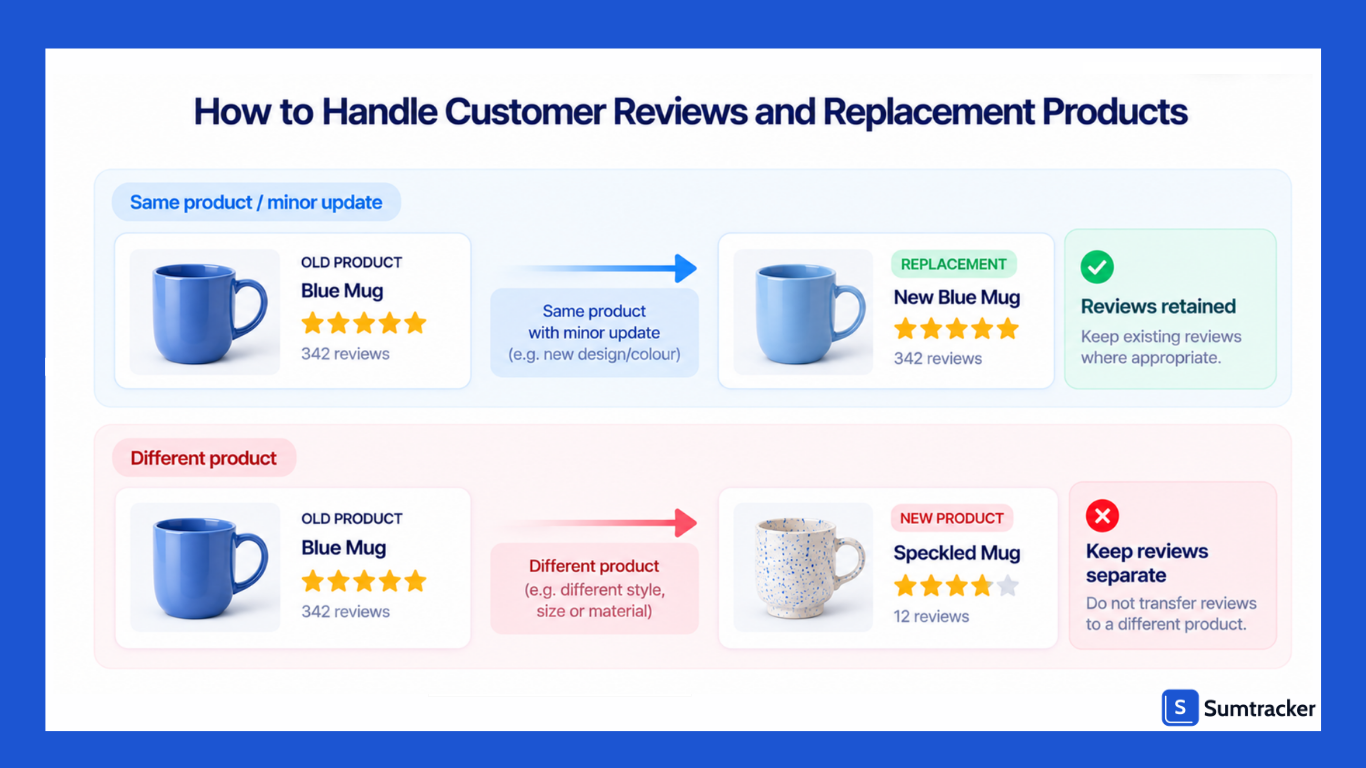
Reviews belong to the product the customer actually bought. You can carry them over to a replacement only when the replacement is essentially the same product.
When Moving Reviews Is Fair
Moving or sharing reviews is reasonable when the change is minor:
- A new color or size of the same item
- Updated packaging with the same contents
- A new SKU created for the same product, for example after a supplier change
When to Leave Reviews Where They Are
If the replacement is a different design, formula, or material, do not move the reviews. Shoppers would be reading feedback about a product they cannot buy.
There is a legal angle too. The FTC's Consumer Reviews and Testimonials Rule took effect on October 21, 2024, and addresses deceptive practices involving consumer reviews, including certain situations where reviews are reused or repurposed in ways that mislead consumers. If you transfer reviews, make sure they accurately represent the product customers are buying and avoid using reviews from a substantially different product as if they were written for the replacement.
Point Shoppers to the Replacement
How you introduce the replacement depends on what you did with the old page:
- Page kept live: add a clear notice near the top, such as "This product has been discontinued. Its replacement is [new product]." Link to it above the fold.
- Page redirected: make sure the replacement page answers the old product's questions. Mention compatibility or what changed, so redirected visitors understand why they landed there.
- No replacement: link to the closest collection and your best-rated alternatives.
If you're choosing a review app for this kind of setup, our roundup of Shopify review and UGC apps compares the main options.
How to Notify Customers About Discontinued Products
Tell the people who care about the product before it disappears, not after. A short, honest message helps maintain trust and gives customers a chance to consider a replacement.
Who to Notify First
- Back-in-stock subscribers. They asked to hear when this specific product becomes available. If it will never return, let them know rather than leaving them waiting for a restock.
- Repeat buyers of the product, especially for consumables, refills, and spare parts.
- Customers with open pre-orders or backorders. Confirm whether you can still fulfill the order, and offer a refund or replacement if you cannot. Our guides to managing pre-orders in Shopify and backorder strategies cover the mechanics.
- Wholesale accounts. They may need to update their own listings, purchasing plans, and inventory.
Use an Automated Flow, Not a One-Off Blast
Discontinuation notices work best when they reach the customers actually affected. Klaviyo's 2026 email benchmarks, based on more than 183,000 customers, show the difference: automated flows accounted for 5.3% of email sends but generated nearly 41% of email revenue, with placed-order rates about 13 times higher than campaigns.
In practice, tag or segment the affected customers, then send a short sequence:
- Last chance: “[Product] is being discontinued. We have limited stock left.”
- Final notice: “[Product] is now sold out and will not be restocked. Here is what we recommend instead.”
What a Good Notice Includes
- The product name and a clear statement that it is discontinued, not simply out of stock
- The reason, in one plain line, if you can share it
- The replacement or closest alternative, with a direct link
- What happens to open orders, subscriptions, or warranties
On the product page, use the same wording. Consistent messaging across email, the product page, and support replies can reduce questions about whether the product will return.
Practical tip: Give your support team a saved reply for discontinued products before the first email goes out. This helps them answer customer questions consistently as soon as the announcement is made.
How Discontinued Products Affect Google Shopping and Shopify Markets
Your product feed has to tell Google the same story your store tells. When the two disagree, Google can disapprove products, and you may pay for clicks that land on items nobody can buy.
Google refreshes product data at a huge scale. At Google Marketing Live in May 2026, Google said its Shopping Graph holds more than 60 billion product listings, with over 2 billion updated every hour.
Discontinued Is Not the Same as Out of Stock in Merchant Center
Google's availability attribute guidelines are specific: do not set discontinued products to out_of_stock. Remove them from your product data. The out_of_stock value is meant for products that are temporarily unavailable.
If you sync through Shopify's Google & YouTube app, archiving the product or removing it from that sales channel takes it out of the data Shopify sends. Check Merchant Center a day later to confirm it is gone, and pause or edit any campaigns built around it.
Discontinuing a Product in One Market Only
With Shopify Markets, a product can be discontinued in one country and still sold in another. Shopify uses catalogs for this. You exclude the product from that market's catalog, and customers in that market can no longer see or buy it. The product list's View as feature shows exactly what each market sees.
Redirects have a helpful default here. Shopify's redirect documentation explains that one redirect applies to all your market and language subfolders. A redirect from /products/blue-mug also covers /en-ca/products/blue-mug. You can still create subfolder-specific redirects if the replacement differs by market.
Practical tip: After you discontinue a product, search Merchant Center for its ID or SKU. If it still shows as active or out of stock a few days later, the feed did not update, and you are likely still eligible to pay for clicks on it.
How to Handle Seasonal Products on Shopify
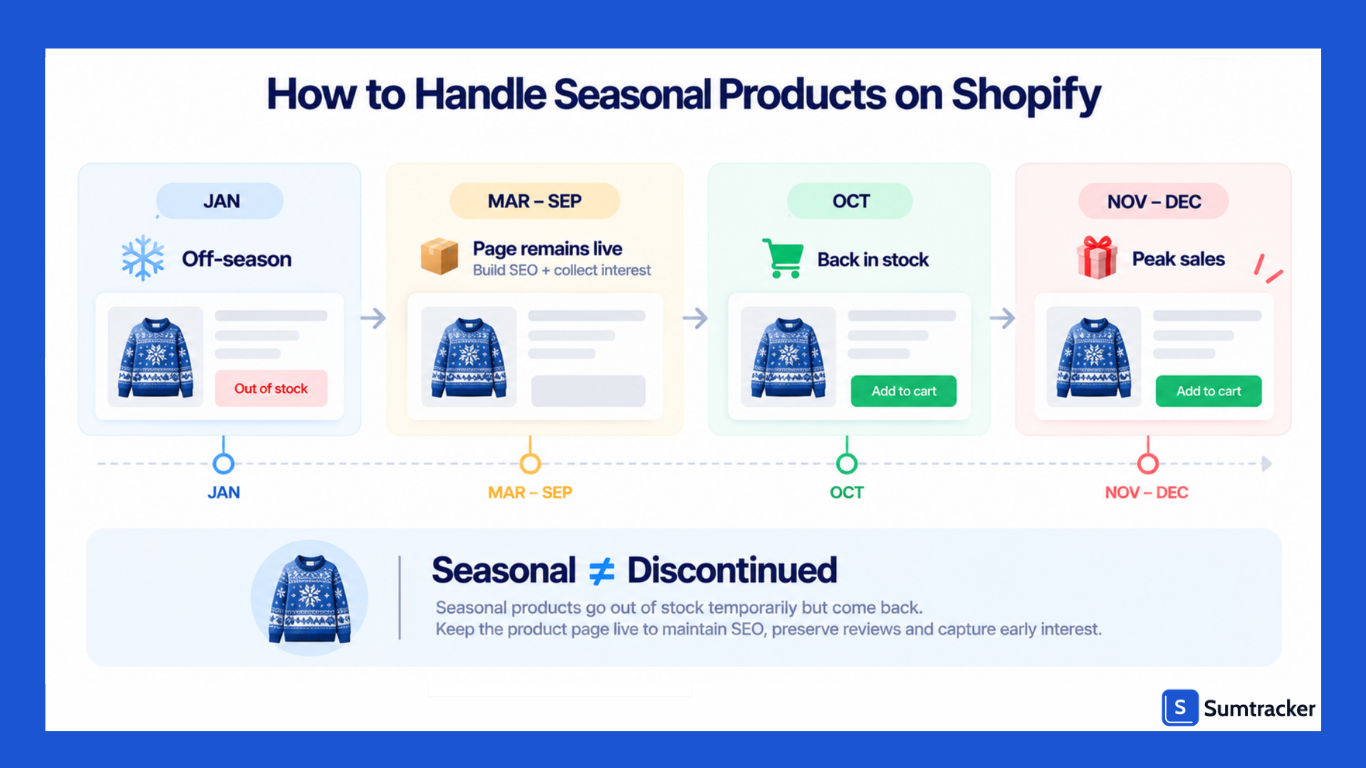
A seasonal product is not discontinued, so do not treat it like one. Redirecting, archiving, or unlisting it every off-season throws away rankings you will want back in a few months.
Keep the URL Alive Between Seasons
The page for a winter coat or a holiday gift set builds authority every year it stays live. If you archive it in March, it returns a 404. If you set it to Unlisted, Shopify adds a noindex tag. Either way, you start the climb again next season.
A better off-season setup:
- Keep the product Active with zero stock and turn off Continue selling when out of stock.
- Add a clear return message, such as "Back in October", so the page still answers the shopper's question.
- Collect interest with a back-in-stock or waitlist signup. That list becomes your launch audience.
- Remove it from main navigation if you want, without unpublishing the page.
Seasonal Collections Can Be Swapped With a Redirect
Shopify's redirect documentation includes a built-in pattern for seasonal collections.
Set a collection like /collections/fall to hidden on the Online Store, then redirect it to /collections/summer.
When you make the fall collection visible again, Shopify deletes the redirect automatically, so there is nothing to clean up.
Do Not Delete Seasonal Items From Your Google Feed
Google's Merchant Center guidance notes that products removed and added back can take longer to show again than products kept in the feed. For seasonal items, set availability to out_of_stock while you are not taking orders, rather than deleting and re-uploading every year.
Planning the stock side matters as much as the page. Our guide to seasonal inventory planning covers how to size each season's buy so you are not left with a pile of off-season stock.
How to Prevent Accidental Sales and Reordering of Discontinued Products
Most discontinued-product mistakes happen after the decision is made. Someone forgets a setting, a purchase order goes out anyway, or a bundle keeps selling a component that no longer exists.
Stop Accidental Sales
- Turn off Continue selling when out of stock. This single setting causes more oversold discontinued items than anything else. Our guide to Shopify's variant inventory policy shows where to find it and how to check it in bulk.
- Check every bundle and kit. If a discontinued item is a component, either swap it out or retire the bundle.
- Hold back a small buffer while selling through. When the last units are spread across channels, sync delays can sell the same unit twice. Sumtracker's Close at Quantity setting pushes zero to your store once stock falls to a level you choose, set per warehouse.
Stop Accidental Reordering
- Review open purchase orders. Cancel or reduce any PO that still includes the item.
- Remove it from reorder logic. Reorder points, min/max levels, and forecasting tools will keep suggesting a product that still shows sales history. Our guide to automating reordering in Shopify explains how these rules work so you know what to switch off.
- Tell your supplier. It prevents a standing order or a "helpful" auto-ship.
Archive in Your Inventory System Too
The same archive-versus-delete logic applies inside your inventory tool. In Sumtracker, archiving a product hides it from product lists and stock screens but keeps its history in sales, purchase, and inventory log reports. Deleting it removes that history for good, which makes later analysis harder.
Practical tip: Add a "discontinued" tag to the product in Shopify the day you make the decision. Tags make it easy to filter reports, exclude the item from reorder lists, and build the customer segment for your notification flow.
How to Measure the SEO and Business Impact of Discontinued Product Decisions
Measure two things: whether you kept the traffic, and whether you kept the revenue. Compare a fixed window before the change with the same-length window after it. Ninety days on each side is a practical default.
Two Formulas Worth Tracking
Revenue retention (%) = replacement revenue in the 90 days after ÷ discontinued product revenue in the 90 days before × 100
Example: the old product earned $12,000 in its last 90 days. The replacement earned $9,600 in its first 90 days. Revenue retention is 9,600 ÷ 12,000 × 100 = 80%.
Sell-through rate (%) = units sold ÷ units available at the start of the period × 100
Example: you had 400 units when you announced the discontinuation and sold 340 in 60 days. Sell-through is 340 ÷ 400 × 100 = 85%. The remaining 60 units are your clearance decision.
In Sumtracker, the Sales by Product report covers the revenue side, and the Stock Valuation report shows the cash still tied up in remaining units. For more on reading these numbers together, see our guide to the inventory turnover ratio.
Case Study: Be Careful What You Credit
Duluth Trading offers a useful lesson in attribution. In its second quarter of fiscal 2025, the retailer reported inventory down 12.2% ($20.7 million) year over year and gross margin up to 54.7% from 52.3%. On the same earnings call, management said it had begun cutting its SKU count for fall.
It would be easy to credit those gains to the SKU cuts. Duluth did not. It said the margin gain came mainly from fewer promotions and lower product costs, and the inventory drop mainly from buying less. It described SKU and style reductions as something expected to improve turns and margins in future seasons.
The lesson for smaller stores: when you discontinue products, note what else changed in the same period, such as pricing, ad spend, or a site redesign. Otherwise, you cannot tell whether the cut worked.
Practical tip: Add an annotation in Google Analytics and a dated note in your inventory log on the day you discontinue a product or add a redirect. Six months later, those dates are what make the before-and-after numbers trustworthy.
Best Practices for Managing Discontinued Products on Shopify
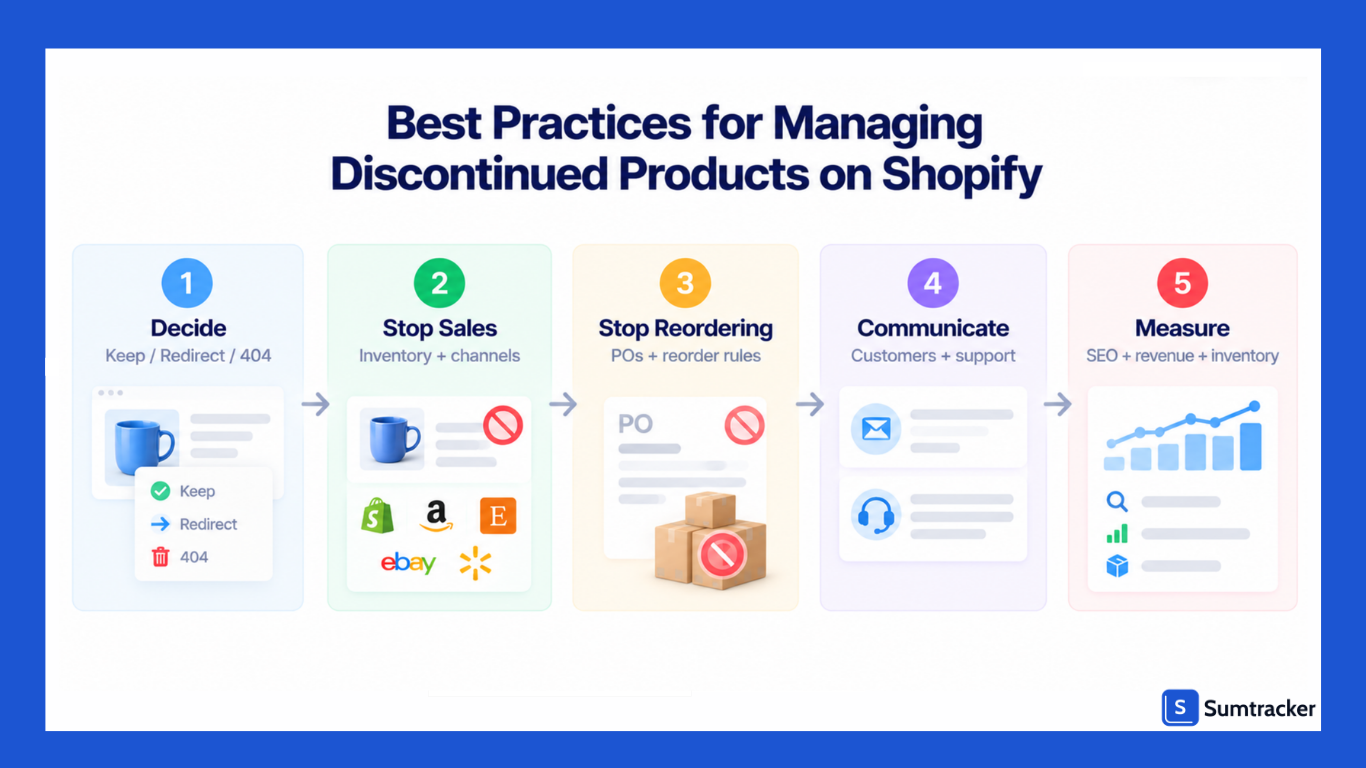
Use this checklist every time you discontinue a product. It follows the order that prevents the most mistakes.
Decide
- Confirm the product is discontinued, not seasonal or temporarily out of stock.
- Check organic clicks, referring domains, and internal links for its URL.
- Choose the outcome: keep the page live, redirect it, or let it 404.
- Pick the redirect target a shopper would accept as a substitute.
Stop Selling and Buying
- Tag the product "discontinued" in Shopify.
- Turn off Continue selling when out of stock on every variant.
- Cancel or update open purchase orders and remove it from reorder rules.
- Update or retire any bundles that use it.
- Tell your supplier.
Communicate
- Notify back-in-stock subscribers, repeat buyers, open orders, and wholesale accounts.
- Add a clear notice on the product page while it is still live.
- Give your support team a saved reply.
Close It Out
- Sell through remaining stock with a small buffer to avoid overselling.
- Zero the stock on every channel, wait one sync cycle, then close each marketplace listing.
- Archive the product in Shopify (and in your inventory tool), rather than deleting it.
- Create the URL redirect, if you chose one.
- Remove it from menus, collections, and blog links.
- Confirm it has left your Google Merchant Center feed.
- Exclude it from the right market catalogs if you sell internationally.
Review
- Annotate the date in Google Analytics and your inventory log.
- After 90 days, check Search Console, revenue retention, and sell-through.
- Fix any redirect chains the next time a replacement is discontinued.
A regular stock review makes this easier, because discontinued items stop piling up quietly. Our Shopify inventory audit checklist is a good companion to this one.
Conclusion
Discontinued products are a normal part of running a Shopify store, but removing them without a plan can create broken links, lost search traffic, accidental sales, and unnecessary inventory costs.
Before taking a product offline, check its traffic, backlinks, internal links, customer demand, and whether a genuine replacement exists. Then choose the right approach: keep the page live, redirect it to a relevant replacement, or let it return a 404.
From there, make sure the product is removed from sales channels, purchase orders, reorder rules, bundles, and product feeds. If customers still search for the product, use the old page to explain what happened and point them toward the best alternative.
A consistent process makes product discontinuation much easier to manage. Review the SEO value, stop sales and reordering, update every channel, communicate with affected customers, and measure the results after the product is gone.
Frequently Asked Questions
What should I do with a discontinued product on Shopify?
Decide whether to keep the product page live, redirect it to a relevant replacement, or let it return a 404. Check the page's organic traffic, backlinks, internal links, and whether a suitable replacement exists before making the decision.
Should I delete discontinued products from Shopify?
Not always. If the product has organic traffic, backlinks, useful product information, or customers who may still search for it, keeping the page live or redirecting it can be a better option. If it has no meaningful traffic, backlinks, or replacement, allowing it to return a 404 may be appropriate.
Should I redirect a discontinued product page to the homepage?
No. Redirect a discontinued product to a relevant replacement or closely related collection when possible. A homepage usually does not match the original search intent and is rarely the best destination for an old product URL.
How do I redirect a discontinued product in Shopify?
Go to Content → Menus → View URL redirects → Create URL redirect. Enter the discontinued product's old URL and the URL of the relevant replacement or destination. Before creating the redirect, make sure the destination provides a useful alternative for shoppers.
Does deleting a Shopify product hurt SEO?
Deleting a product can result in lost search traffic and broken links if the page has organic traffic, backlinks, or internal links. Before deleting it, check its SEO value and decide whether keeping the page or redirecting it would better preserve its value.
How do I handle discontinued product variants in Shopify?
If only one size, color, or other variant is discontinued, keep the product page live and set that variant's inventory to zero. If the variant is permanently discontinued, you can delete it after checking bundles, kits, marketplace listings, and other dependencies.
How do I handle discontinued products across multiple sales channels?
Set the product's inventory to zero first, allow the change to sync, and then close, deactivate, or retire the listing on each sales channel. Check Shopify, Amazon, eBay, Etsy, Walmart, and any other channels where the product is listed to prevent accidental sales.
Conclusion

Bhoomi writes about inventory management and multichannel selling at Sumtracker. Her focus is on solving real operational problems for Shopify, Amazon, and marketplace sellers through well-researched content. She covers everything from multi-location inventory syncing and stock error troubleshooting to replenishment planning and platform comparisons, turning complex eCommerce operations into clear, actionable guidance.
LinkedInRelated Articles
Tool and strategies modern teams need to help their companies grow.


Ready to Simplify Your Inventory Management?
Join hundreds of e-commerce merchants who rely on Sumtracker to save time, eliminate errors, and grow their business.