.svg)
Managing Pre-Orders in Shopify: A Complete Guide for Merchants


Are you launching a new product on your Shopify store?
I know it's exciting to have a new launch scheduled.
But it also comes with a lot of stress.
There would be too many questions that you would be figuring out answers to.
Like how much inventory to order, scared what if you order too much or too little than customer’s demand.
I have seen merchants stock up less and then regret it when they see a huge wave of demand.
And also regretting when they stocked up a lot because they trusted their gut feeling, but ended up having their cash tied up.
So, you wanna avoid this.
Try “pre-orders”!
You must have heard this before. But let me also tell you the whole thing because only knowing the word won’t get you too far.
Pre-orders allow customers to purchase products before they're officially released.
Instead of relying solely on forecasts, you can use real customer demand to make better inventory decisions.
In this guide, we’ll tell you how Shopify pre-orders work, why merchants use them, common challenges to avoid, and best practices for managing pre-orders successfully.
What Are Pre-Orders in Shopify?
A pre-order in Shopify allows customers to purchase a product before you have the product’s inventory stocked up.
Instead of pondering how much inventory you should have in your warehouse, you can directly see how your customers are reacting to your new product. (And maybe even create excitement in your customers)
You can think of pre-orders as a way to sell future inventory.
Pre-orders provide an opportunity for customers to reserve a product before it launches or sells out.
And for you, they will provide early insight into customer demand, helping inform purchasing, production, and inventory planning decisions.
Pre-orders are commonly used for:
- New product launches
- Limited-edition collections
- Seasonal products
- Products currently being manufactured.
- Products with long supplier lead times
- High-demand items expected to sell out quickly
For example, imagine a Shopify store launching a new collection of custom water bottles.
Instead of waiting until all inventory arrives at the warehouse, the merchant opens pre-orders two weeks before launch.
Customers can secure their purchase immediately, while the merchant gains a clearer picture of how much inventory will be needed.
Why Shopify Merchants Use Pre-Orders
Successful brands use pre-orders strategically to determine the demand around their new release.
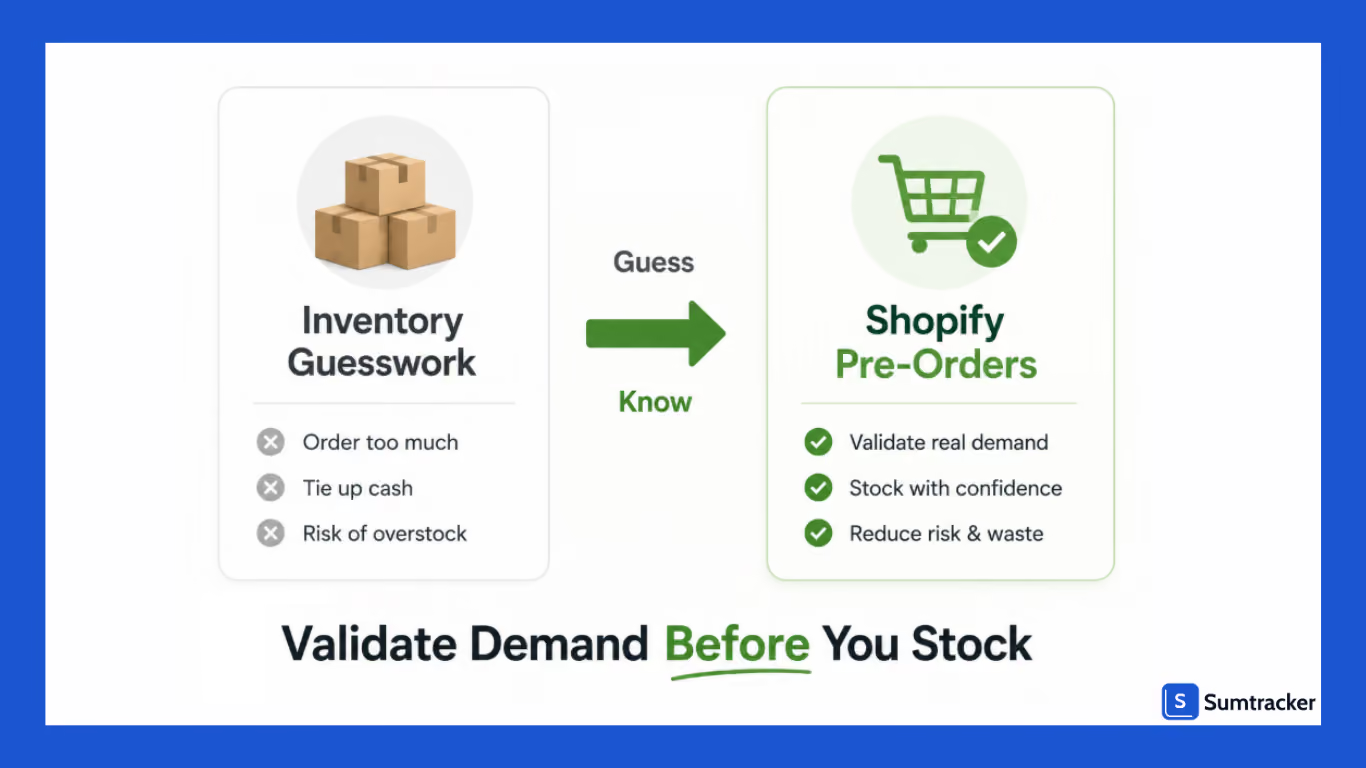
Validate Demand Before Investing in Inventory
The biggest challenge faced in ecommerce is forecasting demand for the next launch.
When you have no historical sales data, then it’s a no-brainer that you are making those inventory decisions based on gut feeling.
Pre-orders help reduce that uncertainty by showing how many customers are willing to buy before inventory arrives.
This becomes even more important when customer demand can vary significantly.
As per Littledata's 2026 Shopify Benchmark Report, the average Shopify store converts approximately 1.4% of visitors, while stores in the top 10% convert above 4.7%.
For a product launch generating thousands of visitors, that difference can impact inventory requirements. Pre-orders provide a more reliable demand signal because they reflect actual purchases rather than projected interest.
Improve Cash Flow
Inventory is often one of the largest upfront expenses.
Pre-orders can help offset this by generating revenue before products arrive, allowing merchants to fund inventory purchases with actual customer demand instead of relying entirely on working capital.
However, it's important to understand when you'll actually receive payment.
Different Shopify pre-order apps and payment providers handle payments differently. Some charge customers at checkout, while others only authorize the payment and capture it closer to fulfillment.
Before launching a pre-order campaign, review how your chosen solution handles payment collection, cancellations, and refunds.
Build Launch Momentum
You may also use pre-orders to create excitement before a product launch.
Customers gain access to products before general availability, while brands benefit from getting early sales, increased anticipation, better demand visibility, and stronger launch-day performance.
Support Products With Long Lead Times
Pre-orders are particularly valuable in industries where products take weeks or months to manufacture.
For example, furniture retailers often use pre-orders to continue generating sales while products are still being produced or shipped. This helps create more predictable revenue despite long lead times.
Real-World Example: Turning Viral Demand Into Confirmed Orders
When influencer-owned sports brand Togethxr experienced a surge in demand after a viral social media post, they enabled pre-orders using a pre-orders app in just 10 minutes and captured 1,000 pre-orders within the next 10 hours.
Instead of losing sales because inventory wasn't immediately available, the brand converted unexpected demand into confirmed orders while gathering valuable demand data for future production planning.
This is one of the biggest advantages of pre-orders.
Even if inventory isn't ready, merchants can continue accepting orders, measure real customer demand, and make more informed inventory decisions instead of relying on estimates.
Read the full case study here.
How Pre-Orders Work in Shopify
Most Shopify pre-order workflows follow a similar process.
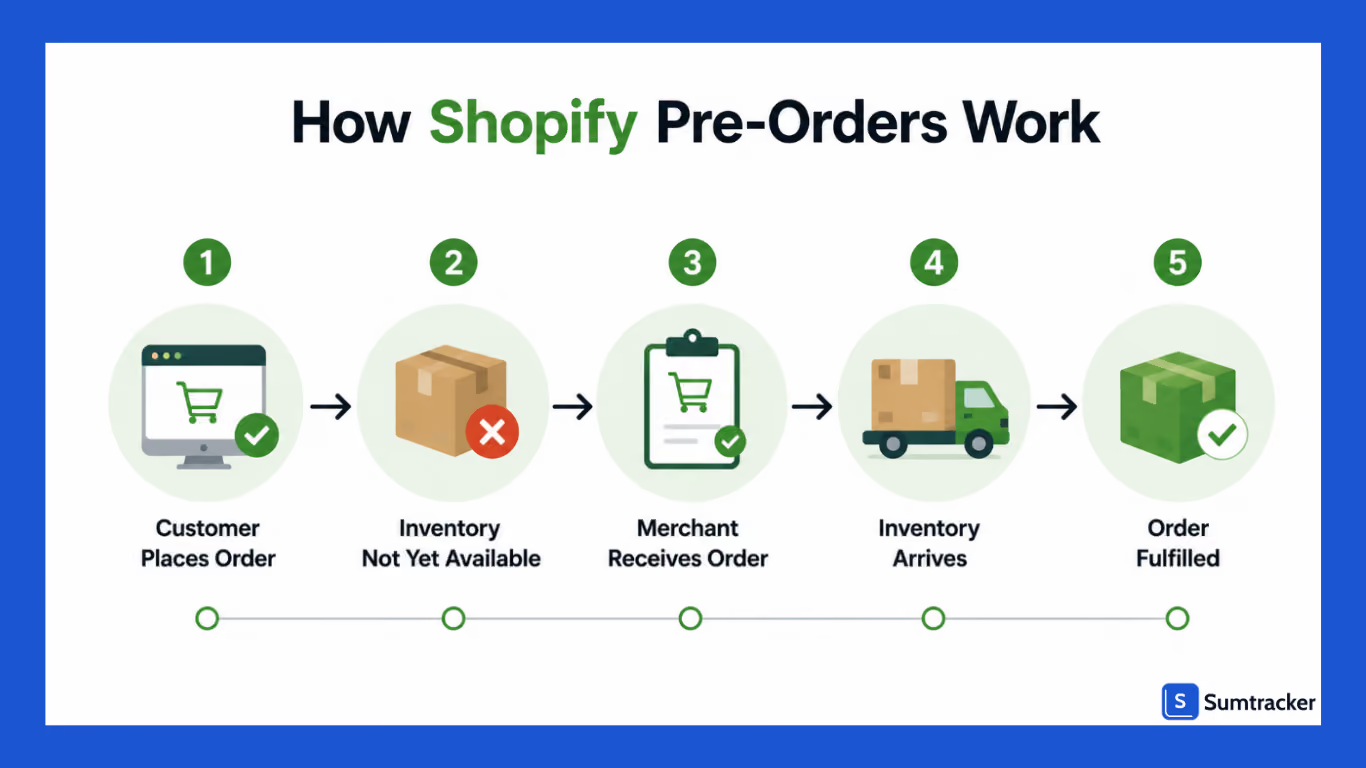
Step 1: Customers Place Pre-Orders
Customers purchase products that are not yet available for immediate shipment.
Your product page should typically include a delivery estimate for setting clear expectations, product availability information, a pre-order button on the orders page, and multiple purchase options.
Step 2: Orders Are Collected
Once checkout is completed, Shopify records the order.
The order enters your workflow but isn't fulfilled until inventory becomes available.
Step 3: Inventory Is Purchased or Manufactured
You then work with suppliers or manufacturers to procure inventory based on expected demand.
This stage may involve purchase orders, supplier coordination, production planning, and shipment tracking.
Step 4: Inventory Arrives
When inventory reaches the warehouse, merchants verify quantities and allocate inventory to pre-order customers.
Step 5: Orders Are Fulfilled
Pre-orders are picked, packed, and shipped.
You should prioritize pre-order customers before releasing remaining inventory for general sale to build customer loyalty among those early customers.
How to Enable Pre-Orders in Shopify
Shopify doesn't offer a complete native pre-order system out of the box.
Most merchants choose one of three options.
Use a Shopify Pre-Order App
According to Shopify's Help Center, merchants typically need a third-party app for pre-order for dedicated functionality.
Continue Selling When Out of Stock
Shopify also allows merchants to continue selling products after inventory reaches zero.
While useful, this behaves more like a backorder workflow than a true pre-order system.
Build a Custom Code Workflow
Larger brands often combine Shopify Flow, inventory management software, and internal processes to create customized pre-order workflows.
Managing Inventory for Shopify Pre-Orders
Inventory management is often the difference between a successful pre-order campaign and a frustrating customer experience.
Because you're selling products that aren't yet available, it's important to have a clear understanding of both incoming inventory and existing commitments.
Track Incoming Inventory
Pre-orders should be tied to expected inventory arrivals whenever possible.
Before accepting pre-orders, you must know the quantity and time till it is expected, the reliable supplier lead times, and the quantity of buffer inventory needed.
Having accurate purchase order and supplier information makes it easier to set realistic expectations with customers.
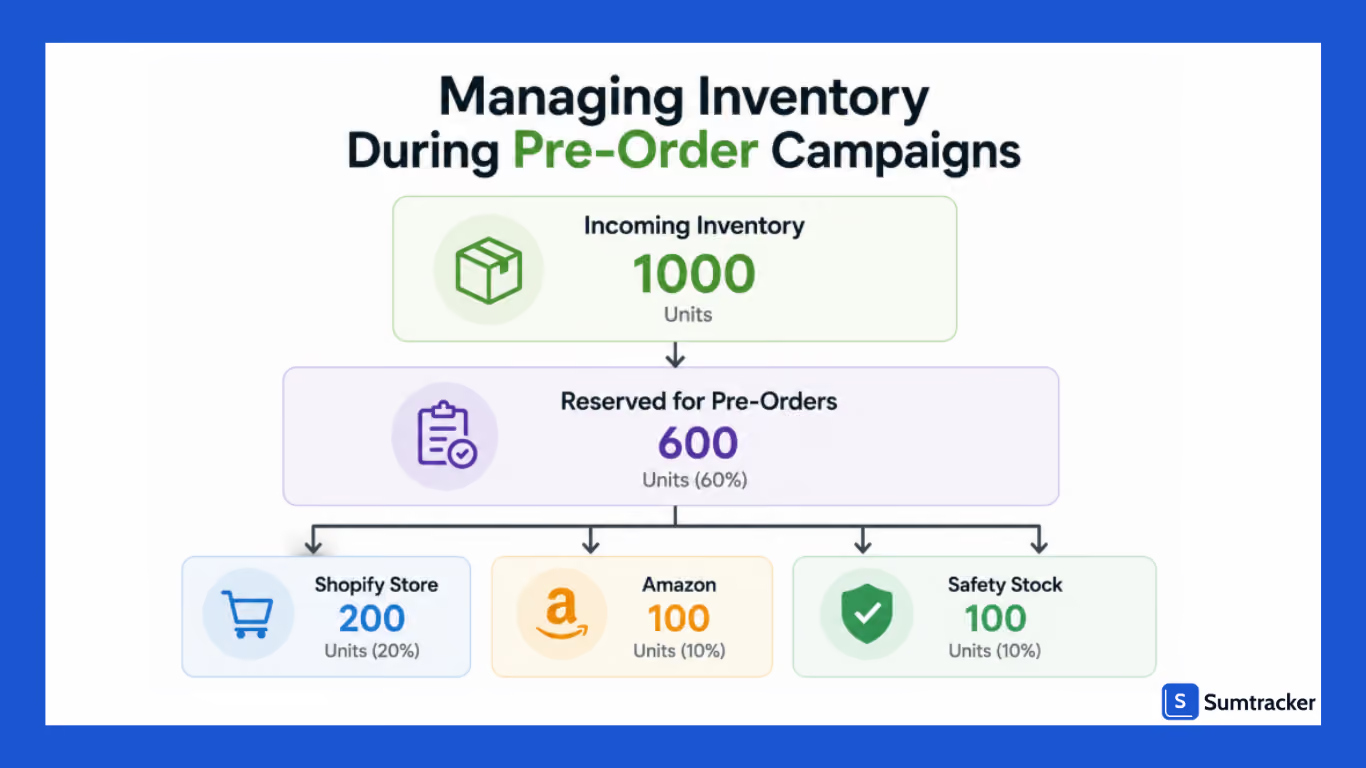
Reserve Inventory for Pre-Orders
When inventory arrives, the first priority should be fulfilling pre-order commitments.
If inventory is immediately made available across all sales channels, there's a risk that stock intended for pre-order customers could be sold elsewhere.
Many merchants reserve inventory specifically for pre-orders until all commitments have been fulfilled.
Prevent Overselling Across Channels
Overselling becomes a bigger risk when inventory is being sold on multiple channels such as Shopify, Amazon, Etsy, eBay, or retail locations.
For example, if you receive 1,000 units and have already accepted 700 pre-orders, only the remaining inventory should be available for new sales. Without proper inventory tracking, merchants can unintentionally sell the same inventory multiple times.
This is why you should use inventory management software to maintain a single source of truth across all channels.
Plan for Inventory Variances
Incoming inventory doesn't always match what was ordered.
Suppliers may ship fewer units than expected, products may arrive damaged, or shipments may be delayed. To reduce risk, many merchants avoid accepting pre-orders for 100% of expected inventory and instead keep a small buffer.
For example, if 1,000 units are expected, a merchant may only accept 850–900 pre-orders to account for unexpected issues.
Use Pre-Order Data to Improve Forecasting
One of the biggest benefits of pre-orders is the demand data they generate.
Instead of relying solely on forecasts, you can use actual customer demand to guide future inventory planning.
As discussed on the Liquid Weekly Podcast:
"You don't have to guess when you've got people actually telling you they want this thing."
Legal and Compliance Requirements for Shopify Pre-Orders
Offering pre-orders comes with additional responsibilities. Since customers are purchasing products that aren't immediately available, it's important to clearly communicate when orders are expected to ship, how cancellations are handled, and what happens if delays occur.
FTC Requirements for U.S. Merchants
If you're selling to customers in the United States, pre-orders are generally covered under the FTC's Mail, Internet, or Telephone Order Merchandise Rule.
To comply with the FTC's guidance, merchants should:
- Clearly communicate expected shipping or delivery timeframes.
- Have a reasonable basis for any advertised shipping estimate.
- Notify customers promptly if shipments are delayed.
- Offer customers the option to agree to the delay or cancel their order for a refund if the promised shipping date can't be met.
Publish Clear Store Policies
Along with complying with applicable regulations, merchants should make their pre-order policies easy to find. Clearly explain:
- Which products are available for pre-order.
- Expected shipping timelines.
- Cancellation and refund policies.
- How customers will be notified if timelines change.
Being transparent throughout the pre-order process helps build customer confidence and reduces misunderstandings after purchase.
Common Challenges When Managing Shopify Pre-Orders
Pre-orders can help drive sales and validate demand, but they also introduce challenges that merchants need to manage carefully.
Since you're selling inventory that hasn't arrived yet, even small mistakes can impact fulfillment and customer satisfaction.
Overselling Inventory
One of the biggest risks is accepting more than what you can fulfill.
This happens when expected inventory doesn't arrive in full or when the same inventory is being sold across multiple channels.
Without accurate inventory tracking, merchants can easily end up promising more stock than they actually have.
Supplier Delays
Pre-orders rely heavily on suppliers and manufacturers meeting expected timelines.
Production delays, shipping disruptions, or customs issues can push back delivery dates, making it difficult to fulfill orders on time.
Managing Customer Expectations
Customers are usually willing to wait for a pre-order as long as you keep your customer informed about the delivery date.
Unclear shipping timelines, delayed updates, or missed delivery estimates lead to support tickets, cancellations, and negative customer experiences.
Forecasting and Planning Challenges
While pre-orders provide valuable demand data, they don't guarantee long-term sales.
A successful pre-order campaign may be driven by launch excitement or limited availability, so merchants should combine pre-order data with broader inventory planning and forecasting efforts.
Best Practices for Managing Pre-Orders in Shopify
A successful pre-order campaign isn't about generating sales but about ensuring you fulfill those orders smoothly when inventory arrives.
Following a few best practices can help you avoid overselling, reduce customer frustration, and maintain inventory accuracy.
Set Realistic Delivery Expectations
Be completely transparent to your customers about the expected delivery timeline.
It's better to provide a longer estimate and deliver early than to promise an aggressive timeline and miss it.
Clearly displaying expected shipping dates on product pages reduces support inquiries.
Reserve Inventory for Pre-Orders
Don’t start shipping to new customers; rather, prioritise those customers who trusted you in the beginning.
In no situation should you start selling in a general sale before you have booked the inventory for your pre-order customers.
You can end up overselling and making your pre-order customers wait if you give away their ordered stuff.
Keep Customers Updated
Customers are generally more understanding of delays when they're kept informed.
A simple communication timeline could look like this:
Track Inventory Closely
Track the inventory status all the time, like how much you have, how much is booked, the delivery dates, among others.
Accurate inventory tracking helps merchants make better decisions and avoid fulfillment issues.
Review Performance After Each Launch
After a pre-order campaign ends, review what worked and what didn't.
Look at the units sold, fulfillment timelines, and cancellation rates. Also, don’t forget about the customer ratings.
Handle Cancellations and Refunds
You never know when a customer changes their mind and cancels their order.
Lay out clear cancellation and refund policies so that you don’t need to face much trouble and customer support queries later on.
Top 3 Shopify Pre-Order Apps
1. STOQ
STOQ is the most loved preorder app on the Shopify App Store, trusted by 30,000+merchants and awarded by Shopify as one of the Top 25 Built for Shopify apps.
Set up your first preorder in minutes, then go as deep as you need – with partial payments, multi-market inventory, and automated back-in-stock alerts, without ever having to switch apps later.
It offers more than a dozen features to optimize your pre-orders for premium and even free users. Here are some of them:
- Partial payments & fulfillment management
- Multi-market, multi-language & Klaviyo integration
- Automated back-in-stock alerts & waitlists
- 24/7 human support even on the free plan
- Variant-level controls for preorders and back-in-stock alerts.
- Full-funnel tracking (engagement analytics for preorders and back-in-stock alerts)
The application is easy to set up and suitable for both beginners and advanced users.
However, if any issue arises along the way, there’s excellent customer support to help you.
STOQ highlights
- Set up in minutes, not hours — no code or developer required.
- From simple preorders to complex workflows, STOQ scales with you.
- Native support for Klaviyo and Shopify Markets
- 24/7 human support, with founders in the loop
2. PreOrder Globo
PreOrder Globo is a popular Shopify pre-order app that helps merchants sell products before they're in stock. It's easy to set up and offers the essential tools needed to run successful pre-order campaigns without coding.
Some of its key features include:
- Custom pre-order buttons and badges
- Partial payment and deposit support
- Backorders and out-of-stock selling
- Estimated shipping messages
- Scheduled pre-order campaigns
- Inventory-based preorder rules
PreOrder Globo highlights
- Quick no-code setup
- Customizable pre-order experience
- Supports deposits and backorders
- Schedule pre-order campaigns in advance.
- Responsive customer support
Notify! Back in Stock & PreOrder
Notify! Back in Stock & PreOrder helps Shopify merchants manage pre-orders, back-in-stock alerts, and waitlists from a single app. It's a great option for stores that frequently launch new products or experience stockouts.
Some of its key features include:
- Pre-orders and backorders
- Automated back-in-stock alerts
- Customer waitlists
- Partial payment support
- Custom preorder messaging
- Email marketing integrations
Notify! Back in Stock & PreOrder highlights
- Manage pre-orders and restock alerts in one app.
- Recover lost sales with automated notifications.
- Accept deposits or full payments.
- Easy integration with Shopify
- Fast setup with reliable customer support
FAQs
Can Shopify handle pre-orders natively?
Not completely. Shopify allows merchants to continue selling products when inventory reaches zero, but most merchants use a dedicated pre-order app to display pre-order messaging, estimated shipping dates, and manage pre-order workflows more effectively.
What's the difference between a pre-order and a backorder?
A pre-order is placed before a product is officially available, often for a new launch or upcoming release. A backorder occurs when an existing product is temporarily out of stock, but customers can still place orders while waiting for inventory to be replenished.
How do I prevent overselling during Shopify pre-orders?
The best way to prevent overselling is to closely track incoming inventory, set pre-order limits, reserve inventory for pre-order customers, and maintain accurate stock levels across all sales channels. Many merchants also keep a buffer instead of accepting pre-orders for 100% of expected inventory.
Should I accept unlimited pre-orders?
In most cases, no. Accepting unlimited pre-orders can create fulfillment issues if suppliers delay shipments or deliver fewer units than expected. Setting limits based on incoming inventory helps reduce risk and improve customer satisfaction.
Can inventory management software help with Shopify pre-orders?
Yes. While inventory management software doesn't usually manage the customer-facing pre-order experience, it can help merchants track inventory on hand, inventory on order, purchase orders, and stock across multiple sales channels. This visibility helps reduce overselling and makes it easier to fulfill pre-orders accurately.
Conclusion
Pre-orders can be a powerful way to launch new products, validate demand, and generate revenue before inventory arrives.
They help merchants make smarter inventory decisions while giving customers early access to upcoming products.
However, successful pre-order management goes beyond collecting orders.
Merchants need accurate inventory visibility, realistic delivery timelines, and clear communication to ensure a smooth customer experience.
By tracking incoming inventory, reserving stock for pre-orders, and planning for potential delays, Shopify merchants can avoid common pitfalls like overselling and fulfillment issues.
When managed well, pre-orders can become more than just a sales strategy; they can be a valuable part of your inventory planning and growth strategy.

Bhoomi writes about inventory management and multichannel selling at Sumtracker. Her focus is on solving real operational problems for Shopify, Amazon, and marketplace sellers through well-researched content. She covers everything from multi-location inventory syncing and stock error troubleshooting to replenishment planning and platform comparisons, turning complex eCommerce operations into clear, actionable guidance.
LinkedInRelated Articles
Tool and strategies modern teams need to help their companies grow.

Ready to Simplify Your Inventory Management?
Join hundreds of e-commerce merchants who rely on Sumtracker to save time, eliminate errors, and grow their business.
