.svg)
Automating Reordering in Shopify: Streamline Inventory & Never Run Out of Stock


Are you still spending time reviewing inventory levels and manually calculating reorder quantities?
That's actually like calculating taxes with a calculator when accounting software is right there.
I know you trying to find reorder quantities manually might just work fine for you.
But as you see your Shopify store growing, manually checking stock levels, tracking supplier lead times, and creating purchase orders would be a headache.
By doing these things manually, you are actually trading your time, which you could spend on other inventory operations.
To eliminate these repetitive tasks and reduce costly inventory mistakes, you can turn to automated reordering.
As a matter of fact, 60% of American online retailers already use some form of automation in operations.
In this guide, I’ll help you understand what automated reordering is, how it works in Shopify, and also how you can build a more reliable replenishment process as your business scales.
What is Automated Reordering in Shopify?
Automated reordering is the process of automatically finding inventory that needs to be replenished and when, on the basis of your inventory data, like sales velocity, inventory levels, supplier lead times, and safety stock requirements.
So with this, you can break the habit of manually checking stock levels every week.
For example:
Customer Reordering vs Inventory Reordering
"Automated reordering" can mean two different things in Shopify, and it's relatively easy to get confused between the two.
One is customer reordering, and the other is inventory reordering.
Customer reordering helps existing loyal customers quickly purchase products they've bought before using features like Buy Again buttons, reorder reminders, or subscriptions.
Inventory reordering, on the other hand, helps merchants determine what products to reorder, when to reorder them, and how much inventory to purchase based on inventory levels, sales velocity, supplier lead times, and safety stock.
How Automated Reordering Works
Automated reordering combines inventory data, historical sales trends, and supplier information to help you know when to replenish inventory.
So with this, you’ll order the right quantity at the right time, not based on your gut feeling.
Here's what the process looks like.
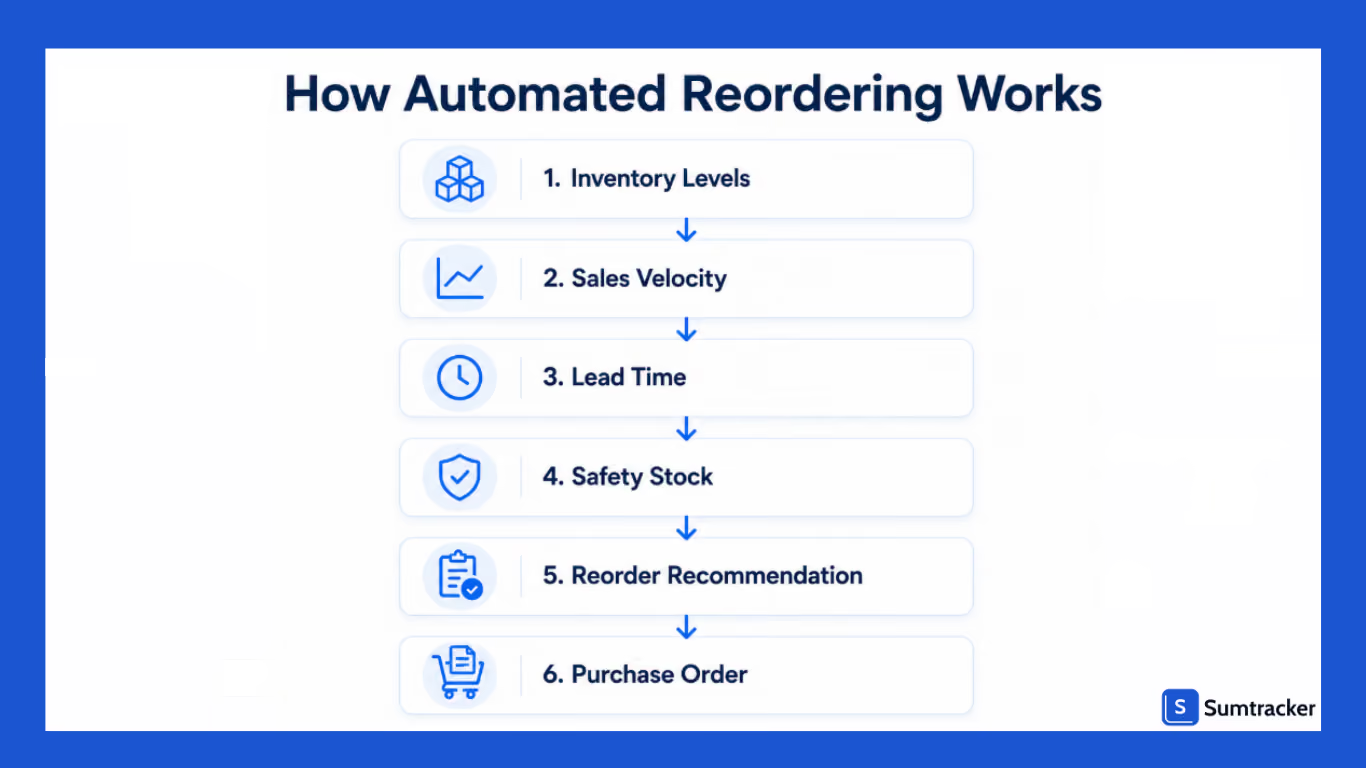
Step 1: Monitor Inventory Levels
Inventory software continuously tracks available stock.
This includes:
- Current inventory
- Reserved inventory
- Incoming inventory
- Inventory across locations
Step 2: Calculate Sales Velocity
The system measures how quickly products are selling.
Example:
- 300 units sold in the last 30 days
- Daily sales velocity = 10 units/day
Step 3: Factor in Supplier Lead Time
Lead time is the number of days required for suppliers to deliver inventory.
Example:
- Daily sales = 10 units
- Lead time = 20 days
Inventory needed during lead time:
10 × 20 = 200 units
Step 4: Add Safety Stock
Safety stock acts as a buffer against:
- Demand spikes
- Supplier delays
- Forecasting errors
Example:
- Lead time demand = 200 units
- Safety stock = 50 units
Reorder point:
200 + 50 = 250 units
Step 5: Trigger Reordering
When inventory drops below 250 units:
- The system flags the product.
- Reorder recommendations are generated.
- Purchase orders can be created.
Reorder Point Formula
Real-World Example
A Shopify supplement brand sells protein powder.
- Average daily sales: 15 units
- Supplier lead time: 30 days
- Safety stock: 100 units
Reorder Point:
(15 × 30) + 100 = 550 units
Once inventory falls below 550 units, the system recommends placing a replenishment order.
Key Benefits of Automating Reordering in Shopify
Automation does not always mean that you are doing it to save time.
It's also about making the right decision based on data and not your intuition.
Reduce Stockouts
Automated reordering helps you identify products that need replenishment before inventory reaches critical levels. This reduces the chances of lost sales and disappointing customers.
Improve Cash Flow
I have seen merchants stocking up too much inventory of just a single product because they ordered it based on their gut feeling.
But if you are making a replenishment decision without any data supporting it, then let me tell you are going to get your cash tied up in the excess inventory, and automated reordering helps you avoid this.
Save Time
We all know that manual inventory reviews and reorder calculations are time-consuming. Automation helps you save time so that you can focus on growing your business and not worry about inventory restocking.
Scale More Efficiently
As SKU counts grow, managing inventory manually becomes increasingly difficult. Automated reordering creates a repeatable process that can support larger catalogs without adding complexity.
Make Better Purchasing Decisions
Reordering decisions are based on inventory levels, sales trends, supplier lead times, and incoming inventory rather than guesswork.
Who Benefits Most from Automated Reordering?
We have discussed automated reordering, but before adopting this, you should know whether it is meant for your business or not because it may not be as valuable to your business.
If you have a very predictable demand for your products, have a frequent replenishment cycle, and where historical sales data can be used to make accurate reorder recommendations, then automated reordering is for you.
It's particularly useful for businesses selling:
- Coffee and beverages
- Vitamins and supplements
- Pet food
- Beauty and skincare products
- Household essentials
- Apparel basics
Businesses with highly seasonal, made-to-order, or limited-edition products can still benefit from automation, but reorder recommendations should be reviewed regularly since demand patterns change more frequently.
What You Need Before Setting Up Automated Reordering
To make the most use of your reordering system, you need to first set it up by feeding it various data. Before you start worrying that this is going to be a long process or you aren’t very handy with software, let me tell you it’s way easier than you think.
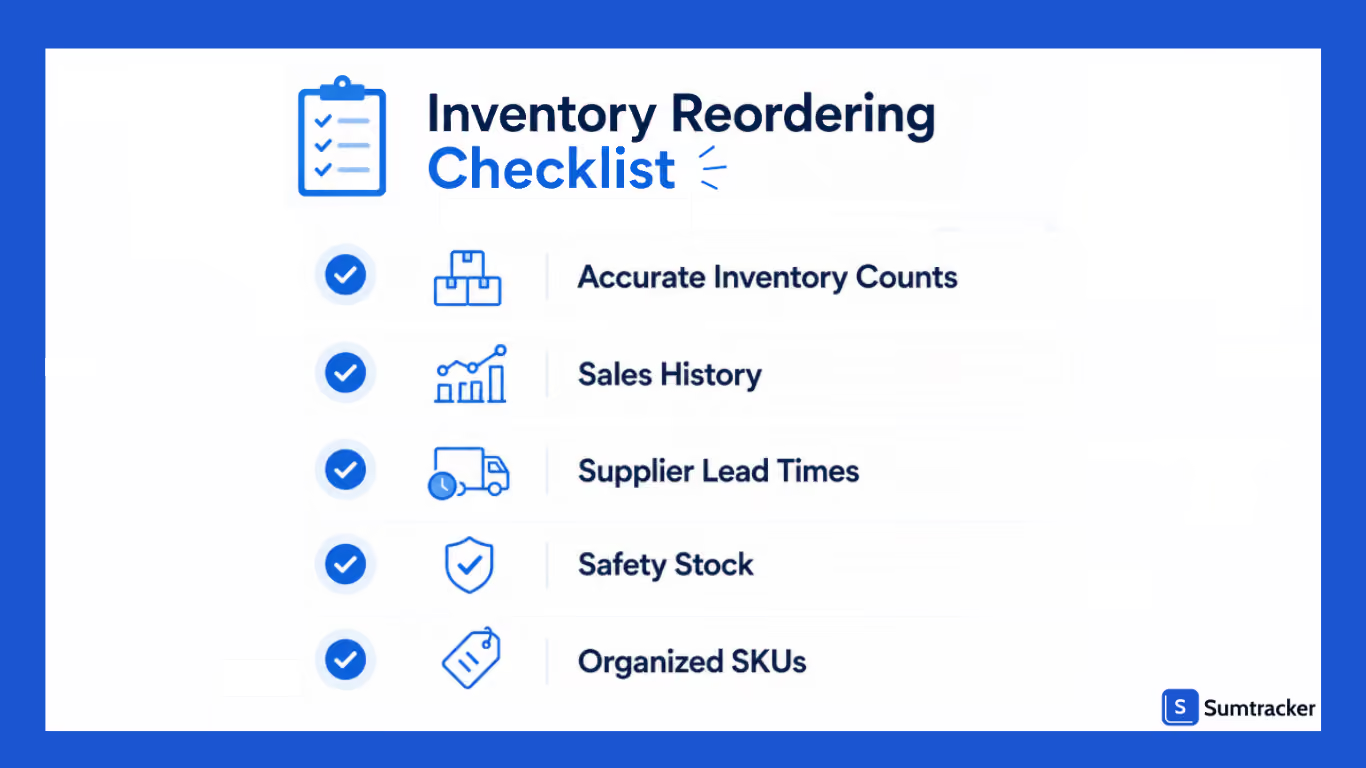
So, here’s what you need before you get started:
Accurate Inventory Counts
Inventory data must be reliable.
Even the best automation system will produce poor recommendations if inventory levels are inaccurate.
Historical Sales Data
At least 60–90 days of sales history helps establish baseline demand patterns.
More data generally leads to better replenishment decisions.
Supplier Lead Times
Document:
- Average lead times
- Seasonal fluctuations
- Supplier reliability
Lead times directly impact reorder points.
Safety Stock Levels
Safety stock should reflect:
- Demand variability
- Supplier reliability
- Business risk tolerance
Fast-moving products often require larger safety stock buffers.
Organized Product Catalog
Your SKUs should be structured correctly.
This includes:
- Product variants
- Bundles
- Supplier assignments
- Multi-location inventory
Methods to Automate Reordering in Shopify Stores
There are several ways you can approach automating reordering in Shopify.
The right solution depends on how much automation you need in your replenishment workflows.
Method 1: Use Inventory Management Apps
The most common and easiest way is to use a tool that helps with automated reordering.
These apps continuously track inventory levels, sales velocity, supplier lead times, and safety stock to recommend when products should be reordered and how much inventory to purchase.
Many inventory planning tools also streamline purchase order creation, helping merchants reduce manual calculations and make more informed replenishment decisions.
Best for: Growing businesses, merchants with large product catalogs, and stores selling across multiple channels.
Method 2: Build Custom Workflows with Shopify Flow
You can automate repetitive tasks without writing long code using Shopify Flow.
For example, when inventory falls below a predefined threshold, Shopify Flow can notify your purchasing team, create an internal task, or send an email or Slack reminder to review inventory.
While Shopify Flow doesn't calculate reorder quantities, it helps automate the workflow surrounding inventory replenishment.
Best for: Shopify merchants who want to automate notifications and internal inventory processes.
Example workflow
- Send a Slack notification to the purchasing team.
- Add the product to a reorder tracking sheet or internal task list.
Check out this podcast for more such workflows.
Real-world example:
After upgrading to Shopify Plus, P&Co used Shopify Flow to automate inventory monitoring and send low-stock notifications whenever products reached predefined thresholds. This helped the team identify products that needed replenishment sooner and avoid promoting items that were running low.
According to Shopify's case study, P&Co also achieved 112% year-over-year growth while scaling its operations.
Key takeaway: Automating inventory monitoring doesn't replace purchasing decisions, but it helps merchants respond faster and reduce the risk of stockouts.
Read the full case study here.
Method 3: Build Custom Automation Using the Shopify API
If you have advanced inventory requirements, then using the Shopify API is the way to build custom reordering workflows.
For example, developers can create integrations that analyze inventory levels, calculate reorder points, connect Shopify with ERP or purchasing systems, or automatically share inventory data with suppliers.
This approach offers greater flexibility but typically requires development resources and ongoing maintenance.
Best for: Enterprise businesses or merchants with custom inventory workflows.
FAQ
Does Shopify have automated reordering built in?
Shopify doesn't natively automate the entire reorder process based on sales velocity calculations, supplier lead times, and inventory forecasts. You'll need an inventory management app to automate replenishment decisions and purchase order workflows.
How do I determine the right reorder point for a product?
A reorder point is usually calculated using average daily sales, supplier lead time, and safety stock. Reviewing historical order data, purchase patterns, and recent sales trends can help you set more accurate reorder points and avoid stockouts.
Can automated reordering help reduce stockouts?
Yes. Automated reordering helps identify products that need replenishment before they run out of stock. By monitoring inventory levels and generating reorder reminders at the right time, you can place purchase orders earlier and reduce lost sales.
Is automated reordering useful for stores with multiple sales channels?
Absolutely. When inventory is spread across Shopify, marketplaces, and multiple locations, manually tracking stock can become difficult. Automated reordering tools use centralized Shopify data and inventory information to help merchants make more informed purchasing decisions.
Can I automate reordering without using spreadsheets?
Yes. Many growing Shopify stores move away from Google Sheets as inventory complexity increases. Inventory management software can track stock levels, supplier information, incoming inventory, and purchase orders in one place, reducing manual work and improving inventory accuracy.
Conclusion
Inventory problems rarely happen because merchants don't care about inventory.
They happen because manual processes eventually hit their limits.
Automated reordering helps eliminate guesswork by using inventory data, sales trends, supplier lead times, and safety stock levels to make replenishment decisions more consistent.
Whether you're managing 50 products or 5,000, implementing automated reordering can help reduce stockouts, improve cash flow, and create a more scalable inventory operation.
The earlier you build a reliable replenishment process, the easier it becomes to support long-term growth without constantly fighting inventory fires.

Bhoomi writes about inventory management and multichannel selling at Sumtracker. Her focus is on solving real operational problems for Shopify, Amazon, and marketplace sellers through well-researched content. She covers everything from multi-location inventory syncing and stock error troubleshooting to replenishment planning and platform comparisons, turning complex eCommerce operations into clear, actionable guidance.
LinkedInRelated Articles
Tool and strategies modern teams need to help their companies grow.


Ready to Simplify Your Inventory Management?
Join hundreds of e-commerce merchants who rely on Sumtracker to save time, eliminate errors, and grow their business.
