.svg)

Shopify Backorder Management Strategies for Growing Ecommerce Brands


Do you want to continue selling even if your inventory is 0?
I know it sounds strange!
But no, this is a real practice that Shopify merchants do.
Why stop selling when you know your inventory is going to arrive soon?
That's where you can turn to backorders. They give you a way to keep taking orders without having inventory on hand at that exact moment.
Backorders allow you to continue accepting orders while waiting for new inventory to arrive.
Whether you're dealing with seasonal demand spikes, supplier delays, or rapid business growth, having a clear backorder management strategy can help you balance sales opportunities with customer expectations.
In this guide, we'll explain how Shopify backorders work, what causes them, and the strategies growing ecommerce brands use to reduce stock shortages and manage backorders more effectively.
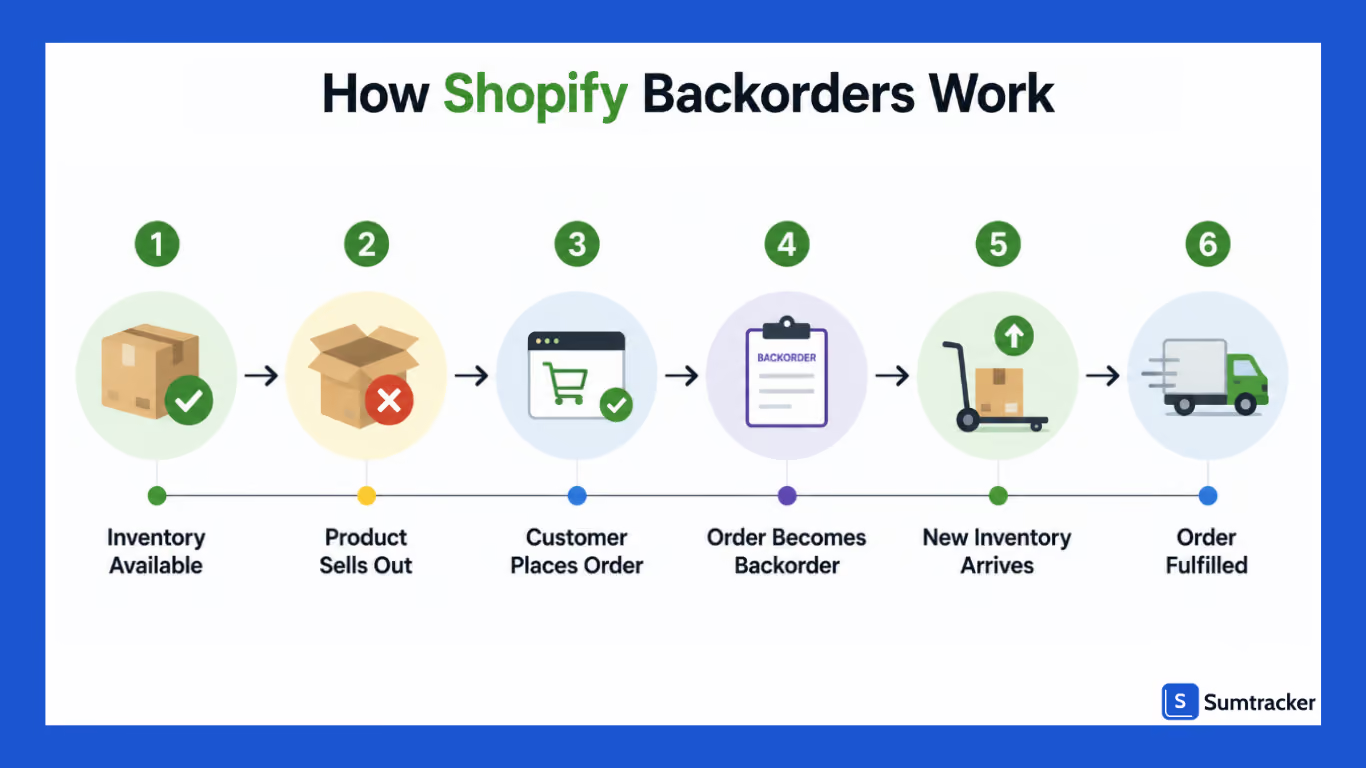
What is a Backorder in Shopify?
A backorder occurs when a customer purchases a product that is currently out of stock but is expected to be restocked soon.
Instead of marking the product as sold out, you can allow your customers to keep on purchasing if you know that inventory will arrive soon.
You can easily enable this by selecting "Continue selling when out of stock" within a product's inventory settings.
For example, if a Shopify store selling fitness equipment in Texas runs out of resistance bands but expects a new shipment in a week, it may continue accepting orders through backorders instead of losing potential customers.
Why Backorders Matter
When managed correctly, backorders help in continuing to generate revenue during inventory shortages, capturing customer demand, maintaining momentum for popular products, and improving inventory utilization.
But you should always use backorders strategically.
If you make your customers wait for too long for their orders, you can expect getting cancel order and poor ratings.
9 Shopify Backorder Management Strategies
Backorders are often viewed as a fulfillment issue, but they're usually the result of inventory planning challenges.
Your goal should be to reduce unnecessary backorders.
1. Maintain Real-Time Inventory Visibility
Inventory accuracy is the basis of effective backorder management.
When stock levels are spread across Shopify, Amazon, Etsy, retail stores, or warehouses, it's easy for inventory discrepancies to occur.
A product may appear available on one channel even though it's already been sold elsewhere.
Having real-time visibility into inventory helps you prevent overselling, monitor stock across channels, identify risks early, and make replenishment decisions faster.
Many backorder problems begin when merchants rely on outdated inventory information.
2. Improve Demand Forecasting
Forecasting helps businesses anticipate demand before products run out of stock.
Rather than relying on intuition, you should analyze historical sales trends, seasonal demand patterns, promotional performance, product launch data, and supplier lead times.
A systematic review published in ScienceDirect found that data analytics helps retailers make more informed operational and strategic decisions.
For ecommerce businesses, analyzing inventory and sales data can significantly improve purchasing decisions and reduce stock-related disruptions.
For example, if a product consistently experiences a 30% sales increase during Black Friday, forecasting can help you order inventory before demand spikes rather than reacting after stock runs out.
3. Set Reorder Points and Safety Stock Levels.
Instead of waiting too long to reorder, establish clear reorder points based on sales velocity and supplier lead times.
A simple formula is:
Reorder Point = Average Daily Sales × Lead Time + Safety Stock
Safety stock acts as a buffer against supplier delays, unexpected demand spikes, shipping disruptions, and inventory inaccuracies.
Without safety stock, even a minor delay can create backorders.
4. Evaluate the Cost of Accepting Backorders
Even though backorders help in saving your sales, they can affect your profit margins as they have operational costs.
Make sure to consider all the costs, including expedited shipping, payment processing fees, customer support requests, refunds, and supplier price increases. If these costs are more than the profit, then taking backorders can be a loss-making decision.
5. Communicate Delivery Expectations Clearly
Customers are generally willing to wait if they know what to expect.
Problems occur when shoppers believe an item is available for immediate shipment, only to receive delay messages.
Best practice is to display backorder notices on product pages, providing estimated shipping dates, sending order confirmation emails with delivery timelines, and updating customers if delays occur.
But keep in mind not to display out of stock, as it can discourage your customers from buying the product; rather, optimise your messaging for better conversion.
You can improve conversions by:
- Placing a backorder badge near the Add to Cart button.
- Repeating the expected delivery timeline during checkout and in order confirmation emails.
6. Automate Low-Stock Alerts
Manually monitoring inventory becomes difficult as your catalog grows.
Automated low-stock alerts notify your team when products reach predefined thresholds, allowing you to place purchase orders before inventory runs out.
It also has various benefits like faster replenishment decisions, reduced stockouts, improved purchasing efficiency, and better supplier coordination.
The earlier you identify inventory risks, the easier they are to address.
7. Diversify Suppliers
Supplier delays are one of the most common causes of backorders.
Relying on a single supplier increases operational risk.
Many successful ecommerce brands maintain:
- Primary suppliers
- Secondary suppliers
- Emergency sourcing options
This flexibility becomes particularly valuable during seasonal demand surges or supply chain disruptions.
8. Prioritize Backordered Orders
When inventory arrives, you'll need a process for deciding which orders get fulfilled first.
Common approaches include:
- First-in, first-out fulfillment
- Prioritizing subscription customers
- Prioritizing VIP customers
- Prioritizing high-value orders
Having a documented process prevents confusion and improves customer experience.
9. Centralize Inventory Across Sales Channels
As brands expand beyond Shopify, inventory complexity increases.
Consider a business selling on:
- Shopify
- Amazon
- Etsy
- Walmart Marketplace
If inventory isn't synchronized, overselling becomes more likely.
A customer may purchase the last available unit on Shopify while the same product is simultaneously sold on Amazon.
Centralized inventory management helps ensure all channels reflect the same stock levels and reduces the likelihood of unexpected backorders.
How to Enable Backorders in Shopify
Shopify allows merchants to continue accepting orders for products that are temporarily out of stock using the "Continue selling when out of stock" setting.
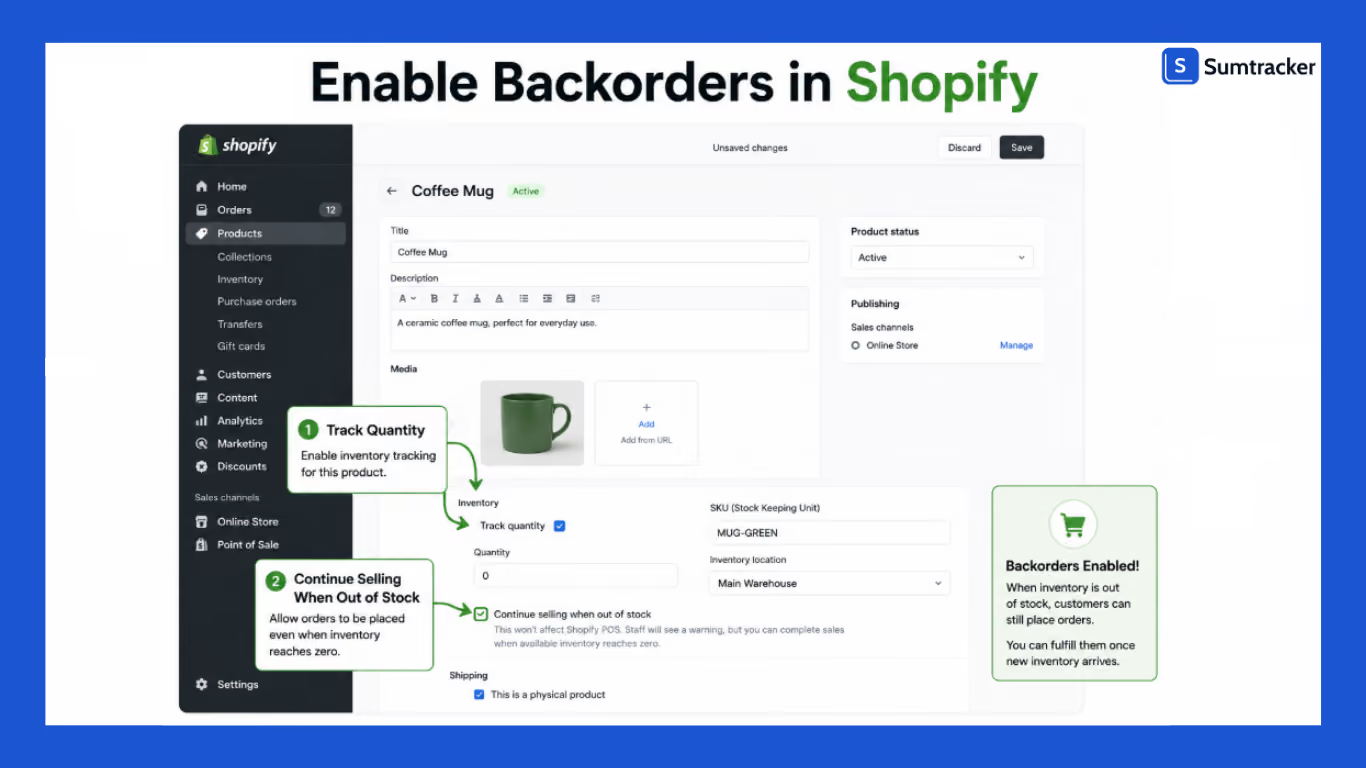
Follow these steps to enable backorders:
Step 1: Open the Product
From your Shopify admin, navigate to:
Products → Select a Product.
If the product has multiple variants, select the variant for which you want to enable backorders.
Step 2: Enable Inventory Tracking
Scroll to the Inventory section and ensure Track quantity is enabled.
Step 3: Allow Sales When Out of Stock
Check the option:
Continue selling when out of stock.
This setting allows customers to purchase the product even when inventory reaches zero.
Step 4: Save Your Changes
Click Save to apply the changes.
That's it! By following these simple directions, Shopify will continue accepting orders for the product even when it's out of stock.
Common Causes of Backorders in Shopify Stores
Backorders are often a symptom of deeper inventory management challenges rather than a problem on their own.
While occasional backorders can occur due to unexpected demand, recurring backorders usually indicate issues with forecasting, inventory visibility, or replenishment processes.
Knowing the root causes is helpful to reduce stock shortages and improve fulfillment performance.
Inaccurate Inventory Tracking
When your inventory data is inaccurate, you may continue selling products that are no longer available,
This results in customers ordering products that cannot be fulfilled immediately.
This issue becomes more common as businesses grow and sell across multiple channels.
Manual inventory updates, delayed stock adjustments, and disconnected systems can all create discrepancies between reported and actual inventory.
Poor Demand Forecasting
If you are ordering inventory based only on recent sales performance, then it is risky,
That too during seasonal peaks, promotional campaigns, or product launches.
With effective forecasting, you can look beyond current inventory levels and analyze historical sales trends, seasonality, and supplier lead times.
If you fail to anticipate demand, you can find yourself placing replenishment orders often after inventory has already started running out.
Supplier Delays
Even with strong inventory planning, you still can experience backorders when your suppliers fail to deliver inventory on schedule.
Delays in manufacturing, shipping, customs clearance, or raw material procurement can extend lead times.
The impact is greater if you rely on a single supplier or maintain minimal inventory buffers.
When replenishment inventory arrives later than planned, customer orders may remain unfulfilled until stock becomes available again.
That can make your customers unhappy.
Insufficient Safety Stock
Safety stock helps to protect businesses from uncertainty. It provides a buffer when demand exceeds expectations or suppliers experience delays.
If you operate with little or no safety stock, then you will have limited flexibility when conditions change.
A sudden increase in orders or a delayed shipment can quickly deplete available inventory and create backorders.
Maintaining an appropriate buffer stock helps reduce this risk and improves the ability to absorb short-term disruptions.
Unexpected Demand Spikes
Not all backorders happen due to poor inventory management. Sometimes demand increases far beyond what historical data would suggest.
A product featured by an influencer, a successful email campaign, or a viral social media post can generate a surge in orders within a matter of hours.
While these situations are positive from a sales perspective, they can strain inventory levels and create temporary shortages if replenishment plans are not prepared for rapid growth.
Signs Your Shopify Store Needs Better Backorder Management
Industry research discussed by RetailWire found that retailers that frequently rely on backorders to satisfy customer demand may lose sales and customer loyalty over time when fulfillment delays become common.
Backorders can protect revenue in the short term, but poor backorder management can damage customer trust in the long run.
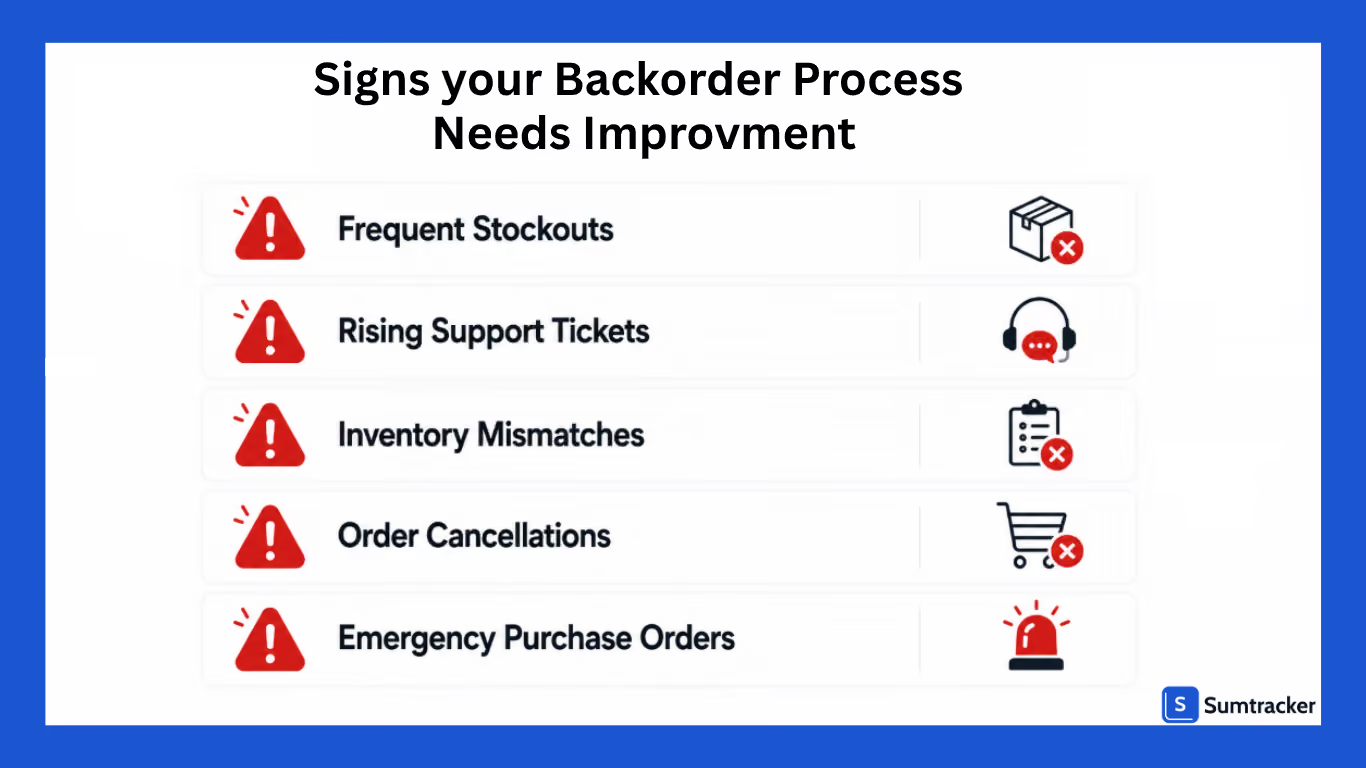
Here are some signs that your current approach may need attention.
Frequent Stockouts
Most products eventually sell out. The question is how often it happens.
If your best-selling products seem to run out of stock every month, or if inventory shortages repeatedly catch your team by surprise, the issue is planning.
Frequent stockouts usually indicate that reorder decisions are being made too late or that inventory levels aren't being reviewed often enough.
Backorders may help you continue taking orders, but they shouldn't become the default solution every time inventory runs low.
Rising Support Tickets
One of the first places backorder problems show up is in customer support.
When customers start emailing to ask where their order is, whether an item has been restocked, or when a shipment will arrive, it often means expectations weren't set clearly during the purchase process.
A handful of inquiries is normal. A growing number of fulfillment-related tickets is usually a sign that backorders are creating friction in the customer experience.
Real-World Example
As order volumes grow, manually managing backorders can quickly overwhelm customer support teams.
For example, 310 Nutrition, a subscription-based health and wellness brand, struggled with the administrative work involved in managing backorders on Shopify.
By automating backorder handling and allowing customers to manage order changes themselves, the company significantly reduced manual backorder processing while improving the customer experience during stock shortages.
The takeaway is simple: if your support team spends more time answering "When will my order ship?" than solving customer problems, it may be time to automate parts of your backorder workflow.
Read the full case study here.
Inventory Mismatches
Many merchants don't realize they have an inventory problem until they conduct a physical count.
A product may show ten units available in Shopify, only for the warehouse team to discover there are actually two left on the shelf. These discrepancies make it difficult to make confident purchasing decisions and increase the likelihood of overselling.
If your team frequently questions whether inventory numbers are accurate, improving inventory visibility should become a priority.
Supplier Delays
Supplier delays happen. Containers get delayed, manufacturers miss deadlines, and shipments arrive later than expected.
The issue isn't the delay itself; it's how much disruption that delay causes.
If a single late purchase order immediately creates stock shortages and fulfillment problems, there may not be enough buffer inventory in place. Businesses that consistently struggle with supplier delays often need to revisit their safety stock strategy rather than simply pushing suppliers for faster delivery.
No Inventory Sync Across Channels
Selling on Shopify is one thing. Selling on Shopify, Amazon, Etsy, Walmart, and retail locations at the same time is something else entirely.
As businesses expand into new channels, inventory management becomes significantly more complex. Without a centralized view of inventory, it's easy to oversell products or miss stock shortages until customers have already placed orders.
Many multi-channel sellers discover that their backorder problems aren't caused by demand—they're caused by inventory existing in multiple places without a single source of truth.
Emergency Purchase Orders
One of the clearest signs of weak backorder management is when inventory decisions are constantly being made under pressure.
If your team regularly finds itself placing urgent purchase orders, expediting shipments, or searching for backup suppliers at the last minute, inventory planning is likely becoming reactive rather than proactive.
Strong inventory operations don't eliminate surprises completely, but they reduce the number of emergencies that need to be solved every week.
Order Cancellation
Backorders only work when customers are willing to wait.
If cancellations are increasing because products aren't shipping within expected timeframes, it may be time to review how backorders are being managed.
A customer who waits two extra weeks for an order might be understanding. A customer who experiences repeated delays may decide not to return.
FAQs
How long should a Shopify backorder last?
There isn't a fixed timeframe, but shorter is always better. If you know a product won't be available for several weeks or months, then create a preorder or waitlist instead. Clearly communicating expected shipping dates is more important than the actual backorder duration.
Should I allow backorders for every product?
Not necessarily. Backorders work best for products with predictable supplier lead times and consistent demand. If restock dates are uncertain or suppliers are unreliable, accepting backorders can lead to customer frustration and order cancellations.
How do I know if I need more safety stock?
If supplier delays, demand spikes, or stockouts regularly lead to backorders, your safety stock levels may be too low. A good safety stock buffer should allow your business to continue fulfilling orders even when sales exceed expectations or inventory arrives later than planned.
What is the biggest cause of backorders for growing Shopify brands?
While there can be multiple causes, poor inventory visibility is often the root issue. As businesses expand into multiple sales channels and warehouses, it becomes harder to maintain accurate inventory records. This increases the risk of overselling, stock discrepancies, and unexpected backorders.
Can selling on multiple channels increase backorders?
Not really. Selling on Shopify, Amazon, Etsy, Walmart, and other channels definitely creates an opportunity for inventory mismatches. But with proper inventory sync, the same stock can be sold multiple times before quantities are updated, resulting in overselling and backorders.
Conclusion
Backorders are unavoidable in situations of sudden high demand. You should make sure to keep backorders as a temporary solution in such scenarios and not a habit.
For Shopify merchants, effective backorder management comes down to three things: maintaining accurate inventory data, planning replenishment proactively, and setting clear expectations with customers.
Brands that invest in better inventory visibility and forecasting are far less likely to be caught off guard by stock shortages.
As your business grows and expands across multiple sales channels, inventory complexity increases.
Having the right processes and the right tools in place can help you reduce stockouts, fulfill orders more reliably, and create a better customer experience.

Bhoomi writes about inventory management and multichannel selling at Sumtracker. Her focus is on solving real operational problems for Shopify, Amazon, and marketplace sellers through well-researched content. She covers everything from multi-location inventory syncing and stock error troubleshooting to replenishment planning and platform comparisons, turning complex eCommerce operations into clear, actionable guidance.
LinkedInRelated Articles
Tool and strategies modern teams need to help their companies grow.
.avif)
.avif)
Ready to Simplify Your Inventory Management?
Join hundreds of e-commerce merchants who rely on Sumtracker to save time, eliminate errors, and grow their business.
