.svg)
Shopify Serialized Inventory: How to Track Serial Numbers in Your Store


If you sell laptops, cameras, bikes, watches, or other high-value products, tracking inventory by quantity alone may not be enough.
You may need to know which exact unit was sold, returned, repaired, or covered by warranty.
That’s where serialized inventory comes in.
Instead of treating 20 identical products as simply 20 units of the same SKU, serialized inventory gives each physical unit its own unique identity and history. This makes it easier to verify products during sales, returns, repairs, and warranty claims.
Returns are also a significant concern for online retailers.
The NRF estimated that 19.3% of online sales would be returned in 2025, making accurate unit-level tracking particularly useful for businesses selling high-value products.
In this guide, you'll learn how serialized inventory works with Shopify, why businesses use serial numbers, and how to set up and manage unit-level tracking.
We'll cover receiving, picking, fulfillment, multi-location inventory, returns, warranties, Shopify apps, and how to decide whether serialized inventory is worth the cost.
Before you start: You don't need to serialize every product in your store. Start with high-value, warranty-backed, regulated, or counterfeit-prone products where knowing the exact unit makes a meaningful difference.
What Is Serialized Inventory on Shopify?
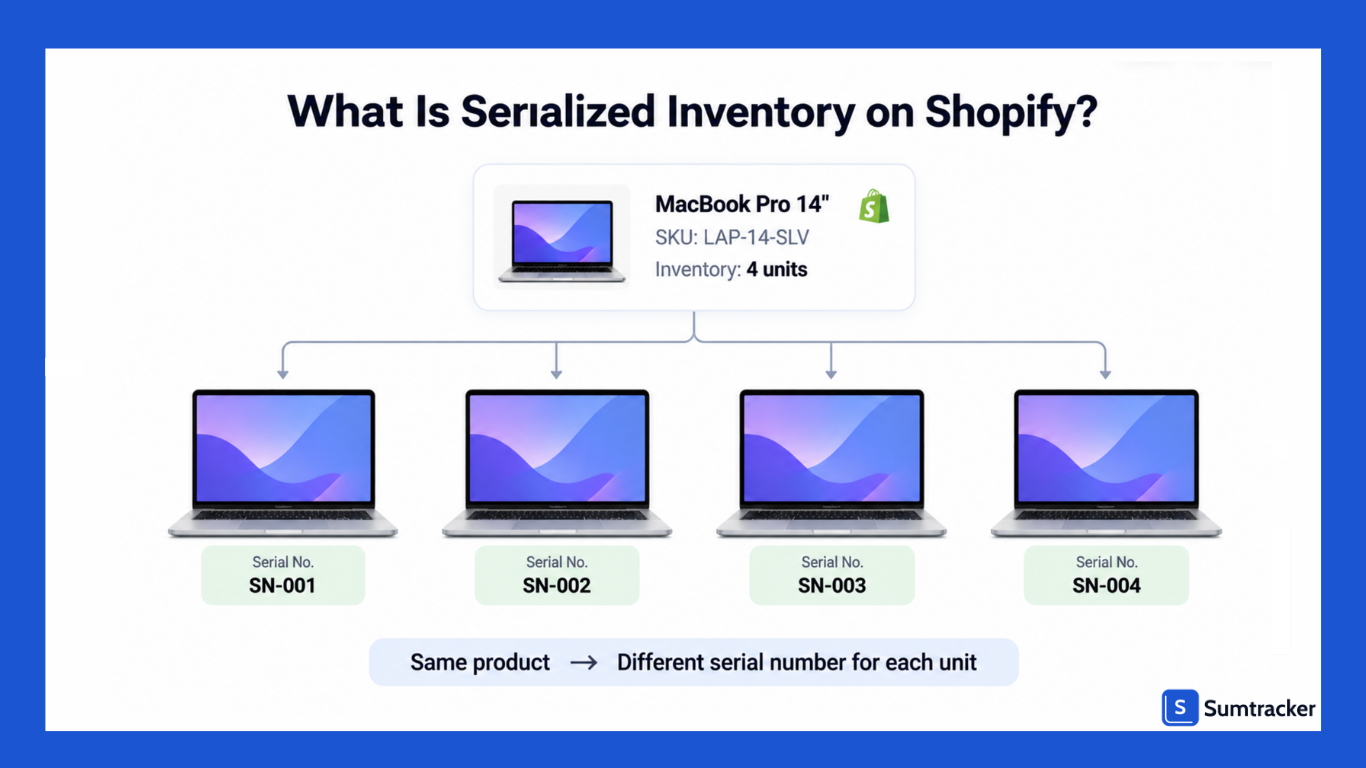
Serialized inventory means every physical unit gets its own unique ID, which you track from the moment it arrives until it is sold, returned, or serviced.
If you have 10 identical laptops, Shopify tracks them as one variant with a quantity of 10. Serialized tracking gives each laptop its own identity and history.
Shopify defines serial numbers as unique identifiers for individual units. A SKU identifies a product or variant, while a lot number identifies a group of products. A serial number identifies one specific unit.
Shopify lets you store SKUs and barcodes on products and variants.
It also supports up to 20 barcodes for a product or variant, which can be useful when the same item has different identifiers across suppliers, regions, or sales channels.
However, these identifiers still describe the product or variant rather than giving every physical unit its own identity.
That's the key difference.
If you have 10 identical laptops with the same variant, SKU, and barcode, those identifiers don't tell you which specific laptop was sold.
A serial number does.
If you're still setting up basic stock tracking, see our guide on how to set up inventory tracking in Shopify before adding unit-level tracking.
Rule of thumb: If you need to know which exact physical unit was sold, returned, repaired, recalled, or covered by a warranty, serializing the product can give you that level of traceability.
Why Shopify Stores Use Serialized Inventory
Stores serialize for five reasons: warranty proof, return fraud prevention, recalls, authenticity, and compliance. Each one comes down to the same need. You must link one physical unit to one order and one customer.
Counterfeiting is another reason high-value sellers use serial numbers.
The OECD and EUIPO estimated that counterfeit goods accounted for $467 billion in global trade, according to their 2025 report.
Serial records can help merchants verify which individual units they sold and identify mismatches during returns or warranty claims.
Tip: You do not have to serialize your whole catalog. Most stores only serialize products above a set price point or products that carry a manufacturer warranty. Accessories like cables, cases, and helmets usually stay as normal SKU-level stock.
How Does Serial Number Tracking Work on Shopify?
On Shopify, serial tracking works as a layer on top of normal quantity tracking. Shopify tracks inventory by variant and location, while a serial-tracking app or your own process keeps records for individual units and links them to orders.
Every serialized unit typically moves through the same lifecycle:
- Received: The serial is scanned or entered when stock arrives.
- In stock: The serial is linked to a variant and location.
- Picked: The serial is selected for a specific order.
- Sold: The serial is linked to the order and customer.
- Returned or serviced: The serial is checked against its history, then restocked, repaired, or written off.
Here's what Shopify handles natively and where you'll need a dedicated serial-tracking system or workaround:
Tip: Decide early which system is your "source of truth" for serials. Shopify stays the source of truth for quantities. Your serial app or spreadsheet should be the only place serials are created or edited. Two lists always drift apart.
How to Set Up Serialized Inventory on Shopify
You have three main ways to set up serial tracking on Shopify: a manual log, order metafields, or a dedicated serial app.
Choose based on your sales volume, workflow, and whether you sell in person.
Option 1: Order Notes and a Spreadsheet
- Keep a sheet with columns for serial, SKU, date received, location, order number, and status.
- When you fulfill an order, enter the serial in the order's Notes field in Shopify admin.
- Mark the serial as sold in your sheet.
This costs nothing, but it relies entirely on staff following the process consistently.
Option 2: An Order Metafield
- In Shopify admin, go to Settings > Custom data > Orders and add a metafield definition.
- Choose a list of single-line text type if an order can contain multiple serial numbers.
- Give it a clear name, such as Serial numbers.
- Add the relevant serials to the order before fulfillment.
Metafields provide a more structured way to store serial numbers than order notes. However, they don't by themselves validate serials, prevent duplicates, or track whether a serial is already in stock.
Option 3: A Dedicated Serial App
- Install a serial-tracking app from the Shopify App Store.
- Select the products or variants that require serial tracking.
- Import existing serials for inventory you already hold, if supported.
- Set up the required scan points, such as receiving, fulfillment, POS, and returns.
A Special Case: One Product per Unit
For truly unique items, such as a used camera or vintage guitar, you can list each unit as a separate product and use its serial number as part of the SKU.
This works when each product has a quantity of one, but becomes difficult to manage when you stock multiple identical units.
How to Receive and Assign Serial Numbers to Inventory
Receiving is the most important step in serial tracking. If a serial is not captured when the box is opened, every later step depends on guesswork.
Shopify's receiving got a real upgrade in June 2026. Purchase orders now create transfers; you can receive in the admin or in Shopify POS, and partial deliveries are tracked shipment by shipment.
For a merchant's walkthrough of these changes, listen to the eCommerce Badassery podcast, which covers the inventory updates.
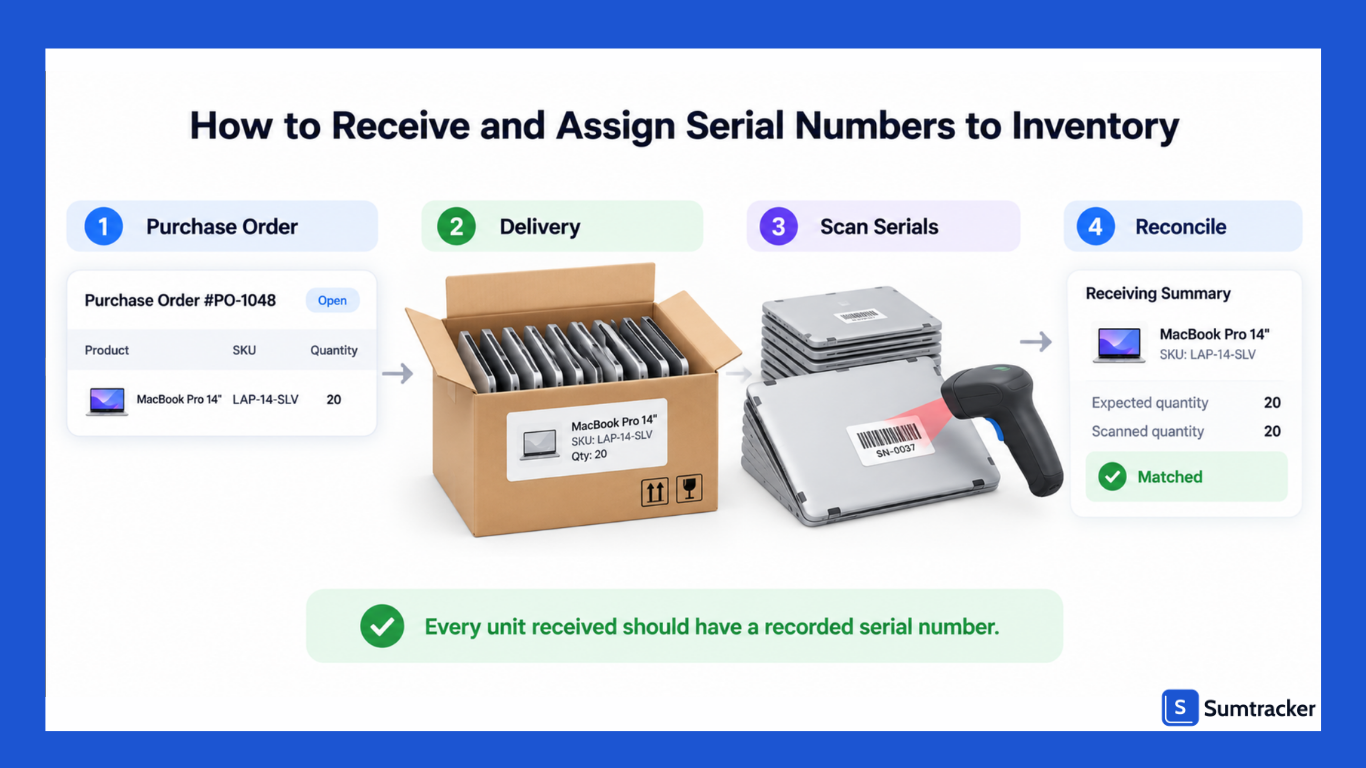
Native receiving is still by quantity, though. It does not capture serials. So a good receiving flow looks like this:
- Create the purchase order in Shopify or your inventory tool before the stock ships.
- Receive the quantity against the PO when the delivery arrives.
- Scan each serial into your serial app, one unit at a time, and link it to the variant and location.
- Label units that lack a scannable serial. Print a barcode label and stick it somewhere visible on the box.
- Reconcile. The number of serials scanned must equal the quantity received.
Why check every unit?
A study by the Auburn University RFID Lab and GS1 US found that 69% of inbound orders contained errors when shipments were checked with standard barcode data.
With serialized goods, a single swapped unit can break a warranty claim months later.
Rule of thumb: Count, then scan, then compare. If 20 units arrived and you only have 19 serials, stop and find the missing unit before any of them go on sale.
How to Pick, Pack, and Fulfill Serialized Orders
Assign the serial at the packing bench, not at checkout. For online orders, you usually do not know which exact unit will ship until someone takes it off the shelf. So the serial gets scanned when the unit is packed.
A reliable fulfillment flow:
- Pick the unit using the order's SKU and bin location.
- Scan the serial into your app or the order metafield.
- Let the app validate it. It should confirm the serial belongs to that SKU, is in stock, and is not already sold.
- Print the serial on the packing slip or invoice. Most serial apps offer custom templates for this.
- Fulfill the order in Shopify. The serial status changes to sold.
When an order is placed, Shopify moves units from Available to Committed until fulfillment. That is quantity-level only. Our guide to Shopify committed inventory explains how this state works and why stock can look "missing" before it ships.
High-volume stores can also group work. Shopify added fulfillment batches in its June 2026 release, letting you group orders by product type or destination. Batching all orders for one serialized SKU makes scanning faster and cuts mix-ups.
Tip: For orders with two or more identical serialized items, scan every unit separately. Never type one serial and add "x2". Each unit needs its own record for warranty and returns.
Managing Serialized Inventory Across Multiple Locations
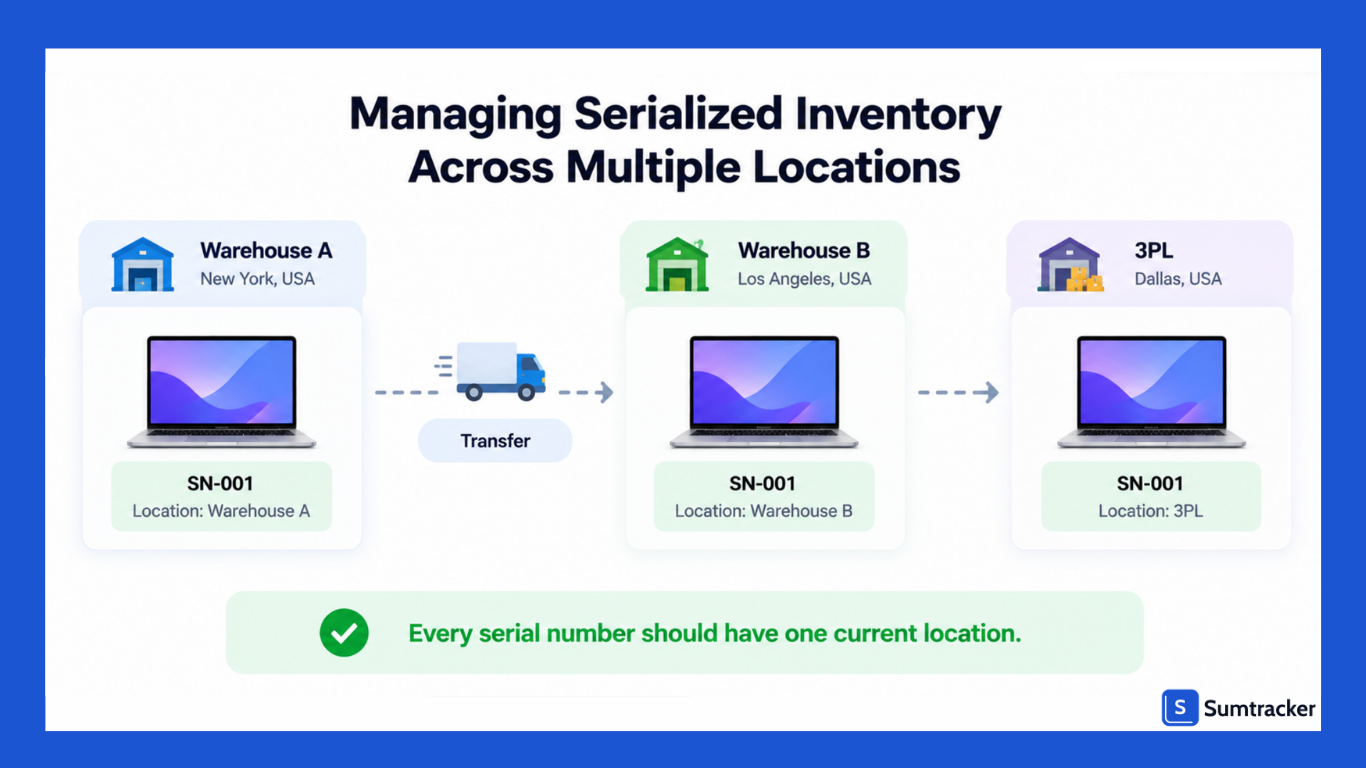
With more than one location, every serial needs a location as well as a status. Shopify already tracks quantity per location. Your serial records must follow the same moves, or you will sell a unit that is sitting in the wrong building.
Follow these rules when stock moves:
- Transfers: scan serials out at the origin and in at the destination. Do not mark a transfer received until every serial is scanned.
- 3PLs: ask you
- r 3PL whether it captures serials at receiving and shipping, and how it sends that data back. Many do not by default.
- Store pickup: the serial should be scanned when the customer collects, not when the order is placed.
Location errors are common even without serials. Serialized stock raises the stakes because each unit is unique.
Case study: Babymaxi. Babymaxi, a Dutch baby-carrier retailer, moved from its own warehouse to two 3PLs. The team needed to transfer stock between locations without losing track of it. Using Sumtracker for stock transfers, PO receiving, and real-time Shopify sync, the team reported 99%+ inventory accuracy across warehouses and a 70% cut in time spent managing inventory. Babymaxi does not sell serialized goods, but the lesson carries over. Clean transfers are what keep location data right.
To be clear about roles: Sumtracker does not track individual serial numbers. It keeps quantities accurate across Shopify stores, locations, and marketplaces like Amazon and eBay.
Serialized sellers often pair a serial app for unit identity with an inventory tool for quantity sync.
Rule of thumb: A serial should only ever exist in one location. If a lookup shows the same serial in two places, freeze both records until you have checked the shelf.
Using Serial Numbers at Shopify POS
Shopify POS cannot capture serial numbers on its own, so in-store serial tracking needs a POS app extension. The extension adds a screen to POS where staff scan or type the serial before completing the sale.
A typical in-store flow:
- Scan the product barcode to add it to the cart.
- Open the serial app's POS extension and scan the unit's serial.
- The app checks that the serial is in stock at that location.
- Complete the sale. The serial is linked to the order and the customer.
- Print or email a receipt that shows the serial.
Check how each app handles step 2. In a Shopify Community thread, one developer noted that its POS extension could not remind staff to add a serial at checkout, only when staff opened the extension. If your team is busy, a forced prompt matters.
Tip: Test your POS serial flow with a real queue in mind. Time how long a serialized sale takes. If it adds more than a few seconds, staff will look for shortcuts.
Handling Serialized Returns and Exchanges
The golden rule for serialized returns: the serial coming back must match the serial you shipped. This one check stops the most common kind of return fraud, where a customer sends back a different or fake unit.
It is not a rare problem. The NRF and Happy Returns 2025 report found that 9% of all returns are fraudulent. Among retailers that track fraud, 64% saw an increase in decoy returns, such as counterfeit items sent back in place of the real product.
How to process a serialized return:
- Look up the original order by serial or order number.
- Scan the serial on the returned unit and compare it with the order record.
- Inspect the unit and decide its condition.
- In Shopify, process the return and choose whether to restock. Use the Unavailable inventory state (damaged or quality control) for units that are not ready to sell.
- Update the serial status in your app so it matches.
For exchanges, treat it as two events: a return of serial A and a sale of serial B. Both must be recorded. Shopify POS now handles returns and exchanges in a single cart, which makes the in-store side faster, but your serial app still needs to log both units.
Using Serial Numbers for Warranty and After-Sales Service
A serial number can turn a warranty claim into a quick lookup. Instead of searching for a receipt, you can use the serial number to find the order, customer, sale date, and warranty details.
To check coverage, most stores use one simple formula:
Warranty end date = Coverage start date + Warranty period
The coverage start is usually the sale date or the delivery date, depending on your terms.
Example: a drill sold on 10 March 2026 with a 24-month warranty is covered until 10 March 2028. Store the start date and period against the serial so nobody has to calculate it by hand.
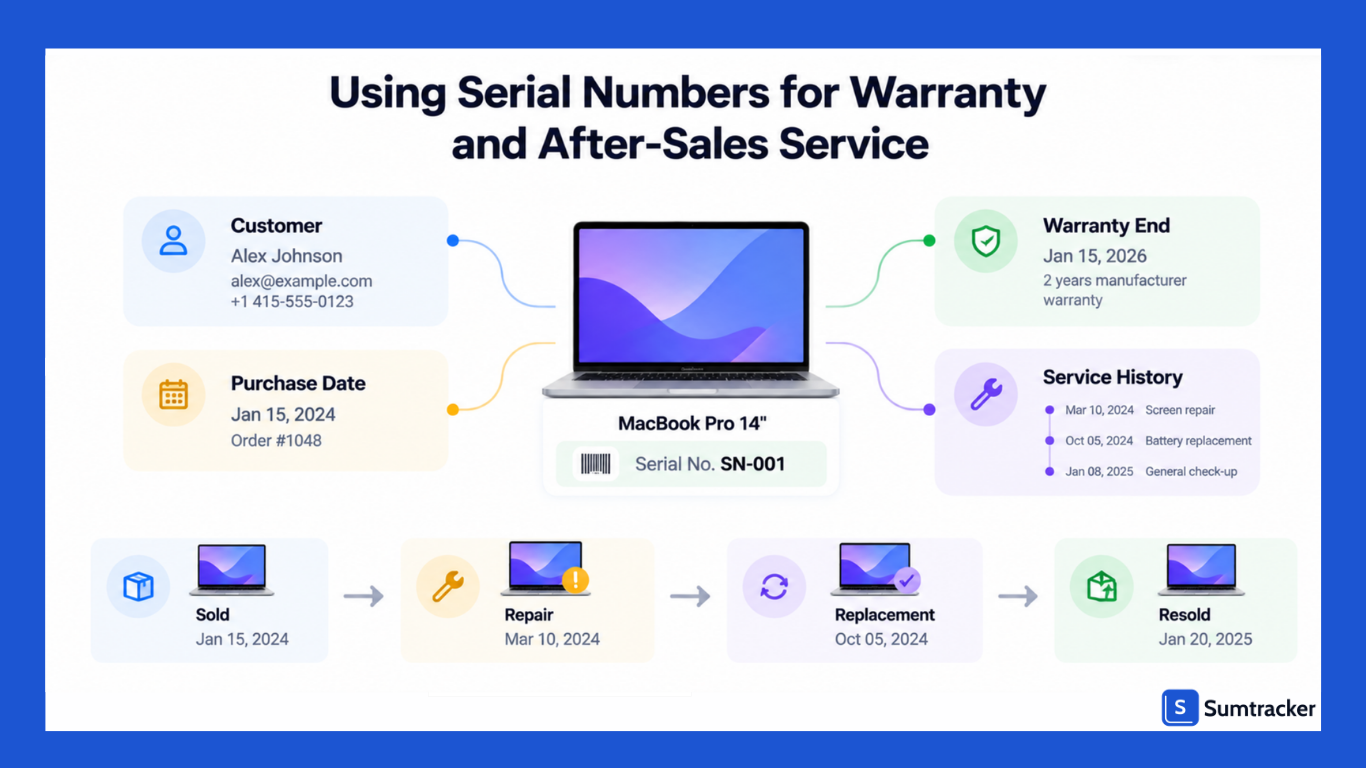
What to record per serial for after-sales service:
- Sale details: order number, customer, sale date, channel.
- Warranty: start date, length, and end date.
- Service history: each repair, the date, and what was replaced.
- Replacements: if you swap a unit, link the new serial to the old one.
Some apps also let customers check their own unit. For example, Serializer lets you embed item information in notifications or on your website so customers can verify what they received.
Best Shopify Apps for Serialized Inventory Tracking
The right app depends on where serials enter your workflow: at receiving, at fulfillment, or at POS. Apps that start at receiving give full traceability. Apps that start at fulfillment are simpler and cheaper.
Prices change often. Check each listing before you install.
Questions to ask before you pick one:
- Does it require a serial before fulfillment, or just allow one?
- Does it block duplicate serials?
- Does it work in Shopify POS, and does it prompt staff at checkout?
- Can you search by serial and see the full history?
- Can you import existing serials by CSV?
- Does it track serials by location?
A serial app handles unit identity. If you also sell on Amazon, eBay, Etsy, or several Shopify stores, you will still need an inventory tool to keep quantities in sync. Our list of the top inventory management tools for Shopify compares those options.
Tip: Run a free trial with your 10 highest-value SKUs first. Receive, sell, and return one unit of each. You will find the gaps in a day, not a month.
Best Practices for Managing Serial Numbers
Good serial tracking depends more on habits than on software. These practices keep your records clean as volume grows.
- Use the manufacturer's serial when there is one. Only create your own when the product has none. Customers and manufacturers will quote the original.
- Set one format for your own serials. Keep it short, uppercase, and free of look-alike characters such as O and 0, or I and 1. Example: ST-2609-00417 (prefix, year and month, sequence).
- Scan, never type, where possible. Every manual entry is a chance for a typo.
- Make serials required, not optional, for any product you choose to serialize.
- Never delete a serial record. Change its status instead: sold, returned, damaged, or written off.
- Restrict who can edit serials. Give edit rights to a few trained staff.
- Audit serialized stock on a schedule. Scan every unit on the shelf and compare it with your in-stock list.
For the audit step, our Shopify inventory audit checklist covers counting, variance checks, and transfer reviews. For serialized goods, add one more check: every serial on the shelf must show as in stock at that location in your app.
Troubleshooting Common Serialized Inventory Issues
Most serial problems start with a skipped scan. When something looks wrong, check the last point where the unit should have been scanned.
If quantity mismatches keep coming back, the cause is often outside serial tracking.
Sales on another channel, bundles, or manual adjustments can move stock without anyone noticing. Fix the quantity side first. Then the serials become easier to trust.
Tip: Keep a short exceptions log. Note every serial problem, its cause, and the fix. After a month, the pattern usually points to one step in your process.
Is Serialized Inventory Worth It? Cost vs. Benefits
Serialized inventory is worth it when one prevented loss pays for months of tracking. For high-value or warranty-backed products, that bar is usually low. For cheap, low-risk items, it rarely is.
Estimate your monthly cost with this formula:
Monthly cost = App fee + Per-serial fees + (Units × Scans per unit × Minutes per scan × Staff cost per minute)
Now compare that with a single loss. One fraudulent return of an $800 laptop costs more than eight months of tracking in this example.
Rule of thumb: Serialize a product if its price is high enough that one bad return would hurt, or if its manufacturer, a regulator, or your warranty terms require it. Everything else can stay at SKU level.
Conclusion
Serialized inventory gives Shopify stores something standard inventory tracking can't: a record of each individual unit.
That makes it useful for high-value, warranty-backed, regulated, or counterfeit-prone products where knowing exactly which unit was sold or returned matters.
Shopify can handle the underlying inventory quantities, but it doesn't provide a dedicated native serial-number workflow. For unit-level tracking, you'll need a serial-tracking app or another system alongside Shopify.
The key is not to serialize everything. Start with the products where the cost of losing track of one unit is greater than the cost of tracking it.
Set up a consistent process for receiving, fulfillment, returns, and service, and keep your serial records aligned with Shopify's inventory quantities.
Frequently Asked Questions
Does Shopify have built-in serial number tracking?
No. Shopify tracks inventory quantities by product variant and location but does not provide a dedicated native workflow for assigning and tracking a unique serial number for every unit. A third-party app or custom workflow is needed for unit-level serial tracking.
Can I add serial numbers to Shopify orders?
Yes. You can store serial numbers using order notes or order metafields. However, these methods don't automatically validate serials, prevent duplicate numbers, or maintain a complete unit-level inventory history.
What is the difference between a SKU and a serial number?
A SKU identifies a product or variant, while a serial number identifies one specific physical unit. For example, 20 identical laptops can share one SKU, but each has a different serial number.
Do I need a serial number for every product I sell?
No. Serial tracking is most useful for high-value, warranty-backed, regulated, or counterfeit-prone products. Low-value products that don't require unit-level traceability can generally remain at SKU-level tracking.
Can serial numbers be used for Shopify returns?
Yes. A serial-tracking system can link a serial number to the original order, allowing you to check whether the returned unit matches the one that was sold. This can help with warranty claims, unit swaps, and return verification.
Conclusion

Bhoomi writes about inventory management and multichannel selling at Sumtracker. Her focus is on solving real operational problems for Shopify, Amazon, and marketplace sellers through well-researched content. She covers everything from multi-location inventory syncing and stock error troubleshooting to replenishment planning and platform comparisons, turning complex eCommerce operations into clear, actionable guidance.
LinkedInRelated Articles
Tool and strategies modern teams need to help their companies grow.

Ready to Simplify Your Inventory Management?
Join hundreds of e-commerce merchants who rely on Sumtracker to save time, eliminate errors, and grow their business.