.svg)
Shopify Inventory Planning: A Complete Guide to Managing Stock Efficiently


Shopify inventory planning means deciding what to keep in stock, when to reorder it, and how much to buy.
The decision depends on how quickly your products sell, how long suppliers take to deliver, how much stock you already have, and how demand changes over time.
Getting this balance right matters. IHL Group's 2026 Inventory Distortion Study estimates that stockouts and excess inventory cost retailers $1.7 trillion worldwide each year, or around 6.2% of global retail sales.
About two-thirds of that comes from products being out of stock. (IHL Group, 2026)
Before you start: Pick 5–10 of your best-selling products and check their recent sales, current stock, incoming stock, and supplier lead time. This gives you a quick picture of which products may need a reorder and where you may be holding more stock than necessary.
What you'll learn: This guide covers the practical side of Shopify inventory planning, including how to set reorder points and safety stock, use ABC analysis, forecast demand, calculate how much to order, prepare for seasonal demand, track the right inventory metrics, and automate replenishment.
What Is Shopify Inventory Planning?
Shopify inventory planning is the process of deciding what inventory to keep, when to reorder it, and how much to order based on expected demand and supply conditions.
The goal isn't simply to keep products in stock. You need to balance product availability, inventory costs, and cash flow.
Ordering too little can lead to stockouts and lost sales, while ordering too much can leave you with excess inventory and cash tied up in slow-moving products.
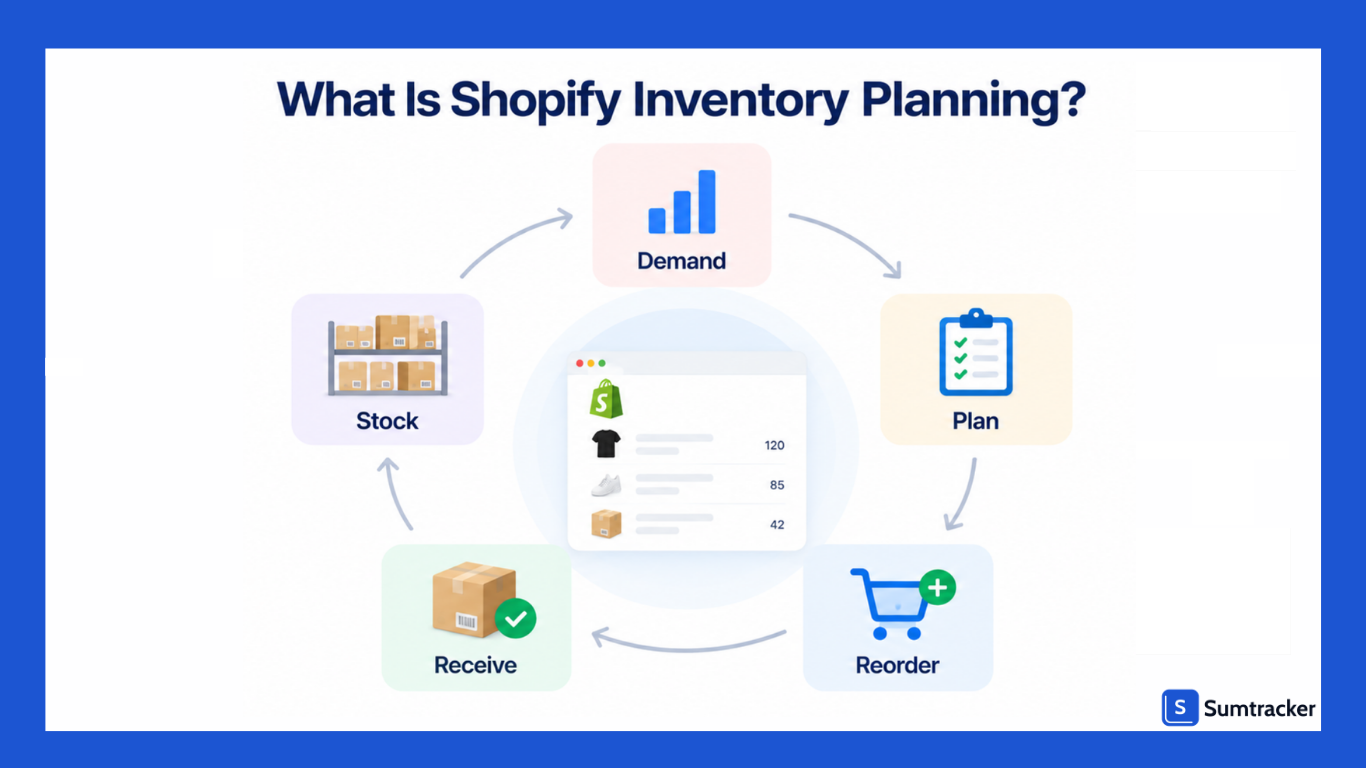
A typical Shopify inventory planning process answers three questions:
- What will I need? — Forecast future demand using sales history, trends, seasonality, and upcoming promotions.
- When should I reorder? — Determine when current inventory is likely to fall below the level needed to cover demand during supplier lead time.
- How much should I order? — Calculate the replenishment quantity based on expected demand, current inventory, incoming stock, safety stock, and supplier constraints.
It's worth noting that inventory planning, management, and replenishment are related but distinct. Management is day-to-day tracking (what's in stock now). Planning is forward-looking (what you'll need). Replenishment is execution (placing purchase orders and restocking).
Why Is Inventory Planning Important for Shopify Stores?
Inventory planning helps Shopify merchants balance product availability, inventory costs, and working capital. Without a plan, businesses can end up with too little stock when demand is high or too much stock when products aren't selling as expected.
Stockouts Can Lead to Lost Sales
When a customer finds a product out of stock, they may buy elsewhere. A 2026 DOSS survey of 1,000 U.S. consumers found that 45% would buy from a different retailer, while 32% would temporarily switch to a competing brand. (DOSS Stockout Stigma Index)
Stockouts can also waste paid advertising spend when customers are sent to unavailable products and make it harder to retain customers over time.
Overstock Ties Up Cash
Excess inventory ties capital to products that may take months to sell. It can also create additional storage, handling, insurance, markdown, and obsolescence costs, particularly for seasonal or short-lifecycle products.
Planning helps merchants estimate how much inventory they actually need instead of simply ordering more to avoid running out.
Better Planning Improves Cash Flow
Inventory is a significant investment for product-based businesses. Buying too much too early can leave cash tied up in stock, while buying too little can result in missed sales.
By aligning purchase quantities and timing with expected demand, Shopify merchants can avoid unnecessary inventory investment while maintaining sufficient stock to fulfill orders.
Multiple Channels Make Planning More Complex
Selling through Shopify alongside Amazon, Etsy, eBay, or other channels means the same inventory may be available to customers in multiple places.
If inventory isn't coordinated, a merchant can oversell a product on one channel while having insufficient stock to fulfill another channel's orders.
Multi-channel inventory planning therefore requires accurate stock visibility, channel-level demand data, and coordinated replenishment decisions.
What Should You Consider When Planning Shopify Inventory?
These are the foundational factors that shape your inventory plan. Getting them right prevents most common mistakes.
Rule of thumb: Add a buffer of 20–30% to your supplier's quoted lead time. If they say 14 days, plan for 17–18 days.
How to Plan Inventory for Your Shopify Store
Step 1: Audit your current inventory
Run a full inventory count and reconcile it against your Shopify admin. Discrepancies between physical stock and system records are more common than most merchants expect.
Step 2: Classify products using ABC analysis
ABC analysis sorts products by revenue contribution:
These are guidelines based on the Pareto principle, not rigid rules. The point is to focus your effort where it matters most.
For a walkthrough, see Sumtracker's guide on how to perform ABC analysis for your Shopify store.
Step 3: Calculate reorder points
Reorder Point = (Average Daily Sales × Lead Time in Days) + Safety Stock
Example: You sell 8 units/day, supplier takes 14 days, and you want 24 units of safety stock (3 days' worth):
Reorder Point = (8 × 14) + 24 = 136 units
When stock hits 136, place an order. For a deeper explanation, see Sumtracker's reorder point for inventory replenishment guide.
Step 4: Set safety stock levels
Safety stock provides a buffer against unexpected demand and supplier delays.
One simplified approach is:
Safety Stock = (Maximum Daily Sales × Maximum Lead Time) − (Average Daily Sales × Average Lead Time)
For example:
(12 × 16) − (8 × 14) = 80 units
A simpler approach for smaller stores: multiply average daily sales by the number of buffer days you want (e.g., 5–7 days of extra stock).
Step 5: Build a replenishment calendar
Map out when you expect to place orders based on current sales velocity and projected stock levels. This helps plan cash flow and coordinate with suppliers in advance.
Step 6: Review and adjust regularly
Review reorder points and safety stock at least every 30–60 days, or more frequently during peak seasons.
Shopify Inventory Planning Methods
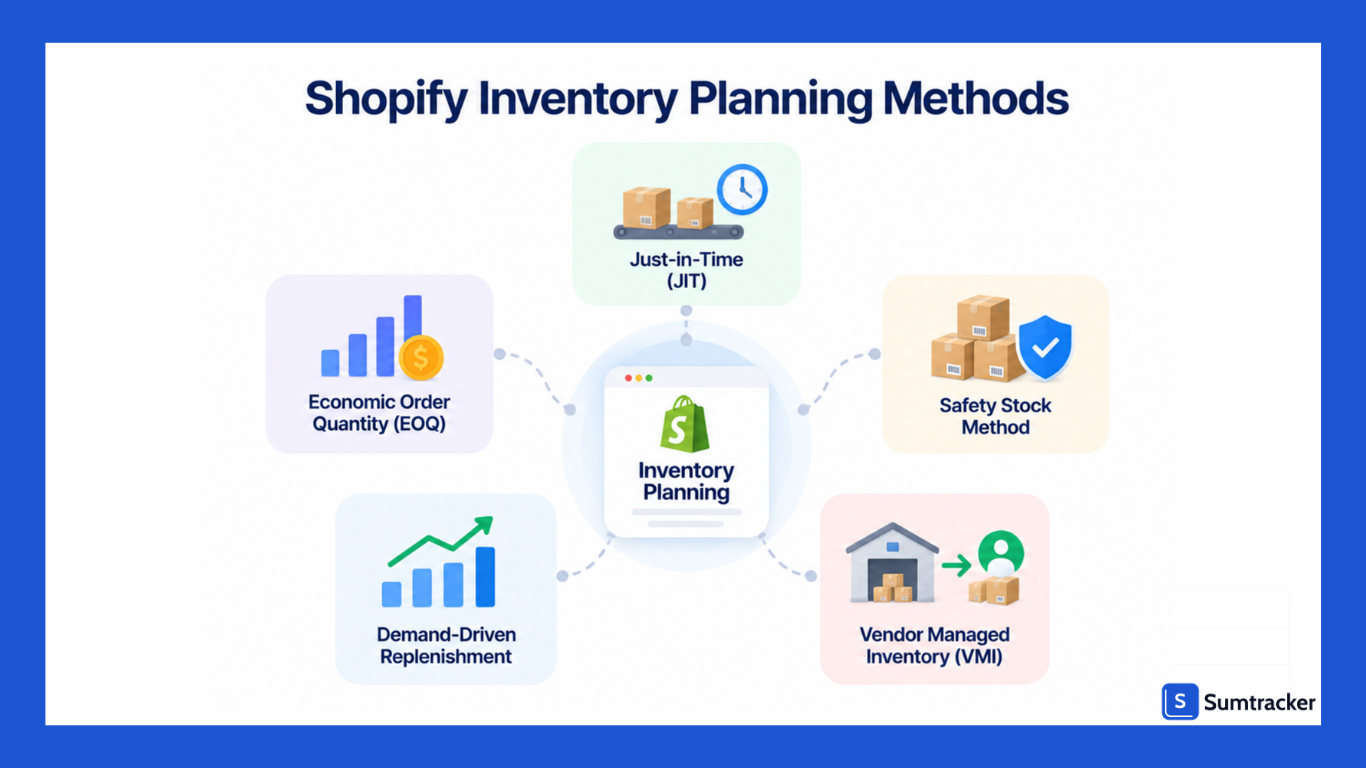
Shopify merchants can use different inventory planning methods depending on their demand patterns, supplier reliability, and operational needs. The most common approaches include JIT, EOQ, safety stock, demand-driven replenishment, and vendor-managed inventory.
Just-in-Time (JIT) inventory
JIT aims to receive inventory only when it's needed for fulfillment — keeping stock levels as lean as possible. This approach minimizes carrying costs and reduces the risk of dead stock.
Best suited for: Stores with reliable, fast-turnaround suppliers (typically domestic) and predictable demand patterns.
Not ideal for: Stores sourcing from overseas manufacturers with long lead times, or those selling seasonal products with unpredictable demand spikes.
Economic Order Quantity (EOQ)
EOQ is a formula that calculates the optimal order quantity to minimize the combined cost of ordering and holding inventory.
EOQ = √(2 × Annual Demand × Order Cost / Holding Cost per Unit per Year)
For example, if you sell 2,400 units per year, each order costs $50 to place (shipping, admin, receiving), and holding cost per unit per year is $2:
EOQ = √(2 × 2,400 × 50 / 2) = √120,000 = ~346 units per order
EOQ works best as a baseline. It assumes stable demand, which rarely holds perfectly in ecommerce. Use it as a starting reference and adjust based on seasonality and promotions. EOQ also doesn't account for MOQs, supplier constraints, or cash flow limits — layer those in after the calculation.
Safety stock method
This approach focuses on maintaining a buffer stock level above and beyond expected demand. It's common among Shopify merchants who source internationally, where lead time variability is high.
The key is calibrating safety stock correctly — enough to prevent stockouts, but not so much that you're warehousing excess for months.
Demand-driven replenishment
This method uses actual sales data and real-time stock levels to trigger reorder decisions dynamically. Instead of fixed reorder schedules, the system adjusts order timing and quantities based on how fast products are actually selling.
This is where dedicated inventory forecasting tools add the most value. They monitor sales velocity continuously and generate purchase order recommendations automatically.
Vendor Managed Inventory (VMI)
In a VMI arrangement, you share your point-of-sale data with your supplier, and they manage replenishment on your behalf. This reduces your planning workload and can lead to fewer stockouts, but it requires a high level of trust and data-sharing with your supplier.
VMI is more common in wholesale and larger retail operations but is worth exploring if you have a strong supplier relationship.
If you want to hear how real founders chose between these approaches, the Shopify Masters podcast regularly features DTC brands discussing the supply chain and inventory methods that worked (and didn't) as they scaled.
Key Shopify Inventory Planning Metrics to Track
You can't improve what you don't measure. These are the metrics that matter most for inventory planning on Shopify.
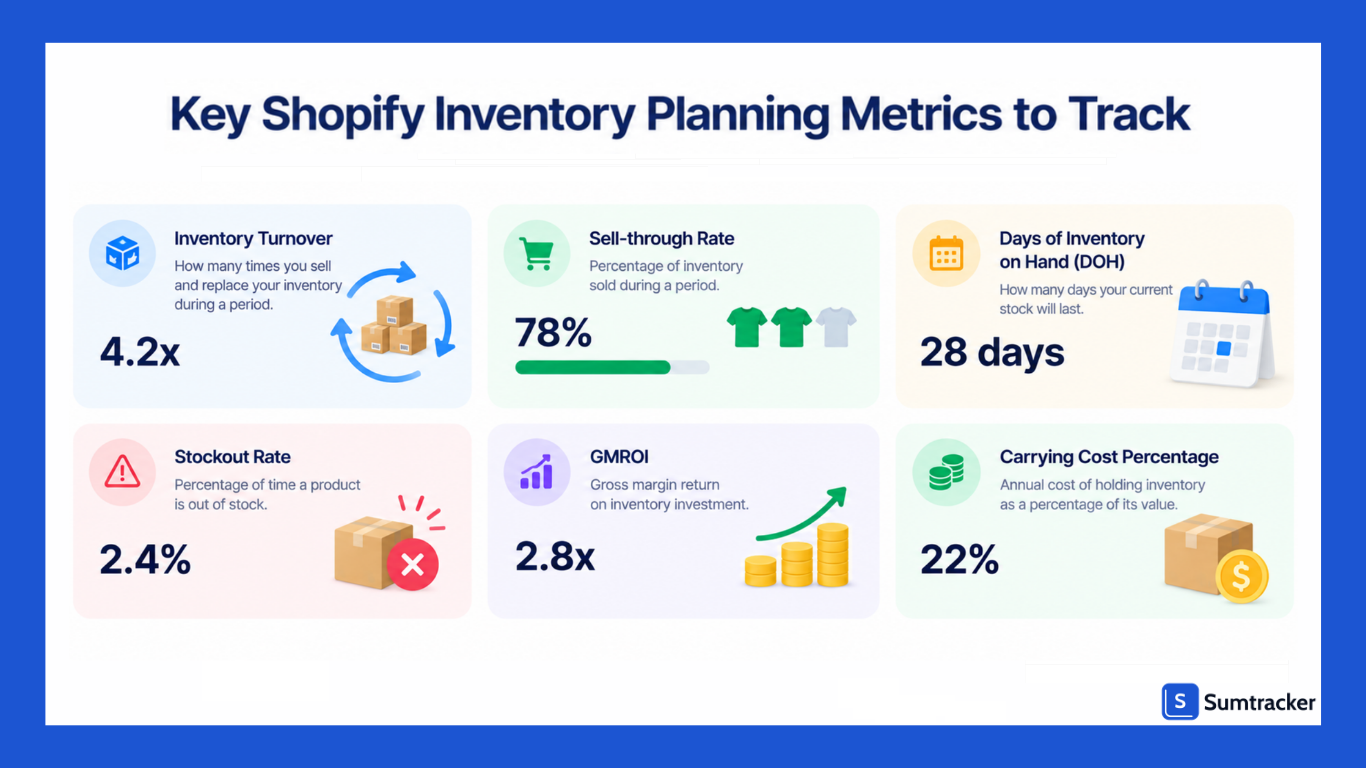
Inventory turnover ratio
This measures how many times you sell through and replace your inventory in a given period.
Inventory Turnover = Cost of Goods Sold / Average Inventory Value
A higher turnover ratio usually means products are selling quickly, while a lower ratio can indicate slow-moving or excess stock.
There's no single ideal ratio; it varies by industry and product type. Tracking it over time helps you identify whether you're holding too much inventory or keeping stock levels too lean.
Sell-through rate
Sell-Through Rate = (Units Sold / Units Received) × 100
This tells you what percentage of your received inventory actually sells within a given period. It's particularly useful for evaluating new product launches and seasonal items.
What counts as "good" varies by product category and time window — a sell-through rate of 80%+ within 30 days is strong for fast-moving consumer goods.
Days of inventory on hand (DOH)
DOH = Average Inventory / Average Daily Sales
This tells you how many days your current stock will last at the current sales rate.
If your top product has 30 units and sells 5 per day, you have 6 days of stock. If your supplier needs 10 days to deliver, you're already late to reorder.
Stockout rate
Stockout Rate = (Days Out of Stock / Total Days in Period) × 100
Most merchants aim to keep this below 5% for important products. Even a seemingly small stockout rate adds up over time — you lose direct revenue on those days, plus the harder-to-measure costs of customers who leave and don't return.
Gross Margin Return on Investment (GMROI)
GMROI = Gross Margin / Average Inventory Cost
This shows how much gross profit you earn for every dollar invested in inventory. A GMROI of 3.0 means you earn $3 in gross margin for every $1 tied up in stock.
Anything below 1.0 means your inventory investment isn't generating enough margin to cover its costs.
Carrying cost percentage
Carrying cost is the annual cost of holding inventory, including storage, insurance, depreciation, shrinkage, and tied-up capital.
For many ecommerce businesses, carrying costs can be around 20%–30% of inventory value per year. So, if you hold $100,000 worth of inventory, you could spend $20,000–$30,000 a year to keep it in stock.
For a breakdown of these metrics with formulas and practical examples, see Sumtracker's top inventory metrics to track.
How to Calculate How Much Inventory to Order
The basic formula:
Order Quantity = (Forecasted Daily Sales × Lead Time) + Safety Stock – Current Stock on Hand – Units Already on Order
Worked example:
Adjust for MOQs and price breaks
If your supplier's MOQ is 200 and your calculation says 186, round up to 200. If 250 units get you a 10% discount, check whether the savings offset the additional carrying costs.
Practical tip (price break math): Calculate:
(Discount per unit × Extra units) − (Carrying cost % × Unit cost × Extra units × Months held / 12)
If the result is positive, the discount may justify the additional inventory. If it's negative, the extra carrying cost outweighs the purchase savings.
Don't forget incoming stock
A common mistake: ignoring purchase orders already in transit. If 100 units are on their way, subtract them from your order quantity.
Batch orders to save on freight
If you order multiple products from the same supplier, consolidate into a single PO. This cuts per-unit shipping costs and simplifies receiving.
For a guide on automating this process, see Sumtracker's how to automate purchase orders.
How to Handle Seasonal Demand and Sales Spikes
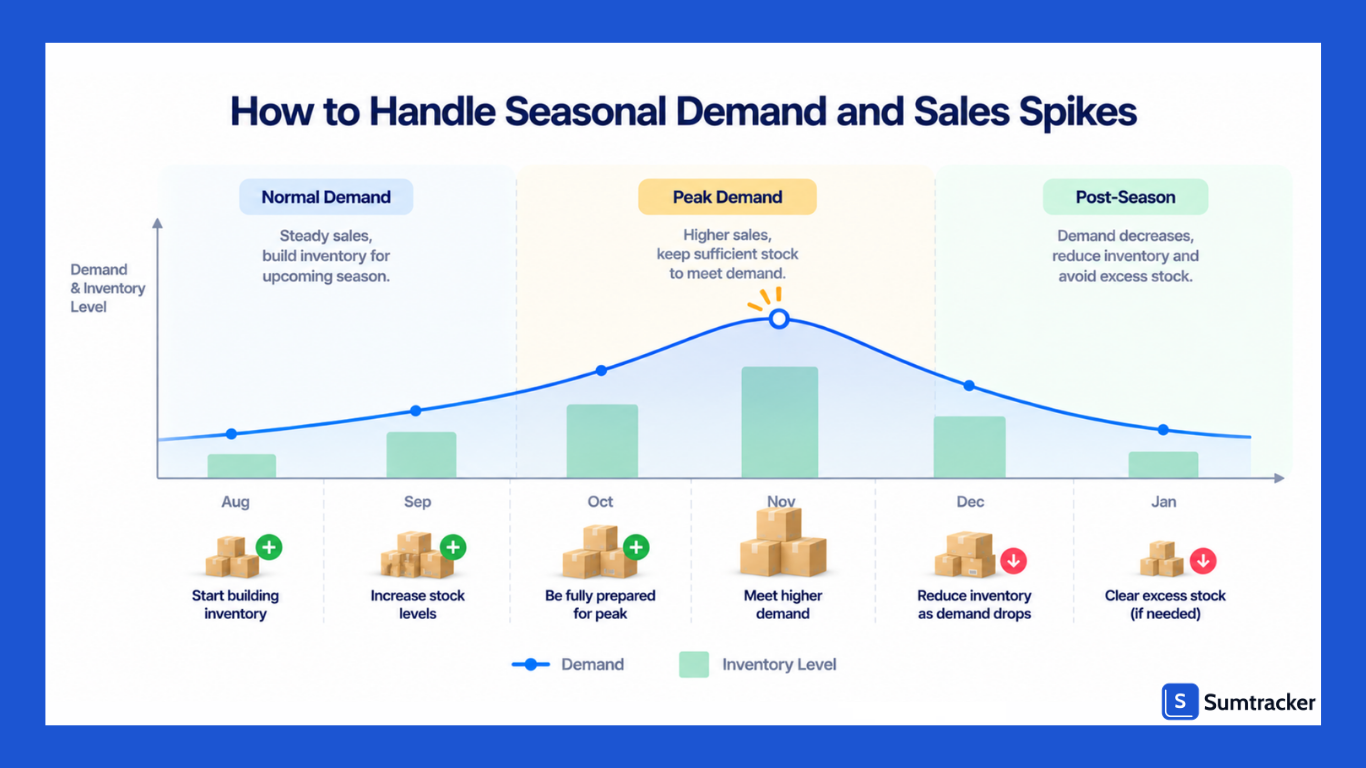
Seasonal demand is one of the biggest inventory planning challenges for Shopify stores. Get it right, and you ride a wave of revenue. Get it wrong, and you're either out of stock during your best-selling period or stuck with unsold inventory in January.
Build a Seasonal Planning Calendar
Create a calendar around your major sales periods so purchasing, promotions, and inventory decisions happen ahead of demand.
For example, a holiday planning timeline could look like this:
- August: Analyze the previous year's holiday sales and identify top sellers and underperformers.
- September: Place initial purchase orders and confirm supplier lead times.
- October: Receive and stage inventory and prepare promotions.
- November–December: Monitor inventory closely and adjust replenishment as demand changes.
- January: Review performance and plan clearance for remaining seasonal inventory.
BFCM planning tip: If you're sourcing internationally, place your primary inventory orders well ahead of Black Friday/Cyber Monday to account for longer lead times. Keep some purchasing budget available for fast-moving products so you can replenish from faster suppliers if demand exceeds your forecast.
Use Pre-Order and Back-Order Strategies
Pre-orders can provide an early signal of demand before you commit to a larger production or purchase quantity. For products that regularly sell out, backorders can also help capture demand while replenishment is underway.
If you offer either option, clearly communicate expected fulfillment and delivery timelines to customers.
Plan for the Post-Season Slump
Seasonal demand often falls quickly after the peak period, leaving merchants with excess stock. Use previous years' sales patterns to estimate how much inventory you'll need after the season and adjust future purchase quantities accordingly.
Rather than relying on a fixed 2–3 week rule, set a post-season inventory target based on your product's sales velocity, markdown strategy, and supplier lead time.
Automate Inventory Monitoring During Peak Periods
During seasonal peaks, inventory can change too quickly for manual monitoring alone. Shopify Flow can be used to automate inventory-related actions, such as sending alerts when stock falls below a threshold or changing product availability based on inventory conditions.
Common Shopify Inventory Planning Challenges
Even experienced merchants run into these issues. Knowing them in advance helps you build systems to avoid them.
Relying on spreadsheets as your store grows
Spreadsheets work for a small catalog with a single sales channel, but inventory planning becomes harder as SKUs, orders, locations, and sales channels increase. Manually updating stock, sales, purchase orders, and incoming inventory also increases the risk of errors and outdated information.
When merchants lack reliable inventory visibility, they may compensate by ordering extra stock, tying up more cash than necessary.
Ignoring lead time variability
Your supplier says 14 days. But sometimes it takes 10 days, and sometimes it takes 22 days. If you plan around the average without accounting for that variability, you'll get caught by the slower deliveries.
Lead time variability is often more important than average lead time when calculating safety stock. A supplier who's reliably slow (always 21 days) is actually easier to plan for than one who's unpredictably fast or slow (10–28 days). Track your actual lead times over multiple orders and use the range, not just the average.
Not accounting for channel-specific demand
A SKU might sell 50 units per week on Shopify but only 10 per week on Amazon. If you plan based on aggregate numbers without channel-level visibility, you'll understock on your primary channel and overstock for slower ones.
Forgetting about dead stock
Dead stock ties up capital in products that aren't generating sales. Instead of applying a universal 90-day definition, set a slow-moving inventory threshold based on your product category, sales cycle, and seasonality.
Review slow-moving products regularly and consider discounting, bundling, promotions, or liquidation where appropriate.
A practical review framework:
- 30 days without a sale: Investigate the cause, such as pricing, visibility, or declining demand.
- 60 days: Consider a discount, promotion, or bundle with a faster-moving product.
- 90+ days: Evaluate whether to liquidate, return, or write off the remaining inventory.
For candid talk about these challenges from merchants who've dealt with them firsthand, the EcomCrew Podcast by Mike Jackness and Dave Bryant covers inventory management, supplier problems, and multichannel selling mistakes with real numbers and no sugarcoating.
How to Automate Inventory Planning on Shopify
Manual inventory planning doesn't scale. Once your store grows past a certain point, automation becomes necessary.
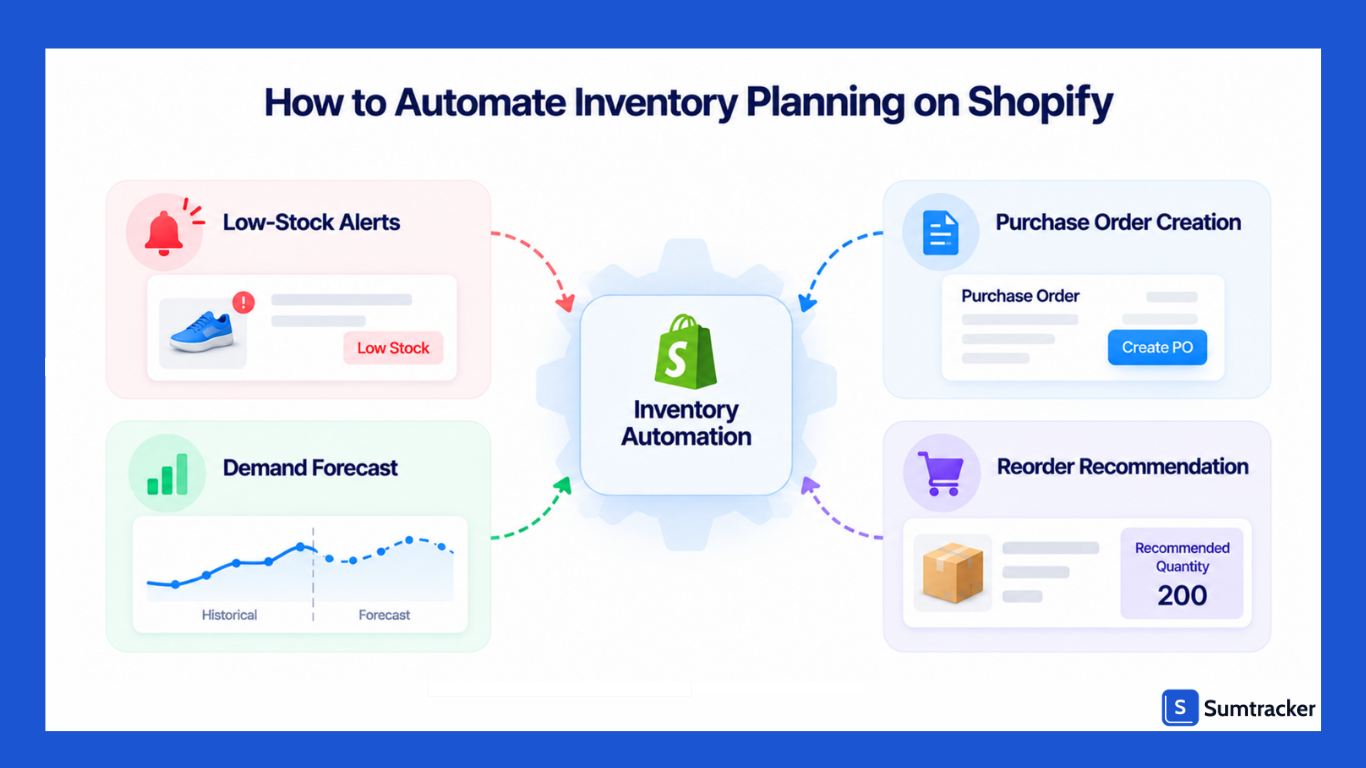
Low-stock and reorder alerts: Automation can monitor inventory levels and notify you when a product reaches its reorder point, so you don't have to manually check every SKU.
Purchase order creation: Inventory planning tools can generate purchase orders when stock reaches predefined thresholds, using details such as the SKU, supplier, reorder quantity, and cost.
Demand forecasting: Forecasting tools can analyze historical sales, seasonality, and demand trends to estimate future inventory requirements.
Reorder recommendations: More advanced tools can combine forecasted demand, current inventory, incoming stock, lead times, and safety stock to recommend what to order, how much to order, and when to place the order.
Shopify Flow
Shopify Flow can automate workflows triggered by inventory-related events. For example, you can use it to send notifications when inventory falls below a threshold or trigger internal actions when inventory conditions change.
Flow is useful for automating individual workflows, but it doesn't replace dedicated inventory planning software. Planning tools handle more complex calculations such as demand forecasting, reorder points, safety stock, and replenishment recommendations.
Shopify Inventory Planning Tools and Apps
Shopify includes several native tools that can support inventory planning, including inventory tracking, inventory analytics, purchase orders, inventory transfers, and multi-location inventory.
Its analytics also include metrics such as sell-through rate, days of inventory remaining, and ABC analysis.
Shopify has also expanded its inventory planning capabilities with Sidekick, which can help merchants analyze demand, identify products that may need replenishment, suggest reorder quantities, and create purchase orders or inventory transfers.
For merchants with more complex inventory operations, dedicated inventory planning apps can provide more specialized forecasting and replenishment workflows.
The right option depends on how complex your inventory operation is. If Shopify's native tools give you enough visibility to make purchasing decisions, you may not need another tool. As your SKU count, sales channels, locations, supplier lead times, or replenishment needs become more complex, dedicated planning software can reduce the amount of manual analysis required.
Best Practices for Shopify Inventory Planning
These are habits and principles that consistently separate well-run inventory operations from reactive ones.
- Use Sales Data: Base purchasing decisions on sales velocity, seasonality, margins, and upcoming promotions rather than intuition alone.
- Review ABC Classification: Revisit product classifications periodically as demand changes, so you can focus planning efforts on the products that matter most.
- Manage Supplier Lead Times: Track actual lead times and communicate upcoming demand with suppliers early. Consider backup suppliers for important products.
- Set Product-Specific Stock Levels: Fast-moving or high-value products may need more safety stock, while slower-moving products may not require the same level of inventory protection.
- Maintain Inventory Accuracy: Use regular cycle counts to catch discrepancies before they affect replenishment decisions. Prioritize fast-moving and high-value products.
- Measure Forecast Accuracy: Compare forecasted demand with actual sales to identify where your forecasts, seasonal adjustments, or replenishment settings need improvement.
- Coordinate Inventory With Marketing: Check inventory levels before promotions and campaigns to ensure you can support an expected increase in demand without unnecessarily overstocking.
Final Thoughts
Inventory planning on Shopify comes down to three questions: What do I need? How much do I need? When do I need it?
The challenge is answering these consistently, across your full product catalog, through seasonal swings and marketing campaigns, while keeping cash flow healthy. That's where the combination of good processes, the right metrics, and appropriate tools makes the difference.
Start with the basics: classify your products, set reorder points, and track your core metrics. Then layer in forecasting and automation as your store grows.
You don't need to implement everything from this guide at once. Even small improvements in inventory planning compound over time into meaningful gains in profitability and operational efficiency.
For a practical next step, Sumtracker's inventory replenishment guide walks through the complete replenishment workflow from reorder trigger to restocking.
Frequently Asked Questions
What is Shopify inventory planning?
Shopify inventory planning is the process of deciding what inventory to keep, when to reorder it, and how much to order based on demand, current stock, supplier lead times, and other inventory constraints.
How do you calculate a reorder point in Shopify?
A basic reorder point can be calculated using: Reorder Point = (Average Daily Sales × Lead Time in Days) + Safety Stock.
For example, if a product sells 8 units per day, your supplier takes 14 days to deliver, and you keep 24 units as safety stock, your reorder point is 136 units.
How much inventory should a Shopify store keep?
There isn't one inventory level that works for every Shopify store. The amount you need depends on sales velocity, supplier lead time, demand variability, safety stock, seasonality, and available cash. Fast-moving products with longer or less predictable lead times generally require more inventory than slow-moving products.
How do you forecast inventory demand for a Shopify store?
Start with historical sales data and account for stockouts, seasonality, promotions, product launches, and other factors that can change demand. Comparing your forecasts with actual sales over time can also help you improve future forecasts.
What is safety stock in Shopify inventory planning?
Safety stock is extra inventory kept as a buffer against unexpected demand or supplier delays. The right amount depends on demand variability, lead-time variability, and the level of product availability you want to maintain.
Can Shopify automate inventory planning?
Shopify provides native inventory tools such as inventory analytics, purchase orders, and inventory management, and its AI assistant Sidekick can help with some inventory planning tasks. For more complex forecasting and replenishment requirements, you can also use dedicated inventory planning apps.
Conclusion

Bhoomi writes about inventory management and multichannel selling at Sumtracker. Her focus is on solving real operational problems for Shopify, Amazon, and marketplace sellers through well-researched content. She covers everything from multi-location inventory syncing and stock error troubleshooting to replenishment planning and platform comparisons, turning complex eCommerce operations into clear, actionable guidance.
LinkedInRelated Articles
Tool and strategies modern teams need to help their companies grow.


Ready to Simplify Your Inventory Management?
Join hundreds of e-commerce merchants who rely on Sumtracker to save time, eliminate errors, and grow their business.