Inventory Replenishment: The Complete Guide to Smarter Restocking



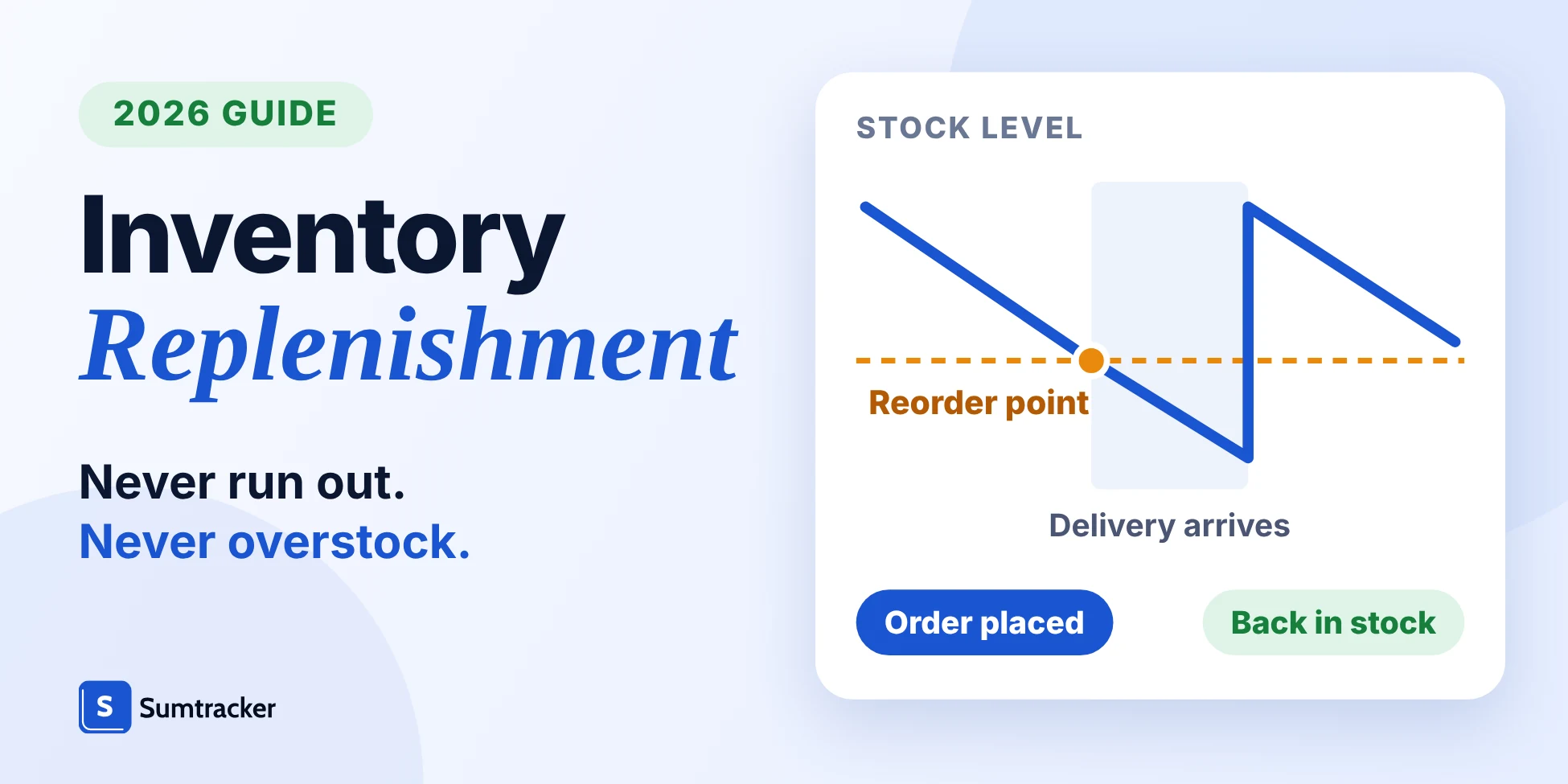
Inventory replenishment is the process of restocking products before they run out. It involves tracking stock, setting reorder points, placing purchase orders and receiving inventory to prevent stockouts and excess stock.
- Reorder when available stock reaches the reorder point: average daily demand × lead time + safety stock.
- Choose from six replenishment methods based on demand and supplier reliability.
- Plan reorders from available stock across channels, and decide whether warehouses are pooled or planned separately.
- Review reorder points as sales demand and lead times change.
Inventory replenishment is essential for keeping products in stock without overordering. Poor replenishment planning can lead to lost sales, excess inventory and cash flow problems. These challenges grow when you sell across multiple channels or manage several warehouses.
Sumtracker is an inventory replenishment software that helps ecommerce businesses with centralized inventory tracking, cross-channel stock syncing and suggestions based on sales history, stock levels and supplier lead times.
In this guide
What are you trying to fix?
This guide explains the five-step inventory replenishment process, six common replenishment methods and when to use them. You'll also learn how to calculate reorder points, measure replenishment performance and manage inventory as your business grows.
What Is Inventory Replenishment?
Inventory replenishment is simply the process of restocking your products to keep them available when customers want to buy them.
It’s about keeping the right balance, enough stock to meet demand, but not so much that you’re stuck with cash tied up in shelves full of slow-moving products.
Think of it as a cycle, products sell, inventory drops, and you bring in fresh stock at just the right time.
Simple in theory, but tricky in practice especially if you’re selling across multiple channels like Shopify, Amazon, or eBay.
One missed reorder can lead to stockouts and canceled orders, while ordering too much can leave you with boxes collecting dust.
A smart replenishment process helps you answer three key questions:
- What should I reorder? (Usually your fast-sellers or products with steady demand.)
- When should I reorder it? (Before you run dangerously low, taking supplier lead times into account.)
- How much should I reorder? (Just enough to stay in stock without overbuying.)
Replenishment sits between planning and buying, and the terms are easy to blur. In everyday use, “restocking” is the act of adding stock, while replenishment is the planned process that decides what, when and how much to restock.
| Term | What it decides | Example |
|---|---|---|
| Demand planning | How much will sell | Forecasting December sales of a gift set |
| Replenishment | When and how much to reorder so stock covers that demand | Placing an order when stock reaches the reorder point |
| Procurement | Who to buy from, at what price and terms | Negotiating a 14-day lead time with a supplier |
| Inventory control | Whether the counts are accurate | Correcting a count after a cycle count |
Why Inventory Replenishment Is Critical for Business Growth
Stock availability caps your sales: traffic and ad spend only turn into revenue when the product is in stock. IHL Group estimated global inventory distortion, meaning out-of-stocks plus overstocks, at about $1.77 trillion for 2022, with out-of-stocks making up roughly 68% of it, according to Chain Store Age’s report on the study.
Here’s why it matters so much:
- Prevents lost sales and stockouts A shopper who finds an item unavailable can buy it elsewhere, so each stockout costs the sale and puts the customer relationship at risk.
- Protects your cash flow Over-ordering locks money in products sitting on your shelves or in Amazon FBA warehouses. Ordering to a calculated reorder point keeps stock lean so cash can go to marketing, launches or growth.
- Keeps customer trust intact Shoppers who can rely on your favorites being in stock keep coming back, and repeat purchases are the base of long-term growth.
- Supports multi-channel expansion Once you sell on Shopify, Amazon, eBay or other platforms, one sale reduces stock everywhere. Without one shared count, overselling and canceled orders become routine.
How the Inventory Replenishment Process Works
At a glance, replenishment looks simple: products sell, you restock, repeat.
But when you break it down, there’s a rhythm to it that helps businesses stay in control instead of always playing catch-up.
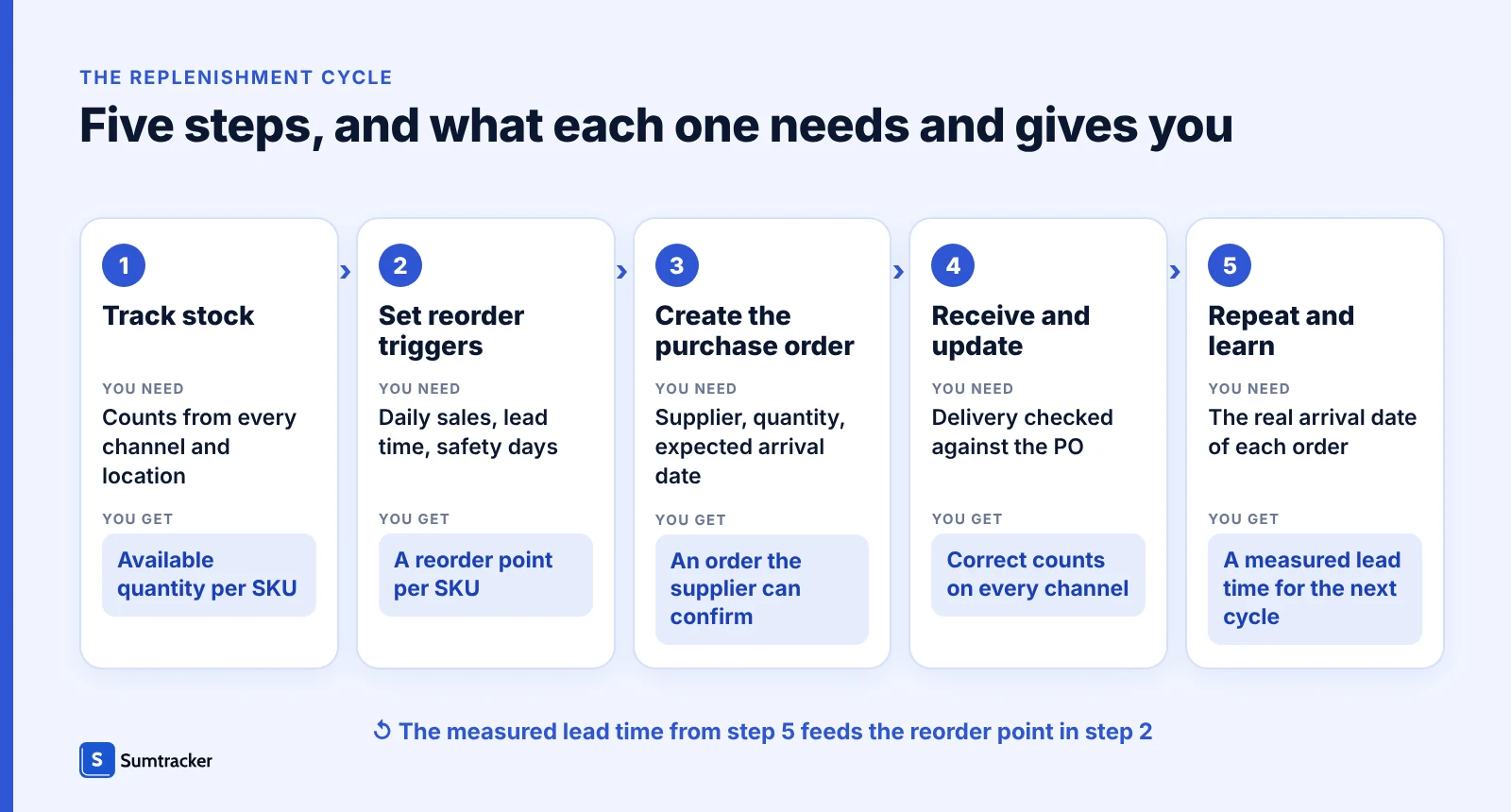
Here’s how the process usually works:
1. Track your stock levels
Count stock in one place across every channel and location, whether that’s your Shopify store, Amazon FBA, a 3PL or your own warehouse. Track available quantity, which is on hand minus units committed to open orders, because that is what you can still sell; how Shopify’s committed and available counts work explains the difference.
2. Set reorder triggers
Give each product its own reorder point instead of one rule for the whole catalog. A rule such as “reorder below 20 units” only works for a product whose sales during the lead time happen to equal 20. The reorder point formula is: reorder point = average daily demand × lead time + safety stock.
Worked example
Reorder point for a SKU that sells 12 units a day
Reorder point = average daily demand × lead time + safety stock.
units a day×14
days lead time+60
units safety stock=228
units: reorder point
Of the 228 units, 168 (12 × 14) cover sales during the lead time and 60 are the safety stock. Here the safety stock is set as 5 days of sales (5 × 12 = 60). When safety stock is expressed in days, the same formula can be written as daily demand × (lead time + safety days). Illustration, not Sumtracker data.
Safety stock is a quantity of units, so the first form always works; the days version is a shortcut for when you choose your buffer as a number of days of sales. To work it out for your own SKU:
- Find average daily sales from recent orders, leaving out days the SKU was out of stock.
- Write down lead time from your last few deliveries: order placed to stock ready to sell.
- Choose safety stock, the extra units you want covered if a delivery is late or demand jumps. A simple way is to pick a number of safety days and multiply by daily sales.
- Calculate daily sales × lead time + safety stock, then reorder as soon as available stock falls to that figure.
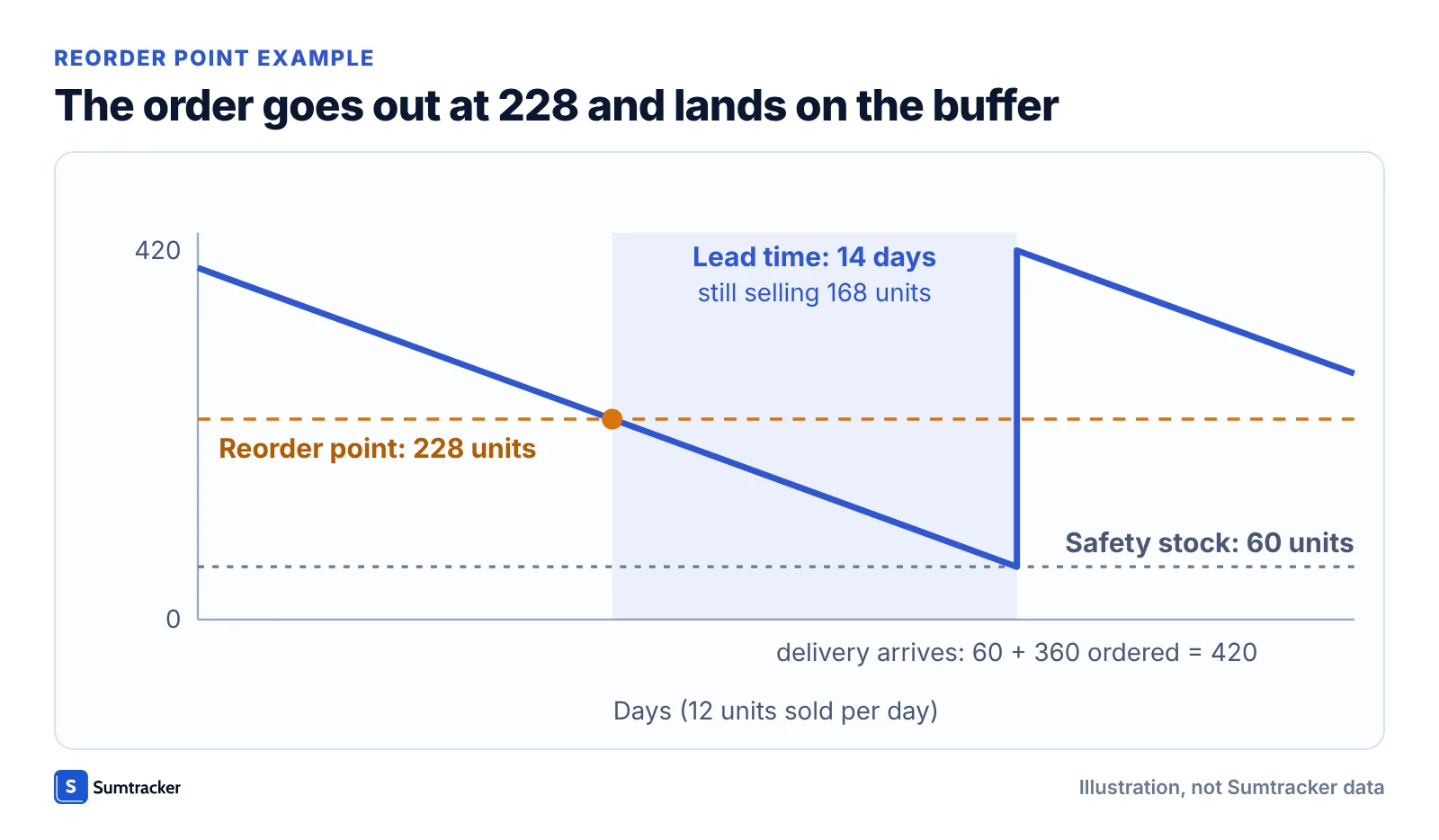
A fixed trigger of 20 units would cover under two days of sales for this SKU, so the order would arrive roughly twelve days after it sells out. Demand that swings needs a different calculation; the reorder point guide covers it.
3. Create purchase orders (POs)
When stock hits the reorder point, place an order with your supplier that names the SKU, quantity and expected arrival date. For some, this still means juggling spreadsheets and emails; for others, software handles part of this step.
Problem: stock running out without warning
Reorder by date, not by a fixed number
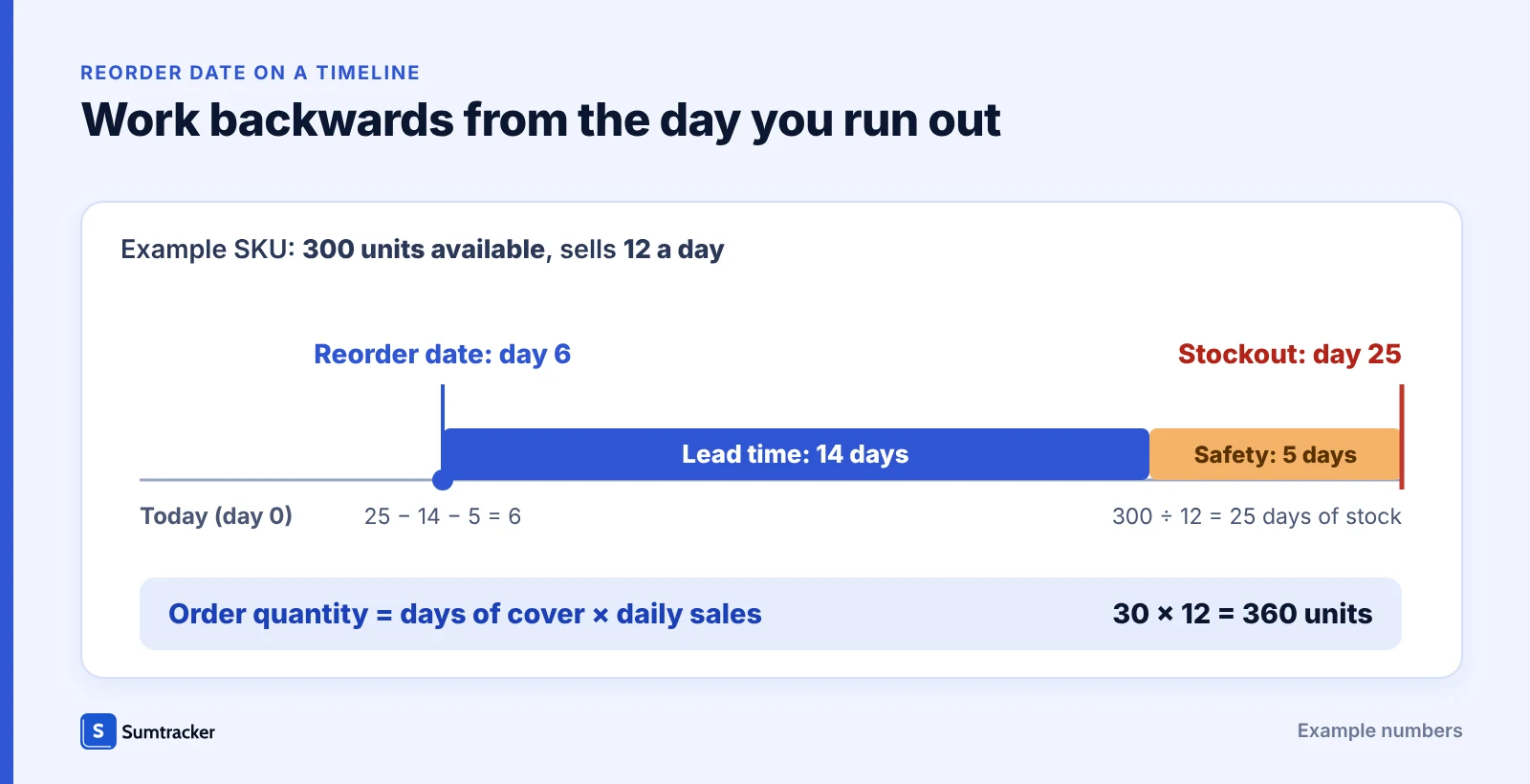
A fixed rule such as “reorder at 20 units” gives fast sellers no warning. Working out each product’s reorder date from its forecast stockout date does.
- Forecast daily sales from past sales
- Estimate the stockout date from current stock and incoming orders
- Reorder date = stockout date − lead time − safety days
- Order enough to cover the days of cover you choose
Sumtracker’s Replenishment table does this per SKU from up to 12 months of sales, leaving out days the SKU was out of stock. You create the purchase order yourself.
4. Receive and update stock
Check the delivery against the PO, record the quantity that actually arrived and update counts on every sales channel. A mismatch here carries into every later reorder.
5. Repeat the cycle
Replenishment is ongoing. Log the real arrival date each time: the gap between order and arrival is the lead time you should use for the next cycle.
Types of Inventory Replenishment Methods
Not every business replenishes stock the same way. The method you choose depends on your products, sales patterns, and supplier reliability.
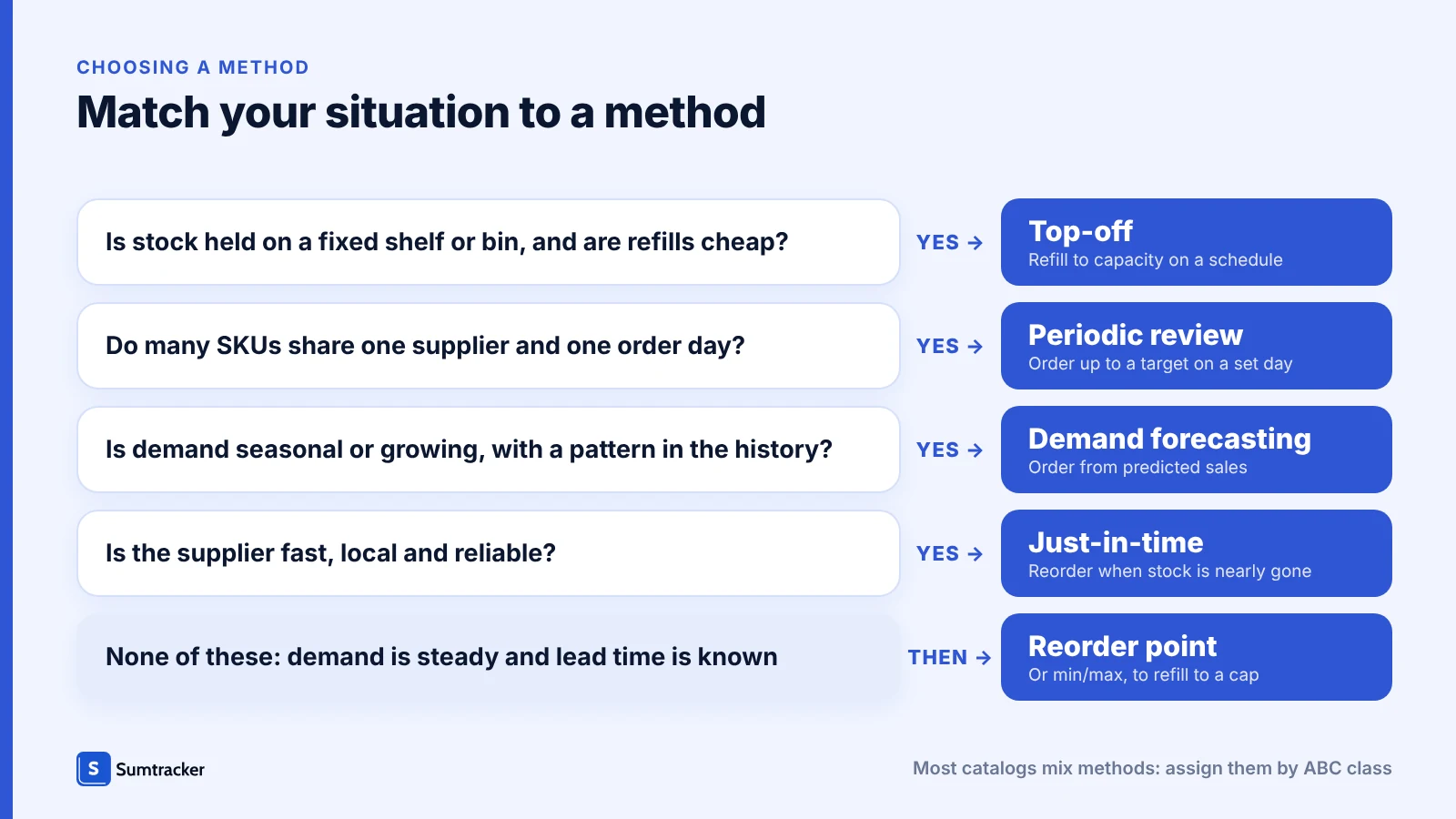
Here are six common approaches:
Reorder Point Method
You set a specific stock level (the “reorder point”), and when inventory drops to that number, it triggers a new order.
- Best for: Products with steady demand and predictable sales.
- Example: A skincare brand reorders moisturizer every time it falls to 50 units, ensuring it never runs out.
Min/Max Method
You define a minimum and maximum level for each product. When stock drops to the minimum, you reorder enough to bring it back up to the maximum.
- Best for: Businesses that want more control over stock ranges.
- Example: A café keeps coffee beans between 20–60 kg, reordering as soon as stock dips below 20.
Periodic Review Method
You review stock on a fixed schedule, weekly or monthly, and order whatever brings each product up to a target level.
- Best for: Many products from the same supplier, ordered on one set day.
- Example: A beauty brand reviews every product on Monday and sends one weekly order to its main supplier.
Top-Off Method
You refill each stock location back to its full capacity on a regular schedule, so shelves or pick bins are never left half empty.
- Best for: Shelf or bin-based stock where space is fixed and refills are cheap.
- Example: A store tops up its water bottle shelf to 48 units every Monday.
Just-in-Time (JIT)
You time orders so stock arrives just as it is needed, keeping inventory lean. This reduces storage costs, but it depends on tightly coordinated purchasing, accurate demand planning and very reliable suppliers, because there is almost no buffer if a delivery slips.
- Best for: Businesses with predictable demand, dependable vendors and fast, consistent lead times.
- Example: A print shop schedules paper deliveries to arrive just before confirmed jobs start, working with a supplier that delivers next day.
Demand Forecasting Method
You replenish based on predicted demand using sales history, seasonality, or trends. This method helps prepare for spikes and avoid dead stock.
- Best for: Seasonal or fast-growing businesses.
- Example: An apparel store orders extra winter jackets in October, anticipating holiday sales.
Methods compared
Which replenishment method fits, and when does it stop working?
Six replenishment methods, each with the situation it suits and the one where it breaks.
| Method | Fits when | Stops working when |
|---|---|---|
| Reorder Point | Demand is steady and lead time is known | Demand turns seasonal or lead time swings, so the point goes stale |
| Min/Max | You want order sizes that refill to a set maximum | The maximum ties up cash, or the minimum ignores lead time |
| Periodic Review | Many SKUs share one supplier and one order day | Sales spike between reviews and the shelf empties first |
| Top-Off | Shelf or bin space is fixed and refills are cheap | Slow sellers get refilled and sit there |
| Just-in-Time (JIT) | Demand is predictable and the supplier is fast, local and reliable | One late shipment causes a stockout, as there is no buffer |
| Demand Forecasting | Sales are seasonal or growing and history shows a pattern | A product is new, history is short, or a promotion distorts the past |
Most catalogs mix methods. ABC analysis is a quick way to assign them: forecast the top sellers, use reorder points for steady middle products and periodic review for the long tail.
Key Factors That Influence Replenishment Decisions
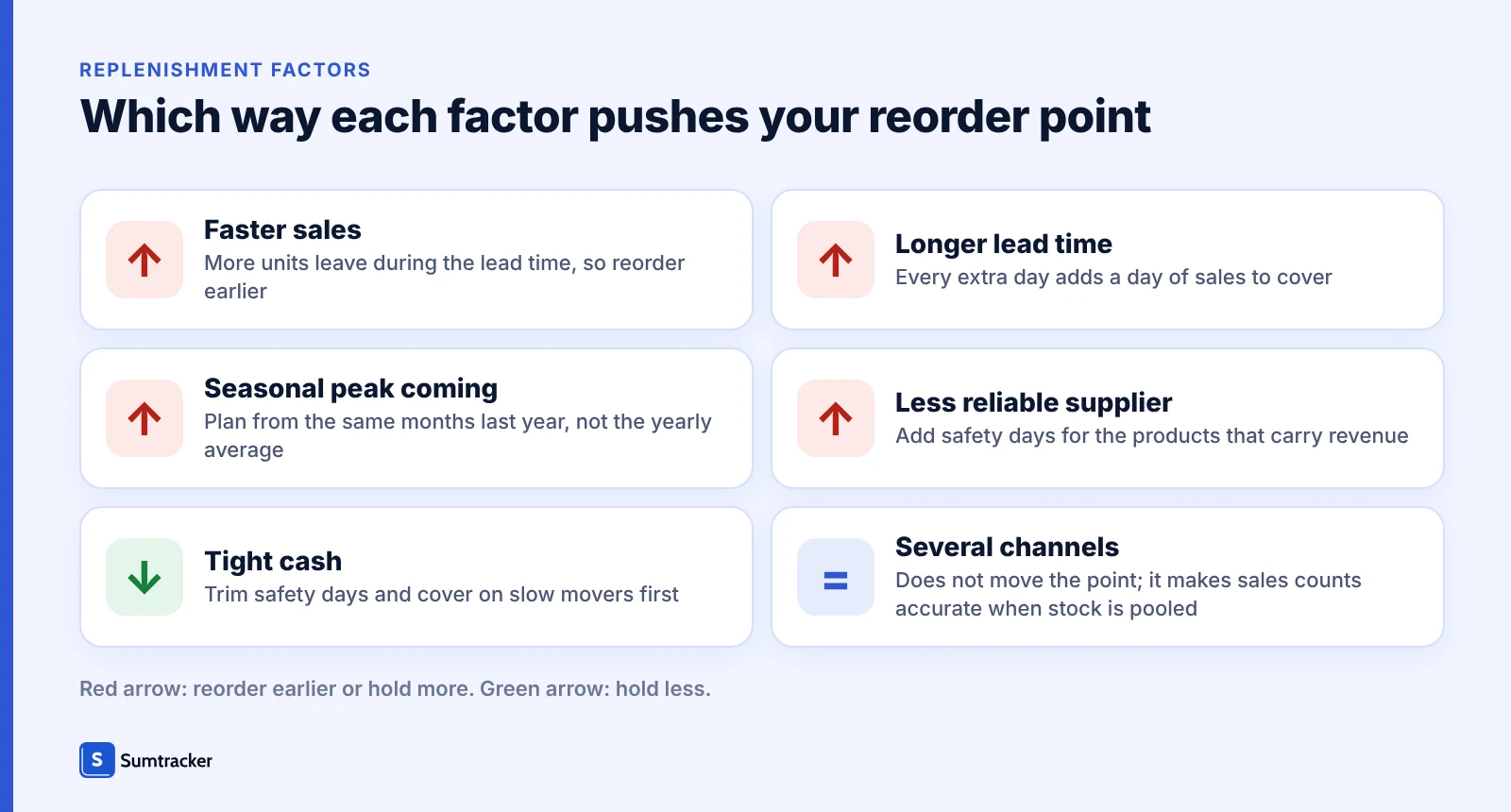
Replenishment isn’t a one-size-fits-all process. The timing and quantity of your reorders depend on several moving parts, and understanding these factors helps you make smarter decisions:
1. Sales Velocity
How quickly products sell directly impacts how often you need to reorder. Fast-moving items demand tighter monitoring, while slow movers allow for more breathing room.
2. Seasonality and Trends
Demand often shifts with the calendar. Holiday rushes, back-to-school seasons, or even viral social trends can suddenly spike sales. Planning for these cycles ensures you’re not caught off guard.
3. Supplier Lead Times
Even the best replenishment plan can fall apart if suppliers take too long to deliver. Knowing average lead times (and accounting for delays) helps you reorder early enough to avoid stockouts. Measure lead time from your last few delivered orders, not the supplier’s quote; how to measure and shorten lead time walks through it.
4. Safety Stock Requirements
A buffer of extra stock protects you when demand exceeds expectations or shipments arrive late. The amount of safety stock you keep depends on how critical the product is to your sales. A simple way to set it is daily sales multiplied by the number of safety days you want to cover (5 days × 12 units = 60 units in the example above); the safety stock guide covers the variable-demand version.
5. Multi-Channel Sales Impact
Selling across Shopify, Amazon, and other platforms means one sale reduces inventory everywhere. If your systems don’t sync, you may underestimate how fast stock is actually moving.
6. Cash Flow Constraints
Replenishment isn’t just about stock levels, it’s also about money. Tying up too much cash in excess inventory can limit your ability to invest in growth elsewhere.
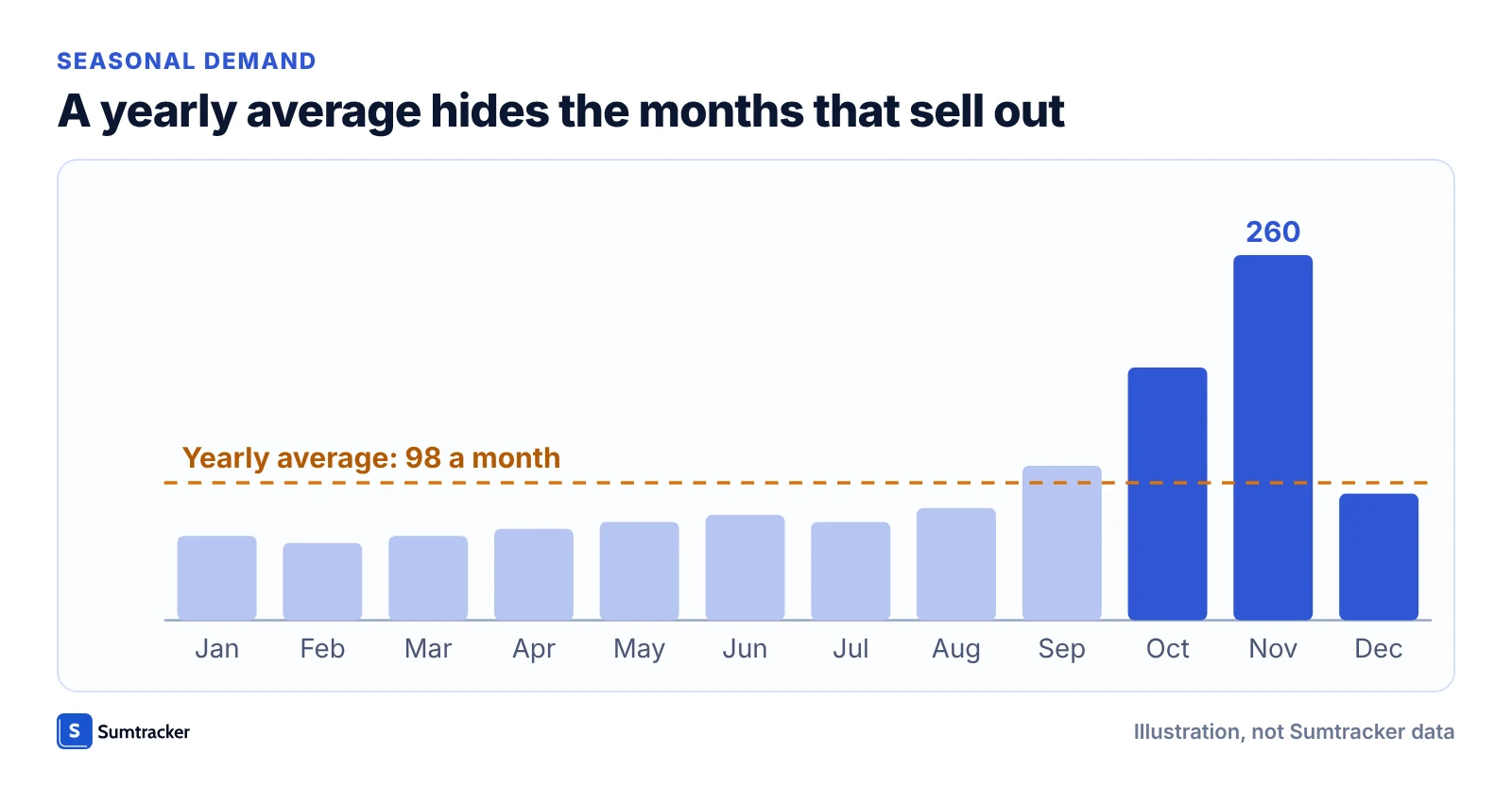
Problem: seasonal peaks selling stock out
Forecast the peak, not the average month
A reorder point set from yearly average sales covers well under half of a peak month’s demand. Plan peak months from the sales of the same months last year, and bring the reorder date forward.
In Sumtracker, mark up to three busy months in Settings › Replenishment Settings and Replenishment forecasts those months at their higher rate.
Best Practices for Effective Inventory Replenishment
Replenishment works best when it’s not treated as a one-off task, but as a continuous system that evolves with your business. Here are the practices successful retailers and eCommerce brands rely on:
1. Automate Reordering:
Checking stock by hand across channels is slow and error-prone. Use reorder points and low-stock lists so the question “what needs ordering today?” has a one-screen answer instead of a spreadsheet hunt; automating reordering in Shopify shows the options.
2. Use Data, Not Gut Feeling
Base each reorder point on recent sales per day, not on how stock “feels”. Look at sales history, seasonality and growth, and leave out days a product was out of stock so a past stockout does not drag the average down.
3. Keep Safety Stock for Bestsellers
Even reliable suppliers get delayed. Hold a buffer for the products that carry your revenue, sized in days of sales, and keep it smaller for slow movers where cash is the bigger risk.
4. Build Reliable Supplier Partnerships
Agree clear delivery dates, track how often each supplier delivers on time, and keep a backup source for critical products. A supplier’s measured lead time is worth more in your reorder point than the one on the quote.
5. Sync Across All Channels
If you’re selling on Shopify, Amazon, or eBay, your inventory needs to move as one. Frequent syncing reduces overselling and keeps customers from hitting an “out of stock” message after they pay.
Problem: one product in several places
Look at the whole stock position, not one location’s number
One location’s count can look healthy while the others have sold their stock. As a general rule, add up available stock across the channels and locations that can fill the same orders, compare the total with one reorder point, and move surplus stock before ordering more.
looks fine
Illustration, not Sumtracker data.
In Sumtracker, one stock count is kept in sync across your connected channels. Replenishment suggestions are calculated for each warehouse separately, not from the combined total, so check the other warehouses for spare stock and use a stock transfer before you order more.
Across sales channels, pooling is straightforward: the same units are listed everywhere, so reorder on one available quantity (on hand minus units committed to open orders), with one reorder point per SKU and one lead time per supplier. Across warehouses it depends on whether stock can move between them. If one location can supply another, compare the total and consider a transfer before reordering. If each location serves its own customers or market, give each its own reorder point and lead time, counted to the location that receives the delivery.
In a November 2026 review of active Sumtracker accounts, about 48% connected two or more sales channels and about 53% had set up two or more warehouses, so planning across channels and locations is the usual case for these merchants, not the exception.
Sumtracker, an inventory management, forecasting and planning platform for Shopify and multichannel eCommerce brands, keeps one stock count in sync across connected channels. For splitting stock between channels, see how to allocate inventory between Amazon and Shopify.
Do this today with your five best-selling SKUs:
- List the five SKUs.
- Add up available stock across channels, and note each warehouse’s stock separately.
- Compare with the SKU’s reorder point: the total if stock can move between locations, or each warehouse’s own if it cannot.
6. Review and Adjust Regularly
A rule that worked at 50 orders a month might not work at 500. Review reorder points monthly for best-sellers, and sooner after a supplier delay, a promotion or a seasonal shift.
Common Inventory Replenishment Mistakes
Most replenishment problems come from five avoidable habits, each with a direct fix.
- One reorder rule for every product. Give each SKU its own reorder point from its sales and lead time.
- Counting one channel’s stock. Reorder on available stock across all channels, and decide whether your warehouses are pooled or planned separately.
- Trusting the quoted lead time. Measure order date to ready-to-sell date on your last few deliveries.
- Averaging in stockout days. Leave out days a product was out of stock, or demand looks lower than it is.
- Setting reorder points once. Review them monthly for best-sellers and after any delay, promotion or season.
How to Measure Whether Replenishment Is Working
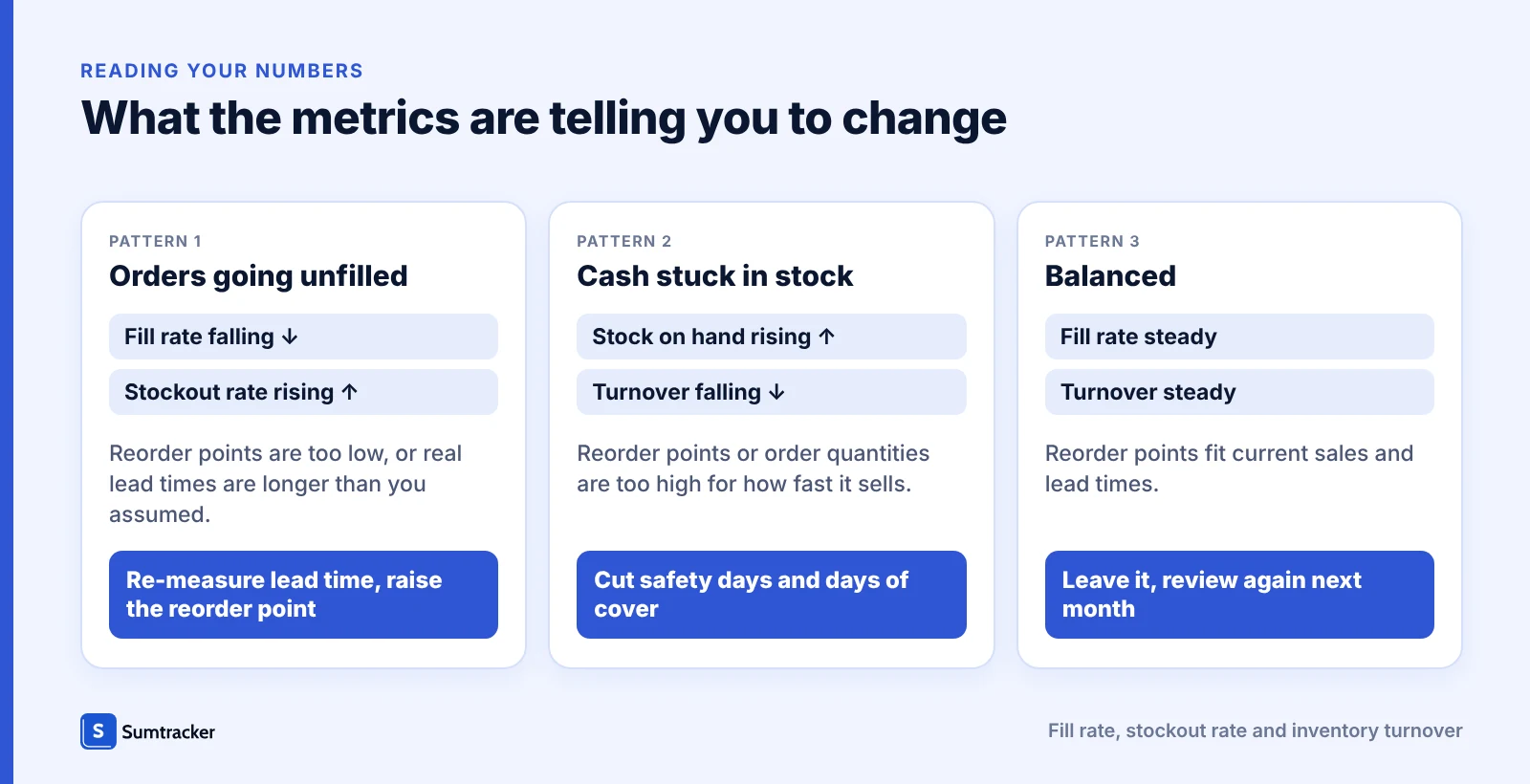
Three numbers show whether your reorder points are right: fill rate, stockout rate and inventory turnover.
| Metric | Formula | Worked example |
|---|---|---|
| Fill rate | Orders shipped complete from available stock ÷ total orders × 100 | 940 of 1,000 orders = 94% |
| Stockout rate | Active SKUs out of stock ÷ active SKUs × 100 | 12 of 400 SKUs = 3% |
| Inventory turnover | Cost of goods sold for the period ÷ average inventory value (opening plus closing value, divided by 2) | $120,000 ÷ $30,000 = 4 turns a year |
Falling fill rate with rising stockout rate means reorder points are too low or lead times are longer than assumed; rising stock with falling turnover means they are too high. Turnover of 4 means stock sells through about every 91 days (365 ÷ 4). The examples use illustrative numbers; the inventory turnover guide goes deeper on the third, and it is best compared within a product category.
How Sumtracker Simplifies Inventory Replenishment
Replenishment is one of those tasks every business has to get right and few enjoy managing. Sumtracker, an inventory management, forecasting and planning platform for Shopify and multichannel eCommerce brands, keeps the inputs in one place so you can see what to reorder instead of chasing spreadsheets.
Here’s how Sumtracker helps:
- Suggests what to reorder, and when
Sumtracker forecasts each SKU’s sales from up to 12 months of history, finds the stockout date from stock and incoming purchase orders, and suggests a reorder date from your lead time and safety days. You review the suggestion and create the purchase order yourself. - Frequent sync across connected channels
Selling on Shopify, Amazon, eBay, or Etsy? Sumtracker updates inventory across connected channels every few minutes, which reduces overselling. - Quantities from your days of cover
The suggested quantity is the forecast sales over the days of cover you set. Mark up to three busy months so seasonal peaks are forecast higher. See inventory forecasting. - Stock by warehouse
See stock and replenishment suggestions for each warehouse and plan transfers between them, so a shortfall in one location can be covered before you order more.
What is automatic and what is not: stock sync across connected channels runs automatically, every few minutes rather than instantly. Reorder dates and quantities are suggestions that Sumtracker calculates for you. You review them and create the purchase order yourself, because Sumtracker does not place orders with suppliers automatically. Suggestions are calculated per warehouse, not from combined stock.
FAQs
1. What exactly is inventory replenishment?
It’s the process of restocking products so you always have enough to meet demand without overstocking or tying up too much cash in slow-moving items.
2. How do businesses decide when to reorder?
Most use a reorder point, which factors in sales velocity, supplier lead times, and safety stock. When inventory dips below that point, it’s time to reorder.
3. What are the most common replenishment methods?
The six main ones are Reorder Point, Min/Max, Periodic Review, Top-Off, Just-in-Time (JIT) and Demand Forecasting. Each has strengths depending on your sales patterns and supplier reliability.
4. Why is replenishment critical for eCommerce growth?
Because stockouts lose sales and customer trust, while overstocking ties up capital. Smart replenishment keeps products flowing smoothly and supports multi-channel expansion.
5. Can replenishment be automated?
Yes, in part. Software can suggest what to reorder from sales history and lead times, and sync stock across channels so counts stay current. In Sumtracker, you still review the suggestion and create the purchase order yourself.
6. What is the difference between replenishment and restocking?
In everyday use the words overlap. Restocking is the act of adding stock; replenishment is the planned process behind it, deciding what to reorder, when and how much.
7. What is a replenishment cycle?
A replenishment cycle is one full loop of the process: stock sells down, a reorder triggers, the purchase order is placed and received, and counts are updated. Then it repeats.
Conclusion
Replenishment comes down to one decision per product: reorder when available stock falls to daily sales multiplied by lead time, plus safety stock, and revisit that number as sales change. Start with your five best-sellers: add up their available stock across channels, check each warehouse separately, and compare the result with the reorder point.
If you would rather not do that arithmetic in spreadsheets, Sumtracker suggests reorder dates and quantities from your sales history and lead times, and keeps stock synced across channels every few minutes.
Ready to simplify replenishment?
Related Articles
Tool and strategies modern teams need to help their companies grow.


Ready to Simplify Your Inventory Management?
Join hundreds of e-commerce merchants who rely on Sumtracker to save time, eliminate errors, and grow their business.