.svg)

Inventory Management Automation: Benefits, Costs, and Challenges



Inventory management automation uses software to sync stock across sales channels and automate reordering. It eliminates manual data entry, improves accuracy, reduces stockouts, and saves your ops team hours of work.
- Automated inventory updates keep stock levels current across sales channels.
- Weekly inventory work typically drops 30–70% once sync and reordering are automated.
- Automated data entry eliminates typos, miscounts, and most manual errors in inventory tracking.
- Payback on a focused tool typically lands inside the first year; ERPs take longer.
- Automation amplifies your current process. If SKU data is messy or lead times are guessed, fix those first.
Your store says an item is in stock. Shopify accepts the order. Amazon shows inventory available. But when your warehouse goes to pick it, the shelf is empty. That’s what happens when inventory tracking can’t keep up with your sales channels.
Inventory management automation helps prevent these mismatches by syncing stock levels, flagging replenishment needs, and reducing the manual work that keeps your team buried in spreadsheets. This guide breaks down what it fixes, what it costs, where it falls short, and how to know if your store is ready for it.
What Does Inventory Management Automation Actually Do?
An automated inventory management system replaces manual inventory tracking with software that watches your stock levels in real time, moves inventory data between your sales channels and warehouse, and takes repetitive tasks — reordering, stock counts, pick-list routing — off your team's plate.
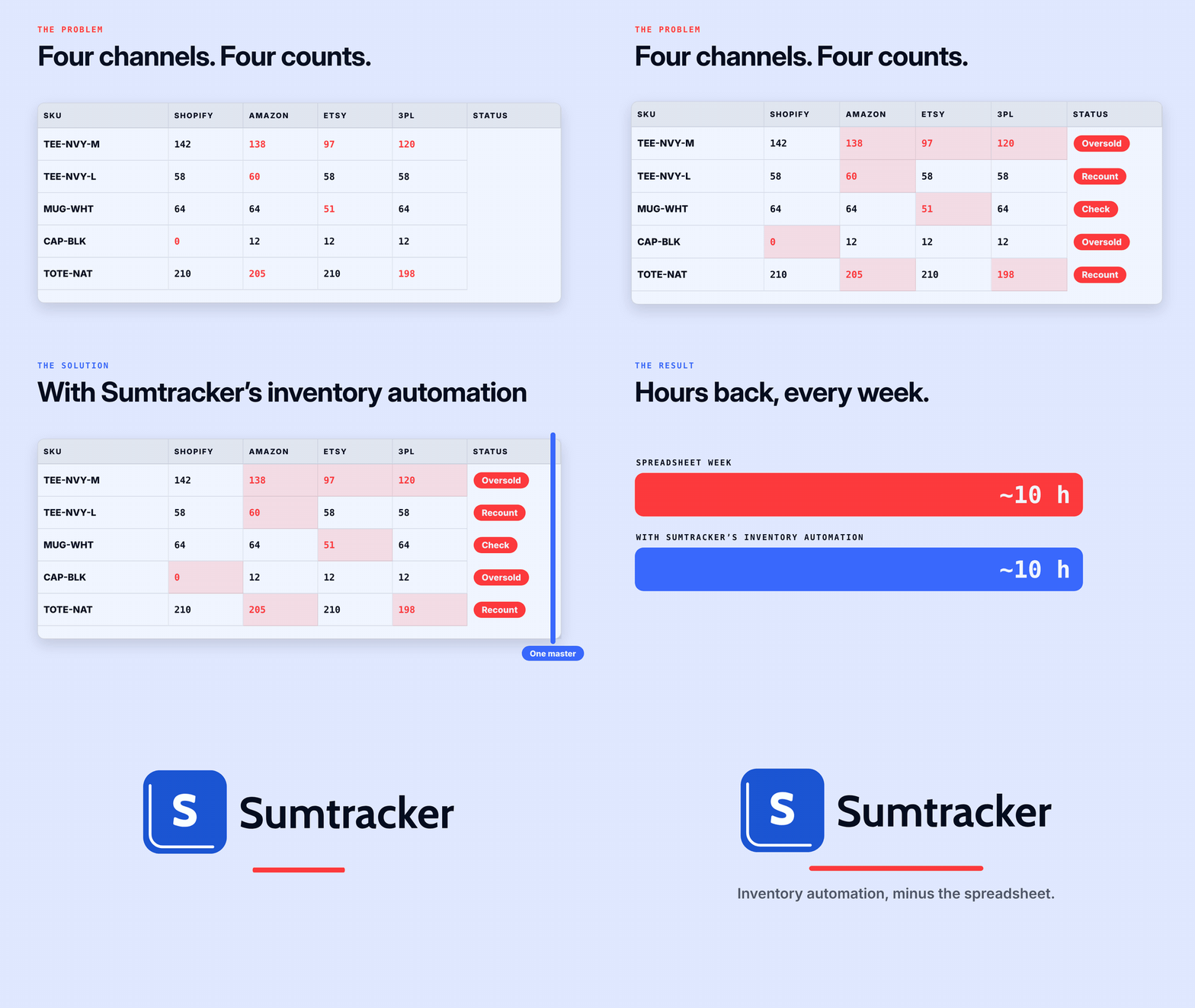
In practice, three things change on day one:
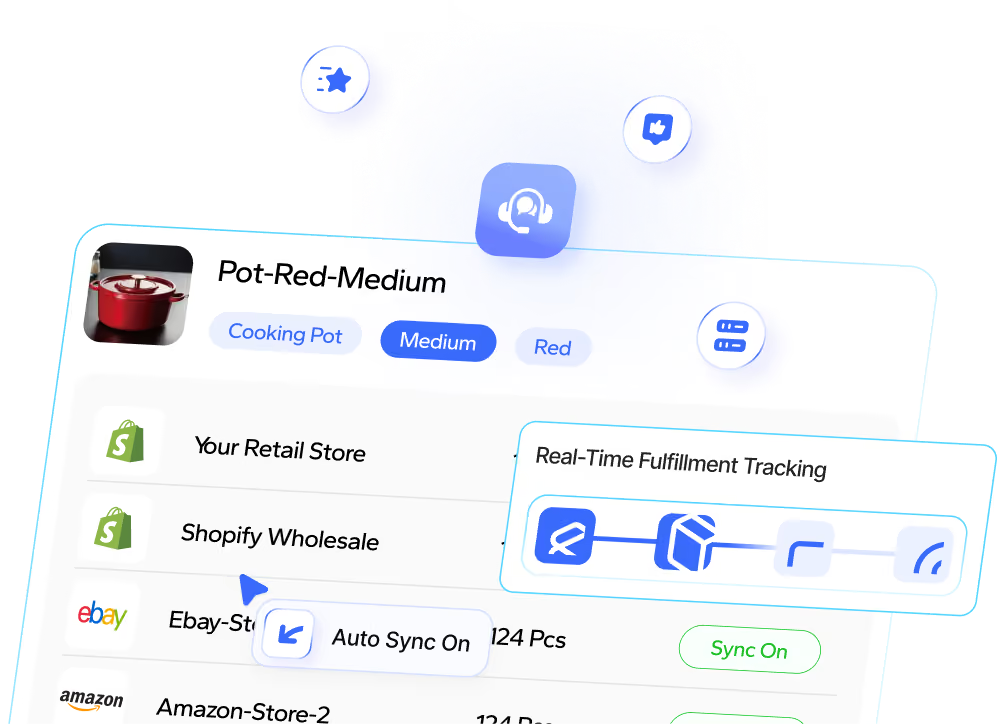
- Syncs stock across sales channels: A sale on Shopify updates Amazon FBA, Etsy, eBay, Walmart, and your 3PL within minutes. No one touches a spreadsheet.
- Automates replenishment: When a SKU reaches its reorder point, the system can flag it for replenishment based on lead times and sales velocity.
- Makes inventory reporting easier: Track inventory turnover, days of cover, dead stock, and stock availability by location without manually combining spreadsheets or building reports from scratch.
Think of a grocery store: every time an item is scanned at checkout, the inventory updates automatically. Automated inventory management does the same for your online store, keeping stock levels in sync across every sales channel in real time. As your business grows, manual stocktakes, shared Google Sheets, and back-and-forth messages with your warehouse become increasingly difficult to manage.
Automated vs. manual inventory management: when each one works
Manual inventory management works at low volume with one channel. It stops working the moment you add a channel, a warehouse, or a seasonal spike. Here's where the line usually sits:
Rule of thumb: if you sell on more than one channel, or you spend half a day a week keeping stock accurate, automation pays back faster than any other operations investment.
6 Inventory Automation Benefits that actually move the needle in month one
Here are six key benefits of switching from manual inventory management to automation that make an immediate difference for Shopify and multichannel brands:
1. Real-time stock visibility across every location and channel
See inventory across Shopify, Amazon FBA, 3PLs, and marketplaces in one dashboard. Keep stock levels in sync, prevent overselling, and know exactly what’s available at every location—without juggling spreadsheets or separate systems.
2. Fewer overselling incidents
Automatically sync stock across sales channels as orders come in. Prevent multiple customers from buying the same unit, reduce costly cancellations, and protect customer trust and reviews.
3. Automated reordering before you stock out
Set reorder points based on sales velocity and supplier lead times. Get purchase orders drafted when stock runs low, ready for your approval - so you replenish on time without relying on manual checks or reminders.

4. Hours back for the ops team
Eliminate repetitive stock updates, spreadsheet edits, and manual recounts. Automate routine inventory tasks so your team can focus on launches, supplier management, and customer experience instead of data entry.
5. Lower carrying costs and better cash flow
Use sales data, days-of-cover, and dead-stock reports to avoid overstocking slow movers and holding excess safety stock. Reduce storage costs, minimize write-offs, and free up cash tied up in inventory.
6. Faster, more accurate order fulfillment
Speed up picking and packing with barcode scanning and automated pick lists. Reduce shipping errors and automatically deduct the right components when bundles or kits sell across channels—ensuring accurate inventory and smoother fulfillment.
How to calculate your automation ROI?
A single ROI figure rarely reflects every business's costs and savings. Here's a framework a CFO will accept — four lines of math pulled from your own data, not a benchmark report:
Annual benefit = (hours saved per week × hourly rate × 52) + (overselling cost avoided) + (carrying cost reduction) + (stockout revenue recovered)
Compare this against year-one costs: software subscription, setup, and training. If annual benefits exceed total costs, your automation investment delivers a positive return.

Where to get each input, in order:
- Hours saved: Track a week of inventory tasks, including spreadsheet updates, stock adjustments, and manual reordering.
- Overselling cost: Review the last three months of refunds and support tickets. Calculate the average cost per incident and annualize it.
- Carrying cost cut: Use Shopify’s inventory valuation report to estimate the value of excess stock you could avoid holding. Apply your finance team’s carrying-cost rate, or use 20–25% as a planning estimate.
- Software cost: Add the annual subscription, setup time, and training costs.
From Sumtracker's data: what multi-location brands actually see
Babymaxi, an Amsterdam-based Shopify retailer with hundreds of SKUs across two 3PL partners, replaced spreadsheets and email-based workflows with Sumtracker. They now manage inventory through a shared stock view, draft purchase orders based on reorder points, and reports for identifying dead stock and tracking days of inventory cover—all in one dashboard.
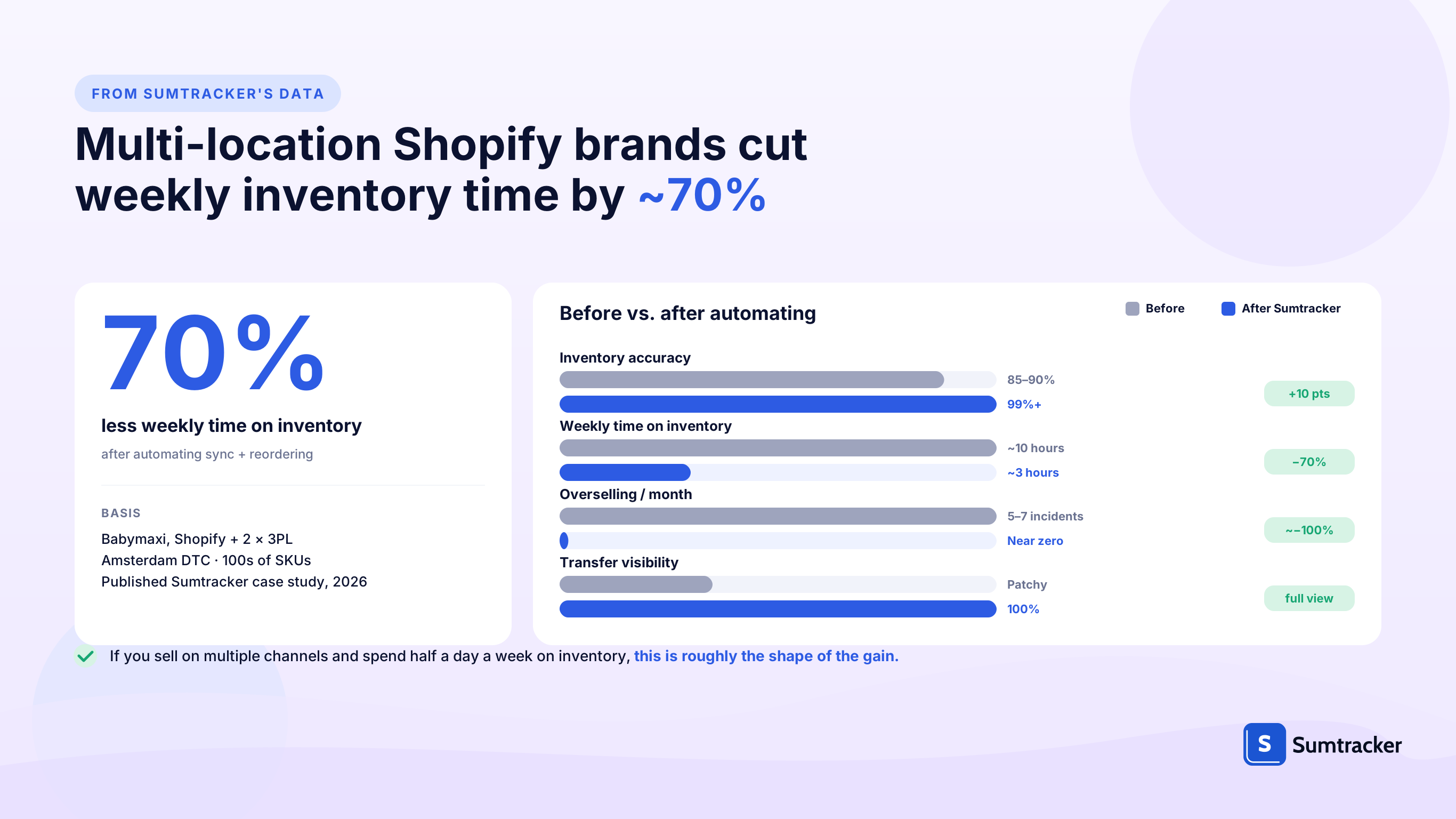
Full case: How Babymaxi manages multi-location inventory on Shopify.
Where inventory automation falls short
Four limitations worth considering before you pick a tool. Any one of them can turn an automation project into a sunk cost — these are the areas we get the most support questions about:

It won't fix bad data
SKU duplicates, missing barcodes, inconsistent variants across channels — automation scales those problems across every channel the next time it syncs. The system can't tell that "TEE-NVY-M" on Shopify is the same product as "TEENAVYM" on Amazon unless you teach it. Clean the inventory master first, then connect anything (audit checklist).
It won't fix bad processes
Automated reorder points still need accurate supplier lead times and real historical sales data. A reorder rule running on a guess is still a guess — it just runs faster. If purchasing is reactive today, map the process on paper, agree on the inputs, then automate.
It won't make up for a thin team
Someone still owns the system — approving reorders, reviewing exceptions, running cycle counts. If no one owns inventory day-to-day today, software doesn't fix that. It just gives the problem a dashboard.
It's rarely truly "real-time"
Most automation tools, Sumtracker included, sync every few minutes rather than instantly. For normal catalogs that's fine. For a product selling dozens of units a minute during a flash sale, pair sync with buffer stock + a max quantity per store rule.
Common mistake: picking a tool before fixing the process. Automation copies what you do today — if that's a mess, you'll scale the mess. (See the data-cleanup window in the Babymaxi box above.)
Is your store ready to automate? Run the 5-point check
Before you demo a single tool, run through these five questions with your ops lead. Each one answers whether you have the clean foundation automation needs:
- Can you produce an accurate count for your top 50 SKUs today, within an hour? If not, start with a stock take.
- Do SKUs follow one naming convention across Shopify, Amazon, your 3PL, and any marketplace you sell on?
- Do you have at least 3 months of historical sales data per channel? Forecasting and reorder points need data; without it, you're paying for features you can't use yet.
- Is your receiving and reorder process documented, even on one page? Automation copies what you do today.
- Is one person accountable for inventory, day-to-day? Shared ownership tends to mean no ownership.
Score 4–5: you're ready — move to vendor demos. Score 3: close; fix the one or two gaps and revisit in 2–4 weeks. Score 2 or less: fix the fundamentals first. A tool won't rescue a broken process.
Which level of automation fits your stage?
Store size changes the right answer. Over-buying is as common as under-buying — a 500-order store on an ERP is as stuck as a 50,000-order store on spreadsheets. Match the tool to the stage, and expand only when the current one hits its ceiling:

For most Shopify and multichannel brands under 5,000 orders a month, a focused tool like Sumtracker covers sync, reordering, and visibility without the lift of a full ERP. For bigger operations, see our best Shopify inventory management software of 2026.
Key features to shortlist for in modern inventory management software
Once you've passed the readiness check and picked your stage, shortlist tools against these capabilities. The order matters — the first four are table stakes; the rest decide the fit for your catalog:
- Real-time inventory sync across multiple sales channels (Shopify, Amazon FBA/FBM, Etsy, eBay, Walmart, your 3PL). Confirm sync cadence — "every few minutes" is the honest answer, not "instant."
- Multi-location and warehouse inventory tracking. Needed if you ship from more than one place or use a 3PL.
- Automated reordering with configurable reorder points. Lead time, safety days, and sales velocity should be editable per SKU.
- Purchase orders with supplier management. PO drafts, partial receiving, cost tracking.
- Bundles and kits with component-level inventory. If you sell bundles across channels, the tool must deduct components automatically — most generic sync tools can't.
- Reporting on inventory turnover, days of cover, dead stock, and stockouts. Live, not export-only.
- Barcode scanning for cycle counts and pick-and-pack.
- Audit log of inventory movements and manual adjustments. You'll need it the first time a count disagrees with the system.
- Integration with your accounting and shipping stack (Xero, QuickBooks, ShipStation, etc.).
Troubleshooting the first 30 days of automation
Most new-automation issues cluster around five problems. Here's the pattern and the fix:
FAQ
Is inventory automation worth it for small businesses?
Usually yes once you sell on more than one channel or weekly inventory tasks tip past half a day. Below that, the labor you save often won't cover the subscription. The decision point is channel complexity, not revenue alone.
How long does implementation take?
For a focused tool connected to Shopify and one 3PL, go-live is usually 1–3 weeks: data cleanup, SKU mapping, and a short pilot. ERP-level implementations run 3–9 months. "Same-day setup" claims usually count the technical install only, not the data preparation.
Can automation handle bundles and kits?
Yes, but only if the tool supports component-level inventory. Shopify's native bundles app and most generic sync tools can't deduct components when a bundle sells across channels. Component-aware tools do.
Does automation replace demand forecasting?
Not entirely. Rule-based reordering handles routine SKUs with simple lead-time and sales-velocity math. For seasonal trends, new launches, and A-items with volatile demand, a human still reviews the forecast each week.
What if the automation system goes down?
Sync pauses and catches up on the next cycle. For BFCM and launches, pre-set channel buffer stock so a brief outage doesn't cause overselling. Keep a weekly stock export as a manual fallback.
Can one tool manage inventory across Shopify, Amazon, and a 3PL?
Yes. Dedicated inventory tools like Sumtracker treat Shopify, Amazon FBA/FBM, Etsy, eBay, Walmart and 3PL feeds as separate sources that write back to one inventory master. The master is the single source of truth; the channels receive updates from it.
Conclusion
Inventory automation delivers when it layers on top of a clean process. Brands that see Babymaxi-shaped gains spend a week preparing their SKU and lead-time data before go-live, pick one benefit to prove first (usually real-time sync), and expand from there.
Related Articles
Tool and strategies modern teams need to help their companies grow.
.avif)
Ready to Simplify Your Inventory Management?
Join hundreds of e-commerce merchants who rely on Sumtracker to save time, eliminate errors, and grow their business.