.svg)
Inventory Costing Methods for Shopify: A Complete Guide for Store Owners


An inventory costing method decides which purchase cost you assign to each unit you sell. On Shopify, that choice changes your COGS, gross profit and inventory value, and Shopify won't make it for you.
- Shopify's limit: the Cost per item field is one static number per variant. It doesn't calculate FIFO, LIFO or weighted-average COGS, and changing it doesn't recalculate past sales.
- The methods compared: buying 300 mugs at $10, $12 and $14 and selling 150, FIFO gives $2,150 gross profit, weighted average $1,950 and LIFO $1,750, from identical sales.
- Which to pick: FIFO or weighted average suits most Shopify stores. LIFO is only for eligible U.S. businesses with an accountant; it isn't allowed under IFRS or for Canadian tax.
- Count the full cost: freight, duties and tariffs can belong in inventory cost, and a blank Cost per item leaves those sales out of Shopify's profit reports.
- Reconcile monthly: Shopify and QuickBooks, Xero or A2X can show different COGS; pick one system as the source of truth for unit costs.
Your Shopify dashboard shows a healthy profit, but your accounting records tell a different story. Why does this happen?
One common reason is the way inventory costs are calculated.
When you purchase the same product at different prices, the inventory costing method you use affects your cost of goods sold (COGS), gross profit, and ending inventory value. Without accurate cost tracking, you may overestimate profits, set the wrong prices, or make poor purchasing decisions.
For Shopify store owners, choosing the right inventory costing method is essential for understanding actual profitability and maintaining accurate financial records.
In this guide, you’ll learn how FIFO, LIFO, and weighted average cost work, how Shopify handles inventory costs, which apps can help, and what you need to know about inventory costing and tax compliance.
What Are Inventory Costing Methods and Why Do They Matter for Shopify Stores?
An inventory costing method determines how you assign costs to the products you sell and the inventory you still have in stock.
If every unit of a product always cost the same, choosing a costing method would be straightforward. But real stores buy inventory in batches, and the cost can change with each purchase.
And lately, costs have been changing a lot. In NFIB’s September 2026 survey, 20% of small business owners named inflation as their most important business problem. That’s nearly three times the historical average of 7%.
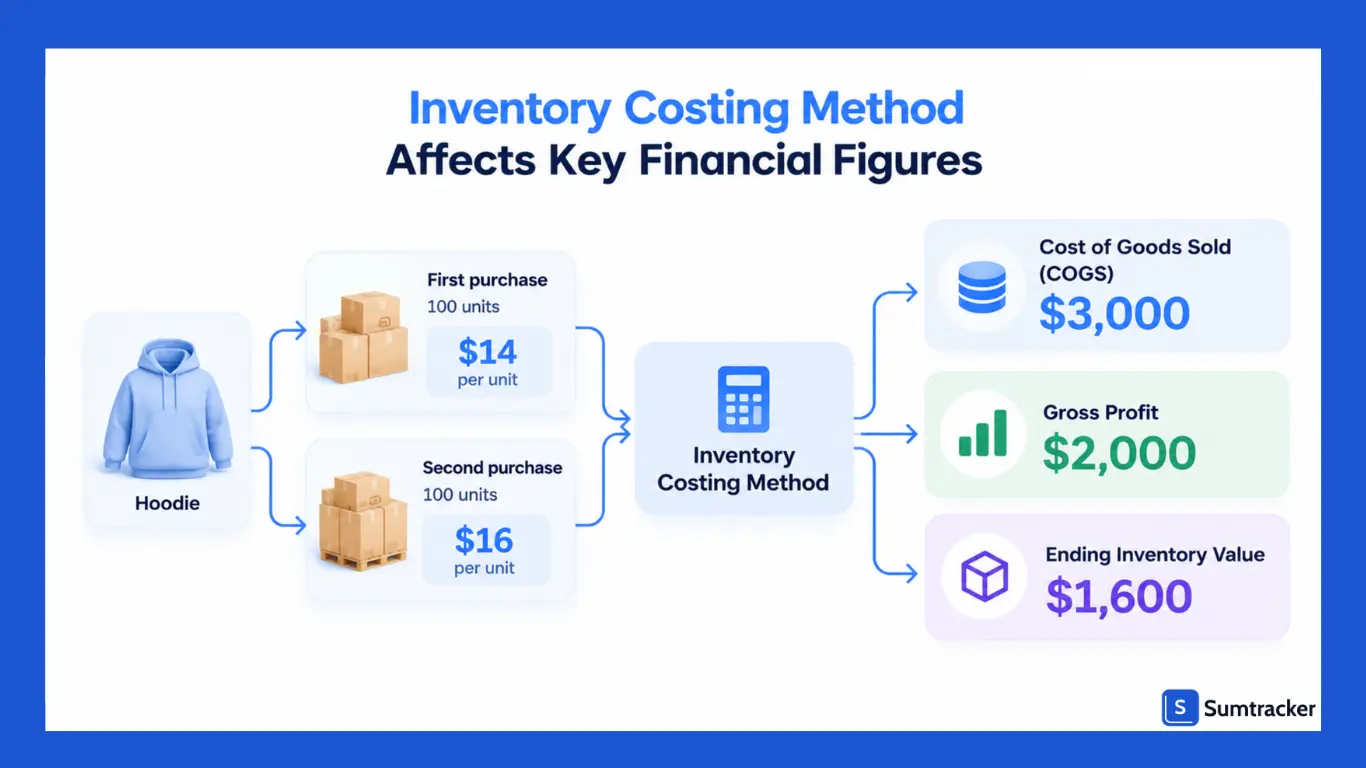
So your first batch of hoodies might cost $14 per unit. The next batch might cost $16 because your supplier raised prices or freight got more expensive.
When you sell a hoodie, which cost should you assign to that sale: $14 or $16?
Your inventory costing method determines how you answer that question. It affects three important financial figures:
- Cost of goods sold (COGS): The cost assigned to products sold during a specific period.
- Gross profit: Net sales minus COGS.
- Ending inventory value: The cost assigned to the products remaining in stock.
These figures are connected by a fundamental accounting formula:
COGS = Beginning Inventory + Purchases − Ending Inventory
Different costing methods can assign different costs to sales and remaining inventory.
As a result, they can affect reported COGS, gross profit, taxable income, and the inventory value on your balance sheet.
Inventory costing also influences everyday business decisions.
If your recorded COGS is too low, you might underprice a product, offer discounts that erode your margins, or overestimate how profitable your store really is.
Before choosing a costing method, decide which expenses belong in your inventory cost. The supplier’s unit price may not tell the whole story.
Depending on the circumstances and your accounting rules, freight, customs duties, and other costs of bringing products to their intended location and condition may also need to be included.
Not sure which expenses to include? Read our guide to cost price vs. purchase price vs. landed cost.
How Shopify Handles Inventory Costs (and What It Doesn’t Do)
Shopify lets you record a cost for each product variant, but it doesn’t automatically calculate FIFO, LIFO, or weighted-average COGS for you.
That distinction matters when your supplier changes prices.
Shopify can help you track product costs and report profit, but you need a separate costing workflow if you want to account for changing purchase costs accurately.
1. Set a Cost per item for each variant
In your Shopify admin, open a product and look for the Cost per item field in the pricing section. If you sell a hoodie in different sizes or colors, you can set a cost for each variant.
Shopify uses this cost to calculate product profit in its reports. However, the field doesn't automatically include every expense involved in getting the product to your warehouse. Shipping, duties, and other costs may need to be tracked separately.
2. Shopify uses the recorded cost when calculating profit for a sale
Shopify's profit reports rely on having a cost recorded when you sell a product. If a product has no cost recorded at the time of sale, Shopify may leave that sale out of the relevant profit calculations.
Changing the cost later doesn't automatically update the cost recorded for an earlier sale.
For example, suppose you buy a hoodie for $14 and later buy more for $16. If you change the Cost per item field to $16, Shopify won't automatically go back and recalculate your earlier sales using FIFO or weighted-average costing.
3. Cost per item doesn’t track changing purchase costs
Shopify's Cost per item field is static. It doesn't track each purchase batch and work out which batch's cost to use when you sell a product.
Let's say you buy 100 hoodies for $14 each, then another 100 for $16 each. A costing method such as FIFO can help determine which costs to assign to sales and which costs remain in inventory. Shopify doesn't perform that calculation automatically through the Cost per item field.
If your purchase prices change often, you may need an inventory app, accounting system, or separate spreadsheet to calculate COGS and the value of your remaining stock.
4. Purchase orders track incoming stock, but they don’t calculate COGS for you
Shopify purchase orders help you record what you've ordered from suppliers and how much you've agreed to pay. You can also record extra charges, such as shipping and customs duties, in the inventory receiving process.
This helps you keep track of what your stock actually costs. But recording those extra charges doesn't automatically mean Shopify updates the product's Cost per item to include them. It also doesn't mean Shopify calculates FIFO or weighted-average costs.
If you need those calculations, you'll need a separate costing process or a system that supports your chosen method.
For details, see Shopify’s purchase order and inventory transfer documentation.
Shopify Cost per Item vs. a Dedicated Inventory Costing System
Features vary by app, so check that a system supports your chosen costing method before you buy it.
Practical tip: Before closing your books each month, check Shopify's finance reports for sales with and without a recorded cost.
Missing costs can make your reported gross profit look higher than it really is.
Add missing costs to the appropriate records, and check past orders separately because changing Cost per item won't necessarily fix historical sales.
3 Main Inventory Costing Methods for Shopify Stores
If you sell products on Shopify, your inventory costs affect your reported cost of goods sold (COGS), gross profit, and inventory value.
The three main costing methods are FIFO (first in, first out), LIFO (last in, first out), and weighted average cost (WAC).
Specific identification is another option for unique or serialized products, such as one-of-a-kind jewelry.
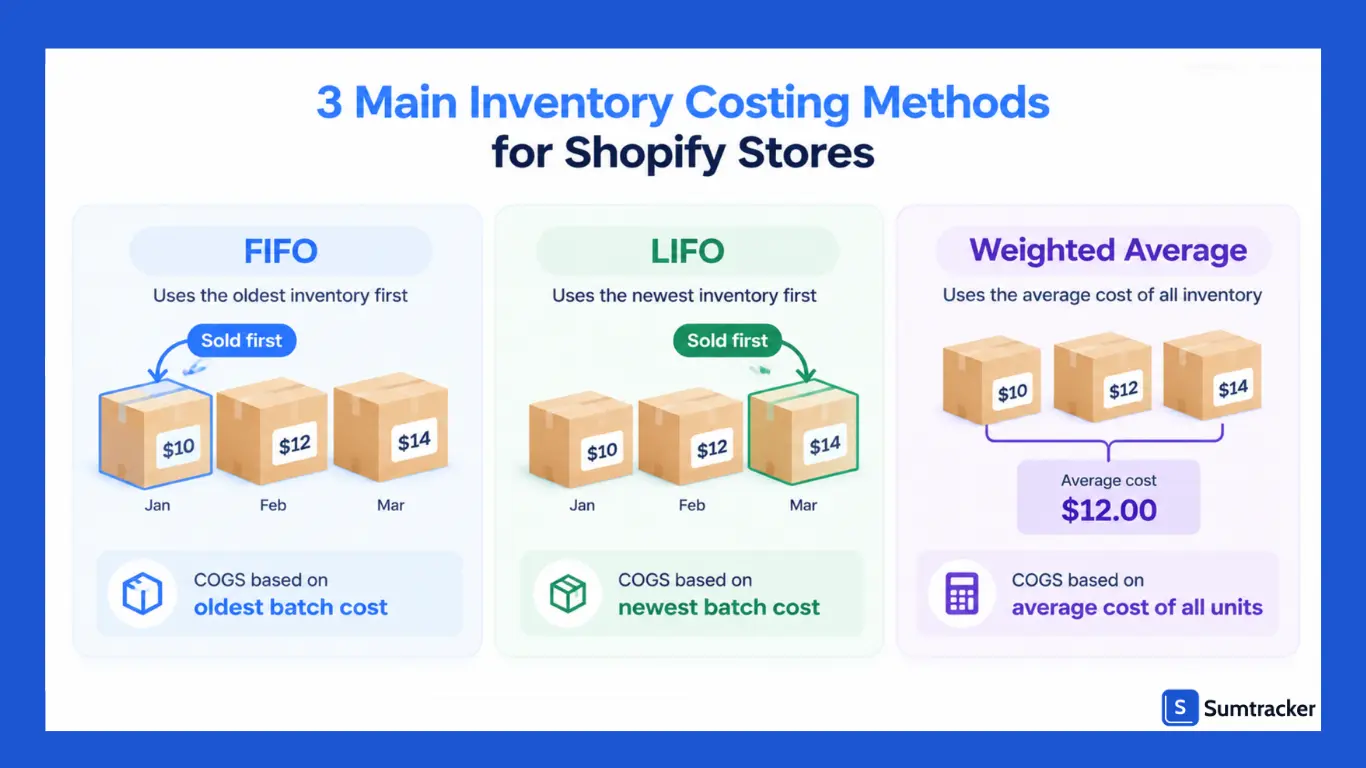
Shopify’s Cost per item field doesn’t automatically calculate COGS using these methods. If you buy the same product at different prices, you may need inventory or accounting software to calculate costs consistently.
Let’s see how the methods compare using a Shopify store that sells ceramic mugs for $25 each.
In Q1, the store buys three batches:
- January: 100 mugs at $10 each ($1,000)
- February: 100 mugs at $12 each ($1,200)
- March: 100 mugs at $14 each ($1,400)
That’s 300 mugs costing $3,600. By the end of March, the store has sold 150 mugs, generating $3,750 in revenue.
FIFO: First In, First Out
FIFO assigns the oldest inventory costs to units sold first. A Shopify merchant might use this method when older stock is sold or rotated first, particularly for products with expiry dates. The accounting method still needs to be applied in the inventory or accounting records.
- COGS: (100 × $10) + (50 × $12) = $1,600
- Ending inventory: (50 × $12) + (100 × $14) = $2,000
- Gross profit: $3,750 − $1,600 = $2,150
When purchase costs rise, FIFO generally produces lower COGS and higher gross profit than LIFO.
LIFO: Last In, First Out
LIFO assigns the newest inventory costs to units sold first. It may be relevant to Shopify merchants operating under eligible U.S. accounting and tax rules, but it’s not permitted under IFRS or for Canadian tax inventory valuation.
- COGS: (100 × $14) + (50 × $12) = $2,000
- Ending inventory: (50 × $12) + (100 × $10) = $1,600
- Gross profit: $3,750 − $2,000 = $1,750
When purchase costs rise, LIFO generally produces higher COGS and lower gross profit. U.S. businesses must meet applicable requirements to use it for tax purposes.
Weighted Average Cost (WAC)
Weighted average cost spreads the cost of inventory across all units available. It can be useful for Shopify stores selling interchangeable products that are restocked at different prices.
Weighted average cost per unit = Total inventory cost ÷ Total units available
- Average cost: $3,600 ÷ 300 = $12
- COGS: 150 × $12 = $1,800
- Ending inventory: 150 × $12 = $1,800
- Gross profit: $3,750 − $1,800 = $1,950
These figures use periodic weighted average. A moving-average system recalculates the average as inventory changes, so results may differ.
How the Methods Affect Your Shopify Store
Gross profit is sales revenue minus COGS, before operating expenses and taxes.
In this example, the costing method creates a $400 difference in gross profit between FIFO and LIFO, even though the store’s sales are identical.
For Shopify merchants, the important point is that tracking a product cost in Shopify and calculating accounting COGS are not necessarily the same thing.
If supplier prices change between purchases, check whether your inventory or accounting setup applies your chosen costing method consistently.
Don’t assume that entering a new Cost per item value automatically recalculates the cost of every unit already sold.
How to Choose the Right Inventory Costing Method for Your Shopify Business
For most Shopify stores, FIFO or weighted average is the practical starting point. LIFO is worth considering only for eligible U.S. businesses with professional accounting support.
Ask yourself five questions.
1. Where does your business report taxes?
If you’re in Canada, LIFO isn’t permitted for tax inventory valuation. IFRS also prohibits LIFO. Your options may include FIFO, weighted average, or specific identification, depending on your products and applicable accounting rules.
2. Are your supplier costs rising or falling?
When costs remain stable, the methods usually produce similar results. When costs change, your choice can affect reported COGS and gross profit. Tariffs can contribute to higher acquisition costs, but the impact depends on your suppliers and sourcing arrangements.
3. Do your products expire or go out of style?
For food, cosmetics, and supplements, rotating older stock first can help manage expiry dates. FIFO may fit this workflow, although physical stock rotation and accounting cost assumptions are not necessarily the same.
4. Are your products interchangeable?
If you sell identical bottles of shampoo, weighted average can simplify cost tracking across batches purchased at different prices. For unique or individually identifiable products, specific identification may be more appropriate.
5. How much tracking can you manage?
Weighted average can be simpler to maintain. FIFO requires reliable cost-layer records, while LIFO can involve additional accounting and tax requirements.
A costing-method change can materially affect reported results.
For example, industrial distributor DNOW reported that its 2025 switch from moving average cost to LIFO increased the cost of products sold by about $27 million. See its 2025 annual report and the auditor’s preferability letter.
Practical tip: Decide on your costing method before preparing your first tax return, and check with an accountant before changing it. In the U.S., a change in accounting method may require IRS approval and Form 3115. Canadian businesses should confirm the applicable CRA requirements before making a change.
How to Implement Inventory Costing Methods on Shopify
Shopify gives you one Cost per item field, so implementing any method means deciding what number goes in that field, and when you update it.
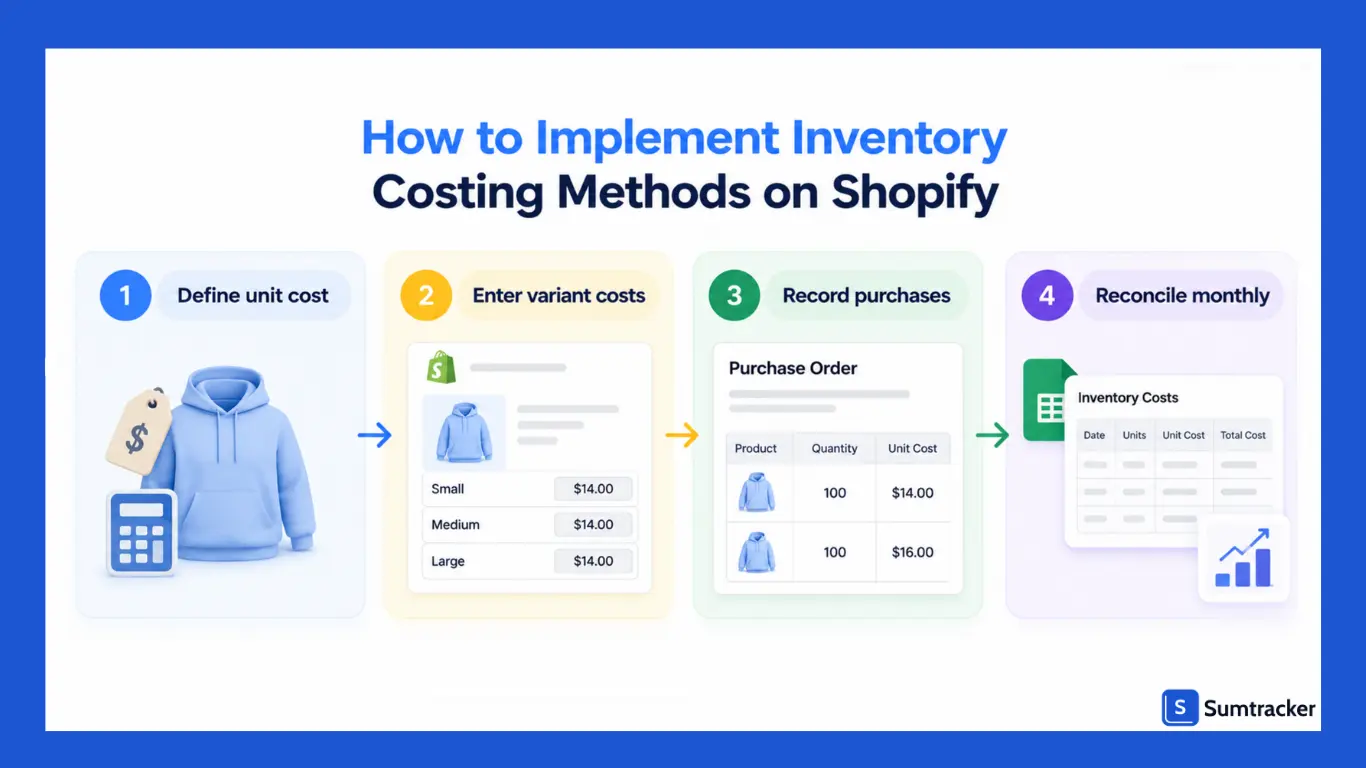
Here's a simple setup that works for any method.
- Define your unit cost. Decide whether to track supplier cost alone or include inbound freight, duties, and tariffs. These additional costs may form part of inventory cost under your accounting rules. Keep the same approach across your records.
- Fill in cost per item on every variant. Use the bulk editor or a product CSV for large catalogs. Our guide to bulk editing in Shopify shows how.
- Record every purchase. Use purchase orders so you have a dated record of quantity and cost for each batch. Here's how to create purchase orders in Shopify.
- Pick an update trigger. For FIFO, you update cost when an old batch runs out. For weighted average, you update after each receipt.
- Keep a cost log outside Shopify. Shopify doesn't keep a history of past costs, so a spreadsheet or app needs to.
- Reconcile monthly. Compare Shopify's COGS with your accounting software and fix any gaps. We cover this below.
LedgerGurus, an ecommerce accounting firm, has a helpful walkthrough of this setup in Inventory and COGS for Shopify: How to Do It Right. It's useful if you want to see how Shopify cost data flows into your books.
Rule of thumb: If Cost per item is blank, that variant's sales don't count toward COGS in Shopify's profit reports. A blank cost is worse than an estimated one. Enter your best estimate now and correct it when the invoice arrives.
How to Track FIFO Inventory Costs for Your Shopify Store
Shopify’s Cost per item field doesn’t automatically apply FIFO to each sale.
If you buy the same product at different prices, you’ll need to track those purchase costs separately to calculate FIFO cost of goods sold (COGS) accurately.
- Record each purchase batch. Track the date, quantity, and unit cost for every shipment of each SKU.
- Track sales against the oldest costs first. Your FIFO records should deduct sold units from the oldest available batch before moving to newer batches.
- Calculate FIFO COGS. Multiply the units sold from each batch by that batch’s unit cost, then add the results.
- Reconcile with your accounting software. Compare your calculated FIFO COGS with your financial records and record any necessary adjustments.
- Use Shopify’s Cost per item carefully. It can support product-level cost and profitability estimates, but changing the value as purchase batches sell out doesn’t replace a proper FIFO cost-layer record.
For a small catalog, a spreadsheet may be enough to maintain purchase layers. If you manage many SKUs or frequent orders, consider inventory or accounting software that explicitly supports FIFO costing.
How to Track LIFO and Weighted Average Costs for Your Shopify Store
Shopify doesn’t automatically calculate moving-average or LIFO COGS from purchase batches. You can track weighted-average costs using an app or spreadsheet, while LIFO is generally handled in your accounting system.
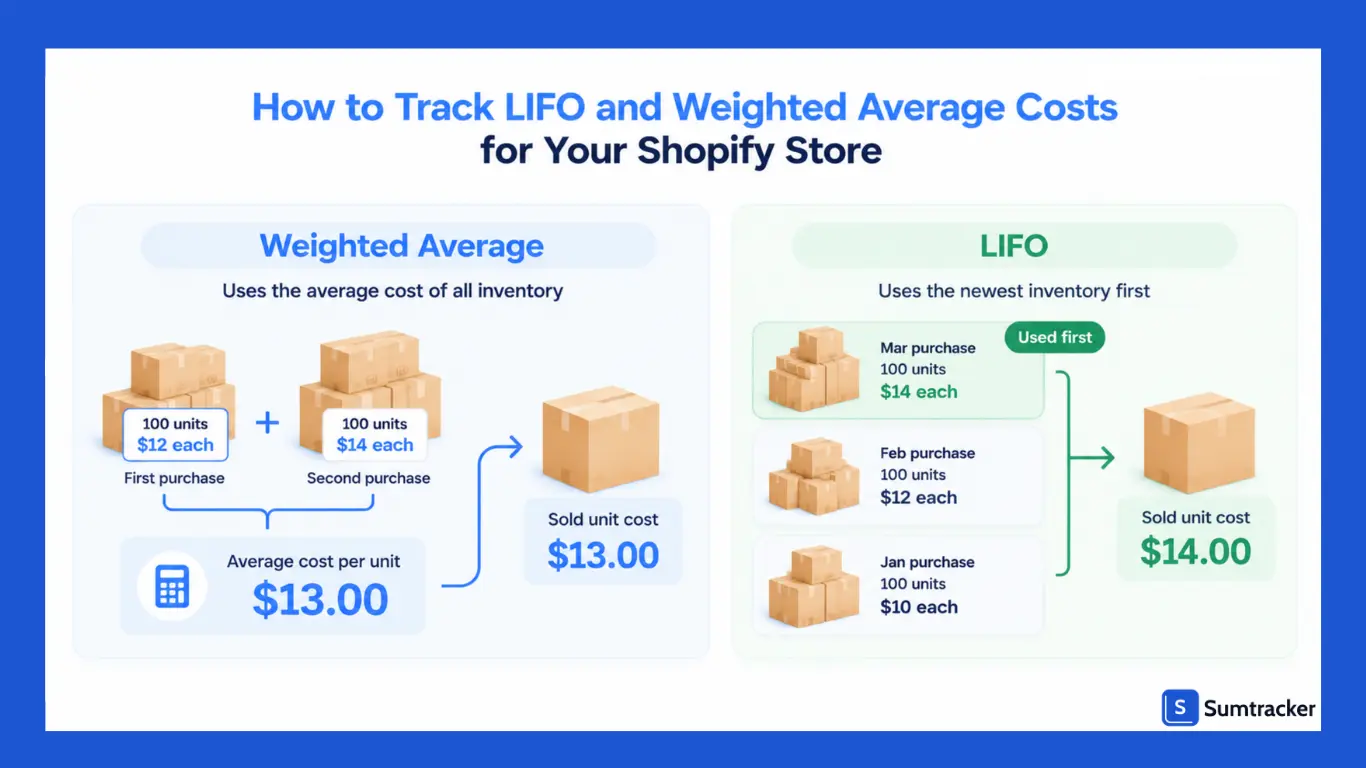
Weighted average
Recalculate the moving average whenever new stock arrives:
New average cost = (Units on hand × Current average cost + Units received × New unit cost) ÷ Total units after receipt
Example: You have 40 units at $12 each and receive 100 more at $13.50 each, including relevant landed costs.
- (40 × $12 + 100 × $13.50) ÷ 140
- $1,830 ÷ 140 = $13.07 per unit
You can update Shopify’s Cost per item to $13.07 for product-level cost tracking. However, this does not guarantee that Shopify’s historical profit reports will use the moving-average cost for each sale. Maintain the cost calculations in your inventory or accounting system.
The IRS also imposes conditions on certain average-cost methods used for tax reporting. See the tax section below.
LIFO outside Shopify
LIFO assigns the most recently acquired inventory costs to units sold first. Shopify’s Cost per item field doesn’t track these cost layers, so businesses using LIFO generally need an accounting system or specialist to calculate and document the adjustment.
In a case study published by CliftonLarsonAllen, an auto parts manufacturer adopted LIFO and recorded the related accounting entries separately from its day-to-day inventory processes. The reported tax savings were specific to that business and shouldn’t be treated as a typical outcome for Shopify stores.
For Shopify merchants, the key is to keep operational inventory records accurate and ensure the accounting system calculates COGS using the method adopted for financial and tax reporting.
Rule of thumb: Choose a method your business can calculate consistently and support with records. Consult an accountant before adopting LIFO or changing your existing method.
Best Shopify Apps for Inventory Costing and Valuation
Shopify’s built-in Cost per item field is useful for basic product cost tracking, but it doesn’t automatically calculate FIFO or weighted-average COGS across inventory purchases. These three apps offer more specialized inventory costing and valuation features.
1. Sumtracker
Sumtracker is an inventory management app that calculates weighted average landed costs. When a purchase order is received and finalized, it updates the landed cost and can sync the revised product cost to Shopify.
It’s a practical option for merchants who need purchase order management, landed-cost tracking, and inventory valuation together.
2. Cin7 Core
Cin7 Core is an inventory and order management platform designed for businesses with more complex inventory operations.
It supports FIFO costing and features such as batch and serial tracking, making it worth considering for merchants who need more detailed inventory control.
3. True COGS
True COGS is an option to investigate if your main goal is tracking product costs and profitability for a Shopify store.
Before selecting it, verify which costing methods are available on the current plan and whether it calculates COGS for individual sales or primarily tracks product-level costs.
Choosing the right app: Check whether the tool supports your required costing method, accounts for landed costs, and reports COGS in the way your accountant needs. Inventory valuation and sale-level accounting COGS are not always the same feature.
How Inventory Costing Methods Affect Shopify Analytics and Profit Reporting
Shopify’s profit reports rely on the Cost per item recorded when a product is sold. Because this field is static, the reports may not reflect FIFO or weighted-average accounting costs.
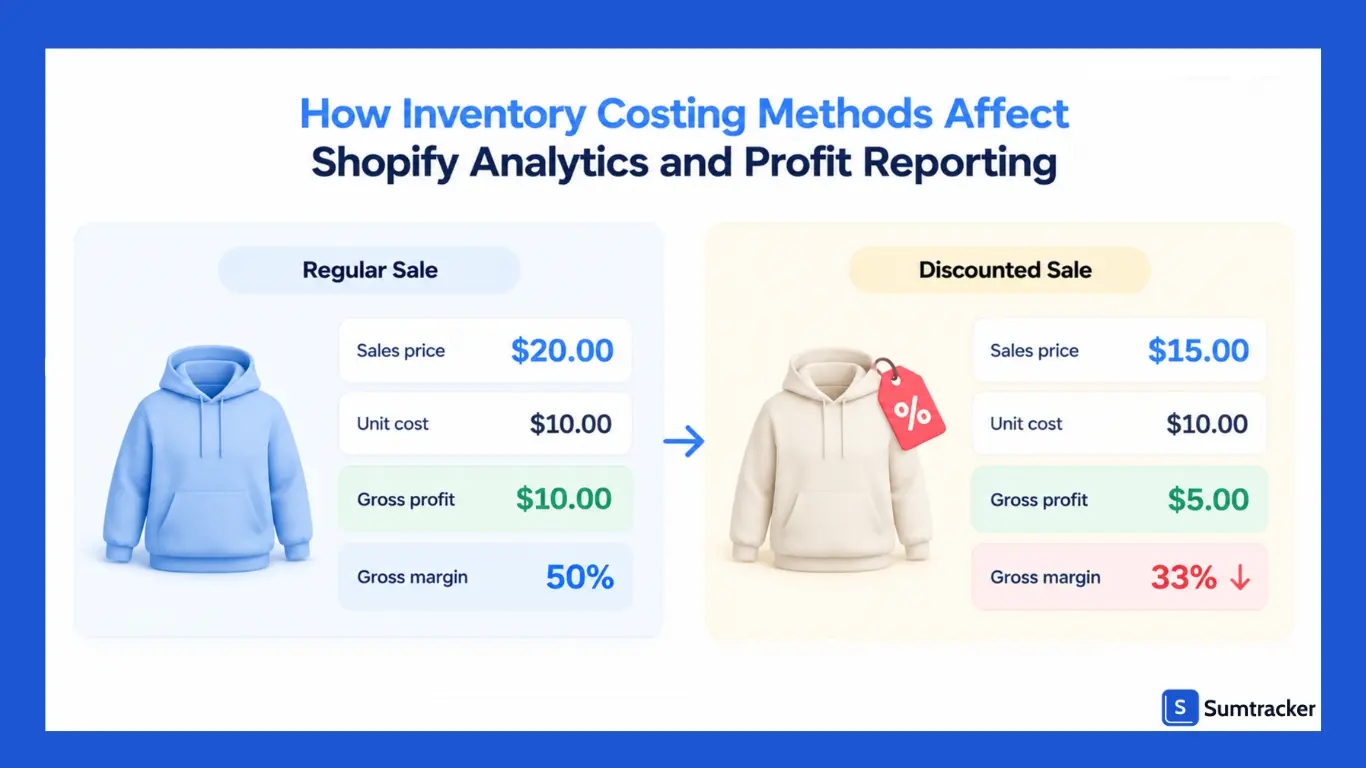
Shopify’s key profit reports include gross profit by product, product variant, POS location, and order. Its finance reports also separate sales with cost recorded from sales without cost recorded. See Shopify’s profit report documentation.
Gross profit = Net sales − Cost of goods sold
Gross margin = Gross profit ÷ Net sales × 100
Three common issues can distort these figures:
- Outdated costs: Old cost-per-item values can make margins look higher or lower than they are.
- Missing costs: Sales without recorded costs are excluded from Shopify’s COGS and gross profit calculations.
- Discounts and refunds: These reduce net sales and can lower reported margins compared with the product page.
For example, a $20 product costing $10 has a 50% margin at full price. If sold for $15 after a discount, its gross margin becomes 33%.
Swings like this are fine when you can explain them. In the Ecommerce Finance Podcast, LedgerGurus’ Brittany Brown, a CPA, and Stephen Brown explain that gross margin should stay fairly steady over time. When it jumps around without a clear reason, like a holiday sale or an inventory write-down, it’s often a sign something in the numbers is off.
Rule of thumb: Check the share of net sales with cost recorded each month. If it's well below 100%, find the variants with a blank Cost per item and fill them in before you trust your gross margin.
For more detail, see our guides to Shopify inventory reports and Shopify inventory valuation.
How to Reconcile COGS Differences Between Shopify and Accounting Software
Shopify and your accounting software may show different COGS because they use different cost data, valuation methods, or reporting periods. Reconciliation helps you identify and explain those differences.
How the systems handle costs
- QuickBooks Online: Supports FIFO and, for eligible users, Moving Average Cost. Check the current QuickBooks documentation for availability and limitations.
- Xero: Its inventory features may not support the FIFO valuation your business needs. Check the Xero inventory guide before choosing an add-on.
- A2X: Can use Shopify Cost per item or other cost sources and applies its documented average/blended costing approach. See A2X’s COGS guide.
Common causes of COGS differences
Monthly reconciliation checklist
- Export COGS by SKU from both systems for the same period.
- Investigate the largest differences first.
- Identify the cause and correct the underlying records.
- Document adjustments that cannot be corrected at source.
- Compare inventory quantities and values across systems.
Practical tip: Choose one system as the source of truth for unit costs and keep the others aligned with it. This reduces discrepancies and makes month-end reconciliation easier.
For more help, see our inventory reconciliation guide.
Common Shopify Inventory Costing Mistakes and How to Avoid Them
Even with the right costing method, small tracking errors can distort your inventory costs and profit reports. Here are five common mistakes to watch for.
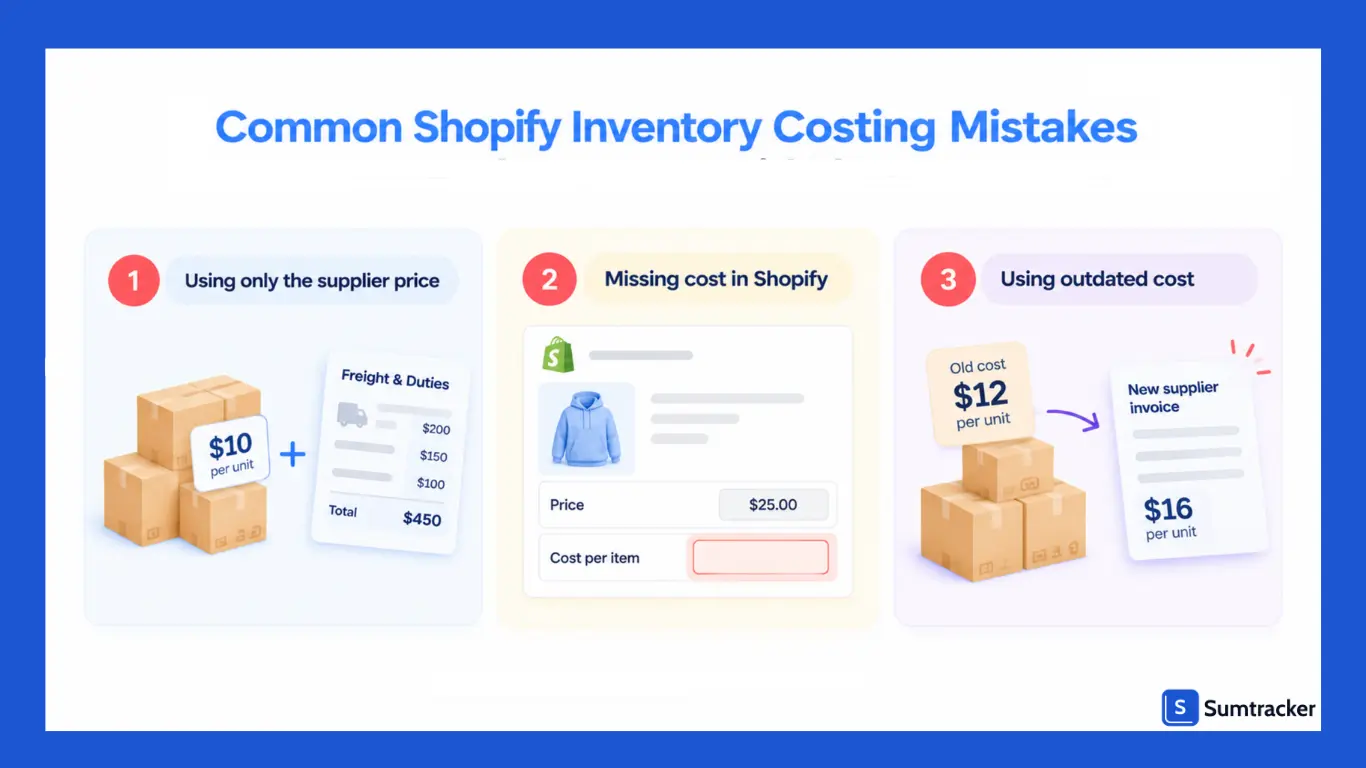
1. Tracking Supplier Prices Instead of Full Inventory Costs
The supplier’s unit price may not reflect the full cost of getting products ready for sale. Freight, duties, and tariffs may also form part of inventory cost, depending on the applicable accounting rules.
Tariffs alone can move that number a lot. The Yale Budget Lab puts the average U.S. statutory tariff rate at 11.0% as of August 2026. Leaving duties out can make imported products look cheaper than they really are.
How to avoid it: Record relevant additional costs and apply the same costing rules consistently.
2. Leaving Product Costs Blank in Shopify
Missing or outdated values in Shopify’s Cost per item field can make product profitability reports incomplete or misleading.
How to avoid it: Review costs for every product variant and update them when supplier prices change. Don’t assume this field calculates your full accounting COGS.
3. Forgetting to Update Costs After Supplier Price Changes
When supplier prices increase or decrease, old cost records can distort your margin calculations.
How to avoid it: Keep a cost log with purchase dates, quantities, unit costs, and supplier details. Review high-selling products regularly and compare recorded costs with recent invoices.
4. Changing Cost Values Without Reviewing Accounting Impact
Updating Shopify’s Cost per item field is not the same as changing your accounting inventory costing method. A formal method change can affect COGS, inventory valuation, and tax reporting.
How to avoid it: Check the impact on your accounting records before changing methods. Confirm any tax or reporting requirements with a qualified accountant.
5. Miscalculating Bundle Costs
If a bundle contains several products, using an incomplete or outdated component cost can understate its total cost and overstate its profit.
How to avoid it: Document how bundle costs are calculated, including the cost of each component and any relevant packaging or assembly costs.
Inventory Costing and Tax Compliance: IRS and CRA Rules
The U.S. and Canada have different inventory tax rules. Your costing method affects how you calculate cost of goods sold (COGS), ending inventory, and taxable income.
This section is general information, not tax advice. Confirm the rules for your business with a qualified tax professional.
IRS rules (United States)
- Accepted methods: The IRS recognizes specific identification, FIFO, and LIFO. Average-cost methods may be allowed under specific conditions. (IRS Publication 538)
- LIFO: File Form 970 when adopting LIFO. The LIFO conformity rule generally requires using it in certain financial reports too.
- Changing methods: You may need to file Form 3115 to change your accounting method.
- Small businesses: Eligible businesses may qualify for simplified inventory tax treatment, subject to IRS requirements.
CRA rules (Canada)
- Valuation: Under section 10 of the Income Tax Act, inventory is generally valued item by item at the lower of cost and fair market value, or the entire inventory may be valued at fair market value.
- Cost methods: FIFO, average cost, and specific identification are discussed in the CRA’s archived IT-473R guidance. LIFO is not accepted under that guidance.
- Changing methods: A change may require the Minister’s agreement.
If you sell in both countries through one Shopify store, FIFO or average cost may be practical options, but confirm the method fits your circumstances in each jurisdiction.
Rule of thumb: Keep clear inventory records, apply your chosen method consistently, and confirm tax requirements before changing it.
Frequently Asked Questions (FAQs)
1. What is the best inventory costing method for Shopify?
FIFO and weighted average cost are practical options for many Shopify stores. The right method depends on your products, purchasing patterns, and accounting requirements.
2. Does Shopify automatically calculate FIFO or weighted average COGS?
No. Shopify’s Cost per item field does not automatically calculate FIFO, LIFO, or weighted-average COGS. You may need inventory or accounting software to calculate costs accurately.
3. Can Shopify merchants use LIFO?
Eligible U.S. businesses may use LIFO under specific accounting and tax rules. However, LIFO is not permitted under IFRS or accepted for Canadian tax inventory valuation.
4. Should shipping and customs duties be included in inventory costs?
Eligible shipping, customs duties, and other acquisition expenses may need to be included in inventory costs, depending on the applicable accounting rules and circumstances.
5. Why does Shopify show different profit figures from my accounting software?
Differences may result from outdated product costs, different costing methods, missing landed costs, returns, or reporting-period differences. Reconcile both systems regularly to identify and correct discrepancies.
Conclusion
Choosing the right inventory costing method is essential for Shopify store owners who want to maintain accurate profit reports, control costs, and make informed business decisions.
FIFO and weighted average cost are practical options for many businesses, while LIFO is subject to specific accounting and tax restrictions.
Since Shopify doesn’t automatically calculate COGS using these methods, merchants may need dedicated inventory or accounting software to track changing purchase costs accurately.
Regularly updating product costs, including relevant landed costs, and reconciling inventory records can help prevent profit discrepancies.
Ultimately, the best inventory costing method depends on your products, purchasing patterns, and accounting requirements.
By choosing a suitable method and applying it consistently, you can improve inventory valuation, understand your actual profitability, and manage your Shopify business with greater confidence.

Bhoomi writes about inventory management and multichannel selling at Sumtracker. Her focus is on solving real operational problems for Shopify, Amazon, and marketplace sellers through well-researched content. She covers everything from multi-location inventory syncing and stock error troubleshooting to replenishment planning and platform comparisons, turning complex eCommerce operations into clear, actionable guidance.
LinkedInRelated Articles
Tool and strategies modern teams need to help their companies grow.

Ready to Simplify Your Inventory Management?
Join hundreds of e-commerce merchants who rely on Sumtracker to save time, eliminate errors, and grow their business.