.svg)
Free BFCM Shopify Inventory Planning Template 2026


Black Friday 2026 is shaping up to be bigger than ever.
Adobe forecasts $12.9 billion in US online sales on Black Friday alone, up 9.2% from last year.
More orders means more pressure on your stock. And most of that demand lands in just four days.
Here’s the thing: most BFCM Shopify inventory stockouts aren’t caused by demand nobody could predict.
They happen because nobody did the math per SKU.
You know your bestseller will fly on Black Friday. But do you know you need 300 units, not 200? Or that the PO had to go out on October 30, not November 10?
This free template answers both. It tells you how much stock each product needs for BFCM, how much buffer to add and the last safe date to order it.
Planning your full BFCM weekend?
Our BFCM prep checklist covers dates, marketing, checkout and fulfillment. This guide goes deep on one thing: your BFCM Shopify inventory numbers.
What’s Inside This Free BFCM Shopify Inventory Planning Template
Four tabs. You fill in one. The template does the rest.
- Start Here: your BFCM dates and settings. Black Friday 2026 is already filled in.
- Your Products: one row per SKU. Enter last BFCM sales, recent sales, stock, lead time and cost. You get a forecast, safety stock, order quantity, order-by date and a next step for every product.
- Action Plan: every purchase order to place, soonest deadline first, plus the products you’re overstocked on.
- Live Tracker: during the sale, enter units sold once a day. It flags what’s running low or selling fast.
Before You Start: Gather These Numbers
- Last year’s BFCM sales per SKU. Your Shopify or marketplace reports have this.
- Sales from a normal pre-BFCM week. Pick an October week with no promotions.
- Current stock on hand per SKU. Across every location and channel.
- Peak season lead times. Ask suppliers what they can deliver before BFCM, not their usual lead time.
- Unit cost per SKU. You’ll need it to check your BFCM buying budget.
- Your BFCM promo plan. Which products get the deepest discounts and the most ad spend.
How to Use the BFCM Inventory Planning Template
This free template is designed to turn your Shopify inventory prep for BFCM from a scramble into a clear, structured plan.
By breaking down each step, you’ll know exactly what to forecast, when to reorder, and how to keep every team aligned during the busiest sales weekend of the year.
Step 1: Pick Your BFCM Hero Products
Not every SKU needs the same attention for BFCM.
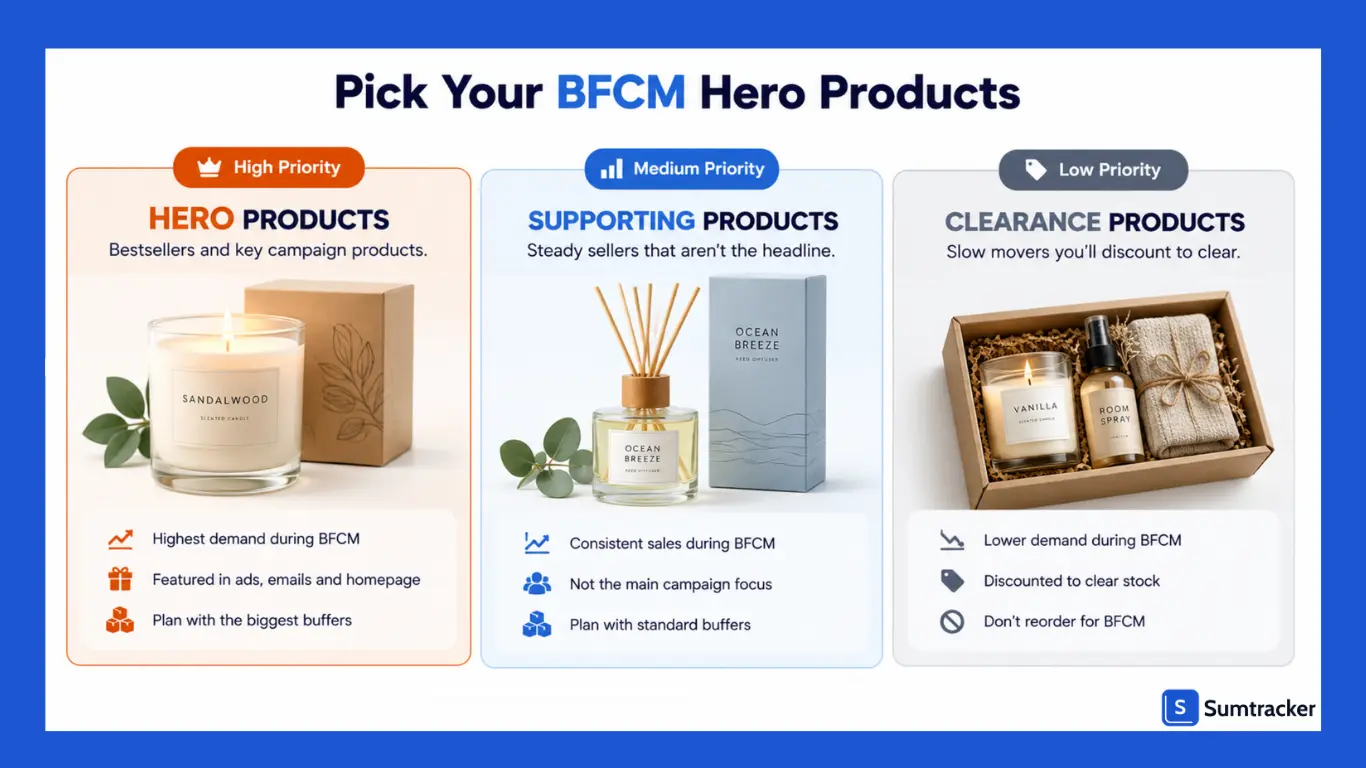
Add last year’s BFCM sales and this year’s promo plan. Then sort your products into three groups:
- Hero products: Last year’s BFCM bestsellers and anything you’re featuring in this year’s campaign. Plan these carefully, with the biggest buffers.
- Supporting products: Steady BFCM sellers that aren’t the headline. Plan with standard buffers.
- Clearance products: Slow movers you’ll discount to clear. Don’t reorder these for BFCM.
A stockout on a hero product during BFCM costs you far more than a stockout on anything else. That’s where your time and cash should go first.
Step 2: Forecast BFCM Demand Per SKU
The core formula:
BFCM forecast = units sold last BFCM × (1 + expected growth)
Set Your Expected Growth
Last year’s numbers are your starting point. But BFCM keeps growing. Deloitte forecasts holiday e-commerce sales will grow 7.5% to 8.4% this season. If you only copy last year’s numbers, your forecast will likely come in low.
Enter the growth you expect once, on the Start Here tab. It applies to every product.
Adjust Individual Products
Some products will beat last year. Others won’t. Use the Adjust column to push a single product up or down:
- Raise it for products in your BFCM ads, emails or homepage banners.
- Raise it if your BFCM discount is deeper than last year’s.
- Lower it for products you’re leaving out of the sale.
- Lower it for products that have slowed down since last BFCM.
For example, enter +20% for a product you’re featuring heavily.
Not sure how much to adjust?
It helps to know what shifted last year.
In this eCommerce Evolution episode, host Brett Curry and four strategists break down what surprised brands during BFCM 2025 and how timing separated the winners. It’s a 54-minute listen, and a useful gut check before you lock in your numbers.
Count Your Real BFCM Sale Days
Black Friday 2026 is November 27, and Cyber Monday is November 30. That’s four days.
But many stores now start BFCM deals early. Count every day your BFCM deal is live. If early access opens November 20, you’re planning for an 11-day sale, not a four-day one.
Enter your real sale dates on the Start Here tab. If your sale runs longer than last year’s, the template scales your forecast up to match.
No BFCM History for a Product?
For new products, the template uses recent sales instead:
BFCM forecast = (units sold in the last 30 days ÷ 30) × BFCM lift × sale days
Your BFCM lift is how much faster a product sells during BFCM than in a normal week. The template starts at 3x. Change it on the Start Here tab to match your store.
- Have a similar product? Look at how much faster it sold last BFCM, and use the Adjust column to match.
- No comparison at all? Keep the forecast conservative. The template already gives new products a bigger buffer.
Step 3: Add BFCM Safety Stock
Your BFCM forecast will be off. The only question is by how much.
Even brands that plan ahead get caught out.
Skincare brand Three Ships matched their supply to expected demand for Black Friday. Their three top sellers still went out of stock. As a small team, they called demand forecasting a constant challenge.
Read their Black Friday recap.
Notice which products ran out: the bestsellers.
Those are exactly the SKUs that need the biggest buffer.
Safety stock = BFCM demand × buffer %
If most of your sales happen online, lean toward the higher end of your buffer range.
On Black Friday 2025, Mastercard SpendingPulse found e-commerce sales jumped 10.4% year over year, while in-store sales grew just 1.7%. Online is where the spike lands hardest.
Why a percentage instead of a statistical formula? Classic safety stock formulas are built for steady, year-round replenishment. BFCM is a short, intense spike. A percentage buffer is simpler and easier to adjust as the sale gets closer.
Step 4: Find Your BFCM Order Quantity
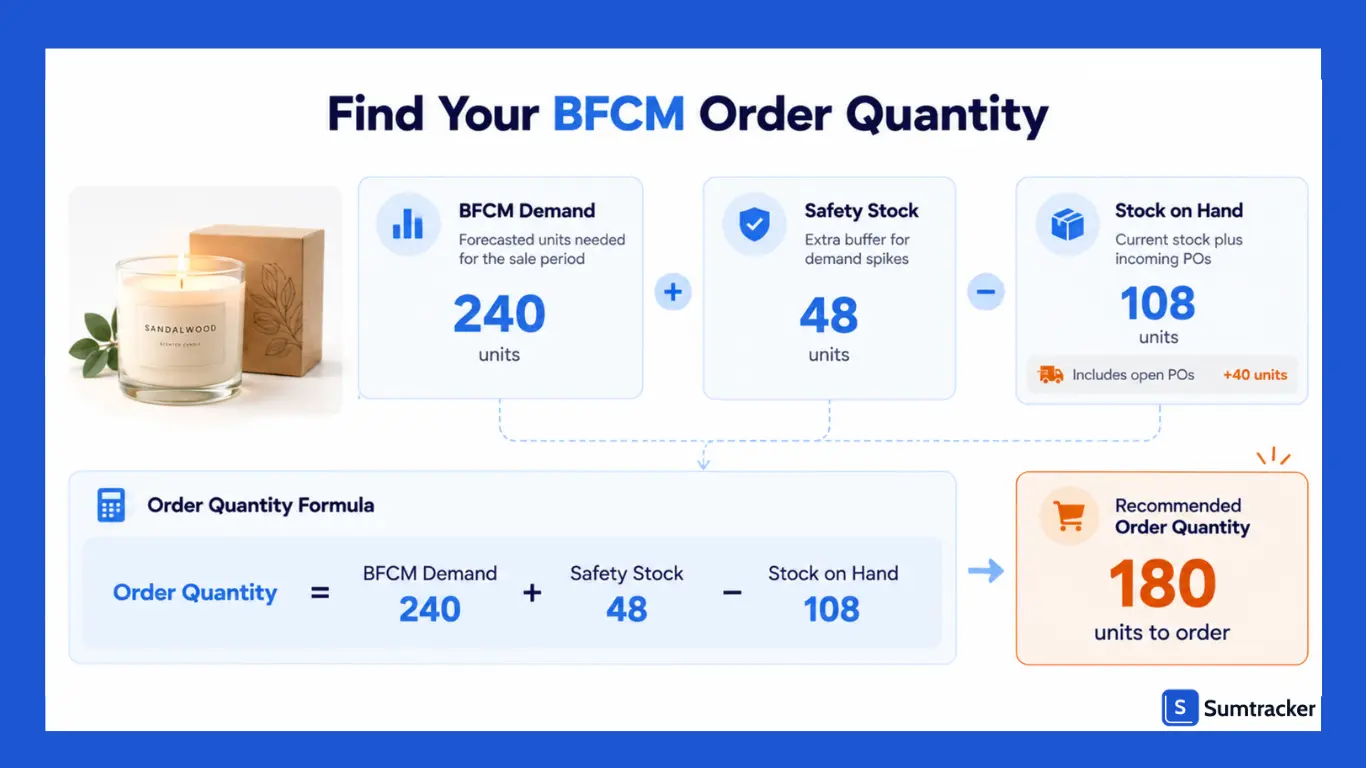
BFCM order quantity = BFCM demand + safety stock − stock on hand
If the result is zero or negative, you’re already covered for BFCM.
Count open POs as stock on hand too. Otherwise you’ll double-order right before the sale.
Step 5: Find Your Last Safe PO Date
This is where most BFCM stockouts start.
Last safe PO date = BFCM receive-by date − supplier lead time
Set your receive-by date at least a week before your first BFCM deal goes live. That leaves time to count stock, update listings and deal with short shipments before the rush.
For a sale starting November 27, that’s November 20. If early access starts November 20, it’s November 13.
Shipping is getting more expensive this season too.
Salesforce predicts retailers will spend an extra $3 billion globally subsidizing free shipping, as geopolitical pressures push logistics costs up.
Ordering early gives you room to use standard freight instead of paying for rush delivery.
Selling on Amazon FBA During BFCM?
FBA stock has to reach Amazon and be checked in before it can sell. Q4 inbound gets busy.
Give FBA stock an earlier receive-by date than the rest of your BFCM stock. Check Amazon’s current holiday inbound guidance before you lock it in.
Worked Example: Three SKUs Before BFCM
Here’s how the template handles three products for a home fragrance store’s BFCM sale.
Three very different BFCM answers:
- The candle needs 180 units, ordered by October 30.
- The diffuser is already covered for BFCM. Don’t spend cash on more.
- The gift set needs an order in the next three days. Without the math, it sells out on Black Friday morning.
Gut feel would have treated all three the same.
Step 6: Check Your BFCM Buying Budget
Your BFCM order list may cost more than you planned to spend. Check before sending POs.
Total BFCM PO value = order quantity × unit cost, for every SKU
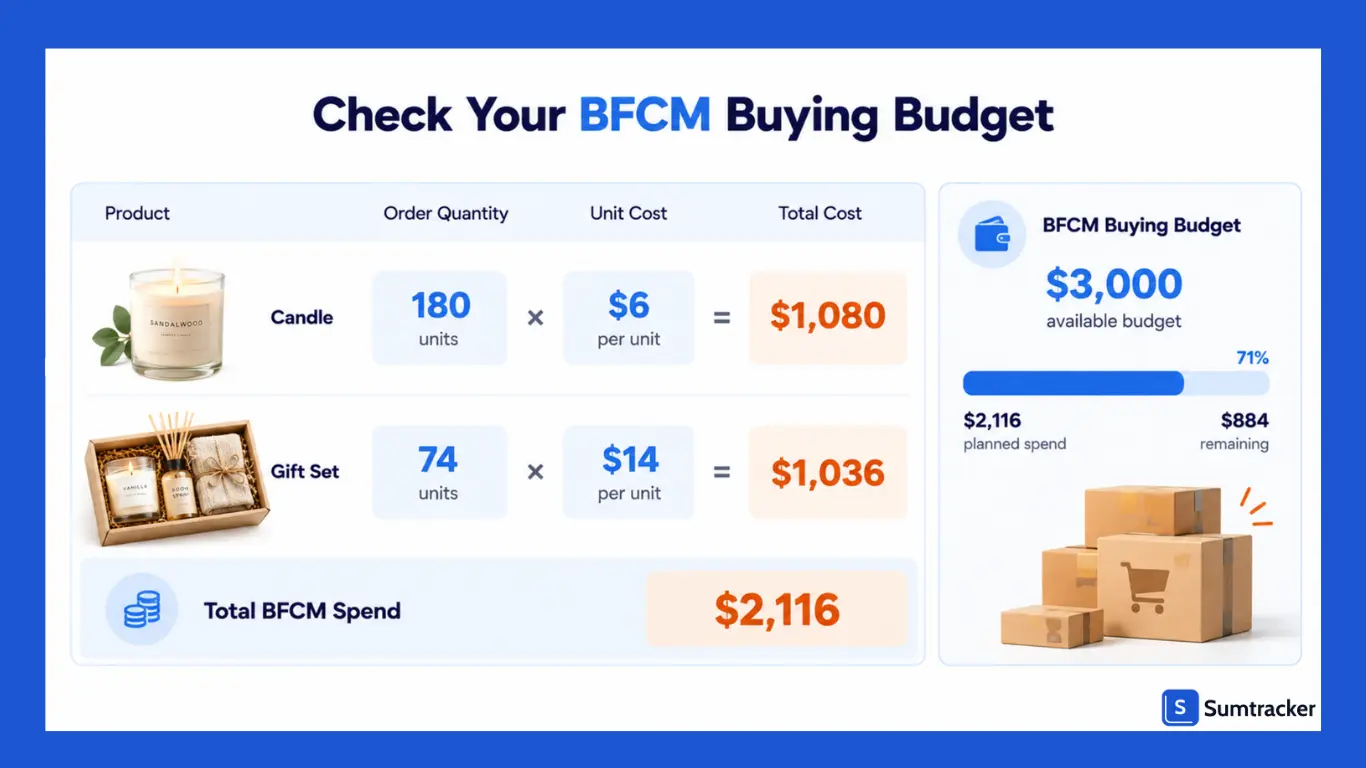
In the example:
- Candle: 180 × $6 = $1,080
- Gift set: 74 × $14 = $1,036
- Total BFCM spend: $2,116
Over budget? Cut in this order:
- Drop BFCM reorders on supporting products first.
- Trim buffers on hero products with reliable suppliers.
- Never cut a hero product with a long lead time. There’s no fixing that one once BFCM starts.
Step 7: Plan BFCM Bundles at the Component Level
Bundles are one of the best BFCM offers. They lift order value and move stock fast.
But a BFCM bundle can only sell as many units as its scarcest component.
If your BFCM gift set includes a candle, every gift set sold also uses up a candle. Add bundle demand to each component’s forecast in the template. Otherwise your components run out mid-sale while the bundle still shows in stock.
Step 8: Work Through Your Action Plan
Open the Action Plan tab. Every order you need to place is listed, soonest deadline first, with the quantity and PO value.
- Start with anything marked Overdue or Order this week.
- Assign each order to one person. A deadline without an owner usually gets missed.
- Confirm each supplier’s ship date once the PO is sent.
The overstocked list on the same tab shows which products to discount or bundle in your BFCM deals.
Step 9: Track Actual vs. Forecast During BFCM
From your first BFCM sale day, open the Live Tracker once a day and enter total units sold so far for each product.
The tracker compares each SKU against its forecast and tells you what to do:
You’ll usually spot a runaway product on Black Friday itself, with time to act before Cyber Monday.
Step 10: Review Right After BFCM
Don’t close the file on December 1. This is how next year’s BFCM gets easier.
- Record the real BFCM lift for every SKU. That’s your starting number next November.
- Log every BFCM stockout. When did it happen, and how much did it likely cost?
- Log every BFCM overstock. Which buffers were too generous?
- Rate each supplier on BFCM delivery. Who delivered on time?
Common BFCM Shopify Inventory Mistakes
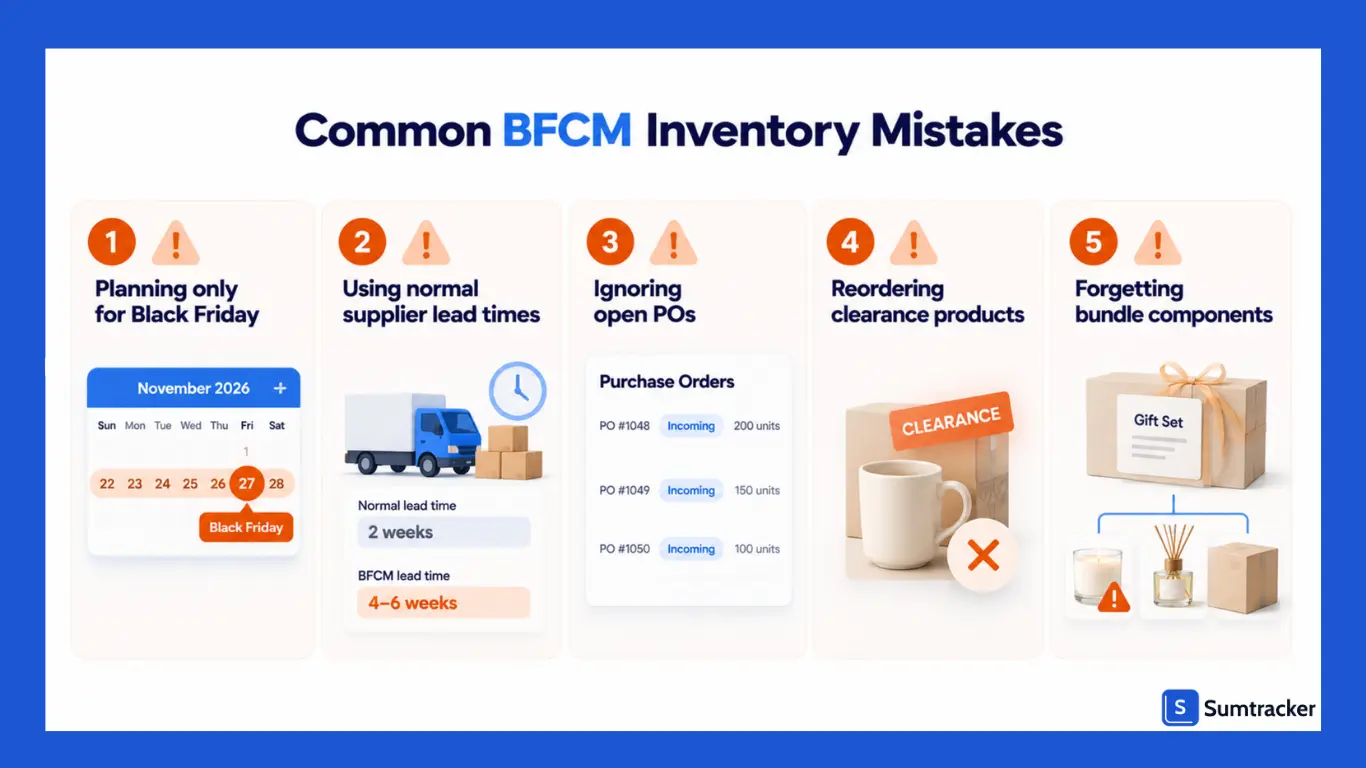
- Planning for Black Friday instead of your first deal. If early access starts a week earlier, so does every deadline.
- Using normal lead times. Suppliers and freight are slower in the run-up to BFCM.
- Forgetting open POs. Leads to double-ordering right before the sale.
- Reordering clearance products. BFCM is your chance to clear them, not restock them.
- Ignoring bundle components. BFCM bundles drain component stock faster than you expect.
- Leaving FBA stock to the last minute. It needs to be checked in before the sale, not shipped during it.
Why Spreadsheets Struggle During BFCM
This template is built for planning. It works well before BFCM.
During the sale itself, it gets harder. Orders land every few seconds, and a spreadsheet is out of date the moment one comes in. If you sell on several channels, a sale on one can leave another showing stock you no longer have.
That’s where a tool like Sumtracker helps. It keeps stock in sync across Shopify, Amazon, eBay, Etsy and Walmart in real time, so your BFCM plan holds up once the orders start.
Conclusion: Get Ahead, Not Caught Off Guard
Black Friday can either be your biggest opportunity or your biggest operational challenge and the difference often comes down to how well you plan.
By forecasting early, locking in supplier timelines, building safety buffers, and staying organized, you turn a stressful sales weekend into a structured, profitable one.
This free Shopify inventory planning template gives you clarity, speed, and control, so instead of reacting to problems, your team can stay focused on selling, fulfilling, and scaling confidently.
Start your planning now, not when the rush begins. A strong inventory plan is your best competitive advantage on Black Friday.
FAQs
1. When should I place purchase orders for BFCM?
Work backward from your supplier’s peak season lead time. Aim to receive BFCM stock at least a week before your first deal goes live. For long lead time products, that can mean ordering in early or mid October. The template works out the date for every product.
2. How much safety stock should I keep for Black Friday?
The template starts at 15% for supporting products and 25% for hero products. Products with lead times over 30 days, and new products with no BFCM history, get more. You can change any of these on the Start Here tab.
3. How do I forecast BFCM demand for a new product?
The template uses your last 30 days of sales, multiplied by a BFCM lift and your number of sale days. If a similar product sold much faster last BFCM, use the Adjust column to match it.
4. How do I plan BFCM stock for bundles?
Give the bundle its own row, then raise each component’s Adjust percentage to cover what bundles will use. A bundle can only sell as many units as its scarcest component.
5. What if a product is selling faster than forecast on Black Friday?
Check whether your supplier can do a quick top-up order or partial shipment. If not, ease off ad spend on that product to stretch stock through Cyber Monday.
6. Does the template cover Cyber Monday too?
Yes. The default sale window runs November 27 to 30, covering Black Friday through Cyber Monday. If your BFCM deals start earlier, change the first day of your sale on the Start Here tab.
Conclusion

Bhoomi writes about inventory management and multichannel selling at Sumtracker. Her focus is on solving real operational problems for Shopify, Amazon, and marketplace sellers through well-researched content. She covers everything from multi-location inventory syncing and stock error troubleshooting to replenishment planning and platform comparisons, turning complex eCommerce operations into clear, actionable guidance.
LinkedInRelated Articles
Tool and strategies modern teams need to help their companies grow.


Ready to Simplify Your Inventory Management?
Join hundreds of e-commerce merchants who rely on Sumtracker to save time, eliminate errors, and grow their business.