

SKULabs suits sellers who pick, pack and ship their own orders and want inventory, shipping labels and purchasing in one system. The best SKULabs alternative depends on why you are leaving: its published plans start at $299 a month, extra users on Starter cost $120 each, and forecasting begins on the $799 Growth plan.
We compared eight SKULabs competitors, the closest apps like SKULabs, on six criteria using each vendor's own pages. The list starts with Sumtracker, an inventory management, forecasting and planning platform for Shopify and multichannel brands, then follows the reasons readers leave SKULabs. The list is ordered by use case, and the criteria behind it are in the method section below.
Quick picks: which SKULabs alternative fits your reason for leaving
| If your reason for leaving SKULabs is | Look at | Why |
|---|---|---|
| The monthly bill is the problem: $299 for Starter, plus $120 for each extra user | Veeqo, Zoho Inventory, Sumtracker | At about 1,000 orders a month, Veeqo's pricing calculator shows $65, Zoho Inventory Premium is $79 billed annually, and Sumtracker Replenish is $269 on monthly billing. |
| You want reorder planning without paying $799 for Growth | Sumtracker, Veeqo | Sumtracker Replenish suggests reorder quantities from 12 months of sales. Veeqo's paid Inventory plan includes a Demand Forecast report. |
| You still pick, pack and ship your own orders | Veeqo, Ordoro, ShipHero | All three document barcode picking or pack checks and carrier labels. ShipHero is built for high-volume warehouses and starts around $15,000 a year. |
| You assemble products or need bills of materials and batch tracking | Cin7 Core, Finale Inventory | Cin7 Core includes kits, bills of materials, assembly and batch or expiry tracking on every plan. Finale Inventory documents kits, bundles and bill-of-materials builds. |
| You only need stock sync across Shopify and marketplaces, not warehouse workflows | Sumtracker | It syncs stock across Shopify, Amazon, Walmart, Etsy and eBay, and has no pick, pack or ship workflow. |
| You sell on three or more channels at 1,000-plus orders a month and will negotiate a quote | Linnworks | Linnworks publishes no prices and prices by order volume, not channel count. |
| You need pick, pack and ship, $0 label fees on USPS, UPS and FedEx, nested kits or batch tracking | Stay with SKULabs | These are the cases where SKULabs is still the stronger fit; the section below sets them out. |
Start with Sumtracker if you want one stock count across channels and reorder planning without paying $799 for Growth. If you still pick, pack and ship every order, Veeqo, Ordoro and ShipHero cover warehouse workflows that Sumtracker does not, and Cin7 Core and Finale Inventory cover assembly and bills of materials. The method is in How we chose these SKULabs alternatives, below the tool sections.
Alternatives to SKULabs compared: monthly cost at about 1,000 orders a month
Each vendor charges for something different: orders, users, channels or add-ons. The table prices one team at about 1,000 orders a month (12,000 a year), 3 users, 3 sales channels and 2 warehouses, using the cheapest published plan that covers that volume and includes the vendor's reorder planning where it sells one. Sumtracker is listed first, then the other tools cheapest first.
| Tool and plan | Monthly cost at this volume | Best for |
|---|---|---|
| Sumtracker Replenish | $269 a month on monthly billing (25,000-orders-a-year tier); Manage is $179 | Shopify and marketplace brands that want stock sync plus reorder planning |
| Veeqo Inventory plan | $65 a month at about 1,000 orders, charged monthly (from $19; $123 at 3,000 orders) | Sellers who want free label software with low-cost inventory sync and forecasting |
| Zoho Inventory Premium | $79 a month, billed annually (3,000 orders, 5 users, 4 locations) | Small sellers on a tight budget |
| Ordoro Inventory Advanced | $349 a month for 1,000 orders; $499 on Premium, where purchase orders are listed | Brands that want shipping, kitting and multi-warehouse routing in one system |
| Finale Inventory Essentials | From $499 a month; Growth, with the barcode module, is from $799 | One or two warehouses on Amazon, Walmart and eBay |
| Cin7 Core Pro | $599 a month (24,000 orders a year); Standard covers only 6,000 a year | Sellers who want assembly, bills of materials and a built-in WMS |
| SKULabs Growth (for reference) | $799 a month; Starter is $299, plus $65 for the third channel, with no forecasting | Teams that run their own warehouse |
| ShipHero | About $1,250 a month floor, from its stated $15,000 a year; quote-based | Brands and 3PLs with high-volume warehouses |
| Linnworks | Not published; quote-based, tiered by monthly orders | Sellers on three or more channels at 1,000-plus orders a month |
Prices are from each vendor's own pricing pages. Sumtracker and SKULabs prices are on monthly billing; Zoho Inventory bills annually only.
1. Sumtracker: best for Shopify and multichannel sellers who want stock sync plus reorder planning
Sumtracker is an inventory management, forecasting and planning platform for Shopify and multichannel brands. It syncs stock across Shopify, Amazon, Walmart, Etsy and eBay and, on its Replenish plan, suggests what to reorder, when and how much.
Best for: Shopify and marketplace brands that want one stock count and reorder planning without warehouse workflows in the same tool.
Skip if: you pick, pack and ship from your own warehouse, or need bills of materials, batch or lot tracking, nested bundles or a B2B-only setup with no direct-to-consumer channel. Sumtracker has no pick, pack or ship workflow.
Key features
- Multichannel stock sync: connects Shopify, Amazon (FBA and FBM), Walmart, Etsy and eBay; in Sumtracker-is-master mode, inventory is pushed to Shopify every few minutes per the help center. See how inventory sync works.
- Forecasting and replenishment (Replenish plan): uses up to 12 months of sales and leaves out out-of-stock days, with lead time (default 14 days) and safety days (default 7) set per supplier and days of cover (default 30) set per product and warehouse. Purchase orders are suggested and you create them. See how inventory forecasting works.
- Bundles and stock tools: bundles with fixed components come with the Manage plan, and stock transfers and QuickBooks Online come with Replenish.
- Warehouses and channels: up to 10 warehouses and 10 connected sales channels on standard plans.
Pros and cons
Pros
- Priced by annual sales orders, with the full tier table published.
- The pricing page states no per-user price, and up to 10 warehouses and 10 channels are included.
- 14-day free trial with no credit card, and 4.8 out of 5 from 128 reviews on the Shopify App Store.
Cons
- Forecasting and reorder suggestions need the Replenish plan.
- No pick, pack or ship workflow, bills of materials, batch or lot tracking, or nested bundles.
- When Shopify is set as the inventory master, Sumtracker pulls inventory about once an hour rather than every few minutes.
Pricing
At about 1,000 orders a month (12,000 a year) the 25,000-orders-a-year tier applies: Manage is $179 and Replenish $269 a month on monthly billing, and annual billing is cheaper. Up to 5,000 orders a year, Manage is $59 and Replenish $119 a month. There is a 14-day free trial with no credit card. See Sumtracker pricing for your order volume.
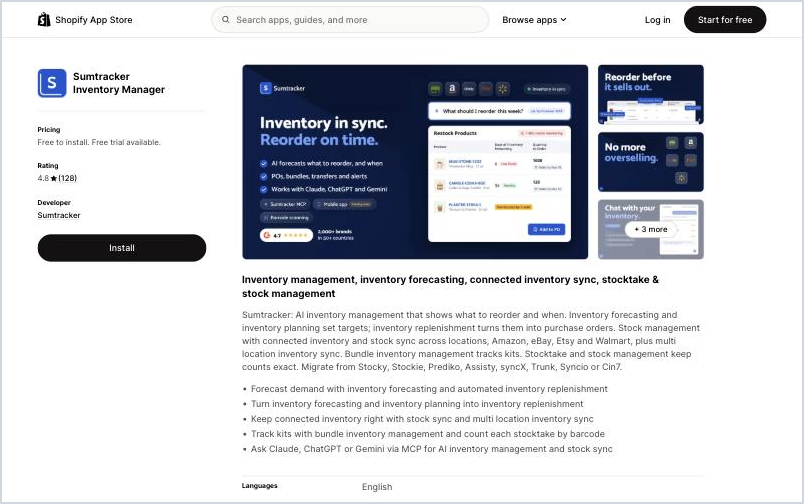
If SKULabs forecasting at $799 is the sticking point, Sumtracker Replenish is $269 a month at 12,000 orders a year on monthly billing. The trade is fulfillment: SKULabs adds pick, pack, ship and $0 label fees on USPS, UPS and FedEx, and Sumtracker does not.
For a feature-by-feature view, read the Sumtracker vs SKULabs comparison.
2. Veeqo: best for sellers who want free shipping software with low-cost inventory sync
Veeqo is Amazon's multichannel shipping and inventory platform for ecommerce sellers, with a free Shipping plan and paid inventory features from $19 a month.
Best for: sellers who ship from their own warehouse across Amazon, Shopify, eBay and Walmart and want label software plus inventory sync and forecasting at a low monthly price.
Skip if: you want a flat price that does not change with order volume, since Veeqo's Inventory and High Volume prices rise with your monthly orders.
Key features
- Inventory plan: inventory sync across channels, purchasing, demand forecasting, digital picking and support for Veeqo Scanner and Dock hardware.
- Channels: Amazon, eBay, Shopify, Walmart, Etsy, TikTok, Temu, SHEIN and WooCommerce.
- Demand Forecast report: uses past sales over a set period (30 days by default), lead time and expected growth, and can bulk-create purchase orders one location at a time.
- Shipping plan: free, with unlimited orders, users, SKUs and locations and labels from UPS, USPS, FedEx, DHL, OnTrac and Amazon Shipping.
Pros and cons
Pros
- The Shipping plan is free with unlimited users and locations.
- Inventory is $65 a month at about 1,000 orders on its pricing calculator, and $36 at 500.
- Users and SKUs are unlimited on every plan.
Cons
- A Veeqo help article says older accounts need a paid plan to keep certain features, and does not say which.
- Shopify stock is sent to the store from one location per store, and Shopify refunds are not pulled into Veeqo.
- Bundles cannot be added to a purchase order, and nested bundles are not documented on its site.
- Its Shopify App Store listing shows 4.1 out of 5 from 127 reviews.
Pricing
Shipping is free. Inventory is from $19 a month, and its pricing calculator shows $36 at 500 orders a month, $65 at 1,000, $123 at 3,000 and $326 at 10,000. High Volume is from $239 a month and $554 at 10,000 orders. Inventory and High Volume are charged monthly based on the previous month's order volume, with orders fulfilled by Amazon not counted, and there is a 30-day free trial with no card required.

Veeqo's Inventory plan includes its Demand Forecast report and costs $65 a month at about 1,000 orders, against $799 for SKULabs Growth. It also covers digital picking and labels, so you keep the fulfillment side that Sumtracker gives up.
3. Zoho Inventory: best for small sellers on a tight budget
Zoho Inventory is a low-cost inventory and order system for small and mid-size sellers, part of the Zoho suite, with a free plan and paid plans from $29 a month billed annually.
Best for: small to mid-size sellers on a tight budget who need multichannel sync, multiple locations and basic replenishment.
Skip if: you need documented demand forecasting or deep warehouse workflows.
Key features
- Channels: Shopify, Amazon with FBA, eBay, Etsy, Walmart, WooCommerce and BigCommerce.
- Replenishment: reorder level, check frequency and maximum stock, with notifications and bulk purchase orders or transfers.
- Stock and fulfillment: composite items and bundles, multiple warehouses with transfers, barcode scanning, pick lists and shipping labels with 40-plus carriers.
- Plan limits: orders, users and locations scale from Free to Enterprise, with add-ons for extra users, orders and locations.
Pros and cons
Pros
- Premium at $79 a month covers 3,000 orders, 5 users and 4 locations.
- Add-on prices are published, and there is a free plan for 50 orders a month.
- A 14-day trial is offered.
Cons
- Sales-based demand forecasting is not documented in the help pages we reviewed; a forecasting update is listed for reports only.
- Barcode generation and batch tracking are listed from Premium.
- Shopify's Fetch Stock Counts runs only once, at the initial sync.
- Per-plan limits on sales channels are not documented on its site.
Pricing
Free is $0 for 50 orders a month, 1 user and 1 location. Standard is $29 (500 orders, 3 users, 2 locations), Premium $79 (3,000 orders, 5 users, 4 locations), Plus $129 (7,500 orders, 10 users, 6 locations) and Enterprise $249 (15,000 orders, 10 users, 10 locations), all billed annually. Add-ons are $7.50 for a user, $7.50 for 500 orders and $10 for a location. At about 1,000 orders a month, Premium at $79 covers the volume.

At $79 a month, Zoho Inventory Premium costs less than SKULabs Starter at $299 plus $65 for a third channel. Zoho documents reorder levels, not forecasting, while SKULabs' help center describes sales-velocity reorder rules, so planning depth is what you give up.
4. Ordoro: best for brands that want shipping, kitting and multi-warehouse routing in one system
Ordoro is a platform for shipping, inventory, purchase orders, kitting and dropshipping for growing multichannel ecommerce brands, sold as separate apps that can be bought alone or together.
Best for: multichannel brands that want shipping, kitting, multi-warehouse routing and purchase orders in one system and can pay $349 a month or more.
Skip if: you want a free or low-cost start with inventory sync, since the only free plan is a one-channel, one-location shipping plan.
Key features
- Inventory app: unlimited warehouses, channels and users, single- and multi-level kits, allocation, transfers and QuickBooks Online.
- Reorder points: set per SKU per warehouse, with a draft purchase order created automatically at the threshold.
- Channels: 14 documented, including Amazon, eBay, Etsy, Shopify, Walmart, WooCommerce and BigCommerce.
- Shipping app: labels with USPS, FedEx, UPS and Canada Post, and a pack-time barcode check.
Pros and cons
Pros
- Warehouses, channels and users are unlimited on the Inventory app.
- Kits can be multi-level, and stock export can be scheduled.
- A 15-day free trial with no card, and 4.7 out of 5 from 41 reviews on the Shopify App Store.
Cons
- Inventory starts at $349 a month with no free inventory plan.
- Orders and inventory sync hourly by default, and a 10-minute interval is set only by emailing support.
- Demand forecasting is not documented on its marketing page, and a custom forecasting report is listed on Premium.
- Walmart Drop Ship Vendor sellers are not supported, and billing is monthly only.
Pricing
Inventory Advanced is $349 a month for 1,000 orders, then $100 per extra 1,000. Inventory Premium is $499 and adds purchase orders, bills of materials, manufacturing orders, stocktakes and the forecasting report. Shipping Advanced is $59 (5 channels, 5 locations) and Premium $149. Inventory Advanced plus Shipping Advanced is $408 a month; the pricing page ties purchase orders to Premium and does not say whether Advanced includes them. Billing is monthly.

Ordoro matches SKULabs on shipping, kitting and multi-warehouse routing. Inventory Advanced is $349 against $299 for SKULabs Starter, but its Inventory app has unlimited users, where Starter charges $120 for each user beyond three.
5. Cin7 Core: best for sellers who want assembly, bills of materials and a built-in WMS
Cin7 Core is inventory and order management software with light ERP features for small and mid-size product sellers, wholesalers and light manufacturers.
Best for: multichannel sellers who want assembly, bills of materials and warehouse management built in and can afford about $599 a month.
Skip if: you need a published, predictable price for forecasting, or a confirmed two-warehouse setup on a mid-tier plan.
Key features
- Built-in manufacturing tools: kits, bills of materials, assembly and batch or expiry tracking on all plans.
- Standard WMS: pick and pack, barcode scanning and shipping labels on all plans, with Advanced WMS as an add-on on Pro.
- Channels: Shopify, Amazon, eBay, Walmart, WooCommerce, BigCommerce and Faire natively.
- Reordering: purchase order management on all plans, with smart reorder suggestions that need the ForesightAI add-on and three months of sales history.
Pros and cons
Pros
- Assembly, bills of materials and batch tracking are included in the base price.
- Onboarding is included.
- Shopify App Store rating of 4.4 from 65 reviews.
Cons
- ForesightAI forecasting is priced on gross merchandise value, and no price is published.
- Standard covers 6,000 orders a year, so 12,000 orders a year needs Pro.
- Per its Shopify FAQ, SKU and price changes do not sync automatically and Shopify order edits are not supported.
- Its pricing page lists unlimited inventory locations but also one warehouse location in the WMS row; confirm two warehouses with Cin7.
Pricing
Standard is $349 a month (5 users, 6,000 orders a year, 2 integrations), Pro $599 (10 users, 24,000 orders a year, 4 integrations) and Advanced $1,199 (15 users, 120,000 orders a year, 6 integrations), for new customers. No annual price is published and add-on prices are not published. A free trial is linked with no length stated.

At about 12,000 orders a year, Cin7 Core Pro is $599 a month, under SKULabs Growth at $799, and it includes bills of materials and assembly that SKULabs' pricing page does not list. Forecasting is an unpriced add-on, so ask for that figure before comparing.
6. Finale Inventory: best for one or two warehouses on Amazon, Walmart and eBay
Finale Inventory, also branded Descartes Finale, is inventory, warehouse and procurement software for growing ecommerce, wholesale and FBA sellers.
Best for: sellers with one or two warehouses who sell on Amazon, Walmart and eBay and want reorder points, kits and bill-of-materials builds.
Skip if: you need a published per-order price, a free trial or a low entry price.
Key features
- Warehouses: multi-warehouse stock with bin-level detail across warehouses including FBA, mobile scanning and pick and pack.
- Reordering: reorder points set manually or from sales velocity, lead time and safety stock, with draft purchase orders.
- Kits and builds: kits, bundles and bill-of-materials builds.
- Channels: 40-plus integrations; Shopify and Amazon orders import every 5 minutes and Shopify stock changes push within 5 minutes.
Pros and cons
Pros
- Essentials includes multi-warehouse, 40-plus integrations and procurement.
- Stock and orders sync within about 5 minutes on Shopify and Amazon.
- Standard onboarding is included.
Cons
- The barcode module needs Growth, from $799 a month.
- Order and user limits per plan are not published, and overage terms are set in the agreement.
- Integrations are included up to five, and a sixth is $72 a month per its Amazon page.
- No free trial is mentioned, and most customers take 12-, 24- or 36-month terms.
Pricing
Essentials is from $499 a month and Growth from $799; Enterprise is custom. Prices are shown monthly, and annual billing is not stated. At about 1,000 orders a month the order threshold for usage pricing is not published, so $499 is a floor.

Finale Inventory Growth starts at $799, the same as SKULabs Growth, so choose it for bin-level stock or bill-of-materials builds rather than price. Essentials at $499 leaves out the barcode module.
7. ShipHero: best for high-volume brands and 3PLs that run their own warehouse
ShipHero is a cloud warehouse management system for 3PLs and high-volume ecommerce brands, covering picking, packing, inventory and shipping.
Best for: brands and 3PLs that run their own warehouse and have the volume to justify about $15,000 a year or more.
Skip if: you mainly need inventory sync and purchase orders across channels, or want a published low entry price.
Key features
- Warehouse tools: mobile barcode picking and packing, batching and guided packing.
- Kits: standard kits that ship whole and build kits that split into lines for partial shipments.
- Channels: Shopify, Amazon, Walmart, eBay, Etsy, BigCommerce, WooCommerce, Magento 2, TikTok Shop and EDI.
- Reordering: reorder level and reorder amount columns with a low-stock alert, and purchase orders for replenishment.
Pros and cons
Pros
- Users, SKUs and warehouses are unlimited per its pricing page.
- No label fees when you use your own carrier accounts.
- Shopify App Store rating of 4.2 from 119 reviews.
Cons
- No list prices, free plan or trial are published, and a demo is required.
- Built-in demand forecasting is not clearly documented on its site.
- Some Shopify App Store reviews describe a steep learning curve.
Pricing
Pricing is custom. ShipHero's pricing page says plans start at $15,000 a year, about $1,250 a month, and its Shopify listing repeats the figure. Whether 12,000 orders a year sits at that floor is not published, so treat $1,250 as a minimum estimate.

SKULabs Pro lists unlimited warehouses and SKUs at $999 a month. ShipHero suits a team that has outgrown SKULabs' warehouse tools, not one leaving over cost.
8. Linnworks: best for sellers on three or more channels at 1,000-plus orders a month
Linnworks is multichannel inventory and order management software for small and mid-size retailers, built for 1,000-plus orders a month across three or more channels.
Best for: multichannel sellers on three or more channels at 1,000-plus orders a month who are happy to negotiate a quote.
Skip if: you need self-serve published prices or a flat low-cost plan, or you sell on Etsy outside North America.
Key features
- Channels: native Amazon, eBay, Shopify, Walmart, TikTok Shop, Temu, WooCommerce and Magento, with 100-plus channels in total.
- Stock sync: one central stock record, with sync stated at under 10 minutes and per-channel buffers.
- Forecasting: forecasting by channel and warehouse, with reorder targets per SKU, supplier and warehouse and purchase orders built in the interface.
- Warehouse management: wave picking, bins, lot management, kitting and barcode scanning, with 70-plus carriers.
Pros and cons
Pros
- Pricing is by order volume, not channel count, and adding a channel is usually free.
- It lists 100-plus channel integrations.
- Order routing across warehouses, 3PLs and dropship suppliers is rule-based.
Cons
- Prices are not published, and overage charges apply above the order tier.
- Forecasting is a paid add-on, and advanced forecasting needs the Inventory Planner add-on.
- Etsy runs through SkuVault Core, which is North America only.
- Its Shopify App Store listing shows 4.1 out of 5 from only 3 reviews.
Pricing
Linnworks publishes no prices, tiers or trial. Quotes come through a demo, and billing is tiered by monthly orders, with overage charges and a one-off onboarding fee.

SKULabs publishes every plan except Ultimate, while Linnworks quotes by demo. It suits sellers at 1,000-plus orders across several channels who expect to negotiate.
When SKULabs is still the better choice, and where it falls short
You pick, pack and ship every order. SKULabs documents pick, pack and ship with a pack verification check, barcode scanning, batch picking and live carrier rates, and its pricing page lists USPS, UPS and FedEx labels with no per-label fee on any plan. Sumtracker has no pick, pack or ship workflow, so stay with SKULabs if your fulfillment team lives in these tools.
You use nested kits or lot tracking. SKULabs documents nested kits with their own barcodes, and its help center lists batch and lot tracking. Sumtracker has no nested bundles or lot tracking, so these workflows would move to a different tool.
Support has been a strength. SKULabs' Shopify App Store listing shows 5.0 from 66 reviews, and recent reviews often mention responsive support. That is a small sample on a vendor-run listing, so test an alternative's support before you leave.
The price rises at each step. Starter is $299 a month for 1,000 orders, 3 users and 2 channels. Extra users cost $120 each, orders above 1,000 cost $0.20 each (1,200 orders adds $40), and forecasting and planning start at Growth, $799.
Planning has stated limits. SKULabs' Insights help article says its estimates ignore seasonality and can misjudge slow sellers and out-of-stock periods, and its reorder rules use sales velocity. If you sell seasonal products, check how any alternative handles seasonality.
Leaving takes some care. Historical order import is limited to Pro and Enterprise and costs 5% of the monthly plan rate per month of history, with a 12-month minimum. Account data is deleted 30 days after cancellation, and its pricing page does not document a free trial. Export your data first and ask support about order history.
How to switch from SKULabs in 5 steps
- Export your products and stock from SKULabs. SKULabs documents CSV exports of item details and item stock in its help center. You want one row per SKU with a quantity for each warehouse.
- Match SKUs across SKULabs and every sales channel. Fix blank and duplicate SKUs first, so each channel listing maps to exactly one SKU.
- Connect your channels in the new tool. Connect Shopify first, then marketplaces, then recreate kits and bundles. In Sumtracker, products sync from the store and you can copy opening inventory from Shopify when you turn sync on; only orders placed after sync is on are imported, and open purchase orders can be sent to support as a CSV.
- Run both systems for one count cycle, with only one pushing stock. SKULabs acts as the master stock record and pushes changes to your channels, so pause its stock sync to each channel before the new tool starts pushing. Compare counts on your top 20 SKUs and chase any difference.
- Cut over and cancel. Disconnect SKULabs from your channels and carriers, reconnect QuickBooks in the new tool if you use it, then cancel. SKULabs refunds an invoice only if you cancel within 30 days of signup and deletes account data 30 days after cancellation. After the first week, counts should still match.
How we chose these SKULabs alternatives
We compared eight SKULabs alternatives against six criteria, using the pricing, feature and help pages each vendor publishes; we did not test the tools hands-on. We took the criteria from the limits on SKULabs' own pricing page (the $299 entry price, per-user and per-channel charges, forecasting only from $799) and from what sellers leaving a warehouse-first tool still need. Every tool was assessed at about 1,000 orders a month (12,000 a year), 3 users, 3 channels and 2 warehouses.
The list is ordered by use case, starting with Sumtracker. We do not give overall scores or name one winner, because the right tool depends on whether you still run your own warehouse. Where a vendor's pages did not document a feature or limit, its section says so instead of assuming the feature is missing.
| Criterion | What we checked | Why it matters when leaving SKULabs |
|---|---|---|
| Price at about 1,000 orders a month | Cheapest published plan that covers that volume, including reorder planning where the vendor sells it | SKULabs Starter is $299 a month and forecasting starts at $799 |
| Multichannel sync | Whether Shopify, Amazon, Walmart, eBay and Etsy are documented | SKULabs Starter includes 2 channels, and a third adds $65 |
| Forecasting and reorder planning | Suggested order quantities from sales history, and which plan includes them | SKULabs lists forecasting from Growth at $799 |
| Warehouse and fulfillment | Pick and pack, barcode scanning and shipping labels | This is the area where SKULabs is strongest and Sumtracker does not compete |
| Bundles and kits | Component-driven stock, nesting, assembly or bills of materials | SKULabs documents nested kits |
| Pricing transparency | Whether plan and add-on prices are published, and whether there is a free plan or trial | Quote-based tools are harder to compare |
Want one stock count across channels and reorder planning without warehouse workflows? Start with Sumtracker. If cost is why you are leaving SKULabs and you still ship your own orders, start with Veeqo and confirm how its paid inventory plan applies to your account. If you assemble products, compare Cin7 Core and Finale Inventory. If you pick, pack and ship at volume and the bill is acceptable, SKULabs remains a strong fit.
It depends on why you are leaving. Sumtracker fits Shopify sellers who want stock sync across channels plus reorder planning without warehouse workflows. Veeqo, Ordoro or ShipHero fit sellers who still pick, pack and ship their own orders.
SKULabs lists Starter at $299 a month, Basic $499, Growth $799, Pro $999 and Enterprise $1,999, billed monthly, with Ultimate by quote. Forecasting and planning start on Growth, according to its pricing page.
Veeqo's Shipping plan is free with unlimited orders and users, but inventory sync and forecasting cost from $19 a month. Zoho Inventory has a free plan limited to 50 orders a month, 1 user and 1 location.
Sumtracker's Replenish plan uses up to 12 months of sales to suggest reorder quantities, and Veeqo's paid Inventory plan has a Demand Forecast report. Linnworks and Cin7 Core sell forecasting as an add-on, while Ordoro, ShipHero and Zoho Inventory document reorder points.
No. Sumtracker has no pick, pack or ship workflow. It syncs stock across channels and plans reorders. If you pick and ship your own orders, compare Veeqo, Ordoro or ShipHero, or stay with SKULabs.
SKULabs documents CSV exports of item details and item stock, and its cancellation article says account data is deleted 30 days after cancellation. Export products and stock levels before you cancel, and ask support about order history.