Shopify Product Bundles: How to Set Up, Price and Manage Them



- Choose your bundle type: Fixed, multipack or mix-and-match. Each has different setup requirements.
- Know your Shopify options: Shopify's free Bundles app supports fixed bundles and multipacks. Mix-and-match requires a third-party app or a custom Shopify Plus solution.
- Price for profit: Set a minimum margin and distribute discounts across components to ensure accurate refunds.
- Track component inventory: Bundle availability depends on the stock of its components and the quantity required for each bundle.
Sumtracker is an inventory management, forecasting and planning platform for Shopify and multi-channel eCommerce brands. If bundles are part of how you sell, it works out each bundle's stock from its components, syncs it to your store and shows what to reorder, so you stop counting kits by hand.
A bundle is several products sold under one listing at one price. Setting one up takes minutes. Managing product bundles in Shopify effectively is harder: you need the right bundle type, a profitable pricing strategy and accurate inventory management to keep everything running smoothly.
To make this guide more practical, we've also included insights from Sumtracker data, showing how merchants selling on Shopify and other eCommerce channels use product bundles.
Why Sell Product Bundles on Shopify?
Bundles raise order value and move slower-selling stock alongside popular products. Offering complementary products together gives shoppers added value and encourages them to purchase more items in a single order. This can be an effective marketing strategy, particularly when the additional revenue outweighs the costs of packaging, marketing and distribution.
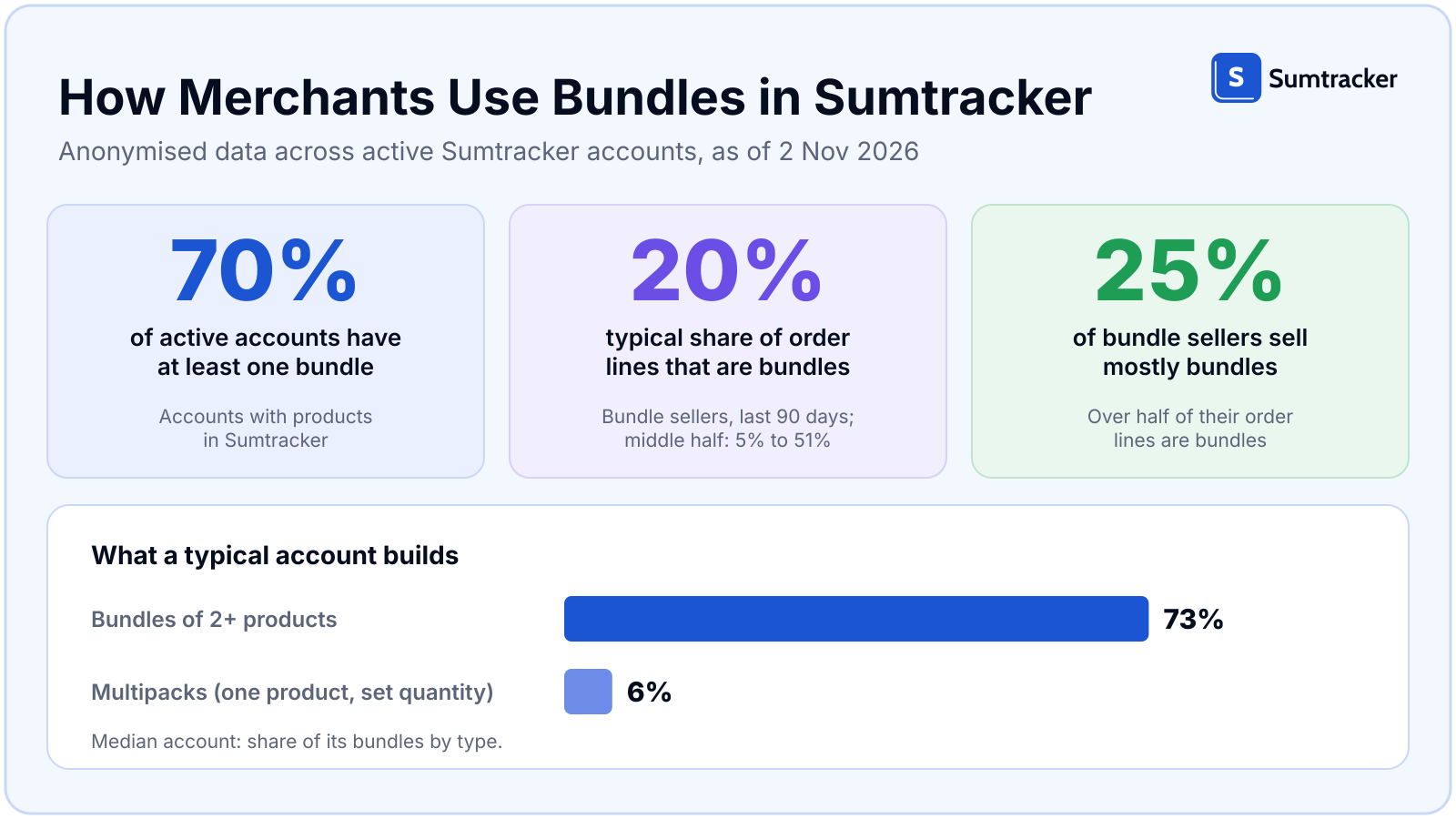
Selling bundles is common practice, not a niche tactic. About 7 in 10 active Sumtracker accounts have at least one bundle. For the typical seller, about 1 in 5 order lines is a bundle, and about 1 in 4 bundle sellers sell mostly bundles.
Types of Shopify Product Bundles
Shopify product bundles generally fall into three categories:
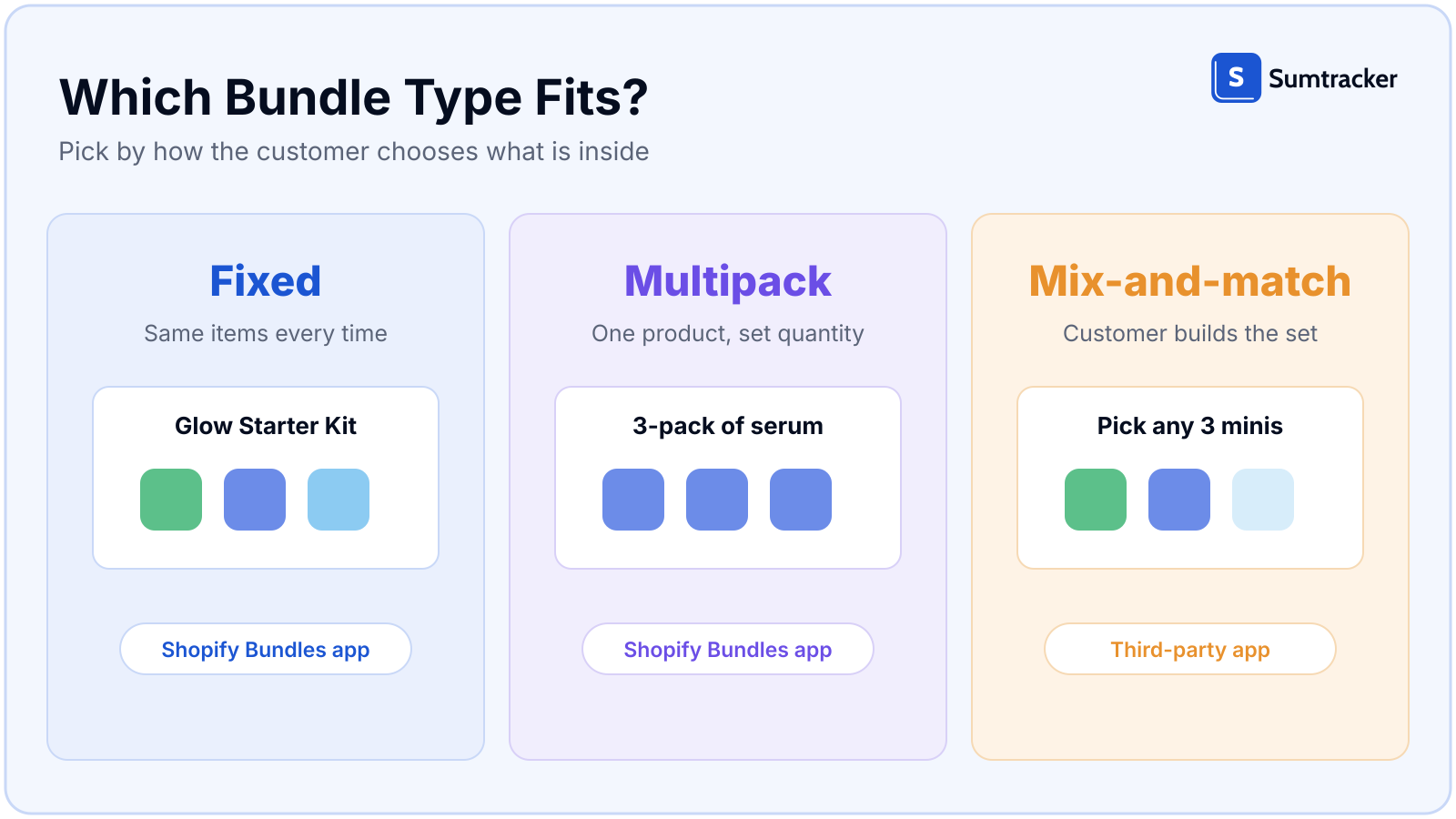
- Fixed: the same items every time, such as a starter kit. Built with the Shopify Bundles app.
- Multipack: one product at a set quantity, such as a 3-pack. Built with the Shopify Bundles app.
- Mix-and-match: the customer chooses the contents. Shopify's help center says this needs a third-party bundle app, or a custom build with the Bundles APIs on Shopify Plus.
Customized bundles give shoppers more flexibility to choose products that match their needs. Fixed bundles work well for complementary products, while multipacks are useful for selling multiple units of the same product, often with volume discounts. Consider which bundle options best fit your products and target buyers.
Shopify Bundles App vs. Third-Party Bundle Apps
Start with the Shopify Bundles app if you sell fixed bundles or multipacks. It is free, built by Shopify, needs no code, and is available on all plans. Bundles can be sold on Online Store, Shop and Shopify POS, and fixed bundles on Google & YouTube. The store needs the Online Store channel or a custom storefront, and an upgraded checkout.
Know the limitations before you commit. Shopify's Help Center lists several features that are incompatible with bundles: subscriptions, pre-orders and try-before-you-buy; the Shopify Subscriptions app; exchanges, including exchanges for an identical bundle; and import, export and bulk editing. Bundles also cannot contain other bundles.
If you need any of these features, consider a third-party bundle app. These apps may offer additional customization, integrations and bundle options depending on the provider. Before choosing one, check its compatibility with your existing inventory system, sales channels and order management workflows.
For a tool comparison, see our top 10 Shopify bundle inventory sync software.
How to Create a Product Bundle in Shopify?
Before you start: each component needs its own product and SKU, with inventory tracking on. Shopify ignores components that are not tracked, or that continue selling when out of stock, when it works out bundle availability.
- Install Shopify Bundles. Open the Shopify App Store, find Shopify Bundles (free) and install it. It then appears under Apps in your admin.
- Add products. In Apps > Bundles, click Create bundle, name it, then Select products and tick the components. You can include up to 30 products in a bundle, subject to Shopify's limits of 3 options and 2,048 variants. Once you've selected the components, click Save and continue.
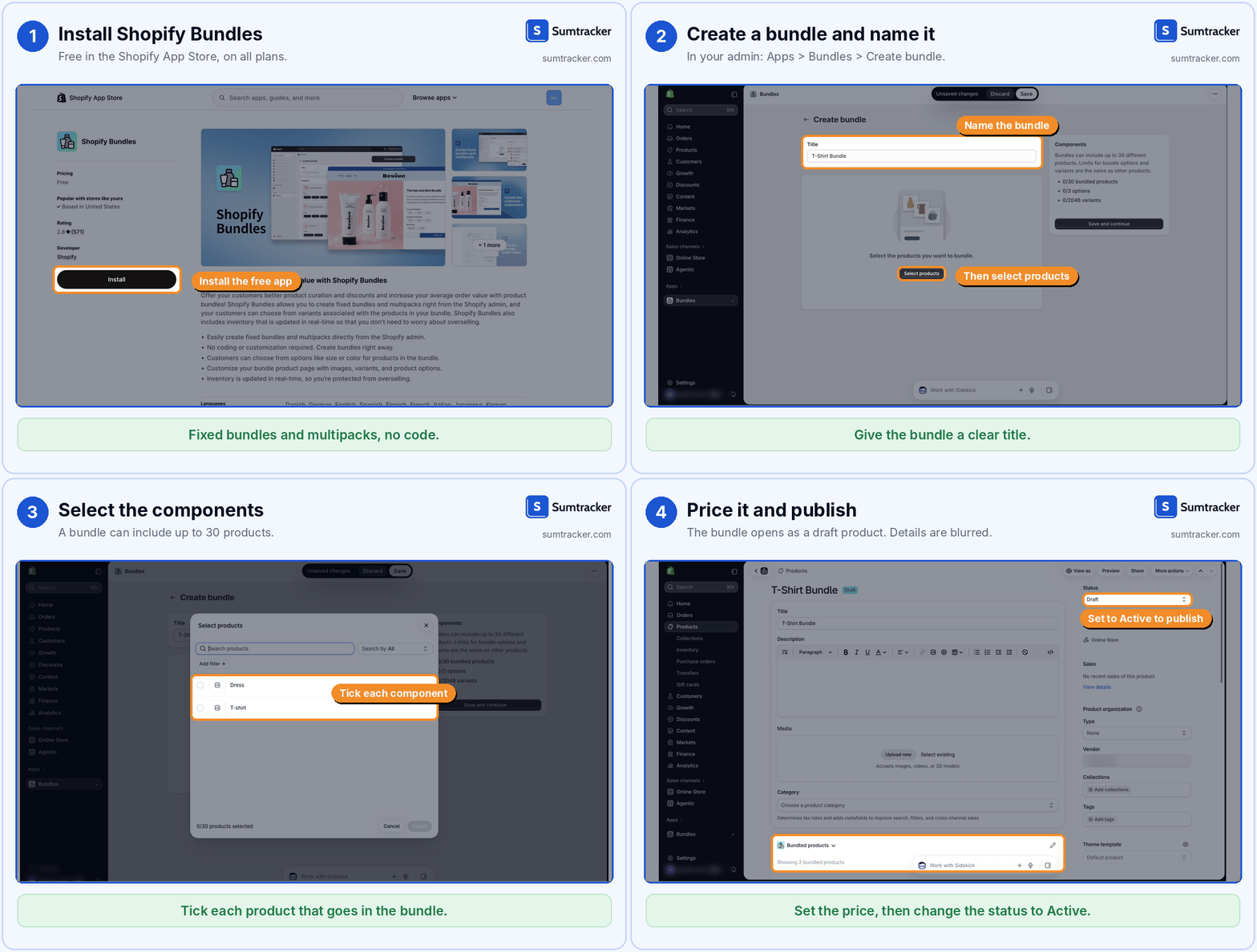
- Set the price. The bundle opens as a draft product with a Bundled products section. Set the bundle price using the margin floor in the next section.
- Publish. Change the status from Draft to Active and choose your sales channels.
- Place a test order. Check that the order lists the bundle and its components, and that stock drops for each component.
Two things to keep in mind
- Bundle SKUs: Each bundle has its own SKU. If you change the SKU of a component, you'll need to delete and recreate the bundle.
- Shipping profiles: Bundles don't have their own shipping profiles. Shipping rates are determined by the profiles assigned to their individual components.
How to Price Shopify Product Bundles for Profit?
A margin floor is the minimum gross margin you're willing to accept on a bundle. Before setting the selling price, calculate the total cost of the kit.
Sumtracker maintains a weighted average landed cost for each product. To calculate the kit cost, add the cost of each component multiplied by the quantity used in the bundle. Sumtracker's Bundle Cost Report (Reports > Bundle Cost Report) shows the cost of each bundle and updates when a component's cost changes, such as when you receive a purchase order.
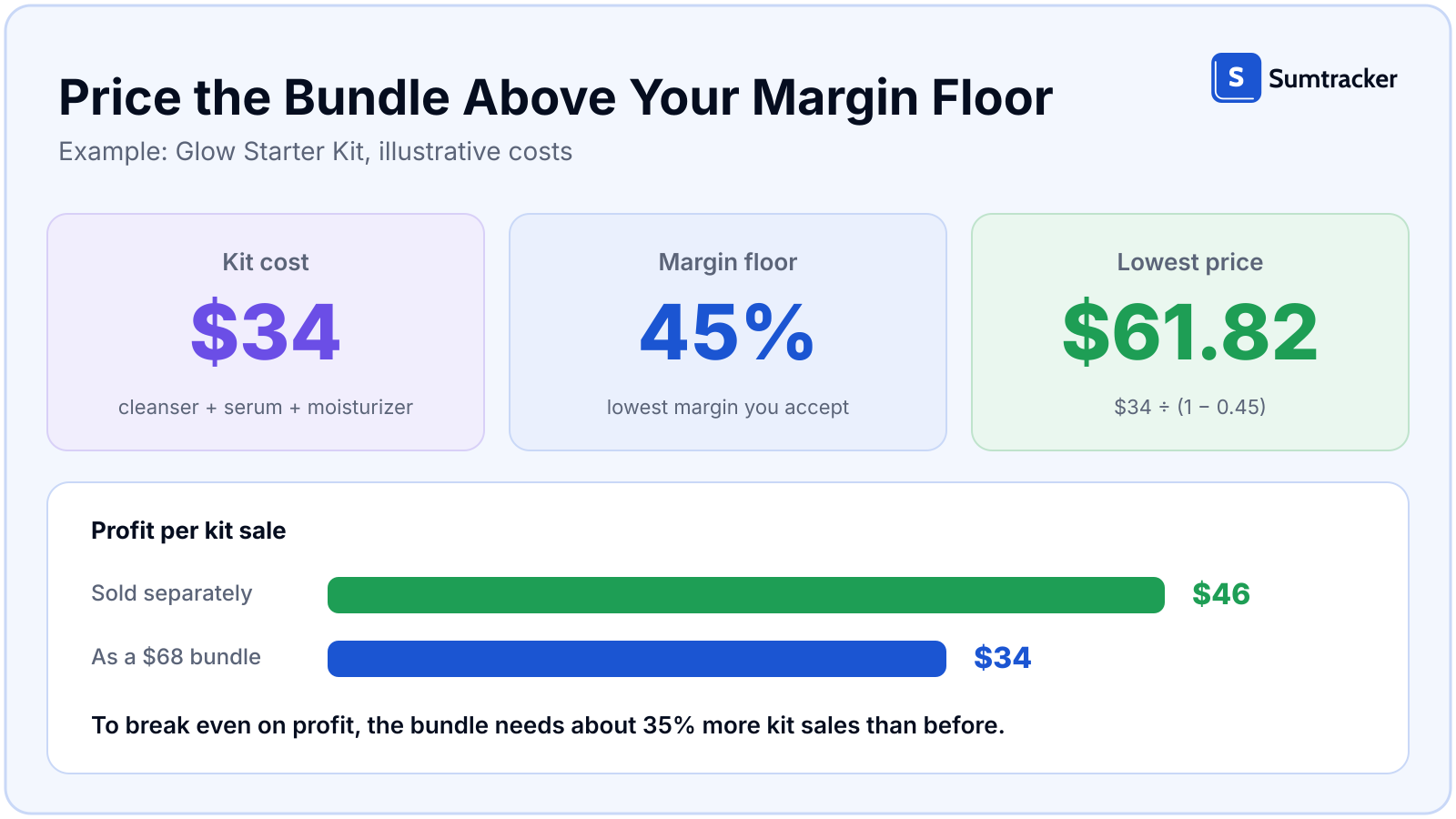
Example: Pricing a bundle with a 45% margin floor
Let's say a Glow Starter Kit contains a cleanser, serum and moisturizer. The three products cost $34 in total and would sell separately for $80.
At a 45% margin floor, the minimum bundle price is:
$34 ÷ (1 − 0.45) = $61.82
If you list the bundle at $68, customers get a 15% discount compared with buying the products separately, while your gross margin is approximately 50%.
Calculate the break-even point
Selling the three products separately generates $46 in gross profit ($80 − $34). Selling them together for $68 generates $34 in gross profit.
That means you earn $12 less per bundle sale. If every bundle sale replaces a purchase that would otherwise have happened at full price, you need approximately 35% more bundle sales to make up the difference.
Spread the bundle discount across components
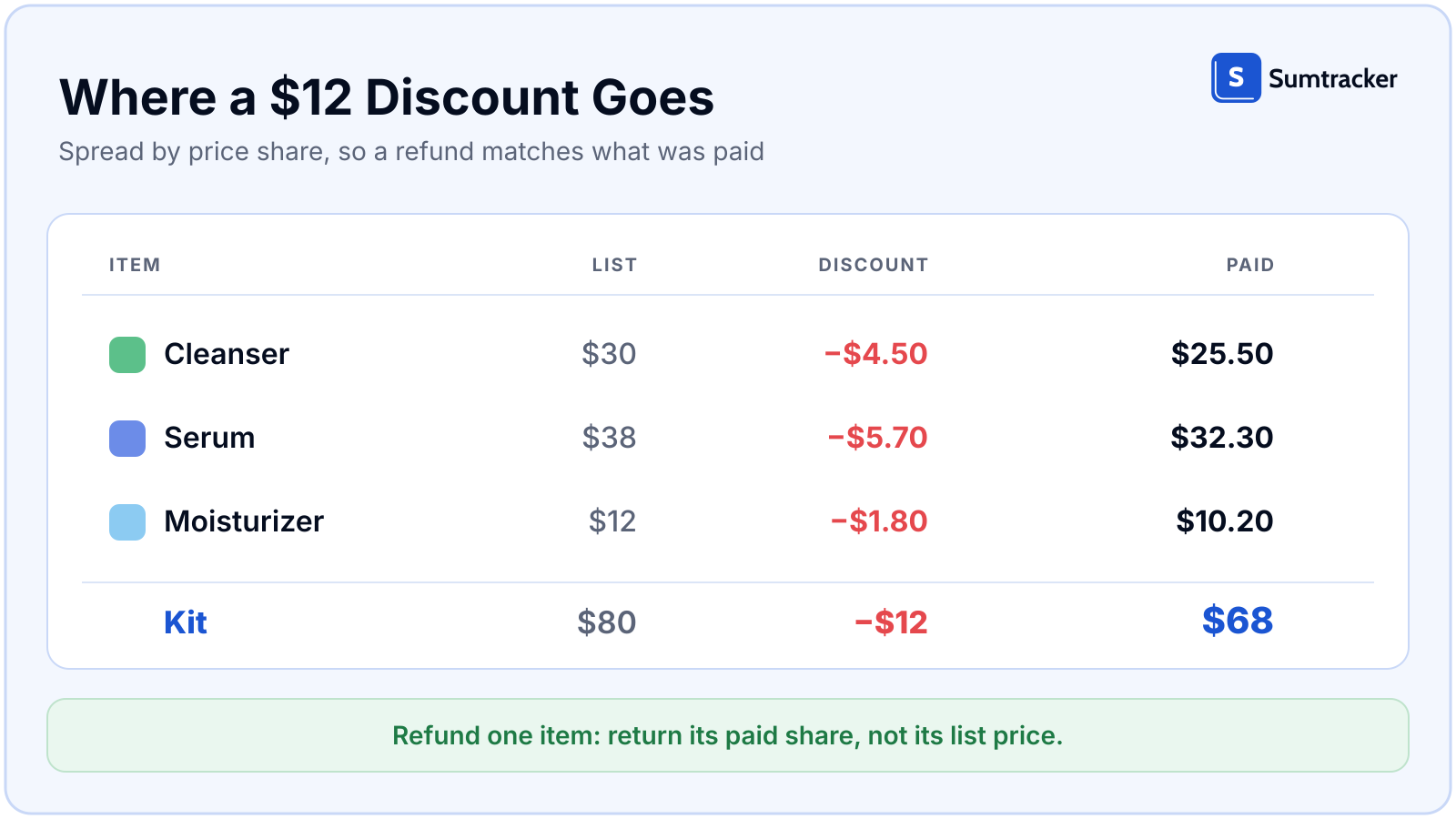
Allocate the $12 discount across the cleanser, serum and moisturizer based on each product's share of the original selling price. This ensures each component carries its portion of the discount, which matters when processing refunds and maintaining accurate per-product sales reports.
Common Shopify Bundle Inventory Problems and How to Fix Them
Three problems cause most Shopify bundle inventory errors. Here's how to identify and fix each one.
1. One component sits in several bundles
Shared stock is the normal case, so plan availability per component, not per bundle.
2. The same set is defined in more than one place
Three different tools might manage the same bundle: the Shopify Bundles app, a third-party bundle app and your inventory management system.
When multiple tools manage the same bundle independently, inventory counts can drift. For example, your Shopify admin might show 6 available bundles while your inventory system shows 4.
To prevent this, assign one system as the source of truth for each bundle. Other tools should read the bundle configuration or have their duplicate bundle setup disabled, while inventory availability should be calculated from the components.
Do this today: Choose one system to manage each fixed bundle and disable duplicate configurations elsewhere.
3. The bundle shows zero while the components have stock
Shopify calculates bundle availability using the component with the lowest available quantity after accounting for how many units each bundle requires.
For example, if you have 9 units of a product and each bundle requires 2, you can make 4 bundles available. But if the quantity is incorrectly set to 20, Shopify shows zero available bundles.
The same issue can occur when a component isn't tracked or isn't stocked at the selected location.
Check the following:
- Verify the quantity of each component in the bundle.
- Make sure inventory tracking is enabled for every component.
- Confirm that every component is stocked at the relevant location.
Do this today: Check component quantities first, then inventory tracking and location-level stock.
How to Manage Shopify Bundle Inventory with Sumtracker?
Shopify automatically calculates bundle availability based on component inventory. This works well for basic fixed bundles, but managing inventory becomes more complicated when products are shared across multiple bundles, you sell across several channels, or you need to plan replenishment.
Where Sumtracker Helps
Shopify handles basic bundle availability by calculating stock from individual components. Sumtracker builds on this by helping merchants manage bundle configurations, synchronize inventory across sales channels, track bundle costs and plan component-level replenishment.
How to Create Bundles in Sumtracker
To create a bundle, make sure its SKU already exists in Shopify and is synced to Sumtracker.
- Go to Bundles Inventory > Create Bundle.
- Select the bundle product.
- Add the component SKUs and their quantities.
- Save.
Sumtracker calculates available stock automatically. You can also import multiple bundles using a CSV file and view In stock, Booked and Available quantities for each bundle.
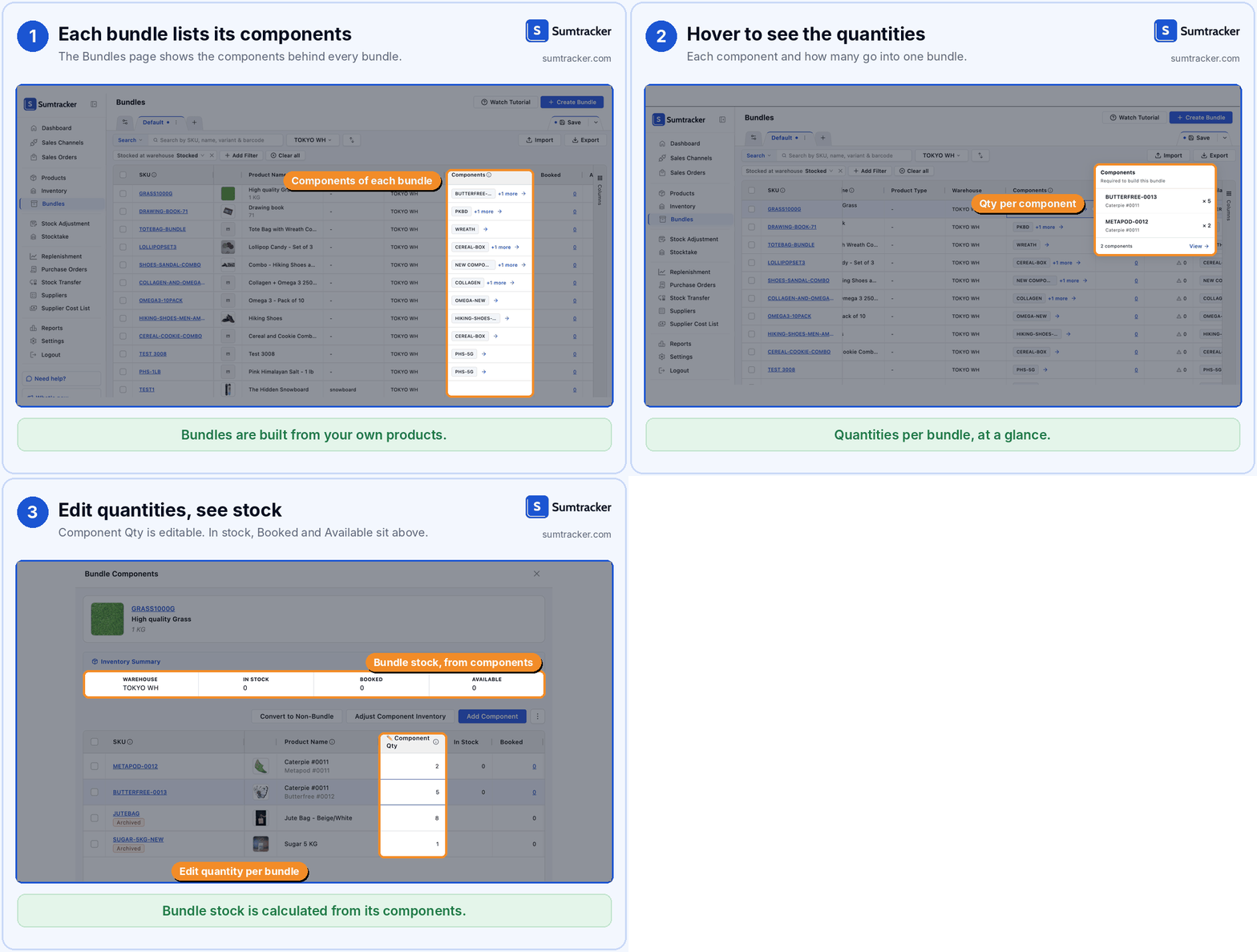
Manage Shared Bundle Inventory
Sumtracker supports shared components, so when the same product appears in multiple bundles, availability is calculated using the same component stock.
It also supports 3-pack and other fixed bundles. For mix-and-match bundles created through third-party apps, Sumtracker deducts stock for each selected product when it appears as a separate line item in an order.
You cannot adjust bundle stock directly; you need to update the component inventory. The Close at Quantity setting lets you mark a product as sold out on Shopify while keeping a few units in stock.
Plan Replenishment for Bundle Components
Sumtracker uses component-level demand and inventory data to recommend what to reorder, when to reorder and how much stock to replenish. Because the scarcest component limits bundle sales, it calculates replenishment at the component level using 12 months of sales data, excluding out-of-stock days.
Managing Bundle Orders, Shipping and Returns
Selling bundles also affects how you handle fulfillment, returns and refunds.
3 Metrics to Track for Shopify Product Bundles
Creating bundles is only half the job. Track these three metrics to understand whether they're actually benefiting your business.
1. Bundle attach rate
The share of orders that include a bundle. For context, about 1 in 5 order lines is a bundle for the typical Sumtracker account that sells bundles.
2. Bundle margin
Track gross margin after discounts and compare it against your minimum margin floor. This helps identify bundles that generate sales but aren't sufficiently profitable.
3. Cannibalization
Check whether sales of individual components decline after introducing a bundle. If the lost individual-product sales outweigh the additional profit from bundle sales, your bundle may be shifting existing purchases rather than generating new demand.
FAQ
Do I need Shopify Plus for product bundles?
No. The Shopify Bundles app is free and available on all plans. Plus matters only if you want a custom mix-and-match build with the Bundles APIs.
Can I still sell the components individually?
Yes. Components stay regular products. The bundle draws on their stock.
Can a Shopify bundle contain another bundle?
No. Shopify does not allow nested bundles.
Do bundles work with subscriptions?
Not with the Shopify Bundles app: subscriptions, pre-orders and try-before-you-buy are incompatible with it.
Conclusion
Pick the bundle type, install the app, price above your margin floor and watch three numbers each week. Then keep the stock behind each bundle honest as it moves. Sumtracker, an inventory management, forecasting and planning platform, calculates bundle stock from components and syncs it to your store.
Related Articles
Tool and strategies modern teams need to help their companies grow.

Ready to Simplify Your Inventory Management?
Join hundreds of e-commerce merchants who rely on Sumtracker to save time, eliminate errors, and grow their business.