.svg)
Choosing Inventory Apps for Shopify: Find the Best Tools for Efficient Stock Management


If you type "best inventory app for Shopify" into Google, you already know what the result looks like. N-number of listicles and not one actually guiding you to which tool would suit your store type.
And I know, there are a lot of apps out there. Some are genuinely great. Some just have features you'll never even use. Some look affordable until you hit a pricing tier that makes no sense for where your business is.
The problem isn't that good tools don't exist. The problem is that nobody tells you what to actually look for before you choose one.
And I know how much of a hassle it is to switch inventory systems mid-operation.
So before you pick an app, you need a framework. What does your store actually need right now? What will it need in six months? And what's the real cost of getting this wrong?
That's what this guide is about.
Key Features to Look for When Choosing Inventory Apps for Shopify
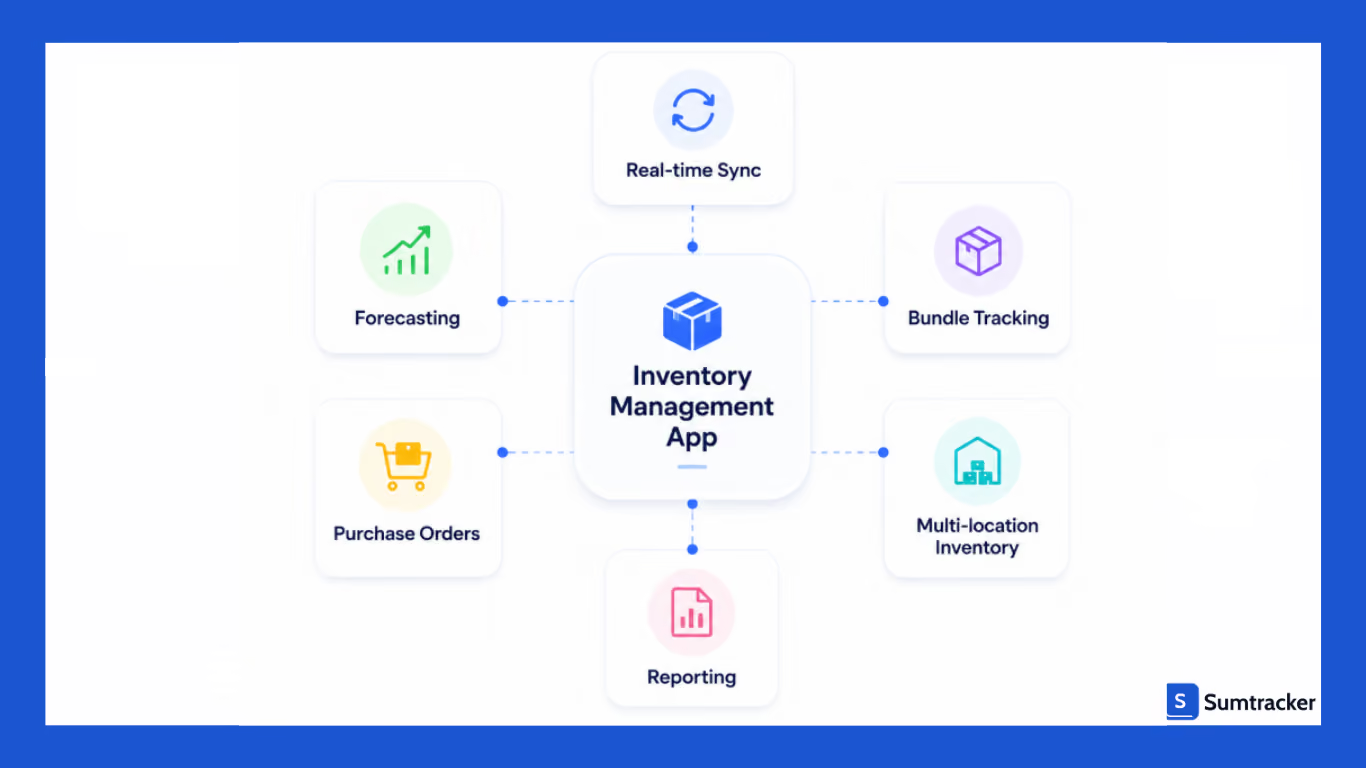
The right inventory app isn't the one with the longest feature list. It's the one that actually fits how your operation runs. Here's what matters.
Real-Time Inventory Sync
If you're selling on more than one channel, like Shopify, Amazon, Etsy, and Walmart, your stock numbers need to update everywhere, instantly.
This is the feature that separates merchants who catch problems early from those who find out about them when a customer complains.
An apparel brand losing thousands on Black Friday because sync lagged between channels isn't a horror story; it's what happens when real-time sync isn't in place.
Inventory Forecasting and Replenishment
If you rely on what your gut says when you reorder, then let me tell you that it can cost you a lot.
As ordering too much can lead you to tie up cash in slow-moving stock. And if you order too little, you will see your customers drifting away.
Good inventory apps take historical sales data, seasonality, and demand trends and turn them into purchasing recommendations.
As your inventory goal should not be to react to stockouts, but rather focus on preventing them, features like reorder points, low stock alerts, and automated restock triggers help in making this possible.
In a recent episode of the ShopifyPercent podcast, ecommerce operators talk about how automated forecasting helps sellers take the guesswork out of Black Friday prep and major product launches.
Listen to the podcast here.
Purchase Orders and Supplier Management
Once your SKU count grows and you're managing more than one or two suppliers, purchase order management becomes an important feature as you need to track what's incoming, when it's arriving, and how it maps against current stock levels.
A solid inventory app handles purchase order creation, supplier tracking, inbound inventory visibility, and replenishment workflows.
Bundle Inventory Management
If you sell subscription boxes, skincare kits, apparel bundles, or promotional sets, then you already know the struggle of syncing the inventory of individual items in a bundle.
Every time a bundle sells, the individual components need to be deducted automatically across every channel you sell on.
Most basic inventory tools don't handle this well. This feature helps in saving hours of manual reconciliation every week and eliminates the overselling that happens when bundle components quietly run out before anyone notices.
Best Inventory Apps for Shopify in 2026
I know we promised you a whole breakdown on how you can choose the best inventory app for your store, but before that, you might want to go through these apps we have curated for you so that you can judge the better.
Here are four tools that might be worth your time.
1. Sumtracker
Sumtracker is an inventory management and replenishment software built for eCommerce brands selling across multiple channels. It can help you sync inventory in real time, track stock across locations, manage purchase orders, and automate restocking decisions with forecasting and low stock alerts.
Designed specially for growing online stores, Sumtracker simplifies inventory operations while improving stock accuracy and replenishment planning.
Key Features
- Real-time multichannel inventory sync
- Inventory replenishment with reorder points
- Bundle and kit inventory auto-updates
- Purchase order management
- Multi-location support
- Detailed inventory logs, COGS, and stock valuation reports
- Bulk import/export and low stock alerts
Pros
- Clean, easy-to-use interface
- Strong bundle tracking, components update automatically across all channels.
- Responsive customer support with hands-on onboarding
- Constantly shipping new features based on merchant feedback.
Cons
- Reporting depth can feel limited for merchants who need advanced analytics.
- Pricing is higher than some alternatives at the entry level.
- Wholesale order creation features are still limited.
Pricing: Starts at $59/month. Free to install with a trial available.
Shopify App Store Rating: 5/5
2. Assisty
Assisty is designed to help merchants sync inventory and replenishment planning. It combines inventory tracking, demand forecasting, and purchase order management into a single platform to reduce stockouts and overstocking.
Key Features
- AI demand forecasting with safety stock controls
- Automated purchase order creation
- Reorder suggestions based on velocity and lead times
- Multi-location and multi-store replenishment
- Centralized supplier and replenishment management
Pros
- One of the strongest reporting setups available at this price point
- Forecasting factors in seasonal trends, not just raw sales history
- Consistently praised for ease of use and "just works" simplicity.
Cons
- Full AI forecasting and purchase order module only available on the Plus tier at $239/month
- AI predictions can be less accurate for niche or highly seasonal products.
- Feel complex for smaller stores that don't need the full feature set.
Pricing: Free plan available. Paid plans start at $19/month. Full AI features from $239/month.
Shopify App Store Rating ⭐ 4.9/5
3. Inventory Planner by Sage
Inventory Planner is built for merchants having inventory complexities like multiple locations, multiple channels, and purchasing decisions that actually move the needle on cash flow. If you are serious about stock distribution across locations and planning, then this is for you.
Key Features
- SKU-level demand forecasting with seasonal trend analysis
- Multi-location inventory planning and stock distribution
- Automated replenishment recommendations
- SKU-level profitability analysis
- Shopify and Amazon integration
- Detailed inventory health and dead stock reporting
Pros
- Excellent for brands that need detailed purchasing and profitability analysis
- Multi-location planning is strong.
Cons
- Might not fit smaller stores or merchants who are just getting started
- Requires proper setup to get full value, not a plug-and-play tool
Pricing: Custom pricing based on business size and order volume.
Shopify App Store Rating ⭐ 4.4/5
4. Katana Cloud Inventory
Katana is built specifically for manufacturers. If your operation involves production runs, raw materials, bill of materials tracking, or any kind of assembly, Katana might be “the one” for you. It's the only tool on this list with full manufacturing resource planning built in.
Key Features
- Bill of materials and subassembly tracking
- Production scheduling with a visual planner
- Real-time raw materials and finished goods visibility.
- Multi-location inventory management
Pros
- The go-to tool for Shopify merchants managing manufacturing or assembly
- Clean interface that doesn't feel like legacy ERP software
- Solid integrations with accounting tools
Cons
- Reporting depth lags behind dedicated analytics tools.
- High-order-volume merchants with low-priced items have flagged that pricing tiers don't work in their favor.
Pricing: Starts at $299/month for the Core plan. Manufacturing add-ons cost extra.
Shopify App Store Rating ⭐ 4.5/5
How Different Shopify Businesses Choose Inventory Apps
Different businesses require different inventory systems.
The right app depends on operational complexity, warehouse setup, and fulfillment workflows.
Small Shopify Stores
Smaller stores usually prioritize:
- affordability,
- ease of use,
- and simple inventory tracking.
Many start with lightweight tools before moving to more advanced systems later.
Multichannel Brands
Businesses selling across multiple channels prioritize:
- real-time inventory sync,
- centralized inventory dashboard,
- forecasting,
- and inventory control.
Bundle and Subscription Brands
Bundle-heavy businesses need:
- accurate component tracking,
- automated stock deduction,
- and real-time inventory updates.
Questions to Ask Before Installing a Shopify Inventory App
Does the App Sync Inventory Across Multiple Channels in Real Time?
Ask vendors:
- How fast do inventory updates sync?
- What happens during sales spikes?
- What is the average sync delay?
If a vendor cannot explain inventory latency clearly, that can become an operational risk during high-volume periods.
Can It Handle Multiple Warehouses and Bundles?
Many inventory apps support simple stock tracking, but struggle with:
- bundle inventory,
- warehouse allocation,
- and fulfillment workflows.
Always test real operational scenarios before implementation.
Does It Support Forecasting and Purchase Orders?
Growing businesses usually need:
- inventory forecasting,
- purchase orders,
- reorder points,
- and restock alerts.
How to Compare Shopify Inventory Apps Without Getting Overwhelmed
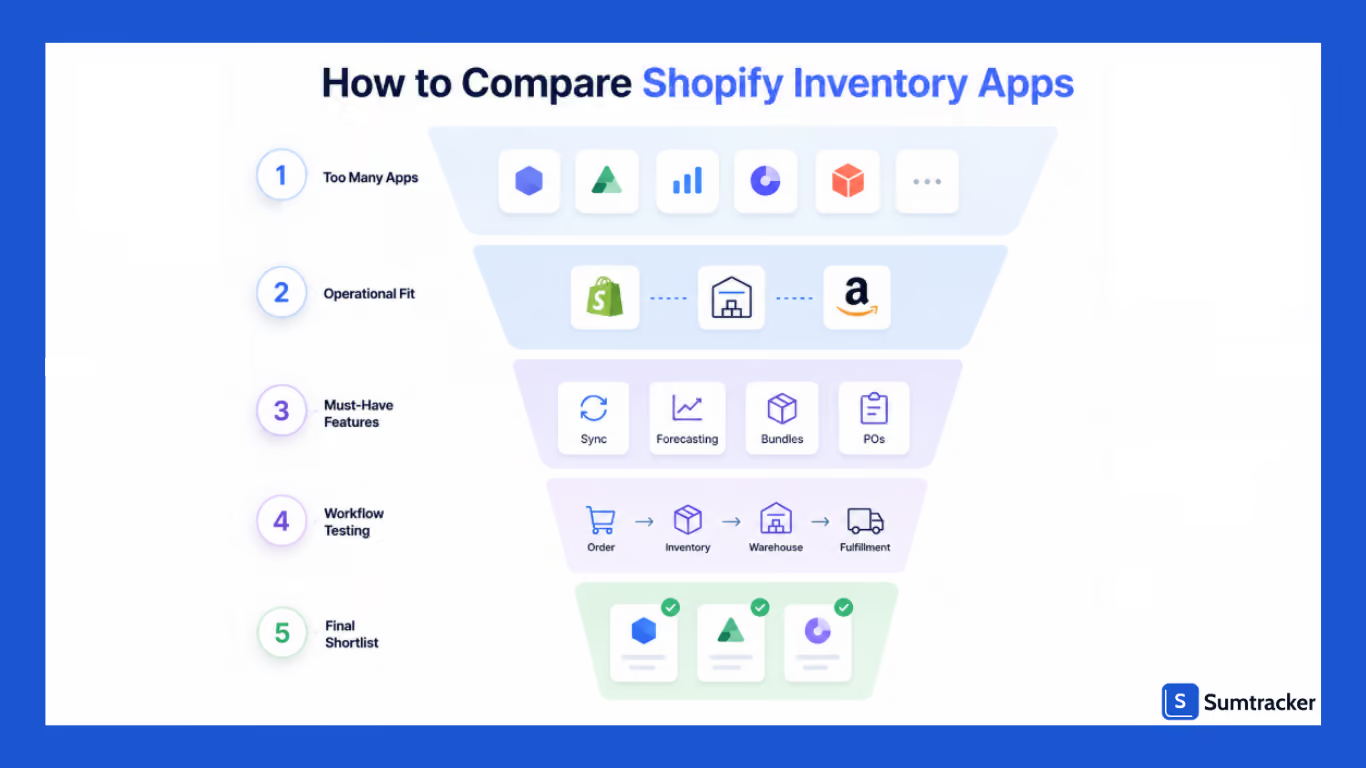
Most merchants don’t struggle because there are too few options. They struggle because almost every app claims to solve the same problems.
Once you start researching tools, the process quickly becomes confusing:
- similar feature lists,
- overlapping promises,
- unclear pricing,
- and very different setup requirements.
The easiest way to simplify the decision is to compare apps based on operational fit instead of marketing claims.
Start With Your Biggest Operational Problem
Before comparing features, identify the one issue creating the most operational friction today.
For example:
- overselling during promotions,
- warehouse confusion,
- delayed fulfillment,
- inaccurate bundles,
- or manual purchasing workflows.
Trying to solve every possible future problem usually leads to buying software that is unnecessarily complicated.
Separate “Must-Have” Features From “Nice-to-Have” Features
Many businesses pay for advanced functionality they rarely use.
A better approach is to divide features into two categories.
Must-Have Features
These directly affect day-to-day operations:
- inventory synchronization,
- warehouse visibility,
- purchase workflows,
- forecasting,
- and reporting.
Nice-to-Have Features
These may help later but are not immediately critical:
- advanced automation,
- custom analytics,
- AI recommendations,
- or highly specialized workflows.
This keeps evaluations focused on practical needs instead of feature overload.
Compare Setup Complexity, Not Just Features
Two apps may offer similar functionality but require very different levels of implementation effort.
Before choosing a system, ask:
- How long does onboarding take?
- Will workflows need rebuilding?
- How much staff training is required?
- Is migration support included?
- How difficult is daily usage?
In many cases, the easiest system to operate consistently performs better long-term than the most feature-heavy option.
Test Real Workflows During the Trial Period
Most software demos are controlled environments. Real operational testing matters far more.
During a trial, test:
- order processing,
- stock updates,
- warehouse transfers,
- bundle sales,
- and purchasing workflows.
This usually reveals operational friction much faster than feature comparisons alone.
Pay Attention to Reporting Visibility
Good reporting should help teams make faster operational decisions.
Look for visibility into:
- stock movement,
- replenishment timing,
- fulfillment delays,
- and slow-moving products.
If reporting feels difficult to interpret during testing, operational visibility may become a problem later as the business scales.
Case Study: How Ozdingo Streamlined Multi-Channel Inventory & Purchase Orders with Sumtracker
Ozdingo, an Australian e-commerce retail brand, sells a wide range of products on Shopify and Amazon. They are basically an all-in-one everything store. The store has thousands of SKUs and bundle-heavy orders.
.avif)
Challenges Faced
Before turning to Sumtracker, Ozdingo managed their inventory through spreadsheets, causing them chaos, plus losing customers due to stockouts and overselling.
They sell many products as kits or multi-packs; every order requires several component SKUs to update correctly. Manual inventory updates often caused delays, making stock levels unreliable during busy sales periods.
The team also struggled with:
- manual purchase order mistakes,
- mismatched stock between Shopify and Amazon,
- repetitive spreadsheet work,
- and delayed inventory visibility across channels.
Why They Switched to Sumtracker
They required an inventory tool that would help take them out of their inventory chaos. After switching to Sumtracker, they could:
- sync inventory across channels in real time,
- automate bundle inventory adjustments,
- simplify purchase order management,
- and reduce operational dependency on spreadsheets.
Operational Impact
After implementation, Ozdingo improved:
- stock accuracy,
- purchase order efficiency,
- and multi-channel inventory visibility.
The team also reduced a large amount of repetitive manual work every week, allowing them to spend more time on growth and fulfillment operations instead of correcting inventory mistakes.
FAQs
What is the ideal inventory management app for Shopify?
The ideal inventory management app depends on operational complexity, sales channels, SKU count, and warehouse requirements. Smaller stores may prioritize simplicity, while multichannel brands often need forecasting and purchase orders.
Does Shopify have built-in inventory management?
Yes, Shopify includes native inventory tracking features. However, growing businesses often require advanced inventory management capabilities like real time inventory sync, multichannel sync, forecasting and barcode scanning.
Can Shopify inventory apps sync inventory across Amazon and Etsy?
Yes. Many Shopify inventory apps support multi channel sync across Amazon, Etsy, Walmart, retail systems, and other marketplaces.
Which Shopify inventory app is best for bundles and kits?
Businesses selling bundles or kits should choose inventory management app that automatically tracks component inventory and updates stock levels in real time across different channels.
How much do Shopify inventory management apps cost?
Pricing varies based on operational complexity and features. Some Shopify inventory apps offer a free trial, while advanced inventory systems may include onboarding, integration, and setup costs beyond monthly subscription pricing.
Conclusion
Choosing inventory apps for Shopify is ultimately about operational fit.
The right inventory management system helps businesses:
- maintain accurate inventory levels,
- reduce overselling,
- improve fulfillment speed,
- optimize cash flow,
- and scale more confidently across multiple channels.
The research also highlights that most merchants underestimate implementation complexity, migration risks, and operational scaling requirements when evaluating inventory software.
Instead of choosing based only on feature lists or pricing, merchants should evaluate how inventory systems fit into their real workflows, warehouse operations, and long-term growth plans.

Bhoomi writes about inventory management and multichannel selling at Sumtracker. Her focus is on solving real operational problems for Shopify, Amazon, and marketplace sellers through well-researched content. She covers everything from multi-location inventory syncing and stock error troubleshooting to replenishment planning and platform comparisons, turning complex eCommerce operations into clear, actionable guidance.
LinkedInRelated Articles
Tool and strategies modern teams need to help their companies grow.

Ready to Simplify Your Inventory Management?
Join hundreds of e-commerce merchants who rely on Sumtracker to save time, eliminate errors, and grow their business.
