How to Manage Bundle Inventory Without Listing Components on Shopify


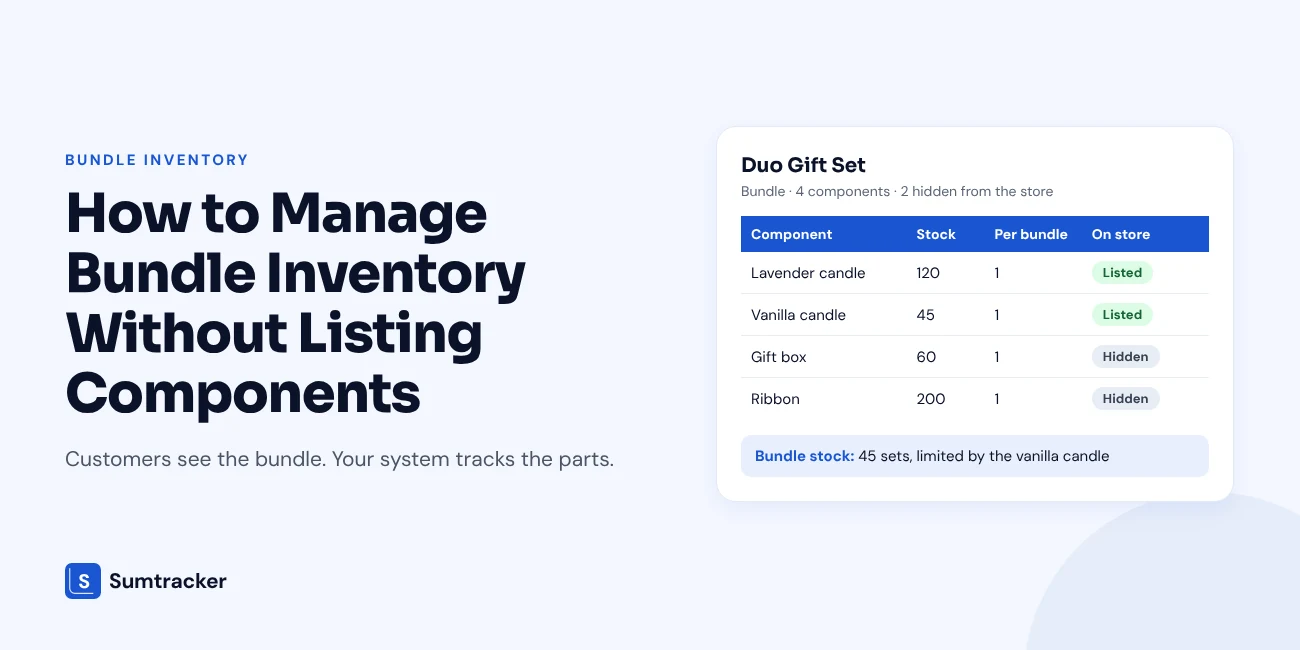
You don't have to list every bundle component on Shopify. A component only needs a SKU and a tracked stock count, so its stock drops when a bundle sells. Bundle stock is the lowest result of component stock divided by quantity per bundle, rounded down.
- Pick a route: Keep hidden components as unpublished Shopify products, or keep them only in your inventory app.
- Hide them safely: Use Active status and remove every sales channel. Avoid Unlisted, because the product can still be bought through its link.
- Watch the edge cases: Shared components, returns, nested bundles and mix-and-match bundles need extra checks.
The guide includes the Shopify steps, a worked stock example and a free mapping template.
You don't need to list every bundle component on your Shopify store. A component only needs to exist as a tracked SKU, so its stock drops when a bundle sells.
This guide shows two ways to set that up. You'll get the Shopify steps, the stock formula with a worked example, and a free template to map your bundles.
Key takeaways
- Customers see the bundle. Your system sees the parts. Listing and tracking are two separate jobs.
- You can keep a component as an unpublished product in Shopify, or keep it only in your inventory app.
- Bundle stock = the lowest value of (component stock ÷ quantity per bundle), rounded down.
- Fixed bundles work well with this setup. Nested and mix-and-match bundles need extra care.
Do You Need to List Every Bundle Component on Shopify?
No. A component needs a SKU and a stock count. It does not need a product page.
Listing and tracking do different jobs. Listing decides what a customer can see and buy. Tracking decides what your stock numbers say. A gift box, a pump cap or a label needs tracking. It rarely needs a listing.
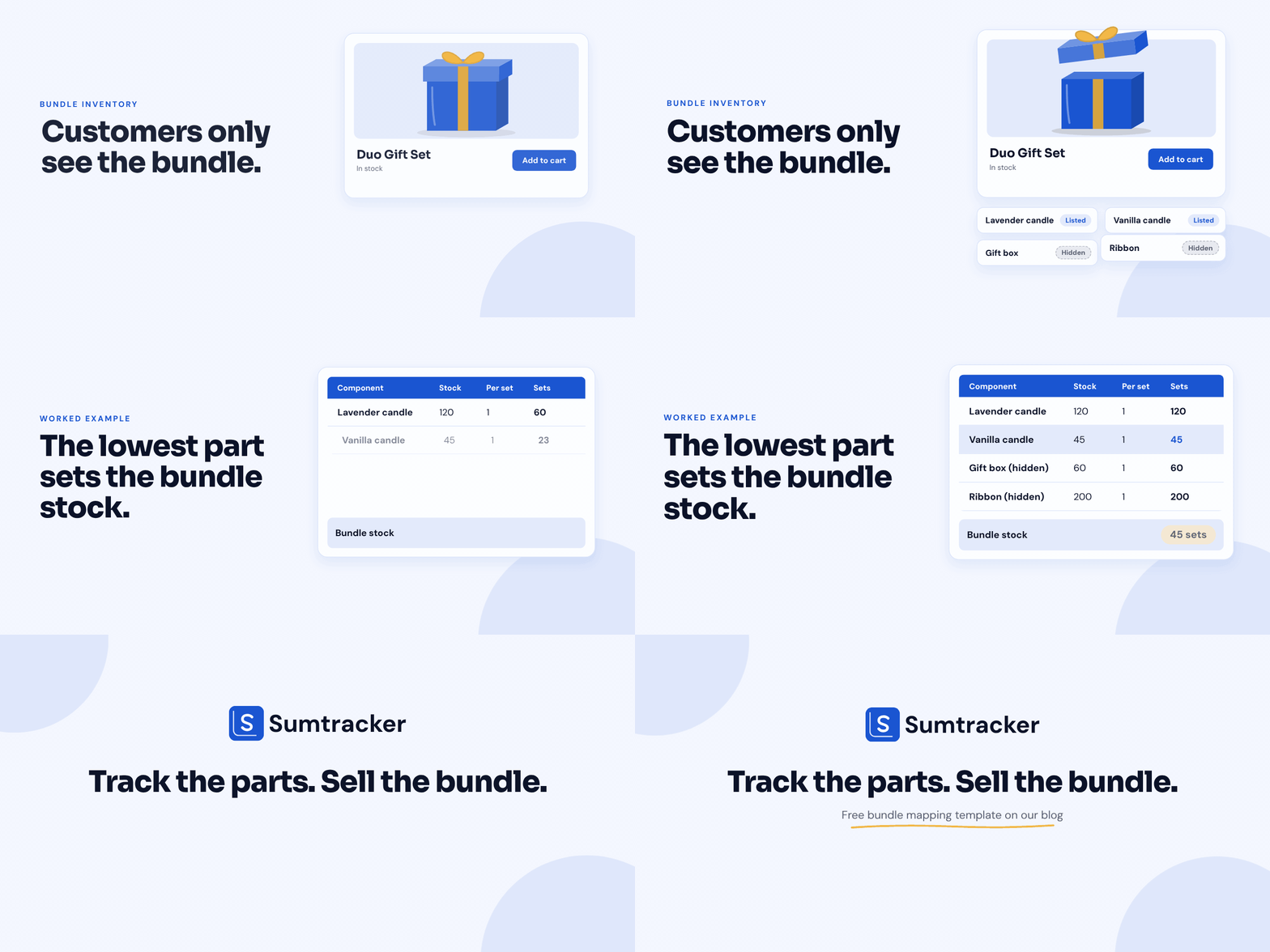
The problem starts when the two get mixed up. If you create a bundle as a regular Shopify product, it gets its own stock count. Nothing connects that number to the parts inside it. So merchants list every part as a product, just to have somewhere to hold the stock.
That fixes nothing. It only fills the storefront with items nobody wants to buy alone.
This is more common than it sounds.
Here is a simple way to sort your own components.
Rule of thumb: If a customer would never search for the item, don't list it. Track it instead.
Two Ways to Keep Components Off Your Storefront
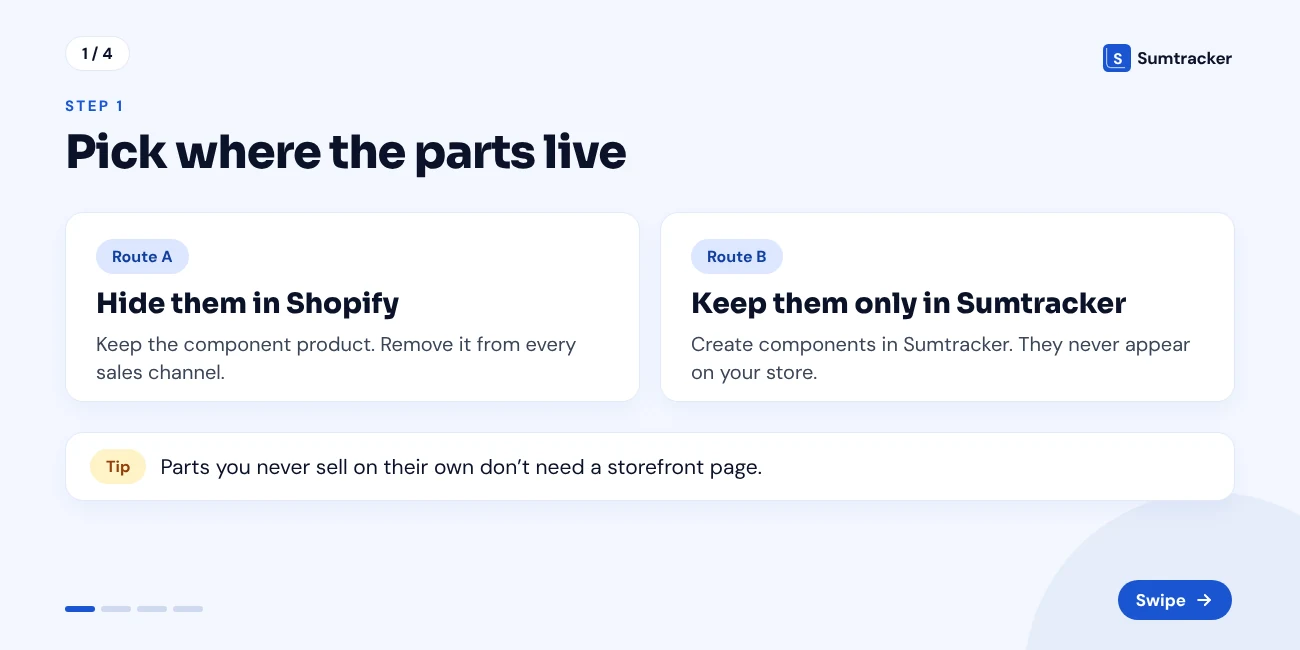
There are two routes. Both keep the component out of sight. They differ in where the component lives.
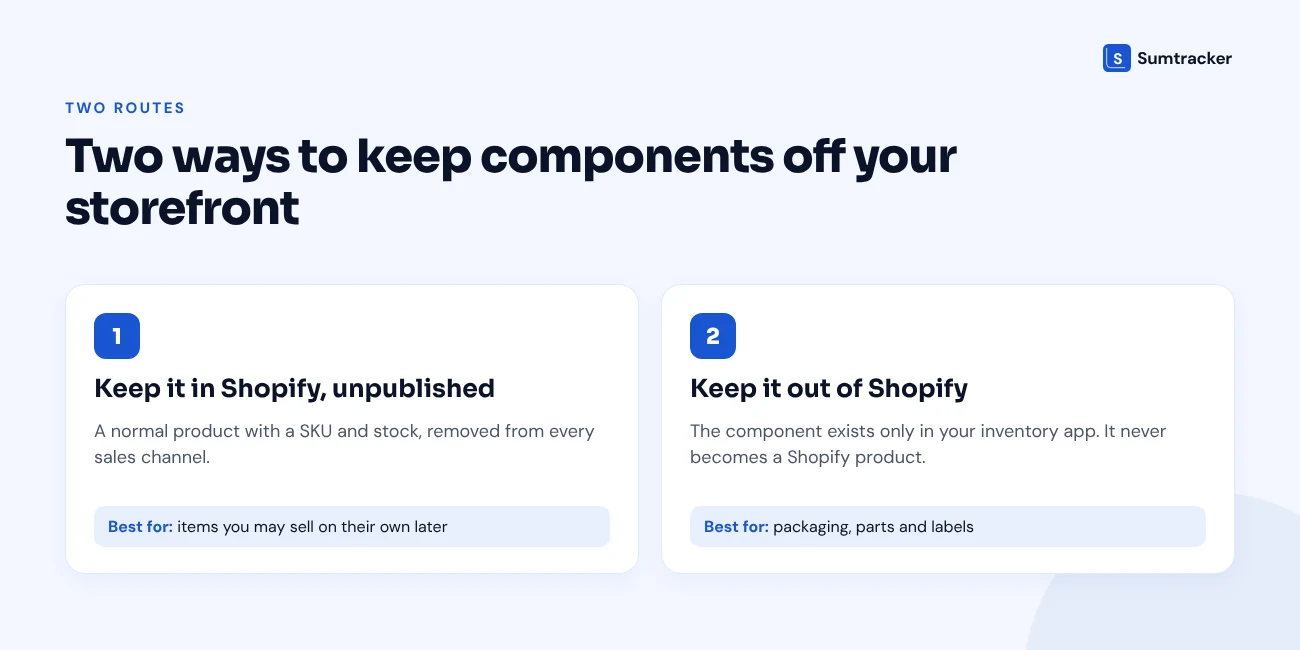
Route 1: Keep the component in Shopify, but unpublished
The component is a normal Shopify product with a SKU and a stock count. You remove it from your sales channels, so customers can't find or buy it.
This route suits items you might sell on their own later. Your team can also see and edit the stock in the Shopify admin.
Route 2: Keep the component out of Shopify
The component never becomes a Shopify product. You create it inside your inventory app and track it there.
This route suits packaging, parts and labels. These items will never be sold alone, so they have no reason to sit in your product list.
A UK supplements brand took this route. It moved its non-sellable components out of Shopify and tracked them only in Sumtracker. That cut the clutter in its Shopify admin and stopped duplicate records. You can read the full story in how this health and wellness brand unified inventory tracking across Shopify, Amazon and its 3PLs.
Rule of thumb: Ask one question. "Will we ever sell this on its own?" If yes, use Route 1. If no, use Route 2.
What about the Shopify Bundles app?
Shopify has a free Bundles app for fixed bundles and multipacks. It works on all Shopify plans, and a fixed bundle can hold up to 30 components.
Two things are worth knowing before you rely on it. It tracks bundle inventory by overall stock, not by location. And orders list the SKUs of the individual items, not a bundle SKU.
If you want to see the setup, this short video on how to create product bundles on Shopify walks through it step by step.
If your components are raw materials or parts, our guide on component and raw material tracking for Shopify stores goes deeper.
How to Hide Component Products in Shopify (Step by Step)
This section covers Route 1. The goal is a product that holds stock but can't be found or bought.
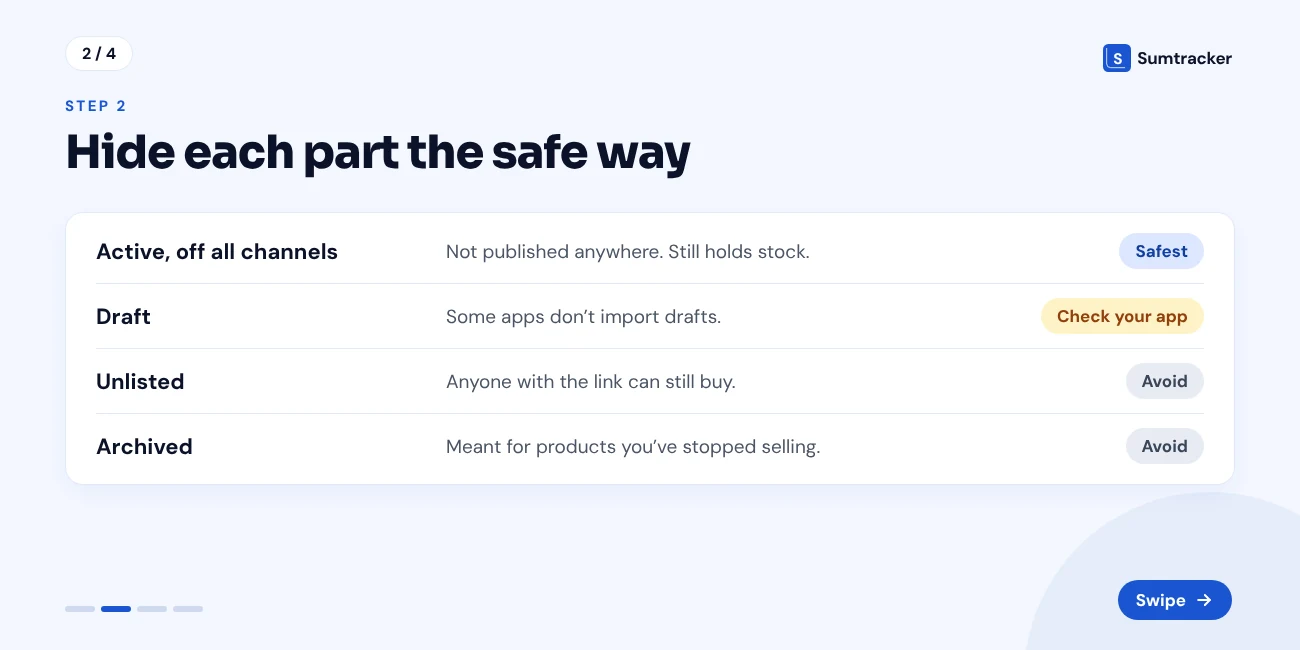
Start with the status. Shopify has four product statuses, and they don't hide a product in the same way.
Watch out for Unlisted. It hides a product from storefront search, collections and recommendations. The product page stays live, and anyone with the link can still add it to a cart.
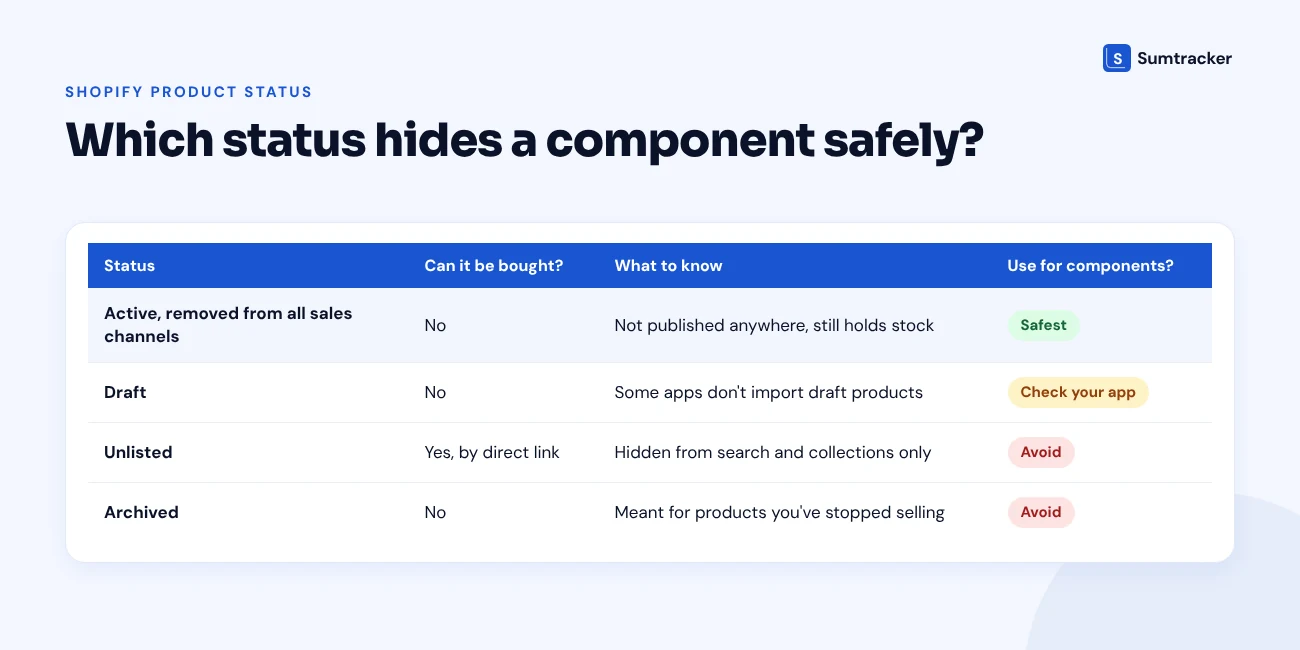
The steps
- Create the component as a product. Give it a clear name and a unique SKU. Turn on inventory tracking and enter the stock.
- Keep the status as Active. In your Shopify admin, go to Products and click the product. Check the Status section.
- Open the Publishing section. It lists your sales channels. All of them are selected by default.
- Deselect the channels. Click the adjust icon, untick the Online Store and any other channel, then click Done.
- Click Save.
- Repeat for the other components. For a long list, select the products on the Products page and change their availability with a bulk action.
- Test it. Open your store in a private browser window. Search for the component by name and by SKU. Nothing should show up.
Tip: Hide variants the same way. Shopify lets you publish or unpublish individual variants, so one size or colour can stay hidden while the rest stay live.
Tip for Sumtracker users: Sumtracker imports active products by default. Keep hidden components Active and unpublished, so they sync without changing any setting.
Good SKUs make the next step much easier. If yours need a clean-up, start with our guide to SKU management.
How Bundle Stock Is Calculated From Hidden Components
A bundle has no stock of its own. Its stock is the number of complete bundles you can build right now.
This only works if the component counts are right. A study by researchers at Cardiff, emlyon and TU Darmstadt, funded by the retail body ECR, looked at about 1 million SKUs across about 100 stores of seven European retailers. It found that about 60% of SKUs had an inaccurate stock record. Correcting the records lifted sales by 4 to 8%. The study covered physical retail, not Shopify stores, but the lesson carries over. A bundle count built on wrong component counts is wrong too.
The formula has three steps.
- For each component, divide the stock on hand by the quantity one bundle needs.
- Round each result down to a whole number.
- Take the lowest result. That is your bundle stock.
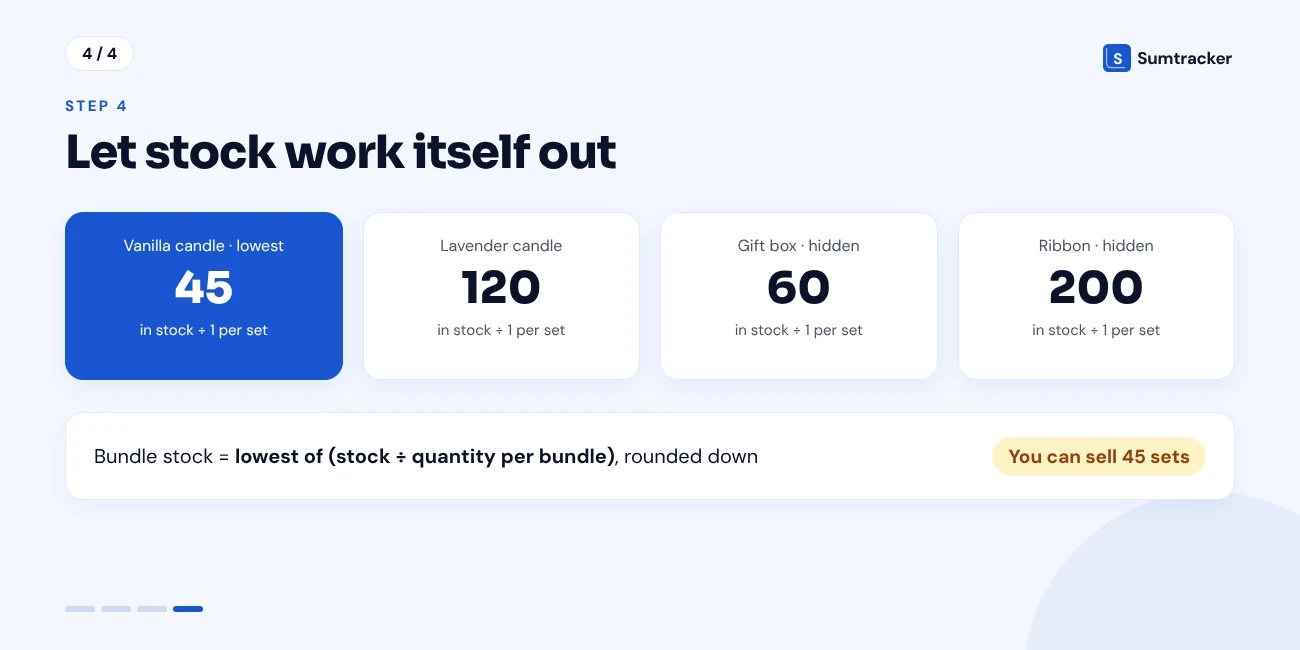
Bundle stock = lowest value of (component stock ÷ quantity per bundle), rounded down
The component with the lowest result is the limiting component. It decides how many bundles you can sell.
A worked example
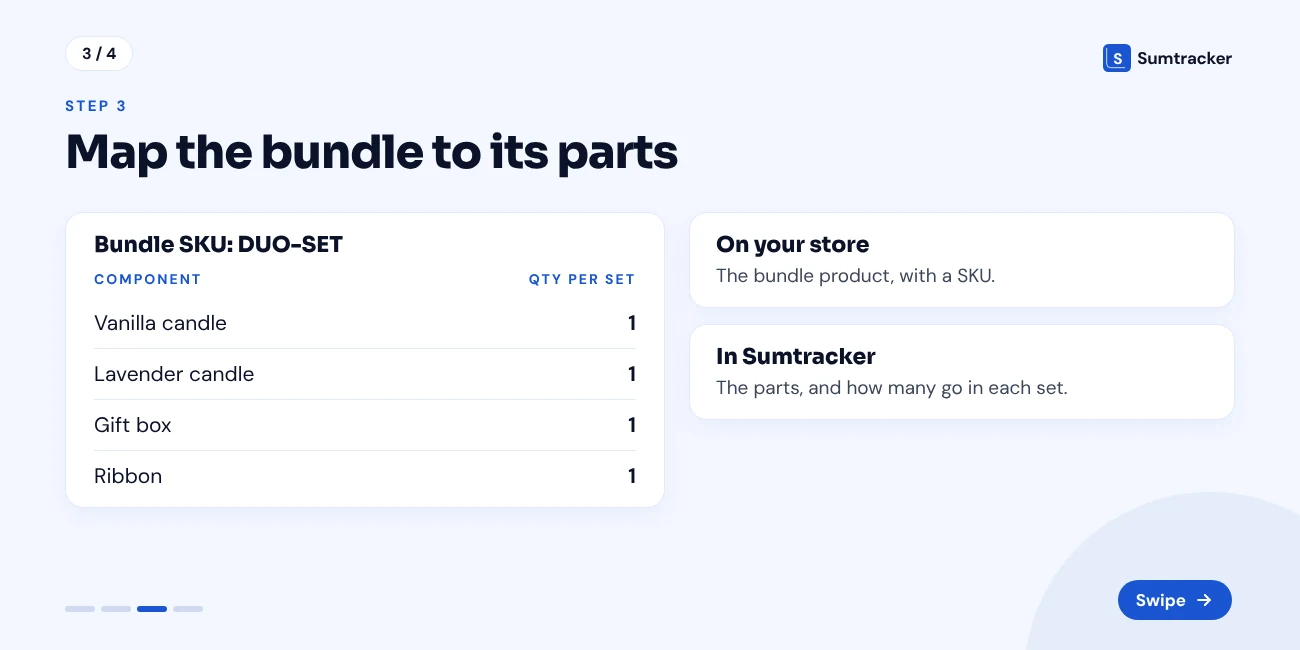
A candle brand sells a Duo gift set. Each set needs one lavender candle, one vanilla candle, one gift box and one ribbon. The box and the ribbon are hidden components.
The lowest number is 45. So the brand can sell 45 Duo gift sets. The vanilla candle is the limiting component.
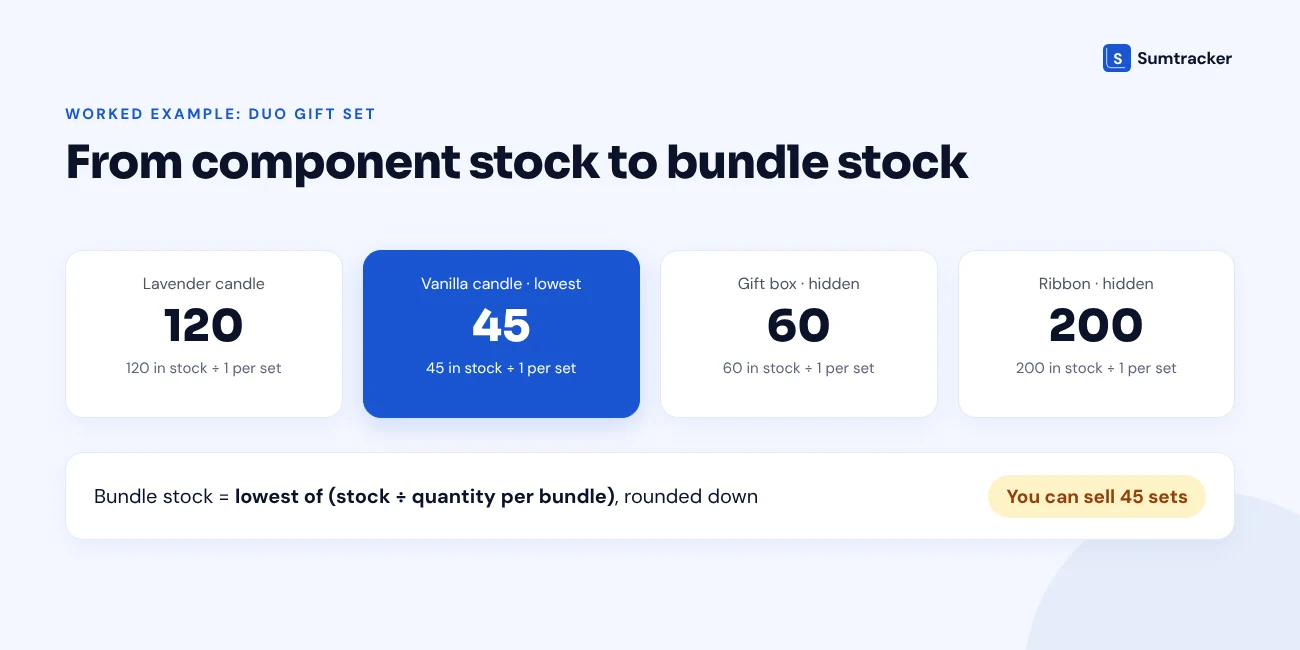
Now take a second bundle, the Lavender 3-pack. It needs three lavender candles, one gift box and two matchboxes.
- Lavender candles: 120 ÷ 3 = 40
- Gift boxes: 60 ÷ 1 = 60
- Matchboxes: 90 ÷ 2 = 45
The lowest number is 40. So the brand can sell 40 Lavender 3-packs.
Rule of thumb: Always round down. 2.9 bundles is 2 bundles. You can't ship most of a gift set.
Tip: Reorder the limiting component first. Buying more of anything else won't add a single bundle.
What Happens to Hidden Components on Amazon, Etsy and Other Channels
A hidden component stays hidden on every channel. But the bundle on each channel still depends on it.
This is where most setups break. Three things cause it.
- Shopify publishing works channel by channel. Removing a product from the Online Store does not remove it from your other channels. A component can be hidden on your website and still be for sale somewhere else.
- Each marketplace listing holds its own quantity. Your Amazon or Etsy bundle listing is a separate record. It can't see the components in your Shopify admin.
- Unlisted is not a fix here either. Shopify does not let you publish Unlisted products to third-party sales channels.
So the component does not need a listing on any channel. What it needs is one stock count that every bundle listing draws from.
The cost of getting this wrong is real. Amazon's seller cancellation rate policy asks sellers to keep their cancellation rate under 2.5%. It says a rate above that may lead to deactivation of seller-fulfilled offers. Amazon also notes that most pre-fulfillment cancellations happen because the product is out of stock.
Tip: After you hide a component, open its Publishing section once more. Check every channel in the list, not only the Online Store.
Rule of thumb: Use the same SKU for the same bundle on every channel. Matching SKUs are what let an inventory tool treat several listings as one product.
For the full multichannel setup, see how to sync bundle inventory across sales channels.
eBay has a similar rule. Sellers must keep their transaction defect rate at 2% or lower to meet the minimum standard, and cancelling an order because the item is out of stock counts as a defect. That is the policy on ebay.com, and thresholds can differ on other eBay sites, so check yours.
Returns, Shared Components and Other Edge Cases
The formula is simple. Real orders are not. These are the situations that throw hidden-component stock off.
Shared components
One component often sits inside several bundles.
Shared components mean one sale can change the stock of a bundle nobody bought.
Go back to the candle brand. Both bundles use lavender candles and gift boxes. Say the brand sells 20 Duo gift sets. Lavender candles drop from 120 to 100.
Now recheck the Lavender 3-pack. 100 ÷ 3 = 33, rounded down. Its stock fell from 40 to 33, and no one ordered a 3-pack.
EasyPlant faced this at scale. Over half of its products are bundles that pair a plant with a self-watering pot, and the same pots appear in many bundles. That made its stock sums complex and error-prone until bundle stock was calculated automatically. The EasyPlant case study has the details.
Rule of thumb: Set reorder points on components, never on bundles. The component is the thing you actually buy.
Our guide on managing the same product across multiple bundles covers this case in full.
Returns and other cases
In Shopify, you can inspect returned items and restock them once they arrive. With hidden components, the question is where that stock goes back.
Returns are also large enough to matter. The National Retail Federation and Happy Returns estimate that retailers will see $849.9 billion in returns in 2025, about 15.8% of annual sales. They also report that 9% of all returns are fraudulent. That is a US retail estimate, not a Shopify figure. But it is a good reason to inspect items before you restock them.
Tip: After any bundle return, look at the component counts, not the bundle count. The bundle number will correct itself once the components are right.
Where This Setup Breaks: Nested and Mix-and-Match Bundles
Hidden components work best with fixed bundles. A fixed bundle has the same parts in the same quantities on every order.
Three bundle types don't fit that pattern.
Nested bundles
Say you sell a 3-pack, and you also sell a gift box that includes that 3-pack. The gift box is a bundle with a bundle inside.
Many tools can't work this out. The fix is to flatten the outer bundle. List three candles in the gift box, not one 3-pack.
Mix-and-match bundles
A fixed mapping deducts the same parts on every order. With "pick any 3" bundles, that means the wrong items get deducted.
What matters is how the order arrives. If each chosen item shows as its own line item, stock comes off the right SKUs. If the order only shows the parent bundle, nothing knows what the customer picked.
Tip: Open a recent mix-and-match order in Shopify. If you can see each chosen item as a separate line, your stock can follow it. If you only see the bundle name, it can't.
Bundle apps handle this in different ways. For background on how bundling tools on Shopify have changed, listen to Bundles of Joy: The Shopify Bundle Episode from The Shopify App Show. It covers fixed bundles and the operational problems that show up as stores grow, including inventory.
How Sumtracker Manages Bundles Without Listing Components
Sumtracker supports both routes in this guide. A component can be an unpublished Shopify product, or it can exist only in Sumtracker.
Products you create in Sumtracker are not pushed to your store. Only the bundle itself has to be listed on your store, with a SKU. Sumtracker keeps inventory in sync across Shopify, Amazon, eBay, Etsy and Walmart in a single dashboard.
How to set it up
- Create the hidden components. In Sumtracker, add each one as a new product with a name and a SKU. Skip this step for components that are already Shopify products.
- Check the bundle product. It must exist on your store with a SKU, so it syncs into Sumtracker.
- Create the bundle. Go to Bundles Inventory, click Create Bundle, and choose the product.
- Add the components. Enter each component SKU and the quantity per bundle. Then save.
- Import in bulk if you have many. Use a CSV with three columns: SKU, Component SKU and Quantity. The free template above builds this file for you.
You can read the full setup in the Bundles in Sumtracker help article. Or try Sumtracker free for 14 days and map your first bundle.
FAQs
Can I sell bundles on Shopify without listing the components?
Yes. Only the bundle needs a listing. Each component needs a SKU and a stock count, either as an unpublished Shopify product or as a product in your inventory app.
What is the best way to hide a component product in Shopify?
Keep the product Active and remove it from all sales channels in the Publishing section. Avoid the Unlisted status for this. An unlisted product can still be bought through its direct link.
How is bundle inventory calculated?
Divide each component's stock by the quantity one bundle needs, and round down. The lowest result is the bundle's stock. With 45 vanilla candles and 60 gift boxes, a bundle that needs one of each has a stock of 45.
Do hidden components need a listing on Amazon or Etsy?
No. Only the bundle is listed on each channel. The components need one shared stock count that every bundle listing draws from.
Can one component be used in several bundles?
Yes. Keep in mind that every bundle using that component changes when its stock changes. Selling one bundle can lower the stock of another.
Does this setup work for mix-and-match bundles?
Only if each item the customer picks shows as its own line item on the order. If the order shows only the parent bundle, the right components can't be deducted.
Can a bundle component exist only in Sumtracker?
Yes. Products created in Sumtracker are not pushed to your store. You can use them as bundle components as long as the bundle itself is listed on your store with a SKU.
Conclusion
You don't need a product page for every part. You need a SKU and one accurate stock count for each component, and a bundle mapped to those components. Start with one question for each part: will we ever sell it alone? Then hide it the safe way, map each bundle once and let bundle stock calculate itself. Reorder the limiting component first.

Bhoomi writes about inventory management and multichannel selling at Sumtracker. Her focus is on solving real operational problems for Shopify, Amazon, and marketplace sellers through well-researched content. She covers everything from multi-location inventory syncing and stock error troubleshooting to replenishment planning and platform comparisons, turning complex eCommerce operations into clear, actionable guidance.
LinkedInRelated Articles
Tool and strategies modern teams need to help their companies grow.


Ready to Simplify Your Inventory Management?
Join hundreds of e-commerce merchants who rely on Sumtracker to save time, eliminate errors, and grow their business.