.svg)
How to Prevent Out-of-Stocks on Shopify: 7 Proven Strategies


Are you here because you're tired of seeing your inventory go out of stock and finding it out after you start losing customers?
I know it must be difficult for you as a merchant to find out that you no longer have the product in stock that your customers wanted to buy.
Because of this, you lost the immediate sale and also risk losing future business if shoppers decide to buy from a competitor instead.
And you're certainly not the only one facing this challenge.
According to research, 51% of businesses cited out-of-stocks as their biggest fulfillment challenge, making it one of the most common operational issues for ecommerce brands.
Maybe you thought you had enough inventory on hand, only to realize your stock levels were inaccurate. Or perhaps demand increased faster than expected, and your inventory couldn't keep up.
If all of this sounds familiar to you, then you're at the right place.
The good news is that most stockouts are preventable.
With the right inventory planning, forecasting, and replenishment processes, you can significantly reduce the risk of running out of stock while maintaining healthy inventory levels.
In this guide, you'll learn 7 proven strategies to prevent out-of-stocks on Shopify, common mistakes that lead to inventory shortages, and practical ways to keep products available across all your sales channels.
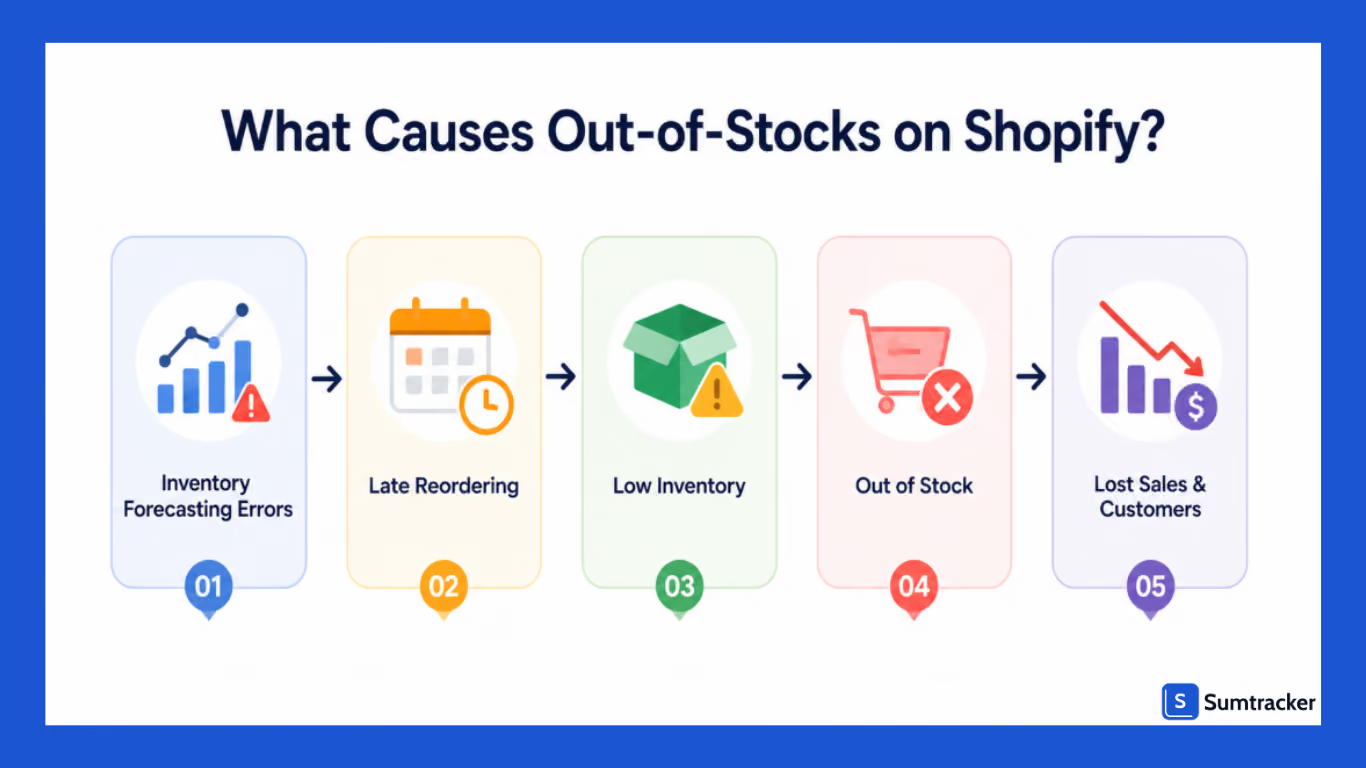
What Causes Out-of-Stocks on Shopify?
An out-of-stock situation occurs when customer demand exceeds the inventory available for sale.
While many merchants assume stockouts happen because they didn't order enough inventory, the reality is usually far different than what you think.
Some of the common causes are:
- Inaccurate inventory counts
- Poor demand forecasting
- Long supplier lead times
- Unexpected sales spikes
- Inventory syncing issues across channels
- Delayed purchase orders
- Lack of visibility into low-stock products
For example, if you are selling on multiple channels at once, like Shopify, Amazon, and Etsy, it may appear that you have inventory available on one channel even after it has already sold elsewhere.
Without proper inventory sync, overselling and stockouts become inevitable.
Why This Matters
This matters because these stockouts impact you more than just a lost sale.
It can lead to:
- Lost customer trust
- Lower repeat purchase rates
- Reduced advertising ROI
- Poor customer experience
- Increased support tickets
- Missed opportunities during peak sales periods
For growing brands, preventing stockouts becomes even more critical as SKU counts, suppliers, and sales channels increase.
Stockouts don't just affect immediate revenue; they can also impact future purchasing behavior.
"According to industry research, 69% of online shoppers will abandon a purchase entirely and shop with a competitor when they encounter an out-of-stock item. For first-time visitors, the damage is even worse: 42% are unlikely to return after hitting a stockout."
— Eliza, Content Author, PreProduct
For Shopify merchants investing in SEO, paid advertising, and customer acquisition, losing a customer because a product is unavailable can be significantly more expensive than the missed order itself.
7 Strategies to Prevent Stockouts on Shopify
Strategy #1: Set Reorder Points for Every SKU
If you are one of those Shopify merchants who reorder their inventory based on their gut feeling .
The problem is that this gut feeling doesn't scale.
A reorder point is the inventory level at which you should place a new purchase order to avoid running out of stock before replenishment arrives.
Example
Consider a Shopify apparel brand selling a best-selling hoodie.
- Average daily sales: 10 units
- Supplier lead time: 30 days
- Safety stock: 100 units
Reorder Point:
(10 × 30) + 100 = 400 units
Once inventory reaches 400 units, a new purchase order should be created.
Without a reorder point, your team may wait too long to reorder and face stockouts before new inventory arrives.
Don't Ignore Product Variants
If your product inventory comes in different sizes, colors, or styles, then setting the same reorder point for all doesn’t really make any sense.
If one variant goes out of stock, your total product inventory might still look available.
Set individual reorder points for different variants. With this, you can get better visibility to fast-moving variants.
Strategy #2: Use Inventory Forecasting to Predict Demand
Looking at current inventory levels alone doesn't tell you what you'll need next month.
That's where inventory forecasting becomes essential.
Inventory forecasting uses historical data, seasonality, growth trends, and supplier lead times to estimate future demand.
Instead of reacting after inventory runs low, forecasting helps you plan ahead.
Why Forecasting Matters
Imagine a Shopify store selling apparel products in New York.
Demand may surge during the summer but decline during the winter.
If purchase decisions are based only on recent sales, inventory planning becomes inaccurate.
With the help of forecasting, merchants can:
- Prepare for seasonal demand.
- Anticipate growth trends
- Reduce emergency reorders
- Improve cash flow management.
- Maintain better product availability.
Plan Inventory Around Your Cash Flow
During peak seasons such as Black Friday, holidays, etc., planning inventory around cash flow is very important.
Without proper planning, you might end up spending too much cash if you create large orders of a single product.
Instead, estimate purchasing costs early and speed inventory purchases where possible instead of placing one large order.
This helps maintain healthier cash flow while ensuring inventory is available when customer demand increases.
Real World Example:
Lions Pride, a retailer serving Penn State University alumni, students, and fans, faced a common inventory challenge. Their online store sold a mix of replenishable products, seasonal collections, and limited-edition merchandise, but they initially treated every out-of-stock item the same way.
Instead of using a one-size-fits-all approach, they categorized products based on their replenishment strategy.
Products with confirmed restocks were made available for pre-orders, replenishable items allowed customers to sign up for back-in-stock notifications, and discontinued products simply remained marked as sold out.
This helped the business capture demand for products that were returning while avoiding false expectations for items that wouldn't be restocked.
Key takeaway: Not every out-of-stock product should be managed the same way. Classifying products based on whether they're replenishable, seasonal, or limited-run allows merchants to forecast inventory more accurately, improve customer communication, and recover sales that might otherwise be lost.
Read the full case study here.
Strategy #3: Enable Low Stock Alerts
Low stock alerts act as an early warning system for inventory management.
Instead of manually checking inventory levels every day, merchants receive notifications when inventory falls below predefined thresholds.
This allows teams to take action before products become unavailable.
Benefits of Low Stock Alerts
- Faster replenishment decisions
- Reduced manual monitoring
- Better visibility across SKUs
- Improved inventory planning
Low stock alerts become especially valuable when managing hundreds or thousands of products.
Without automated alerts, critical products can easily slip through the cracks.
Best Practice
Set different thresholds for different products.
Fast-moving products should trigger alerts earlier than slow-moving items.
A one-size-fits-all approach often results in missed opportunities and unnecessary inventory purchases.
Strategy #4: Track Inventory Across All Sales Channels
Many Shopify brands don't sell exclusively on Shopify.
They also sell through:
- Amazon
- Etsy
- Walmart
- eBay
- Retail stores
- Wholesale channels
The more channels you add, the more difficult it becomes to manage them.
Using an inventory management software like Sumtracker helps in tracking inventory across channels in a single dashboard.
The Challenge
Imagine you have 20 units available.
A customer buys five units on Shopify.
Another customer purchases ten units on Amazon.
If inventory isn't synced in real time, both channels may continue showing incorrect availability.
This often leads to:
- Overselling
- Order cancellations
- Negative reviews
- Stockouts
Why Multi-Channel Inventory Sync Matters
Accurate inventory synchronization ensures inventory updates automatically whenever a sale occurs.
As sales channels increase, real-time inventory visibility becomes a requirement rather than a luxury.
Strategy #5: Improve Supplier and Purchase Order Management
Even accurate forecasts won't help if purchase orders are delayed.
Supplier management plays a major role in preventing stockouts.
Merchants should track:
- Supplier lead times
- Supplier reliability
- Purchase order status
- Expected delivery dates
A Common Problem
Many businesses know what inventory they need but fail to place purchase orders on time.
The result is predictable:
Inventory reaches critical levels before replenishment arrives.
As Chris Lang, Founder of Fresh Chili, puts it, "Cash conversion cycle... it makes or breaks."
Managing suppliers isn't just about placing purchase orders on time; it's also about maintaining a healthy cash conversion cycle.
Even if you know exactly what inventory to replenish, delays caused by cash flow constraints can leave shelves empty and increase the risk of stockouts.
Planning inventory purchases alongside your cash flow helps ensure products are available when customers need them.
Strategy #6: Prioritize Your Best-Selling Products
Not every SKU deserves the same level of attention.
Some products generate a disproportionate share of revenue.
These products should receive the highest inventory planning priority.
Use ABC Analysis
ABC analysis groups products into categories based on business importance.
Why This Matters
A stockout on a slow-moving accessory may have little impact.
A stockout on your top-selling product could significantly affect revenue and customer satisfaction.
Protecting high-performing products with higher safety stock levels often delivers the greatest business impact.
Strategy #7: Conduct Regular Inventory Audits
Inventory records are only valuable if they're accurate.
Over time, discrepancies occur due to:
- Damaged inventory
- Returns
- Human error
- Receiving mistakes
- Inventory theft
Regular inventory audits help identify and correct these issues.
Types of Inventory Audits
Full Physical Counts
Count all inventory periodically.
Cycle Counts
Count a small subset of inventory regularly throughout the year.
Many growing Shopify brands prefer cycle counting because it minimizes operational disruption.
Why Audits Matter
Accurate inventory data improves:
- Forecasting accuracy
- Reorder decisions
- Purchase planning
- Inventory reporting
Without accurate sales data, every inventory decision becomes less reliable.
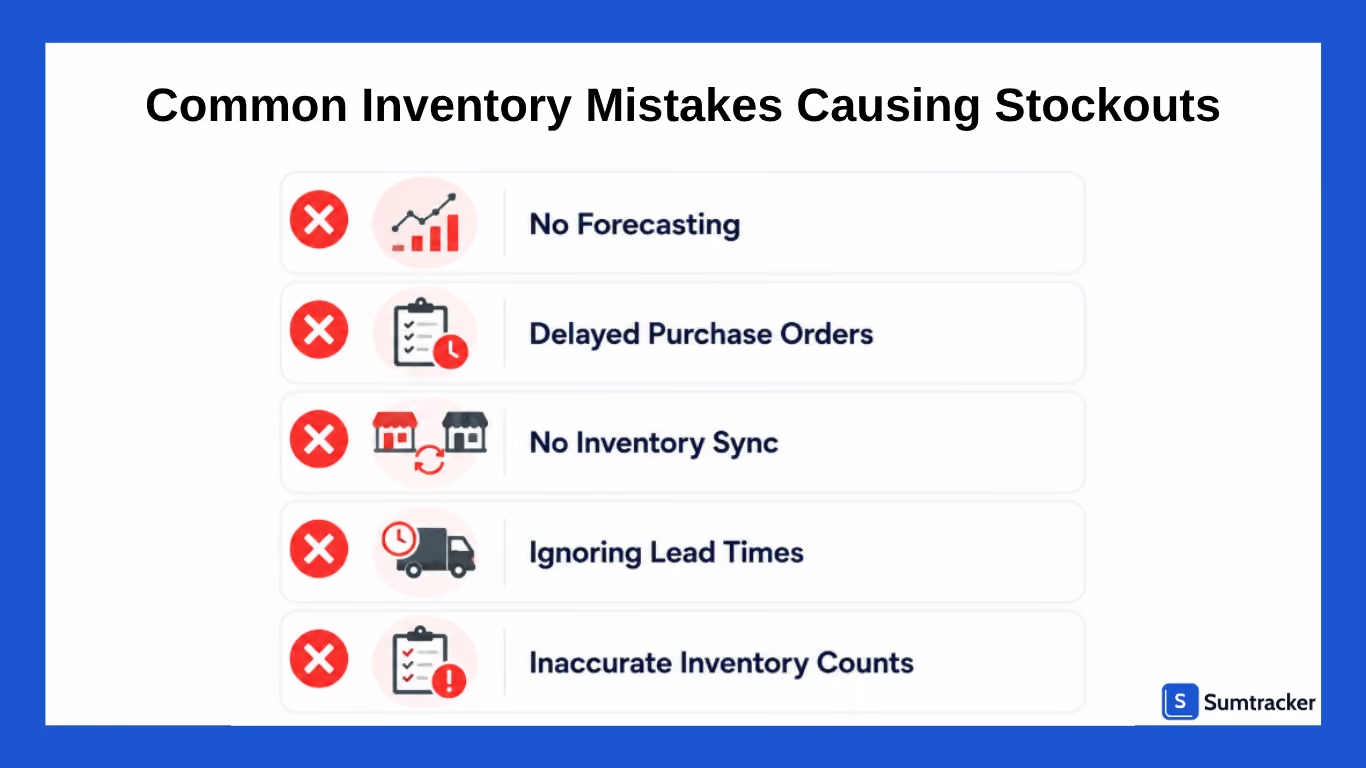
Common Inventory Mistakes Causing Shopify Stockouts
Stockouts aren't really caused by sudden spikes in demand. They're in reality the result of preventable inventory management mistakes that build up over time.
Finding out these issues early can help you avoid lost sales and frustrated customers.
Reordering Based on Gut Feeling
If you are relying on intuition when deciding when to replenish inventory, then you are doing it wrong.
This may work when you're managing a small catalog, but in the long term it becomes unreliable as order volume grows.
Reorder decisions should always be based on your sales data, supplier lead times, and inventory trends, and never on guesswork.
Ignoring Lead Times
A product may appear well-stocked today, but if your supplier takes 30 days to deliver new inventory, waiting until stock is low can create a stockout before replenishment arrives.
Lead times should always be factored into purchasing decisions.
Ignoring Seasonal Demand
Holidays, promotions, product launches, and seasonal trends impact demand. Merchants who forecast inventory based only on recent sales often find themselves understocked during peak periods.
Poor Inventory Sync
Selling on Shopify, Amazon, Etsy, Walmart, or other marketplaces without real-time inventory sync can lead to overselling. If inventory isn't updated immediately after a sale, customers may purchase products that are no longer available.
Poor Promotion Planning
Marketing campaigns can drive significant increases in sales. Launching a promotion without verifying available inventory often results in products selling out sooner than expected. Inventory planning should always be part of campaign preparation.
Delaying Purchase Orders
Some merchants wait until inventory reaches critically low levels before placing a purchase order. This leaves little room for supplier delays, shipping disruptions, or unexpected demand increases. Creating purchase orders earlier provides a buffer against uncertainty.
Inaccurate Inventory Data
If inventory counts are inaccurate due to receiving errors, damaged stock, returns, or missing products, forecasting and replenishment become much less reliable. Regular inventory audits help ensure inventory records remain accurate.
Frequently Asked Questions
How can I prevent products from going out of stock on Shopify?
The best way to prevent stockouts on Shopify is to use inventory forecasting, set reorder points, enable low-stock alerts, track supplier lead times, and regularly review inventory levels. Merchants selling across multiple channels should also use inventory sync tools to maintain accurate stock counts.
What causes stockout issues on Shopify?
Stockouts are commonly caused by inaccurate demand forecasting, delayed purchase orders, long supplier lead times, inventory tracking errors, and poor inventory visibility across sales channels. Unexpected demand spikes and seasonal fluctuations can also contribute to inventory shortages.
Does Shopify have built-in tools to prevent stockouts?
Shopify provides basic inventory tracking and inventory level notifications. However, merchants with larger catalogs or multi-channel operations often require additional tools for inventory forecasting, purchase order management, low-stock alerts, and inventory synchronization across platforms.
What is the difference between a reorder point and safety stock?
A reorder point is the inventory level that triggers a new purchase order, while safety stock is the extra inventory kept on hand to protect against unexpected demand increases or supplier delays. Together, they help reduce the risk of stockouts.
How can I avoid stockouts when selling across multiple channels?
Use real-time inventory synchronization across all your sales channels. When inventory updates automatically after every sale, you can reduce overselling, maintain accurate stock counts, and prevent unexpected stockouts.
Conclusion
Stockouts rarely happen because of a single mistake.
They're usually the result of forecasting gaps, delayed purchasing decisions, inaccurate inventory data, or poor visibility across sales channels.
The most successful Shopify brands prevent stockouts by combining strong inventory processes with the right technology.
By implementing reorder points, forecasting demand, enabling low stock alerts, improving supplier management, syncing inventory across channels, and auditing inventory regularly, you can maintain healthier inventory levels and protect revenue as your business grows.
If you're looking for a simpler way to forecast demand, manage purchase orders, track inventory, and prevent stockouts across multiple sales channels, Sumtracker can help streamline the entire process.

Bhoomi writes about inventory management and multichannel selling at Sumtracker. Her focus is on solving real operational problems for Shopify, Amazon, and marketplace sellers through well-researched content. She covers everything from multi-location inventory syncing and stock error troubleshooting to replenishment planning and platform comparisons, turning complex eCommerce operations into clear, actionable guidance.
LinkedInRelated Articles
Tool and strategies modern teams need to help their companies grow.
.avif)
![10 Best Shopify Inventory Sync Tools for 2026 [Tested & Reviewed]](https://cdn.prod.website-files.com/67907f49647e48895e5dc266/6a8ec5f1a733015478e1a0e3_Screenshot%202026-08-26%20at%204.17.26%E2%80%AFPM.png.avif)

Ready to Simplify Your Inventory Management?
Join hundreds of e-commerce merchants who rely on Sumtracker to save time, eliminate errors, and grow their business.
