Inventory Management for Product Launches: A Complete Guide (2026)


Inventory management for a product launch means deciding how much of a new product to buy, when to buy it and where to hold it before you have any sales data.
- Forecast a range: build low, base and high scenarios from an analog product, audience size, or pre-order and waitlist signals.
- Size the order: (demand in the cover period + demand in the lead time) × (1 + buffer), minus stock on hand or on order, rounded up to the supplier's MOQ.
- Plan backward: start from launch day and count back through shipping, production and sampling to find your real order deadline.
- Watch days of cover in launch week: if cover is shorter than your reorder lead time, reorder now and switch the page to a waitlist or pre-order.
- After 30 days: calculate sell-through and forecast accuracy, then set a reorder point from real sales.
A product launch is the one time you have to buy inventory without knowing how fast it will sell.
Order too little and you sell out in week one, just as ads and emails are driving traffic.
Order too much and cash sits on a shelf for months.
This is a common problem, not a rare one.
In Netstock's 2026 Benchmark Report, nearly every small and mid-sized business surveyed had launched new products or expanded a product line in the past year. Close to three-quarters named lead-time variability as a planning challenge, and 60% named minimum order quantities (MOQs).
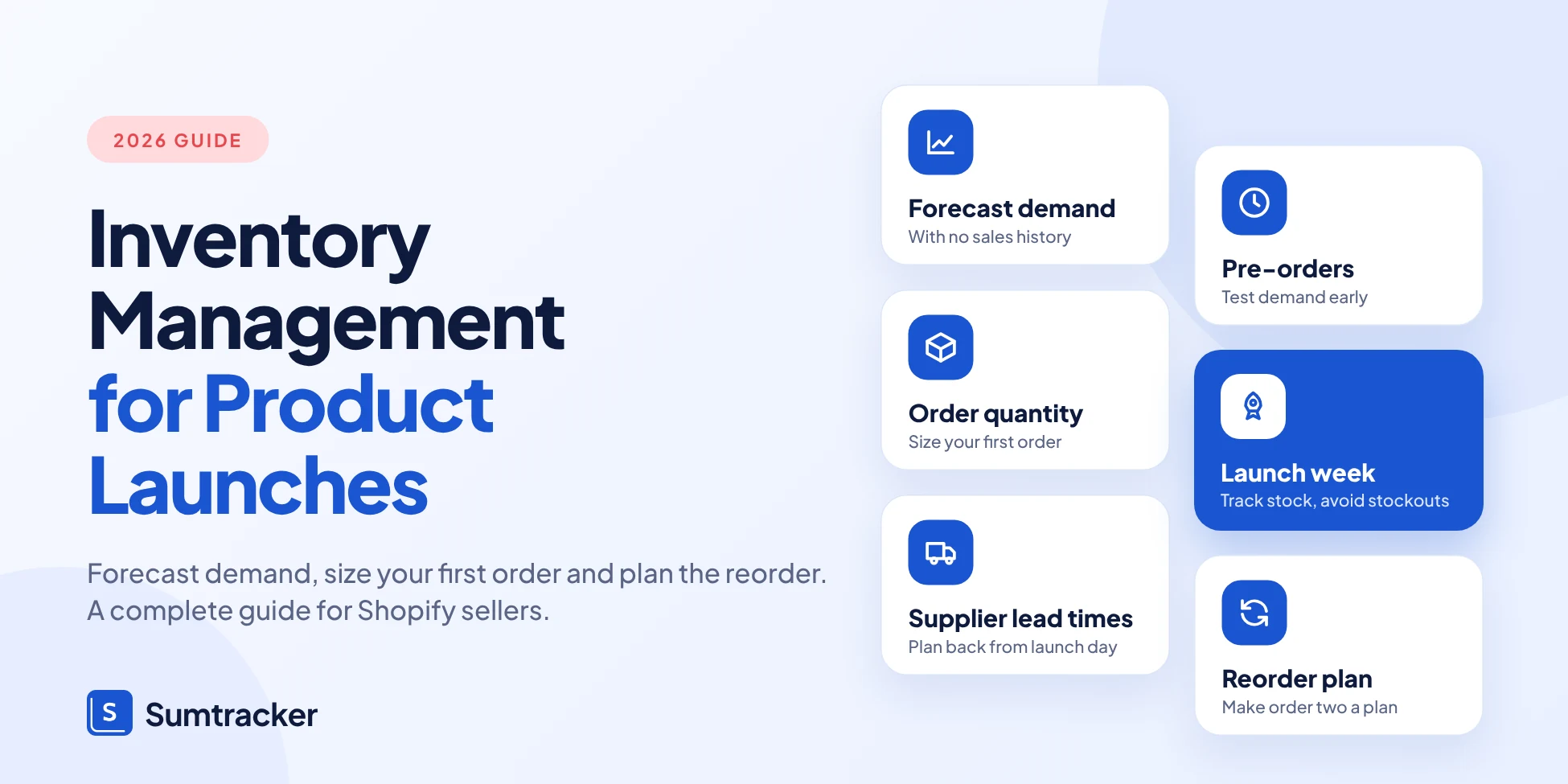
This guide walks you through the whole launch, in order: forecasting with no historical sales data, deciding how much to order, planning variants, working back from launch day, de-risking with pre-orders, preparing your channels, running launch week, and learning from the results.

What Is Inventory Management for Product Launches?
Inventory management for product launches is the process of deciding how much of a new product to buy, when to buy it, and where to hold it, before you have any real sales data. It covers everything from the first demand estimate to your first reorder.
It is different from everyday inventory management in one way: you are working from estimates, not history. Regular products let you look at last quarter's sales.
A launch product gives you nothing, so you replace history with proxies (similar products, audience size, pre-orders) and you plan for a wide range of outcomes.
A launch has three phases, and each one needs different decisions:
The Shopify numbers you need to read
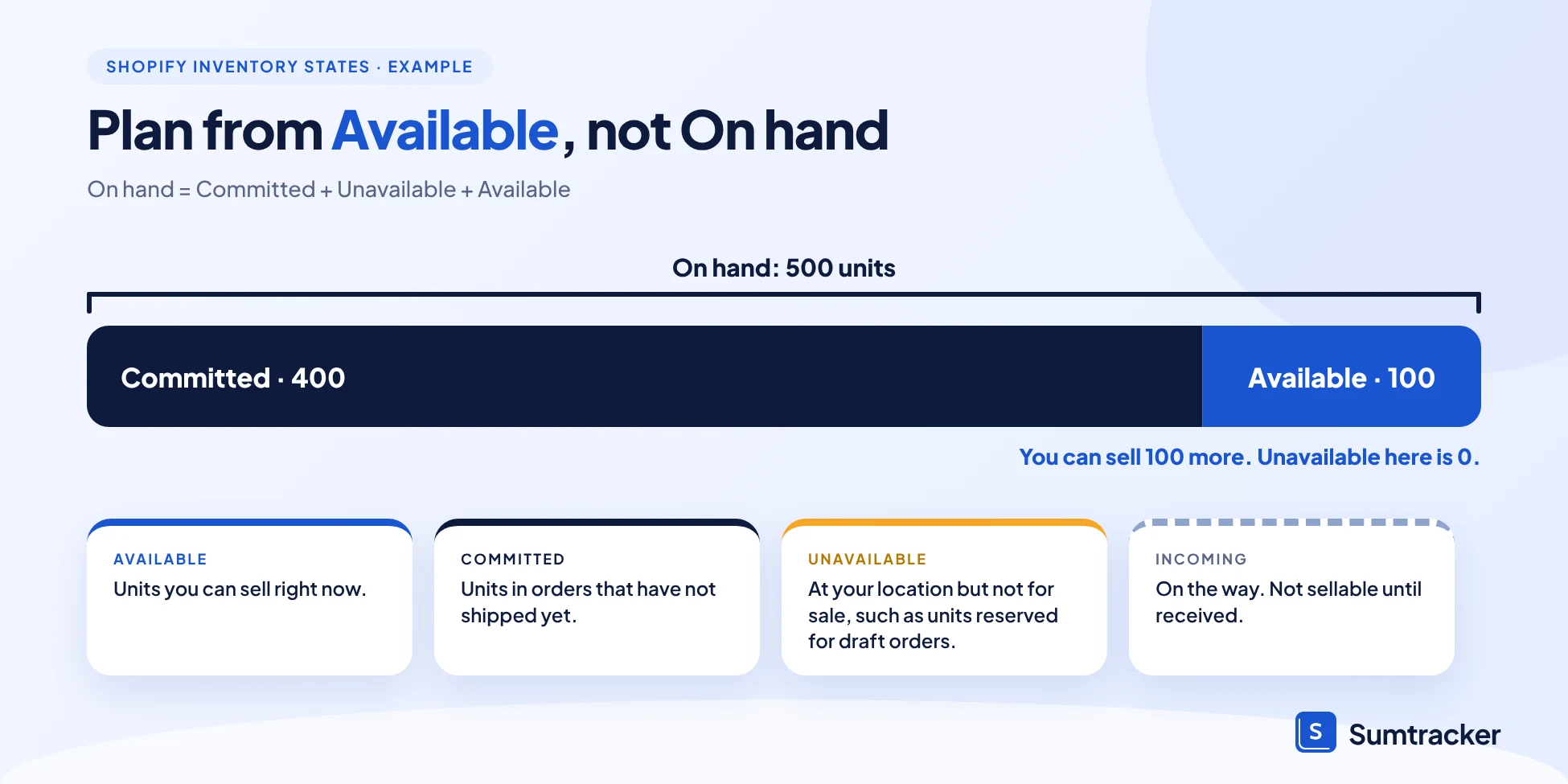
On Shopify, every product at a location has inventory states. Knowing them stops you from misreading your own stock on launch day.
For launches, the one to watch is Available, not On hand. A launch day with 500 units on hand and 400 committed means you can only sell 100 more.
How to Forecast Demand for a New Product With No Sales History
You forecast a new product the same way you would guess how many guests will come to a party: look at similar past events, count who you invited, and plan for a range.
There is no exact answer, so aim for a number you can defend and a plan for being wrong.
Four ways to estimate launch demand
Most stores use the first two together. Start with an analog product, then adjust up or down for how your audience and ad budget differ this time.
A worked example
Throughout this guide we use one made-up product: a ceramic mug set for a store with 4,000 email subscribers. All numbers are illustrative, not benchmarks.
Say your last new product sold to about 2% of your email list in its first 30 days. Apply that to the new launch, then build three scenarios:
The gap between low and high is 4×. That is normal for a launch, and it is why you plan a range. In the next section we use the base case to size the order.
Tip 1: Write down your assumptions next to the forecast (list size, conversion rate, ad spend). When results come in, you can see which assumption was wrong instead of just seeing that the number was off.
Build the audience before the product
If you have no list and no analog, demand has to be earned before you order. In a Shopify Masters episode, Sell Out Your First Batch in 30 Minutes by Building an Audience With No Product to Sell, the founder of COTTO describes selling out her first production run in 30 minutes after building an audience first.
The lesson for forecasting: a growing waitlist is data, and it costs far less than leftover stock.
How Much Inventory Do You Need for a Product Launch?
Order enough to cover demand until your second order can arrive, plus a buffer for being wrong, then round up to what your supplier allows. That is the whole idea. The formula below turns it into a number.
Then round up to your supplier's MOQ (minimum order quantity).
Using our mug set example
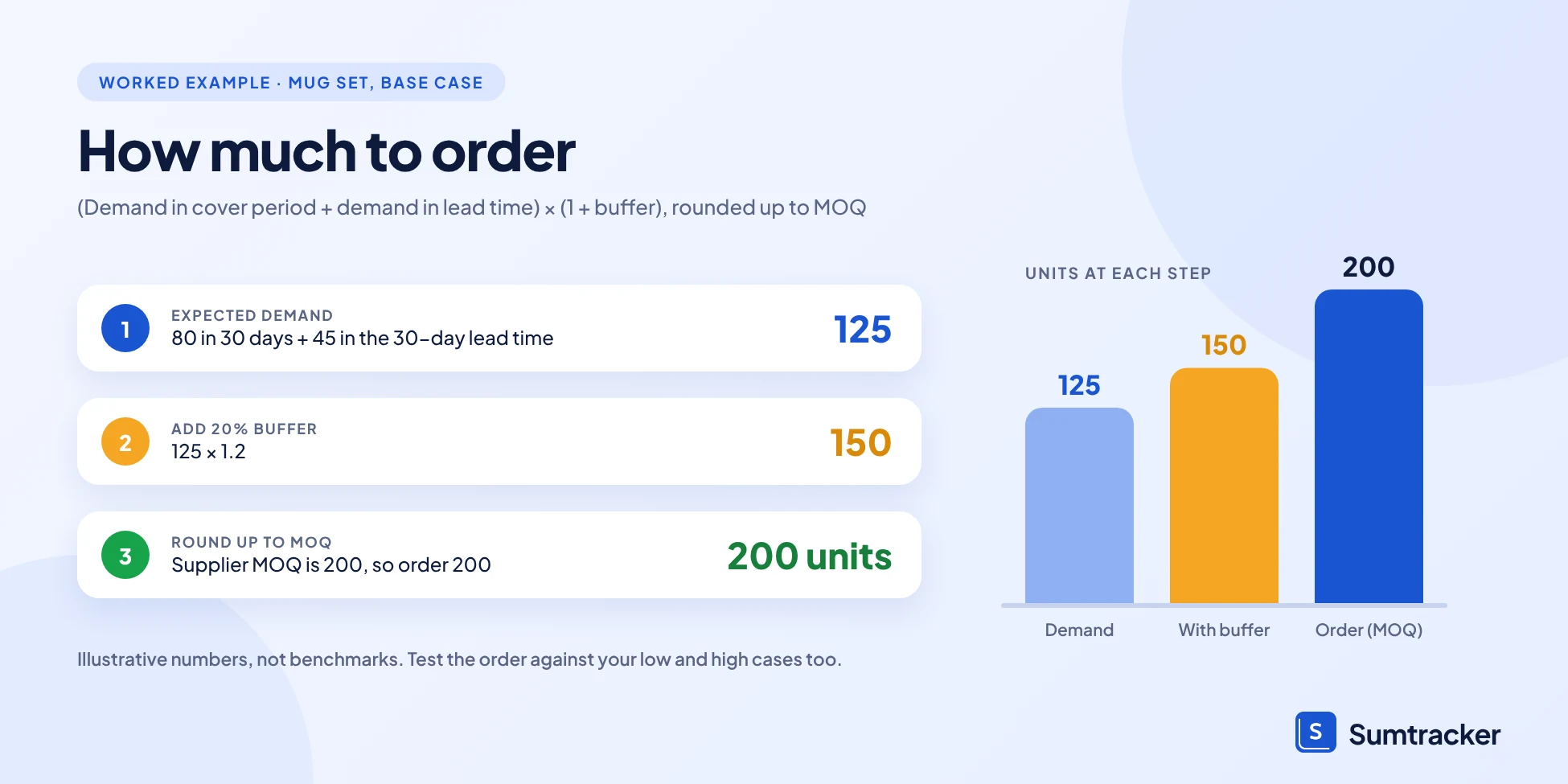
Assume these illustrative inputs:
- Base forecast: 80 units in the first 30 days (from the last section)
- After launch, sales settle at about 1.5 units a day
- Reorder lead time: 30 days (the time from placing a second order to having it on your shelf)
- Buffer: 20%
- Nothing on hand or on order
- Supplier MOQ: 200 units
The MOQ is higher than the formula, so you order 200. That is fine, but check what happens in each scenario before you commit:
Tip 2: Always run the order against your low and high scenarios, not just the base. If the low case leaves you with more than 4–6 months of stock, ask the supplier for a smaller first run or fewer variants.
Set your reorder point before you launch
A reorder point tells you the stock level at which to place the next order. The standard formula:
In our example, at 1.5 units a day, a 30-day lead time and 10 days of safety stock (15 units): (1.5 × 30) + 15 = 60 units.
When available stock hits 60, you reorder. In the high-demand case you would cross that level in the last week of the first month (after about 140 units sold), which is why the plan should say who decides, and how fast, before the launch starts.
If you do not want to do this by hand, Sumtracker's purchase order tools let you raise orders against suppliers and track what is incoming, so the reorder point has an action behind it.
Tip 3: Treat the MOQ as a cost of the deal, not a fixed rule. Ask for a lower first MOQ, a split production run, or mixed variants within one MOQ. Many suppliers will trade price per unit for a smaller first order.
SKU and Variant Planning: Launch With Depth, Not Breadth
Your order forecast is for the product as a whole. Customers buy a specific size or color, so the real risk is that you run out of one variant while another sits untouched. The more variants you launch, the thinner each one is spread.
Here is what that looks like with our 200-unit mug set:
The focused plan gives up some choice at launch to get stable stock. You can add variants in a second drop once real sales tell you which ones people want.
How to split units across variants
- Start from your analog product. If your last launch sold 55% in the first color, 30% in the second and 15% in the third, use those shares as your first guess.
- No analog? Split by what you can measure. Use a pre-launch poll, which color your audience clicked on in emails, or the best-selling variant of competing products.
- Hold some back. Keep 10–20% of units unassigned if the supplier allows it (for example, undyed or unpacked), or push the least certain variants to the second run.
Here is the split for the mug set, using an illustrative 55/45 share of 200 units:
Notice that the base case sells less than half of each variant in the first month. That leftover is your safety margin for the second month, not waste.
Tip 4: Give every variant its own SKU from day one, with a consistent naming pattern (for example, MUG-SAGE-S). Clean SKUs make launch reports readable and prevent mix-ups when you add variants later.
Bundles and kits
If your launch includes a bundle (say, the mug set plus a gift box), plan the components, not just the bundle. Selling 50 bundles uses 50 mug sets and 50 boxes, and the box may be the item that runs out.
Sumtracker's Replenishment guide notes that bundles should be set up before past sales are synced, because replenishment is calculated on the components.
Working Backward From Launch Day: Supplier Lead Times, MOQs, and Production
Most launch delays are not marketing problems. They are calendar problems: someone picked a launch date first and only then asked the supplier how long production takes. Fix that by starting at launch day and counting backward.
Netstock's 2026 benchmark found that 63% of SMBs struggle with long lead times. Both belong on your launch calendar as hard constraints, not footnotes.
A backward launch calendar
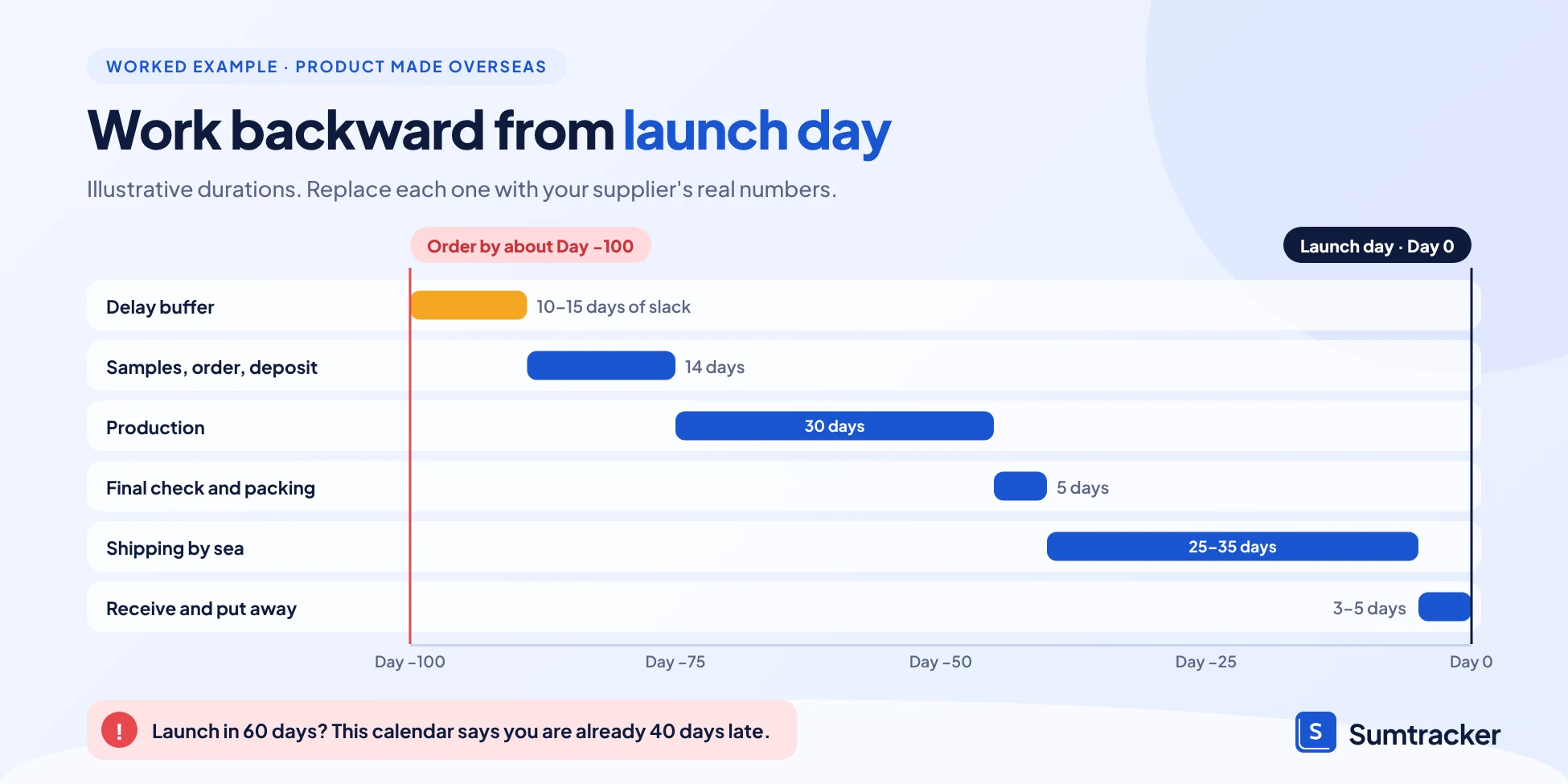
Here is an illustrative timeline for a product made overseas. Replace each duration with your own supplier's real numbers.
In this example you must place the order about 100 days before launch. If a marketing plan says "we launch in 60 days," the calendar says you are already late.
Tip 5: Add a delay buffer of 10–20% of your total lead time and treat the result as your real order deadline. Suppliers slip, ports get busy and samples need a second round.
Three questions to ask every supplier
- What is your lead time, from approved sample to goods on my dock? Ask for the last three orders, not the quote.
- What is the MOQ, and does it apply per product or per variant? A per-variant MOQ changes your variant plan.
- Can you do a smaller first run, or split the delivery? Splitting lets you receive some stock for launch and the rest later.
Why "anchor dates" help
In The Product Boss podcast, the host explains backward planning with anchor dates: fix the dates that cannot move (launch day, a big event, a peak season) and plan production and ordering backward from them. It works for a first launch for the same reason it works for a recurring one: it replaces reacting with a calendar.
Lock your first MOQ carefully
The Make it British podcast episode SOS: Why Ordering Too Much Stock is a Costly Mistake covers why a big first order from a manufacturer is risky for a new product, and how to treat the first production run as a test.
If the MOQ forces a large first order, look at whether a smaller run, fewer variants or a pre-order can bring your exposure down before you pay.
Once the order is placed, record it as a purchase order so the incoming quantity and expected date are visible to everyone. Sumtracker's purchase orders let you do that and receive stock against the order when it arrives.
Pre-Orders, Waitlists, and Phased Rollouts: De-Risking Launch Inventory
These three tools all do the same job: they let real customers tell you how much to make before you commit all your cash. Each one trades speed for certainty.
Pre-orders on Shopify
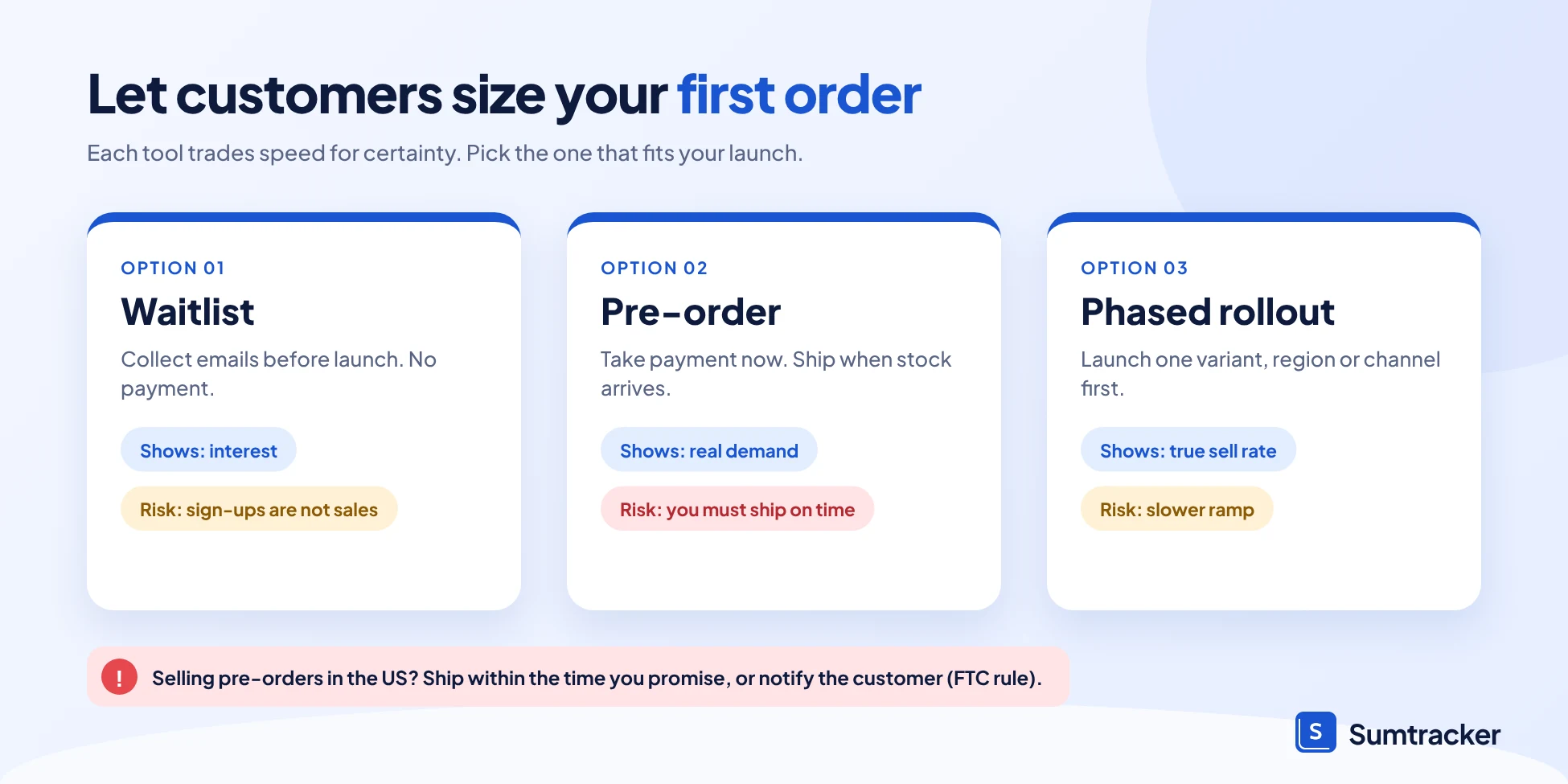
Shopify's built-in setting, Continue selling when out of stock, lets a product keep selling after it reaches zero. It needs Track quantity turned on for the product, and it does not apply in Shopify POS. It also has no cap, so you cannot say "only take 300 pre-orders" with the setting alone.
For limits, pre-order messaging, delivery dates or partial payment, most stores use a pre-order app. Sumtracker has a full walkthrough in managing pre-orders in Shopify, so we will not repeat it here.
The point for a launch is simple: a pre-order count is a forecast you can trust more than any spreadsheet guess. If 300 people pay before production, you know you need at least 300 units, plus some buffer for walk-up demand.
Tip 6: Set a pre-order cap before you open sales, equal to what your supplier can deliver by your promised date. Closing at the cap is better than a refund email.
The FTC rule you cannot ignore
If you sell to customers in the United States, the FTC's Mail, Internet, or Telephone Order Merchandise Rule applies to pre-orders. In plain terms:
- You need a reasonable basis to believe you can ship within the time you advertise, or within 30 days if you state no time.
- If you cannot, you must notify the customer, give a revised date and explain their right to cancel for a full refund.
- If the new date is more than 30 days away or unknown, the order is cancelled unless the customer says otherwise.
This is general information, not legal advice. Check the FTC's guide, and the rules in your own country, before you launch a pre-order.
Case study: a brand built on pre-orders
The French clothing brand Asphalte calls preordering its "secret sauce." In its own explanation, the brand says pre-ordering is at the center of its model, because it lets the brand make quality clothes at accessible prices.
The takeaway for a launch is that pre-orders work best when customers know exactly what they are waiting for and when it will arrive.
Phased rollouts
A phased rollout limits risk by staging the launch. For example, launch your best-guess variant first, hold the rest, and release new ones as the first batch shows what sells. Or launch to your email list first, then to paid ads once you know you have stock. The cost is a slower ramp, which is usually cheaper than a stockout or a markdown.
To hear how pre-orders and back-in-stock alerts work when demand outruns supply, listen to the eCommerce Fastlane episode Pre-Orders And Back In Stock Alerts: Restocked 500, Emailed 10,000.
Getting Warehouses, 3PLs, and Sales Channels Launch-Ready
Stock that has arrived is not the same as stock that can be sold. Between the supplier's truck and a customer's cart, someone has to receive it, count it, shelve it and make sure every sales channel shows the right number. Do this checking one to two weeks before launch, not on launch morning.
Launch-readiness checklist
Tip 7: Place one test order on every sales channel the day before launch and watch the stock count change. It takes 15 minutes and catches sync problems that would otherwise show up as oversells.
Decide who gets stock first
If you sell on more than one channel, you have to decide how to share a limited launch quantity. Three common choices:
- Pool it. All channels draw from one shared count. Simple, but one fast channel can drain the rest.
- Reserve a share. Set aside a number of units for each channel or region, such as 70% to your store and 30% to a marketplace.
- Store first. Sell on your own store for the first days, then open other channels once you know your sell rate.
The store-first option is common for launches because your own store has the best margins and the cleanest customer data. The right choice depends on your channels and your supplier plan.
Keep every channel in sync
Overselling during a launch usually comes from two systems showing different numbers for a few minutes. Sumtracker keeps one inventory count across your stores, marketplaces, warehouses and 3PLs, so a sale on one channel updates the others. Learn more on the Sumtracker site.
Launch Week: Real-Time Tracking and Handling Stockouts or Overstock
In launch week, you are checking one number every day: days of cover, which is how many days your available stock will last at the current sell rate.
Compare days of cover with your reorder lead time. If cover is shorter than the lead time, you will stock out before a new order can arrive, and the only question left is how long the gap will be.
A simple launch-week dashboard
Track these five numbers daily (twice daily on launch day):
In Sumtracker, the Replenishment dashboard shows products that are stocked out, due for reorder or due soon, broken down by location, plus incoming purchase orders, so those questions are on one screen.
If you are selling faster than planned
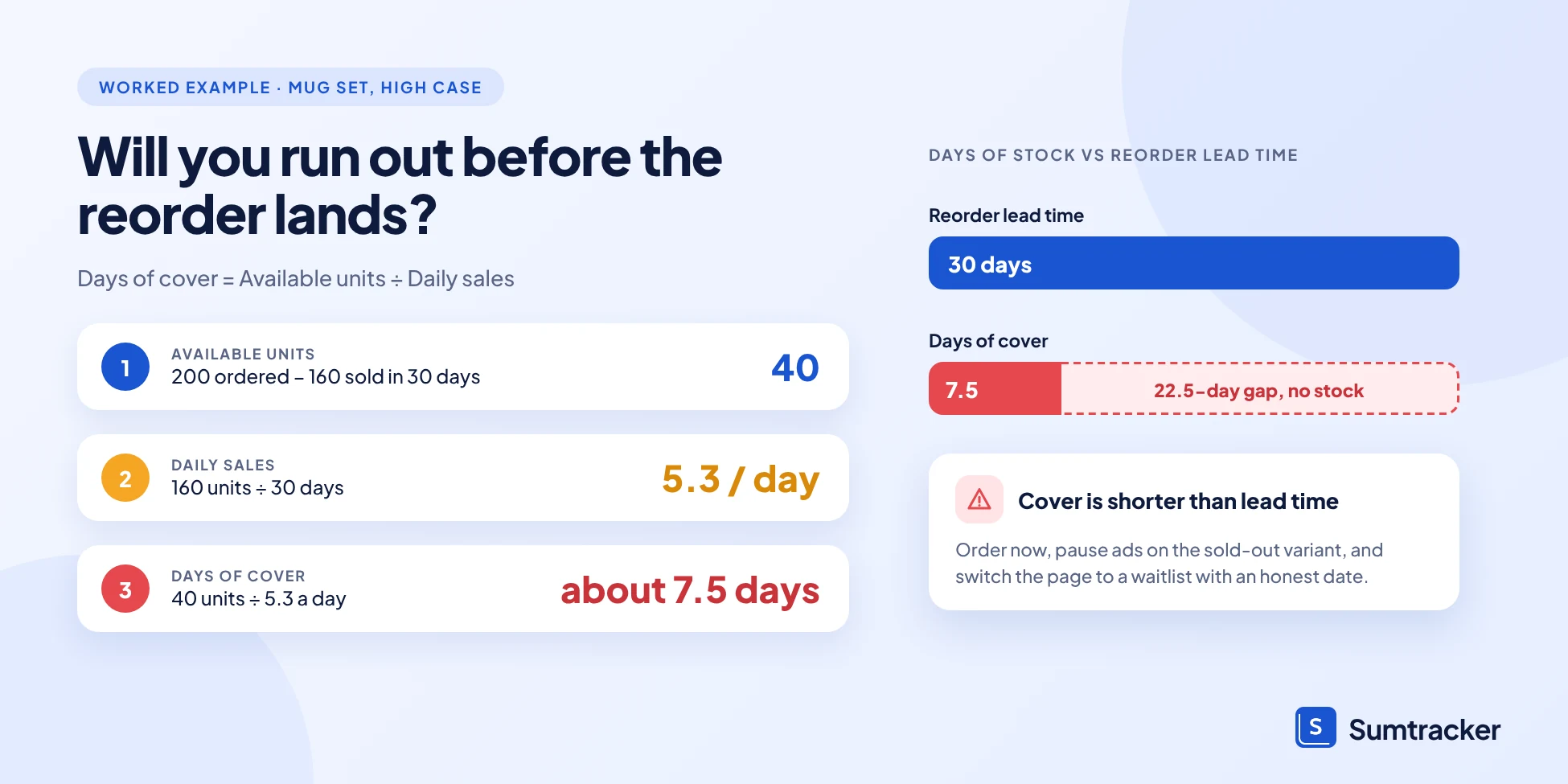
Using the high scenario from our mug example (160 units in 30 days, 5.3 a day, 200 units ordered), you would have 40 units left around day 30 and about 7.5 days of cover. Here is what to do:
- Place the reorder now. Do not wait for the reorder point to be perfect. The lead time clock only starts when you order.
- Slow the demand you control. Pause paid ads for the fastest variant, or cap discounts, so you do not burn money driving traffic to a sold-out page.
- Switch the product page to a waitlist or pre-order with an honest ship date (and follow the FTC rule above if you sell in the US).
- Tell customers the truth. A clear "back in stock on this date" message loses fewer sales than an empty page.
If you are selling slower than planned
If the low scenario shows up (40 units in 30 days), you have too much stock, not too little. Do not panic-discount in week one.
- Check the funnel first. Low sales with high traffic points to price or page problems. Low traffic points to marketing.
- Move or re-allocate. If you have more than one location or channel, shift units to where sales are happening.
- Hold back reorders and variants. Cancel or delay any second order and any planned new variants.
- Plan markdowns in steps. A small discount at day 30–45 is better than a clearance at day 120.
Do not read a stockout as low demand
A variant that sold out on day 3 did not have a weak week; it had a 3-day week. When you review sales later, count only the days it was in stock. Sumtracker's forecast does this for you: it looks at the effective days a product was in stock, so stockouts do not drag the forecast down.
Post-Launch Analysis: Sell-Through, Forecast Accuracy, and Your Reorder Strategy
About 30 days after launch, you have your first real data. Use it to answer three questions: how much of the stock sold, how close was the forecast, and when should the next order go in.
Three numbers to calculate
For our mug set, suppose 100 units sold in the first 30 days against a forecast of 80:
There is no single "good" accuracy score for a first launch, so do not judge yourself against one. What matters is that you can say why you missed (the assumptions you wrote down in Section 2) and that the next forecast is better.
Do it per variant
Overall accuracy can hide variant-level errors. Check each variant:
Sage green is selling faster than the 55/45 plan. Weight your second order toward it, and consider whether cream needs a promotion or a smaller reorder.
Set the reorder plan
Now replace launch guesses with measured numbers. Suppose sales are settling at 2 units a day, lead time is still 30 days, and you keep 10 days of safety stock:
The reorder point is a floor, not a schedule. If sales speed up, you will hit it sooner, so check it weekly during the first few months.
Watch for slow stock early
Netstock's 2026 report found that the share of SMBs reporting more than 10% of inventory as dead stock has doubled since 2024. Launch variants that miss their forecast are a common source. Decide in advance when you will mark down a slow variant (for example, if sell-through is below 25% at day 60) so you act before the stock becomes dead.
If you want the reorder suggestions calculated for you, Sumtracker's Replenishment module uses your last 12 months of sales, supplier lead times and seasonality to suggest what to buy, how much and when, as described in its help guide. It is available on the Replenish plan.
Common Inventory Mistakes That Derail Product Launches
Most launch problems repeat across stores. Check your plan against this list before you place the order.
A pattern behind most of them
Look at the right-hand column. Almost every fix is made before launch day, when it is cheap. After launch, the same problems cost you ad spend, refunds or discounts.
The Make it British episode on ordering too much stock makes the same point from the factory side: treat your first production run as a test, not a bet.
How Sumtracker Helps You Run a Launch
Sumtracker is an inventory management software for Shopify (and other channels) that sits behind your store. It cannot predict demand for a product that has never sold, so the first forecast is still yours. What it does is keep the numbers you rely on during and after launch accurate and visible.
Case study: bundles and several warehouses
Launches often add bundles and new stock locations at once. The plant brand EasyPlant sells over 50% of its products as bundles, and the same pots are shared across many of them. It also ships from several regional fulfillment centers. In its case study, the company describes using Sumtracker to track bundle components and keep stock in sync across locations, so staff were no longer updating Shopify by hand.
You can see how the forecasting side works on the inventory forecasting page.
FAQs
How much inventory should I order for a new product launch?
Order the expected demand for your cover period plus demand during your reorder lead time, add a buffer (10–30% is a common starting range), subtract stock on hand or on order, and round up to the supplier's MOQ. Then test the result against your low and high scenarios.
How do I forecast demand with no sales history?
Use a similar past product from your store, or your audience size multiplied by a conversion rate. Build low, base and high scenarios, and check them with a waitlist or pre-orders if you can wait to order.
Can I take pre-orders on Shopify?
Yes. Turn on Track quantity and Continue selling when out of stock for the product, or use a pre-order app for caps, delivery dates and payment options. The setting does not apply in Shopify POS. If you sell to US customers, ship within the time you promise or follow the FTC's delay-notice rules.
How many variants should I launch with?
As few as your customers will accept. Fewer variants means more units per variant, which lowers the chance that one sells out in days while others sit unsold.
What should I do if my launch product sells out in the first week?
Place the reorder immediately, pause ads for the sold-out variant, switch the page to a waitlist or pre-order with an honest date, and email customers when stock returns.
Does Sumtracker forecast a product with no sales history?
No. Its forecasts use sales history, so a new product needs a manual first estimate. Once orders come in, Sumtracker's Replenishment module (Replenish plan) can suggest what and when to reorder.
Conclusion
A good launch is not about predicting demand perfectly. It is about being wrong cheaply: plan three scenarios, order against the calendar, test your channels, and decide in advance what you will do if sales run hot or cold. Then use the first 30 days of real data to set a reorder point, so your second order is a decision, not an emergency.

Bhoomi writes about inventory management and multichannel selling at Sumtracker. Her focus is on solving real operational problems for Shopify, Amazon, and marketplace sellers through well-researched content. She covers everything from multi-location inventory syncing and stock error troubleshooting to replenishment planning and platform comparisons, turning complex eCommerce operations into clear, actionable guidance.
LinkedInRelated Articles
Tool and strategies modern teams need to help their companies grow.



Ready to Simplify Your Inventory Management?
Join hundreds of e-commerce merchants who rely on Sumtracker to save time, eliminate errors, and grow their business.