Best Multi-Location Inventory Management Software



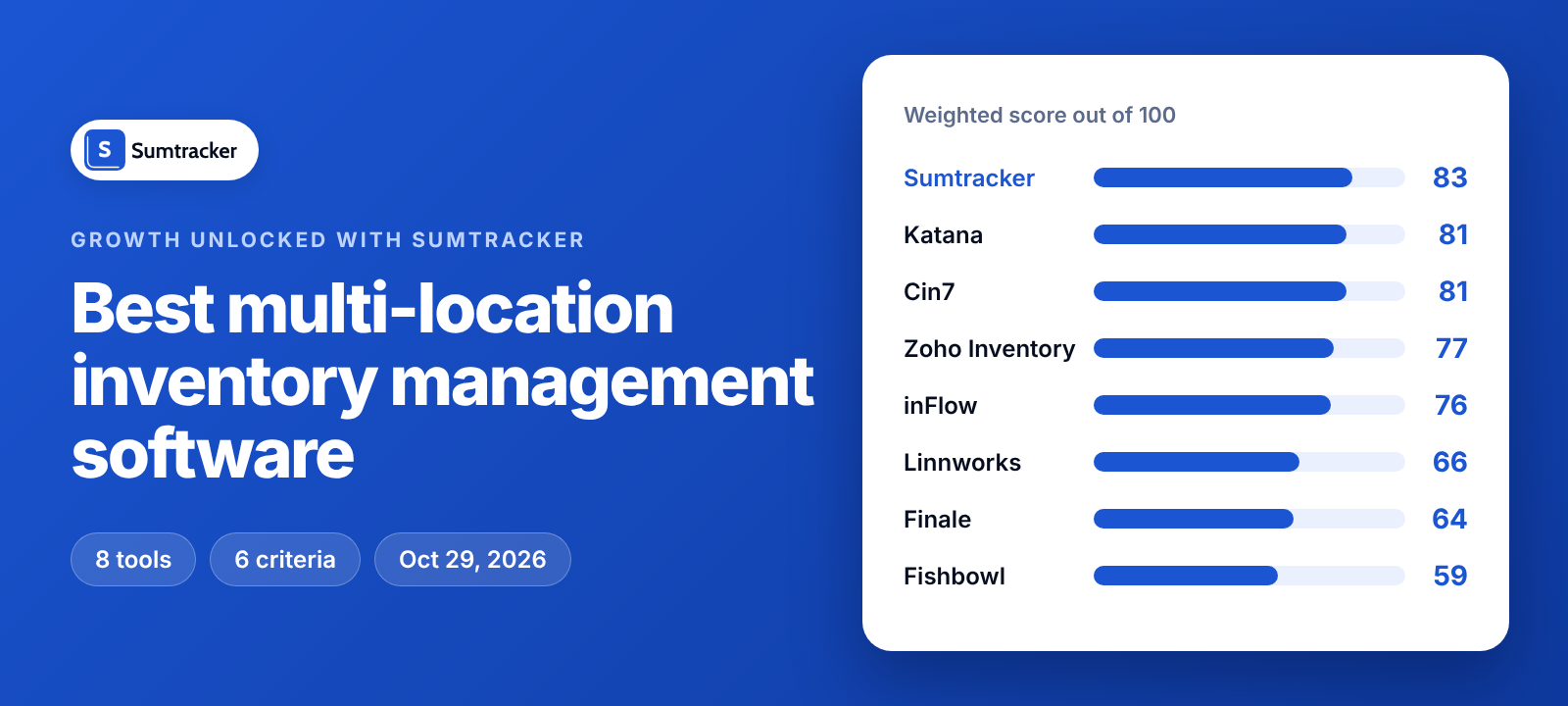
The best multi-location inventory management software depends on how much warehouse depth you need: Sumtracker scored highest (83 of 100) for Shopify sellers syncing stock by location, while Katana, Fishbowl and Linnworks suit bins and pick-and-pack.
If you sell from two warehouses, a 3PL and a store, your multi-location inventory management software has to do three jobs: keep each location's stock separate, move stock between locations, and tell every sales channel the right number. We scored eight tools on those jobs.
The list is for online and omnichannel sellers running two or more warehouses, 3PLs or stores; ERPs and store-POS-first systems are outside it.
How multi-location inventory management software works?
Multi-location inventory management software keeps one stock quantity per product at each location, then sells, moves and reorders from the right place.
- Location stock: every SKU has its own on-hand quantity at each warehouse, 3PL or store, and the total is the sum of those quantities. On Shopify, each location keeps its own quantity.
- Order allocation: an incoming order is assigned to one location, and only that location's quantity goes down.
- Transfers: moving stock lowers the sending location and raises the receiving one, and a good tool shows the units still in transit.
- Reorder levels and sync: reorder points are set per location, and each sales channel is told the quantity that is available to sell.
How we scored multi-location inventory management software: six criteria
Weighted total = the sum of (score ÷ 5 × weight) across the six criteria. Katana's total of 81, for example, comes from 20 + 12 + 20 + 15 + 6 + 8.
We list tools by total score. A tie goes to the higher Shopify and channel sync score, then to the higher price clarity score.
Multi-location inventory management software compared: scorecard for 8 tools

The third column lists the six scores in this order: location capacity, cross-location control, Shopify and channel sync, warehouse operations, price clarity, self-serve setup.
8 best multi-location inventory management software tools, reviewed
1. Sumtracker: per-location Shopify sync from $50 a month, with no warehouse floor tools
Sumtracker is inventory management and replenishment software for Shopify and Amazon merchants that helps them sync stock across channels, prevent stockouts and reorder intelligently, and it scored 83 because location sync and price are its strongest ground.
- Best for: Shopify and multichannel brands that need per-location sync, transfers and reorders.
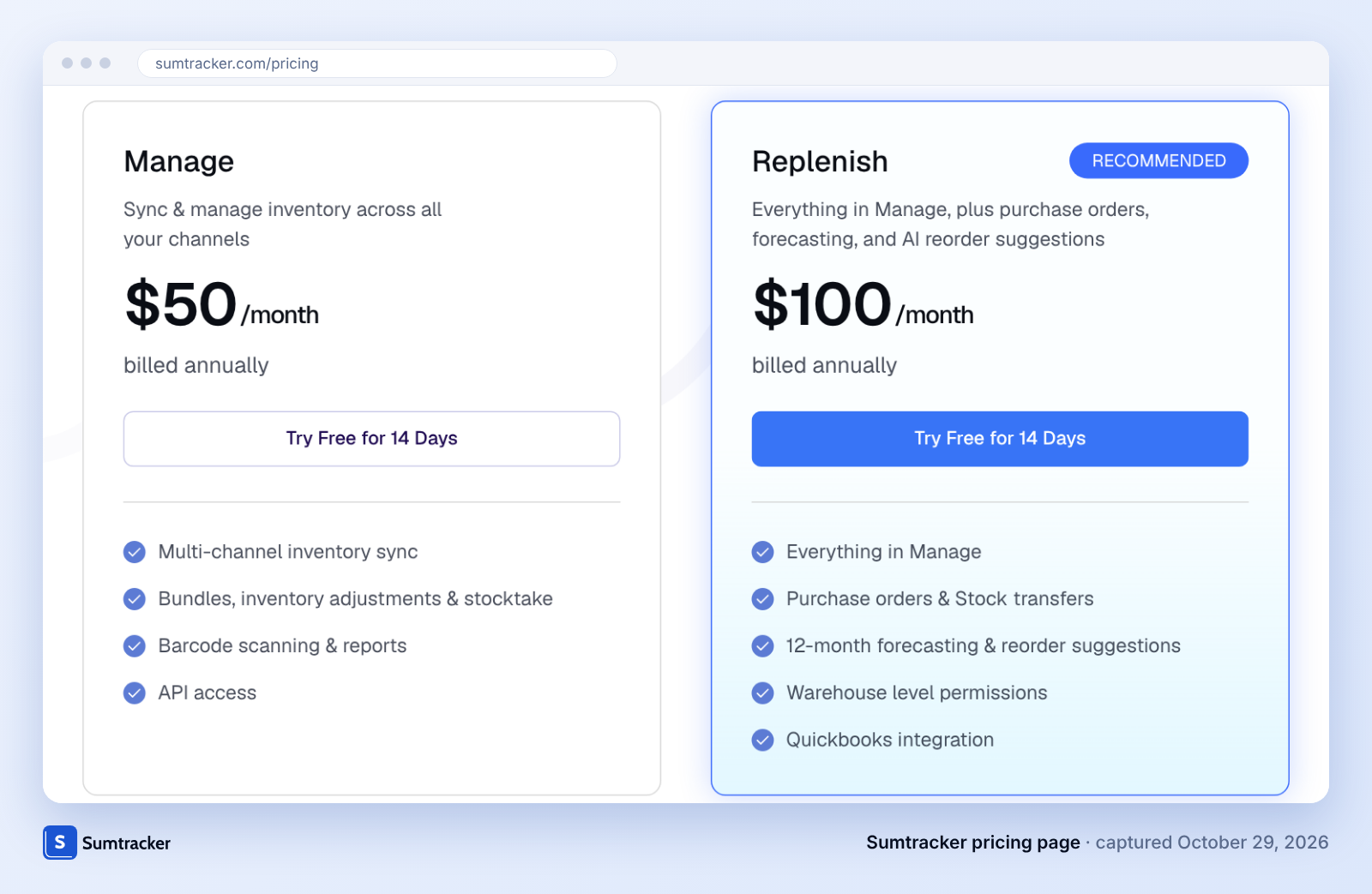
- Strong at: Each Shopify location maps to a Sumtracker warehouse, and with Sumtracker as master, stock syncs to Shopify every few minutes. Purchase orders and stock transfers run in one place, warehouse-level user permissions come with Replenish, and any barcode scanner works for scanning products on Mac, Windows or Android.
- Customer proof: Babymaxi, a Dutch baby-gear brand, moved from one warehouse to two 3PLs and went from 5–7 overselling incidents a month to near zero, according to its published case study.
- Skip if: You need bins, pick and pack, lot, serial or expiry tracking, more than 10 warehouses without custom pricing, or stock transfers on the Manage plan (transfers are Replenish-only).
2. Katana: bins, lots and pick-and-pack with unlimited locations, but no published price
Katana scored 81 because it pairs unlimited inventory locations with a warehouse management app that adds bin locations, pick and pack, and receiving.
- Best for: Makers who need bins, lots and pick and pack alongside manufacturing.
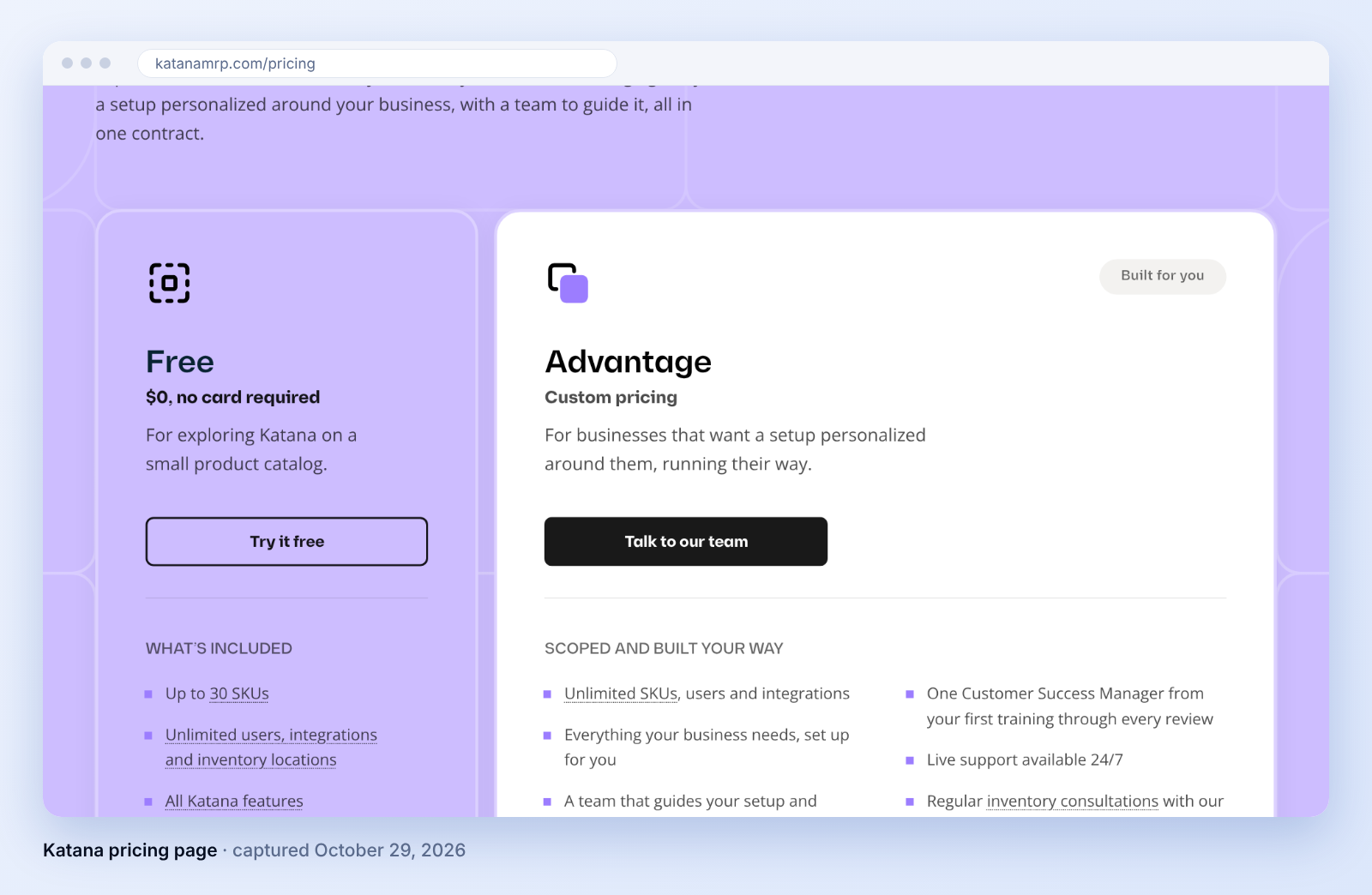
- Strong at: Katana's free plan allows unlimited users, integrations and inventory locations up to 30 SKUs. Manufacturing orders and lot tracking sit in the same product.
- Skip if: You want a published monthly price, because Katana now sells Advantage as a custom annual contract, or you resell finished goods and do not manufacture. Our Sumtracker vs Katana comparison covers the trade-offs.
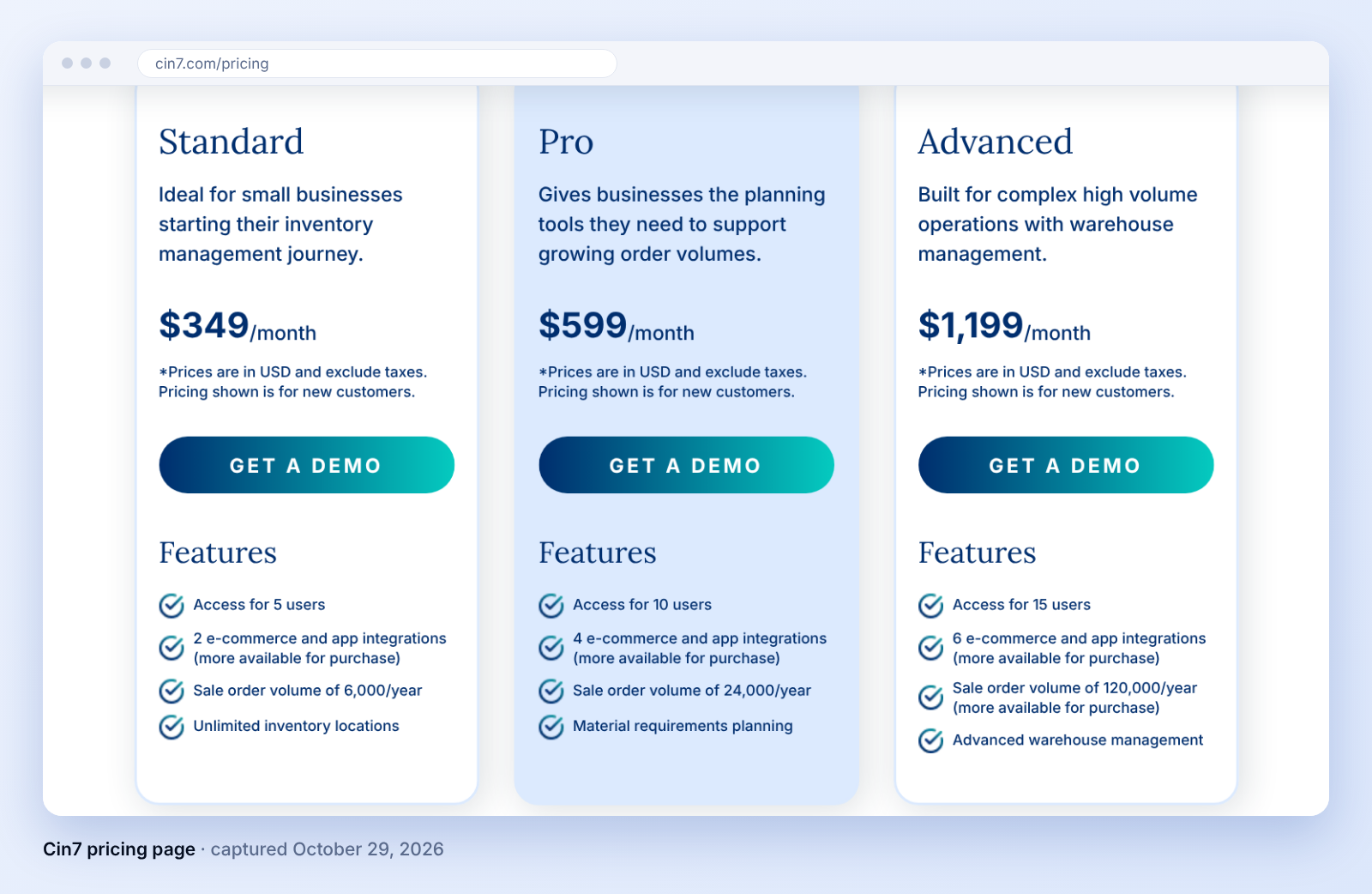
3. Cin7: unlimited locations from $349 a month, with warehouse tooling sold as add-ons
Cin7 scored 81 because its Standard plan includes unlimited inventory locations and its pricing page lists Advanced Warehouse Management and ForesightAI demand forecasting as add-ons.
- Best for: Mid-size brands that want unlimited locations from the entry plan.
- Strong at: Unlimited inventory locations start at the $349 Standard plan, so a growing location count does not force a plan change. For a head-to-head view, see our Sumtracker vs Cin7 comparison.
- Skip if: Your budget sits under $349 a month, or you want warehouse tooling included, because Advanced Warehouse Management is sold as an add-on.
4. inFlow: reorder by location and sublocations, capped at 5 locations on Core
inFlow scored 76 because it documents reorder by location and sublocations and scores 5 on cross-location control.

- Best for: Small teams that want sublocations and reorder by location in a simple app.
- Strong at: inFlow sets reorder points per location and documents restricting team members' access by location, a higher-plan feature. Core costs $299 a month billed annually.
- Skip if: You need more than 5 locations without moving to the $499 Pro plan, or you cannot absorb the required $499 one-time onboarding package on Core.
5. Zoho Inventory: the lowest published prices, with a location limit that climbs by plan
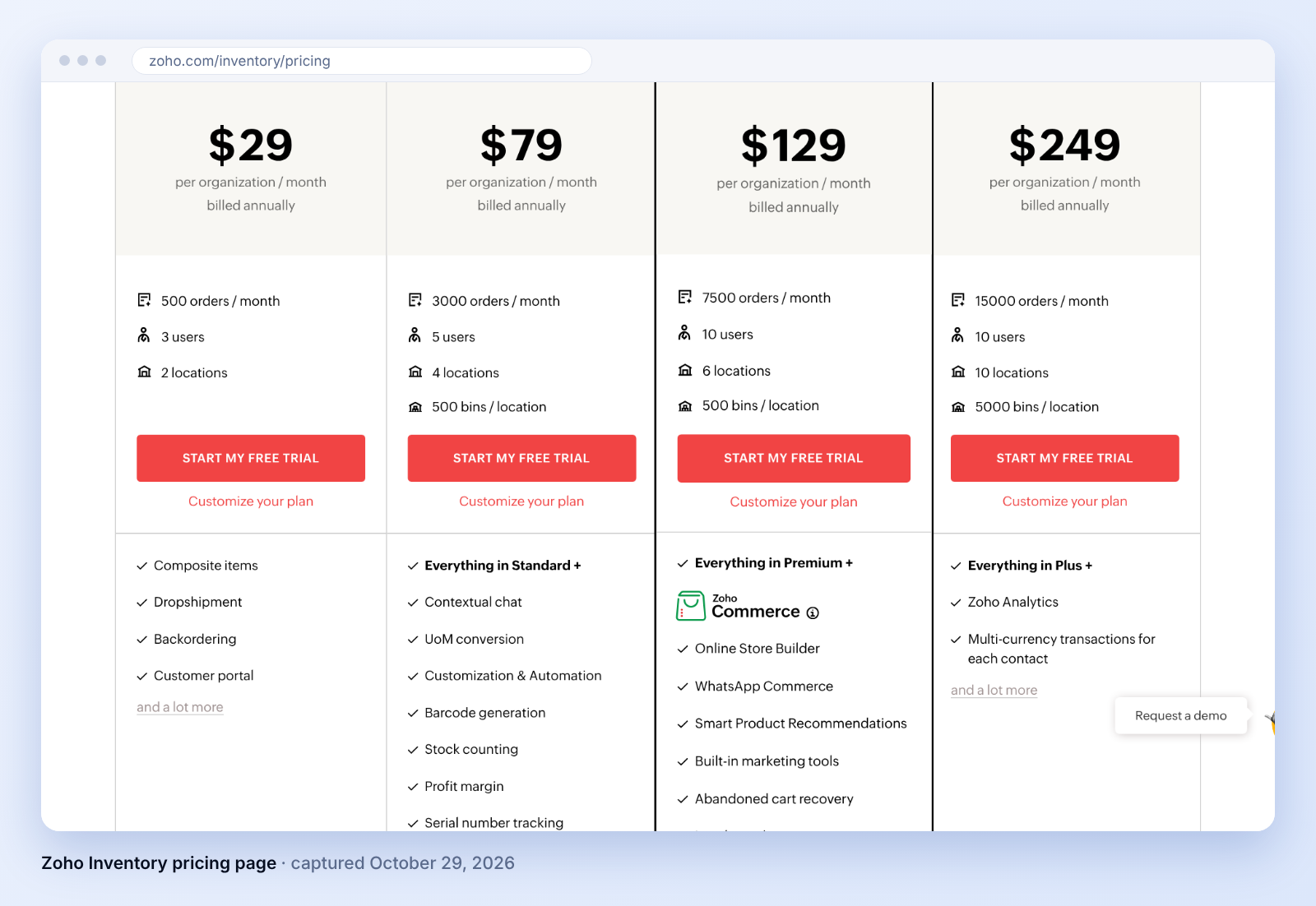
Zoho Inventory scored 77 because its Premium plan costs $79 a month for 4 locations and a free plan covers 2 locations.
- Best for: Budget-first sellers, especially those already using other Zoho apps.
- Strong at: Zoho plans scale from 2 locations on Standard to 10 on the top plan, and it lists a Locations add-on at $10 a month billed annually for going past a plan's limit.
- Skip if: You pass 3,000 orders a month on Premium, since extra 500-order blocks are priced as add-ons, or you want published per-location Shopify sync detail, which we did not find on its pricing page.
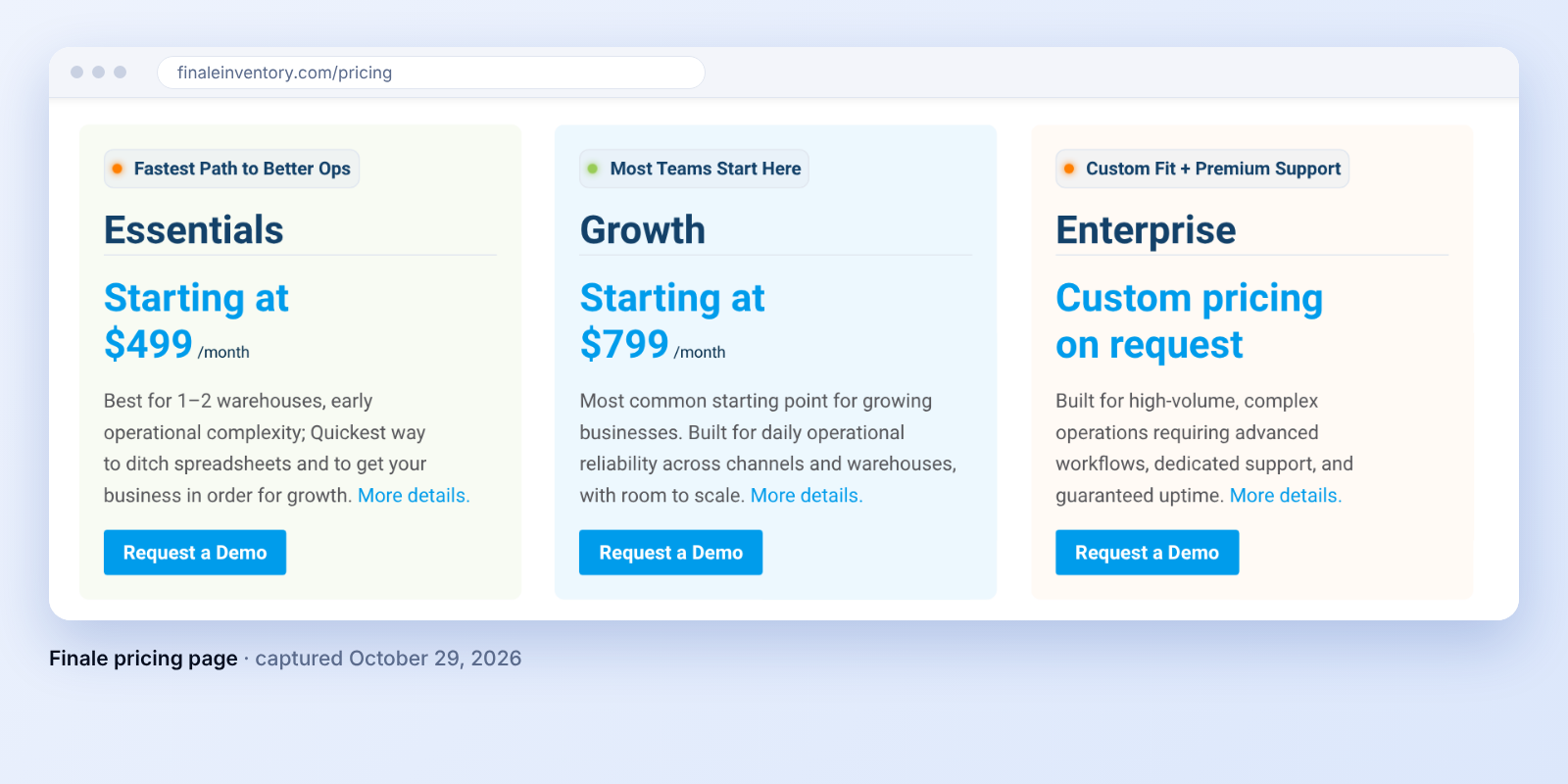
6. Finale (Descartes Finale): multi-warehouse management from $799 a month, sold by demo
Finale scored 64 because its plans include multi-warehouse management and 40+ sales channel integrations, but its pricing page states no location limit and does not describe per-location Shopify sync.
- Best for: Warehouse-heavy sellers who are comfortable buying through a demo.
- Strong at: Essentials ($499 a month) is positioned for one to two warehouses, so Growth at $799 is the first plan built for more. Finale also lists an optional mobile barcode module for receiving, picking and stock takes.
- Skip if: You want to start without a demo call, since every Finale plan is sold through a demo request.
7. Linnworks: order routing across warehouses, priced by quote only
Linnworks scored 66 because its Rules Engine lists unlimited routing rules and its inventory and warehouse features include bins, lot tracking, digital picking and packing, and warehouse transfers, but it publishes no price.

- Best for: High-order-volume sellers who need order routing across warehouses.
- Strong at: Plans are tiered by monthly orders with no percentage fees, overages apply if you exceed your tier, and add-on modules are priced separately. Every package includes a guided onboarding plan, and Linnworks recommends paid onboarding as a one-off fee based on your needs.
- Skip if: You want to see a price before talking to sales, or you want the onboarding fee known before you start.
8. Fishbowl: unlimited warehouses and deep warehouse control, with implementation required
Fishbowl scored 59 because its Growth plan adds unlimited warehouses, but implementation is part of every purchase.

- Best for: Distributors and manufacturers that need deep warehouse control.
- Strong at: Growth costs $429 a month billed annually and lists unlimited warehouses, and the Advanced Warehouse plan from $595 a month targets multi-warehouse and 3PL workflows.
- Skip if: You want self-serve setup, or you need per-location Shopify sync, which we could not confirm in Fishbowl's public pricing pages.
Which multi-location inventory management software to pick, by situation
Pick the tool that matches your biggest constraint, not the highest total. The table says why each lower-scoring tool wins in its case.
Weights change the winner. We re-scored all eight tools under three other weightings, listed in criterion order (location capacity, cross-location control, sync, warehouse operations, price clarity, setup).
Example: how your needs change the best multi-location inventory management software
The best tool depends on what matters most to you, so the same eight tools rank differently for different sellers. Here are two made-up sellers (not customers).
To do this yourself, split 100 points across the six criteria by how much each matters to you. A tool earns a share of each criterion's points based on its score out of 5: a 5 earns all of them, a 3 earns 60%. Add up the points and the highest total wins.
- Seller A sells on Shopify and Amazon from a stockroom and two 3PLs. Moving stock between locations matters most (30 points), then location limits and sync (20 each), price (15), easy setup (10) and warehouse tools (5). Sumtracker earns 87 points, Cin7 81 and inFlow 78.
- Seller B is a food maker with six locations that needs bins and lot tracking. Warehouse tools matter most (35 points), then location limits (25), transfers (20), sync (15) and setup (5), and price does not matter (0). Katana scores 5 out of 5 on warehouse tools, so it earns all 35 of those points and 91 overall. Sumtracker scores 2 out of 5, earns 14 of the 35 and finishes last of 8 with 70.
Same eight tools, different winner. Do the same with your own points before you shortlist, as step 3 below explains.
How to choose multi-location inventory management software in 5 steps
- Count the locations you will run in 12 months in Shopify admin → Settings → Locations, including each 3PL and fulfillment app, which appear as locations but do not count toward Shopify's limit.
- Compare your store-location count with the active-location limit for your Shopify plan in Shopify's locations documentation, then with each tool's location limit in the reviews above.
- Set your own weights for the six criteria in the table above, then apply the weighted-total formula to each shortlisted tool so the ranking reflects your constraint rather than ours.
- Price the top three tools at your 12-month order volume and location count, using each vendor's current pricing page, and add any required onboarding fee.
- Trial the leader with two locations and one transfer and check that both locations' quantities update in your store and in every other sales channel.
To set up Shopify locations before you choose a tool, read our guide to Shopify inventory locations; for a broader Shopify-only ranking, see our best Shopify inventory management software post.
FAQ
How many locations can a Shopify store have?
It depends on the plan: 2 locations on Starter, 10 on Basic, Grow and Advanced, and 200 on Shopify Plus. Deactivated locations do not count, and neither do apps that stock inventory for you, such as 3PLs, even though they appear as locations.
Can Shopify move stock between locations without an app?
Yes. Shopify supports inventory transfers between locations in the admin, and it tracks each location's quantity separately. An app becomes useful when you need purchase orders, reorder levels by location or sync to other sales channels.
Is inventory management software the same as warehouse management software?
No. Inventory management software tracks how many units sit at each location and where they sell. Warehouse management software adds floor-level control such as bins, pick paths and putaway, and it matters most when a warehouse holds thousands of SKUs.
Is multi-location inventory management software worth it for two locations?
Yes, once stock moves between those two locations or sells on more than one channel. With a single stockroom and one storefront, Shopify's built-in location tracking is usually enough.
Conclusion
Related Articles
Tool and strategies modern teams need to help their companies grow.


Ready to Simplify Your Inventory Management?
Join hundreds of e-commerce merchants who rely on Sumtracker to save time, eliminate errors, and grow their business.