.svg)

How to Sync Shopify Inventory with Facebook Shop (Step-by-Step Guide)


If you’re selling on both Shopify and Facebook Shop, you’ve probably had that moment:
A customer places an order on Facebook…
…but the product was already sold out on Shopify.
Now you’re stuck dealing with refunds, frustrated customers, and messy inventory.
That’s exactly why inventory syncing matters.
When your Shopify store and Facebook Shop are properly connected, your stock levels stay accurate across both platforms automatically. No manual updates, no guesswork, no overselling.
In this guide, we’ll walk you through how to sync Shopify inventory with Facebook Shop, how it actually works behind the scenes, and what to do when things don’t go as planned.
Why Syncing Shopify Inventory with Facebook Shop Matters
Selling on multiple channels is great for growth but it also adds complexity.
Without proper inventory sync, things can go wrong quickly.
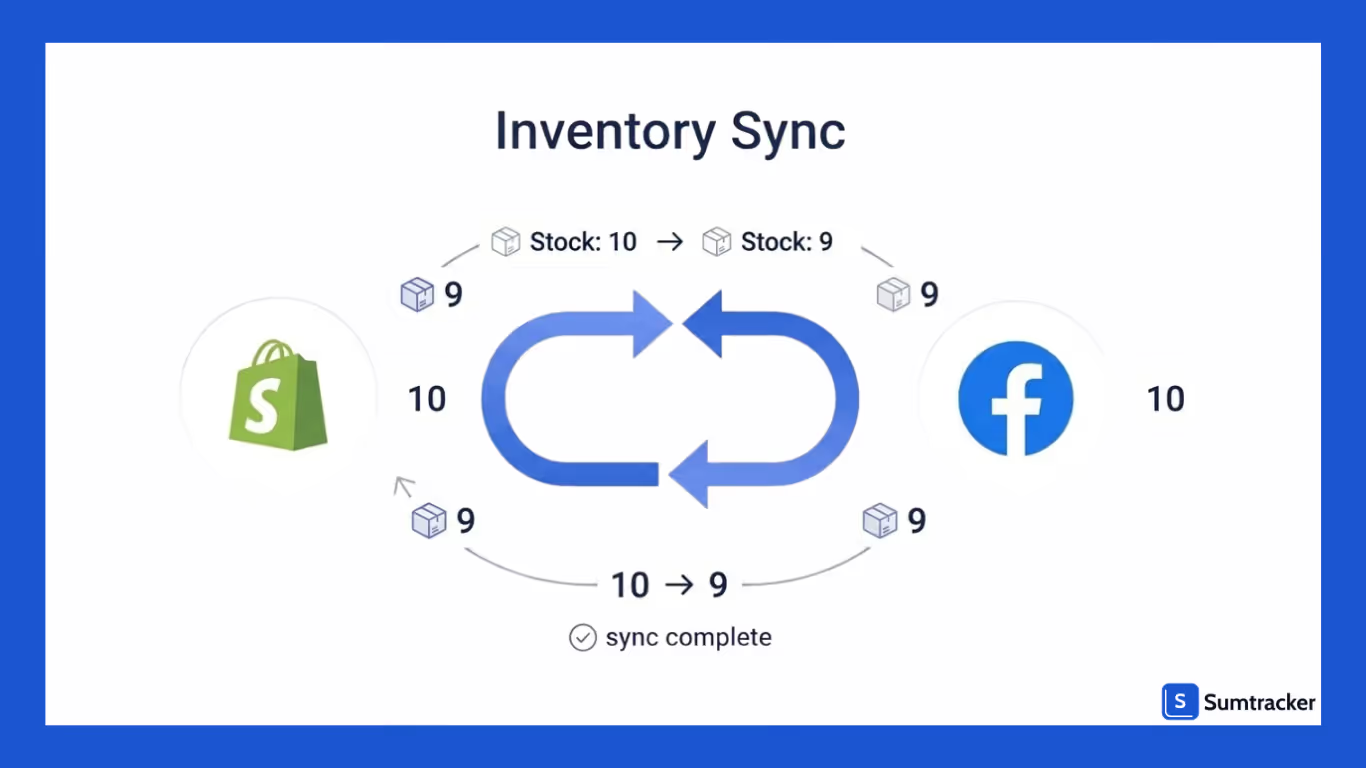
Here’s what syncing helps you avoid:
- Overselling products that are already out of stock
- Underselling due to incorrect stock levels
- Manual updates across platforms (time-consuming and error-prone)
And here’s what you gain:
- Real-time stock updates across Shopify and Facebook
- Better customer experience (accurate availability)
- Smooth order management from one central system
Think of it this way:
Shopify becomes your single source of truth, and Facebook simply reflects that data.
How Shopify and Facebook Shop Integration Works
To keep things simple, Shopify acts as your main control center, while Facebook Shop is just a sales channel that displays your products and inventory.
Product & Catalog Sync
- You create and manage all products in Shopify
- Shopify pushes this data to your Facebook Catalog
- Facebook Shop pulls product details (title, price, images, variants) from this catalog
Any changes made in Shopify automatically reflect on Facebook
Inventory Sync Flow
- Inventory is tracked and updated in Shopify
- When stock changes (due to orders or edits), Shopify updates the catalog
- Facebook then reflects the updated stock levels
Facebook does not manage inventory on its own, it only mirrors Shopify data.
Order Flow
- A customer places an order on Facebook Shop
- The order is sent to Shopify
- Inventory is deducted in Shopify
- Fulfillment is handled from Shopify
You don’t need to manage orders separately on Facebook
Role of SKUs
- Each product variant must have a unique SKU in Shopify
- These SKUs are used to match and sync inventory with Facebook
- Missing or duplicate SKUs can lead to incorrect stock updates
Steps to Sync Shopify Inventory with Facebook Shop
Setting up inventory sync between Shopify and Facebook is straightforward but missing a step can cause issues later. Follow this clean setup to get it right the first time.
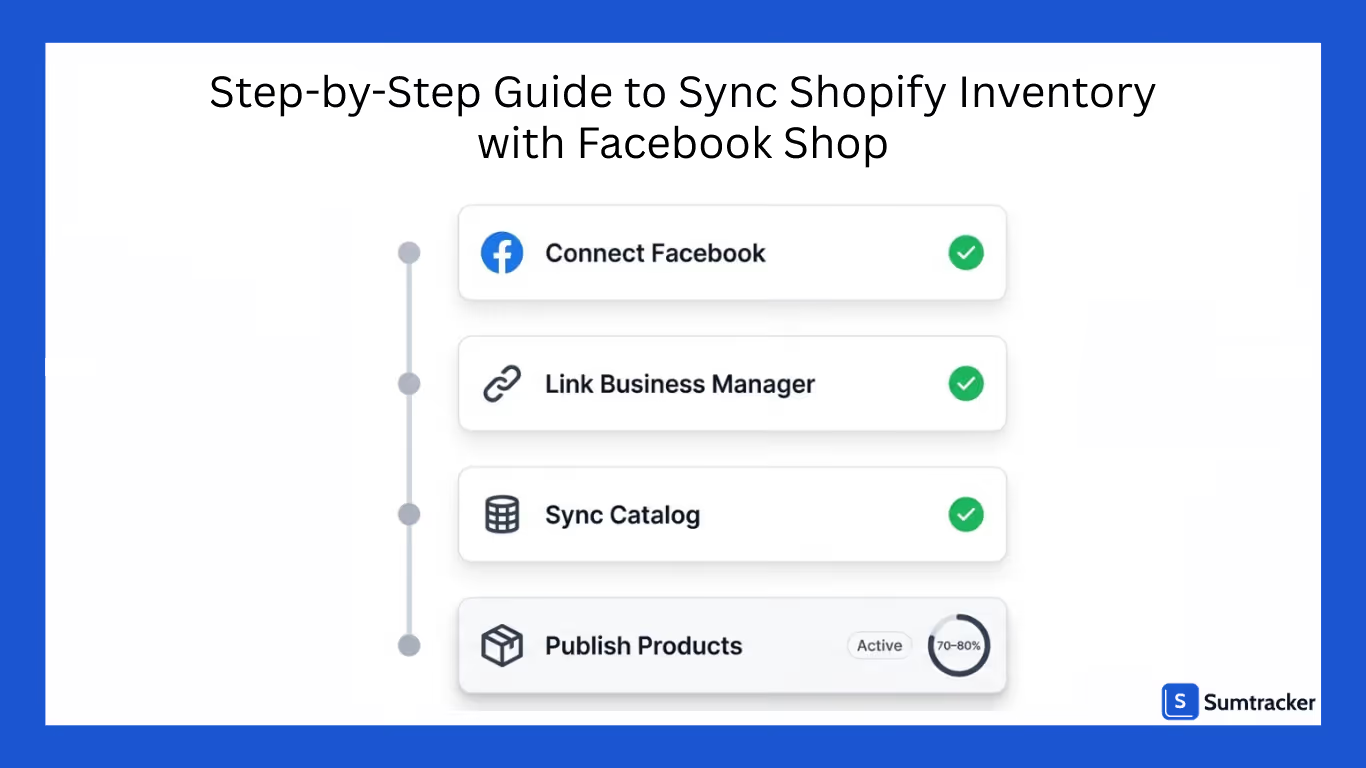
Step 1: Add the Facebook Sales Channel
Start by connecting Facebook to your Shopify store.
- Go to Shopify Admin → Settings → Apps and Sales Channels
- Click Add Sales Channel
- Select Facebook & Instagram and install it
Step 2: Connect Your Facebook Account
Next, link your Facebook assets.
- Log in to your Facebook account
- Connect your Business Manager
- Select your Facebook Page and Ad Account
Step 3: Set Up Your Product Catalog
Shopify will automatically create or connect a catalog.
- Choose the correct Facebook Catalog
- Ensure your products have:
- Images
- Prices
- Descriptions
- SKUs (important for inventory sync)
- Enable inventory tracking in Shopify
Step 4: Sync and Publish Products
Now, push your products to Facebook Shop.
- Select the products you want to make available
- Submit them for Facebook review
- Once approved, they’ll appear in your Facebook Shop
Step 5: Verify Inventory Sync
After setup, do a quick check to ensure everything works.
- Place a test order (if possible)
- Check if inventory updates correctly in Shopify
- Confirm the same update reflects on Facebook
Common Shopify–Facebook Inventory Sync Issues (And Fixes)
Even after setup, things don’t always work perfectly.
Here are the most common problems and how to fix them.
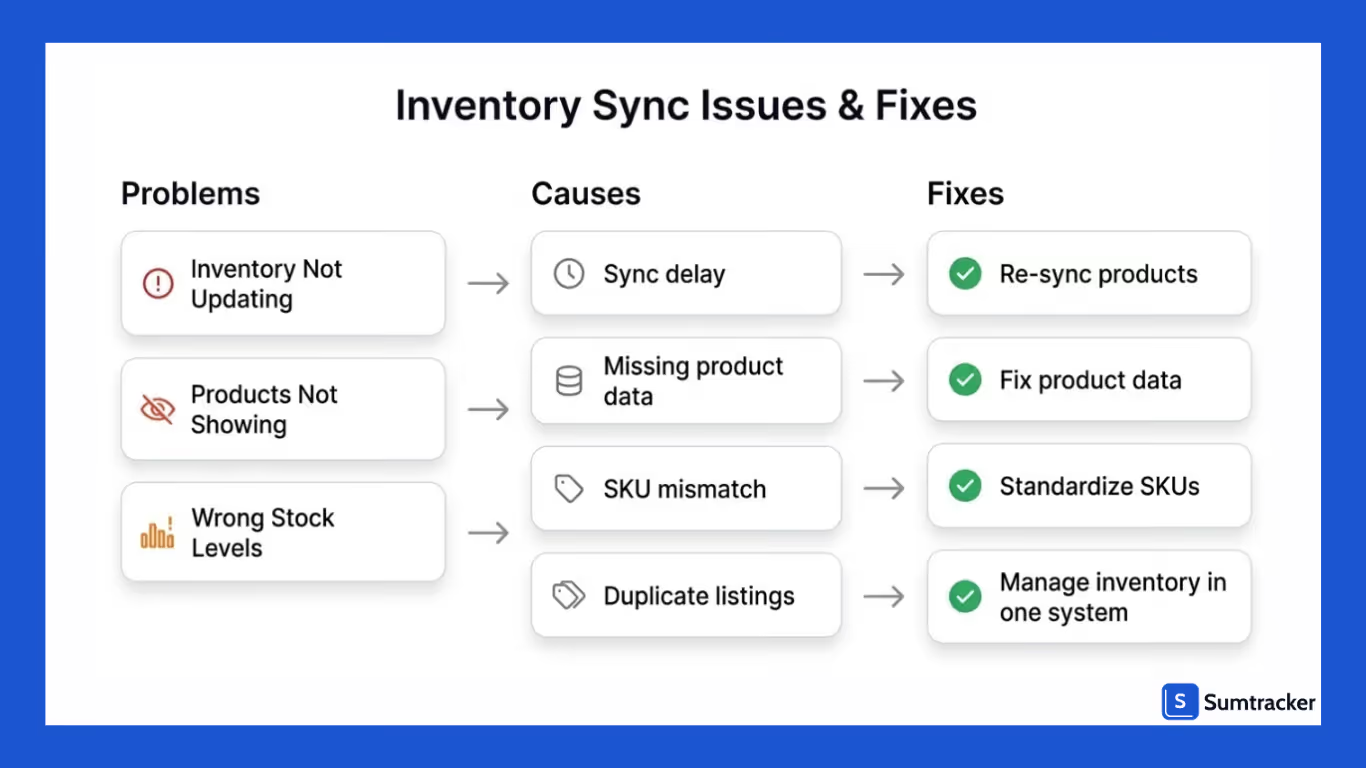
Inventory Not Updating on Facebook
- Sync delay
- Product not approved
- Catalog issues
Fix:
- Wait a few minutes and refresh
- Re-sync products from Shopify
- Check Facebook Commerce Manager for errors
Products Not Showing in Facebook Shop
- Missing product data
- Policy violations
- Catalog sync errors
Fix:
- Ensure product titles, images, and descriptions meet Facebook guidelines
- Re-submit products for approval
Wrong Stock Levels Showing
- SKU mismatch
- Multiple listings for the same product
- Manual edits on Facebook
Fix:
- Standardize SKUs across all products
- Avoid duplicate listings
- Manage inventory only in Shopify
Best Way to Ensure Accurate Inventory Across Shopify and Facebook
To keep inventory accurate across Shopify and Facebook, the focus should be on reducing how many places stock is managed from.
In practice, this means handling all inventory updates in Shopify and avoiding manual edits on Facebook. When stock changes happen in multiple places, even small inconsistencies can lead to mismatches.
It’s also important to keep your product data clean. Consistent SKUs and a well-maintained catalog go a long way in preventing sync issues.
As your order volume grows, you may start noticing occasional delays or discrepancies with native syncing.
At that point, having a more structured setup where inventory is managed in a single, controlled flow helps maintain accuracy without constant monitoring.
Conclusion
Syncing Shopify inventory with Facebook Shop is fairly straightforward, but keeping it accurate over time requires a bit more discipline.
If your setup is simple, Shopify’s native integration can handle most of the work. But as orders increase and operations expand, even small inconsistencies can start affecting your inventory.
The key is to keep your setup clean manage stock from one place, maintain consistent product data, and regularly check for sync issues. That alone solves most problems.
As your business grows, having a more structured way to manage inventory across channels becomes less of an option and more of a necessity. Because at scale, even small inventory errors can directly impact sales and customer trust.
FAQs
How long does it take for Shopify inventory to sync with Facebook Shop?
In most cases, inventory updates happen within a few seconds to a few minutes. However, delays can occur due to API limits, high traffic, or catalog sync issues.
Does Facebook Shop track inventory separately from Shopify?
No, Facebook does not track inventory independently. It simply reflects the inventory data from your Shopify store.
Why is my Facebook Shop showing the wrong stock levels?
This usually happens due to SKU mismatches, duplicate product listings, or manual edits made directly on Facebook. Keeping SKUs consistent and managing inventory only in Shopify helps avoid this.
Can I manually update inventory on Facebook Shop?
You can, but it’s not recommended. Manual updates can override synced data and lead to inconsistencies between Shopify and Facebook.
Do I need an app to sync Shopify inventory with Facebook?
Not necessarily. Shopify’s native Facebook & Instagram integration can handle basic syncing. However, if you’re selling across multiple channels or need more control, a dedicated inventory management tool can help maintain accuracy.
Conclusion

Bhoomi writes about inventory management and multichannel selling at Sumtracker. Her focus is on solving real operational problems for Shopify, Amazon, and marketplace sellers through well-researched content. She covers everything from multi-location inventory syncing and stock error troubleshooting to replenishment planning and platform comparisons, turning complex eCommerce operations into clear, actionable guidance.
LinkedInRelated Articles
Tool and strategies modern teams need to help their companies grow.


.avif)
Ready to Simplify Your Inventory Management?
Join hundreds of e-commerce merchants who rely on Sumtracker to save time, eliminate errors, and grow their business.
