.svg)
Connected Inventory Shopify: Sync Stock Across All Your Sales Channels


Do your inventory levels not match across channels?
I know it's super frustrating to wonder every time whether the number you see on your screen matches what you have.
But wait!
You don't need to worry anymore!
A connected inventory solution is the answer.
Instead of updating stock separately for each sales channel, a connected inventory system synchronizes inventory automatically.
In fact, Shopify reports that businesses with connected inventory systems can increase average sales by up to 18% by selling more of their existing inventory.
In this guide, you'll learn what connected inventory is, when you need it, how Shopify's native inventory features compare with third-party apps, and which solutions work best for growing Shopify businesses.
What is Connected Inventory for Shopify?
Connected inventory is a system that automatically syncs inventory quantities across all the places you sell.
In this, every connected sales channel gets updated whenever any product is sold, returned, or restocked.
For example, if you sell a coffee grinder on your Shopify store, Amazon, and Etsy, and there's only one unit left, a connected inventory system ensures that once it sells on Amazon, the available quantity is immediately updated on Shopify and Etsy as well.
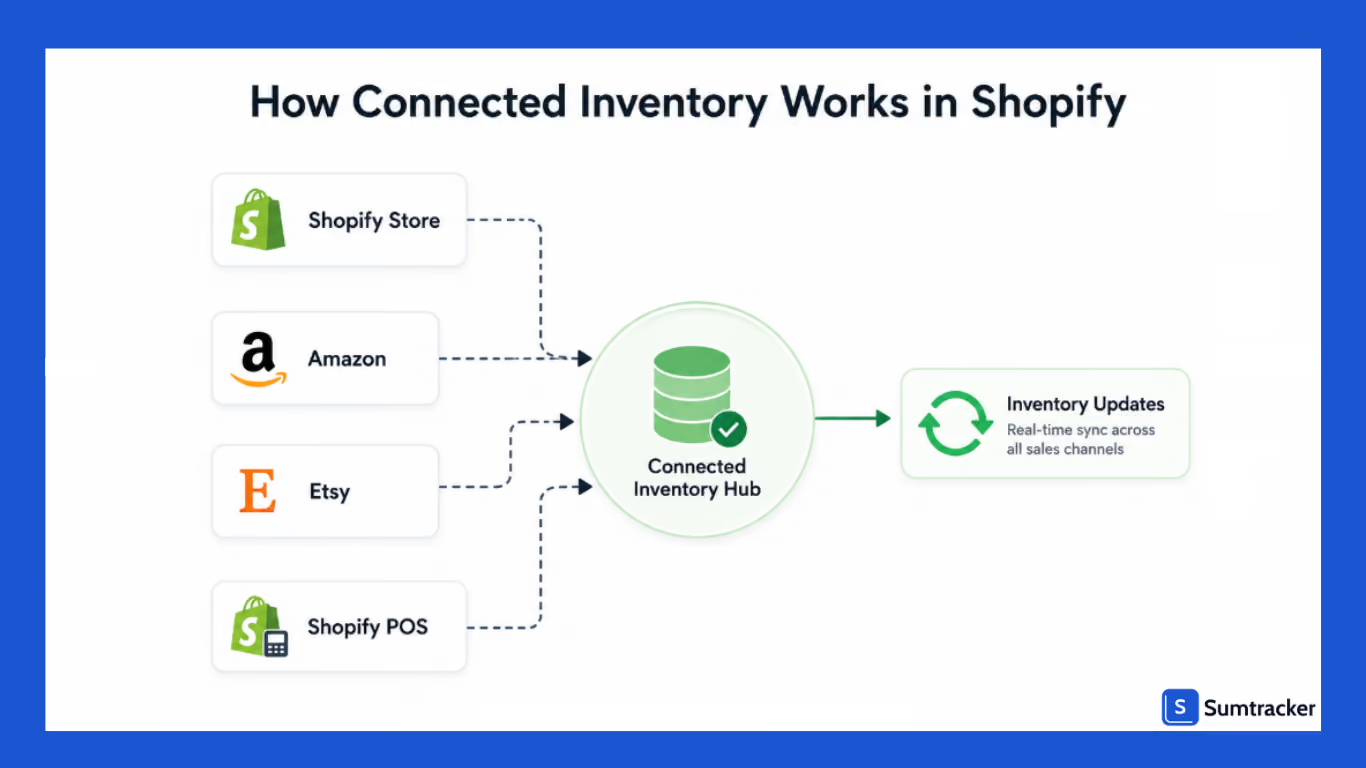
This significantly reduces the risk of overselling the same product.
For merchants selling across multiple channels, connected inventory acts as a single source of truth for stock levels, helping maintain inventory accuracy regardless of where orders originate.
Multi-Store Inventory Sync vs. Single-Store Inventory Linking
Although these terms are often used interchangeably, they solve different inventory challenges.
Imagine you sell a summer special kit made up of various individual products. Inventory linking ensures that selling one set reduces the stock of each component product.
Connected inventory ensures every channel reflects the latest stock levels after each sale, regardless of where the order was placed.
When Do You Need Connected Inventory?
You may not need connected inventory from day one. But once you expand beyond a single online storefront, manually updating inventory quickly becomes difficult and prone to costly mistakes.
Here are the most common situations where connected inventory becomes essential.
Running Multiple Shopify Stores
If you sell on multiple Shopify stores, with a connected inventory solution, the inventory between your stores can be in sync so you only get to see accurate levels.
Selling Bundles or Kits
If you sell products through bundles and kits, connected inventory helps ensure both the bundle and its components remain synchronized, preventing inaccurate stock counts.
Omnichannel Retail (Shopify POS + Online Store)
If you operate physical retail locations using Shopify POS, connected inventory helps bridge the gap in syncing retail and online store stock.
With this, your staff can confidently know what products are available and show customers accurate stock information.
According to Salsify's Consumer Research report, 67% of shoppers browse products online before going for an in-store purchase.
If your online inventory doesn't accurately reflect what's available at your physical location, customers may visit your store expecting to buy a product that's actually out of stock, leading to a poor shopping experience.
Real-world example:
JTech Mobio Zone connected its Erply POS with Shopify to synchronize inventory across its online and physical stores. The integration eliminated stock mismatches, reduced manual data entry, and provided real-time inventory visibility across all sales channels.
Selling Across Multiple Sales Channels
If you are selling on channels beyond Shopify like Amazon, Etsy, eBay, etc, you may know that each platform tracks inventory independently; it's easy for inventory counts to drift apart throughout the day.
A connected inventory system ensures every sale updates stock across all connected channels, helping reduce overselling and canceled orders.
Dropshipping and Supplier Integration
Connected inventory is equally valuable for merchants working with dropshipping suppliers or multiple wholesalers.
Supplier inventory changes constantly as products sell to other retailers.
Many connected inventory platforms integrate supplier inventory feeds or automatically sync stock updates from vendors, allowing your storefront to reflect current supplier availability.
Shopify Native Features vs. Connected Inventory Apps
Shopify's built-in inventory tools are capable of handling many day-to-day inventory tasks for smaller businesses.
Understanding what Shopify already offers and where it reaches its limits can help you decide whether it's time to invest in connected inventory software.
What Shopify's Native Features Can Do
Shopify includes several inventory management features that work well for businesses operating a single store.
With Shopify, you can track, transfer, and manage inventory across multiple locations.
For merchants selling exclusively through one Shopify store with relatively simple operations, these built-in tools are often sufficient.
However, as your business expands, inventory workflows become more interconnected, and that's where Shopify's native functionality starts to show its limitations.
Best Shopify Apps for Connected Inventory
Several Shopify apps help merchants synchronize inventory across stores, marketplaces, and warehouses.
The best choice depends on the channels you sell on, operational complexity, and future growth plans.
1. Sumtracker — Best Overall for Multi-Channel Inventory Management
If you're selling across multiple Shopify stores or marketplaces, Sumtracker offers one of the most comprehensive connected inventory solutions.
You can manage inventory across Shopify, Amazon, Etsy, eBay, Walmart, and other connected channels through a centralized inventory dashboard .
Beyond inventory synchronization, Sumtracker supports:
- Multi-store inventory sync
- Bundle and kit inventory management
- Purchase order and supplier management
- Inventory replenishment and forecasting
2. Trunk Inventory
Trunk is a popular option for merchants selling on Shopify alongside marketplaces like Etsy, Amazon, eBay, and Faire.
Its primary focus is inventory synchronization, making it suitable for businesses that need to prevent overselling across several online channels.
It also supports bundle inventory, making it a good fit for brands selling product kits without requiring a full inventory management system.
3. SyncLogic
SyncLogic is designed primarily for merchants operating multiple Shopify stores.
It synchronizes inventory, products, and pricing between Shopify stores, making it useful for businesses with regional storefronts or separate wholesale and retail stores.
If your inventory management challenges are limited to Shopify-to-Shopify synchronization, SyncLogic provides a focused solution.
4. Stock Sync
Stock Sync specializes in synchronizing inventory from suppliers using CSV files, FTP servers, Google Sheets, XML feeds, and APIs.
It is particularly useful for dropshipping businesses or merchants working with multiple suppliers that frequently update stock levels.
Rather than manually importing supplier inventories, Stock Sync automates inventory updates, reducing the chances of selling unavailable products.
How to Set Up Connected Inventory on Shopify
Following a structured approach helps ensure inventory remains accurate as your business grows.
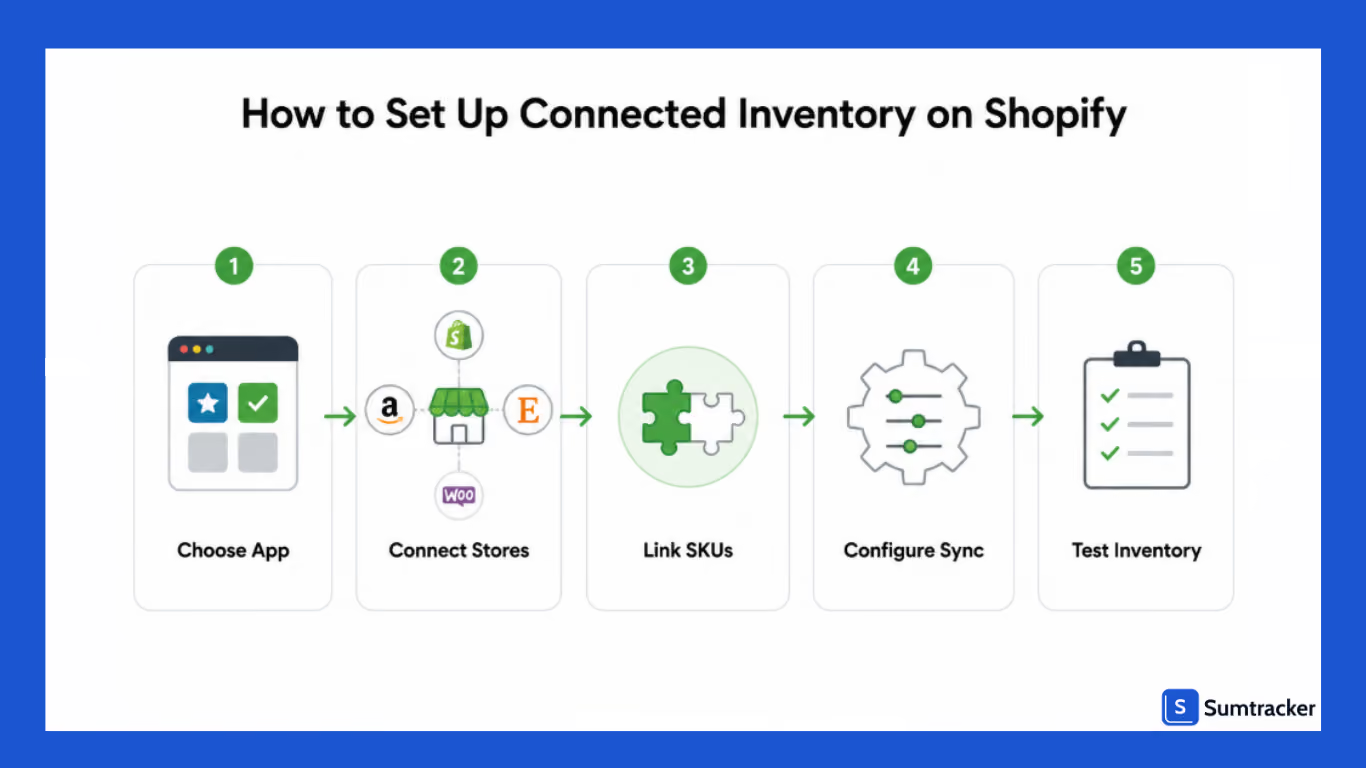
Step 1: Standardize Your SKUs
Make sure every product has a unique and consistent SKU before connecting multiple stores or sales channels.
Using different SKUs for the same product across Shopify, Amazon, and other marketplaces can result in duplicate inventory records.
Step 2: Choose a Single Source of Truth
Installing a connected inventory app is the first step.
But don't stop at installation only!
During an episode of the Inventory Genius Podcast, Susan Bradley emphasized that merchants often invest in software but never take the time to learn its full capabilities.
Understanding how your inventory workflows, automation rules, and integrations work together is what delivers the biggest operational improvements.
Step 3: Connect Your Stores and Sales Channels
Next, connect your Shopify store along with any marketplaces, additional Shopify stores, or retail locations you use.
Most inventory management apps provide guided integrations that allow products to be matched using their SKUs, making synchronization straightforward.
Step 4: Configure Inventory Sync Rules
You can configure inventory sync rules as per your needs. For example, you may want to:
- Inventory updates to sync automatically after every order.
- Separate inventory buffers for different marketplaces.
- Different warehouse locations assigned to specific stores.
- Inventory thresholds to prevent overselling low-stock products.
Taking time to configure these rules ensures the system reflects your actual inventory workflow.
Step 5: Test Inventory Synchronization
Before relying on connected inventory in production, place several test orders across your connected channels.
Verify that inventory updates correctly on every platform, bundles reduce component inventory accurately, and retail inventory remains synchronized with online stock.
FAQs
What is connected inventory in Shopify?
Connected inventory is a system that automatically synchronizes inventory across multiple Shopify stores, marketplaces, warehouses, or retail locations. When inventory changes in one channel, stock levels are updated everywhere else to help maintain inventory accuracy.
Can Shopify sync inventory across multiple stores?
No. Shopify doesn't natively sync inventory between separate Shopify stores. You need to use a third-party solution for this.
What's the difference between inventory linking and inventory syncing?
Inventory linking connects related products within a store, such as bundles or duplicate listings. Inventory syncing updates stock levels across multiple stores or channels whenever inventory changes.
Which Shopify app is best for connected inventory?
The best app depends on the feature you are looking for. If you manage inventory across multiple Shopify stores and marketplaces while also needing POs, bundle management, and forecasting, you can choose Sumtracker .
Can a connected inventory system prevent overselling?
Yes. With a connected inventory system, you can accurately sync stock levels across sales channels whenever a product is sold, returned, or restocked, which helps significantly reduce the risk of overselling.
Conclusion
Managing inventory becomes significantly more challenging as your Shopify business expands across multiple stores, marketplaces, or retail locations.
A connected inventory system gives you a single source of truth by automatically synchronizing stock across every sales channel, reducing manual work and helping prevent overselling.
While Shopify's built-in inventory tools are sufficient for many small businesses, growing merchants often need more advanced capabilities like multi-store synchronization, bundle management, supplier integrations, and inventory planning.
Choosing the right connected inventory solution not only improves inventory accuracy but also creates a smoother experience for both your team and your customers.

Bhoomi writes about inventory management and multichannel selling at Sumtracker. Her focus is on solving real operational problems for Shopify, Amazon, and marketplace sellers through well-researched content. She covers everything from multi-location inventory syncing and stock error troubleshooting to replenishment planning and platform comparisons, turning complex eCommerce operations into clear, actionable guidance.
LinkedInRelated Articles
Tool and strategies modern teams need to help their companies grow.

.avif)
Ready to Simplify Your Inventory Management?
Join hundreds of e-commerce merchants who rely on Sumtracker to save time, eliminate errors, and grow their business.