.svg)
Cloud-Based Shopify Inventory Management: Real-Time Control & Scalable Operations


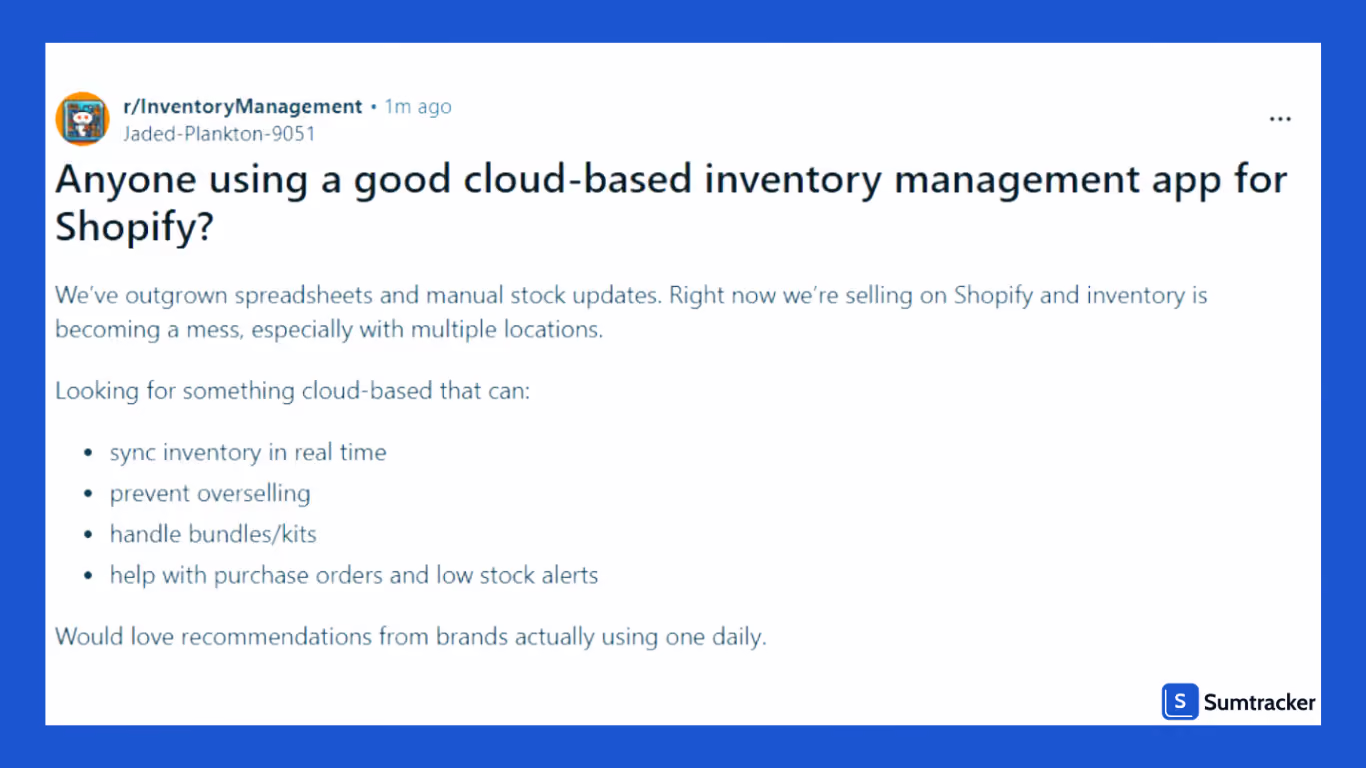
The post above?
It's from Reddit from a Shopify store owner just like you who is frustrated with spreadsheets and manually updating inventory.
And honestly, it makes sense because Shopify now powers over 5.6 million active stores globally, and merchants are processing more than $280 billion in GMV. The platform is growing, and so are the businesses running on it.
But here's the thing: most Shopify store owners start feeling the pain once they're handling 200+ daily orders, selling across multiple channels, managing 500-1000+ SKUs, or running multiple warehouses and retail locations.
If you have started relating to this, and the best part is that you are at the right place!
We have curated a whole list for you so that we can make it easy for you to judge which cloud inventory tool is the right fit for you.
We compared 7 tools on a number of aspects like features relevant to Shopify sellers, pricing, ratings, and more, so that you don't have to go through the struggle of changing tabs and visiting different app pages to compare them separately.
What is Cloud-Based Shopify Inventory Management?
Cloud-based Shopify inventory management refers to using online inventory management software that stores various stock data centrally and syncs stock levels across all connected systems in real time.
Unlike spreadsheets or desktop-based inventory management apps, cloud-based inventory systems continuously update inventory quantities whenever:
- Orders are placed
- Returns are processed
- Inventory transfers happen
- New stock arrives
- Product data changes
This allows Shopify merchants to track inventory across:
- Multiple locations
- Multi-stores
- Multiple sales channels
- Warehouse inventory systems
- Retail operations
from one centralized dashboard.
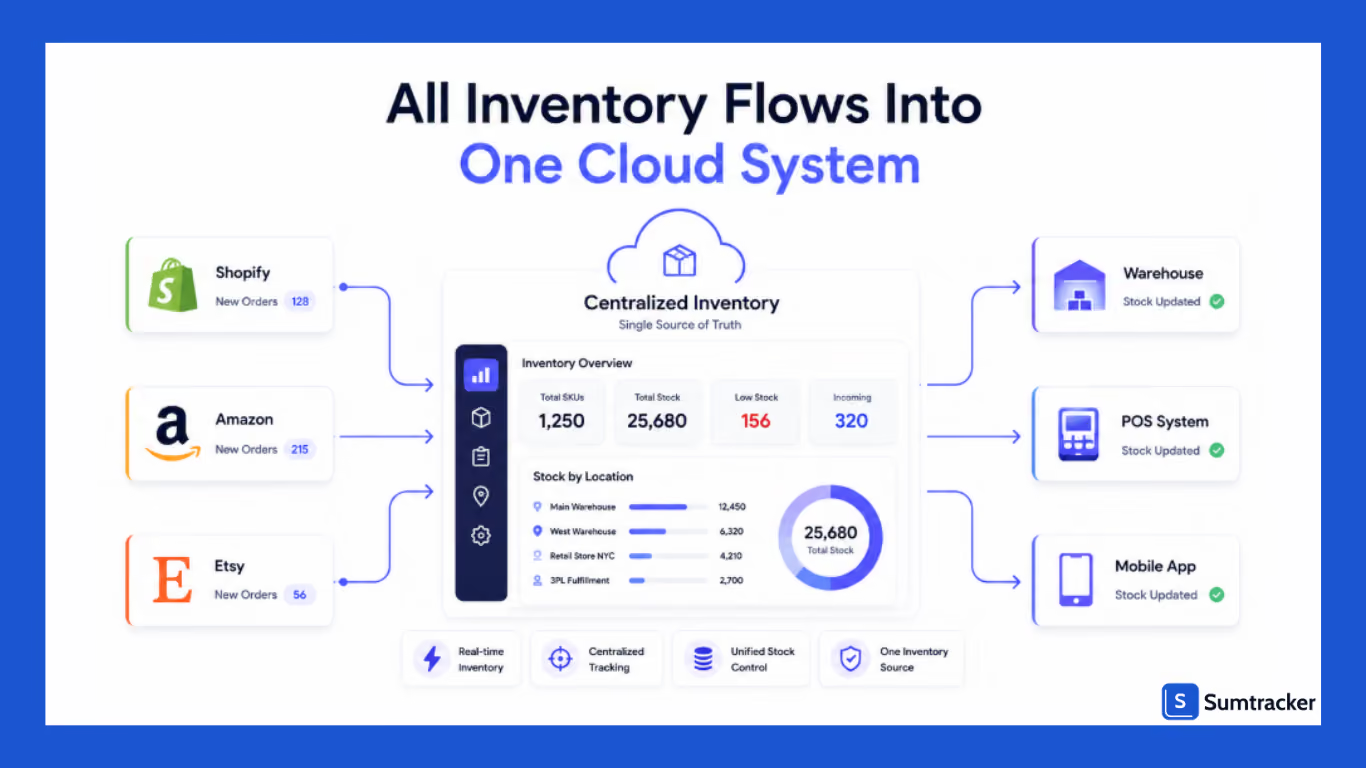
For example, if a product sells on Amazon, inventory quantities automatically update inside the centralized dashboard and even from other connected sales channels instantly.
According to a podcast discussing Shopify inventory challenges, inventory blindness has become a major profitability problem for growing Shopify merchants, especially businesses operating with disconnected spreadsheets and outdated workflows.
As ecommerce strategist Cameron Lee explained:
“Most e-commerce founders know their revenue. Far fewer truly understand where they’re making money, where they’re losing it, and what to do next.”
Listen to the full podcast here.
That lack of operational visibility is exactly why cloud-based inventory management has become essential for modern Shopify merchants.
How We Selected These Tools?
We didn't just randomly pick these tools and put them on the list.
We have judged each one of them on a number of aspects, like existing customer ratings, features, pricing, integration with Shopify and other channels, and a number of other things that are of great importance to Shopify sellers.
So whatever you see on this list, it's there because it’s essential for you.
Here is what we kept in mind while putting this list together:
- Customer Ratings — We went through what real users say about these tools on platforms like the Shopify app store, G2, Capterra, and even Reddit.
Because at the end of the day, a tool with a great sales page but bad reviews is not worth your time - Features — We checked whether the tool actually has the features you would need on a daily basis for managing your store inventory.
Things like real-time sync, low stock alerts, bundle management, purchase orders, and more - Pricing — We looked at whether the pricing actually makes sense for what you are getting.
Some tools charge a lot for features you will barely use, so we made sure to flag that wherever we saw it. - Shopify Integration — We made sure to check if it connects with Shopify without a ton of manual setup or back and forth, with good customer support that helps you and doesn’t ghost when the time comes.
- Multi-channel Support — If you are selling on Amazon, eBay, or any other channel alongside Shopify, we checked whether the tool can handle all of that in one place
- Multi-location Support — For store owners who are managing more than one warehouse or retail location, this one is a big deal, and we made sure to check it properly
- Ease of Use — Because a tool that takes months to figure out is not really solving your problem. We checked how easy it is to get started and how much of a learning curve each tool has.
We have also added the limitations of each tool so that you are aware of the full picture before making a decision.
Because we don't want you to sign up for something, invest your time setting it up, and then realize it isn’t what you were looking for.
Top Cloud-Based Inventory Management Software
There are many Shopify inventory management apps available today.
Some focus heavily on warehouse operations, while others prioritize demand forecasting, manufacturing workflows, or multichannel sync.
Here are seven widely used cloud based inventory management software options for Shopify merchants.
Sumtracker
Best for: Shopify merchants selling across Shopify, Amazon, Etsy, retail stores, or multiple warehouses.
Sumtracker is a complete inventory management system built for brands looking for fast inventory syncing, replenishment forecasting, purchase order management, and multichannel inventory control without much operational complexity.
It works well for Shopify merchants managing multiple sales channels, multi-location inventory, low stock alerts, inventory replenishment, forecasting, and bundle inventory management from one centralized dashboard.
Typical setup time: A few hours to 1 day
When ROI usually makes sense: Businesses managing multiple sales channels, bundle inventory, or manual inventory workflows.
Key Features:
- Real-time inventory tracking
- Inventory replenishment
- Bundle inventory management
- Demand planning
- Automated purchase orders
- Demand forecasting
- Low stock alerts
Pros
- Easy implementation
- Fast inventory sync
- Strong multichannel support
- Built for ecommerce operations
- Clean dashboard experience
Known Limitation
Sumtracker is less suitable for businesses requiring advanced manufacturing workflows such as bill of materials (BOM), factory production scheduling, or raw material planning.
Shopify App Store Context
Sumtracker is commonly praised for fast multichannel inventory syncing, bundle inventory management, ease of setup, and operational simplicity for growing ecommerce brands.
Pricing
Starts around $59/month depending on operational complexity and order volume.
Katana Cloud Inventory
Best for: Manufacturing brands assembling products internally or managing production schedules.
Implementation complexity: 4/5
Typical setup time: 2–4 weeks
When ROI usually makes sense: Businesses with manufacturing workflows, raw materials, or assembly operations.
Katana Cloud Inventory is built more like a lightweight manufacturing ERP than a standard inventory management app.
The system gives strong visibility into production capacity and inventory availability simultaneously.
Key Features
- Manufacturing workflows
- Batch tracking
- Production scheduling
- Real-time inventory
- Purchase orders
- Warehouse inventory management
Known Limitation
- Setup takes longer
- Forecasting requires cleaner data
- Staff training requirements are higher
It also becomes relatively expensive for businesses that do not actually need manufacturing workflows.
Shopify App Store Context
Katana is commonly praised for manufacturing visibility, but smaller merchants sometimes mention longer onboarding and more operational setup requirements.
Cin7
Best for: Large multichannel ecommerce or wholesale businesses with operational complexity across warehouses and B2B channels.
Implementation complexity: 5/5
Typical setup time: 4–8 weeks
When ROI usually makes sense: Businesses managing high SKU counts, wholesale operations, or multiple warehouses.
Cin7 is designed for operationally mature businesses needing advanced inventory management systems.
For businesses operating both wholesale and DTC operations, Cin7 can centralize stock data effectively.
Key Features
- Advanced warehouse workflows
- Supplier inventory
- POS integrations
- Multi-warehouse inventory
- Stock forecasting
- Wholesale support
Known Limitation
- Complex data migration
- High workflow customization time
- Staff onboarding requirements
It often requires more operational standardization before implementation succeeds.
Shopify App Store Context
Cin7 is generally viewed as powerful but operationally complex. Businesses with limited inventory processes sometimes struggle with the learning curve initially.
Zoho Inventory
Best for: Small and mid-sized Shopify merchants needing affordable cloud-based inventory management software.
Implementation complexity: 2/5
Typical setup time: 1–5 days
When ROI usually makes sense: Smaller ecommerce stores outgrowing spreadsheets but not needing enterprise workflows.
Zoho Inventory is often chosen because it combines affordability with relatively easy onboarding.
The platform is especially attractive for businesses already using other Zoho products.
Key Features
- Inventory tracking
- Purchase orders
- Shipping integrations
- Barcode scanning
- Accounting software integration
- Low stock alerts
Known Limitation
- Sync delays during higher-order volumes
- Difficult to track inventory across channels simultaneously.
- Limited forecasting and warehouse automation
Shopify App Store Context
Zoho Inventory is commonly praised for affordability and ease of use, though growing multichannel businesses sometimes outgrow its operational depth.
Finale Inventory
Best for: Warehouse-heavy ecommerce businesses needing advanced inventory tracking and operational control.
Implementation complexity: 3/5
Typical setup time: 1–2 weeks
When ROI usually makes sense: Businesses managing large SKU catalogs, barcode workflows, or multiple warehouse operations.
Finale Inventory focuses heavily on warehouse inventory management and barcode-driven inventory tracking. It works well for Shopify merchants needing stronger operational visibility across warehouse inventory, stock transfers, and order fulfillment workflows.
The platform is especially useful for businesses handling high inventory volumes or complex warehouse operations.
Key Features
- Barcode scanning
- Warehouse operations
- Batch processing
- Inventory tracking
- Multi-warehouse support
- Purchase orders
Known Limitation
The interface can feel operationally complex for smaller businesses, especially teams transitioning directly from spreadsheets.
Shopify App Store Context
Finale Inventory is commonly praised for advanced inventory controls and warehouse workflows, though smaller merchants sometimes find the setup process more technical.
Linnworks
Best for: Multichannel ecommerce sellers managing marketplaces, warehouses, and fulfillment operations.
Implementation complexity: 4/5
Typical setup time: 2–4 weeks
When ROI usually makes sense: Businesses selling across Amazon, eBay, Walmart, Shopify, and other marketplaces simultaneously.
Linnworks is designed for e-commerce businesses that need centralized inventory and order management across different channels. It helps merchants sync inventory, automate order routing, and improve fulfillment visibility from one inventory management system.
The platform is especially useful for businesses managing large marketplace operations.
Key Features
- Multichannel inventory sync
- Order fulfillment workflows
- Shipping provider integrations
- Bulk update inventory
- Inventory management automation
- Warehouse visibility
Known Limitation
Linnworks can have a steeper learning curve during onboarding, particularly for smaller Shopify merchants without standardized inventory workflows.
Shopify App Store Context
Linnworks is generally viewed as powerful for multichannel operations, though implementation can require more operational setup compared to lightweight inventory management apps.
Veeqo
Best for: E-commerce brands focused heavily on shipping, fulfillment, and Amazon operations.
Implementation complexity: 2/5
Typical setup time: A few hours to 3 days
When ROI usually makes sense: Businesses needing shipping automation and centralized fulfillment workflows.
Veeqo, owned by Amazon, focuses heavily on order fulfillment and shipping operations for e-commerce businesses. It helps Shopify merchants in inventory tracking, warehouse workflows, shipping labels, and multichannel fulfillment from one dashboard.
The platform is especially popular among Amazon-focused sellers.
Key Features
- Shipping provider integrations
- Warehouse operations
- Barcode scanning
- Inventory tracking
- Order fulfillment management
Known Limitation
Veeqo offers less advanced demand forecasting and replenishment functionality compared to more inventory-focused systems.
Shopify App Store Context
Veeqo is commonly praised for shipping workflows and fulfillment automation, especially among merchants handling high order volumes.
Essential Features to Look for in a Cloud-Based Shopify Inventory Management Software
Not all Shopify inventory management software platforms are designed for growing e-commerce operations.
The best cloud based inventory management systems usually include several critical key features.
Real-Time Inventory Tracking
Real-time inventory tracking automatically updates stock levels whenever orders, returns, or inventory transfers happen. This helps reduce overselling, inventory mismatches, and delayed stock updates across multiple sales channels.
Multi-Location Inventory Management
Multi-location inventory management helps businesses track inventory across warehouses, retail stores, and fulfillment centers from one centralized dashboard. It improves inventory visibility and warehouse operations.
Demand Forecasting
Demand forecasting uses sales data and sales trends to predict future demand. This helps businesses improve inventory planning, maintain stock availability, and reduce excess inventory.
Automated Purchase Orders
Automated purchase orders allow businesses to create purchase orders automatically when inventory levels fall below predefined thresholds. This reduces manual work and helps prevent stockouts.
Multichannel Inventory Sync
Multichannel inventory sync helps Shopify merchants sync inventory across Shopify, Amazon, Etsy, Walmart, eBay, and other sales channels in real time from one inventory management system.
Reporting and Inventory Analytics
Inventory analytics tools help businesses monitor inventory performance, sales trends, excess inventory, and stock movement to support better operational and purchasing decisions.
Integration With Other E-commerce Tools
Modern inventory management software should integrate with accounting software, shipping providers, POS systems, and marketplace platforms to streamline operations and centralize inventory data.
These integrations help streamline operations while improving data-driven decision-making.
According to industry research, automated inventory systems can reduce manual inventory management work by up to 70% while improving order fulfillment accuracy significantly.
One inventory manager described the operational benefit clearly:
“I open the dashboard in the morning and instantly know what needs reordering, what is overstocked, and what to focus on.”
That kind of operational visibility becomes increasingly valuable as businesses scale across various sales channels.
Best Practices for Setting Up Cloud-Based Inventory Management
Even the best cloud-based inventory management software can fail if implementation is rushed or stock data is disorganized.
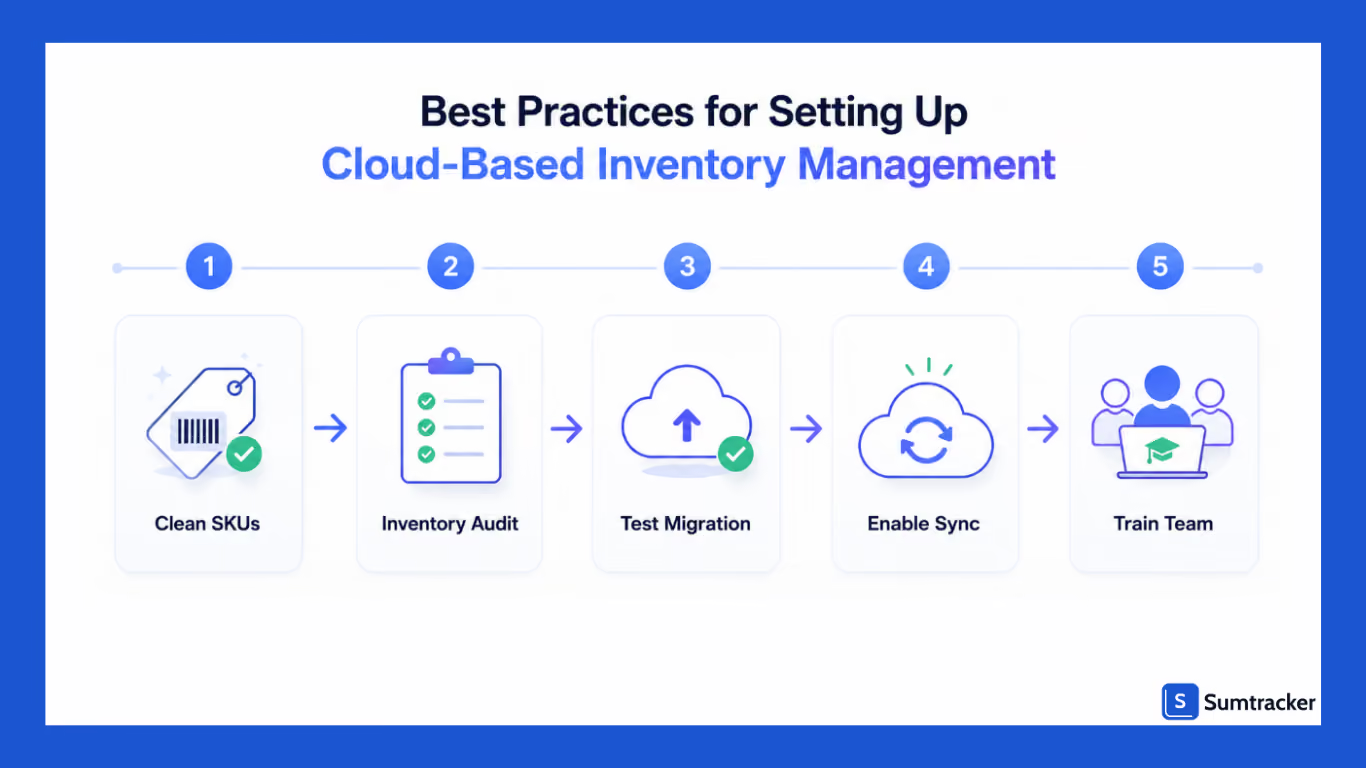
Most migration problems happen because businesses underestimate how messy their stock data actually is.
Create Standardized SKU Naming Conventions
Before migration, standardize SKU naming structures across all systems.
A clean format might look like:
[Category]-[Brand]-[Color]-[Size]
Example:
TEE-NK-BLK-XL
This helps improve inventory management. Avoid inconsistent naming formats between Shopify, warehouses, and marketplaces.
Use an Inventory Audit Checklist Before Migration
Before importing stock data into a new inventory management system:
- Export all SKUs from every platform
- Flag duplicate SKUs
- Verify inventory quantities against physical counts.
- Standardize supplier naming conventions.
- Remove archived or inactive products.
- Check bundle and kit relationships carefully.
One common migration failure is importing duplicate SKUs that accidentally create phantom inventory.
Always test imports using a smaller product batch first, ideally 25–50 products, before migrating the full warehouse inventory.
Follow a 4-Week Migration Timeline.
Many businesses try to switch inventory systems instantly.
That usually creates operational problems.
A safer migration approach looks like this:
Most successful Shopify merchants run parallel systems temporarily before fully replacing spreadsheets or older inventory management apps.
Prioritize Core Automation First
Many businesses try to enable every automation feature immediately.
Instead, start with:
- Real-time inventory syncing
- Low stock alerts
- Automated purchase orders
- Multichannel inventory sync
Then expand gradually into:
- Demand forecasting
- Inventory replenishment
- Supplier automation
- Advanced warehouse workflows
This reduces implementation risk significantly.
Train Warehouse and Operations Teams Early
Inventory software implementation is not just a technical migration.
It’s an operational workflow change.
Warehouse teams should be trained early on:
- Receiving workflows
- Inventory transfers
- Purchase order processing
- Inventory audits
- Stock adjustment procedures
Most implementation failures happen because workflows change faster than teams adapt operationally.
Faqs
What are the benefits of cloud-based inventory management for Shopify?
Cloud-based inventory management helps Shopify merchants track inventory in real time, reduce overselling, automate purchase orders, improve demand forecasting, and sync inventory across multiple sales channels from one centralized system.
Can cloud-based inventory management help prevent stockouts?
Yes. Modern inventory management software uses low stock alerts, inventory replenishment, and demand forecasting to help businesses maintain healthy stock levels and reduce missed sales caused by stockouts.
Is cloud-based inventory management suitable for businesses with multiple warehouses?
Yes. Managing multi-location inventory allows businesses to track warehouse inventory, transfer stock between locations, and monitor stock levels centrally across multiple warehouses or retail stores.
What should Shopify merchants look for in inventory management software?
Shopify merchants should prioritize real-time inventory tracking, multichannel inventory sync, demand forecasting, automated purchase orders, inventory analytics, and integrations with accounting software and shipping providers.
How do you set up cloud inventory management in Shopify?
Start by cleaning your SKU structure and stock records, then connect your store to an inventory management system. Next, configure warehouses, sales channels, low stock alerts, and purchase order workflows before testing inventory syncing and stock updates.
Conclusion
Cloud based Shopify inventory management is no longer optional for growing ecommerce brands.
As Shopify merchants expand across multiple sales channels, warehouses, retail locations, and fulfillment providers, manual inventory management tasks become increasingly difficult to maintain.
Modern cloud based inventory management software helps businesses:
- Track inventory in real time
- Improve demand forecasting
- Reduce excess stock
- Automate purchase orders
- Improve order fulfillment
- Maintain accurate stock levels
- Streamline warehouse operations
More importantly, it helps businesses scale inventory operations without operational chaos behind the scenes.

Bhoomi writes about inventory management and multichannel selling at Sumtracker. Her focus is on solving real operational problems for Shopify, Amazon, and marketplace sellers through well-researched content. She covers everything from multi-location inventory syncing and stock error troubleshooting to replenishment planning and platform comparisons, turning complex eCommerce operations into clear, actionable guidance.
LinkedInRelated Articles
Tool and strategies modern teams need to help their companies grow.

.avif)
Ready to Simplify Your Inventory Management?
Join hundreds of e-commerce merchants who rely on Sumtracker to save time, eliminate errors, and grow their business.
