.svg)
Barcode Scanning for Shopify Inventory: Simplify Tracking & Stock Management


Many Shopify sellers are saying they are stuck in a loop of incorrect stock counts.
The thing is that their fast-moving products are being oversold over the weekend, and the manual updates that used to be in order are just not reliable anymore.
And of course, they have the right to be frustrated, as it's a process problem that’s costing them their time.
Have you already said Oh, this is so relatable or are you yet to say it?
If you have yet to feel relatable, then let me ask you, are your inventory numbers all over the place, and you're wondering what to do about it?
I think you must have started relating somewhat by now.
Spreadsheets become useless when you start pushing 50+ orders a day.
That's where barcode scanning comes in.
It's actually not a new process; retailers have been doing this for decades.
But for Shopify merchants, getting this right is one of those changes where six months later you can't believe you ran things any other way.
What is Barcode Scanning for Shopify Inventory?
Barcode scanning is the process of using a scanner, either a handheld device or your phone camera, to read the unique barcode on each product and automatically update your Shopify stock levels in real time.
Every product in your store has a barcode. That little striped label that you see on the products is your product's fingerprint.
The moment you scan it, your system knows exactly what it is, where it is, and how many you have left.
You will not be left wondering if you have something in stock or not.
It matter a lot for you as your physical stockroom and your online store are probably not talking to each other in real time.
And that tiny delay between what's actually on your shelf and what Shopify thinks is on your shelf is exactly where oversells happen.
Barcode scanning closes that gap completely.
Because as per Shopify, barcode systems can reduce scanning errors to as low as 1 in 2.8 million scans.
Why Barcode Scanning Matters for Shopify Stores?
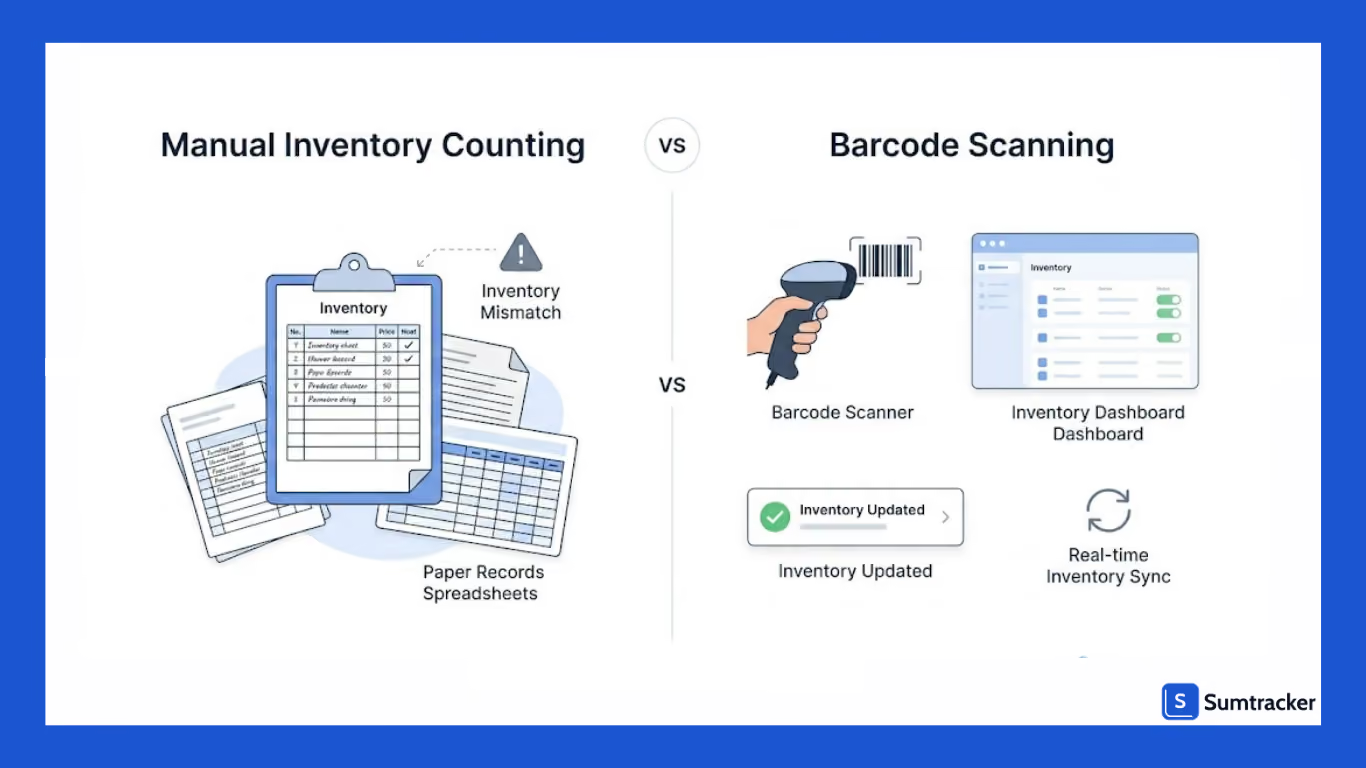
Inventory problems usually begin with small mistakes.
A product gets counted incorrectly. A stock update is skipped. A duplicate SKU appears during an inventory audit.
As order volume grows, these issues become more expensive.
Many merchants first adopt barcode scanning after inventory mismatches start appearing during stock counts or after overselling fast-moving products.
As a general rule, once a store starts processing 50+ daily orders or managing 300–500 SKUs, manual inventory counting usually becomes much harder to maintain consistently.
That’s why many Shopify merchants move to barcode scanning once manual inventory updates become difficult to manage reliably.
In a podcast discussing inventory management for Shopify retailers, Jordan Finners, Founder of Pimsical, explained how inaccurate inventory data creates hidden operational costs and makes inventory decisions reactive instead of reliable.
Does Shopify Support Barcode Scanning Natively? (And Its Limitations)
Yes, Shopify supports barcode scanning natively. And by now, you would have assumed that you're covered, but you aren’t.
Here's what most people don't realize. There are two types of barcode scanning, and they do very different things.
Shopify handles POS scanning well, but inventory-focused workflows become more limited as operations grow.
POS scanning happens at checkout. Inventory scanning happens during stock counts, audits, and inventory updates. Shopify handles POS scanning well. Inventory scanning is a different story.
What Shopify does well:
- Assigning barcodes to products and variants
- Basic stock adjustments
- POS barcode scanning at checkout
Where the limitations show up:
- No advanced inventory counting workflows
- Limited support for large inventory audits
- Limited visibility across multiple locations
- Minimal reporting tied to scanning activity
A lot of Shopify merchants don't feel these limitations early on. The foundation is solid, and for smaller stores, it does the job.
But once operations grow with more SKUs, more locations, and more volume, inventory-focused workflows become really hard to manage without dedicated software.
How to Set Up Barcode Scanning in Shopify
Most barcode scanning problems start with inconsistent barcode data or poor scanner setup.
Here’s a practical setup process Shopify merchants can follow.
Step 1: Assign Barcodes to Products
Every product or variant should have a unique barcode.
You can:
- Add barcodes manually in Shopify
- Import them through CSV files
- Generate them using barcode apps
Step 2: Choose Barcode Scanning Software
If you want to use barcode scanning for inventory workflows not just checkout, you’ll need software that supports:
- Inventory counts
- Stock adjustments
- Multi-location inventory tracking
- Inventory reporting
- Browser-based scanning
- Real-time inventory sync
For example, Sumtracker supports barcode scanning directly through desktop and mobile browsers across:
- Windows
- MacOS
- Android
- iPhone and iPad
Barcode scanning in Sumtracker can be used inside:
- Purchase Orders
- Stock Adjustments
- Stock Transfers
- Inventory counting workflows
This allows merchants to update inventory while scanning products instead of entering quantities manually later.
Sumtracker integrates barcode scanning into everyday inventory workflows instead of treating scanning as a separate process.
Step 3: Choose the Right Scanner
There isn’t really one “best” scanner setup for every Shopify store.
Smaller brands often start with mobile phone scanning because it’s cheap and easy to test. But once inventory counts become part of weekly operations, dedicated scanners usually save a huge amount of time.
Most Shopify merchants use either a mobile device camera or an external scanner depending on inventory size and scanning frequency.
Step 4: Print Barcode Labels
Using poor barcode labels is one of the fastest ways to create scanning problems.
For Shopify inventory workflows:
- Small products usually use 1x0.5 inch labels
- Larger inventory labels often use 2x1 inch formats
Different barcode formats are designed for different purposes, depending on whether the barcode is used for retail products, internal control of inventory, or tracking information.
Step 5: Test Before Full Rollout
Before rolling barcode scanning out across the entire catalog, it’s worth testing with a smaller batch first.
Most teams discover at least a few barcode mapping issues during the initial test, especially with size/color variants or older inventory imported from spreadsheets.
A good testing batch usually includes at least 20–30 products, including multi-variant items like different sizes or colors.
This testing phase is especially important for stores using temporary or seasonal staff, since inconsistent scanning procedures often create inventory discrepancies during busy sales periods.
Barcode Scanning Workflows for Shopify Inventory
The biggest advantage of barcode scanning comes from integrating it into everyday inventory processes.
Updating Inventory During Stock Intake
When new stock arrives, most teams usually scan products while checking quantities against purchase orders. This also helps catch barcode mapping problems before inventory is finalized.
Staff can scan directly into inventory workflows instead of recording stock updates manually later.
Cycle Counting & Inventory Audits
Instead of conducting large inventory counts every few months, many Shopify merchants now use cycle counting workflows.
Example cycle count workflow
- Monday → Scan shelves 1–3
- Tuesday → Scan shelves 4–6
- Wednesday → Reconcile discrepancies
- Thursday → Audit high-selling SKUs
- Friday → Review inventory adjustments
According to Black Belt Commerce, barcode scanning can reduce manual data entry errors by up to 90%.
A 1,000 SKU inventory count that might take 4+ hours manually can often be completed in under an hour using dedicated barcode scanners.
Multi-Location Inventory Tracking
For Shopify stores managing multiple locations, barcode scanning helps maintain accurate inventory visibility across stores.
A luxury retail brand Derek Rose implemented barcode scanning to improve inventory visibility across online and retail locations.
The results included:
- Doubling its store footprint within 3 months
- A 7% increase in turnover
- Improved cross-location inventory visibility and sales
Common Barcode Scanning Issues (and How to Fix Them)
Even well-configured barcode systems occasionally run into problems.
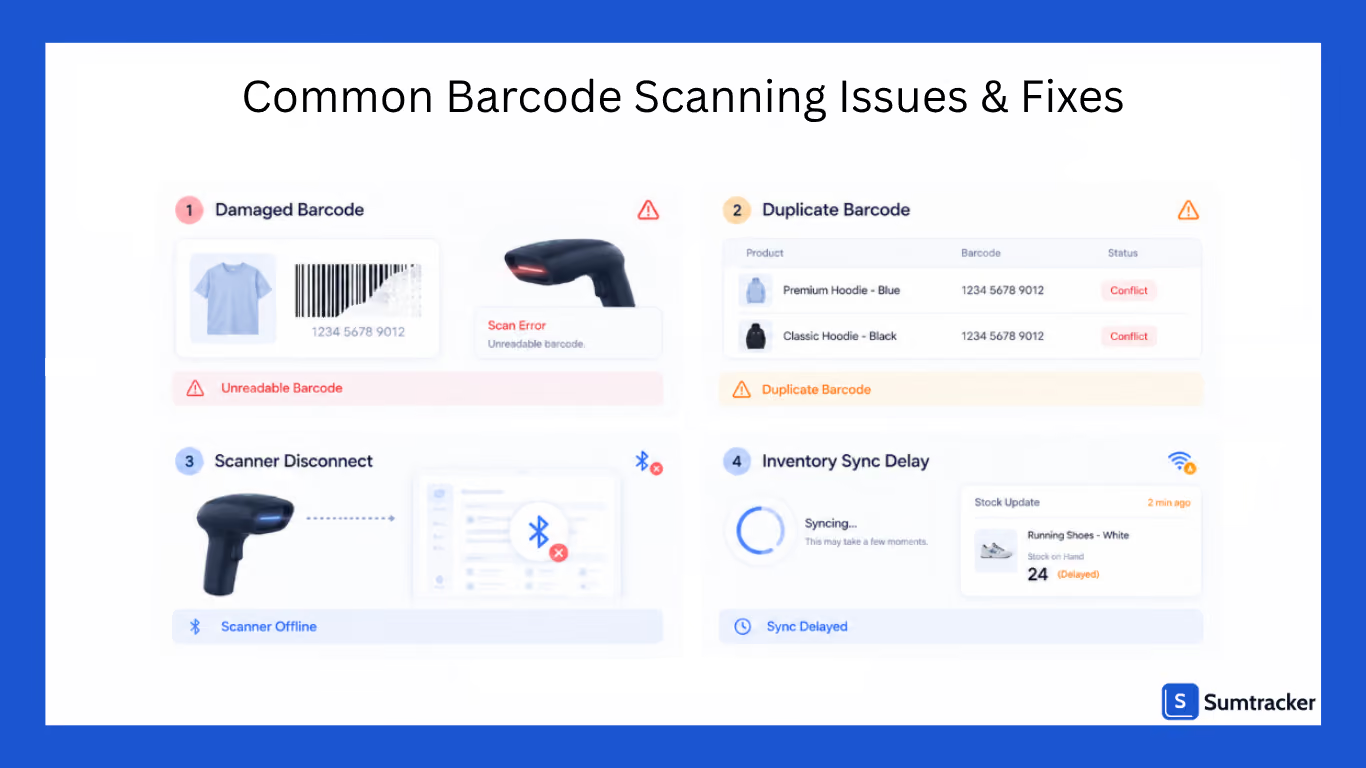
Barcode Not Scanning
Common causes:
- Damaged labels
- Low print quality
- Incorrect barcode format
Fix:
Reprint labels using thermal printers and standardize barcode placement across products.
Incorrect Product Mapping
Common causes:
- Duplicate barcodes
- Variant mapping errors
Fix:
Audit barcode assignments and ensure every variant has a unique barcode.
Scanner Connectivity Problems
Common causes
- Incorrect Bluetooth pairing
- HID mode disabled
Fix
On most Bluetooth scanners:
- Hold the pairing button for 5 seconds
- Scan the HID/keyboard mode barcode from the scanner manual
- Re-pair the scanner with the device
Inventory Not Updating Correctly
Common causes
- Sync delays
- Incorrect app permissions
- Multiple inventory systems updating stock simultaneously
- Weak Wi-Fi or unstable internet connections
Fix
Verify inventory sync settings and ensure only one inventory source controls stock updates.
Barcode Scanning Implementation Checklist
Before implementing barcode scanning in Shopify:
- Assign unique barcodes to every variant
- Audit inventory data before setup
- Decide between mobile or dedicated scanners
- Choose inventory-focused scanning software
- Standardize barcode label formats
- Test workflows before rollout
- Train staff on consistent scanning processes
- Create recurring inventory counting schedules
Frequently Asked Questions
Does barcode scanning work on all Shopify plans?
Basic barcode support works across Shopify plans, but advanced retail workflows may require Shopify POS Pro depending on your setup.
Can I use barcode scanning with bundled or kit products?
Yes, but bundled inventory requires accurate SKU mapping between bundle components and individual products. Many inventory issues happen when bundle quantities are not synced correctly during barcode-based stock updates.
Can barcode scanning work with a 3PL?
Yes. Many third-party logistics providers already use barcode-based inventory systems. If you use both Shopify and a 3PL, make sure only one inventory source controls stock syncing to avoid duplicate inventory updates.
Is a mobile phone enough for barcode scanning?
For smaller catalogs, yes. Many Shopify stores successfully use mobile scanning for occasional inventory counts. However, for larger inventory, a dedicated scanners usually become much faster and more reliable.
How much time does barcode scanning save for inventory management?
The time savings depend on inventory size, but barcode scanning significantly reduces inventory counting time. For small inventories can often complete counts in under 30 minutes and for large 1,000+ SKU counts can be reduced from several hours to under an hour with dedicated scanner.
Conclusion
For smaller Shopify stores, manual inventory updates can work for a while.
But once catalogs grow and inventory starts moving across multiple channels or locations, barcode scanning usually becomes less of a “nice to have” and more of an operational necessity.
While Shopify offers basic barcode support, growing businesses usually need more structured inventory workflows to maintain accurate stock across products and locations.
Barcode scanners by themselves don’t really solve inventory problems. What usually makes the difference is having scanning connected to inventory tracking, stock visibility, and the workflows your team already uses every day.
Once implemented correctly, barcode scanning helps reduce inventory errors, improve stock visibility, and create a more scalable inventory process.

Bhoomi writes about inventory management and multichannel selling at Sumtracker. Her focus is on solving real operational problems for Shopify, Amazon, and marketplace sellers through well-researched content. She covers everything from multi-location inventory syncing and stock error troubleshooting to replenishment planning and platform comparisons, turning complex eCommerce operations into clear, actionable guidance.
LinkedInRelated Articles
Tool and strategies modern teams need to help their companies grow.


![10 Best Shopify Inventory Sync Tools for 2026 [Tested & Reviewed]](https://cdn.prod.website-files.com/67907f49647e48895e5dc266/6a8ec5f1a733015478e1a0e3_Screenshot%202026-08-26%20at%204.17.26%E2%80%AFPM.png.avif)
Ready to Simplify Your Inventory Management?
Join hundreds of e-commerce merchants who rely on Sumtracker to save time, eliminate errors, and grow their business.
