.svg)

Amazon AWD Inventory Management: How to Manage Stock Efficiently


Sellers often struggle with balancing stock levels, avoiding costly storage fees, and ensuring products are always available for customers. This is where Amazon Warehousing and Distribution (AWD) comes in.
Amazon AWD acts as a large-scale storage and replenishment system that helps sellers store inventory at lower costs and automatically move products into fulfillment centers when needed.
Instead of constantly sending small shipments to FBA warehouses, sellers can send bulk inventory to AWD and let Amazon handle the distribution.
In this guide, we’ll break down how Amazon AWD inventory management works, the benefits it offers, and the best practices sellers can use to keep their stock levels optimized while reducing operational headaches.

What Is Amazon AWD (Amazon Warehousing and Distribution)?
Amazon Warehousing and Distribution (AWD) is a storage and distribution service designed to help sellers manage large amounts of inventory before it reaches Amazon’s fulfillment centers.
Think of AWD as Amazon’s upstream warehouse network. Instead of sending inventory directly to Fulfillment by Amazon (FBA) warehouses, sellers can first store their products in AWD facilities. Amazon then distributes inventory from AWD to fulfillment centers based on demand.
This system helps sellers reduce the complexity of constantly managing FBA shipments while also lowering storage costs for long-term inventory.
Key aspects of Amazon AWD include:
- Bulk storage for inventory before it moves to fulfillment centers
- Automatic replenishment to FBA warehouses when stock runs low
- Lower storage costs compared to standard FBA storage fees
- Simplified logistics by allowing Amazon to handle distribution
How Amazon AWD Inventory Management Works
Amazon AWD inventory management follows a structured workflow that connects storage, replenishment, and fulfillment.

Here’s how the process typically works:
1. Sellers send bulk inventory to AWD warehouses
Instead of splitting inventory across multiple FBA locations, sellers ship large quantities of products directly to Amazon’s AWD facilities.
2. Inventory is stored in AWD
Products remain in AWD warehouses until they are needed. These facilities are designed for long-term storage at lower costs than FBA fulfillment centers.
3. Amazon monitors demand
Amazon’s system tracks sales velocity and inventory levels at fulfillment centers.
4. Automatic replenishment to FBA
When inventory levels at fulfillment centers start dropping, Amazon automatically transfers stock from AWD to FBA warehouses to ensure products remain available for customers.
5. Orders are fulfilled through FBA
Once inventory reaches the fulfillment centers, Amazon handles picking, packing, shipping, and customer service.
Key Benefits of Using Amazon AWD for Inventory Management
Amazon AWD offers several advantages for sellers who want to simplify inventory logistics and reduce operational overhead.
Lower storage costs
FBA warehouses are optimized for fast-moving inventory, which often makes long-term storage expensive. AWD provides a more cost-effective solution for holding large quantities of stock.
Simplified replenishment
Instead of repeatedly creating inbound shipments to FBA, sellers can rely on Amazon’s system to automatically replenish inventory when stock levels drop.
Better supply chain management
AWD allows sellers to maintain a buffer stock of inventory within Amazon’s network, helping prevent stockouts during demand spikes.
Reduced logistics complexity
Handling multiple shipments to different fulfillment centers can be time-consuming. AWD centralizes storage and lets Amazon manage the distribution.
Improved inventory availability
By maintaining a steady flow of inventory from AWD to fulfillment centers, sellers can reduce the risk of running out of stock, which helps maintain product rankings and sales momentum.
Step-by-Step Guide to Managing Inventory with Amazon AWD
The process is designed to help sellers send inventory in bulk, store it efficiently, and ensure that fulfillment centers never run out of stock.
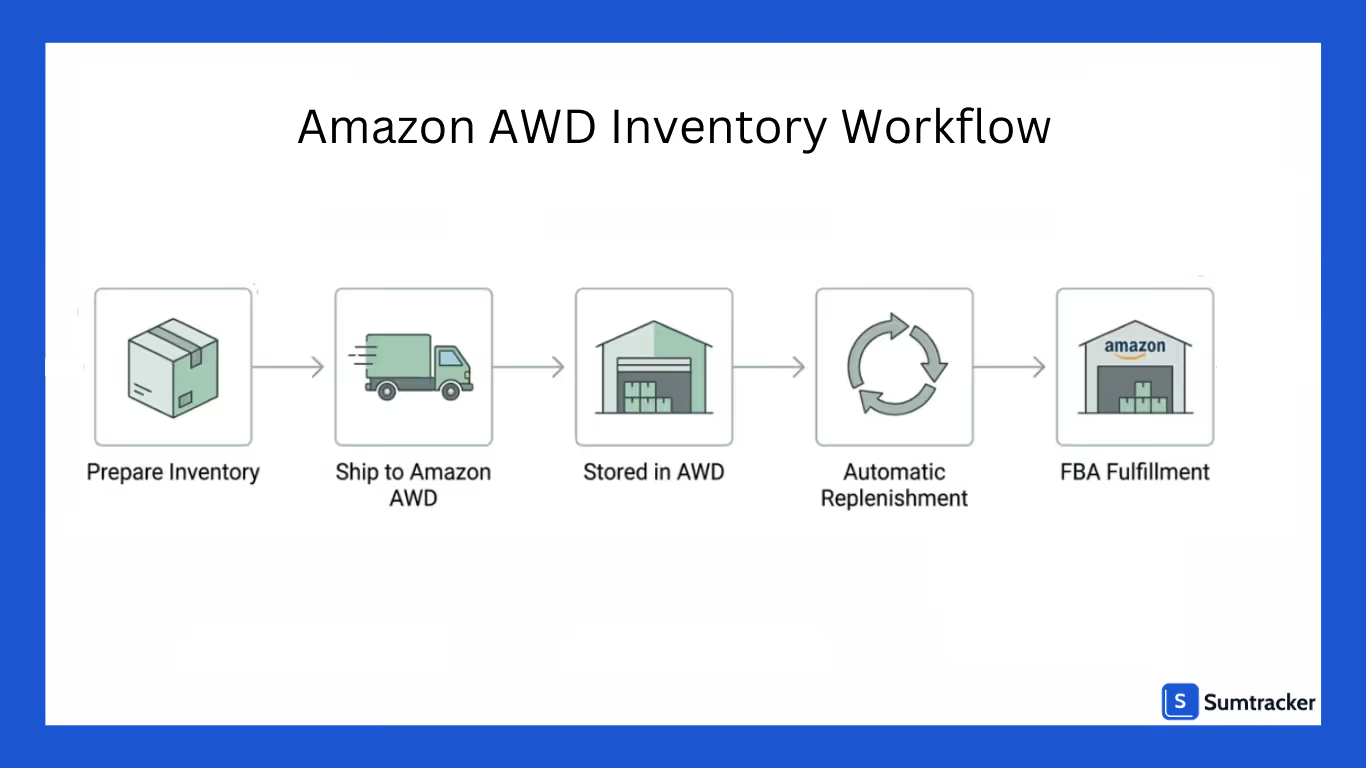
Here’s a step-by-step look at how it works.
1. Enroll in Amazon AWD
The first step is enrolling in the Amazon Warehousing and Distribution program through your Amazon Seller Central account. Once approved, you’ll gain access to AWD within your inventory management settings.
This allows you to start creating inbound shipments specifically for AWD warehouses.
2. Prepare Your Inventory for Shipment
Before sending products to AWD, you need to prepare them according to Amazon’s packaging and labeling requirements.
This usually includes:
- Applying correct FNSKU labels
- Packaging products securely
- Ensuring cartons meet Amazon’s shipping guidelines
- Providing accurate product details and quantities
Proper preparation helps avoid delays or rejected shipments.
3. Send Bulk Inventory to AWD Warehouses
Unlike traditional FBA shipments where inventory is split across multiple fulfillment centers, AWD allows you to send larger shipments to a single warehouse location.
This simplifies logistics and reduces the need to manage multiple inbound shipments.
Sellers typically send large batches of inventory to AWD to maintain a steady supply buffer.
4. Store Inventory in AWD
Once your shipment arrives, the inventory is stored in Amazon’s AWD warehouses.
These facilities are designed for longer-term storage at lower costs compared to FBA fulfillment centers. Your products remain here until Amazon determines that stock is needed at fulfillment centers.
During this stage, you can monitor your inventory levels directly from Seller Central.
5. Amazon Automatically Replenishes FBA Inventory
One of the biggest advantages of AWD is automatic replenishment.
Amazon monitors sales velocity and stock levels at fulfillment centers. When inventory starts running low, Amazon transfers products from AWD to FBA warehouses.
This helps ensure your listings remain in stock without constantly creating manual replenishment shipments.
6. Orders Are Fulfilled Through FBA
Once inventory reaches fulfillment centers, the normal FBA process takes over.
Amazon handles:
- Picking and packing orders
- Shipping products to customers
- Managing returns and customer support
From the customer’s perspective, the process is seamless, they simply receive their order quickly through Amazon’s fulfillment network.
7. Monitor Inventory and Replenishment Performance
Even though Amazon handles much of the logistics, sellers should still regularly monitor their inventory performance.
Keep track of:
- Inventory stored in AWD
- Inventory available in FBA warehouses
- Sales velocity and demand trends
- Replenishment timing
This helps ensure you always maintain enough inventory in AWD to support future sales.
Best Practices for Efficient Amazon AWD Inventory Management
To make the most of AWD, sellers need a clear inventory strategy.
Forecast demand accurately
Understanding sales trends and seasonality helps sellers send the right amount of inventory to AWD.
Maintain safety stock
Keeping extra inventory in AWD ensures you can handle sudden increases in demand.
Monitor inventory movement
Regularly review how inventory flows from AWD to FBA to ensure replenishment is happening efficiently.
Avoid overstocking
Sending too much inventory can tie up capital and increase storage costs, even within AWD.
Plan for seasonal spikes
If your business experiences seasonal demand, ensure inventory reaches AWD well before peak periods.
Common Challenges Sellers Face with Amazon AWD Inventory
While AWD simplifies inventory management, sellers may still encounter some challenges.

Limited inventory visibility
Tracking inventory across AWD, fulfillment centers, and other sales channels can sometimes become complicated.
Forecasting difficulties
Accurate demand forecasting is essential. Sending too little inventory may cause stockouts, while sending too much can increase storage costs.
Replenishment timing issues
If inventory isn't moved from AWD to FBA quickly enough, sellers may experience temporary stock shortages.
Managing multi-channel inventory
Many sellers also sell on platforms like Shopify, eBay, or Walmart. Managing inventory across these channels alongside Amazon can become difficult without the right systems in place.
How Inventory Management Tools Help Manage Amazon Inventory Across Channels
Selling across multiple channels while using Amazon AWD and FBA can make inventory management complicated. Sellers often have stock spread across AWD warehouses, Amazon fulfillment centers, and their own warehouses while also selling on platforms like Shopify, eBay, or Etsy.
An inventory management tool like Sumtracker helps bring all this information into one place and makes it easier to track and control inventory across the entire system.

Here are some key ways inventory management tools help.
- Centralized inventory dashboard
View inventory across AWD, FBA warehouses, and other locations from a single dashboard without switching between platforms.
- Prevent overselling across marketplaces
Keep inventory accurate across channels so you don’t sell products that are already out of stock.
- Track inventory across multiple locations
Monitor stock stored in AWD warehouses, fulfillment centers, and your own warehouses in one place.
- Low stock alerts and restocking insights
Get notified when inventory levels are running low so you can restock products before they run out.
- Better demand visibility with inventory reports
Access sales and stock movement reports to understand which products are selling quickly and which ones are slow-moving.
Conclusion
Amazon Warehousing and Distribution (AWD) provides sellers with a more efficient way to store inventory in bulk and automatically replenish Amazon fulfillment centers when stock runs low.
This helps reduce storage costs, simplify logistics, and maintain consistent product availability.
However, to get the most out of AWD, sellers need strong inventory planning and visibility across their entire supply chain.
Using an inventory management tool like Sumtracker can help track inventory across locations, prevent overselling, and support smarter restocking decisions.
With the right strategy and tools in place, sellers can use AWD to streamline operations and keep their inventory running smoothly.
FAQS
1. What is Amazon AWD and how is it different from FBA?
Amazon Warehousing and Distribution (AWD) is a bulk storage and distribution service where sellers store inventory before it is sent to Amazon fulfillment centers. Unlike FBA, AWD primarily handles inventory storage and automatic replenishment to FBA warehouses.
2. Does Amazon automatically move inventory from AWD to FBA?
Yes. Amazon monitors inventory levels and sales velocity at fulfillment centers. When stock starts running low, Amazon automatically transfers products from AWD warehouses to FBA fulfillment centers to maintain availability.
3. Is Amazon AWD cheaper than FBA storage?
In many cases, AWD storage costs are lower than standard FBA storage fees, especially for long-term or bulk inventory storage. This makes AWD useful for sellers who want to maintain larger inventory reserves within Amazon’s network.
4. Who should use Amazon AWD?
Amazon AWD is ideal for sellers who manage large inventory volumes, seasonal demand, or frequent FBA replenishments. It helps businesses streamline their supply chain and maintain a consistent inventory flow.
Conclusion

Bhoomi writes about inventory management and multichannel selling at Sumtracker. Her focus is on solving real operational problems for Shopify, Amazon, and marketplace sellers through well-researched content. She covers everything from multi-location inventory syncing and stock error troubleshooting to replenishment planning and platform comparisons, turning complex eCommerce operations into clear, actionable guidance.
LinkedInRelated Articles
Tool and strategies modern teams need to help their companies grow.

.avif)

Ready to Simplify Your Inventory Management?
Join hundreds of e-commerce merchants who rely on Sumtracker to save time, eliminate errors, and grow their business.
